Stock lives only on the marketplaces
The dealer's own site is a single showroom page while every car sits on AutoTrader or a similar portal. A buyer who searches the dealer's name cannot reach the stock and goes back to browsing competing listings.

Your Windows contrast theme is on; colours come from your system.
Your device is set to reduce motion; animations are already off.
Your choices are saved in this browser only.
Industry-specific web design
Buyers usually spot a car on a marketplace, then search for the dealer's name to see the rest of the stock and decide whether to trust them. We build car dealer websites around filterable stock, vehicle pages that show history and inspection details up front, and enquiries that arrive with the car's name attached, for independent dealers in the UK and elsewhere working with a remote team, and for dealers in Turkey.
Open the live demoA demo design we built for a fictional brand
In short
A car dealer website shows the dealer's current stock, filterable by make, model, year, mileage and fuel type, gives every vehicle its own page with its history and inspection details, and ties each enquiry to the car the buyer asked about. In the UK, the ASA expects material information such as a car's former fleet or hire use to appear in the ad.
Talha Aslan and teamLast updated:
Why it needs its own approach
A dealer site has to show stock that changes every day, answer the buyer's history and condition questions, and stay within advertising rules. Generic business templates are not built for any of that.
The dealer's own site is a single showroom page while every car sits on AutoTrader or a similar portal. A buyer who searches the dealer's name cannot reach the stock and goes back to browsing competing listings.
When thirty cars sit on one page as a wall of photos, buyers cannot narrow down by budget, gearbox or fuel type, and they leave even when the model they want is in stock.
The first questions are about previous owners, service history, inspection results and former use. If the vehicle page does not answer them, every buyer phones with the same question, and those who will not wait move on.
A sold car remains live for weeks and buyers only learn it has gone when they call. That wastes everyone's time and makes the rest of the stock look out of date too.
The ASA treats a vehicle's former fleet, hire or business use as material information that should be in the ad. When the listing template has no place for it, it is easy to leave out on every car.
Calls and WhatsApp messages land on one general number; the salesperson does not know which car the buyer means, and nobody can see which vehicle or campaign brings enquiries.
Sources: ASA advice: Motoring, advertising ex-fleet vehicles
Our approach
We do not build a dealer site like a brochure; we build it in the order buyers search. First they narrow down the stock, then they check the car's history and condition, and finally they contact the dealer about that car. That is why every vehicle has its own page, every page follows the same layout and every enquiry button carries the car's name.
If you add cars by hand, the stock form is kept as simple as your daily routine; if you manage stock on a marketplace, we look at the export or feed options that marketplace offers and connect what is possible. For a model or campaign you want to advertise, a single-goal landing page can go live without disturbing the main site.
Design, development and content sit in one team, so the listing template, filters and tracking are not patched on later. Talha Aslan sets the strategy and an experienced team handles delivery. We work remotely and in English with dealers abroad.
Home
Each vehicle page answers its own search; once sold, it comes down and sends buyers to similar cars.
The right setup
All three start from the same vehicle page foundation; stock size and what buyers need to know make the difference.
Small stock
Buyers find the dealer by name or recommendation, so the site shows trust and current stock.
Large stock
As stock grows, filters, sorting and routing each enquiry to the right person decide results.
Specialist
Buyers research each car for longer, so its story and paperwork are told in detail.
Built for car dealers
These are the points that come up most often when planning a site that sells vehicles.
Car entry with make, model, trim, year, mileage, fuel, gearbox and body type; photos are reordered by drag and drop. You decide car by car whether the price is shown.
Buyers narrow the stock by make, model, year, mileage, fuel and gearbox; filtered pages are set up so they do not multiply in search results, while make and model pages can be found for their own searches.
Previous owners, service history, inspection results and any former fleet or hire use sit in fixed fields on every vehicle page, and inspection reports can be attached as files.
The ASA says ads must not omit material information and treats a car's former business use as such information. We give it a field in the listing template; the final compliance check belongs to the dealer.
A sold car comes down in one click and its old URL sends buyers to similar vehicles, so the visits that page earned from search are not wasted.
If stock is kept on a marketplace, we connect it as far as that marketplace allows. The WhatsApp and call buttons on each car open with the car's name, and enquiries are measured with their source.
Sources: ASA advice: Motoring, advertising ex-fleet vehicles (CAP Code rule 3.3)
Comparison
| Topic | Generic business template | Site built for a car dealer |
|---|---|---|
| Stock | A photo gallery or a link to a marketplace | Filterable stock and a page for every car |
| Vehicle details | A short description and a few photos | History, inspection and previous use in fixed fields |
| Advertising rules | Material details added by hand, often missing | Required fields built into the listing template |
| Sold cars | The page stays live for weeks | Comes down in one click and points to similar cars |
| Enquiries | A general contact form | WhatsApp, call and part exchange request naming the car |
| Measurement | Visitor numbers | Which car and which campaign bring enquiries |
Quick check
Must haves: does your site have them?
0 of 6 in place Tick the boxes to see where your site stands.
Added as needed
We choose which of these you need together during the scoping call.
Tell us how many cars you usually carry, where you manage them and how enquiries reach you; we will come back with a site structure and a written quote.
Process
We define your business, your audience and the site’s one-sentence job: who it sells what to, through which action. Scope and timeline are written from that answer.
The home page and key templates come to you as designs first; no code is written before your approval. We do not like surprises, and we do not cause them.
The approved design becomes fast, secure, maintainable code. You follow progress in the CRM and see every page in a staging environment before launch.
The site goes live with analytics, Search Console and conversion tracking connected; panel training is given, first-year hosting and maintenance included.
Search and speed foundations
Buyers do not only search for your dealership's name; they search for a make and model, often with a town and the word used. Make and model pages, the contact page and the Google Business Profile are built to support each other.
Make, model, year, mileage and condition are marked up so search engines can read them; nothing is marked up that is not on the page.
A vehicle page can carry dozens of photos, so images are resized and converted to modern formats on upload, and Core Web Vitals are measured before launch.
Calls, form submissions and WhatsApp clicks are tracked as conversions from day one, so you can see which car, which make page and which campaign bring enquiries.
Free tools
Before planning a new site, see how the current one opens on a phone, how heavy your car photos are and how it looks in search. The tools are free and need no sign up.
Tech SEO
Test whether a page works well on phones: viewport, font size, tap targets, a mobile screenshot and Core Web Vitals.
Tech SEO
Scan any URL for title, meta description, headings, canonical, indexability and speed signals, and get an SEO score with a clear to-do list.
Image
Resize + compress photos and cut the KB; never leaves your device.
Image
Convert between JPG, PNG and WebP in one click or in batches; it detects the input format, lets you set quality and a background for transparency, and uploads nothing.
Tech SEO
Generate rich-result JSON-LD for Article, Product, FAQ, Local Business.
Conversion
Create a wa.me link with a preset message + embeddable button code.
How we work
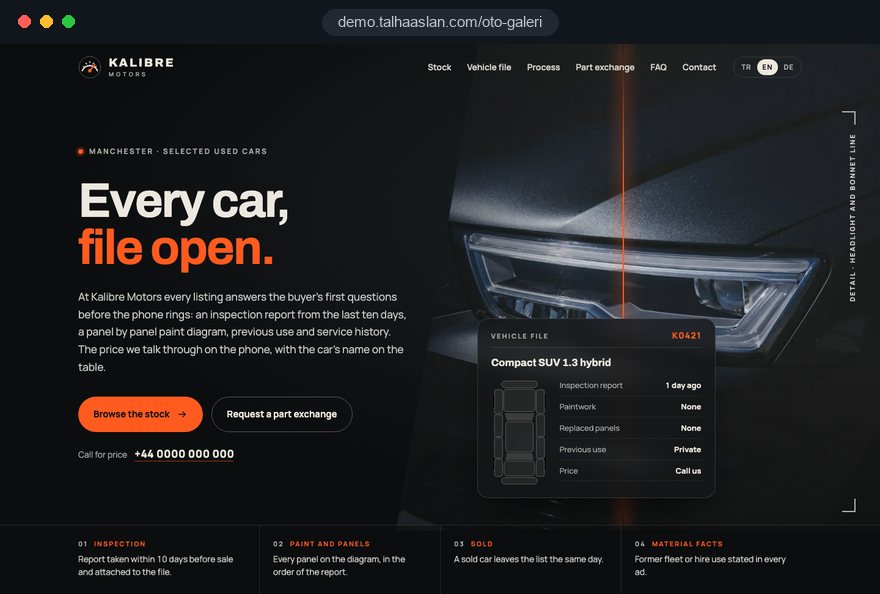
We do not have a live client project for a car dealer yet, so we show our approach on a live demo site. The demo is not a client site. You can see our work in other sectors on the references page.
Live demo
For this field we built a one page demo site for a fictional brand, made only to show our approach. You can explore the design, the copy structure and the mobile view live in three languages.
Open the live demoIn the first call we look at how you take a car into stock and what you record about it, and keep the listing form in that order.
Company details and the information buyers and regulators expect go into the listing template from the start, so a car cannot go live with gaps.
History, condition and warranty details come only from you and from inspection reports; we do not publish a claim without a document behind it.
We track which car, filter and campaign bring enquiries and where buyers drop off, then adjust the site structure.
Related pages
Industries
A report and inspection focused structure for vehicle inspection firms.
Industries
For businesses offering servicing and repairs after the sale.
Industries
For businesses that rent cars instead of selling them: fleet and rental flow.
Industries
The next step for someone buying a car is an insurance quote.
 Out of Stock Product Pages SEO: 404, 410 or 301?Read article
 How Does Product Filtering Affect Ecommerce Sales? UX and SEORead article
 Professional Photography for Websites: What It Adds and How It Beats Stock PhotosRead article
 Website CRM Integration: How to Track Form Leads AutomaticallyRead article
FAQ
If your question is not here, write to us; we will send you an answer and a written quote.
Next step
In a free 15-minute call, in English, we will go through your stock, where you manage it and how buyers reach you, then send a written scope and quote.
In-depth guide
A car dealer website is not a copy of your marketplace listings. It is where a buyer who found one car elsewhere checks who you are, looks through the rest of your stock and decides whether to call. This guide walks through the decisions in the order you will face them, from where your stock data lives to how you measure which car brings inquiries.
There are no promised results and no invented figures here; each section gives you a checklist, a criterion or a question to put to whoever builds your site.
The first decision is which system holds the truth about each car: your website, a marketplace such as AutoTrader, or an admin panel that feeds both. Entering the same car in three places by hand means that sooner or later the mileage or the description changes in one place and not the others.
Weigh the options against your daily routine:
Ask your agency one plain question: "When I change a car's mileage, in how many places does that change, and who does it?" If the answer is not one place and one person, the setup will produce errors. Also ask how often a feed runs. A feed that updates once a day keeps a car sold in the morning online until the evening, so marking a car as sold needs its own instant route.
A vehicle page should answer questions in the order buyers ask them, and every car should follow the same layout. When the order never changes, a buyer looking at a second car finds what they want without searching and can compare cars in their head. The layout we recommend:
Keep the description to two or three sentences about who the car suits. Phrases such as "must be seen" tell buyers nothing and create hundreds of near identical texts for search engines to ignore.
Consistent photography is the visible face of trust on a car dealer website. Stock shot from the same angles in similar light tells buyers the business is run carefully. Write the shot list down and follow the same order for every car that comes into stock:
The last step is the one most dealers skip and the one buyers value most. A listing that shows its flaws up front removes surprises at the viewing and brings in buyers who are already serious about that car.
On the technical side, phone photos usually end up far larger than the page needs. If your current site does not resize images on upload, try a few of your files in our image resizer to see how much lighter they can get. A fixed shooting spot on your lot gives every car the same background without a studio.
How clearly a vehicle page shows its history decides how many buyers phone with the same question, but every detail on it has to come from a document. Service records, inspection reports, previous owner counts and history check results are the sources; your salesperson's memory is not.
The most useful display is a short summary that buyers see before they open any file: number of previous owners, whether the service history is complete, the inspection result and any former business use. Buyers who want detail open the report; buyers in a hurry decide from the summary. Follow these rules for the detail:
Writing a claim into the description that no document supports risks a dispute with the buyer and, under advertising rules, a misleading ad.
Information that advertising rules require should be a fixed part of your listing template, not a note someone remembers to add. In the UK, the ASA's CAP Code says ads must not omit material information, and its advice treats a vehicle's former fleet, hire or business use as information of that kind that should appear in the ad.
Turn that into a template with this checklist:
Placement matters too. A small but readable line directly under the key specifications meets the rule and shows buyers they are dealing with a business that has nothing to hide; a line buried in the footer does neither.
We do not give legal opinions. Once the template is built, have your compliance adviser confirm that the fields are sufficient for your market. When a rule changes, adding a field is a single template update, not a week of editing every listing by hand.
A sold car should come off the site promptly, but its address should still lead somewhere useful. A buyer arriving from search or from a shared link should land on similar cars, not a "page not found" message. The flow we recommend:
Two mistakes are common here. One is leaving sold cars online for weeks with a sold badge; it makes your stock look bigger than it is and frustrates buyers who call. The other is redirecting every old address to the home page, which drops a buyer looking for a specific model onto a generic page.
If you are replacing an existing site, old vehicle and make URLs need the same treatment; in a website redesign this mapping is the step most often forgotten. Match every old vehicle URL to a page on the new site and watch the not found report in Search Console after launch.
Filters are built for buyers, make and model pages for search engines, and treating them as the same thing floods the index with useless URLs. As make, year, fuel and transmission choices combine, the number of possible addresses becomes almost endless, and search engines spend their time on copies.
Blocking filter URLs in robots.txt can backfire. Google cannot read the noindex tag on a page it is not allowed to crawl, so a page you want out of the index has to stay crawlable.
The text on a make page should not repeat the manufacturer's brochure. Write about your own knowledge: which trims you usually carry, what you check on that model before it goes on sale. If you want search planned across the whole site, our SEO service covers that scope.
Every inquiry should state which car it is about in its first line, so the salesperson can give a useful answer in the first minute. The WhatsApp button on a vehicle page should open a prefilled message with the car's make, model, year and stock number. You can see how such links behave on your own number with our WhatsApp link generator.
When you set up the inquiry flow, settle these points:
A privacy notice should be reachable right next to the form, explaining what you do with the phone number and message. If you use outside tools to store inquiries, check the data protection terms you have with each provider.
Trade in and finance questions generate more back and forth than anything else in a car sale, so separating them from the general form saves your team time. A trade in form should ask for enough to make a first assessment, but not so much that buyers give up halfway.
End the form by saying what happens next: who will review it, when they will reply, and that any figure is provisional until someone has seen the car.
On finance, the site should not offer a calculator that looks like an approval. Describe the options you work with, the documents buyers need and the steps of the process on a plain page. Finance promotions are regulated in many markets, including the UK, so have the wording checked by whoever handles your compliance, and name the person who keeps the page current.
Buyers often look at cars on a phone, on the move, so measure speed on a phone rather than a desktop. A vehicle page carrying dozens of photos becomes the slowest page on the site unless it is built carefully. Google assesses Core Web Vitals at the 75th percentile of visits, and these are its thresholds for a good result:
In practice, the cover photo loads first and the rest load as the buyer scrolls. Each image has its space reserved in advance so text does not jump. The stock list uses small previews instead of full photos, and walkaround videos or 360 degree views load only when tapped.
Before launch, ask your agency for phone measurements of a real vehicle page full of photos, not a single good score from an empty test page.
Many buyers search for a make and model with a town name and the word used rather than for your dealership's name, so your Google Business Profile and your website have to work together. Google's guidelines require the business name to match the name you use in the real world. Adding keywords to it puts the profile at risk of suspension.
Work through these steps:
A car dealer with several sites needs a separate contact page and a separate profile for each one, and each vehicle page should say which site the car is at, so nobody drives to the wrong address.
The point of measurement is not counting visitors; it is seeing which car and which source produce inquiries. Calls, WhatsApp clicks, contact forms and trade in forms are each set up as separate conversions from day one, and each one carries the vehicle's details.
Links in your social media profiles and marketplace listings should carry UTM parameters (small additions that pass the click's source into your reports); without them those visits appear as traffic of unknown origin. Once a month, look at these questions:
If you advertise one model or a single offer, a landing page matched to that ad keeps the main site untouched and makes measurement simpler. For setting up and running the ad budget, see our Google Ads management service.
In the UK and the EU, non essential tracking needs the visitor's consent first, and Google requires consent mode for measurement and personalized advertising features for users in the European Economic Area. Plan the cookie banner together with the tracking, not after it.
The habits below are what turn a working car dealer website into a dead one a few months after launch. Each item names the better alternative.
All six come from running the site apart from daily work; tie it to the process from intake to handover and most of them disappear.
When choosing who builds your car dealer website, ask how they will set up your workflow before you look at design samples. An attractive home page loses its value within weeks if adding a car is tedious, because the site soon starts showing stock that has already gone.
Ask for clear answers to these questions:
We do not have a live client project for a car dealer yet, so we show our approach on a live demo site linked on this page. You can see our work in other sectors in our references, and test your current site's speed and search appearance with our free tools.
Our fixed scope packages are listed in the pricing section. Tell us roughly how many cars you carry, where you manage them and how buyers reach you, and we will propose a structure and send a written quote; just get in touch.
Start a Project
Thanks {name}, we've received your brief. We usually reply within the same day.
What happens next?