Every job in one line
The site says 'servicing and repairs' and nothing more. A driver searching for brake pads, a timing belt, a clutch or air conditioning regas cannot see their job and goes to the garage that explains it on its own page.

Your Windows contrast theme is on; colours come from your system.
Your device is set to reduce motion; animations are already off.
Your choices are saved in this browser only.
Industry-specific web design
Drivers rarely search for a garage by name. They search for a symptom or a job, such as a grinding brake, a warning light or a service that is due, usually with their car's make and their town. We build garage websites around a page for each job, the makes you know best, a simple service request and clear updates until the car is collected, for independent garages in the UK and elsewhere working with a remote team, and for workshops in Turkey.
Open the live demoA demo design we built for a fictional brand
In short
A car repair garage website explains each job the workshop does on its own page, shows which makes the team specialises in, lets drivers request a service with their registration, mileage and fault, and keeps them updated until the car is ready. In the UK, the CMA's guidance says carmakers should not make a warranty conditional on non-warranty servicing being done only within their own network.
Talha Aslan and teamLast updated:
Why it needs its own approach
A garage site has to recognise the driver's problem, show that their make is looked after and make it easy to bring the car in. Generic business templates are not built for any of that.
The site says 'servicing and repairs' and nothing more. A driver searching for brake pads, a timing belt, a clutch or air conditioning regas cannot see their job and goes to the garage that explains it on its own page.
You have years on certain makes, but the site does not say so. A driver looking for a specialist for their car picks the garage that names their make.
Drivers often plan a service in the evening or at the weekend, but the only way to book in is a phone call during the working day, and the registration, mileage and fault are asked for every time.
Owners of newer cars ask whether an independent service will affect their warranty. With nothing balanced on the site, the question moves to the phone and the car often goes to the main dealer.
Once the car is dropped off, the customer calls again and again to ask what was found and when it will be ready, and the technician's work is broken up by the phone.
Stock photos instead of the real workshop, equipment and team. A driver about to leave their car with strangers looks for reassurance, and without it they follow the reviews to a garage they can see.
Sources: CMA Guidance on Motor Vehicle Agreements, 5 June 2023, paragraphs 5.35 to 5.41
Our approach
We do not build a garage site like a brochure; we build it in the order drivers go through. First they search for their fault or the service that is due, then they check whether their make is looked after, and finally they ask when they can bring the car in. That is why every job has its own page, every make page lists the work you do and every page carries the same request and WhatsApp button.
The request form follows your workshop's capacity: drop off time, wait or leave the car, and a short note on the fault, all on one screen. After diagnosis, approval and photos of what was found can go through WhatsApp; if you need a fuller diary by technician and bay, we move to a booking system website.
Design, development and content sit in one team, so the job pages, request flow and tracking are not patched on later. Talha Aslan sets the strategy and an experienced team handles delivery. We work remotely and in English with garages abroad.
Home
Each job and make page answers its own search and leads the driver to the same request step.
The right setup
All three start from the same job page foundation; the size of the workshop and the expertise drivers look for make the difference.
Single workshop
Drivers find the garage by word of mouth or on the map, so the site builds trust and makes calling easy.
Make specialist
Drivers look for a garage that knows their make, so expertise and equipment are explained in detail.
Multi-department
Different jobs go to different teams, so requests reach the right department.
Built for garages
These are the points that come up most often when planning a site for a repair and servicing workshop.
Servicing, brakes, timing belts, clutches, suspension, air conditioning, diagnostics and bodywork each get a page: the symptoms, the work involved, how long the car usually stays and common questions.
The makes you work on appear by name with the jobs you do most. If you are not a franchised dealer, the site says so plainly and uses make names only to describe which cars you look after.
Drivers leave their registration, mileage, fault and preferred drop off time; a day closes when your capacity is full, and the request reaches you by WhatsApp and email.
Diagnosis, quote approval and the start of work are explained step by step. Approval and photos of the fault go through WhatsApp, so it is clear from the start that no extra work is done without the customer's consent.
The CMA's guidance says a warranty made conditional on non-warranty servicing being done only in the carmaker's network is likely to raise competition concerns, while a claim can be refused if it is caused by incorrect work. The site explains your parts options and points owners to their warranty terms.
A ready message goes out when the job is closed, and customers who opt in can be reminded when the next service is due. Consent for marketing messages and the privacy notice are planned in from the start.
Sources: CMA Guidance on Motor Vehicle Agreements, paragraphs 5.36, 5.37 and 5.41
Comparison
| Topic | Generic business template | Site built for a garage |
|---|---|---|
| Jobs | One paragraph on 'servicing and repairs' | A page for every main job, with symptoms |
| Makes | A few logos, no explanation | The makes you know and the jobs you do on them |
| Booking in | Phone only, during opening hours | Request with registration, mileage and drop off time |
| Warranty and parts | Not mentioned | Parts options and warranty questions explained |
| Vehicle status | The customer calls to ask | Approval and ready message by WhatsApp |
| Measurement | Visitor numbers | Which job and which make bring requests |
Quick check
Must haves: does your site have them?
0 of 6 in place Tick the boxes to see where your site stands.
Added as needed
We choose which of these you need together during the scoping call.
Tell us which jobs and makes you cover, how cars are booked in today and how you keep customers updated; we will come back with a site structure and a written quote.
Process
We define your business, your audience and the site’s one-sentence job: who it sells what to, through which action. Scope and timeline are written from that answer.
The home page and key templates come to you as designs first; no code is written before your approval. We do not like surprises, and we do not cause them.
The approved design becomes fast, secure, maintainable code. You follow progress in the CRM and see every page in a staging environment before launch.
The site goes live with analytics, Search Console and conversion tracking connected; panel training is given, first-year hosting and maintenance included.
Search and speed foundations
Drivers do not search for your garage's name; they search for their fault, their make and their town. Job and make pages, the contact page and the Google Business Profile are built to support each other.
Business details, address, opening hours and the work you offer are marked up with a business type that fits a repair garage; nothing is marked up that is not on the page.
Most drivers look for a garage on their phone, often by the roadside. Pages are kept light, workshop photos are resized and Core Web Vitals are measured before launch.
Calls, service requests and WhatsApp clicks are tracked as conversions from day one, so you can see which job, which make page and which local search bring work in.
Free tools
Before planning a new site, see how the current one opens on a phone, how it looks in search and whether your WhatsApp button works. You can also make a review QR code to put up in the workshop. The tools are free and need no sign up.
Tech SEO
Test whether a page works well on phones: viewport, font size, tap targets, a mobile screenshot and Core Web Vitals.
Tech SEO
Scan any URL for title, meta description, headings, canonical, indexability and speed signals, and get an SEO score with a clear to-do list.
Tech SEO
Generate rich-result JSON-LD for Article, Product, FAQ, Local Business.
Conversion
Create a wa.me link with a preset message + embeddable button code.
Conversion
Turn URLs, WhatsApp, Wi-Fi, vCard and text into a QR code in seconds; download high-res PNG or SVG.
Image
Resize + compress photos and cut the KB; never leaves your device.
How we work
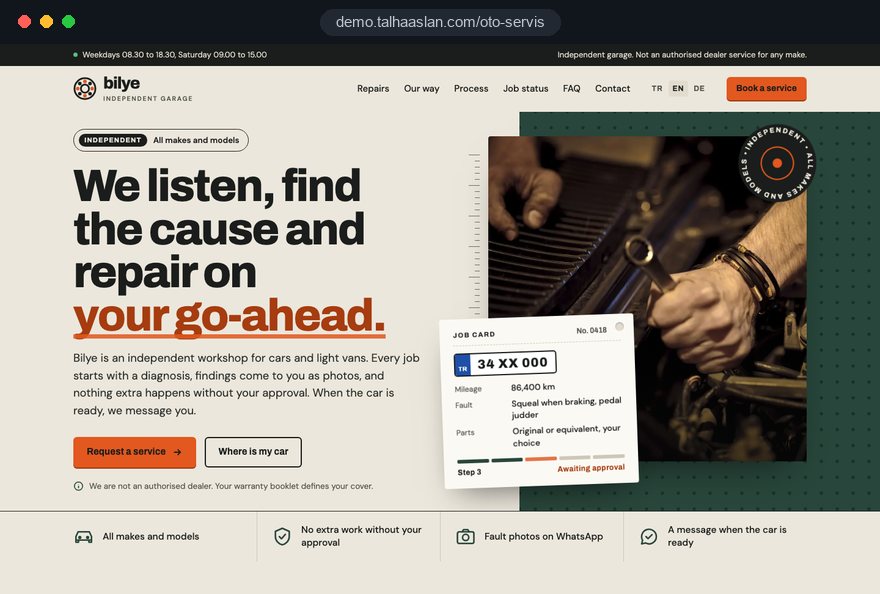
We do not have a live client project for a garage yet, so we show our approach on a live demo site. The demo is not a client site. You can see our work in other sectors on the references page.
Live demo
For this field we built a one page demo site for a fictional brand, made only to show our approach. You can explore the design, the copy structure and the mobile view live in three languages.
Open the live demoIn the first call we list the jobs you do most and the makes you know, and plan the job pages in that order.
We learn how many cars you can take a day and which jobs are wait or leave, and keep the form to match.
Specialisms, equipment and warranty statements come only from what you can confirm, and we avoid wording that suggests a franchised dealer.
We track which job, make and local search bring requests in, then adjust the site structure.
Related pages
Industries
A stock-led structure for businesses that sell cars rather than repair them.
Industries
A report-led site for firms that inspect cars before purchase.
Industries
For repair services that fix appliances, boilers and homes, not cars.
Industries
Letting drivers pick a slot and explaining packages reaches the same customers as a garage.
 Lead Form Design for Booking, Quote and Demo Requests: UX Rules That Lift ConversionsRead article
 How to Do Google Maps SEO: A Guide to Ranking Your Business Higher on the MapRead article
 Google Business Profile Analytics: How to Link It and Read ItRead article
 WhatsApp Marketing Messages: Templates, Costs and Ads GuideRead article
FAQ
If your question is not here, write to us; we will send you an answer and a written quote.
Next step
In a free 15-minute call, in English, we will go through your jobs, the makes you cover and how cars are booked in, then send a written scope and quote.
In-depth guide
A car repair website has one job: to take a driver who is trying to describe a problem and bring that car through your door. Drivers search for a grinding noise, a warning light or a service that is due, then want to know whether you work on their make, when they can drop the car off and what happens once it is inside. Each of those questions maps to a page, a form field or a message.
Below are the decisions we make on a car repair garage project, in the order we take them. Every section ends in something you can apply to your current site or ask any agency you are talking to.
A garage sitemap should come from the work you actually do, not from a competitor's menu. Before the first meeting, pull the last three months of job cards and count which jobs come up most; that list decides which pages come first.
We use four tests to decide whether a job deserves its own page:
In practice, 6 to 10 job pages is a sound start for a single site garage. Everything else sits on an "other services" page with short descriptions, and jobs that start to show up in search later move onto their own page. Name pages the way drivers talk: "brake pad replacement", not "braking systems".
A strong job page opens with the symptom the driver is living with and ends with a booking button. Nobody searches for "our braking services"; they search for "brakes squealing". The first paragraph should name that symptom, then explain in plain language what you check and do.
A brakes page could follow this order:
Give the time as a range and say what it depends on; if parts may need ordering, say so. If you prefer not to publish prices, do not dodge the topic: explain that the cost is confirmed in writing after the inspection. Use at least one real workshop photo per job page, since a photo of your own ramp beats any stock image.
The booking button at the bottom should open the form with that job already selected. That saves the driver a step and tells you which page produced the request.
A make page is the clearest way to tell a driver you know their car, but it must never suggest you are part of that manufacturer's network. If you are an independent garage, say so in the first paragraph; a driver who finds out later trusts you less than one who was told up front.
A useful make page includes:
Avoid large, official looking manufacturer logos; naming the make in the text is enough. Title pages "Servicing and repairs for this make" rather than "this make service centre". If a phrase feels borderline, show it to your legal adviser before launch. As make pages multiply, keep them distinct: each needs a few sentences specific to that make and a photo from your workshop, or they read as copies.
The first worry of anyone with a newer car is whether an independent service will affect the manufacturer's warranty; your site should answer it calmly. In the UK, the CMA's guidance on motor vehicle agreements says that making a warranty conditional on non warranty servicing being done only within the carmaker's network is likely to raise competition concerns, while a claim can still be refused if the fault was caused by incorrect work.
Do not turn this into a promise. Warranty terms belong to each car's own documents, so we suggest the site covers three things:
A dedicated "parts and warranty questions" page is cleaner than answering the same question on every job page; the job pages link to it in one line. Have the front desk read it, so the phone answer matches the site.
The booking form has to make life easier for the driver while protecting your daily plan. Keep it short; every field you ask for should be something you will not need to ask again on the phone.
For most car repair garages these fields are enough:
A request should stay a request until you confirm it, and the confirmation screen should say so, along with when you will reply and which number to call if the car cannot be driven.
For a full diary by technician, ramp and department, a booking system website is the better fit; most single site garages do well with a simple request form. In the UK, MOT bookings deserve their own option, since they run to fixed test slots.
Drivers trust a garage least at the moment an unexpected extra job appears, so spelling out the process on the site is the foundation of trust. A written process also keeps the whole team working to the same rule.
A process you could publish:
State whether diagnosis is charged and how that charge is treated if the job goes ahead; you do not need a figure, only the rule. Some US states, California among them, require a written estimate and the customer's authorization before work begins, so check your state's rules and make the page match them. Name the page in the driver's words, such as "What happens to your car in our workshop".
Telling a customer their car is ready and sending them a promotion are different things, and the site and messaging flow should keep them apart from day one. A ready message is a service notice; a discount offer is marketing. In the UK, PECR generally requires consent for marketing texts and emails to individuals, with a limited exception for existing customers who were given a clear chance to opt out, and UK GDPR requires a privacy notice.
In practice we set it up like this:
If you use the WhatsApp Business Platform, prepare the templates before launch: car ready, approval request and service reminder. For messages the business starts, WhatsApp requires approved templates in many cases, so leave time for that. Fixed templates also stop each technician writing in a different tone. Check that your WhatsApp link opens the right number with a ready first message using our WhatsApp link generator.
A driver about to leave their car with strangers wants to see the place first; stock photos do not reassure them, they make them suspicious. One half day shoot can produce enough material for every page on a car repair garage website.
Our usual shot list:
Shoot on a normal working day, after a tidy up. Set aside frames for your Google Business Profile so drivers see the same workshop on the map and on the site. Resize every photo before upload, give files descriptive names such as "brake pad replacement", and write short alt text, the description screen readers use.
In technician profiles, list specialisms and real qualifications only; never use a title you cannot document. Plan for updates when the team changes, because a photo of someone who left raises questions instead of trust.
A driver with an engine fault, a driver with a damaged door and a company looking after twenty vans do not follow the same path, so the site should take each request through its own door. Putting them all into one contact form wastes time on both sides.
If you have a body shop, build an accident repair request form with photo upload. The driver sends a few angles of the damage, the registration and whether an insurance claim is open, and you can make a first assessment from that. On the page, explain how the process runs, how long a car may stay and what you do and do not offer on courtesy cars, written as how things work rather than as a promise.
A fleet and business page answers different questions:
These pages see fewer visitors, but each request tends to be worth more; list them under services rather than in the main menu.
Many drivers looking for car repair decide from the map, so your Google Business Profile should be planned as part of the website. The business name on the profile must be your real world name, the one on your sign; Google's guidelines do not allow added keywords such as "car repair" or a town name, and breaking that rule can get a profile suspended.
Keep the profile and the site consistent:
The natural moment to ask for a review is when the customer collects the car; a QR code on the front desk makes asking easy. Make one that opens your review link with our QR code generator. Reply to critical reviews briefly and with specifics, since the next driver reads how the problem was handled.
For lasting visibility in local and job searches, the local side of our SEO work treats the profile and your job pages as one system.
Drivers looking for a garage are usually on a phone, sometimes at the side of the road; if a page is slow, they tap the next result. Speed has to be tracked while the site is designed, not after.
Google's Core Web Vitals set these "good" thresholds, measured at the 75th percentile of visits:
On garage sites the usual culprits are oversized workshop photos and an embedded map. Loading the map only on the contact page, and only when tapped, lightens the first load noticeably. A sticky call bar helps, as long as it does not load late and shift the page. See how your current site behaves with our mobile friendly test.
For structured data, the schema.org AutoRepair type fits your name, address, opening hours and phone number. Mark up only what is visible on the page; adding a rating or a service that is not shown breaks Google's rules. Check that the markup reads correctly with our schema markup tool before launch.
Visitor numbers mean little to a garage; what matters is which page, which make and which search brought a car in. If tracking is not set up from day one, that history is lost, so we write the measurement plan alongside the design and decide in advance what each button and form records.
Track these actions as conversions:
Once a month, set these numbers beside your own records: how many requests turned into cars in the workshop. A "how did you find us" field on the job card is enough.
If you run Google Ads campaigns for specific jobs, the same tracking applies, and each ad should land on the matching job page, not the home page. For visitors from the EU and UK, cookie consent is needed before non essential tracking, and Google requires consent mode for measurement and ad personalization for users in the European Economic Area.
These are the habits that turn a carefully built car repair website into a dead one within months. Each item names the better alternative.
All six come from running the site apart from the workshop. Give one person at the garage ownership of the site, so they hear first when a service, an opening time or a team member changes.
When you choose who builds your car repair garage website, ask how they will carry your workshop process onto the site before you look at design samples. An attractive home page loses its value quickly if booking requests do not reach the right person.
Ask for clear answers to these questions:
We do not have a live client project for a car repair garage yet, so we show our approach on a live demo site linked on this page. Try the booking form and WhatsApp flow on your own phone and note what does not fit your workshop. You can see our work in other sectors in our references.
Our fixed scope packages are listed in the pricing section. Tell us the jobs you do most, the makes you know and how bookings come in today, and we will propose a structure with a written quote; just get in touch.
Start a Project
Thanks {name}, we've received your brief. We usually reply within the same day.
What happens next?