The fleet is just a photo gallery
The cars look good, but transmission, fuel, seats and luggage space are missing. A family looking for an automatic estate has to open every photo, or gives up and books with a larger brand that shows it all.

Your Windows contrast theme is on; colours come from your system.
Your device is set to reduce motion; animations are already off.
Your choices are saved in this browser only.
Industry-specific web design
People renting a car already know their dates and where they want to pick it up; only then do they look for a vehicle. We build car rental websites around a fleet grouped by vehicle class, a rental flow that starts with dates and locations, and terms that are visible before anyone pays. Extras such as child seats or an additional driver are chosen in the same flow, for independent firms in the UK and Europe and for rental companies in Turkey serving visitors.
Open the live demoA demo design we built for a fictional brand
In short
A car rental website shows the fleet by class, transmission and fuel type, lets customers pick their pickup and return dates, branch or airport, and adds extras in the same step. Age limits, licence requirements, deposit and mileage are stated before booking. In the UK, vehicle rental for a specific date or period is listed among the exceptions to the cancellation right in the Consumer Contracts Regulations 2013, so your cancellation policy should be clear before payment.
Talha Aslan and teamLast updated:
Why it needs its own approach
A rental decision comes down to dates, place and vehicle. Generic business templates never bring the three together on one screen, so the customer has to call to find the answer.
The cars look good, but transmission, fuel, seats and luggage space are missing. A family looking for an automatic estate has to open every photo, or gives up and books with a larger brand that shows it all.
There is no date picker, so customers message to ask which car is free on which days and then wait. Requests sent after hours sit until morning, and by then the customer has booked through a comparison site.
The site does not say whether cars are handed over at the airport, a branch or a hotel, or whether a one way return is possible. A traveller about to land picks the brand that explains it.
Age limits, years of driving, deposit, mileage caps and insurance cover are only explained at the counter. In the UK, rental for a fixed date is also exempt from the usual cancellation right; a customer who did not see this before paying ends up in a dispute.
Child seats, an additional driver, sat nav or extra cover are discussed at the desk rather than during the rental. The customer sees a total they did not expect, which is one of the most common reasons for poor reviews in this sector.
A visitor renting at the airport cannot read the terms on a site in one language and asks everything by message. When the terms are not written in their language, decisions are delayed or made on the wrong assumptions.
Our approach
We build a car rental website in the order customers decide: first they choose when and where, then they see the vehicle classes available for those dates, and finally they add extras and send the request. Every vehicle class has its own page and every pickup point its own explanation, all part of the same flow.
If you need live availability and prepayment, we connect the fleet to a reservation system; if most customers are visitors from abroad, we set up a multilingual structure from day one. For seasonal campaigns, a single-goal landing page can go live without disturbing the main site.
Design, development and content sit in one team, so the fleet, flow and terms pages are not patched together later. Talha Aslan sets the strategy and an experienced team handles delivery. We work remotely and in English with rental firms abroad.
Home
Each vehicle class and each pickup point answers its own search, and all of them lead into the same date and branch selection.
The right setup
All three start from the same foundation; who the customer is and where they collect the car make the difference.
Local firm
Customers search by area and usually rent for a day or a weekend, so the site puts speed and proximity first.
Visitors and airport
Customers book from another city or country while arranging their flight, so the site explains pickup and terms in their language.
Business customers
The decision maker is a company, so the site explains monthly rental, maintenance and replacement vehicles with a quote form.
Built for car rental firms
This list comes from the questions rental teams answer most often on the phone and the points that decide a rental.
For each vehicle class: transmission, fuel type, seats, luggage space, example models and real photos. If you do not guarantee a specific model, we say so clearly; customers rent a class, not a model.
The flow begins with pickup and return dates, times and locations. Depending on your needs, the choice reaches you as a request or is connected to a system that shows live availability.
Airport, branch and hotel handovers are explained separately: the meeting point, how long staff wait, what happens if a flight is late and whether a one way return is possible.
Minimum age, years of driving, deposit, mileage limits, fuel policy and insurance cover on one page and summarised in the rental step. You set the terms; we write them so customers understand them.
Child and baby seats, an additional driver, sat nav and extra cover are ticked within the rental step, so customers see what they have chosen before they send the request.
Under regulation 28 of the UK Consumer Contracts Regulations 2013, vehicle rental services with a specific date or period of performance are excluded from the cancellation right. We show your cancellation policy clearly before payment; the final legal check of your terms belongs to your business.
Sources: legislation.gov.uk: Consumer Contracts Regulations 2013, regulation 28(1)(h)
Comparison
| Topic | Generic business template | Site built for car rental |
|---|---|---|
| Fleet | A photo gallery and model names | Class pages with transmission, fuel, seats and luggage space |
| Dates | A general contact form | A flow that starts with pickup and return dates, times and branch |
| Pickup point | One address | Airport, branch and hotel pickup explained separately |
| Terms | Explained at the desk | Age, licence, deposit and cancellation rules visible before payment |
| Extras | Discussed on the phone | Chosen within the rental step |
| Measurement | Visitor numbers | Which vehicle class and pickup point bring requests |
Quick check
Must haves: does your site have them?
0 of 6 in place Tick the boxes to see where your site stands.
Added as needed
We choose which of these you need together during the scoping call.
Share your vehicle classes, branches and where your customers come from; we will come back with a page structure and a written quote.
Process
We define your business, your audience and the site’s one-sentence job: who it sells what to, through which action. Scope and timeline are written from that answer.
The home page and key templates come to you as designs first; no code is written before your approval. We do not like surprises, and we do not cause them.
The approved design becomes fast, secure, maintainable code. You follow progress in the CRM and see every page in a staging environment before launch.
The site goes live with analytics, Search Console and conversion tracking connected; panel training is given, first-year hosting and maintenance included.
Search and speed foundations
Customers do not only search for car hire; they add an airport, a town or a district. Pickup point pages, branch pages and your Google Business Profile are built to support each other, and pages are created only for places you really serve.
Business name, branch addresses, phone and opening hours are marked up so search engines can read them; nothing is marked up that is not on the page.
Many rentals are booked on a phone, often while travelling. Pages are designed for phone screens first, vehicle photos are compressed and Core Web Vitals are measured before launch.
Requests, calls and WhatsApp clicks are tracked as conversions from day one, so you can see which vehicle class and which pickup point bring business.
Free tools
Before planning a new site, see how your current one loads on a phone, how it looks in search and whether its language settings work for visitors. The tools are free and need no sign up.
Tech SEO
Test whether a page works well on phones: viewport, font size, tap targets, a mobile screenshot and Core Web Vitals.
Tech SEO
Scan any URL for title, meta description, headings, canonical, indexability and speed signals, and get an SEO score with a clear to-do list.
Tech SEO
Generate rich-result JSON-LD for Article, Product, FAQ, Local Business.
Tech SEO
Correct hreflang tags for multilingual sites; x-default automatic.
Conversion
Create a wa.me link with a preset message + embeddable button code.
Conversion
Turn URLs, WhatsApp, Wi-Fi, vCard and text into a QR code in seconds; download high-res PNG or SVG.
How we work
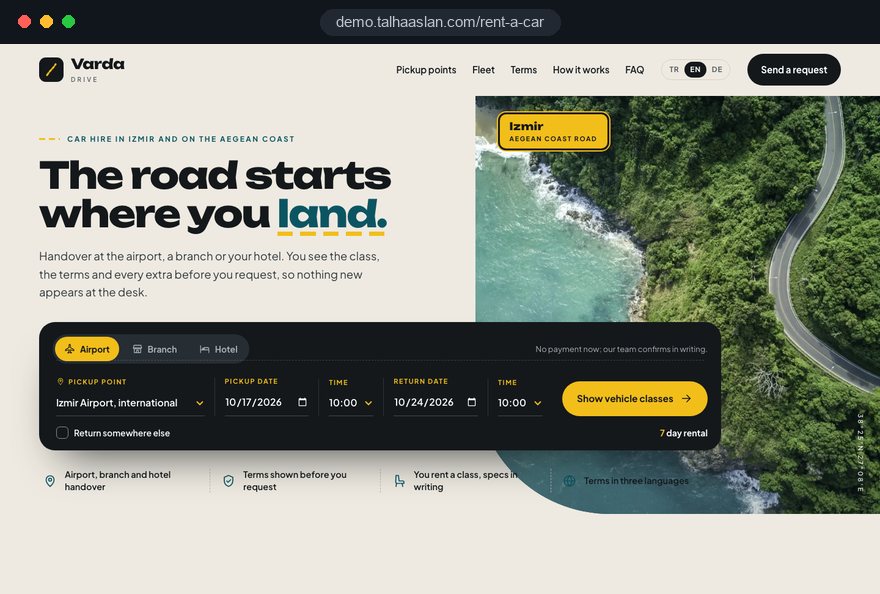
We do not have a live client project for a car rental firm yet, so we show our approach on a live demo site. The demo is not a client site. You can see our work in other sectors on the references page.
Live demo
For this field we built a one page demo site for a fictional brand, made only to show our approach. You can explore the design, the copy structure and the mobile view live in three languages.
Open the live demoIn the first call we list the questions your team answers most often on the phone and at the counter; the terms page and the steps of the rental flow come from that list.
We group your vehicles the way customers choose them, by class, transmission and capacity, and state clearly whether you guarantee a specific model.
We create airport, branch or hotel pages only for places where you actually hand over cars, each with its own meeting point details.
We track which vehicle class and pickup point bring requests and where people drop out of the flow, and adjust before the busy season.
Related pages
Solutions
The technical base for a rental flow with live availability and prepayment.
Industries
A separate setup for airport transfer firms that provide the car with a driver.
Industries
A listing focused site for dealers who sell cars rather than rent them.
Solutions
Pages per language for rental firms that mostly serve visitors from abroad.
 Lead Form Design for Booking, Quote and Demo Requests: UX Rules That Lift ConversionsRead article
 How to Do Google Maps SEO: A Guide to Ranking Your Business Higher on the MapRead article
 Professional Photography for Websites: What It Adds and How It Beats Stock PhotosRead article
 What Is Mobile First Design? How Mobile First Affects Your SEO RankingsRead article
FAQ
If your question is not here, write to us; we will send you an answer and a written quote.
Next step
In a free 15-minute call, in English, we will go through your fleet, branches and pickup points, then send a written scope and quote.
In-depth guide
A car rental website should do on screen what your most experienced counter agent does in person: ask when and where the customer needs a car, show only the vehicles that fit, and explain the terms before anything surprises them. Any site that breaks this order sends people to the phone or to a comparison site.
We wrote this guide around the decisions rental firm owners make, in the order they make them during a web project. Each section gives you a criterion to check, a step to take or a question to put to the agency building your site.
The first structural decision is which customer brings in most of your revenue, because each one needs a different front door. A local customer looking for a weekend car, a traveler collecting a vehicle at the airport and a company leasing ten cars for two years are not persuaded by the same page or the same question.
Even if you serve all three, the home page leads with one; the others get depth on their own pages. Your last twelve months of rental records usually settle it.
These four answers form the core of the first conversation in our web design service. A business rental firm, for example, might replace the date picker on the home page with a quote prompt asking for the number of vehicles and the contract length. Settle this before anyone discusses colors or fonts.
The booking flow is the most important part of a car rental website, and it should always begin with dates, times and the pickup location. Customers who pick a car first and then find it is not free on their dates usually close the tab.
Time selection looks like a detail, yet it changes the bill. If you charge in 24 hour rental days, the flow should flag in one line when a later return time adds an extra day. If you offer after hours handovers, those times should be selectable, with a note if a surcharge applies; if not, grey them out.
Not every car rental firm needs a live reservation engine; the right choice depends on fleet size and where your vehicles are tracked today. With a request form, the customer picks dates, branch and class and you confirm. With live availability, the customer sees which cars are free and secures one with a prepayment.
We cover the technical side of live booking on our reservation website page. If your rental software offers an API, meaning a connection point that lets other software read its data, the site can pull fleet and availability from it. If not, launch with a request form and connect the software later.
Customers rent a vehicle class, so fleet pages should be built around classes rather than individual models. When the site shows one model and the counter hands over another, the customer feels tricked and often says so in a review.
A separate page for automatic cars is worth adding, because many renters start their search with the transmission. A photo of the open trunk with two suitcases inside answers the family question faster than a volume figure in liters.
If you hand over cars at an airport, a branch or a hotel, each location deserves its own page, and that page should read like step by step meeting instructions rather than sales copy. Write it for someone who has just landed with a suitcase and a phone low on battery.
An airport pickup page should answer:
For hotel delivery, list the areas you cover and how much notice you need. State whether one way rentals are possible and between which locations. Create these pages only for places where you really hand over cars, since a page for an airport you do not serve misleads customers and search engines alike. When a meeting point moves, update the page the same day.
Most disputes in car rental start with a condition the customer hears for the first time at the counter, and the terms page exists to remove that moment. You set the terms; the website's job is to write them plainly and completely.
At minimum, the terms page should cover:
Cancellation deserves its own line. In the UK, regulation 28 of the Consumer Contracts Regulations 2013 excludes vehicle rental with a specific date or period from the cancellation right, and German law has a matching exception in § 312g BGB. Show your own cancellation policy before payment or confirmation, keep the website wording identical to the contract signed at the counter, and have your legal adviser check both.
Child seats, an additional driver, sat nav, snow chains or extra cover should be offered on the same screen where the customer chooses the car. Every extra first mentioned at the counter creates a gap between the total the customer expected and the one on your invoice.
Follow these rules when designing the extras step:
The request summary should list every chosen extra on its own line, and the same summary should reach the customer by email. Seasonal extras such as winter tires or snow chains can be shown only in the months they apply.
For a car rental firm at an airport or in a tourist region, a multilingual site is part of the operation, not an optional extra. If visitors cannot read what the deposit and the cover mean in their own language, they either postpone the booking or arrive at the counter with the wrong expectations.
Translate in this order: terms, cancellation policy and pickup pages first, fleet pages next, blog articles last. A half finished language version looks worse than none.
We explain the page per language setup on our multilingual website page. When terms change, update every language on the same day; a short checklist is enough to keep every version in step.
Most people looking for car hire add a place to their search, so local visibility comes from branch pages, pickup pages and your Google Business Profile working together. Competing with global brands on a broad term is hard, but a well built site can stand out in searches that name an airport, a town or a district.
Invented branch pages or copies that only swap the town name weaken the whole site. Rather than chasing ranking promises, we prefer a structure that grows real branches and real reviews over time; our SEO service explains how that structure is built and maintained.
A large share of renters open your site on a phone, often at the airport or on the road, so a car rental website has to be designed for phone screens first. A wide calendar that looks elegant on a desktop is useless if a thumb cannot pick a date on it.
Use Google's Core Web Vitals to judge speed. LCP (largest contentful paint) measures how long the biggest element takes to load; good is 2.5 seconds or less. INP (interaction to next paint) measures how quickly the page responds to a tap; good is 200 milliseconds or less. CLS (cumulative layout shift) measures how much content jumps while loading; good is 0.1 or less.
You can see how your current site behaves on a phone in seconds with our free mobile friendly test. Run it on your busiest fleet and airport pages too, where photos usually cause the problems.
Rental demand rises and falls with summer, school holidays and public holidays, and ad budgets should follow that rhythm into dedicated, single goal pages. Sending an ad to the home page forces the customer to find the class or pickup point they were promised all over again.
In Google Ads, Quality Score has three components: expected click through rate, ad relevance and landing page experience. Google describes it as a diagnostic tool rather than a direct input in the ad auction; still, ad and page must say the same thing.
A dedicated landing page can go live without touching the main site. We describe account setup and management in our Google Ads service.
The success of a car rental website is measured by which vehicle class and which pickup point bring requests, not by visitor numbers. To see that, request submissions, call clicks and WhatsApp clicks need to be set up as separate conversions from launch day.
When setting up measurement, aim for a reliable picture for decisions before each season:
On privacy, ask only for what the request needs. Copies of driver's licenses or passports are rarely necessary at the request stage, since they can be checked at handover. If your booking tool stores customer data on your behalf, the GDPR (Article 28) requires a data processing agreement with that provider. Google requires consent mode for measurement and personalized advertising features for users in the European Economic Area, and in the EU non essential tracking must wait for cookie consent; a firm serving European travelers has to plan for both.
These are the mistakes we see most often on car rental sites, and the ones that lose customers most easily. Each comes with the better alternative.
What these mistakes share is a site built around the company's internal order instead of the customer's decision order. Check your current site against this list before planning the new one.
To choose the right partner, look less at design samples and more at how many questions the agency asks about your operation. Nobody can build a good car rental website without understanding how your counter works.
Ask these questions in the first call:
We do not yet have a live client project in car rental, so we show our approach on a live demo site linked on this page, where you can try the flow yourself. To talk through your fleet, branches and pickup points, get in touch with us; if you would like to compare fixed packages first, see our web design pricing. After the first call we send the scope of your car rental website in writing, including the page list and what each step needs from you.
Start a Project
Thanks {name}, we've received your brief. We usually reply within the same day.
What happens next?