Packages that look the same
Package names are listed, but nothing says which one includes a road test, a diagnostic scan or only paint and bodywork checks. Customers ring to ask, or book the wrong level and change it on the day.

Your Windows contrast theme is on; colours come from your system.
Your device is set to reduce motion; animations are already off.
Your choices are saved in this browser only.
Industry-specific web design
People book a vehicle inspection under time pressure: they have found a car and want it checked before someone else buys it. We build inspection websites around packages compared check by check, a slot picker by location or coverage area, and a sample report that shows what the customer is paying for, for independent and mobile inspectors in the UK and elsewhere working with a remote team, and for inspection centres in Turkey.
Open the live demoA demo design we built for a fictional brand
In short
A vehicle inspection website compares inspection packages check by check, lets customers choose a location or coverage area and a free slot, and shows a sample report before they pay. It also makes clear what an inspection does not cover. For businesses that work with dealers, a separate trade enquiry route keeps regular volume apart from one-off private bookings.
Talha Aslan and teamLast updated:
Why it needs its own approach
An inspection website has to move a buyer in a hurry to the right package and a free slot, and show why the report can be trusted. Generic business templates are not built for that flow.
Package names are listed, but nothing says which one includes a road test, a diagnostic scan or only paint and bodywork checks. Customers ring to ask, or book the wrong level and change it on the day.
Buyers view cars in the evening and at weekends, when nobody answers the phone. If they cannot see a free slot, they book with whoever shows one first.
Customers pay without knowing what they will receive: which sections the report has, how paint, panel and damage findings are shown, whether photos are included. Without a sample, firms are compared on price alone.
Accreditations, equipment and the inspectors' background are missing from the site. A customer deciding whether to trust a report about a large purchase has nothing to go on. In Turkey, the 2024 motor vehicle trade regulation even holds the inspection business responsible if a report does not reflect the vehicle's real condition.
Dealers, leasing firms and car buying companies need regular inspections, but the site only talks to private buyers. Without a trade enquiry route, that work depends on personal contacts.
A mobile inspector covers a region and a centre serves nearby towns, yet the site never says where. Customers searching for an inspection near them cannot tell whether you come to them.
Our approach
We build an inspection website in the order customers decide: first they work out which package suits the car, then they see what the report will look like, and finally they choose a slot at the nearest location or within your coverage area. That is why packages sit side by side with their checks, the sample report opens from every package page and the booking button is on every screen.
If customers should pick slots from a live calendar, an online booking system is connected to the site; if you already use inspection software, we check how the two can work together before quoting. For a campaign in one area or for one package, a single-goal landing page can go live without disturbing the main site.
Design, development and content sit in one team, so the package table, booking flow and tracking are not patched on later. Talha Aslan sets the strategy and an experienced team handles delivery; we work remotely and in English with businesses abroad.
Home
Each package page answers its own search, and all of them lead into the same booking flow and sample report.
The right setup
All three start from the same package and booking foundation; the number of locations and who your customers are make the difference.
One location or mobile
Customers find you through referrals and local search, so the site shows trust and free slots.
Several locations
Customers look for the nearest location, so each one gets its own page and calendar.
Trade focused
Much of the work comes from dealers and fleets, so the site is set up for regular volume.
Built for inspection businesses
These are the points that most often need a decision when an inspection website is planned.
Paint and bodywork, engine, gearbox, underbody, brakes, suspension and a diagnostic scan are marked package by package. Whether to publish prices is a decision we make together with you.
We prepare a sample from your real report layout, with the registration, VIN and personal details removed, so customers see how findings and photos are presented before they book.
Location or coverage area, package, day and slot; the vehicle and contact fields stay short. Confirmation and reminder messages, changes and cancellations are added as needed.
Customers can open their report again with a personal code, so you are not resending files by email. Access stays limited to the report's owner, and the privacy notice explains how the data is used.
Dealers, leasing companies and car buying firms get their own enquiry form and, where useful, a bulk booking and report delivery flow, kept apart from one-off private bookings. In Turkey, dealers must obtain a report within ten days before selling M1, M1G, N1 and N1G vehicles where a TSE certified inspection business operates in the province, with exemptions for older or high mileage vehicles; a trade page there can summarise this rule.
Memberships, accreditations, equipment, inspector background and real photos are shown only as far as you can document them; nothing is claimed without proof behind it.
Comparison
| Topic | Generic business template | Site built for vehicle inspection |
|---|---|---|
| Packages | Package names and a short description | Side by side comparison with every check listed |
| Booking | A phone number and a general form | Location, package and slot chosen online |
| Report | No idea what the customer will receive | Downloadable sample report and report access |
| Trust | General claims about reliable service | Accreditations, equipment and inspectors, backed by documents |
| Trade customers | The same form as private buyers | Trade enquiries and bulk booking |
| Measurement | Visitor numbers | Which package and location bring bookings |
Quick check
Must haves: does your site have them?
0 of 6 in place Tick the boxes to see where your site stands.
Added as needed
We choose which of these you need together during the scoping call.
Share your packages, how many locations or which area you cover and how bookings come in today; we will come back with a site structure and a written quote.
Process
We define your business, your audience and the site’s one-sentence job: who it sells what to, through which action. Scope and timeline are written from that answer.
The home page and key templates come to you as designs first; no code is written before your approval. We do not like surprises, and we do not cause them.
The approved design becomes fast, secure, maintainable code. You follow progress in the CRM and see every page in a staging environment before launch.
The site goes live with analytics, Search Console and conversion tracking connected; panel training is given, first-year hosting and maintenance included.
Search and speed foundations
Buyers search for a car inspection near them or add a town name, often on their phone while standing next to the car. Location pages, package pages and each location's Google Business Profile are built to support each other.
Each location's name, address, phone and opening hours, or a mobile inspector's service area, are marked up so search engines can read them; nothing is marked up that is not on the page.
The booking flow is designed for phone screens first; forms stay short, pages stay light and Core Web Vitals are measured before launch.
Bookings, calls and WhatsApp clicks are tracked as conversions from day one, so you can see which package, location and campaign bring bookings.
Free tools
Before planning a new site, see how the current one loads on a phone and how your locations appear in search; you can also create the QR code for your printed reports here. The tools are free and need no sign up.
Tech SEO
Test whether a page works well on phones: viewport, font size, tap targets, a mobile screenshot and Core Web Vitals.
Tech SEO
Scan any URL for title, meta description, headings, canonical, indexability and speed signals, and get an SEO score with a clear to-do list.
SEO
Test your title and meta description with pixel-based measurement, desktop + mobile view.
Tech SEO
Generate rich-result JSON-LD for Article, Product, FAQ, Local Business.
Conversion
Create a wa.me link with a preset message + embeddable button code.
Conversion
Turn URLs, WhatsApp, Wi-Fi, vCard and text into a QR code in seconds; download high-res PNG or SVG.
How we work
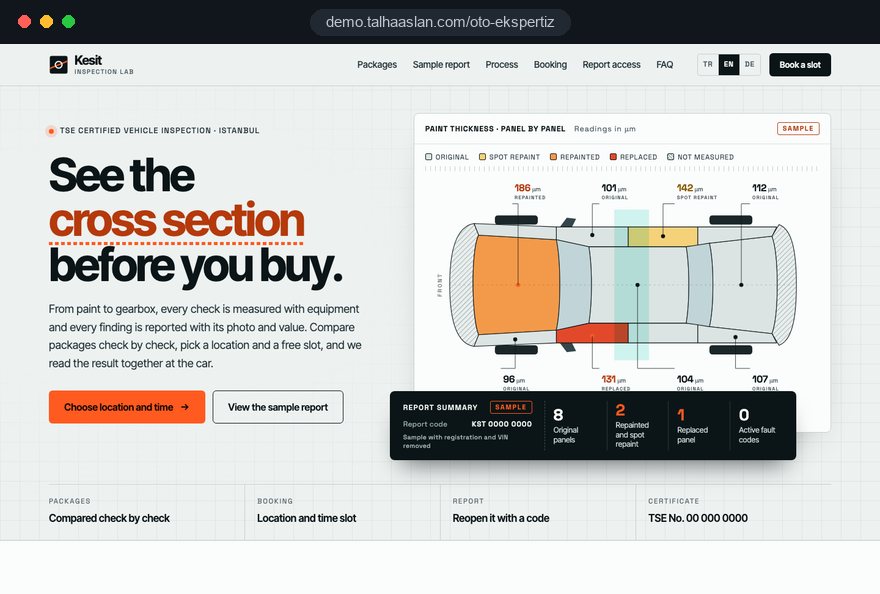
We do not have a live client project for a vehicle inspection business yet, so we show our approach on a live demo site. The demo is not a client site. You can see our work in other sectors on the references page.
Live demo
For this field we built a one page demo site for a fictional brand, made only to show our approach. You can explore the design, the copy structure and the mobile view live in three languages.
Open the live demoIn the first call we list which checks each package includes and build the comparison table from that list.
We look at how many vehicles a location or inspector can take per day and how slots are split, then set up the calendar to match.
Accreditations, equipment and team details come only from documents you give us; we do not publish a claim without proof behind it.
We track which package and location bring bookings and where customers drop out of the booking form, then adjust the structure.
Related pages
Industries
For dealers selling cars: filterable stock and vehicle pages with inspection details.
Industries
For garages offering servicing and repairs: a site built around the service.
Solutions
Let customers pick a location and slot from a calendar themselves.
Solutions
A single-goal page matched to an ad for one location or package.
 Lead Form Design for Booking, Quote and Demo Requests: UX Rules That Lift ConversionsRead article
 How to Build Trust on Your Website: Trust Signals That Turn Visitors into CustomersRead article
 How to Do Google Maps SEO: A Guide to Ranking Your Business Higher on the MapRead article
 What Is Mobile First Design? How Mobile First Affects Your SEO RankingsRead article
FAQ
If your question is not here, write to us; we will send you an answer and a written quote.
Next step
In a free 15-minute call, in English, we will go through your packages, your locations and how customers book today, then send a written scope and quote.
In-depth guide
Most people land on a vehicle inspection website with one question: can someone check this car properly before I hand over the money, and how soon. This guide walks through the decisions an inspection business makes when planning its site, in the order they come up, from package structure and booking to report access, trade accounts and measurement.
Every section gives you something to act on: a criterion, a checklist or a question to put to your agency. We do not promise results or quote invented figures, and where rules differ between countries we say so instead of guessing.
A vehicle inspection site serves at least three different people, and the first planning step is to write down how each one moves through it. The private buyer is in a hurry and on a phone. The private seller wants a report to strengthen a listing and decides more calmly. The trade customer, a dealer, leasing company or car buying firm, cares about volume, turnaround and a predictable delivery routine.
One home page can serve all three, but each needs an entry point it recognises on the first screen. Use your own booking history to build the map:
This table is the most useful thing you can bring to a first agency meeting. The sitemap, the menu order and the placement of every button follow from it; colours and typefaces come later.
Do not skip the sellers. Someone ordering a report on their own car wants to show it to buyers, so a short section explaining how a report can be shared and how a buyer can confirm it is genuine turns them into a distinct and reachable audience.
A package table should be built from the complete list of checks, not from package names. Labels such as "Gold" or "Premium" tell a buyer nothing; what they want to see is which level includes a road test, a diagnostic scan or an underbody inspection.
List every check you perform as a single row, then mark which package includes it. On a desktop this grid becomes a comparison table; on a phone it turns into one card per package instead of a table that scrolls sideways.
Whether to publish prices is a separate decision; the table works without them. What matters is that the difference between two packages is visible at a glance and nobody has to upgrade on the day.
A trustworthy vehicle inspection website explains the limits of the inspection as clearly as the packages. If a customer reads the report as a promise about the car's future, every later fault becomes a complaint aimed at you.
A short limits page informs customers properly and reduces arguments after the event. Link it from every package page and from the sample report, and keep the tone explanatory rather than defensive.
Write this page with your inspectors and adjust every point to the method you actually use. Describing your own process, rather than pasting generic terms, sets the right expectation; have your own adviser review the final legal wording.
The limits page also helps customers who need more. If a further inspection at a main dealer or a specialist is advisable, two sentences on how to arrange it keep the customer from feeling dropped.
The sample report is the only tangible product a customer sees before paying, so it should be derived from your real report layout rather than a mock template. Preparing it means removing personal data while keeping it fully readable.
Add a short reading guide beside it: what paint thickness readings mean, how advisories differ from failures and what each symbol stands for. When customers understand the report, they stop comparing inspection firms on price alone.
For mobile inspectors, the booking is really an appointment at someone else's address, so the form has to collect where the car is and who will be there. Get this wrong and the inspector drives to a car that has already been sold or to a seller who never agreed to the visit.
Keep everything else optional. Asking for the VIN or registration at this stage can lose a buyer who has only just seen the advert and does not have those details yet.
The confirmation message should repeat the address, the time window, what the inspector needs on site (keys, documents, access to the engine bay) and a link to cancel. Data protection law in the UK and the EU requires a privacy notice explaining how this data is used; link it beside the submit button, especially because you are collecting details about a third party, the seller.
Online booking only works if the calendar reflects what a location or inspector can actually handle; otherwise a customer turns up to a slot that is already full. Before the calendar is configured, capacity should be written down in numbers.
Plan cancellations and changes too. A buyer's plan depends on the seller; if the seller backs out, the buyer should be able to cancel with one tap so the slot reopens for someone else.
Decide before quoting whether the calendar will run on a standalone online booking system or on the calendar inside your inspection software. Keeping two calendars in sync by hand is the most familiar way to end up with two cars booked into one slot.
Report access lets customers reopen their report with a personal code, but built carelessly it becomes a door into other people's reports. It is also a long lived archive, so it deserves the same care as any customer account.
A QR code printed on the paper report can take customers straight to the access page; you can try one with our QR code generator. Put only the address of the access page in the code, never the report itself.
Buyers often want to show the report to a lender, an insurer or a family member. Instead of sharing their code, let them create a viewing link that expires after a set period, which keeps access under the report owner's control.
Trade customers need a different flow from private buyers, because they book in volume and care about turnaround more than anything else. A trade section should be built around that regular demand rather than squeezed into the private booking form.
In Turkey there is also a regulatory reason. The 2024 regulation on the trade of motor vehicles requires dealers, in provinces with a TSE certified inspection business, to obtain a report within ten days before selling M1, M1G, N1 and N1G vehicles, with exemptions for older or high mileage vehicles. If you operate there, a plain language summary of this rule belongs on the trade page, with the final legal reading left to your own adviser.
When the dealer's own site shows inspected cars, both sides benefit from working to the same format; we describe that side on our car dealer website page. Decide, too, who answers trade enquiries and how fast, so a form never sits in a shared inbox.
Customers trust the people and the method behind a report, not the report template, so the site should build trust through evidence rather than adjectives. A report can influence a large purchase, and visitors want to know who is standing behind it.
Showing Google reviews on the site supports trust as well. Display the current average and the latest reviews rather than a hand picked selection; a calm, specific reply to a negative review shows how you deal with problems.
Add a route for disputes. Telling a customer exactly how to query a finding in their report, and what information to send, gives the problem a place to be solved and shows you stand behind your work.
A buyer searching for a car inspection near them should land on the right page, which means each location, or each part of a mobile inspector's area, needs its own page. A single contact page listing addresses gives neither search engines nor customers a clear signal.
Link package pages and location pages both ways: a package page sends visitors to the nearest location, and a location page lists the packages available there. The wider work on local visibility is covered on our SEO services page.
When you open a new location, follow a fixed order: page first, then the business profile, then the location in the booking calendar. Reversing it leaves customers able to book somewhere they cannot find on a map.
Vehicle inspection searches often happen on a phone beside the car, and a slow page sends the buyer to the next result. Mobile performance is therefore a booking decision, not a technical detail.
Google's Core Web Vitals give clear targets: LCP, which measures how long the largest content takes to load, at 2.5 seconds or less; INP, which measures how fast the page responds to a tap, at 200 milliseconds or less; and CLS, which measures how much the layout shifts while loading, at 0.1 or less.
Before discussing a new project, check how your current site behaves on a phone with our mobile friendly test; the result gives you a concrete starting point with any agency.
Without measurement, an inspection business guesses which package, location and channel bring work. The tracking plan should be written alongside the design, not added after launch.
For visitors in the European Economic Area, Google requires consent mode for its measurement and personalised advertising features, and in the EU non essential tracking needs cookie consent first; plan the consent banner with the tracking, not after it.
If you advertise one location or package, the ad should lead to that page and the conversion should be measured the same way. Google Ads Quality Score combines expected click through rate, ad relevance and landing page experience; Google describes it as a diagnostic tool, not a direct input in the auction. We cover campaigns on our Google Ads management page.
These are the problems we meet most often when reviewing inspection sites, each with the better alternative next to it.
Go through this list against your current site point by point. If several apply, work on structure and flow before commissioning a new design.
When choosing an agency for a vehicle inspection website, test the flow with questions before looking at design samples; the right partner should be ready to think through the chain from package to report with you.
We show our approach to vehicle inspection on a live demo site, linked on this page; the demo is not a client site. If you also offer servicing and repairs, a garage website can be planned alongside the inspection site, and our general approach is described on the web design services page.
Tell us about your packages, your locations or coverage area and how bookings arrive today, and get in touch so we can work out the right structure together. For budgeting, see the pricing page and the quote form.
Start a Project
Thanks {name}, we've received your brief. We usually reply within the same day.
What happens next?