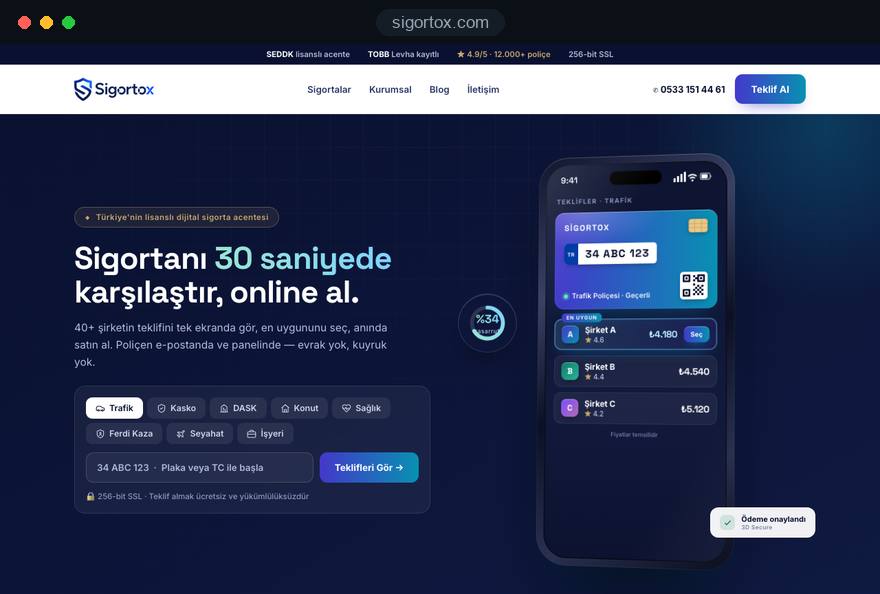
An insurance agency or broker website is usually opened a few weeks before a renewal, and within minutes it either becomes a quote request or sends the visitor to a comparison site. In that moment the visitor wants three answers: does this firm handle my kind of cover, which insurers does it work with, and how much effort will a quote take.
In this guide we, Talha Aslan and team, walk through the decisions we make when planning an insurance intermediary's website, in the order we make them. Each section gives you a criterion to check on your current site, a step you can take, or a question to put to any agency you are talking to.
01Start with the lines of cover that pay the bills
The structure of the site starts from the two or three products that carry the firm's income; a site that gives twelve products equal weight stands out for none of them. A broker writing mostly motor and home policies and one placing commercial property and liability cover cannot share a home page, a form or a tone of voice.
Before the planning call, we ask you to answer these questions in writing:
- Income mix: Which three products brought most of your commission last year, and which one do you want to grow.
- Client type: Private customers, small business owners or procurement teams; each needs a different first screen.
- How clients arrive: Mostly referrals, the map listing or organic search.
- Capacity: Who replies to a new request on the same day, and through which channel.
The answers decide the first product tiles on the home page, the menu order and which products get a detailed quote form. Priority products get deep pages and full forms; the rest start with a short page and a callback request, and grow over time. In our industry focused website design projects this list becomes the backbone of the scope, because it drives page count and schedule more than anything else.
02What belongs on a product page
A good product page answers the first five questions a client has about that cover without a phone call, then leads into a quote form for that product. A landlord insurance page should not start with a dictionary definition; it should be filled with what helps the reader decide.
The sections we recommend for each product page:
- Short answer: What this insurance protects and who typically needs it, in two sentences.
- Cover and exclusions: What is usually covered and what is not, stating clearly that details depend on the policy.
- What the quote needs: For van cover the registration and the main driver's details, for home cover the address and rebuild information, as a list the client can prepare.
- Common questions: The four or five questions your team hears most often on the phone, with short answers.
- Quote form: The product already selected, with a short first step.
Be careful with sentences that contain figures. Limits, excesses and rules change, and an outdated number on the page costs the firm credibility. We only add figures with a known source and date, and leave you a checklist to review at the start of each year.
03Building the quote form in two steps
The quote form asks only for contact details and the product on its first step; everything the quote itself needs waits for the second step. Someone who only wants a rough idea of price will not hand over a licence number and claims history before trusting the firm.
This is the flow we build:
- First screen: name, phone and product, with the privacy notice link and a separate marketing consent on the same screen.
- The request is saved as soon as the first step is sent, so your team can call even if the second step is never finished.
- Second screen: only the fields that product's quote needs, such as vehicle details for motor or property details for home.
- Final screen: when and through which channel you will reply, with an optional preferred callback time.
Ask of every field: can we prepare a quote without it. If yes, remove it or ask for it on the call. For fields such as a registration number, add a short hint showing where to find it; a visitor who does not know where to look will leave. Before launch, fill in the form on your own phone, one handed, and check that number fields open a numeric keypad.
04Intermediary or insurer: making your status clear
An insurance intermediary's website must show plainly that the visitor is dealing with an agency or broker, not with the insurer. How that is expressed depends on where the firm is regulated, so this decision belongs in the design phase, not at the end.
What it means in practice:
- UK firms: The FCA Handbook sets the standard status wording, Authorised and regulated by the Financial Conduct Authority, for letters and their electronic equivalents; written in full, it sits well in the site footer with your firm reference number.
- Agencies in Turkey: Since an amendment published on 22 January 2025, the Insurance Agencies Regulation requires the agency title on web pages and bans names, logos and identity that suggest the firm is an insurer.
- Other markets: Licensing and disclosure rules differ by country and, in the United States, by state; ask your compliance adviser for the exact wording before design starts.
- Visual identity: Build the firm's own brand rather than borrowing an insurer's colors and logo as your main identity.
Language matters as much as the footer. Prefer "your policy is underwritten by one of the insurers on our panel" to "we insure you". Final wording should always be signed off by your compliance adviser.
05Running the insurer panel page
The insurer panel page is not a logo strip; it is a current list of the insurers you place business with and, where relevant, the authority each has given you. For agencies in Turkey, the 2025 amendment requires this information to be published on the website if the firm has one; elsewhere a clear panel page simply answers a question clients ask anyway.
The layout we recommend:
- Insurer name and products: Next to each insurer, the products you place with them.
- Your role: In plain words whether you act for the client, for the insurer, or under delegated authority.
- Last reviewed date: A line showing when the page was last checked.
- Logo use: Logos only where you have permission; otherwise the name appears as text.
The real risk is that the page is forgotten after launch. Decide from the start who updates it when an agency agreement ends or a new one is signed. We build it so it can be edited in the admin panel without code, and product pages can pull a short "insurers we use for this cover" list from the same record, so two pages never disagree.
06Personal data, health details and consent
The quote form is where an agency website collects the most personal data, so it needs the most careful build from a data protection point of view. Health details asked for private medical or life cover are sensitive data under data protection law and deserve extra caution.
The separations we make in practice:
- Minimal data: Only the fields each product's quote needs; nothing added because it might be useful one day.
- Health details: Instead of detailed medical questions in a web form, take a callback request and discuss details with an adviser.
- Separate consents: The privacy notice link and the marketing consent kept apart, and consent boxes never ticked in advance.
- Storage: Documented answers to where requests are stored, who can access them and how long they are kept.
Sending form data as plain email to several people is the weak point most often overlooked. Collecting requests over an encrypted connection in one panel that only authorised staff can open helps both security and follow up. Your adviser writes the privacy notice and consent texts; we make sure they appear in the right place and form.
Cookies need the same care. In the EU, consent is required before non essential tracking, and Google requires consent mode for its measurement and personalized advertising features for users in the European Economic Area. List the cookies your analytics and ad tools set, word the banner accordingly and check on a phone that it never covers the quote form.
07What happens after a request arrives
The site's job does not end with the request; who receives it and how quickly they reply matters as much as the form. A client may ask several brokers for quotes on the same day, and the first to respond often starts the conversation.
We settle these points when planning the request flow:
- Product label: Every request is saved with the product page and form it came from.
- Routing: Motor requests go to the person handling personal lines, commercial requests to the commercial team.
- Alerts: The responsible person is notified at once; requests sent out of hours sit at the top of the list the next morning.
- Status: Stages such as called, quote sent, bound or lost are marked.
A small agency can run this in a simple panel; a growing broker may need a CRM integration. Sending quote requests to your CRM, or connecting to insurers' web services, is planned as a separate software development item, and we do not promise an integration you have no authorised access for. Keep the measure simple: can you see, each week, how long each request waited for its first reply.
08Preparing for renewal season
Most of an agency's income comes from renewals, so the site should help clients remember renewal dates and catch seasonal demand. Car, home and landlord policies bring the same client back every year with the same question.
A few concrete renewal features:
- Reminder request: Visitors leave their renewal month and preferred contact channel, with a separate consent to receive the reminder.
- Existing client route: A "renew my policy" button leading to a shorter flow than the new client form.
- Evergreen pages: One permanent page per product is updated each year instead of a new page each season, so its search history is kept.
- Campaign page: For paid traffic, a single goal landing page goes live without disturbing the main site.
Collecting reminder requests depends on getting marketing consent right, so the consent text and box belong on that form as well. Whether reminders go out by email, SMS or WhatsApp depends on your own systems; the site collects the request and the consent correctly. As a check, make sure your reports show requests from existing and new clients separately.
09Writing a claims page that helps on the worst day
The claims page is opened at the most stressful moment a client has with you, and it is where loyalty is often won. It should be a checklist someone can follow on a phone at the roadside, not a long text.
An example flow for a road accident:
- Make sure everyone is safe and call the emergency services if needed.
- Take photos of the scene and the vehicles, and exchange details with the other driver.
- Note witnesses and, where the police attend, any reference they give you.
- Check on this page how to notify your broker and which details to have ready.
- Prepare the documents on the list, such as the policy number, photos and repair estimates.
Theft, fire and escape of water get their own sections in the same format. A claims line or WhatsApp button should be reachable at the top of the page without opening the menu; nobody wants to browse in that moment. If you list insurers' claims lines, check the numbers at least once a year.
Adding the page link to policy documents and renewal messages means the client never has to search for it on the day.
10Local search and the Google Business Profile
Many clients search with a town name or type "insurance broker near me"; to appear there, the website and the Google Business Profile must tell the same story. Local visibility comes less from one page than from small details that support each other.
Points to check:
- Business name: Under Google's guidelines the profile name must match the real world name; adding keywords such as "cheap car insurance" puts the profile at risk.
- Consistent details: Legal name, address, phone and opening hours identical on the site, the profile and directories.
- Category and services: An insurance broker or agency category, with products entered as separate services.
- Structured data: Firm name, address and opening hours marked up for search engines; you can review the markup with our schema markup generator.
A firm with several branches needs a contact page and a profile for each; three addresses on one page make it harder for search engines to know which branch to show. Brokers who visit commercial clients and do not receive visitors can hide their address as a service area business. Replying personally and regularly to reviews is the most concrete way to keep a profile alive.
The wider work, including content and technical foundations, is covered by our search engine optimization service.
11Speed and usability on the phone
Most insurance quotes are requested from a phone, so product pages and forms are designed for the small screen first and adapted to desktop afterwards. A page that loads slowly or whose fields jump around loses the visitor before step two.
Google defines three Core Web Vitals thresholds, to be met for at least 75 percent of visits:
- LCP: How long the largest content element takes to load; 2.5 seconds or less is good.
- INP: How quickly the page responds to a tap; 200 milliseconds or less is good.
- CLS: How much elements shift while loading; 0.1 or less is good.
On broker sites the usual culprits are heavy sliders on the home page, dozens of uncompressed insurer logos and chat widgets. Serving logos small and in a modern format, and loading chat only when tapped, makes a visible difference. Test your current site with our mobile friendly test, then fill in the quote form on mobile data and note how long each step takes.
Usability is a separate matter. Keep the phone and WhatsApp buttons fixed where a thumb reaches easily, keep the product menu within two taps, and use readable type and generous tap targets; older clients use these sites too.
12Measuring which products bring requests
Measurement should show which product page and which source bring quote requests, not just visitor numbers. Without it, you decide where to spend content and advertising budget by guesswork.
Conversions to set up from day one:
- Form submissions: Recorded with the product, and the first and second steps tracked separately.
- Click to call: Visitors who tap the number on a phone.
- WhatsApp clicks: With the page they came from.
- Claims page use: Existing clients using the claims line; tracked separately and never counted as new business.
If you run search ads for car or home insurance, the ad should land on a campaign page and you should see which keyword produced each request. Google Ads Quality Score is built from expected click through rate, ad relevance and landing page experience. Google calls it a diagnostic tool rather than a direct input in the auction, yet a weak landing page experience rating signals that the page does not deliver what the ad promised. We set up campaigns in our Google Ads management together with the on site measurement.
Once a month, look at three numbers per product: requests, requests that became policies and their source. Marking bound policies in the panel shows products that bring many requests but few sales. Visitors who decline cookies are partly missing from analytics, so treat the panel's numbers as the reference.
13Common mistakes on insurance agency websites
Most mistakes on agency and broker sites do not come from design; they come from treating the site like a brochure. The ones we meet most often, with what to do instead:
- Every product on one page: Search engines cannot tell which page answers the van question; give each priority product its own page.
- Asking for a licence number on the first screen: People who only want a price leave; move identity and vehicle details to the second step.
- Borrowing an insurer's identity: An insurer's colors and logo used as the firm's own brand confuse clients; lead with your own identity and full legal name.
- An outdated insurer panel: A logo stays up years after the agreement ended; give the list a review date and a named owner.
- Emailing requests to everyone: Nobody knows who replied and data spreads; collect requests in one panel with a named owner each.
- Claims help only by phone: The same questions come in after every accident; publish a step by step claims guide on the site.
Tick this list against your current site. If three or more apply, the problem lies in the structure rather than the content, and replanning pages and forms beats small fixes. If you decide to rebuild, list the old URLs and plan redirects to the new pages before design starts; that is how pages with search history keep their value.
14Questions to ask an agency, and your next step
The right agency for an insurance intermediary's website can discuss product pages, the two step form, status details and measurement in writing at the proposal stage. A proposal that starts with a visual mockup and leaves these decisions for later leaves the most important part of the job undefined.
Ask every agency you talk to:
- Which products will get their own page, and what content structure will each page follow.
- Which fields go on the first and second steps of the quote form, and where will requests be stored.
- How will regulatory status, legal name and the insurer panel be presented, and who will keep them current.
- Which conversions will be measured, and who sees the report and how often.
- Who handles content and technical updates after launch.
You can see work we have done in insurance and other trust driven fields on our references page.
The scope of our fixed packages is listed in the web design pricing section. For a written scope and quote tailored to your firm, send us your products and insurer panel through our contact page; on the first call we answer the questions in this guide together and set out the page and form structure in writing.