Traffic drops after launch
The new site goes live and within weeks search visitors fall away. Usually the old URLs were never connected to the new pages, so Google cannot find what it used to rank, and the rankings go with them.

Your Windows contrast theme is on; colours come from your system.
Your device is set to reduce motion; animations are already off.
Your choices are saved in this browser only.
Web design solution
A website redesign is more than a new look. Pointing old addresses to the right new pages, carrying over content you have invested in and making the site fast on a phone all belong to the same project. We plan the redesign so that the visitors you already have keep finding you.
Open the live demoA demo design we built for a fictional brand
In short
A website redesign changes the design and often the platform of an existing site while protecting its traffic and search visibility. It starts with an inventory of every old URL and the pages that bring visitors, then each old URL is mapped to its new page with a 301 redirect, content is updated and moved, and speed and mobile issues are fixed. After launch, Search Console is monitored and any broken URL is fixed straight away.
Talha Aslan and teamLast updated:
When you need one
A site that looks dated is often still earning business: pages that have ranked for years, links from other websites, blog posts people search for. An unplanned redesign can wipe that out overnight. These are the losses we see most often after a relaunch.
The new site goes live and within weeks search visitors fall away. Usually the old URLs were never connected to the new pages, so Google cannot find what it used to rank, and the rankings go with them.
Links on other websites, on social media and on printed material now lead to an empty page. Without permanent redirects, the value those links carried does not pass to the new site.
Colours and photos change, but the site is still slow on mobile, forms still fail and visitors still cannot find what they came for. A redesign that does not start by asking why the site underperforms stays on the surface.
Pages that do not fit the new design are deleted, and well ranked articles get new titles and copy. Trimming the site without knowing which pages bring traffic can remove the very pages people read most.
Sources: Google Search Central: Site moves with URL changes · Google Search Central: Redirects and Google Search
Our approach
We start a redesign with an inventory, not a mood board: every crawlable URL on the old site, the pages that get traffic in Search Console and Analytics, and the URLs that earn links from elsewhere go into one sheet. Whether a page is kept, merged or retired is decided from that data.
While the new structure takes shape, every old URL gets its new address written next to it. For URL changes Google recommends permanent server side (301) redirects and keeping them in place for generally at least a year, so we test the map before launch. Pages that rank keep their topic and main heading, even when the copy is refreshed.
Design and build follow our web design standards: phone first, measured speed, working forms. On launch day we check redirects, the sitemap and tracking tags, then follow coverage and error reports over the following weeks. If you want to go deeper on the technical side, our SEO service runs with the same team.
The staging site stays closed to search engines; on launch day it opens, the redirects go live and the sitemap is resubmitted.
Which kind of redesign?
The risk of a redesign grows with how much changes in your URLs and domain, and the plan is built around that.
Visual refresh
The page structure stays; design, copy and speed are renewed.
Platform change
Moving from an off the shelf system or old code to a new platform.
Domain and mergers
A rebrand, or several sites brought together into one.
What a redesign must keep
Each item carries over value the old site has built up over the years.
Every old URL is permanently redirected to the closest matching new page. Pages without a match are not sent to the home page in bulk; they go to the most relevant parent page.
Pages that bring traffic keep their topic, main heading and depth; the copy is updated, but the page does not turn into something else.
Page titles, meta descriptions and structured data move to the new templates, with no empty or duplicated titles left behind.
URLs that earn links from other sites are listed separately, and their redirects are tested one by one before launch.
Analytics, ad conversions and form notifications are set up again on the new site and checked on launch day so no data is lost.
A redesign is the chance to leave old speed and mobile problems behind: images are compressed, unnecessary plugins are dropped and Core Web Vitals are measured.
Comparison
| Topic | Replace the old site overnight | Planned redesign |
|---|---|---|
| Old URLs | Most return 404 | Each one 301 redirects to its new match |
| Content | Whatever fits the new design survives | Kept and updated based on traffic data |
| Rankings | Have to be earned again from scratch | Signals pass to the new URLs |
| Tracking | Data can stop on launch day | Tags installed and tested before launch |
| Speed and mobile | Depends on the theme, rarely measured | Measured and reported before launch |
| After launch | Problems noticed once traffic falls | Search Console monitored for weeks |
Quick check
Must haves: does your site have them?
0 of 6 in place Tick the boxes to see where your site stands.
Added as needed
We choose which of these you need together during the scoping call.
Send us your site address; we will talk through what should stay and what should change, and put together a written redesign plan.
Process
We define your business, your audience and the site’s one-sentence job: who it sells what to, through which action. Scope and timeline are written from that answer.
The home page and key templates come to you as designs first; no code is written before your approval. We do not like surprises, and we do not cause them.
The approved design becomes fast, secure, maintainable code. You follow progress in the CRM and see every page in a staging environment before launch.
The site goes live with analytics, Search Console and conversion tracking connected; panel training is given, first-year hosting and maintenance included.
Search, speed and tracking
Every old URL on the map is crawled again right after launch to confirm there are no redirect chains, loops or 404 errors left.
The new sitemap is submitted in Search Console, and indexed pages and error reports are followed over the next weeks.
The new site goes through a mobile speed test before and after launch, and Core Web Vitals are compared with the old site.
Search traffic and conversions are compared page by page with the period before the redesign; if a page drops, we find out why and fix it.
Free tools
Map your old URLs, find existing redirects and broken links, and see what your site runs on and how it performs on mobile.
Tech SEO
Match broken or old URLs to the best live page in your sitemap by path and title similarity, with a confidence score, then export 301s for .htaccess, nginx or CSV.
Tech SEO
See the 301/302 redirect chain and HTTP status codes step by step.
Tech SEO
Find broken links, redirects and broken images on any page, with status code, anchor text and target URL.
Analysis
Detect a website's CMS, e-commerce platform, server, and tracking tags such as GA4, GTM, Google Ads and Meta Pixel.
Tech SEO
Test whether a page works well on phones: viewport, font size, tap targets, a mobile screenshot and Core Web Vitals.
Tech SEO
Build a valid sitemap.xml with lastmod and priority from your URL list.
How we work
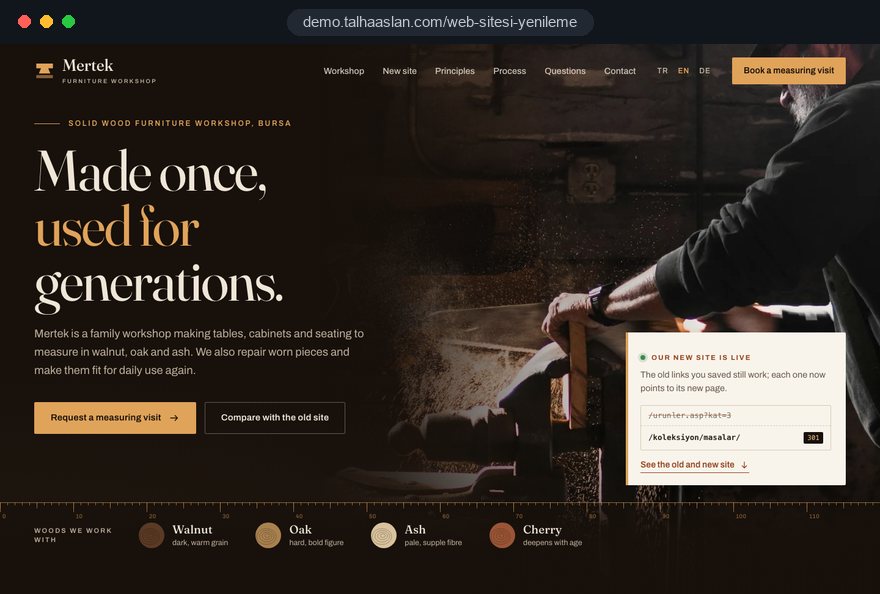
We are not showing a published client redesign on this page yet; instead we explain our approach on a live demo site. Our other client work is on the references page.
Live demo
For this field we built a one page demo site for a fictional brand, made only to show our approach. You can explore the design, the copy structure and the mobile view live in three languages.
Open the live demoWhich pages stay is decided by traffic and link data, not by design preferences.
The old to new URL mapping sheet is handed over with the project and stays with you, whoever works on the site later.
Redirects, forms and tracking tags are tested one by one on a staging site closed to search engines.
After launch we follow Search Console reports, fix any failing URL and compare traffic with the period before.
Related pages
Solutions
For businesses that want to add a language as part of the redesign.
Solutions
If ad traffic needs its own landing page while the redesign is under way.
Locations
For businesses that want to be found in local search in Istanbul.
 How to Protect SEO During a Website Redesign: A Guide to Relaunching Without Losing TrafficRead article
 Website Migration SEO: A Checklist to Move Your Site Without Losing RankingsRead article
 When Should You Redesign Your Website? 9 Signs It Is TimeRead article
 Website Content Migration: How to Move Content Without Losing It During a RedesignRead article
FAQ
If your question is not here, write to us; we will send you an answer and a written quote.
Next step
Share your current site address and what you expect from the redesign; after a free 15-minute call we will send a written plan and quote.
In-depth guide
Most website redesign projects start with how the site looks: a competitor's site feels sharper, the old theme looks awkward on a phone, the brand has moved on. Yet the real risk is invisible: pages that have ranked for years, links other websites point to and the landing pages your campaigns depend on can all disappear on launch day.
We have ordered this guide the way Talha Aslan and team make decisions on a redesign: first whether you need one at all, then the inventory, redirects, content, speed, tracking, launch day and the weeks after. Each section gives you criteria you can apply to your own site or to an agency proposal.
The first question is not about design; it is how much value the current site already carries. A site that earns steady search traffic, has links from other websites or catches paid traffic needs a different project from a brand new build. The job becomes moving that value into a new structure.
These are the criteria we use to decide:
Sometimes the right answer is not to redesign yet. A site with strong rankings but a broken contact form and a missing phone number may gain more from fixing those two things this week than from a six month project. When a new site is the right call, our web design service standards take over from there.
The only way to judge a website redesign is to record the old site's numbers before launch. Without that record, every rise or fall afterward is open to debate, and nobody can show what actually changed.
A few weeks before launch, export and keep the following:
These numbers also turn the project goal into something you can check later. "Make it look modern" is not a goal; "more form submissions on mobile, service pages moving off page two" is. If your business is seasonal, compare against the same period last year rather than last month, or a seasonal dip will be blamed on the redesign.
Store the exports in the project folder with their dates. Search Console only keeps performance data for a limited window, so detail from the old period may be gone from the dashboard by the time you want to compare. That report, not a mockup, is the first deliverable of a careful website redesign.
A redirect map is only as good as the URL list behind it: any address missing from the list returns a 404 error after launch. That is why we build the inventory from several sources that fill each other's gaps, not from one.
The last group is the one most often forgotten. A QR code printed for a trade show keeps circulating for years and points to an old campaign page; if that page vanishes, everyone who scans the brochure lands on an error. Writing each URL's source, traffic and number of linking domains into the sheet makes the next step far easier.
Every URL in the inventory gets one written decision, and that decision comes from data, not taste. "This page does not fit the new layout" is not a reason to delete it.
We decide with these criteria:
A concrete case: a furniture retailer with two short posts, "choosing an office chair" and "how to pick an ergonomic chair", answering the same search could merge them into one thorough guide that serves readers better than either. On the other hand, burying a page that has ranked well on its own for years inside another page, just so the new menu looks tidy, scatters the signals it has built.
Review the sheet with the business owner as well. A page with little traffic may still be the price list or technical sheet your sales team sends to customers every week, and that never shows up in the data. Once the decisions are written down, the redirect map almost writes itself.
Every old URL should point to exactly one closest matching new URL with a permanent, server side 301 redirect. The quality of the map depends on the accuracy of each line, not on how many lines it has.
You can draft the first pass of the match between old and new URLs with our free redirect mapping tool, then review every suggested match line by line. Google generally recommends keeping redirects in place for at least a year; we recommend never removing them, because old links keep getting clicked years later.
Decide early where the rules will live. They can sit in the server configuration or in the new platform's redirect module; what matters is that the redirect happens on the server, not through a script that runs in the browser after the page loads. If hosting changes too, moving the rules to the new server goes on the launch checklist.
The safest redirect is the one you never need. A new design can usually run on the old URL structure, so change URLs only when there is a real problem to solve.
The cases that justify a change are limited: URLs full of meaningless numbers or session codes, the same content opening at two addresses, inconsistent casing or word separators, or a site structure that mirrors internal departments rather than the services customers look for. Shortening URLs simply because they look long is a risk with no clear payoff.
When we design the new structure, we work in this order:
If the redesign adds a new language, decide the folder structure for language versions now; changing it later means a second migration. We cover that separately on our multilingual website page.
A ranking page should keep its topic, main heading and depth on the new site; the copy can be refreshed, but the page must not turn into something else. Google ranks a page for what it says, and when that disappears, the ranking goes with it.
These are the points we check page by page during migration:
One more practical rule: do not publish new content on the old site while migration is underway. Every page added during design and build creates a second round of inventory work. A short content freeze closes that gap; if an urgent change cannot wait, make it on the old and new site on the same day and note it in the sheet.
If you want the technical side and content strategy handled together, our SEO service is run by the same team that builds the site.
The speed of the new design should be a written acceptance criterion, measured before launch. "It will be fast" cannot be measured; Google's Core Web Vitals thresholds can.
Google assesses page experience with three metrics and treats these values as good when at least 75 percent of visits meet them:
The usual speed killers in a website redesign are predictable: full screen sliders, uncompressed photos, plugins loaded on every page but used on two, external fonts and chat widgets. Each should be debated during design, not after the build is finished. Measure the top service pages and blog posts, not just the home page, because most visitors never enter through the home page.
On mobile, speed is not the only test. A phone number that dials with one tap, a form that works comfortably with the on screen keyboard and a menu you can open with your thumb belong on the same list. Check how your current site behaves on a phone with our mobile friendly test, then run the same pages again on the new build to compare.
If tracking breaks on launch day, you will never know whether the redesign worked. That is why tags are installed on the new site before launch and tested on staging.
Our checklist covers these items:
Privacy rules travel with the redesign. In the EU, non essential tracking needs cookie consent first, and Google requires consent mode for its measurement and personalized advertising features for users in the European Economic Area. If you serve UK visitors, check the ICO's current guidance on cookies as well.
A banner that only appears but lets tags fire before consent does not meet these rules; you can check it by watching network requests in the browser's developer tools before clicking accept.
If ads keep running during the migration, catching campaign traffic on a stable landing page reduces the chance that the switch hurts ad performance.
The new site is finished on a staging environment closed to search engines, and launch follows a written sequence. Every step left to improvisation on launch day leaves an error that is hard to trace later.
The right way to close staging is password protection. Google cannot read a noindex tag on a page blocked in robots.txt, so a staging URL that leaks through a shared link can end up indexed. A password keeps out both visitors and crawlers.
We run launch day in this order:
Our redirect checker shows which status code any single URL returns and how many hops it takes to reach its target. Schedule launch for a quieter day and keep the next two working days free for checks.
A redesign does not end on launch day; the real checks happen in the weeks while Google recrawls the new URLs. Small fluctuations in the first days are normal, but a lasting drop almost always points to something missing.
During the first weeks we review these regularly:
When a page drops, we ask three questions in order: does the old URL redirect to the right place, does the new page still answer the question the old one answered, and is the page indexed. Most problems turn up in one of those three and can be fixed. Do not delete the Search Console property or verification for the old site either; you may need it to trace the move.
Close the monitoring period with a short report: which URLs were added later, which pages dropped and how they were fixed, and how speed compares with the old site. It becomes the starting point for the next website redesign or major update.
Most losses after a redesign are not technical bad luck; they are predictable omissions. These are the mistakes we see most often, each with what to do instead.
Going through this list with an agency at proposal stage makes clear which items are in scope.
When you compare website redesign proposals, look at the process before the portfolio: who builds the inventory, who writes the redirect map, who monitors after launch. If those three answers are vague, the proposal is selling a new look and little else.
Ask every team you talk to:
To see our approach in practice, this page links to a live demo site that walks through the redesign process, and you can browse work we have done for clients in our references.
For budgeting, our fixed scope packages are listed under pricing; the scope of a redesign becomes clear once the old site's inventory is done. Send us your current site address through the contact form, and we will talk through what should stay and what should change, then prepare a written redesign plan and quote.
Start a Project
Thanks {name}, we've received your brief. We usually reply within the same day.
What happens next?