Tours live in a flyer image
The itinerary sits inside an image made for social media. Search engines cannot read it and travellers zoom in on their phones; without its own page, the tour never appears in searches for that trip.

Your Windows contrast theme is on; colours come from your system.
Your device is set to reduce motion; animations are already off.
Your choices are saved in this browser only.
Industry-specific web design
Travellers rarely search for an agency; they search for a trip and a date: Cappadocia in October, the Amalfi Coast in May, a Christmas market weekend. We build travel agency websites around one page per tour, departure dates with availability, a day by day itinerary and a simple enquiry, for agencies and tour operators in the UK and elsewhere working with a remote team, and for Turkish agencies selling tours to international guests.
Open the live demoA demo design we built for a fictional brand
In short
A travel agency website gives every tour its own page with departure dates, a day by day itinerary, what is and is not included and the travel documents guests need, then takes the traveller to an enquiry for a chosen date. It also shows the licence details your market requires: in the UK, the CAA expects ATOL holders to show their name, ATOL number and ATOL logo on websites.
Talha Aslan and teamLast updated:
Why it needs its own approach
A tour website has to keep changing dates and filling departures accurate while carrying the licence and protection details your market requires. Generic business templates are built for neither.
The itinerary sits inside an image made for social media. Search engines cannot read it and travellers zoom in on their phones; without its own page, the tour never appears in searches for that trip.
A sold out departure still looks open, a cancelled date is still listed and new dates are missing. Travellers enquire for nothing and the team answers the same question on WhatsApp all day.
The CAA expects ATOL holders to state their name, ATOL number and ATOL logo clearly on websites and brochures. In Türkiye, agencies must show their licence number and agency name on the first page and in the footer of other pages.
Visa fees, entrance tickets, optional excursions and city taxes are not mentioned. Every extra the traveller discovers later feels like a surprise and raises the risk of cancellations and complaints.
One comes through the form, one through Instagram, one by phone, and none of them are logged against a tour and a date. In peak season, every enquiry left unanswered goes to another agency.
When next season's programme is ready, the site still depends on someone else to update it. Old dates and old tours stay online, and the agency looks out of date too.
Sources: Civil Aviation Authority: Compliance with ATOL Standard Term 1 · Travel Agencies Regulation of Türkiye, article 17, Mevzuat Bilgi Sistemi
Our approach
We do not build a travel website like a brochure; we build it in the order travellers decide. First they find the route and the dates, then they read the itinerary and what is included, and finally they pick a departure and send an enquiry. That is why every tour has its own page, every departure its own row and every page ends in the same enquiry flow.
If you want instant confirmed sales, an online reservation system is connected to the site; if you sell to travellers in several languages, we set up a multilingual structure from day one. For early booking campaigns, a single-goal landing page can go live without disturbing the main site.
Design, development and content sit in one team, so the tour panel, the calendar and the enquiry flow are planned together. Talha Aslan sets the strategy and an experienced team handles delivery. We work remotely and in English with agencies abroad.
Home
Each tour page answers its own search, and all of them lead into the same calendar and enquiry flow.
The right setup
All three start from the same foundation; the size of the catalogue and where the traveller comes from make the difference.
Package tours
Travellers compare routes and dates, so the site puts the calendar and the itinerary first.
Day trips
Decisions are quick and often made on a phone, so the site shows pick-up points and times on the first screen.
Inbound
Travellers research from another country, so the site speaks their language and answers their questions.
Built for travel agencies
These are the points agencies decide on most often when we plan a tour website together.
Tours are listed by region, month and length, and every departure shows its availability. A full date is closed in the panel with one click, and your team can add next season's tours.
Each day's route, overnight stop, meals, free time and guided visits on separate lines. What is included and what is not are written in two clear lists.
The CAA states that ATOL holders must show their name, ATOL number and ATOL logo clearly on websites, and use the set wording on whether all or only some services are ATOL protected. We place these in the template; the final legal check belongs to your business.
For agencies licensed in Türkiye, article 17 of the Travel Agencies Regulation requires the licence number and agency name on the first page of the online sales channel and at the foot of every other page. We fix both into the template.
For overseas tours, passport validity, visa requirements and when to apply sit in a separate box on the tour page. We take the details from you and link to the official source.
Travellers pick a date, party size and room type and send an enquiry; it reaches you with the tour name and departure date and is measured as a conversion.
Sources: Civil Aviation Authority: Compliance with ATOL Standard Term 1 · Travel Agencies Regulation of Türkiye, article 17, Mevzuat Bilgi Sistemi
Comparison
| Topic | Generic business template | Site built for a travel agency |
|---|---|---|
| Tour content | A flyer image and a short description | Each tour on its own page: day by day itinerary, inclusions and exclusions |
| Dates | Typed into the text and updated by hand | A row per departure with availability |
| Enquiry | A general contact form | An enquiry sent for a chosen tour and date |
| Licence details | Missing or only on the contact page | Licence or ATOL details where your rules require them |
| Updates | Outside help every new season | A panel where your team adds tours and dates |
| Measurement | Visitor numbers | Which tour and which departure bring enquiries |
Quick check
Must haves: does your site have them?
0 of 6 in place Tick the boxes to see where your site stands.
Added as needed
We choose which of these you need together during the scoping call.
Share how many tours you run, your departure calendar and the travellers you want to reach; we will come back with a page structure and a written quote.
Process
We define your business, your audience and the site’s one-sentence job: who it sells what to, through which action. Scope and timeline are written from that answer.
The home page and key templates come to you as designs first; no code is written before your approval. We do not like surprises, and we do not cause them.
The approved design becomes fast, secure, maintainable code. You follow progress in the CRM and see every page in a staging environment before launch.
The site goes live with analytics, Search Console and conversion tracking connected; panel training is given, first-year hosting and maintenance included.
Search and speed foundations
Travellers search for 'Cappadocia tour', 'Balkans tour in May' or 'Rome city break in October'. Each tour page is built around its route and season, and a tour that ends its season moves to the next dates instead of being deleted.
Agency name, address and contact details, and route and date information on tour pages, are marked up so search engines can read them; nothing is marked up that is not on the page.
Tour pages are heavy on photos, so images are compressed, galleries load on demand and Core Web Vitals are measured before launch.
Enquiry forms, calls and WhatsApp clicks are tracked as conversions from day one, so you can see which tour and which channel bring enquiries.
Free tools
Before planning a new site, test your current site and the tour links you share the way travellers see them. The tools are free and need no sign up.
Tech SEO
Test whether a page works well on phones: viewport, font size, tap targets, a mobile screenshot and Core Web Vitals.
Tech SEO
Scan any URL for title, meta description, headings, canonical, indexability and speed signals, and get an SEO score with a clear to-do list.
Tech SEO
Generate rich-result JSON-LD for Article, Product, FAQ, Local Business.
Sharing
Preview how your link looks on WhatsApp, Facebook, X, LinkedIn and Telegram, and find missing Open Graph tags and image problems.
Conversion
Create a wa.me link with a preset message + embeddable button code.
Analytics
Build correctly tagged links with Google Ads, social and newsletter presets.
How we work
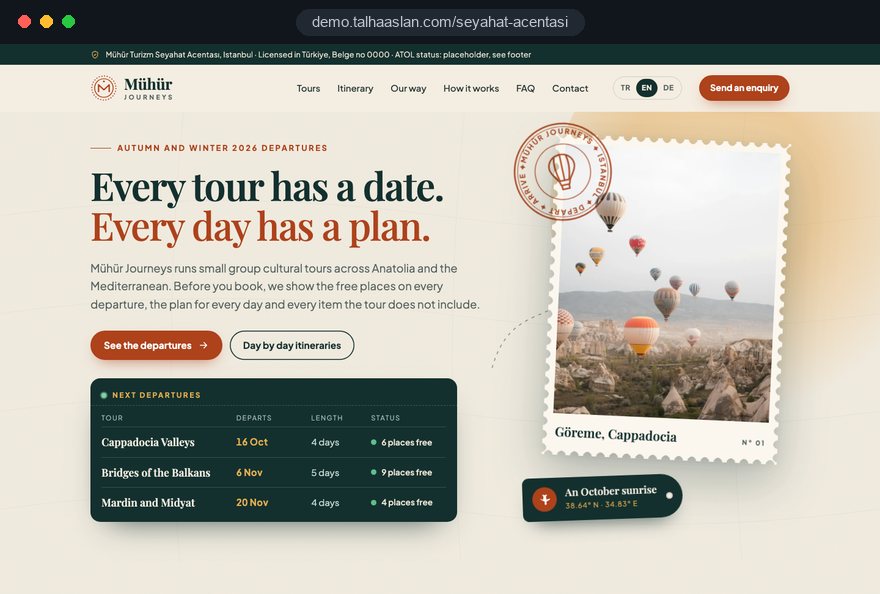
We do not have a live client project for a travel agency yet, so we show our approach on a live demo site. The demo is not a client site. You can see our work in other sectors on the references page.
Live demo
For this field we built a one page demo site for a fictional brand, made only to show our approach. You can explore the design, the copy structure and the mobile view live in three languages.
Open the live demoIn the first call we collect the season's tours, the departure calendar and the answers your team gives travellers most often; the tour page template comes from that list.
Licence numbers, ATOL details and agency name are copied from the documents you give us; we do not publish anything we cannot verify.
Tours, dates and availability are entered in a panel your team can use in minutes, and we give a short training session at handover.
We track which tour and which channel bring enquiries and where travellers drop off, and adjust the pages before each season.
Related pages
Industries
For the accommodation itself; an agency sells the tour, the dates and the itinerary.
Industries
For firms that sell airport and hotel transfers as a service of their own.
Solutions
Paid, instantly confirmed tour sales instead of enquiries.
Industries
Boat trips and blue cruises are the sea experience that agencies add to their packages.
 Lead Form Design for Booking, Quote and Demo Requests: UX Rules That Lift ConversionsRead article
 How to Build Trust on Your Website: Trust Signals That Turn Visitors into CustomersRead article
 Multilingual Website SEO: How to Reach Global CustomersRead article
 Professional Photography for Websites: What It Adds and How It Beats Stock PhotosRead article
FAQ
If your question is not here, write to us; we will send you an answer and a written quote.
Next step
In a free 15-minute call, in English, we will go through your tour catalogue, your departure calendar and the travellers you want to reach, then send a written scope and quote.
In-depth guide
A travel agency website has to answer three questions on a phone screen within a few minutes: is this trip right for me, is there space on the date I want, and how do I ask for it. A site that cannot answer all three sends the traveler to WhatsApp, to a booking platform or to another agency, however polished it looks.
In this guide, Talha Aslan and team walk through the decisions we make with agency owners and tour operators planning a new site, in the order they need to be made. Each section gives you a criterion to check today, a task for your team or a question to ask any agency you are considering.
The decision that shapes everything else is whether travelers send an inquiry or pay and receive confirmation on the spot. The bottom of every tour page, the fields in your admin panel and your team's daily routine all follow from it, so it belongs before any design work.
Four criteria usually settle the question:
For many agencies a mixed model works well: day trips with fixed departures are sold online, while overseas packages run on inquiry. On the booking side, an online reservation system handles payment, the confirmation email and the seat count in one flow, and the inquiry option stays on the same tour page as a separate button.
The maintenance burden of a tour website is decided by how tours are stored, not by the design: every tour should be one record, and every departure a separate row attached to it. Panels that put itinerary, dates and hotels into one big text box feel quick in the first season and force a rewrite in the second.
We recommend keeping at least these four record types apart:
The payoff comes at the change of season. If your Cappadocia itinerary stays the same, your team only adds new departure rows; the tour's address, reviews and search history are kept. When a hotel changes, updating one accommodation record corrects every tour page that uses it. Before handover, ask someone on your team to enter a real tour from start to finish; every field where they hesitate should be simplified.
A tour page should follow the order of the questions travelers ask while deciding: suitability and dates first, detail second, the inquiry last. Even when every fact on the page is correct, presenting it in the wrong order makes travelers leave before they find what they came for.
This is the sequence we use for tour templates in our web design service:
The "who this trip is not for" line is what most agencies leave out, even though their team says it on the phone every day. Telling a traveler with bad knees about the long walks at Ephesus up front prevents a wrong inquiry and a later cancellation. Keeping sold out dates visible also shows that the trip is in demand and steers people to the next departure.
Costs that surface after booking damage a traveler's trust faster than anything else, so the included and excluded lists should read like contract clauses, not marketing copy.
These are the items we most often see missing from tour pages:
Marking each item with one of three states keeps things clear: included, optional, or paid locally. The list on the page and the list in your booking conditions or package contract should match word for word. Generating both from the same record in your panel stops one from being updated mid season while the other is forgotten.
The details your regulator expects should be built into the site template, not added page by page, so every new tour page carries them automatically. Which details apply depends on where your travel agency is licensed and who it sells to.
For UK sellers, the CAA states that ATOL holders must show their name, ATOL number and ATOL logo clearly on publicity such as websites, and use the set wording on whether all or only some flights and holidays are ATOL protected.
For agencies licensed in Türkiye, article 17 of the Travel Agencies Regulation requires the license number and agency name on the first page of the online sales channel and at the foot of every other page; the same article asks for verified license numbers of the licensed hotels used in the tours. Our launch checklist covers:
The legal content belongs to your business. We build the placement and the template, and we recommend a final read by your adviser or against the regulator's own guidance.
A good inquiry form never asks for the tour and date again; it takes them from the page and only asks for what your team needs to reply. When a traveler taps the button next to "Rome, October 12 departure", the form should open with both already filled in.
For a first contact, these fields are enough: name, phone number, number of adults and children, room type and an optional note. Passport numbers, dates of birth or copies of ID documents do not belong at this stage; collect them at confirmation through a secure channel. Asking for personal data only when it is needed shortens the form and gives you a more defensible privacy position.
The WhatsApp button should work the same way. If the prefilled message contains the tour name and date, your team never has to ask which trip the person meant. The automatic email sent after a form submission should state three things: that the inquiry arrived, which tour and date it concerns, and the hours in which the team will reply.
Finally, test the form on an actual phone: does the keypad switch to numbers in the phone field, is the date picker usable on a small screen, and does each error message name the missing field.
The value of the website depends on what happens after an inquiry arrives; a properly designed flow means no inquiry gets lost in peak season.
The basic flow we suggest has five steps:
Status data also supports decisions. At the end of a season, filter the inquiries that stayed on option and never converted by tour, and you will see where travelers hesitated; the answer is often a missing detail on that tour page.
Every travel agency sells with photography, but a gallery that loads slowly on a phone loses the traveler on the first screen, so speed is a design decision. Google's Core Web Vitals treat these values as good at the 75th percentile of visits: LCP (how long the largest element takes to load) at 2.5 seconds or less, INP (how quickly the page responds to a tap) at 200 milliseconds or less, and CLS (how much content shifts while loading) at 0.1 or less.
These are the elements that most often hurt the numbers on tour sites, and how to handle them:
Run your most visited tour page, not the home page, through our mobile friendly test; most travelers enter the site there.
Travelers search for a route and a season rather than an agency, so the search structure of the site is built by adding route and season pages above the individual tour pages. Searches such as "Balkans tour", "Northern Lights trip in February" or "Christmas markets weekend" can each be met by a page that gathers the matching tours.
These page types do the work for search on a travel agency site:
Filtered lists need care. If every combination of month, region and length creates its own address, those pages should be kept out of the index with noindex; Google cannot read the noindex on a page blocked in robots.txt, so the page must stay crawlable. A tour whose season has ended is not deleted: the page shows a "new dates coming" note and similar tours. We cover the technical side in our SEO service.
For an agency selling to international guests, language is not a flag added to the menu; it means tour pages written separately in each language and a contact routine that fits the traveler's clock. A traveler browsing from Germany wants the Cappadocia tour explained in German, answering German questions.
The technical foundation is hreflang markup: each language version must reference the others and itself, and the annotations must be reciprocal. Beyond that, content differs by market. For Turkish travelers, visa details lead the tour page; for European and American guests, airport meet and greet, transfer times and distances from the hotel to the sites draw more questions.
Check these points for each language:
An automatic reply in the traveler's language that says when you will respond builds more trust than a silent form. Choosing which languages to open first, based on where your sales come from, is the first step of a multilingual website plan.
Every visit from outside the site should land on the tour it is about; a traveler who arrives on the home page has to search for the tour again, and often does not. An Instagram post, a WhatsApp status or an ad should link to the address of the tour it promotes.
Tags that add source and campaign to each link show which post brought an inquiry; you can create them consistently with our UTM builder. The preview image and title shown when a tour is shared should also be defined on the tour page, otherwise the social network picks an image on its own.
On the advertising side, Google Ads evaluates Quality Score through expected click through rate, ad relevance and landing page experience; Google describes it as a diagnostic tool, not a direct input in the ad auction. Still, sending a "Rome tour" ad to the Rome tour page helps all three components. Short campaigns such as early booking periods are worth planning together with the tour page structure through Google Ads management.
On your Google Business Profile, the business name must match your real world name; adding keywords such as "Cheap Tours" breaks the guidelines. Tagging the website link in the profile separates inquiries that come from Maps.
The point of measurement is not counting visits but seeing which tour and which departure bring inquiries, so every inquiry event should be recorded with the tour name and date. Form submissions, WhatsApp clicks and phone taps are set up as separate conversions from day one.
Consent has to be part of the setup. Non essential tracking depends on the traveler's choice; for users in the European Economic Area, Google requires consent mode for measurement and personalized advertising features, and in the EU cookie consent is needed before non essential tracking starts. An agency selling to European guests should configure this before launch.
Once a month, look for answers to these questions:
The answers become your preseason task list for the travel agency team.
Most of the mistakes we see on tour websites are structural rather than technical; a small decision made during the build costs inquiries all season. Use these six as a checklist when you review your current site:
Most of these can be fixed without a new site; a rebuild makes sense when your platform cannot keep tours and departures as separate records.
When choosing who builds your travel agency website, look first at how they structure tour data and the inquiry flow, not at their visual portfolio. These are the questions we suggest asking in the first call:
We do not yet have a live client project for a travel agency, so we show our approach on the live demo linked on this page. Our work in other sectors is on our references page. Fixed price packages are listed in our web design pricing, and you can get in touch with us to share your tour count and departure calendar; we will put the scope in writing and send a quote through the quote form.
Start a Project
Thanks {name}, we've received your brief. We usually reply within the same day.
What happens next?