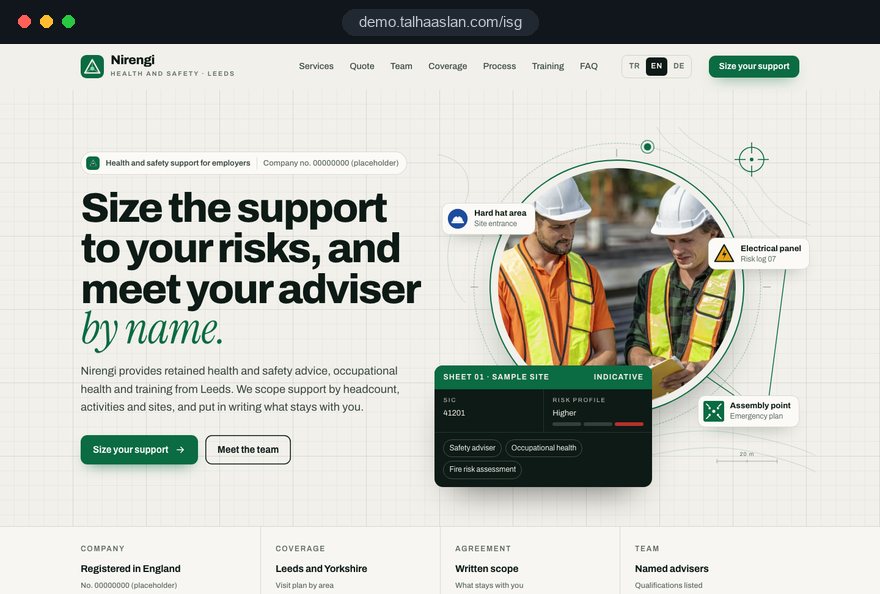
An employer who buys outside health and safety support is not handing the problem over. The legal duty stays with them, so they read a provider's website the way an auditor would: who exactly will advise us, is that person competent for our kind of work, can you reach all our sites, and how will you work with the people we already have.
This guide follows the decisions a provider makes when planning an occupational health and safety website, in the order they come up: how to show competence without overclaiming, how to size support in the quote form, how to describe coverage honestly, where health information must never go and how to measure what the site brings in.
01The four checks a buyer makes before calling
The first job of the site is verification, not persuasion: before an employer calls, they check four things, and if they cannot find them in a minute they move on to the next provider. In larger organizations the person checking is often in HR or procurement, collecting answers for a director who will sign later.
- Competence: Named advisers and clinicians, with qualifications and the kinds of workplaces they know.
- Scope: Which types of support you offer, and what the client receives from each one.
- Coverage: Whether you can reach every site the employer runs, and how visits are planned.
- Fit with existing staff: Whether you replace their arrangements or support someone they already have.
Put these four answers on the home page as short blocks that each link to a full page. That alone separates a provider website from the usual hero image with a hard hat and a slogan about safety culture. It also gives you a sitemap where every page has a reason to exist, which makes later decisions about new pages much simpler.
A realistic example: a facilities manager at a food production business is comparing two providers. One site names its advisers, lists the sectors they cover and explains how site visits work; the other shows a phone number and stock photography. The first gets the enquiry, the second never gets a call.
02Support pages built around what the client receives
Every support page should open with what the client ends up holding, because that is what a buyer compares. "Who visits" matters, but "what we leave behind" is the question that decides whether a retained contract looks worth it. Give each type of support its own page instead of listing everything on one services page.
A retained adviser page explains how the adviser helps with risk assessment, inspections and policy, and how findings are reported. An occupational health page explains health surveillance, fitness for work and management referrals, and which records are kept where. Risk assessment, emergency planning and training each deserve their own page, because each one is searched for separately.
Use the same four blocks on every support page so buyers can compare quickly:
- Who comes: The role, and the kinds of workplaces that person typically supports.
- What happens on site: The flow of a visit and who on the client side takes part.
- What is delivered: Reports, action plans, records or certificates, named plainly.
- What the client prepares: Staff lists, previous assessments, site access and a named contact.
Write these blocks with your advisers and clinicians, not from a template, since they know what actually happens on a visit. Every page should end with one button to the same quote form, so an employer looking only for occupational health never has to read about fire risk assessment to ask for a price.
03Showing competence the way the regulations describe it
Competence is the core of an occupational health and safety website, and UK law gives you the yardstick to write against. Regulation 7(5) of the Management of Health and Safety at Work Regulations 1999 treats a person as competent where they have sufficient training and experience or knowledge and other qualities. A team page should therefore show training, experience and knowledge as evidence, not as adjectives.
For each adviser and clinician, publish a short profile that a buyer could check:
- Role and qualifications: The qualification titles exactly as awarded, and the awarding body.
- Professional memberships: Only current ones, with the grade held.
- Workplace experience: The sectors and types of site the person knows, such as construction, warehousing or laboratories.
- Kept current: A named person in your team who updates profiles when someone joins or leaves.
Never upload certificates or registration documents to an open page; they contain personal data and are easy to misuse. Offer copies on request to a client at contract stage instead. Doctors and nurses on your team also answer to their own professional regulators, so check that guidance before clinician profiles go live. Keep those profiles to role, qualifications and experience, and leave out claims about outcomes or comparisons with other providers.
04Supporting in house staff, and what stays with the employer
Many buyers already have someone handling health and safety, and your site should say clearly how you work alongside that person. Regulation 7(8) says that where a competent person exists in the employer's own workforce, that person is appointed in preference to an outside one. HSE guidance adds that managing health and safety remains the employer's legal duty even when they use outside help.
Turn this into two honest blocks on your support pages. The first explains the models you offer: full retained support, support around an internal safety lead, or occasional specialist input. The second, titled something like "what stays with you", lists what the employer still owns.
- Decisions: The employer decides which recommendations to act on and when.
- Information: Regulation 7(4) expects the employer to give outside appointees the health and safety information they need, so ask for it plainly.
- Cooperation: Where several competent people are appointed, the employer arranges cooperation between them.
- A named contact: One person who receives findings and tracks actions.
Avoid copy such as "we take care of all your obligations". It sets an expectation the law does not support and attracts clients who will be disappointed. Being exact about the split is also a selling point: it shows the buyer you understand their position, and it attracts the employers who want a working partnership rather than a box to tick.
05A quote form that sizes support by headcount and risk
The quote form should collect enough to size the support before the first call. Regulation 7(3) says the number of competent people, the time available to them and their means must be adequate to the size of the undertaking and the risks employees face. A form that asks only for a name and a phone number captures neither, so every enquiry turns into a discovery call.
Build the form in short steps, in this order:
- Activity: Sector and main activities, with a free text box for anything unusual such as work at height or hazardous substances.
- Size: Number of employees and number of sites, asked separately.
- Locations: Town or postcode area for each site; if one is outside your coverage, say so at that step.
- Current arrangements: Whether there is an internal safety lead, an existing provider, and when a current contract ends.
- Support needed: Retained adviser, occupational health, training, a single assessment, or several.
- Contact details: Name, role, phone and email, at the very end.
After sending, show a confirmation page that says what happens next and when, and send the same message by email. Decide early where enquiries land: one shared inbox, separate inboxes by service, or a CRM. For providers with regional teams, routing the enquiry to the right team usually shortens response time more than any change to the form itself.
06Coverage pages that match where you really work
The coverage section of an occupational health and safety website should describe where you can genuinely deliver, how visits are planned and what can be handled remotely. Multi site employers need this answer before anything else; a vague list of towns leads buyers to assume you cover less than you do, or more than you can deliver.
Build the coverage page in this order:
- State the regions where you deliver site visits routinely.
- Explain how visits are scheduled and how far ahead clients can expect them.
- List what can be done remotely, such as document reviews or some management referrals.
- Explain how a client with sites outside your core area is handled, for example through a partner network you can name.
- Say how an enquiry from outside coverage is answered, so nobody is left waiting.
If you target searches by town or region, create pages only where you actually work, and give each one something specific: which team covers it, which industrial estates or sectors you visit most, how travel is handled. Pages where only the place name changes add nothing for the buyer and little for search. When you open a new regional team, update the coverage page and the regional page on the same day.
07From signed quote to first site visit
A process page that walks through the steps from accepted quote to first visit answers the questions your team otherwise handles by phone. Buyers in HR and procurement want to know what they must sign, what they must send and when someone will turn up.
- Acceptance: The client accepts the written proposal and confirms company details.
- Agreement: You issue the service agreement, setting out scope, reporting and how changes are handled.
- Information pack: The client sends staff numbers, previous assessments and site access details.
- Introductions: You introduce the named adviser or clinician who will attend.
- First visit: A date is fixed and a short preparation list goes to the client contact.
Close the page with the questions buyers actually raise at this stage: how to end an existing provider's contract, who on the client side should attend the first visit, what happens if the adviser changes. Collect these from your team's calls rather than inventing them. Link to the process page from every written quote; it cuts repeat questions and makes the proposal look organized.
For UK limited companies, also make sure the website carries the company details the trading disclosure rules require, including the registered number and registered office address. Procurement teams look for them when setting you up as a supplier.
08Training calendar, bookings and certificates
Training needs its own flow on an occupational health and safety site, because the person booking a course is rarely the person who signs a retained contract. An HR coordinator looks for a date on a specific topic, asks how many people they can book and wants to know when certificates arrive. The calendar should answer all three without a phone call.
Create one page per course topic covering the topic, the intended audience, whether it runs at the client's site or at your venue, what attendees need to bring and what records follow afterwards. If you mention refresher intervals or course lengths, base them on the current text of the relevant standard or awarding body and link to it; do not quote numbers from memory.
- Calendar: Date, topic, venue and places left; past dates disappear automatically.
- Group booking: Several employees from one client booked in a single form.
- In house request: A short separate form for employers who want a course at their own site.
- Noticeboard promotion: A QR code on each course poster that opens the booking page.
You can create those codes with our QR code generator and tag each one, so you see which client site responds to posters. In the booking form, ask only for name, role and employer; anything else needed for a certificate can be completed on the day.
09Client document areas and the line around health data
A marketing website is not a place for employees' health information, and that line should be drawn on day one of the project. Health data receives stricter protection under data protection law, and clinical records belong in your clinical system. Public forms should ask only for the business details a quote or booking needs.
If you want to share annual reports, action plans or training records with retained clients, build it as a members area and settle these questions before design starts:
- Who logs in: One or two named people per client, never a shared password.
- What is uploaded: Workplace level reports and records, not individual health files.
- How long it stays: A written retention period, and what happens to access when a contract ends.
- Audit trail: A log of who downloaded which document and when.
Plan the privacy notice, access rules and retention for this area with your data protection adviser. Keeping clinical systems separate from the website also means a hosting problem on the marketing site never touches health records.
You do not need the document area at launch. Many providers start with the public site and add the client area as a second phase once the number of retained clients makes manual sharing tiresome.
10Being found for services, towns and your business name
Employers search by service and by place, so your occupational health and safety site should be built along those two lines, for areas you genuinely cover. Searches such as "occupational health provider" with a town name, or "health and safety consultant for construction", land on different pages. Each support page answers its own search, and regional pages link back to the support pages.
Google Business Profile guidelines require the business name to match the name used in the real world, without added keywords. A profile name such as "Acme Safety Occupational Health Near You" breaks that rule; use the trading name exactly as it appears on your signage and paperwork.
- Title tags: Service first, then region where it matters, brand name last.
- Structured data: Business name, address, phone, service area and types of support, only where they appear on the page.
- Employer guides: Short articles answering real questions, such as how to brief an outside adviser.
- Internal links: Each guide links to the relevant support page and the quote form.
Test your markup with our schema markup tool before launch. If you want the content and technical side planned together, our SEO service does that so regional and service pages do not compete for the same searches. Nobody can promise a ranking; what you can control is how well each page answers its search.
11Speed, tracking and getting quotes delivered
You cannot improve the site without knowing where enquiries come from and whether your replies reach the buyer. Enquiries arrive from office desktops and from phones on site, so test both. Google's Core Web Vitals thresholds call for LCP, the time for the main content to load, at 2.5 seconds or less, and INP, how quickly the page responds to a tap or click, at 200 milliseconds or less.
Check how your current site behaves on a phone with our mobile friendly test. On the measurement side, define these events from launch:
- Each step of the quote form and its submission, so drop off points show up.
- Course bookings and in house training requests, tracked separately.
- Calls and WhatsApp taps, with the support page they came from.
- Visits to the coverage page followed by an enquiry from outside your area.
Review the numbers monthly and more often before busy training periods; the form step most often abandoned is the first thing to fix. If your quote emails land in a client's spam folder, the enquiry the site produced is wasted. Check your domain's SPF, DKIM and DMARC records with our email authentication checker, and send form notifications from the same domain. Corporate mail filters look closely at these records.
12Common mistakes on occupational health and safety websites
Most mistakes come from vague claims and from ignoring what the buyer has to check, not from design. These six are the ones worth checking before launch.
- Anonymous team: "Our experienced consultants" with no names; instead, publish named profiles with qualifications and sectors.
- Promising to carry the duty: Copy suggesting the client's obligations become yours; instead, explain what you do and what stays with the employer.
- Selling only full outsourcing: Ignoring clients with an internal safety lead; instead, offer and describe support around existing staff.
- A form that asks for a name only: Every enquiry needs a call back; instead, ask for sector, headcount, sites and current arrangements in short steps.
- Copied town pages: Dozens of pages where only the place name changes; instead, publish coverage honestly and build regional pages only where you work.
- Certificates as images: Scans with personal data on open pages; instead, summarize qualifications and send copies on request.
Turn this list into a prelaunch checklist and run it again whenever the team changes, a regional office opens or a service is added. An adviser who left last year still listed on the team page undermines trust in everything else the site says.
13Choosing a web partner and your next step
Choose the team building your site by how well they understand the buyer's checks and the limits of what you can claim, not by how polished their portfolio looks. In the first conversation, ask:
- Which documents will you base the team, competence and coverage content on.
- Which questions the quote form will ask, in what order, and who decides that.
- How you will keep health information out of the public site and forms.
- How you will show which support page brings retained clients and which brings training.
We start occupational health and safety projects by listing the questions employers ask you before signing; the page headings and form steps come from that list. You can see our approach on the live demo linked on this page, and our work in other sectors on our references page. The wider scope is described on our web design service page.
Decide by your stage. A newly launched provider needs support pages, a team and competence page and the quote form. A provider serving plants and construction sites needs industry pages and a clear emergency planning story. A provider growing through courses needs the calendar and booking flow in the first release.
Fixed price packages are listed in our pricing section. For a written proposal based on your scope, send us your services, team and coverage through the contact form, and we will agree the page structure and timeline with you in the first call.