Products live only in a PDF
Product information sits in one large PDF that is hard to read on a phone, and search engines cannot see which product is made in which size. A buyer who cannot find the product moves on to a competitor's product page.

Your Windows contrast theme is on; colours come from your system.
Your device is set to reduce motion; animations are already off.
Your choices are saved in this browser only.
Industry-specific web design
Buyers usually find a manufacturer by searching for a product, a material or a process, and they want to see technical data, capabilities and certificates before they ask for a quote. We build manufacturer websites around those pages and an RFQ form that collects everything your sales team needs, for producers in the UK and elsewhere that work with a remote team, and for Turkish exporters that need a proper English site for foreign buyers.
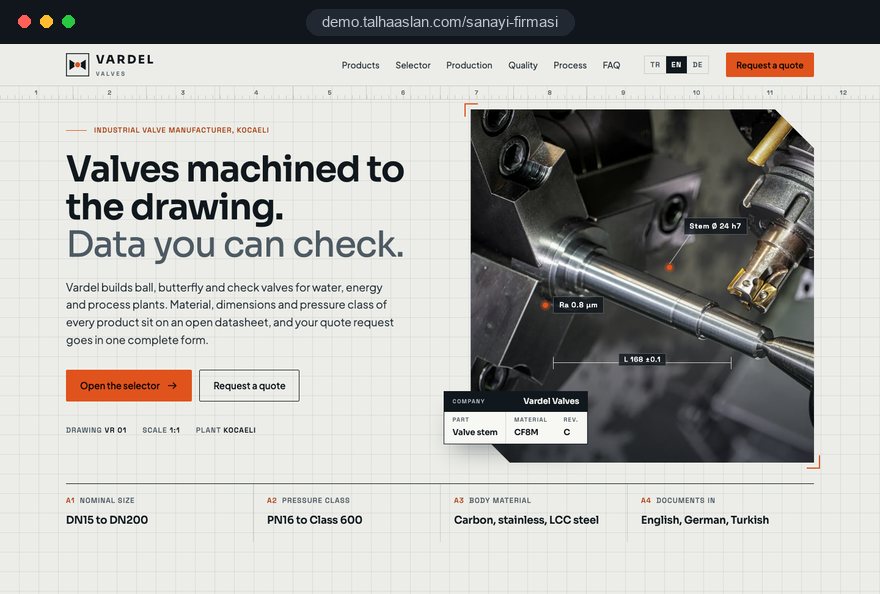
Open the live demoA demo design we built for a fictional brand
In short
A manufacturer website explains each product on its own page with technical data, shows production capabilities and certificates, speaks to foreign buyers in their language and turns interest into a complete request for quote. The goal is not a showroom but answers to the questions buyers ask before they request a price. In the UK, a company website must also show its registered name, number and registered office address.
Talha Aslan and teamLast updated:
Why it needs its own approach
A factory does not sell to a single consumer but to a team: engineers, buyers and quality managers. Generic business templates do not answer that team's questions.
Product information sits in one large PDF that is hard to read on a phone, and search engines cannot see which product is made in which size. A buyer who cannot find the product moves on to a competitor's product page.
Material, dimensions, tolerances and standards are either absent or several revisions old. When engineers cannot confirm the data on the site, they put off adding you to the approved supplier list.
Stock photos and generic sentences say nothing about machinery, capacity or quality control. Buyers who cannot see the plant are not sure the work is really done in house.
A general contact form never asks for quantity, material, delivery location or a drawing. Your sales team asks for the same details by email every time, and response times grow.
The home page exists in the export language, but product pages stay in the original language or machine translation garbles technical terms. Foreign buyers get stuck at the most critical point, the technical data.
In the UK, the Names and Trading Disclosures Regulations 2015 require a company to show its registered name, registered number, registered office address and the part of the UK where it is registered on its websites. Leaving them out is a compliance gap and looks careless to a buyer running supplier checks.
Our approach
We do not build a manufacturer website like a brochure; we build it in the order buying decisions are made. The engineer finds the product and its data, the quality manager checks the certificates, and the buyer finally requests a quote. That is why every product has its own page, every certificate shows its scope and every page ends in the same quote flow.
If you export, we plan a multilingual structure for your markets from day one; with a large range, we build a filterable product tree in the spirit of a product catalogue site. For trade fairs or ad campaigns, a single-goal landing page can go live without disturbing the main site.
Design, development and content sit in one team, so none of this is patched on later. Talha Aslan sets the strategy and an experienced team handles delivery. We work remotely and in English with manufacturers abroad, through video calls and written sign off.
Home
Each product page answers its own search, and all of them lead into the same quote flow.
The right setup
All three start from the same foundation; what the buyer is looking for makes the difference.
Contract manufacturing
Buyers are not after a ready product but a plant that can make their part, so the site sells capability.
Own products
Buyers search by product name or specification, so the site moves from product group down to a single item.
Export
Buyers research from another country, so the site speaks their language and shows the documents they expect.
Built for manufacturers
These are the points manufacturers decide on most often when we plan a site together.
For each product: applications, material, dimensions and standards in a readable table. The data comes from your technical documents or an ERP export, never from guesswork.
Quality, environmental or product certificates are not shown as a row of logos but with the issuing body, scope and validity. Expired certificates come off the page.
Quantity, material, delivery location, required lead time and a drawing upload in one form. Requests reach sales complete, and you can see which product page they came from.
The catalogue sits next to the product pages rather than replacing them: separate files per product group, the current revision date and tracked downloads.
Complete versions, product and data pages included, only for markets where you actually sell; technical terms are checked after translation.
UK companies must show their registered name on their websites, together with the registered number, registered office address and part of the UK where they are registered. We build a company information block into the footer and legal pages from the start; the final check of the details belongs to your company.
Comparison
| Topic | Generic business template | Site built for a manufacturer |
|---|---|---|
| Product information | Product groups on one page with a few photos | A page with its own searchable heading for every product |
| Technical data | A downloadable PDF catalogue only | A table on the page plus a current datasheet |
| Capabilities | Generic claims and stock photos | Machinery, capacity and real photos of the plant |
| Quote requests | A contact form asking for name, email and message | An RFQ form asking for quantity, material, delivery and drawings |
| Foreign buyers | A translated home page only | Complete language versions, technical data included |
| Measurement | Visitor numbers | Which product and which country bring quote requests |
Quick check
Must haves: does your site have them?
0 of 6 in place Tick the boxes to see where your site stands.
Added as needed
We choose which of these you need together during the scoping call.
Share your product groups, export markets and the details your sales team needs before quoting; we will come back with a page structure and a written quote.
Process
We define your business, your audience and the site’s one-sentence job: who it sells what to, through which action. Scope and timeline are written from that answer.
The home page and key templates come to you as designs first; no code is written before your approval. We do not like surprises, and we do not cause them.
The approved design becomes fast, secure, maintainable code. You follow progress in the CRM and see every page in a staging environment before launch.
The site goes live with analytics, Search Console and conversion tracking connected; panel training is given, first-year hosting and maintenance included.
Search and speed foundations
Buyers rarely search for your company name; they search for a product, a material or a process. Product and application pages are built so that each of these searches has its own answer.
Each language version lives at its own address and is linked to the others with hreflang; visitors are never forced into a version by location.
Product photos are compressed, catalogues load separately without holding up the page, and Core Web Vitals are measured before launch.
RFQ submissions, catalogue downloads, calls and WhatsApp clicks are tracked as conversions from day one, so you can see which product page and which country bring enquiries.
Free tools
Before planning a new site, check your current one on mobile, its language tags and your email setup, so that quotes sent to foreign buyers do not land in spam. The tools are free and need no sign up.
Tech SEO
Test whether a page works well on phones: viewport, font size, tap targets, a mobile screenshot and Core Web Vitals.
Tech SEO
Scan any URL for title, meta description, headings, canonical, indexability and speed signals, and get an SEO score with a clear to-do list.
Tech SEO
Correct hreflang tags for multilingual sites; x-default automatic.
Tech SEO
Generate rich-result JSON-LD for Article, Product, FAQ, Local Business.
Why do your emails land in spam? Check a domain's SPF, DKIM and DMARC records, find the errors and get a corrected record to copy.
Conversion
Turn URLs, WhatsApp, Wi-Fi, vCard and text into a QR code in seconds; download high-res PNG or SVG.
How we work
We do not have a live client project for a manufacturer yet, so we show our approach on a live demo site. The demo is not a client site. You can see our work in other sectors on the references page.
Live demo
For this field we built a one page demo site for a fictional brand, made only to show our approach. You can explore the design, the copy structure and the mobile view live in three languages.
Open the live demoIn the first call we separate current products from discontinued ones and group them; the menu and number of pages come straight from that list.
Technical values come from your documents or ERP export, and we do not publish a capacity or quality claim you cannot back up.
We list every detail your sales team asks for before quoting, and the fields of the RFQ form come from that list.
We track which product page, which language version and which catalogue file bring enquiries, and adjust before trade fairs and busy seasons.
Related pages
Solutions
A page structure per language with hreflang for export markets.
Solutions
A filterable product catalogue without a shop for manufacturers with hundreds of products.
Industries
A separate setup for building materials brands that sell through dealers and installers.
Solutions
A page focused on one product for a trade fair or ad campaign.
 Manufacturing Website Design: Site Standards That Win Dealers and Export BuyersRead article
 How to Build a B2B Website: Site Structure That Generates Qualified LeadsRead article
 What Is the Hreflang Tag and How Do You Use It? Multilingual Website SEO SetupRead article
 Lead Form Design for Booking, Quote and Demo Requests: UX Rules That Lift ConversionsRead article
FAQ
If your question is not here, write to us; we will send you an answer and a written quote.
Next step
In a free 15-minute call, in English, we will go through your product groups, export markets and quote process, then send a written scope and quote.
In-depth guide
A manufacturer website has one job that matters more than any other: keeping you on the shortlist of a buyer who has never heard of you and may take weeks to decide. That buyer rarely visits once. Their engineer opens a product page one day, their quality manager checks your company details another day, and their purchasing lead asks for a price at the very end.
This guide goes past the usual page list. It covers how export buyers actually research suppliers, how to keep product data consistent for years, what happens to an RFQ after someone presses send, how to plan around trade fair dates and how to build distributor pages that do not start channel conflicts. Each section gives you something to check or ask.
Export buyers usually evaluate a supplier in four stages, and your site needs a clear answer for each one.
In practice, we write a simple table: each stage in one column, the page that answers it in the next. An empty cell is your gap. Landing page reports in your analytics confirm the picture; if most visitors arrive on product pages, those pages need a clear path onward to capacity, certificates and the quote form.
Pick one master source for technical values and generate everything else, the website, the catalogue and the quote documents, from it. A pattern we see often at manufacturers: the ERP item record, the engineering spreadsheet and the catalogue layout file each list a slightly different dimension. A quote based on the wrong value costs real money.
The last point looks minor but matters. When numbers are typed separately for each language, a revision updates one version and leaves another behind. Decimal separators should also follow the language automatically, a point in English and a comma in German or Turkish. If you want a scheduled connection to your ERP, it can be built as a nightly sync within our custom software work.
Show the last revision date on each product page, too; an engineer can then tell at a glance whether a printout is current.
Every product page should have an address that will not change for years, and a discontinued product should never simply be deleted. Buyers paste product links into quote files, supplier records and internal threads; when the address breaks, those records break with it, and so does the value search engines had assigned to the page.
Set a rule for pages that should not be public, too. If you block a page in robots.txt, Google cannot read its noindex tag; to keep a page out of search results it must stay crawlable and carry noindex. Content that is truly confidential, such as a distributor price list, belongs behind a login. Agree these rules before launch as part of SEO work.
For a contract manufacturer, process pages take the place of product pages, and each one answers a single question: can you make my part? A generic "our capabilities" page does not answer it, because the buyer wants to hold their own part's size, material and volume against your limits.
We recommend that every process page covers these points:
Photos of sample parts explain capability faster than any paragraph, but parts showing a customer's design or logo need written permission first. Do not present outsourced operations as your own; a supplier audit will reveal it and the trust you built goes with it. Writing plainly that "plating is done by our approved partner" signals a controlled supply chain.
Splitting a detailed request for quote form into a few short steps usually raises both completion and the quality of what arrives.
Keep mandatory fields to what is truly mandatory. Target price, budget or annual volume should stay optional; when forced, buyers type a made up figure and the data becomes useless. Conditional fields help: choosing "prototype" hides the annual volume question.
Large assembly drawings can exceed any upload limit, so offer a second route: a field where the buyer can paste a file sharing link. Error messages should appear in the form's language, next to the field, saying exactly what is missing. Before launch, open the form from your busiest product page and complete it on a phone; file pickers and step changes are where mobile forms fail most often.
An RFQ form is only as good as where the request lands, how fast, and with what information.
The response time in your automatic reply must be one your team can keep in busy weeks; a broken promise costs more trust than no promise. Leave it as an editable field so you can change the text during trade fairs and holidays.
The most overlooked link is your own reply. If your domain's email authentication records are incomplete, the quote you send abroad can land in the buyer's spam folder, and each side assumes the other went silent. Checking those records with our SPF, DKIM and DMARC checker takes a few minutes before launch.
A language version works when it speaks in the units, standards and buying habits of the buyer's own market; a correctly translated product page that is not localized still feels foreign. Once you have chosen a market, run these checks for it:
Have a native speaker who knows your industry review the technical terms; one wrong term can make a buyer confuse your part with another component. For search engines to understand the versions, each one needs hreflang annotations that reference itself and all the others reciprocally. We explain that structure in detail on our multilingual website page.
For a manufacturer selling through distributors, each country page must answer one question without ambiguity: who do I buy from here, and who supports me technically? Otherwise the same request comes back through two channels at two different prices.
That last point keeps outdated data from circulating on distributor sites. Also state the difference between an agent and a distributor: an agent negotiates on your behalf while orders and invoices come to you, whereas a distributor buys your product and resells it in its own name. For a buyer, that decides who takes the order and who handles service and returns.
A manufacturer website that must be ready for a trade fair is planned backward from the fair, with a buffer for testing between launch and opening day. A page that will not load on a buyer's phone at your booth makes a weaker impression than a printed brochure.
Avoid timing a domain change or a full redesign for fair week. If the schedule is tight, leave the main site as it is and launch only the fair page and the featured products.
To tell what a trade fair brought in compared with other channels, every touchpoint needs its own trackable source. Visitor numbers are a weak measure for a factory website; the real question is which product, which country and which channel produced qualified RFQs.
Industrial sales cycles are long. Read your reports by the source of the first contact rather than by fair week. For visitors in the European Economic Area, Google requires consent mode for measurement and personalized advertising features, so analytics has to be planned together with the cookie consent banner from the start.
Technical data pages must be readable not only at a desk but on the shop floor, in an exhibition hall and on a weak mobile connection.
Google's Core Web Vitals give everyone a shared language for speed. A page counts as good when, at the 75th percentile of visits, LCP (how long the main content takes to load) is 2.5 seconds or less, INP (how quickly the page responds to a tap) is 200 milliseconds or less and CLS (how much content shifts while loading) is 0.1 or less. Measure your heaviest product page and your gallery before launch; the home page tells you far less.
A buyer running supplier checks expects to find your legal details and data handling rules clearly on the site, and for UK companies these details are a legal requirement. Under the Names and Trading Disclosures Regulations 2015, a UK company must show its registered name on its websites, together with its registered number, registered office address and the part of the UK where it is registered.
The strongest trust signal is concrete information: real photos of the plant, the name and role of your contact person, the year you were founded and the markets you ship to. A row of logos does not replace any of that. We build the structure and placement from day one; we recommend your accountant or solicitor makes the final check of the legal wording.
Most recurring mistakes on manufacturer websites come from process rather than design. These six cost the most time and opportunity after launch.
The right team for a manufacturer website asks about your product data, quote process and fair calendar before it asks about colors and fonts. When you request proposals, ask for written answers to these questions:
We do not yet have a live client project in manufacturing, so we show our approach on a live demo site linked on this page. The demo is not a client site, but it lets you try the product pages, quote flow and language logic yourself. You can review the overall scope of our web design service and see fixed packages in the pricing section.
Share your product groups, export markets and the date of your next fair, and we will come back with a page structure and a written schedule. Simply book a free introductory call to get started.
Start a Project
Thanks {name}, we've received your brief. We usually reply within the same day.
What happens next?