All jobs in one long list
Vacancies sit on a single page with no address of their own. Candidates cannot share a role, search engines cannot tell which jobs are open and filled roles stay online for months.

Your Windows contrast theme is on; colours come from your system.
Your device is set to reduce motion; animations are already off.
Your choices are saved in this browser only.
Industry-specific web design
A recruitment website has two audiences: candidates looking for their next role and employers looking for people. We build recruitment agency websites around both journeys, for agencies in the UK and elsewhere working with a remote team, and for firms in Turkey that recruit for international clients.
Open the live demoA demo design we built for a fictional brand
In short
A recruitment agency website gives every vacancy its own page, lets candidates apply and upload a CV in a few steps on their phone and gives hiring clients a separate brief form. In the UK, the Conduct of Employment Agencies and Employment Businesses Regulations 2003 require every advertisement to show the agency's full name and whether a role is temporary or permanent, so job pages are built with those fields from the start.
Talha Aslan and teamLast updated:
Why it needs its own approach
A recruitment website has to earn the trust of candidates and the interest of hiring clients at the same time, while handling a lot of personal data. Generic business templates plan for none of this.
Vacancies sit on a single page with no address of their own. Candidates cannot share a role, search engines cannot tell which jobs are open and filled roles stay online for months.
Candidates email their CV to a general address and files pile up in personal mailboxes and messaging apps. Nobody knows who applied for which role or when the data should be deleted.
The site only talks to candidates. A company looking for staff cannot see what you offer or how to brief you, so the visitor who actually pays has to pick up the phone.
Under regulation 27 of the UK Conduct Regulations 2003, every advertisement must show the agency's full name and whether each position is temporary or permanent, and adverts that give pay rates need the nature of the work, the location and the minimum experience or qualifications. Many job pages leave some of this out.
The application form collects identity, contact and work history, but there is no privacy notice, no retention period and no word on candidates' rights. Candidates hesitate, and the agency carries the risk as data controller.
Many candidates see a job on their phone; long forms and upload fields built for a desktop make them give up halfway.
Our approach
We build a recruitment website with two front doors. A candidate goes from the home page to the jobs, reads the role and applies in a few steps; a hiring client goes from the services pages to a brief form that fits their sector and type of role. Both routes share one design language but never get in each other's way.
If candidates need an account to follow their applications, we plan it as a members area site; for seasonal volume hiring, a single goal landing page can go live without touching the main site.
Design, development and content sit in one team, so forms, data retention and the job feed are not patched on later. Talha Aslan sets the strategy and an experienced team handles delivery. We work remotely and in English with agencies abroad.
Home
Candidate and client routes start separately; each ends in a form that is measured.
The right setup
All three start from the same foundation; who you talk to and how many vacancies you manage make the difference.
Recruitment agency
Many vacancies, a steady flow of applications and client briefs; the site works like part of your workflow.
HR consultancy
Fewer but critical roles; trust comes from the team, the method and how confidentiality is handled.
In house HR
The company hires for itself; the site tells the employer story and shows what working there is like.
Built for recruiters
These are the points recruitment agencies and HR consultancies have to decide on when we plan a site together.
Each role has its own address, duties, requirements, working pattern and location, and says whether it is temporary or permanent. When a role is filled it is taken down or marked closed, so nobody applies for nothing.
A short form, upload from a phone, file type and size limits and an encrypted connection. Each application is linked to the job it was made for and shows up in one panel.
Role, number of people, working pattern and start date: the details the first call needs. The brief goes to the right consultant and is measured as a conversion.
Regulation 27 asks for the agency's full name and the temporary or permanent status in every advert, and allows adverts only for roles you have details of and the hirer's authority to fill. Job page templates carry these fields so they are never forgotten.
A privacy notice next to every form, only the data the first screening needs and a defined retention period with a deletion step. Texts go in with your adviser's approval; the final legal assessment belongs to your agency.
Templates focus on the tasks and skills a role needs rather than conditions such as age, gender or appearance. When you advertise in other countries, their rules are checked as well.
Comparison
| Topic | Generic template | Site built for a recruitment agency |
|---|---|---|
| Vacancies | One long list on one page | A shareable page for every role |
| Applying | CV sent to a general email address | Form linked to the job and secure upload |
| Hiring clients | General contact form | Service pages and a brief form |
| Required details | Missing or buried | Agency name and role type on every job page |
| Candidate data | Scattered across mailboxes | One panel with a retention period |
| Measurement | Page views | Which job brings applications and which page brings briefs |
Quick check
Must haves: does your site have them?
0 of 6 in place Tick the boxes to see where your site stands.
Added as needed
We choose which of these you need together during the scoping call.
Tell us how many roles you advertise each month, how applications reach you today and which clients you recruit for; we will come back with a page structure and a written quote.
Process
We define your business, your audience and the site’s one-sentence job: who it sells what to, through which action. Scope and timeline are written from that answer.
The home page and key templates come to you as designs first; no code is written before your approval. We do not like surprises, and we do not cause them.
The approved design becomes fast, secure, maintainable code. You follow progress in the CRM and see every page in a staging environment before launch.
The site goes live with analytics, Search Console and conversion tracking connected; panel training is given, first-year hosting and maintenance included.
Search and speed foundations
Candidates usually search for a job title and a town, while employers search for a recruitment agency in their sector. Job pages and service pages are built to answer these two kinds of search separately.
Vacancies carry JobPosting markup that Google's job search experience can read; markup is removed once the closing date has passed and nothing is marked up that is not on the page.
Job and application screens are designed for phones first, uploads are tested on mobile and Core Web Vitals are measured before launch.
Applications and client briefs are measured as conversions from day one with cookie consent, so you can see which job and which channel brings candidates.
Free tools
Before planning a new site, test the current one for its security certificate, email authentication records, mobile usability and job markup, and make the links you share for each vacancy measurable. The tools are free and need no sign up.
Security
Check an SSL certificate's validity, expiry date, issuer, hostname match, certificate chain and TLS versions in seconds.
Why do your emails land in spam? Check a domain's SPF, DKIM and DMARC records, find the errors and get a corrected record to copy.
Tech SEO
Test whether a page works well on phones: viewport, font size, tap targets, a mobile screenshot and Core Web Vitals.
Tech SEO
Generate rich-result JSON-LD for Article, Product, FAQ, Local Business.
Tech SEO
Scan any URL for title, meta description, headings, canonical, indexability and speed signals, and get an SEO score with a clear to-do list.
Analytics
Build correctly tagged links with Google Ads, social and newsletter presets.
How we work
We do not have a live client project in this field yet, so we show our approach on a live demo site built by our team. The demo is not a client site. You can see our work in other sectors on the references page.
Live demo
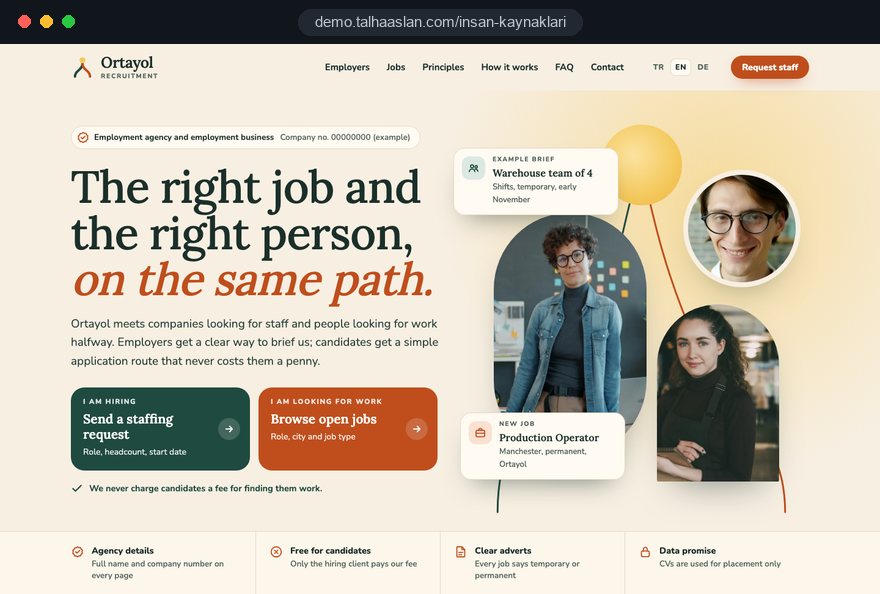
For this field we built a one page demo site for a fictional brand, made only to show our approach. You can explore the design, the copy structure and the mobile view live in three languages.
Open the live demoTogether we list where applications come from today, who looks at them and where they pile up, then build the form and panel around that flow.
We never guess registration or company details; we take them from your documents and have you approve every line before launch.
Forms ask only what the first screening needs, and the retention period and deletion step are defined from the start.
Adding and closing a job takes a few steps in the panel, and a closing date field stops expired roles from staying online.
Related pages
Industries
A site structure for management and business consultancies beyond HR.
Solutions
For sites where candidates open an account and follow their applications.
Solutions
A single goal page that matches the ad for seasonal volume hiring.
Solutions
Pages per language for agencies working with candidates or clients abroad.
 How to Build a GDPR and KVKK Compliant Website: A Business GuideRead article
 Website Data Security for Business Sites: Encryption and Secure Data Handling GuideRead article
 Lead Form Design for Booking, Quote and Demo Requests: UX Rules That Lift ConversionsRead article
 LinkedIn Lead Gen Forms: How They Work, Setup and CRM Integration for B2B LeadsRead article
FAQ
If your question is not here, write to us; we will send you an answer and a written quote.
Next step
In a free 15 minute call, in English, we will go through your job volume, your application flow and the clients you recruit for, then send a written scope and quote.
In-depth guide
A recruitment agency website hosts two very different visitors on the same day: a warehouse supervisor scrolling vacancies on a phone after a late shift, and an operations director comparing staffing agencies at a desk the next morning. Both decide within minutes. One applies or leaves; the other sends a brief or calls a competitor.
This guide walks through the decisions you make, in order, when planning a recruitment website: which audience leads, how job pages and applications are built, where candidate data lives and for how long, which advert details must appear, how hiring clients are guided and how all of it is measured. Each section gives you a criterion or a checklist your team can use straight away.
Who pays you and how many roles you manage decide where the site's weight sits. A high volume staffing agency filling hundreds of temporary roles and an executive search firm running a handful of searches a year cannot share one menu without talking to the wrong visitor first. Before planning anything, answer these four questions in writing with your team.
For a high volume agency, the first screen of the home page belongs to job search, with the client route clearly visible but second. For an executive search firm it flips: the first screen explains method and people, and open roles sit in a quieter list. On an in house careers site, the employer story leads, with teams, culture and benefits read before the vacancies.
Once the answers are clear, the menu, the home page order and the number of forms follow naturally.
Every job page should answer the questions a candidate asks before applying, using the same structure on every vacancy. A fixed template lets consultants post quickly, lets candidates compare roles and helps search engines read the page correctly. We build the job template around these fields.
The process field is the one most often skipped, yet it does more than anything else to counter the "nobody ever replies" feeling candidates bring with them. When a client cannot be named, describing the sector and company size gives candidates something solid without breaking confidentiality.
A job page is not written once and forgotten; it opens, changes, fills and closes, and each stage needs a response on the site. Taking applications for a filled role wastes candidates' time and costs your agency goodwill. We recommend building this flow into the admin panel.
Keeping a closed page for a short time, instead of deleting it at once, means a candidate arriving from a shared link does not land on a blank error page. If the same role reopens every few months, a permanent page for that role can be better than a new address each time. When we scope a build under our web design service, these rules are written in from day one.
The application form should ask no more than the first screening needs and be easy to complete with one thumb. Candidates often see a role on the bus or during a break, and their CV sits in a phone folder, a cloud drive or a chat app. Designing the form around that reality affects application numbers more than any visual change.
For most roles, the first screening needs a name, phone number, email address, location and a CV. For hourly roles where many applicants have no CV, a short experience question as an alternative to an upload keeps good people from dropping out at the door. Asking for date of birth, a photo or identity numbers at this stage collects data you do not need and invites concerns about unfair screening.
Before launch, test the form on at least two different phones, on mobile data, with a real CV file.
Where candidate data is stored, who can open it and when it is deleted should be decided in writing before the site goes live. A recruitment agency collects identity, contact and work history for many people every month, which makes its responsibility as data controller considerable. Data protection law in the UK and the EU expects candidates to receive clear privacy information at the point their data is collected.
In confidential executive searches, the candidate's current employer must not learn of the application. Turning off automatic email notifications for those candidates and limiting file access to one consultant is a sensible starting point. Leave the final wording of your privacy notice and any consent questions to your data protection adviser; we build the technical side, the content of the notice is your agency's responsibility.
If you recruit in the UK, every job advert on your site must show your agency's full name and whether the role is temporary or permanent. Regulation 27 of the Conduct of Employment Agencies and Employment Businesses Regulations 2003 sets this out, and adverts that state a pay rate must also give the nature of the work, the location and the minimum experience or qualifications required. The regulation also allows adverts only for roles you have details of and the hirer's authority to fill.
In practice we build these into the job template as required fields, so a consultant cannot publish without them. Agency details come from your documents, never from guesswork, and sit in a footer visible on every page.
Wording is a separate matter. Templates that describe tasks and skills, rather than age, gender, appearance or "young and dynamic" style phrases, are fairer and reach a wider pool of candidates. A short checklist shown to consultants when they enter a role helps.
A company looking for staff should find what you offer and how to brief you within two clicks; for most agencies, that visitor brings the revenue. A site that only speaks to candidates pushes clients toward a general contact form or the phone, and the first call starts unprepared. Separate pages for permanent recruitment, temporary staffing and executive search help each client recognise their own situation.
Each service page should answer the same questions: which role types you cover, what steps the process has, what you need from the client and how soon a first shortlist is planned.
The brief form should ask for enough to prepare the first call, and no more.
The form should route each brief to the right consultant by service or sector and confirm to the client, straight away, that the brief has arrived.
If you already use an applicant tracking system, the website should talk to it; if you do not, applications should collect in the site's own panel. Running both halfway is the worst option. An applicant tracking system is software that gathers applications by job, moves candidates through stages and lets a team keep shared notes. Use these criteria to decide.
Where an integration exists, we pull jobs from the system, show them in your own design and send applications back. Candidates apply without leaving your site, and your team keeps working in the screens it knows. Custom flows that off the shelf systems do not cover, such as a portal where clients review a shortlist, call for custom software; we suggest leaving that for a later phase, once the need is proven.
Candidates search by job title and town; clients search by service. The site needs separate pages for each kind of search. Someone typing "forklift driver jobs Leicester" and someone typing "temporary staffing agency for warehouses" will never meet on the same page; job pages answer the first search, service and sector pages the second.
Job pages should carry JobPosting markup that Google's job search experience can read. This markup is a block of code that describes the title, location, posting date and closing date of a role in a structured way. It must be removed once the closing date has passed, and nothing may be marked up that is not visible on the page. You can check the markup on a live vacancy with our structured data tool.
If you want ongoing work on content and technical search health, see what our SEO service covers. We do not promise rankings; we focus on getting the structure and content right.
Job and application screens should be designed for phones first and measured under real conditions before launch. Most candidates arrive from a shared link or a search result on a phone; if the first screen is slow or the form jumps around, the application ends before it starts. Google's Core Web Vitals give a concrete frame, measured at the 75th percentile of visits.
On recruitment sites, filters cause the most trouble. If filtering by town, role and working pattern reloads the whole page on every tap, responsiveness suffers on a phone.
File upload needs its own test. When an upload drops on a weak connection, the form should keep everything the candidate typed, so nobody has to start again.
The real measurement question is not visits but which job and which channel bring applications, and which page brings client briefs. A recruitment site has two separate conversions, and if they share one report you cannot make decisions. Define the application and the brief as separate conversions and record them from day one, subject to cookie consent where the law requires it.
If you share roles on LinkedIn, job boards, community groups and email lists, use a separately tagged link for each channel. These tags are UTM parameters: short labels added to the end of a link that tell your analytics tool where the visit came from. You can build them in seconds with our UTM link builder.
For volume hiring campaigns with paid ads, the page the ad sends people to should focus on a single application. In those campaigns our Google Ads management plans the tracking and the page together. On the client side, recording which service page a brief was sent from shows which service actually brings work to your recruitment business.
Candidates and clients both want to see who they will deal with before first contact, and agency pages should build that trust with concrete detail. Instead of "a team of experienced professionals", say which role types each consultant fills, which sectors they know and how they get back to candidates.
If you work with candidates or clients in other countries, offering job and service pages in a second language builds trust quickly. This needs a separate page structure per language rather than machine translation; our multilingual website approach is planned for exactly that. Adverts in another country also need that country's rules checked.
Most mistakes we see on recruitment sites come not from design but from a flow that was never thought through. These six come up most often when an agency plans a new recruitment website, each with a better alternative.
What these mistakes share is treating the site as a brochure. A recruitment site is a working tool your team uses every day; making design decisions with that in mind prevents most later fixes.
When choosing who builds your site, ask how they handle the application flow, data retention and job management before looking at design samples. A recruitment website is used every day after launch, so the answers matter more than the visuals.
We do not have a live client project in this field yet, so we show our approach on a live demo site linked on this page. You can try the job page, the application form and the client brief flow on your own phone. Ask yourself two questions while you do: could a candidate apply on the bus in two minutes, and could a client send a brief without picking up the phone?
At quote stage, make sure the written scope lists the number of job templates, forms, integrations, languages and the support period after launch. Work that is not in the scope and turns up later as an extra is the most common source of disagreement.
For the next step, tell us how many roles you advertise each month, how applications reach you today and which clients you recruit for. You can see fixed scope packages in our web design pricing, and for a written quote based on your agency, reach us through our contact page.
Start a Project
Thanks {name}, we've received your brief. We usually reply within the same day.
What happens next?