Sports and levels blur together
Gymnastics, swimming and basketball share one page and a few sentences, and nobody explains the difference between beginners and advanced groups. Parents cannot tell which group to choose without picking up the phone.

Your Windows contrast theme is on; colours come from your system.
Your device is set to reduce motion; animations are already off.
Your choices are saved in this browser only.
Industry-specific web design
When parents look at a sports school, they want three answers: which sport and level should my child start at, when does registration open, and how close is the gym or pool. We build sports school websites around those three questions, with clear information on what fees cover and a sign up flow that handles health details with care.
In short
A sports school website lets a parent choose a sport and the right level for their child, see term dates and available places, find the nearest gym or pool and book a trial class. What the fees cover is explained openly. Because health information such as medical notes is special category data under Article 9 of the GDPR, forms are planned around it.
Talha Aslan and teamLast updated:
Why it needs its own approach
A sports school website is more than a brochure. It has to guide parents to the right sport and level, announce each registration window and collect children's details with care.
Gymnastics, swimming and basketball share one page and a few sentences, and nobody explains the difference between beginners and advanced groups. Parents cannot tell which group to choose without picking up the phone.
Term start dates, holiday courses and available places are only posted on social media. A parent arriving from search cannot see whether registration is open, and nobody keeps a waiting list for full groups.
Which sport runs in which hall or pool, the address, parking and where parents can wait are nowhere to be found. With several venues, parents click through every page to find the closest one.
You do not have to publish amounts, but when the site never says whether fees are monthly or per term, or whether kit is included, parents ask the same question on every call and the first minutes go on it.
A photo of a medical note comes via WhatsApp, details of a condition through the general contact form. Data concerning health is special category data under the GDPR, so this scatter puts both the school and the family in a difficult position.
Skill levels in gymnastics and the steps from water confidence to strokes in swimming are a school's strongest story. Without them on the site, parents cannot see where their child will progress, and the school's difference is lost.
Our approach
We structure a sports school website around sports and levels. Parents choose a sport first, then see the level that fits their child's age and experience; the same page shows which venue the group trains at, on which day and time, and whether registration is open. The trial class form asks for sport, level and venue together, so each request reaches the right coach.
For the start of term or a holiday sports course, a single-goal landing page matched to the ad can go live without disturbing the main site. After enrolment, fees, attendance and parent updates can run through a sports school management system such as Planox, so the website only collects what it needs.
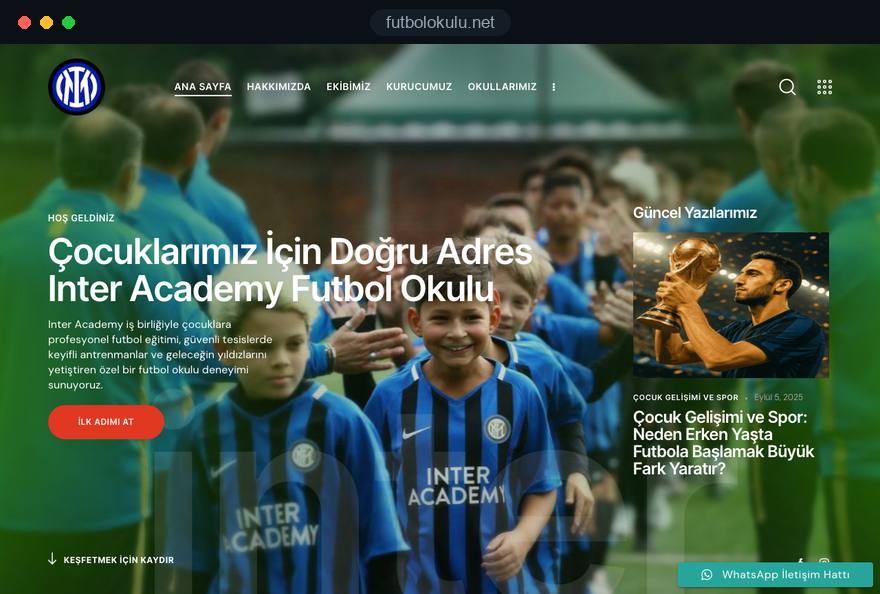
Design, development and content sit in one team; Talha Aslan sets the strategy and an experienced team handles delivery. We work remotely and in English with schools abroad. For football academies we recommend a separate structure, because there parents decide by age group and pitch.
Home
Each sport page answers its own search; level, venue and term details come together in one sign up form.
The right setup
All three start from the same foundation; the number of sports and whether the school runs all year or in terms make the difference.
One sport
The school goes deep in one sport; parents pick a venue first, then their child's age group.
Several sports
Gymnastics, swimming and basketball under one roof, each with its own levels and venue.
Seasonal
Registration opens and closes in set weeks; the site puts dates and places up front.
Built for sports schools
These are the points sports schools discuss most often when we plan a site together.
For each sport: what it covers, the age range and the levels; for each level, what a child should know at the start and gain by the end. For parents who are unsure, a level assessment class is explained separately.
Autumn, spring and summer terms, when registration opens and closes, and whether a group is full. Full groups get a waiting list form, so you can contact families the moment registration opens.
For each venue: address, map, directions, which sports run there, changing rooms and where parents can wait. Venue pages carry the same details as the Google Business Profile.
Publishing amounts is your decision, but the site explains clearly whether fees are monthly or per term, whether kit and equipment are included, and how sibling or multi-sport arrangements work if you offer them.
Under Article 9 of the GDPR, data concerning health is special category data and may only be processed under specific conditions, such as explicit consent. So we never ask for medical notes in an open contact form; the health declaration sits in a separate, protected step next to the privacy notice. The final legal assessment belongs to your school.
A short trial class form asking for sport, level and venue, next to click to call and WhatsApp buttons. Each coach's sports and levels are listed; qualifications and titles appear only as far as they are documented.
Comparison
| Topic | Generic sports template | Site built for a sports school |
|---|---|---|
| Sports | A short list on one page | A separate, searchable page for every sport |
| Levels | Suitable for all levels | Levels explained from beginner to advanced |
| Registration | Announced on social media | Dates, places and a waiting list on the site |
| Fees | Call us for details | A clear section on what fees cover |
| Health details | Via the contact form or WhatsApp | A separate, protected step with a privacy notice |
| Measurement | Visitor numbers | Which sport and venue bring trial classes |
Quick check
Must haves: does your site have them?
0 of 6 in place Tick the boxes to see where your site stands.
Added as needed
We choose which of these you need together during the scoping call.
Tell us which sports you teach, at how many venues and in which terms; we will come back with a page structure and a written quote.
Process
We define your business, your audience and the site’s one-sentence job: who it sells what to, through which action. Scope and timeline are written from that answer.
The home page and key templates come to you as designs first; no code is written before your approval. We do not like surprises, and we do not cause them.
The approved design becomes fast, secure, maintainable code. You follow progress in the CRM and see every page in a staging environment before launch.
The site goes live with analytics, Search Console and conversion tracking connected; panel training is given, first-year hosting and maintenance included.
Search and speed foundations
Parents type kids gymnastics classes or children's swimming lessons plus their area. Each sport page answers its own search, while venue pages and the Google Business Profile are built to support each other.
School name, venue addresses, phone and opening hours are marked up so search engines can read them; nothing is marked up that is not on the page.
Movement tells a sports school's story best: a gymnastics routine, a swimming lesson. Videos load without slowing the page, photos are compressed and Core Web Vitals are measured before launch.
Calls, form submissions and WhatsApp clicks are tracked as conversions from day one, so every registration window shows which sport, which venue and which channel brought trial classes.
Free tools
Before the next registration window, test how your current site opens on a phone, how it looks in search and how much your photos slow it down; you can also create a QR code for the gym entrance. The tools are free and need no sign up.
Tech SEO
Test whether a page works well on phones: viewport, font size, tap targets, a mobile screenshot and Core Web Vitals.
Tech SEO
Scan any URL for title, meta description, headings, canonical, indexability and speed signals, and get an SEO score with a clear to-do list.
Image
Resize + compress photos and cut the KB; never leaves your device.
Conversion
Turn URLs, WhatsApp, Wi-Fi, vCard and text into a QR code in seconds; download high-res PNG or SVG.
Conversion
Create a wa.me link with a preset message + embeddable button code.
Sharing
Preview how your link looks on WhatsApp, Facebook, X, LinkedIn and Telegram, and find missing Open Graph tags and image problems.
Real projects
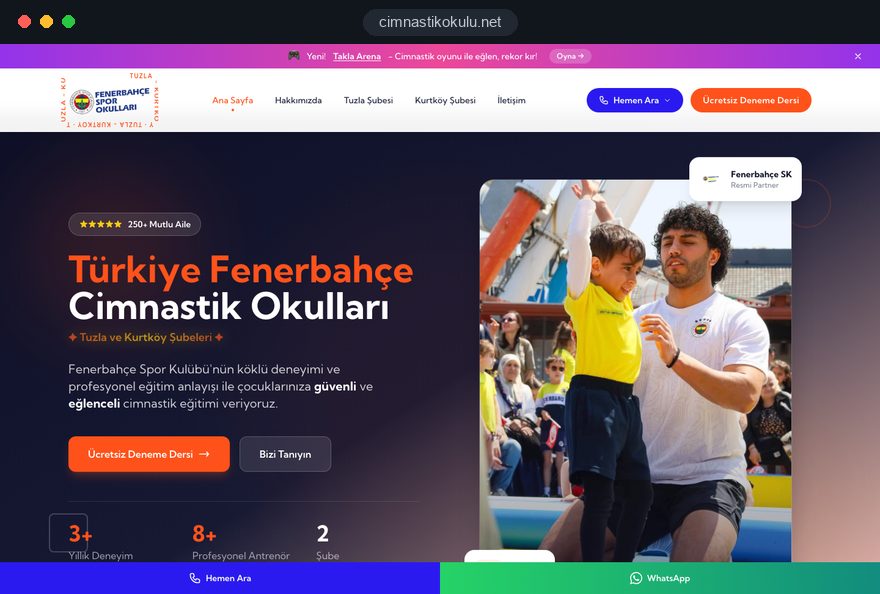
Our team designed and built the multi-venue registration site for Cimnastik Okulu, a gymnastics school in Istanbul, and our football academy projects use the same trial class and venue logic. All are live; details are on the references page.
Gymnastics school · two-venue registration site, web design
Football academy · web design
Football school · local site, web design
Related pages
Industries
A separate structure for football academies, built around age groups and pitches.
Industries
For clubs with registered athletes, teams and competitions.
Solutions
A single-goal page matched to a start of term or holiday course campaign.
Solutions
Let parents pick the day and time of a trial or level assessment class themselves.
 What Is Information Architecture? How to Build a User Centered Site StructureRead article
 How to Build a GDPR and KVKK Compliant Website: A Business GuideRead article
 How Website Video Affects Conversion Rate: When It Helps, When It HurtsRead article
 How to Do Google Maps SEO: A Guide to Ranking Your Business Higher on the MapRead article
FAQ
If your question is not here, write to us; we will send you an answer and a written quote.
Next step
In a free 15-minute call, in English, we will go through your sports, venues and term calendar, then send a written scope and quote.
In-depth guide
A sports school that teaches several sports has a different website problem from a single sport club. Parents are not only choosing a school; they are choosing a sport, the right level within it and the gym or pool where that level trains.
This guide walks through the decisions you make, in order, when planning a sports school website: which axis the structure follows, what sport and level pages contain, how places and fees are explained, how health details are collected, how parents find you in search and how you measure each term.
The first decision is which door parents walk through: sport, venue or age. For a sports school with several sports the right axis is almost always the sport, because parents start their search with "kids gymnastics classes" or "swim lessons for children", not with your school's name.
Schools differ, though. Use these criteria to choose:
Football deserves its own treatment. Parents choose a football academy by age group and pitch, so its structure is different; we cover that on our football academy website page.
Once the axis is settled, write a simple grid: each sport, its levels and the venues where each level runs. That grid becomes the source for both the sitemap and the options in the registration form.
Each sport page should answer every question a curious parent has without a phone call. When the swimming page answers "my child is afraid of water, can they still start", the gymnastics page answers "she is not flexible, is that a problem" and the basketball page answers "he is short for his age, does it matter", parents feel understood.
Plan the content of each sport page around these headings, in this order:
Keeping the same order on every sport page lets parents compare two sports without getting lost. The content itself must stay specific: generic paragraphs copied across sports send the same weak signal to search engines and to parents. Give each level its own subheading rather than a collapsible panel; parents scroll on phones and rarely open hidden content.
Level descriptions are where a sports school stands apart, and on most sites they are the weakest part. Labels like "beginner, intermediate, advanced" tell a parent nothing; what helps is the skill a child enters a level with and the skill they leave with.
An example: when the first swimming level is described as "for children who hesitate to put their face in the water" and the next as "for children who can glide unaided but cannot yet breathe while swimming", a parent can place their own child. In gymnastics the same job is done by observable skills such as "can do a forward roll with help" or "can hold a bridge alone".
You can prepare each level description with these steps:
Parents who do not know their child's level need a separate assessment class described on the site. It is not the same as a trial class: its purpose is placement, not introduction.
One generic trial form for every sport produces requests with the wrong information. In swimming the coach needs to know how the child feels about water; in gymnastics, whether they have trained in a gym before; in basketball, whether they already play on a school team.
So we build the form on a shared core plus one short question that appears once a sport is chosen. The core asks for the parent's name, phone number, the child's age, the sport and the preferred venue. The extra question depends on the sport: "Is your child comfortable with their face in the water?" for swimming, "Has your child taken classes in a gym before?" for gymnastics. One well chosen question per sport keeps the form short enough to finish on a phone.
When assessment classes run at fixed times, letting parents pick a slot themselves cuts phone traffic considerably. We can set up a website with online booking per sport and venue, with pool times and gym times on separate calendars so they never clash.
The thank you screen is part of the flow as well. Give a preparation note specific to the sport: a towel and flip flops for swimming, no jewelry for gymnastics, indoor court shoes for basketball. Then say who will call and when.
Showing registration windows on the site smooths out the rush a sports school goes through several times a year. When parents can see whether registration is open, whether a group is full and when the next term starts, they stop asking in comments and on the phone.
For most schools it is easier to show availability as a status rather than a number. Four statuses cover nearly everything: "open", "few places left", "full, waiting list open" and "opening next term". Being able to change that status per sport and level with one click in the admin panel is what keeps the site accurate.
When opening a new term, we recommend this sequence:
For seasonal programs such as a summer sports camp, update the same page every year instead of creating a new one. The page keeps the visibility it has earned in search; last year's dates go, the new program goes up at the same address.
A venue page that only shows an address and a map does not answer what parents actually ask. At a sports school the facility drives the decision almost as much as the sport: whether the pool is indoors, how changing rooms are arranged and whether parents can watch are among the first questions on any call.
We recommend that each gym and pool page includes:
Photos do much of the work here. A picture of the entrance, the changing corridor and the parent area answers "where do I go" for a first time family before they ask.
If you rent time at a public leisure center or a private facility, say so plainly and add the facility's own rules to the page, such as compulsory swim caps.
Whether to publish amounts is your decision, but leaving out what fees cover spends the start of every call on the same question. Before the amount, a sports school parent wants to know how payment works and whether any extra costs will appear later.
When preparing the fees section, write a short, clear answer to each of these questions:
This section also helps inside the school. Written rules mean coaches, front desk and management give the same answer, so one parent is never told makeups exist while another hears they do not.
If fees, attendance and parent updates run in a separate management system after enrollment, the fees section must use the same terms as that system.
Health information is the most sensitive data a sports school website collects, and it should never mix with the general contact form. Under Article 9 of the GDPR, which also applies in the UK as the UK GDPR, data concerning health is special category data and may only be processed under specific conditions, such as explicit consent.
In practice, health details become a separate step in registration. We do not ask health questions in the trial request; once a child moves to full enrollment, a dedicated health declaration step opens next to the privacy notice. Asking parents to send a photo of a medical note over WhatsApp breaks that structure and leaves the data on whichever phone received it.
When designing the health declaration step we follow these principles:
Outside the UK and the EU, check the privacy rules that apply where you operate. The final legal assessment belongs to your school and your legal adviser; our job is to make the site's technical structure able to carry it out.
Movement tells a sports school's story more clearly than any paragraph, but video added without care makes pages heavy on phones. A gymnastics routine, a child's first strokes, a passing drill on the court show parents what text cannot; the goal is to do it without slowing the page.
Google's Core Web Vitals give clear targets here. LCP, which measures how long the largest visible element takes to load, should be 2.5 seconds or less; INP, which measures how quickly the page responds to a tap, 200 milliseconds or less; CLS, which measures how much content shifts while loading, 0.1 or less. These "good" thresholds apply at the 75th percentile of visits.
To stay within them, video never autoplays in the first screen; a compressed cover image takes its place and the video loads only when tapped. Short loops stay silent and a few seconds long. Gallery photos are resized before publishing; you can prepare your own with our free image resizer.
To see how your current site opens on a phone, run the mobile friendly test before registration opens. Written parental permission for images of children, and a preference for shots that do not show faces, belong in the content plan; sessions are filmed so that children whose families declined stay out of frame.
Parents usually search for a sports school by combining a sport and an area, so every sport page and every venue page should answer its own search. A parent typing "kids swim lessons in Brooklyn" should land on the page carrying that venue's swimming details, not on your home page.
That means the sport name appears naturally in the title and first paragraph of each sport page, and the neighborhood and facility name on each venue page. Copying one text and swapping the area name backfires; each venue page needs its own details.
Your Google Business Profile is the second half. Under Google's guidelines the business name must match your real world name, with no keywords such as "swim lessons" added. Each physical venue gets its own profile, and the address, phone and hours on the profile match the venue page exactly. If you teach in a rented pool, agree with the facility how that address should appear before creating a profile.
School name, venue addresses, phone and opening hours are marked up as structured data, a format search engines can read; nothing is marked up that is not on the page. Our SEO service page explains this technical groundwork and the content plan behind it. How quickly a sport page appears for its search depends on competition and content depth, so we do not promise a timeline.
Visitor counts tell a sports school very little. The real question is which sport, which venue and which channel brought trial requests in each registration window. Build measurement around that question from day one.
Tagging every request with its sport and venue is enough to start. Form submissions, click to call and WhatsApp taps are tracked as separate conversions, so a picture emerges such as "swimming requests mostly come from search, gymnastics requests from WhatsApp". For visitors in the EU and UK, non essential tracking runs only after cookie consent, and Google requires consent mode for its measurement and personalized advertising features for users in the European Economic Area.
Measurement becomes meaningful when you match requests to actual enrollments. At the end of each term, take the children who attended a trial and enrolled, from your management system or a simple spreadsheet, and compare them with the requests. A sport that brings many requests but few enrollments may have a page that sets the wrong expectation or a level description that falls short.
Three questions are worth asking at the end of every term: which sport page brought the most requests, which venue converted requests into enrollments at the higher rate, and how many families from the waiting list came back the next term.
Most mistakes we see on sites for schools teaching several sports come from forcing every sport into one template. Each mistake below comes with the better alternative:
The shared fix is a maintenance routine tied to the term calendar rather than a site launched and left alone.
The team building your sports school website should be willing to understand sport and level logic as well as you do. A proposal that puts your logo on a generic sports template leaves out most of the distinctions in this guide from the start.
Ask any agency you talk to these questions:
We built the two venue registration site for Cimnastik Okulu, a gymnastics school in Istanbul, and our football academy projects on the answers to these questions; all are live on our references page. Our web design service page describes how we work, and fixed price packages are listed in the pricing section.
To share your sports, venues and registration calendar, get in touch with us and we will come back with a written scope and quote. We work remotely and in English with schools abroad. If the site needs to be ready for a registration window, mention it on the first call so we plan around it.
Start a Project
Thanks {name}, we've received your brief. We usually reply within the same day.
What happens next?