A security company website has two difficult jobs at once. It has to convince the manager who signs the contract that your firm is licensed, supervised and serious, and it has to do that without giving away a single unnecessary detail about the sites you protect.
Below, we at Talha Aslan and team walk through the decisions a guarding or alarm firm makes when planning its website: page structure, credentials, the quote form, recruitment, the security of the site itself, search and measurement. Our general project process is on our web design service page; here we stay with what is specific to the security sector.
01How business buyers shortlist a security firm
Business buyers filter security providers by scope first, credentials second and the quote last, so the website should follow the same order. The person deciding is usually a facilities manager, a property or estate manager, a plant manager or someone in procurement, and they often look at several firms in the same week.
Before they pick up the phone, they look for answers to these questions:
- Scope: whether you provide manned guarding, mobile patrols, alarm response or event security, and which roles you can staff.
- Coverage: which towns, counties or regions you can staff, and whether a remote site comes with extra conditions.
- Credentials: whether your licenses, insurance and accreditations are current and can be checked.
- Supervision: who checks on officers in the field, how often and how incidents are reported.
- Process: what information you need for a quote, whether you do a site survey and how long it takes.
Look for those five answers on your current website. If any is more than two clicks from the home page, or missing entirely, that is the first thing to fix on the new site.
02Separating service pages from sector pages
Three questions decide whether a service deserves its own page: is it searched for separately, is it planned separately and is it sold to a different buyer. If the answer is yes to all three, it needs its own page, and manned guarding, mobile patrols, alarm response, event security and close protection usually pass that test.
A service page answers "what we do", while a sector page answers "how we work at a site like yours". The two should link to each other rather than repeat each other. A construction sector page, for example, covers sites left empty at night and over weekends, the risk of plant and material theft and control of vehicle and contractor access, then points readers to the guarding and patrol pages.
- Residential and estates: visitor logs, deliveries and how officers work with the managing agent.
- Industrial and warehousing: shift changes, vehicle and load checks and perimeter patrols.
- Retail and commercial: peak trading hours, emergency drills and coordination with tenants.
- Construction: temporary perimeters, night cover and tracking subcontractor access.
Groups that also sell cleaning or facilities management should describe those services under their own brand and on separate pages. Our websites for cleaning companies use a similar quote and recruitment structure and pair well with a security site in the same group.
03What a service page should cover
A service page works well as a short scope document that a manager can read before requesting a quote, not as a sales brochure. By the end, the reader should know what is included, what is not and how the work would be planned.
Using the same framework on every service page makes it easier for buyers to compare like for like:
- Scope: what the assignment covers and what is explicitly excluded, such as reception duties or cleaning.
- Who it suits: the types of site the service fits and the situations where it does not.
- Planning: the site survey, risk assessment, assignment instructions and shift schedule.
- Supervision and reporting: how field checks work and how and when incidents reach the client.
- Common questions: real questions about officer changes, contract length and cover for sickness or holidays.
The wording should be concrete, but you control the level of detail. A mobile patrol page does not state when the vehicle visits a given area; it explains how patrol plans are built around each site's risk and why irregular timings matter. The buyer understands your method, and anyone with bad intentions finds nothing useful.
Every service page should end with a clear call to the same quote route, and the form should arrive with the visitor's service already selected.
04The licenses and accreditations page
Credentials belong on one trust page, taken from your own documents and shown with dates, rather than scattered across the site. In the UK, the Private Security Industry Act 2001 makes roles such as security guarding, door supervision, CCTV and close protection licensable activities regulated by the SIA; in the United States, licensing is set at state level, so check what your state board requires you to state.
This is the sequence we follow when building the page:
- Collect every document in one folder: licenses, liability insurance, accreditations, quality certificates and training records.
- Decide for each item what appears online: the name, the issuing body, the date and, where useful, a reference number.
- Publish the information as readable text rather than a scanned image; the image, if any, only supports the text.
- Enter expiry dates for anything that lapses and set a reminder that reaches you before that date.
- Review the page with your sales team at least once a year and remove anything that has gone stale.
The rule that matters most is never implying a status you do not hold. The SIA Approved Contractor Scheme is voluntary and has a public register, and claiming approval you do not have, including by displaying the ACS mark, is a criminal offence. When you are on the register, show the mark and refer readers to your public entry so the claim can be checked. A dated, downloadable company profile with the same details helps tender teams.
05Where trust ends and disclosure begins
The rule is simple: explain how your firm works, never where or how your clients are protected. In security, references, photos and case stories cannot be used as freely as in other sectors, because every detail tells someone something about a protected site.
Check every image and paragraph against this list before it goes live:
- Site images: entrances, barriers, camera and sensor positions of protected sites never appear.
- Deployment details: officer numbers at a named site, shift change times and patrol routes are never published.
- Client names and logos: used only with written permission and removed as soon as permission is withdrawn.
- Staff photos: no recognizable faces without the officer's agreement.
- Vehicles and kit: license plates, radio details and similar specifics are removed from images.
For references you cannot name, use an anonymous format: sector, service, length of contract and the kind of problem solved. A line such as "two shift warehouse security on an industrial estate, with vehicle access control redesigned" shows method without naming anyone.
Fill the need for images with training sessions, equipment shots and uniformed team photos taken against a neutral background. Apply the same rules to your social media accounts; a site entrance kept off the website but visible in an officer's post undoes the care taken on the site.
06Building a quote form that captures the brief
A good quote form asks most of the questions from the first phone call without wearing the visitor out, and the way to do that is a form in steps that only shows relevant questions. Name, phone and message alone means a second conversation for every inquiry.
- Step one: the service needed and the type of site, such as a residential block, factory, retail park or construction site.
- Step two: location, approximate size, hours of cover, number of officers and any specific role requirements.
- Step three: start date, organization name, contact person and contact details.
- Conditional fields: choosing event security asks for dates and expected attendance; choosing alarm response asks about a site survey.
- Tender upload: an option to attach a specification if there is one.
Questions such as officer numbers need an "I am not sure, please survey the site" option. Buyers often do not know the exact figure, and a mandatory field makes them abandon the form.
Each submission should reach the right person by service: event inquiries to operations, alarm inquiries to the technical team. The sender should receive a short automatic email saying who will reply and when,, with a clear pointer to your privacy notice.
07Giving job applications their own route
Applications need their own page, their own form and their own recipient, separate from the quote route. Security firms recruit all the time, so applications easily outnumber inquiries, and without a separate route the most valuable message ends up in the busiest inbox.
Each vacancy should state the location, shift pattern, role and requirements. If a role needs a particular license, such as an SIA door supervision or security guarding license in the UK, or a specific training course, say so in the job ad so that candidates who do not meet it can see this before applying.
- Short form: name, phone, town, license status, years of experience and shift preference are enough to start.
- Built for phones: most candidates apply from a phone, so uploading a résumé should be optional.
- Candidate privacy notice: a separate notice explains why and how applicant data is processed.
- No unnecessary data: health information and criminal record details are not requested on the first form.
A short line at the top of the quote form saying "looking for a job? visit our careers page" keeps most applications out of the wrong inbox. Connect the application form to recruitment and the quote form to sales, with separate addresses, and take filled roles down promptly so nobody applies for a vacancy that no longer exists.
08Extra pages for alarm, CCTV and monitoring firms
When a security firm sells systems, the client is buying what happens when the alarm goes off, not the hardware, so the website needs to explain that moment step by step.
The alarm response page should show your actual procedure in a plain sequence: the signal reaching the monitoring center, the operator verifying it, the client or keyholder being called, a response team or the relevant authorities being informed where needed, and a report following the incident. Say who does what at each step, and describe the procedure instead of promising response times.
- System pages: intruder alarms, CCTV, access control and remote monitoring are each explained on their own.
- Survey and installation: what a survey looks at, how installation is planned and what the client receives at handover.
- Maintenance: what scheduled maintenance covers and how faults are reported.
- Monitoring center: working pattern and operator training are described; its location and interior are not photographed.
Clients of these firms range from homeowners to plant managers. Separating "home and small business" from "commercial sites" on the home page lets each group reach pages written in its own language. Homeowners get a short survey request form instead of the stepped quote form.
09Your own website is the first security test
A client's IT team can check your website in a few minutes, and for a security firm a certificate error or a domain open to email spoofing raises a direct question during the sale.
Things to check before launch and at regular intervals afterwards:
- HTTPS certificate: every page loads over a secure connection and renewal is automatic; our SSL checker shows the status in seconds.
- Email authentication: SPF lists which servers may send email for your domain, DKIM signs each message and DMARC tells receivers what to do with mail that fails both checks. The SPF, DKIM and DMARC checker shows any missing record.
- Current software: the content management system and plugins are kept up to date and unused plugins are removed.
- Admin access: two factor authentication is on, every user has a personal account and leavers lose access the same day.
- Form protection: invisible spam protection is in place and submissions reach authorized people only.
Email authentication deserves extra attention, because a fake invoice or a fake payroll message sent from a lookalike of your domain can target both clients and staff. Ask for these settings to be documented at handover, along with a written note of who is responsible for backups.
10Speed and mobile: the manager on site
Managers looking for a security provider often open your website on a phone, on site or between meetings, so pages must load quickly and calling you must take one tap.
Google measures page experience with three Core Web Vitals and treats the following as good when they are met at the 75th percentile of visits:
- LCP: how long the largest piece of content takes to load; 2.5 seconds or less.
- INP: how quickly the page responds to a tap or click; 200 milliseconds or less.
- CLS: how much the layout shifts while loading; 0.1 or less.
On security websites, the usual culprits are full screen dark videos, uncompressed team photos and chat windows that pop up after the page has loaded. Serve images in modern formats at the right size and only play video when the visitor asks for it.
On mobile, a fixed "call now" button at the bottom of the screen, a quote form that can be completed with one hand and a credentials page that reads without opening a PDF all matter. Run your current site through our mobile friendly test to see where you start.
11Showing up in service and area searches
People looking for security rarely search for a company name; they search for a service and a place, and service pages, coverage details and your Google Business Profile answer those searches together. A search such as "construction site security Leeds" or "retail security guards Manchester" matches a dedicated service page, not a general about page.
The most common mistake with area pages is copying the same text and changing the town name. Only create pages for areas where you genuinely deploy officers and have something real to say: which services you run there, which kinds of site you work with and where operations are coordinated from. Other areas can sit as a short line in a coverage list.
- Business name: your Google Business Profile uses your real trading name, with no added keywords.
- Address: if clients do not visit your office, you can hide the address as a service area business.
- Structured data: company name, phone and service area are marked up for search engines; check the code with our schema markup tool.
- Internal links: sector pages link to the relevant service pages, and service pages link to the quote form.
For firms that want regular content and technical care on top of this foundation, our approach is on the SEO services page.
12Measuring quotes, calls and applications separately
Visit numbers on their own mean little for a security firm; the real question is which service page brings qualified quote requests. To see that, each type of inquiry has to be tracked as a separate conversion, meaning an action on the site that has business value.
- Quote form: each submission is recorded with the chosen service, so patrol and guarding inquiries can be told apart.
- Click to call: a tap on the phone button is its own conversion, with the page it came from.
- Application form: tracked separately and never counted as a lead, otherwise a campaign looks successful while sales stay flat.
- Company profile downloads: watched as a sign of interest during tender periods.
The second half of measurement happens outside the website. Record the outcome of every quote, won or lost and the type of contract, in a simple sheet or your CRM. Within a few months you see which pages bring contracts, not only inquiries.
Set up a cookie notice and privacy notice alongside the analytics. In the EU, consent is needed before non essential tracking, and Google requires consent mode for measurement and ad personalization features for visitors in the European Economic Area. A short monthly review with your sales team then shows which service page needs work next.
13Common mistakes on security company websites
Most mistakes in this sector come from trying to look trustworthy and creating the opposite impression. Each of the six below has a better alternative.
- Dark stock imagery: silhouettes with weapons and generic night shots look the same on every site; use your own training and team photos instead.
- Inflated promises: phrases like "total protection" make experienced buyers suspicious; describe your planning and supervision process in concrete terms instead.
- A logo wall without consent: publishing client logos without approval puts relationships at risk; get written permission or use anonymous case descriptions.
- One contact form for everything: quotes and applications landing in one inbox lose inquiries; set up two forms with two recipients.
- Stale credentials: an expired certificate image undermines trust; publish credentials as dated text with renewal reminders.
- Copied town pages: pages where only the town name changes carry no weight in search; write original information for areas you actually cover.
If your current site has two or three of these, use your measurement data to find which one costs the most inquiries before deciding on a full rebuild.
14Questions to ask an agency, and your next step
When choosing who builds your security company website, ask less about design samples and more about how they will handle credentials, confidentiality and form routing. These are the hardest things to fix later.
- Where do you take credential details from, and how do you avoid wording that implies a status we do not hold?
- How do we agree which client names and images can be published?
- Where do quote and application forms go, and how is each tracked as its own conversion?
- Who checks SPF, DKIM and DMARC for our domain, and how is it documented at handover?
- Who looks after updates, backups and credential expiry dates after launch?
Before the first call, gather your service list, current credentials, references you may publish, open vacancies and your own photos.
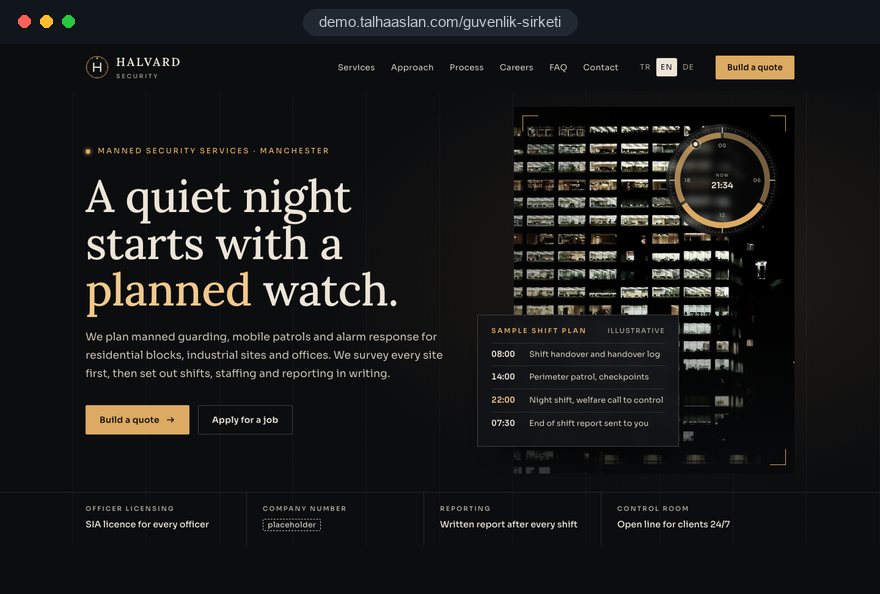
This page links to a live demo site our team built for security companies; it is not a client site and exists to show our approach. You can see our work in other sectors on our references page. When you are ready, send us your services, coverage area and the clients you want more of through our contact page; fixed packages are listed in the web design pricing section, and we prepare a written scope and schedule for your firm.