The phone number is hard to find
Someone with water dripping through the ceiling looks for a number and finds it only on the contact page. Without a fixed call button on mobile, the call usually goes to the next roofer in the list.

Your Windows contrast theme is on; colours come from your system.
Your device is set to reduce motion; animations are already off.
Your choices are saved in this browser only.
Industry-specific web design
Most people looking for a roofer have a damp patch on the ceiling or water coming through after heavy rain, and they want someone they can call now. We build roofing websites around an emergency call button that is always visible, a survey request that asks for roof photos, and separate pages that explain repairs, re-roofing and flat roofs. We work with roofers in the UK and elsewhere, remotely and in English.
Open the live demoA demo design we built for a fictional brand
In short
A roofing company website puts a one-tap call button in front of anyone with a leak, collects roof type, covering and photos through a survey request, gives repairs, re-roofing, flat roofing and guttering their own pages, and explains tiles, slate, membranes and metal in plain English. For roofers who replace coverings, scheme membership and working at height are shown too. The goal is to catch the urgent call and to arrive at each survey prepared.
Talha Aslan and teamLast updated:
Why it needs its own approach
Roofing work is two businesses in one: the urgent leak call during a storm and the re-roof or flat roof that is planned over weeks. Generic builder templates treat both the same, so they serve neither the caller in a hurry nor the client comparing quotes.
Someone with water dripping through the ceiling looks for a number and finds it only on the contact page. Without a fixed call button on mobile, the call usually goes to the next roofer in the list.
The form asks for a name and phone number only. Without roof type, covering, number of storeys, where the leak is and a photo, the team has to visit even to replace a few slipped tiles.
Repairs, re-roofing, flat roofs, insulation, chimneys and guttering share one paragraph. People searching for roof repair and people searching for a new flat roof both miss their answer, and search engines cannot match the page to either search.
Clients rarely know the difference between concrete tiles, natural slate, EPDM, GRP and metal sheeting, so they compare quotes on the total alone. Without a page on lifespan, suitable roofs and upkeep, a thorough quote looks the same as a cheap one.
GOV.UK lists replacement of roof coverings on pitched and flat roofs as work covered by competent person schemes, with CompetentRoofer and NAPIT authorised for it. If you are registered, clients and managing agents look for it; if it is not on the site, the question stays open.
Photos of completed work are often taken from the street, from one angle, with no note of the problem, the work done or the materials. Visitors cannot judge the quality, and search engines cannot tell what the picture shows.
Our approach
We build a roofing website for two different visitors. Someone with a leak sees the call button and the areas you cover on the first screen of their phone. Someone planning work reads the service page, the materials guide and finished jobs, then fills in a survey request that asks for roof type, covering, number of storeys and where the problem is. Photos can be uploaded, so your team knows what to expect before going up.
If you work for managing agents, factories or warehouses, we add a separate commercial quote form and a page on how you work at height. For seasonal campaigns such as storm damage repairs or pre-winter roof checks, a single-goal landing page can go live without disturbing the main site.
Design, development and content sit in one team, so none of this is patched on later. Talha Aslan sets the strategy and an experienced team handles delivery. We work remotely and in English with roofers abroad, through video calls and written sign off.
Home
Urgent visitors reach the call button on the first screen; people planning work reach the same survey request through the service pages and the materials guide.
The right setup
All three start from the same foundation; whether the work is urgent or planned and who makes the decision make the difference.
Repairs
The client is a homeowner dealing with a leak; the site puts a quick call and an easy way to send photos first.
Re-roofing
The client takes weeks to decide; the site explains materials, the process and finished roofs.
Commercial
The buyer is a managing agent, factory or warehouse owner; the site covers safety, scope and the quote process.
Built for roofers
These are the points a roofing firm has to decide on most often when planning its site.
A call and WhatsApp button fixed on every mobile screen, next to the areas you cover. We only state the hours you can genuinely respond, and if you do not offer night callouts, the site says so.
Roof type (pitched, flat, hipped), covering, number of storeys, where the leak is and photo upload. Small jobs can be assessed from photos, and the team knows what it will find before setting up ladders.
Roof repairs, slipped tiles, re-roofing, flat roofs, insulation, chimneys and guttering each get their own page. Every page answers its own search and leads to the same survey request.
Tiles, slate, felt, EPDM, GRP and metal: which roofs they suit, how long they tend to last and what upkeep they need. Clients learn to compare quotes on scope rather than the total.
How you use edge protection, scaffolding and harnesses, your team's training and any scheme or trade association you belong to. We only publish what you hold and can document.
Your team travels to the client. Google asks businesses that do not serve customers at their own address to remove it from the profile and enter a service area only; the site describes the same towns on their own pages.
Sources: GOV.UK, Competent person scheme: current schemes and how schemes are authorised (replacement of roof coverings) · Google Business Profile Help, Guidelines for representing your business on Google (service area businesses)
Comparison
| Topic | Generic business template | Site built for a roofer |
|---|---|---|
| Urgent calls | Number on the contact page | A fixed call button on every screen |
| Survey | A general form with name, phone and message | A request asking roof type, covering and photos |
| Services | One long list on one page | Repair, re-roofing, flat roof and guttering pages |
| Materials | Not mentioned | A plain guide from tiles to membranes |
| Trust | A vague line about quality work | Working at height, memberships and detailed jobs |
| Measurement | Visitor numbers | Which page brings urgent calls and which brings surveys |
Quick check
Must haves: does your site have them?
0 of 6 in place Tick the boxes to see where your site stands.
Added as needed
We choose which of these you need together during the scoping call.
Share how emergency calls reach you today, the questions you ask before a survey and the roofing jobs you do most; we will come back with a page structure and a written quote.
Process
We define your business, your audience and the site’s one-sentence job: who it sells what to, through which action. Scope and timeline are written from that answer.
The home page and key templates come to you as designs first; no code is written before your approval. We do not like surprises, and we do not cause them.
The approved design becomes fast, secure, maintainable code. You follow progress in the CRM and see every page in a staging environment before launch.
The site goes live with analytics, Search Console and conversion tracking connected; panel training is given, first-year hosting and maintenance included.
Search and speed foundations
Clients search for roof repair in Reading or flat roof replacement near me. Service pages, area pages and the Google Business Profile are built to support each other.
Urgent searches happen on a phone, sometimes on a weak signal. We keep pages light, serve images at the right size and make sure the call button appears straight away.
Company name, phone, opening hours and service area are marked up so search engines can read them; nothing is marked up that is not on the page.
Calls, WhatsApp clicks and survey requests are tracked as conversions from day one, so you can see which service page brings urgent calls and which brings planned work.
Free tools
Before planning a new site, see how your current one loads on a phone and appears in search; resize your roof photos and convert them to WebP, and create a QR code for your vans and a WhatsApp link for urgent enquiries. The tools are free and need no sign up.
Tech SEO
Test whether a page works well on phones: viewport, font size, tap targets, a mobile screenshot and Core Web Vitals.
Tech SEO
Scan any URL for title, meta description, headings, canonical, indexability and speed signals, and get an SEO score with a clear to-do list.
Image
Resize + compress photos and cut the KB; never leaves your device.
Image
Convert between JPG, PNG and WebP in one click or in batches; it detects the input format, lets you set quality and a background for transparency, and uploads nothing.
Conversion
Turn URLs, WhatsApp, Wi-Fi, vCard and text into a QR code in seconds; download high-res PNG or SVG.
Conversion
Create a wa.me link with a preset message + embeddable button code.
How we work
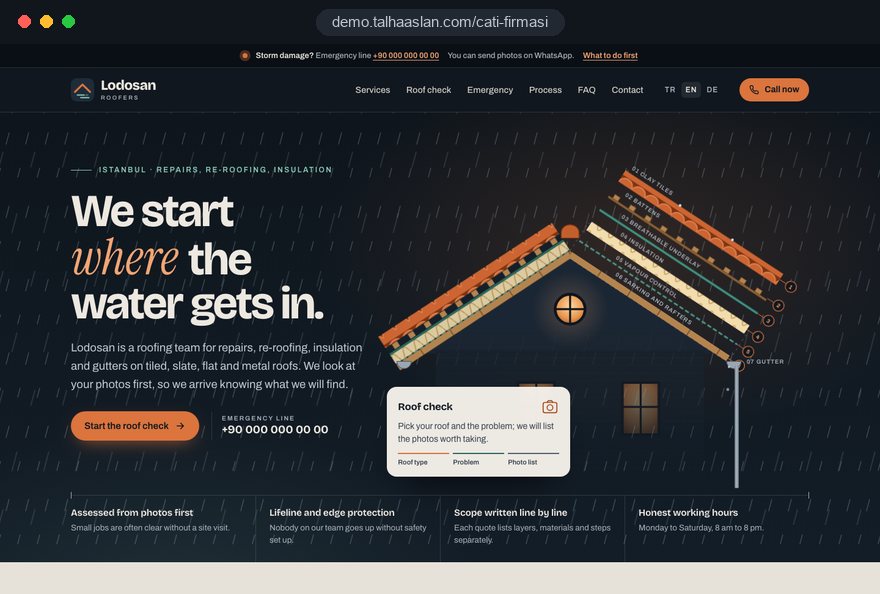
We do not have a live client project for a roofing company yet, so we show our approach on a live demo site. The demo is not a client site. You can see our work in other sectors on the references page.
Live demo
For this field we built a one page demo site for a fictional brand, made only to show our approach. You can explore the design, the copy structure and the mobile view live in three languages.
Open the live demoBefore design starts, we talk through which calls are urgent and which are planned work, and when they come in; the position of the call button and the emergency page follow from that.
We write down every question your team asks before a survey and build the steps of the request and the photo upload from that list.
We listen to how you explain the coverings and insulation you use, your guarantees and how you work at height, and turn that into a plain guide; we never publish a claim you cannot document.
We track which page brings calls and survey requests and update the emergency and roof check pages before the autumn and winter weather.
Related pages
Industries
A separate setup for renovation firms working on kitchens, bathrooms and interiors.
Industries
For construction firms selling housing projects from a portfolio.
Industries
For firms installing solar panels on roofs, built around energy rather than roofing.
Solutions
A single-goal page for seasonal campaigns such as storm damage repairs or pre-winter roof checks.
 Lead Form Design for Booking, Quote and Demo Requests: UX Rules That Lift ConversionsRead article
 How to Do Google Maps SEO: A Guide to Ranking Your Business Higher on the MapRead article
 How to Optimize Images for Your Website: Format, Size and SEO SettingsRead article
 How to Build Trust on Your Website: Trust Signals That Turn Visitors into CustomersRead article
FAQ
If your question is not here, write to us; we will send you an answer and a written quote.
Next step
In a free 15-minute call, in English, we will go through your urgent calls, the questions you ask before a survey and the jobs you do most, then send a written scope and quote.
In-depth guide
A roofing company's phone rings at two very different speeds. One caller is standing under a ceiling that drips during a storm and wants to reach someone in the next five minutes; the other is a property manager comparing three quotes for a new flat roof over several weeks. A good roofing website greets both on the same home page and then sends them down different paths.
This guide walks through the decisions that are specific to roofing work, in the order you will meet them: how to show capacity on storm days, which photos to ask for without sending anyone up a ladder, how to turn a materials guide into a quote comparison tool and how to present working at height on the site.
The first decision is to split urgent callers from planned buyers on the home page; showing both the same form loses both. Someone with a leak does not read, they look for a number and for the areas you cover. Someone planning a roof replacement wants materials, process and finished roofs.
We build that split with two clear doors on the first screen: one asks "Is water coming in right now?" and goes straight to a call or WhatsApp, the other asks "Planning a repair or a new roof?" and leads to the service pages. On a phone, the call button stays fixed at the bottom of the screen while the visitor scrolls.
Look at your call log and job book rather than guessing, and count winter and summer separately to see the seasonal swing.
The emergency page is not just a phone number; it is a short set of instructions for the time before your team arrives. Three or four calm, practical steps build trust with a worried homeowner before they even dial.
We never publish a response time you cannot keep. If you do not offer night or weekend callouts, saying so plainly is kinder than a caller who rings at midnight and gets no answer.
This page should be the lightest on the site. We avoid large images and video and aim to keep LCP, which measures how quickly the main content appears, within the 2.5 seconds Google treats as good, even on a weak signal. You can see how your current site loads on a phone in seconds with our mobile friendly test.
Roofing demand spikes with the weather; the day after a hard storm, a week of enquiries can arrive at once. Deciding in advance what the site says on those days prevents the chaos of a phone that never stops ringing and callers who never hear back.
We add a status banner to the home page and the emergency page that you switch on and off from the admin panel. It states the real situation, for example "Due to high demand today we are attending active leaks only; we will call all other enquiries in order."
If you want a separate page for storm damage repairs, a single goal campaign landing page can go live without touching the main site; it comes down when demand settles and returns next season.
A survey request with photos is only as useful as the photos it asks for, and asking safely matters. "Upload a photo of your roof" nudges a homeowner onto a ladder and into danger. In the form we describe which photo to take and from where, with small example sketches.
We put one sentence at the top of the form: "Please do not go onto the roof to take photos." It protects the client and shows your attitude to safety at first contact. Because phone photos are large and slow to upload, the form resizes them automatically.
Assessing from photos lets you price small jobs without a visit and filter out enquiries outside your area or outside your trade early.
Each roofing service answers a different question and deserves its own page. Someone searching for roof repair is dealing with one leak; someone searching for flat roof replacement is thinking about a failing membrane over an extension or a garage. Listing everything in one paragraph answers neither.
We name pages in the client's words rather than trade jargon. "Ridge repointing" is clear to a roofer, but a homeowner often describes it as "the cement on the top tiles is falling out." Explaining the term in the opening sentence helps readers and search engines alike.
Every page links to the same survey request, but the form records which page the visitor came from. Your team then knows what an enquiry from the gutter page is about before opening it.
The real job of a roofing materials guide is to teach clients to compare quotes by scope rather than by the total. Someone who cannot tell concrete tiles from natural slate, or felt from EPDM, looks at the lowest figure and misses the underlay, ventilation or flashing detail in your quote.
We use the same template for each material: which roofs it suits, limits such as pitch and weight, upkeep and common installation faults. Rather than promising a fixed lifespan, we explain what shortens it, so the site never carries a figure you cannot defend.
At the end of the guide we add a checklist the client can hold against every quote:
The checklist explains why your quote has the scope it has, without you saying a word. We can name the brands you install, but we publish manufacturer claims only where you hold the documents.
A working at height page is a precondition for many managing agents and commercial buyers. A clear page answers their safety questions before the board meeting.
Instead of a vague line about taking safety seriously, the page describes what you actually do. Describe how you meet the working at height rules where you operate, and publish only what you can document; a sentence that implies a certificate you do not hold backfires the moment a buyer asks for it.
In the UK, GOV.UK lists replacement of roof coverings on pitched and flat roofs as work covered by competent person schemes and names CompetentRoofer and NAPIT as authorized schemes. If you are registered, show it here and on each replacement page; if not, leave it out rather than hinting. Photos of your crew clipped in behind edge protection say more than a paragraph, so retire old photos that show no protection at all.
Clients want to know what happens after the job while they are still choosing, and clear terms on the site shorten that decision. There are two separate things here: the manufacturer's warranty on materials and your own commitment on workmanship. Mixing them in one sentence creates the wrong expectation when something goes wrong.
For each service we set out the scope and length of your workmanship warranty and when it does not apply, in your own terms: a satellite dish or solar panels fitted later, gutters never cleared, or another contractor working on the roof. We check the wording against your contract before publishing.
That reminder is also the quietest source of repeat work. If you use contact details for it, say so in your privacy notice and collect consent for marketing messages in line with the rules where you operate; we design this into the form from the start.
On commercial roofs the decision belongs to a board, a purchasing team or a facilities manager, not one person, and the site should give them something they can take into a meeting. Homeowner language does not work here; they expect clarity on scope, timing and responsibility.
The commercial page covers large area work such as single ply membranes, built up felt and metal sheeting separately, and explains how the job runs while the building stays in use. Working without stopping production, phasing the roof section by section and out of hours work are the first questions a factory or warehouse buyer asks.
For blocks of flats we can add a "preparing for the residents' meeting" page that sets out scope, likely disruption and duration in plain words. When the managing agent shares that link with residents, it presents your proposal for you.
What builds trust in roofing is showing that you found the real cause, and a nice final photo cannot do that alone. We build job pages like a case record: what the client noticed, what the survey found, why that fix was chosen and what was done.
A leak is rarely directly above the stain; water can run under the covering for meters before it drops. A job page that shows this speaks directly to the client whose last repair did not stop the leak.
We give image files descriptive names instead of camera codes like "IMG2045" and write meaningful alt text. Converting photos to WebP with our image converter before upload keeps the page light as the gallery grows.
Your crew travels to the client, so local visibility comes from your service area, not from a yard address. Google asks businesses that do not serve customers at their own address to remove it from the Business Profile and enter a service area only, and the business name must match the real world name without added keywords such as "roof repair."
We create area pages only for towns where you work regularly, and each one says something specific: the dominant housing type, jobs completed there or local access issues. Copying the same text across thirty towns with only the name changed helps neither clients nor search engines.
Roofing searches follow the seasons, and the content calendar should too:
We handle the technical and content work behind this as part of our SEO service. If you want to appear quickly on storm days, short Google Ads campaigns targeted only at your area and urgent searches complement organic visibility.
Visitor numbers alone say nothing on a roofing site; the real question is which page brings urgent calls and which brings planned surveys. We set up three separate conversions from day one: taps on the call button, clicks through to WhatsApp and submitted survey requests.
The WhatsApp link carries a prefilled message with the page name, so a message that starts "Hi, I'm writing from the gutters page" gives context to your team and to the data. You can create a link like that in seconds with our WhatsApp link generator.
Tracking that uses cookies needs a privacy notice and, for visitors in the EU and other places with similar rules, consent before non essential tracking; we set this up together with measurement. The point is to decide which page to strengthen before the next storm season.
Most of these come from a site that ignores the rhythm of roofing work, not from design.
If your current site has two or three of these, starting with quick fixes such as the call button and photo instructions can make more sense than a full rebuild.
When choosing a team for your roofing website, look less at sample designs and more at whether they understand the two speeds of roofing work. We suggest asking these questions in the first call:
If the answers are vague, ask for the page list, form steps and tracked actions to appear one by one in the written quote.
We do not yet have a live client project for a roofing company, so we show our approach on a live demo site linked on this page. You can see delivered work in other sectors on our references page; our web design service page explains how we run projects.
Fixed scope packages are listed in the web design pricing section; for a written scope based on your services, area and commercial work, reach us through the contact form. Bring a rough split of your incoming calls, the questions you ask before a survey and a few job photos, and we will build the first page structure and survey steps from that.
Start a Project
Thanks {name}, we've received your brief. We usually reply within the same day.
What happens next?