The quote form brings useless leads
A form with name, phone and message tells your surveyor nothing. Without annual usage, roof type and location, the first call is spent collecting basics, and serious buyers look the same as casual browsers.

Your Windows contrast theme is on; colours come from your system.
Your device is set to reduce motion; animations are already off.
Your choices are saved in this browser only.
Industry-specific web design
Homeowners and businesses rarely ask for a solar quote on day one. They first check whether their roof is suitable, how the process works and who will actually do the install. We build solar company websites around that research: pages per install type, a step by step process, a quote form that asks for the energy bill and roof details, and real project pages, for installers in the UK and elsewhere who work with a remote team.
Open the live demoA demo design we built for a fictional brand
In short
A solar company website explains domestic, commercial and ground mounted systems on separate pages, walks visitors through survey, installation and grid connection, and collects quote requests with the energy bill, roof type and location. Every completed install becomes a project page with system size, type and area, and maintenance gets its own page. In Great Britain, the site also explains certification such as MCS where it matters for export payments.
Talha Aslan and teamLast updated:
Why it needs its own approach
Solar is a considered purchase with technical questions behind it. Visitors want to be convinced before they ask for a quote, and installers need the right details before they price a job; generic business templates do neither.
A form with name, phone and message tells your surveyor nothing. Without annual usage, roof type and location, the first call is spent collecting basics, and serious buyers look the same as casual browsers.
A homeowner and a business looking at a warehouse roof ask very different questions. A single services page answers both badly, and ground mounted projects are often not explained at all.
Buyers want to know what happens after they sign. In Great Britain, small solar PV systems up to 50kW need an MCS certificate or an equivalent to show the installation and installer are suitably certified for Smart Export Guarantee payments. If the site skips this, every question lands on the phone.
In solar, trust comes from finished work. When projects only exist as a few social media photos, the system size, install type, area and equipment used are lost.
Lines like never pay for electricity again damage trust, because real output depends on orientation, shading and usage. When visitors cannot see the assumptions behind a figure, they do not believe it.
Panel cleaning, inverter faults and output monitoring are what customers ask about after the install. If maintenance is not on the site, that work goes to another company.
Sources: Ofgem: Smart Export Guarantee, Guidance for Generators
Our approach
We build a solar website in the order buyers make decisions. First they find the install type that fits them, then they read how the process works, look at completed projects and finally ask for a quote. The quote form gathers the questions your surveyor would ask on the first call, so the conversation starts with a technical assessment.
For seasonal campaigns, a single-goal landing page for rooftop solar can go live without disturbing the main site. If your firm also does general electrical work, we keep that in its own flow, the way an electrician website would, and leave the solar side with its own quote process.
Design, development and content sit in one team, so none of this is patched on later. Talha Aslan sets the strategy and an experienced team handles delivery. We work remotely and in English with installers abroad.
Home
Each install type answers its own search, and all of them lead into the same quote form.
The right setup
All three start from the same foundation; the buyer's questions and the steps of the quote form make the difference.
Domestic
The decision is usually made as a household, so the site builds trust with plain language and real photos.
Commercial
The decision involves facilities staff and management, so the site works like a project file.
Ground mounted
Investors and landowners want to see the process and your capacity to deliver.
Built for solar installers
These are the points we settle when we plan a solar installer's website.
Annual usage or a recent energy bill, roof type and orientation, approximate area and postcode. Customers can upload a bill and a roof photo, so the request reaches your surveyor complete.
Domestic rooftops, commercial and industrial rooftops, ground mounted systems and battery storage each get their own page, answering the questions of their own buyer.
For installs in Great Britain, Ofgem's guidance says that for solar PV up to 50kW the installation and installer must be suitably certified, for example with an MCS certificate or an equivalent, or the SEG licensee is not obliged to pay. We explain your certification in plain words; the final check of current rules is yours.
For each install: system size, type, area, panels and inverter used, handover date and real photos. Customer names and exact addresses are published only with written consent.
If estimated output or savings are shown, location, orientation, shading and usage assumptions sit next to them. Instead of a guaranteed result, visitors get an early estimate that the survey will confirm.
A page and a service request form for panel cleaning, periodic checks, inverter service and remote monitoring, so the customer relationship continues after the install.
Sources: Ofgem: Smart Export Guarantee
Comparison
| Topic | Generic business template | Site built for a solar installer |
|---|---|---|
| Quote request | Name, phone and message field | A step by step form with bill, roof type, area and location |
| Install types | One services page | Separate pages for domestic, commercial and ground mounted |
| Process | Not explained, asked on the phone | Survey to handover explained step by step |
| Projects | A gallery of a few photos | Project pages with size, area and install type |
| Savings | Fixed figures and bold promises | Early estimates with visible assumptions |
| After the install | Not covered | Maintenance, monitoring and service request page |
Quick check
Must haves: does your site have them?
0 of 6 in place Tick the boxes to see where your site stands.
Added as needed
We choose which of these you need together during the scoping call.
Tell us which systems you install, the areas you cover and what you look at before you quote; we will come back with a page structure and a written quote.
Process
We define your business, your audience and the site’s one-sentence job: who it sells what to, through which action. Scope and timeline are written from that answer.
The home page and key templates come to you as designs first; no code is written before your approval. We do not like surprises, and we do not cause them.
The approved design becomes fast, secure, maintainable code. You follow progress in the CRM and see every page in a staging environment before launch.
The site goes live with analytics, Search Console and conversion tracking connected; panel training is given, first-year hosting and maintenance included.
Search and speed foundations
Buyers search for things like solar panels for my home or commercial rooftop solar, often with a town or county. Install type pages, project pages and the Google Business Profile are built to support each other.
Company name, address, phone, service area and FAQs are marked up so search engines can read them; nothing is marked up that is not on the page.
Solar sites carry many project photos, so images are compressed and loaded as they scroll into view; Core Web Vitals are measured before launch.
Quote forms, calls and WhatsApp clicks are tracked as conversions from day one, so you can see which install type page brings quote requests.
Free tools
Before planning a new site, test the speed and visibility of the current one; the electricity cost tool is also handy to share with customers. The tools are free and need no sign up.
Energy
Turn an appliance's watts and hours of use into kWh and running cost per day, month and year, add standby power and total several devices at once.
Tech SEO
Test whether a page works well on phones: viewport, font size, tap targets, a mobile screenshot and Core Web Vitals.
Tech SEO
Scan any URL for title, meta description, headings, canonical, indexability and speed signals, and get an SEO score with a clear to-do list.
Tech SEO
Generate rich-result JSON-LD for Article, Product, FAQ, Local Business.
Conversion
Create a wa.me link with a preset message + embeddable button code.
Image
Convert between JPG, PNG and WebP in one click or in batches; it detects the input format, lets you set quality and a background for transparency, and uploads nothing.
How we work
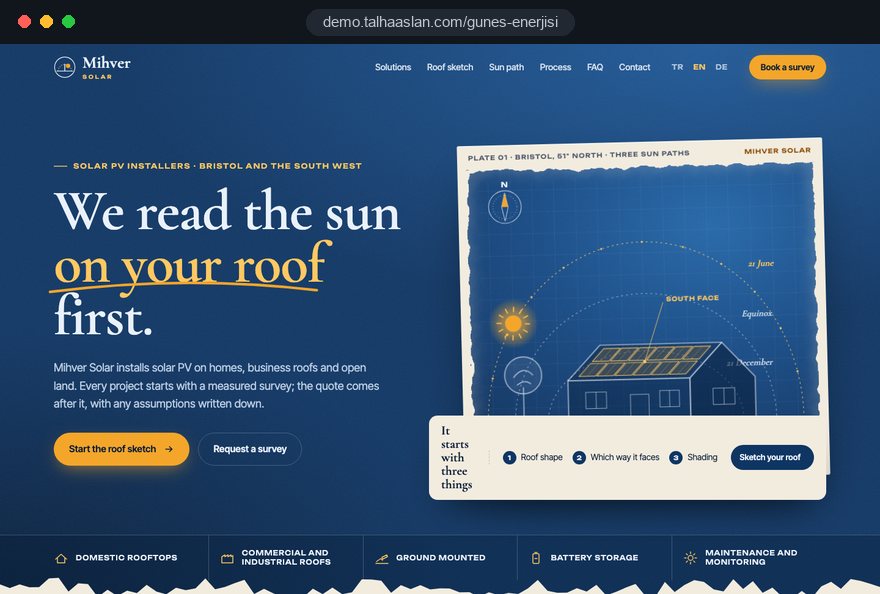
We do not have a live client project for a solar company yet, so we show our approach on a live demo site. The demo is not a client site. You can see our work in other sectors on the references page.
Live demo
For this field we built a one page demo site for a fictional brand, made only to show our approach. You can explore the design, the copy structure and the mobile view live in three languages.
Open the live demoIn the first call we list every question your surveyor asks before quoting; the steps and required fields of the quote form come from that list.
We write survey, design, certification, installation and handover in the order your team really works, and check every regulatory sentence against an official source.
If output or savings figures are published, the assumptions sit next to them, and we leave out wording that promises a guaranteed result.
We track which install type page and which form step bring quote requests, see where people drop off and adjust before the busy season.
Related pages
Industries
For roofing firms, reaching homeowners who replace their roof before going solar.
Industries
A local electrician site for wiring and repair work.
Industries
For firms that install EV chargers alongside solar.
Solutions
A single-goal page matched to a rooftop solar ad campaign.
 Lead Form Design for Booking, Quote and Demo Requests: UX Rules That Lift ConversionsRead article
 How to Build Trust on Your Website: Trust Signals That Turn Visitors into CustomersRead article
 How to Build a B2B Website: Site Structure That Generates Qualified LeadsRead article
 How to Do Google Maps SEO: A Guide to Ranking Your Business Higher on the MapRead article
FAQ
If your question is not here, write to us; we will send you an answer and a written quote.
Next step
In a free 15-minute call, in English, we will go through the systems you install, the areas you cover and your quoting process, then send a written scope and quote.
In-depth guide
Nobody books a solar survey on impulse. A homeowner notices panels on a neighbor's roof, checks a few energy bills, reads three installer websites over several weeks and only then asks for a quote. On a commercial roof the same decision passes between a facilities manager, a finance lead and a managing director. A solar company website has to meet each of these people at the right stop on that long road.
This guide covers the decisions behind a solar installer's website in the order they come up: the quote form, uploaded bills, an honest estimate calculator, rules on green claims, certification, project pages and aftercare. Every section ends in something you can act on.
The structure of the site should follow the stage the visitor is in, not the list of services you sell. Someone researching solar for the first time does not want a quote; they want to know whether their roof is suitable, how complicated the process is and whom to trust. Each of those questions needs its own type of page.
Every page ends with one clear route to the next stage. A visitor who has just read the suitability guide is better served by projects on similar roofs than by a quote form. The home page shows all four doors and lets visitors pick their own stage.
This is the same decision order we use across every industry in our web design service, adapted to solar. The difference is the length of the cycle. Many visitors return weeks later, so the site should let them pick up where they left off.
Explaining three install types on one page means losing three different decision makers at once. A homeowner thinks about the household budget and how the roof will look. A business owner asks about the usage profile and whether installation will disrupt operations. A landowner or investor cares about project management and grid capacity.
Each door needs its own language, images and form. A close shot of a real house roof sets the tone on the domestic page, an aerial view of a warehouse roof on the commercial page and a site preparation photo on the ground mounted page.
A useful test: can someone reading one install type page make a decision without ever seeing the other two? If not, the page is still written like a generic services page. Name the pages in the buyer's words, such as "Solar panels for your home", and list all three under "Solutions".
The quote form is the digital version of the questions your surveyor asks on the first call; a form with name, phone and message cannot do that job. The answer is to split the questions into short steps and let each step adapt to the previous answer.
The timing question looks minor but changes how your sales team prioritizes. An information pack suits someone who is only researching better than a same day call.
Show a progress bar and a short "why we ask" line at every step. Next to the orientation question, a line such as "We use this for the output estimate; leave it blank if you are not sure" keeps genuine but incomplete requests from being abandoned halfway. A partial request from a serious buyer is worth more than a perfect form nobody finishes.
An energy bill is not an ordinary attachment: it carries a name, an address, an account number and a usage history. The moment you add a bill upload field, you are processing personal data, and the site has to handle it like that.
Put a short privacy notice right next to the upload, not behind a link at the bottom of the page. Say what the file is used for, how long it is kept and who sees it. For installers serving customers in the EU, consent is also required before non essential tracking cookies are set; plan the cookie banner and the form together.
Roof photos can reveal where someone lives. Before any image is published on a project page, strip the embedded location data (the GPS coordinates a phone stores inside the file) and confirm the customer's written consent.
A calculator earns its place only when it gives an early idea that the survey will confirm, never a fixed promise. The fastest way to lose trust on a solar website is a single box where visitors type a bill and receive a precise savings figure; real output depends on orientation, shading, panel tilt and how the household or business uses electricity.
A good calculator shows the assumptions right beside the result. When visitors read "assumes a south facing roof with no shading", they think about how their own roof differs.
Before launch, run a handful of your completed projects through the calculator with your surveyor and adjust the assumptions where results drift from what you saw on site. Visitors who first want to understand their own consumption can be pointed to the electricity cost calculator.
Every environmental or savings sentence on the site is a marketing claim, and advertising rules apply to it. In the UK, section 11 of the CAP Code covers environmental claims: the basis of a claim must be clear, the meaning of the terms used must be clear to consumers, and absolute claims need a high level of substantiation. Claims should also reflect the full life cycle of the product unless the ad states otherwise.
For solar companies this hits common phrases directly. "Zero carbon energy" is an absolute claim; panels are manufactured, shipped and eventually recycled. "Slash your bills" without a stated basis leaves out material information. Other markets have their own consumer protection and advertising rules, so check them before you publish.
A simple habit helps: for every green or savings sentence, note in an internal document the evidence it rests on. Sentences without evidence are rewritten or removed. Apply the same list to social posts, brochures and your sales team's phone scripts.
Buyers most want to know what happens after they sign, and the process page removes that uncertainty. For installs in Great Britain, Ofgem's guidance on the export payment scheme (SEG) says that solar PV systems up to 50kW must be suitably certified, for example through MCS or an equivalent scheme, otherwise the SEG licensee is not obliged to pay for exported electricity.
Rather than summarizing regulation, describe how your firm actually works. Say which documents the customer prepares, which steps you handle and when the customer hears from you.
Instead of promising durations, explain what sets the pace at each step, such as network operator response times or missing documents. Mark every sentence that depends on regulation and add a "last reviewed" date at the bottom. For installs outside Great Britain, write the equivalent steps from your own local rules.
A project page should be a data card that visitors can compare with their own situation, not a handful of attractive photos. Showing the same fields in the same order for every install makes comparison easy.
Image heavy pages slow down easily. Google rates LCP (how long the largest element takes to load) as good at 2.5 seconds or less, CLS (how much the layout jumps) at 0.1 or less, and INP (how quickly the page responds to a tap) at 200 milliseconds or less, measured at the 75th percentile of visits. Compressed modern image formats, lazy loading and reserved image dimensions cover the basics.
Customers who need a new roof before panels go on are better served by a roofer's site kept separate from yours; we explain how that split works on roofing company websites. You can check how your current site behaves on a phone with the mobile friendly test.
On commercial roofs and land, the decision is made around a table, so the site should offer something people can bring to that table. Facilities asks technical questions, finance asks about process and risk, and the managing director asks whether your firm is reliable. A single page that tries to answer all three satisfies none of them.
We recommend a downloadable company pack for the commercial side. It turns the site's content into something that can be presented in a meeting, and a short form at download shows you who is interested.
Give land investors their own short form asking for location, approximate land size and the stage they are at. Trade partner applications need a separate form too, or they clutter the sales list. A team page that explains the roles of project managers and site leads, with a direct contact for technical questions, shows commercial visitors your scale in concrete terms.
The relationship does not end at handover; the maintenance page is the steadiest source of repeat work and referrals. Panel cleaning, inverter faults and a drop in output are what customers ask about most after installation, and if your site does not answer, they look for another company.
The service request form should split by type of problem. Asking someone who sees an error on the inverter display for a photo of the code means the engineer arrives with the right part.
Seasonal reminders sent by e-mail or text need separate permission from the customer. Servicing systems installed by other firms is a strong source of new customers, especially when the original installer has left the market. State which inverter brands you can service.
People search for solar along two lines: install type and place. Someone typing "commercial rooftop solar" and someone typing "solar panels for my house" should land on different pages, and searches that include a town or county should meet content about the area you actually serve.
Copying one area page and swapping the town name does not work. Each area page should show projects completed there, the roof types common in that area and which days your survey team covers it. With no projects in an area yet, skip the page.
We cover the search side of this structure in our SEO service. Each page should be the single answer to a single search. Tie guides to the calendar too; maintenance topics should be live before winter and installation topics before spring interest rises.
In solar, a form submission is the start of a sale, not the result, so measurement should not stop at the quote request. To see which pages really bring work, you need to record what happens to each lead after it arrives.
This view might show that the domestic page brings many requests while fewer commercial requests turn into contracts more often. A short "reason lost" option, such as roof unsuitable or budget postponed, adds useful insight. In search ads, Google's Quality Score combines expected click through rate, ad relevance and landing page experience; it is a diagnostic tool, not a direct input in the auction.
For seasonal campaigns, a dedicated rooftop solar landing page matches the ad without disturbing the main site. We build the campaign and its tracking together in our Google Ads management.
These are the problems we see most often on solar company websites, and most are easy to fix.
Most of these come not from design but from not deciding who each page is for. Asking "who reads this, and at what stage" for every page catches most of them before launch.
The right partner wants to understand your survey process before making your site look good. We suggest putting these questions to every team you get a quote from.
We do not have a live client project in solar yet, so we show our approach on a live demo site linked on this page; our work in other industries is on our references page. You can compare packages in the web design pricing section, or get in touch to talk through the systems you install and the areas you cover. In that call we list your survey questions and send you a written scope and quote.
Three things on your side speed this up: last year's projects with photos, your surveyor's first call questions in writing, and the install type you want to prioritize. With those, most of the structure takes shape in the first meeting.
Start a Project
Thanks {name}, we've received your brief. We usually reply within the same day.
What happens next?