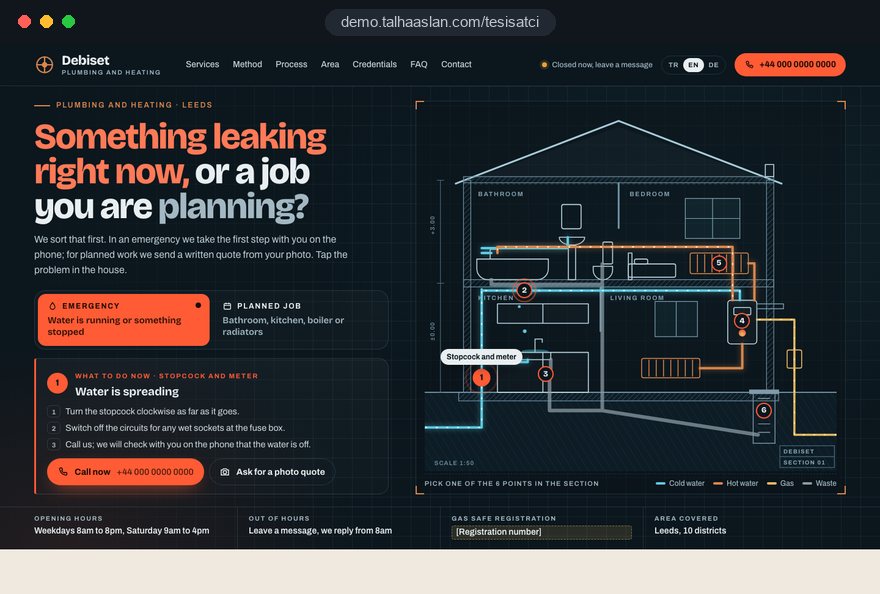
The real test of a plumbing website is the first two minutes after someone sees water coming through the ceiling. That person does not know what to do, does not know whom to trust and often cannot name the problem. The visitor planning a new bathroom is in no hurry at all; they want to read about method, credentials and process.
This guide walks through the decisions we make when planning a plumbing and heating firm's site, starting with the hardest moments: the emergency page, the structure of leak detection and blocked drain pages, gas registration, photos sent from inside people's homes, leak reports, property managers and measurement.
01Write the emergency page like a first aid card
An emergency page should be a short first aid card that tells the customer how to limit the damage before and while they call you. Knowing what to do while the engineer is on the way protects the home and shows that the firm they are calling knows its job.
We usually write the page in this order:
- Where the main stopcock usually is: under the kitchen sink, near the meter or where the supply enters the building; in a block of flats, ask the caretaker or managing agent.
- If water is reaching sockets or light fittings, switch off that circuit at the consumer unit and keep out of standing water.
- If there is a smell of gas, the call goes to the gas emergency line, not to a plumber; in Great Britain that is the National Gas Emergency Service on 0800 111 999. Open windows, do not touch electrical switches.
- Take photos of the leak and the wet area; they help the engineer and any later conversation with neighbors or the landlord.
- A call button and one line saying whether the phone is answered right now.
The third point matters: a gas leak is a job for the network's emergency team first, and saying so clearly makes you look responsible rather than less useful. This page should be the lightest on the site, with no large images or video, so it opens on a weak signal in a basement. Google treats LCP, the time until the largest element on the page has loaded, as good at 2.5 seconds or less.
02Name problems the way customers describe them
Customers type the symptom they can see, not the trade term, so page titles and subheadings should match those symptoms. A firm that writes "drain clearance" and a homeowner who searches "sink draining slowly" are talking about the same job but may never find each other.
In the planning meeting we build a list that maps each symptom to a service. Typical matches for a plumbing firm look like this:
- Brown stain on the ceiling, complaint from the flat below: The leak detection page, with a subheading for "water coming through to the neighbors".
- Water bill suddenly higher, meter moving with taps off: A hidden leak section, explaining the simple meter check customers can do themselves.
- Toilet keeps running: Cistern valve and flush repair, with an honest note that this is often a small job.
- Bad smell from the bathroom: Traps and drain venting, as a section linked to the blocked drain page.
- Boiler pressure keeps dropping: The heating page, with questions that separate a leak in the system from a fault in the boiler itself.
The most reliable source for this list is your own phone: for a few weeks, note the first sentence callers use to describe the problem. Those sentences belong in headings and in FAQs, and they help search engines understand which question each page answers.
03The structure of a leak detection page
A leak detection page should put the customer's biggest fear, walls and tiles being ripped out, at the center and explain the method step by step. For many plumbing firms this is the most searched and most compared page on the site, and a generic paragraph does not hold up.
We build the page from these parts:
- Signs: Stains, bubbling paint, the meter moving when nothing is in use, falling boiler pressure.
- Methods: Thermal imaging, acoustic detection, pressure testing and, if you use it, tracer gas; one sentence each on the kind of leak it suits.
- How the visit runs: The order in which the engineer tests, roughly how much time to allow and what the customer is asked to do, such as not running water for a while.
- If access is needed: The area is marked and agreed before any opening, and it is clear who makes good afterwards.
- Afterwards: The repair, a photo report and an honest note on drying times.
The fourth part is the one most competing pages leave out. Instead of promising to find every leak without opening anything, explain that the methods usually pinpoint the location, that the final call is made on site and that any opening is kept as small as possible.
04Blocked drain pages: method and who is responsible
A blocked drain page is most useful when it helps the customer tell whether the problem is inside their home or in a shared drain. In a block of flats, water backing up on the lower floors often points to a shared pipe, and the right first call may be the managing agent; a customer who knows this calls you with better information.
Topics we cover on this page:
- Questions that narrow it down: Is one sink blocked or is every drain in the home slow; do the neighbors have the same problem.
- Methods: Drain rods, high pressure water jetting and CCTV drain surveys; when each one is chosen.
- What not to do: Pouring one chemical unblocker after another; if they already have, tell the engineer, because it matters when working with equipment.
- Recurring blockages: How a camera survey shows roots, a collapsed section or a poor fall, and what a lasting fix looks like.
If you carry out CCTV surveys, a short sample clip without any address details is strong evidence; the customer sees what they would pay for.
05Gas work: show registration and match it to your areas
If you carry out gas or boiler work, the site should show your registration plainly and only offer that work where you are entitled to do it. In Great Britain, HSE states that a gas engineering business must be on the Gas Safe Register to legally carry out gas work within the scope of the Gas Safety (Installation and Use) Regulations 1998, and registered engineers carry an ID card.
On the site, that turns into a few concrete decisions:
- Registration details: Your registration number and the work categories you are registered for, taken from your own records, not a generic badge.
- ID card check: A short note inviting customers to ask the engineer for their Gas Safe ID card on arrival.
- Separate services: Boiler servicing, boiler replacement, radiator work and general plumbing explained under their own headings, so the customer sees which jobs need a registered engineer.
- If you are not registered: Gas work stays off the service list; if useful, say that you refer those jobs to a registered business.
Outside Great Britain the rules differ by country, state or province, and many places license plumbers or gas fitters separately. Whatever applies to you, the principle is the same: show the license or registration that the customer can verify, describe only the work it covers and use the wording from your own documents.
06Trust at the door: pricing process, identity and paperwork
What worries a plumbing customer most is not the price itself but surprises, and the site can remove much of that worry without publishing a single figure. Someone about to let a stranger into their home wants to know who will turn up and whether the price can change halfway through the job.
The elements that build this trust:
- Call out rule: Whether there is a call out fee and, if so, whether it is deducted when the customer goes ahead; whichever it is, stated plainly.
- Agreement before extra work: If opening a wall or replacing a part turns out to be necessary, the customer is told and agrees before work starts.
- What sets the price: Parts, labor time, out of hours visits and difficult access, explained without numbers.
- Who is coming: Names and photos of the team, taken with their consent, plus a branded van and workwear.
- Paperwork and payment: Whether an invoice is issued and which payment methods you accept.
We collect this on a single "How we work" page and link to it with one sentence from every service page. Publish team photos only with clear consent. When the van, the workwear and the site share the same logo and colors, the customer recognizes the firm from the website the moment they open the door.
07Ask for the right photo for each job
A photo quote form only creates real value when it tells the customer which photo helps for the job they selected, not just "add a photo". A vague photo is barely better than none; the engineer still has to see the problem in person.
When the customer picks a job type, the form shows a short line of guidance. Examples:
- Leak: One wide shot of the whole stain, one close shot and a photo of the water meter while nothing is running.
- Boiler: The model label on the boiler, the fault code on the display and the pressure gauge.
- Blocked drain: Which drain it is and how the water sits; ideally a short video showing how slowly it clears.
- Bathroom refit: A wide shot of the room from the doorway and the existing pipe positions.
- Radiators: Where the cold radiator is and where the boiler sits.
We keep the form short: job type, photo, postcode, urgency and phone number. The upload stays optional, because making it mandatory loses customers who struggle with their phone.
08Photos from inside homes: privacy and location data
Photos sent from inside a customer's home are personal data and need care both in the form and before anything is published. A bathroom photo can show family pictures, a door number or a letter on the counter, and the image file itself may store the location where it was taken.
The checks we apply:
- A short privacy notice linked next to the quote form, saying why the photos are collected, who sees them and how long they are kept; in the UK and the EU this is part of your data protection duties.
- Photos from the form are stored where only the people handling the job can open them, with a set period after which they are deleted.
- Separate permission from the customer before any job photo appears on the site; nothing from the form is published automatically.
- Location data removed from the file before publishing, and door numbers, number plates and faces cropped out.
Images also need resizing before they go online; our free image resizer handles that in the browser. If you use analytics or advertising tags, remember that in the EU, consent is needed before non essential tracking, so the cookie banner has to work properly without covering the call button.
09Offer the leak report as a service in its own right
The photo report you write after a leak detection visit is often a document the customer needs before any repair, and the site should describe it as a service of its own. A homeowner who has to talk to the flat below, to a landlord or to their insurer wants something that shows where the leak was and what caused it.
When we describe the report service, we make these points clear:
- What the report contains: The location of the leak, the method used, thermal or test images, a short description of the work and the date.
- Who it helps: Conversations between landlord and tenant, between neighbors or with a managing agent about what happened.
- How it is delivered: As a PDF by email, on the same day or later; how the customer requests it.
- A sample: An image of one page from a report with all personal details removed.
The one thing to avoid is promising a legal or insurance outcome. We never write that an insurer will pay because of the report; we say that the insurer or managing agent decides which documents they need.
10A separate entrance for landlords and property managers
Managing agents, building managers and landlords with several properties ask different questions from a one off household customer, and they should find a page written for them. They bring repeat work, but before they commit they want to understand your process, your invoicing and how reachable you are.
Questions this page answers:
- Shared systems: Whether you handle communal pipework, shared drains, booster pumps and water tanks.
- Reporting route: How the agent reports a fault, who logs it and how residents are informed.
- Planned checks: If you offer regular maintenance visits, what they include and how often they happen.
- Documentation: A photo summary and invoice after every job, in a format the agent can pass on to owners.
The enquiry form on this page differs from the household form: it asks for the building name, number of units, the contact person and billing details.
If your firm is moving toward full bathroom and kitchen refits, our site structure for renovation companies shows how that work can be presented without crowding the plumbing pages.
11Google Business Profile: name, address and real job photos
Many plumbing searches end on the map, so your Google Business Profile should be run as an extension of the site with exactly the same information. The most common problem we see here is keywords added to the business name; a name like "Emergency Plumber Leak Detection" goes against Google's guidelines, which require the real world name.
Points we check on the profile:
- Real name: The same name as on your van, invoices and website, without a town or service added.
- Address: If customers do not visit your premises, set up as a service area business, hide the address and define the areas you cover.
- Hours: Identical to the site; if the emergency line runs on different hours, say so in the description.
- Photos: The van, the team and approved job photos rather than stock images.
- Replies to reviews: Calm and short, and never revealing customer details, even when the review is unfair.
To collect reviews, a short link sent after each job or a card left with the customer works well, and our QR code generator can create the code for the card. We run the map, service pages and area pages as one piece of work in our SEO service.
12From call to job: measure which page brings work
For a plumbing business the measure that counts is not visits or clicks but which page produced a call that turned into a paid job. A tap on the call button can be tracked; whether that call was a leak job, a wrong number or a town you do not cover, only you know.
That is why we set up measurement in two layers:
- The call button, WhatsApp and the quote form are tracked as separate conversions, together with the page where they were used.
- WhatsApp messages open with a prefilled sentence naming the page the customer came from.
- You or whoever answers the phone keeps a simple weekly sheet: job type, area and whether it became a job.
- Once a month the sheet sits next to the site data; pages that bring no work get fixed, pages that do get strengthened.
If you advertise, this data matters even more. For emergency campaigns built around calls, showing ads only during the hours the phone is answered and only in the areas you really cover cuts wasted clicks. We handle that setup as part of our Google Ads management. Before any of this, a quick run of your current site through our mobile friendly test shows how it behaves on the phone your customers are holding.
13Common mistakes on plumbing websites
Most mistakes we see on plumbing websites come from promises that do not match how the business really works, not from design. Each one below has a better alternative, and most can be fixed in an afternoon.
- A 24/7 promise you cannot keep: If nobody answers at night, show your hours and set up an out of hours message that says when you will call back.
- "We find every leak without damage": Explain your methods, when each one works and how any opening is kept small instead.
- Listing gas work without registration: If you are not registered, remove boiler and gas work from the list and describe the plumbing you actually do.
- A copied page for every town: Create area pages only where you really go and have something specific to say; list the rest on one coverage page.
- Telling people to call you when they smell gas: Put the gas emergency number first on the emergency page; your work starts after that.
- Job photos that reveal a customer's home: Use approved photos with location data removed and identifying details cropped out.
14Deciding on a plumbing website and the next step
The right starting point is not how many pages the site will have but which jobs you want, which areas you cover and when the phone is answered. Once those three answers are clear, the page structure, the form and the measurement follow from them.
Before you work with any agency, we suggest asking these questions:
- Credentials: Will you write my registration and license details from my own documents, or use generic wording.
- Form: Where do the customer photos go, who can see them and how long are they kept.
- Measurement: Will I see from day one which page brings calls.
- Ownership: Whose name will the domain, the site and the accounts be in.
- Updates: When I add a service, an area or a new engineer, can I do it myself, and if not, how quickly do you respond.
We show our approach for plumbing and heating on a live demo site linked on this page; the demo is not a client site. You can read more about scope and process in our web design service, and see the fixed packages in the web design pricing section. Share the jobs you do, the areas you cover and how your emergency line works through our contact page, and we will put together a suitable page structure and a written quote.