The number is hard to find
The phone number sits on the contact page or in the footer. A customer with water across the kitchen floor or a boiler that stopped overnight has to scroll to find it, and often calls a competitor instead.

Your Windows contrast theme is on; colours come from your system.
Your device is set to reduce motion; animations are already off.
Your choices are saved in this browser only.
Industry-specific web design
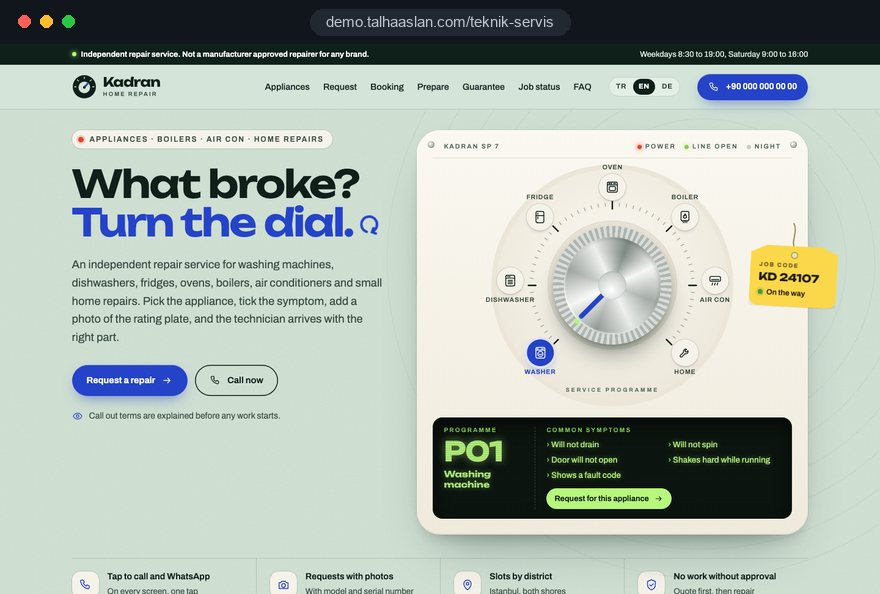
Most people looking for a repair service have something broken at home right now: the washing machine will not drain, the boiler shows a fault code, the fridge has stopped cooling, a kitchen cupboard door has come off. They pick up their phone, search for the appliance or the job with their area name and call the first number that looks trustworthy. So we build home and appliance repair websites around appliance and fault pages, tap to call and a short request form with photos.
Open the live demoA demo design we built for a fictional brand
In short
A home and appliance repair website gives every appliance you fix, every common fault and every area you cover its own page, and takes visitors to a call or WhatsApp message in one tap. It states brand information honestly, makes parts and labour guarantees clear and loads fast on a phone. In Great Britain, it also shows your Gas Safe registration wherever you work on gas appliances.
Talha Aslan and teamLast updated:
Why it needs its own approach
Someone with a broken appliance does not read a website, they scan it. If the number and their appliance are not obvious within seconds, they go back and call the next result. Generic business templates are not built for that urgency.
The phone number sits on the contact page or in the footer. A customer with water across the kitchen floor or a boiler that stopped overnight has to scroll to find it, and often calls a competitor instead.
Washing machines, dishwashers, fridges, boilers and small household repairs share a single services page with one line each. Someone whose fridge has stopped cooling cannot see their problem described, and search engines cannot tell which appliances you actually repair.
Showing manufacturer logos or calling yourself an approved repairer when you are not suggests a link that does not exist. Customers who find out later feel misled, and the manufacturer may object to the use of its name and logo.
The site does not say whether parts are genuine or compatible, how long labour and parts are guaranteed, or whether you are on the Gas Safe Register. In Great Britain, a business doing gas work within the scope of the Gas Safety (Installation and Use) Regulations 1998 must be registered.
The site shows an address but not the towns and postcodes you cover, or whether repairs happen in the home or in your workshop. Visitors cannot tell whether you will come out to them, and the site does not appear for searches that include their area name.
Calls, WhatsApp messages and form requests end up in different places, and nobody knows which appliance page brought the job in. The return on ads or content cannot be measured.
Sources: HSE: Gas Safe Register, Gas Safety (Installation and Use) Regulations 1998
Our recommended structure
We build a repair website around the situation the customer is in. When an appliance has stopped completely, they see your number and a one tap call button on the first screen. When planning a service or a few small repairs, they read the relevant page and send a request with a photo of the rating plate or the job. Both paths live on the same site without getting in each other's way.
Each appliance group, such as washing machines and dishwashers, fridges, ovens, boilers or air conditioning units, gets its own page; if you run a multi trade handyman team, assembly, small repairs and maintenance jobs sit in a section of their own. If you work in a single trade, our electrical contractor, plumbing and heating or HVAC company website pages are a closer fit.
Design, development and local search work sit in one team, so these decisions are not patched on later. Talha Aslan sets the strategy and experienced members of our team carry out the build.
Home
Every appliance and area page answers its own search, and every one carries the same call and request buttons.
The right setup for you
All three start from the same foundation; what changes is the appliances you cover, whether you repair in the home or the workshop and how you relate to manufacturers.
Household appliances
A service repairing washing machines, dishwashers, fridges and ovens; customers often search by brand, so the site lists the brands you work on without implying you are the manufacturer's own service.
Heating and cooling units
A service handling boiler, water heater and air conditioning breakdowns and servicing; work peaks with the seasons, so the site separates urgent breakdowns from planned servicing.
Several trades
A team bundling small repairs, assembly and maintenance into one visit; the customer writes a job list, and the site sets clear limits on what you take on.
Built for repair services
This list comes from the decisions that come up most often when planning sites for appliance repair and home repair businesses.
On phones, call and WhatsApp buttons stay fixed at the bottom of the screen; on desktop, the number is clearly visible at the top. WhatsApp opens with a ready message that says which appliance page the visitor came from.
Each appliance group has its own page, describing symptoms in the customer's own words: will not drain, not cooling, showing a fault code. Customers recognise their problem, and search engines understand what you repair.
Customers can attach a photo of the rating plate and the fault with a short note. You can see which part might be needed before you go, which makes it more likely you arrive with the right one.
The brands you repair are listed as plain information; if you are not a manufacturer approved repairer, the site says so and shows no manufacturer logos. We write it this way so nothing implies a link that does not exist; you confirm the wording for your business.
Whether parts are genuine or compatible, how labour and parts are guaranteed and how you invoice are set out clearly. Where you work on gas appliances, your Gas Safe registration number is shown, as gas work in Great Britain within the scope of the 1998 Regulations requires registration.
Your name or your team's, photos of real jobs and any qualifications. In multi trade teams, the site also says who does which kind of job and which jobs you do not take on.
Sources: HSE: Gas Safe Register, Gas Safety (Installation and Use) Regulations 1998
Comparison
| Topic | Generic business template | Website built for repair services |
|---|---|---|
| Phone number | On the contact page or in the footer | Sticky call and WhatsApp button on every screen |
| Appliances | Every appliance in one list | Each appliance and fault type on its own page |
| Request form | General contact form | Form taking model number, photos and a job list |
| Brands | Manufacturer logos and vague claims | Brands as information, approval status clear |
| Guarantees | Missing or vague | Parts and labour guarantees with their terms |
| Measurement | Visit counts | Which appliance and area pages bring in calls |
Quick check
Must haves: does your site have them?
0 of 6 in place Tick the boxes to see where your site stands.
Added as needed
We choose which of these you need together during the scoping call.
Tell us the appliances you repair, the jobs you take on, the areas you cover and your working hours; we will work out the right page structure and send a written quote.
Process
We define your business, your audience and the site’s one-sentence job: who it sells what to, through which action. Scope and timeline are written from that answer.
The home page and key templates come to you as designs first; no code is written before your approval. We do not like surprises, and we do not cause them.
The approved design becomes fast, secure, maintainable code. You follow progress in the CRM and see every page in a staging environment before launch.
The site goes live with analytics, Search Console and conversion tracking connected; panel training is given, first-year hosting and maintenance included.
Search and speed foundations
Customers search for a repair service, but also for washing machine repair with their town name, boiler repair near me or a local handyman. Appliance pages, area pages and your Google Business Profile are set up to support each other.
Business name, phone number, service area and opening hours are marked up so search engines can read them; nothing that is not on the page is marked up, and no rating that is not real.
Someone standing next to a broken appliance usually searches on their phone. Pages are designed for the phone screen first, images are compressed and Core Web Vitals are measured before launch.
Call button clicks, WhatsApp messages and form requests are tracked as conversions from day one, so you can see which appliance and area pages bring in work.
Free tools
Before planning a new site, test the current one against the measures your customers experience. The electricity cost calculator is here too, useful for showing a customer what an old appliance costs to run. The tools are free and need no sign up.
Tech SEO
Test whether a page works well on phones: viewport, font size, tap targets, a mobile screenshot and Core Web Vitals.
Tech SEO
Scan any URL for title, meta description, headings, canonical, indexability and speed signals, and get an SEO score with a clear to-do list.
Conversion
Create a wa.me link with a preset message + embeddable button code.
Tech SEO
Generate rich-result JSON-LD for Article, Product, FAQ, Local Business.
Conversion
Turn URLs, WhatsApp, Wi-Fi, vCard and text into a QR code in seconds; download high-res PNG or SVG.
Energy
Turn an appliance's watts and hours of use into kWh and running cost per day, month and year, add standby power and total several devices at once.
How we work
We do not show a live client site for appliance repair or multi trade home repair on this page; instead, we explain how we work in this field. See the work we have done in other industries on the references page.
Live demo
For this field we built a one page demo site for a fictional brand, made only to show our approach. You can explore the design, the copy structure and the mobile view live in three languages.
Open the live demoIn the first call, we write down the appliances you cover, the faults you hear about most and the jobs you do not take on; the site map and the request form fields come from that list.
We describe your approval status from the documents you give us, and use no logos or approved wording for brands you are not approved by.
We write your parts and labour guarantees, invoicing and call out terms exactly as you apply them, and put no promise on the site that you do not keep.
After launch, we watch which appliance pages and areas bring calls and requests, and adjust for the season, for example boiler breakdowns in winter and air conditioning faults in summer.
Related pages
Industries
For electricians and electrical contractors who work in that trade only.
Industries
For plumbing and heating firms focused on leaks, drains and heating systems.
Industries
For companies installing air conditioning, ventilation and heat pumps.
Industries
For renovation firms that run projects rather than small repairs.
 How to Do Google Maps SEO: A Guide to Ranking Your Business Higher on the MapRead article
 What Is a Call to Action (CTA)? CTA Button Examples That ConvertRead article
 Lead Form Design for Booking, Quote and Demo Requests: UX Rules That Lift ConversionsRead article
 What Is Mobile First Design? How Mobile First Affects Your SEO RankingsRead article
FAQ
If your question is not here, write to us; we will send you an answer and a written quote.
Next step
In a free 15 minute call, we will go through the appliances you repair, the jobs you take on, the areas you cover and how you work, then prepare a written scope and quote.
In-depth guide
For an appliance repair engineer or a multi trade handyman team, a website works less like a brochure and more like a dispatcher: it puts the right person through to a call, a WhatsApp message or a repair request at the right moment. Making a repair site look good is easy. Making one that reliably brings in work depends on a series of small decisions made in the right order.
This guide walks through those decisions the way we approach them at the start of a project. From the appliance list and the request form to brand wording, Google Business Profile and call tracking, each section ends with checks you can apply to your own site straight away.
Not everyone who lands on a home and appliance repair website wants the same thing; the site has to serve four quite different situations at once. Knowing which one dominates your work decides what sits on the first screen and which pages get written first.
Before a project starts, we ask clients to sort the last two months of jobs into these four groups. If most work comes from breakdowns, the first screen is given over almost entirely to calling. If planned work dominates, the depth of the appliance pages and the request form come forward. A growing share of commercial clients puts a landlord page into the first release.
Not every appliance or job needs its own page; a separate page is worth creating when customers search for it in their own words and make a separate decision about it. Washing machine repair and fridge repair are different searches, while putting up a curtain rail and fitting a shelf usually sit comfortably on one assembly page.
Use these criteria to decide whether something earns its own page:
In practice, four to eight pages is a sensible start for a service focused on one appliance group, and twelve to twenty for a business covering several appliances and home repairs. We group the pages under clear headings such as household appliances, heating and cooling units, and home repairs and assembly, which keeps the menu simple and tells search engines exactly what you do. Skip pages for work you do not want; those calls only cost you time.
An appliance page is where customers recognise their own problem and see why they should trust you, so it explains the job through symptoms and process rather than general claims. A page that says "professional appliance services" tells nobody anything; a page that opens with "if your washing machine stops mid cycle with water still in the drum" speaks directly to the person reading it.
We usually build an appliance page in this order:
The fourth point is missing from most repair sites, yet it builds real trust. You do not have to publish prices, but explaining what affects the price, such as the age of the appliance, the parts needed or a workshop repair, shortens the conversation on the phone.
An area page should exist only for places you visit regularly and can say something specific about. Pages where only the town name changes give customers no information, and search engines tend to treat them as thin, low value content.
A good area page includes:
For most repair businesses, a balanced start is three to six detailed pages for main areas, with every other town and postcode listed on a single coverage page. Crossing every area with every appliance, so that each town gets its own washing machine page, its own fridge page and its own boiler page, quickly turns into hundreds of weak pages.
The first screen on a phone has to show a customer in a hurry three things without scrolling: what you repair, where you go and how to reach you with one tap.
On desktop the same logic moves to the header, with a large, clickable number in the top right corner. Always check on a real phone that popups, chat bubbles and the cookie banner never sit on top of the call button; it is the single most common way we see calls being lost.
A breakdown and a planned service should never go through the same form; breakdowns go straight to a call, planned work goes into a request flow that gathers detail. Mixing them makes someone with water on the kitchen floor fill in a form.
These are the steps we follow when setting up the breakdown path:
The planned path runs from the appliance or repair page to the request form and can let customers choose a convenient day and time slot. In busy seasons it can be supported by a dedicated campaign page, which we cover in the content section below.
A repair request form should be short but collect enough for you to understand the job without a visit, and the most valuable fields are almost always the photos. A picture of the rating plate and the error display says more than two paragraphs of description, and tells you which part you may need.
When the form is sent, the request should reach both an e-mail inbox and the phone of whoever handles enquiries, and the customer should see a confirmation that says when you will be in touch. Photos often show the inside of homes, so limit who can see them and delete them a set period after the job closes.
Someone about to hand over an appliance or let a stranger into their home wants to know who will knock on the door; trust comes from real names, real jobs and clear terms, not stock photography. It is the part of a repair website most often neglected.
Brands need care. You can list the appliance brands you work on as plain information, but presenting yourself as a manufacturer's approved repairer when you are not misleads customers, and consumer protection rules in most markets treat misleading claims seriously; check the details with your adviser. A sentence such as "we repair washing machines and dishwashers from these manufacturers; we are an independent engineer, not the manufacturer's own service" is both accurate and reassuring.
For a large share of appliance repair and handyman searches, customers see the map results first, so your Google Business Profile and your website have to be planned together. The profile gets you onto the map; the website wins the decision.
When setting up or fixing a profile, we suggest this order:
Keep your name, phone number and hours identical across the profile, the site and the directories you appear in. If you want this handled together with content and technical work, see the scope of our SEO service.
A customer searching during a breakdown is usually on a phone, sometimes standing in a utility room with a weak signal, and a slow repair site is a call that goes to a competitor.
Google treats three Core Web Vitals as good when they are met for 75 percent of visits: LCP, the time until the main content has loaded, at 2.5 seconds or less; INP, how quickly the page reacts to taps, at 200 milliseconds or less; and CLS, how much the layout shifts while loading, at 0.1 or less.
To see where your current site stands, run a few appliance pages through our mobile friendly test. Slow inner pages usually point to large gallery images or embedded videos.
Visitor numbers mean little for a repair business; what you need to know is which page and which source made the phone ring. Without this from day one, you cannot tell later which investment paid off.
Privacy rules shape this setup. For visitors in the European Economic Area, Google requires consent mode for measurement and personalized advertising features, and in the EU consent is needed before non essential tracking; in the UK, follow the ICO's guidance on cookies. Marking up your business name, phone number, service area and hours as structured data helps search engines read them correctly, and you can generate the code with our schema markup tool.
If you plan ads for seasonal peaks, do not spend before tracking works. Google describes Quality Score as a diagnostic built from expected click through rate, ad relevance and landing page experience; when the ad leads to a page about the exact appliance searched for, all three tend to improve. We describe our approach to campaigns on our Google Ads management page.
Content on a home and appliance repair website means short, honest answers to the questions customers ask while something is going wrong; the aim is to look reliable in the right search, not to pile up pages. A good fault guide sometimes tells the reader they can fix it themselves, and that is exactly why they remember you.
Drawing up the seasonal calendar at the start of the year and updating one appliance page or adding one short guide for each season is a realistic pace for a busy repair service. For short campaigns such as autumn boiler servicing, a single goal campaign landing page matched to your ads keeps the main site untouched and makes measurement cleaner.
Most of the mistakes we see come not from design but from rushed decisions about content and structure, and each one has a known, practical fix. Use this list as a checklist when you write the brief for a new home and appliance repair site.
Some of these may already be on your current site. Check all six on a friend's phone before planning a new one; a first time visitor often takes longer to find the number than you expect.
When choosing who builds your home and appliance repair website, look less at design samples and more at how they handle the decisions above. The right team asks questions first: which appliances you cover, which jobs you want, which areas you go to, what you do out of hours.
In our work, design, development and local search sit in one team; you can read about the process and what we deliver in our web design service, and see sites we have built on our references page. To see the fixed packages and scope, look at the web design pricing section. Then send us your list of appliances and jobs, the areas you cover and your working hours through our contact page, and we will work out the right site map and a written quote together.
Start a Project
Thanks {name}, we've received your brief. We usually reply within the same day.
What happens next?