The timetable is an image
The weekly schedule is a graphic posted to Instagram or a scanned table on the site. It is not updated when a class is cancelled or a teacher covers, it is unreadable on a phone and search engines cannot see a single class.

Your Windows contrast theme is on; colours come from your system.
Your device is set to reduce motion; animations are already off.
Your choices are saved in this browser only.
Industry-specific web design
Someone new to a Pilates or yoga studio usually wants three answers: when are the classes this week, where should a beginner start, and how do the class packs work. A regular just wants to see whether there is a reformer left in tomorrow's 7am class. We build studio websites for both, with the timetable and class pack sales at the centre, for studios in the UK and elsewhere that are happy to work with a remote team.
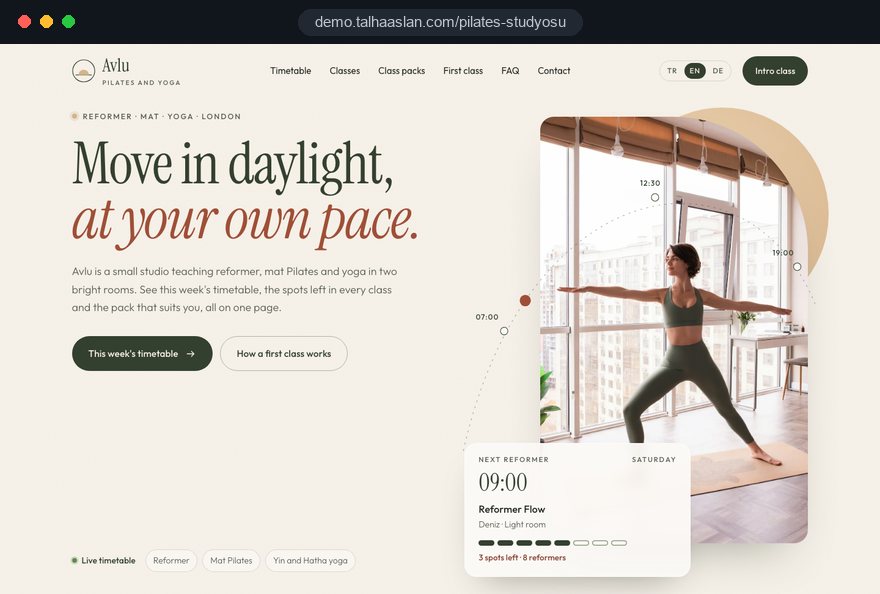
Open the live demoA demo design we built for a fictional brand
In short
A Pilates studio website shows a live weekly timetable, keeps reformer class capacity up to date in real time, sells class packs and credits online and introduces teachers with real details. A yoga studio website rests on the same foundation. In the UK, the 14 day cancellation right does not apply to leisure services booked for a specific date, so cancellation terms are written out clearly before checkout.
Talha Aslan and teamLast updated:
Why it needs its own approach
A studio really runs on its timetable and its class packs, yet the website is often just a gallery of nice photos. Class times live in one place, packs in another and sign ups drift around in direct messages.
The weekly schedule is a graphic posted to Instagram or a scanned table on the site. It is not updated when a class is cancelled or a teacher covers, it is unreadable on a phone and search engines cannot see a single class.
How many classes a pack holds, when credits expire and whether a pack can be paused or transferred is not written anywhere. Every newcomer asks the same questions by message, and the answers vary depending on who replies.
A reformer class has as many spots as there are machines, and who is coming is tracked in messages and a notebook. Double sign ups, empty machines and late cancellations end up eating the most staff time.
People often choose a class by its teacher. If the site does not show who teaches what, their training and the level they teach, a newcomer has to decide without knowing the studio at all.
Claims that a class will cure back pain or fix posture can be misleading and run into advertising rules. Promising results to someone with a health condition, instead of suggesting they speak to a doctor or physiotherapist first, leaves the studio exposed.
If packs are sold online, customers need clear pre contract information and terms before they pay. When cancellation, refund and late arrival rules only hang on the studio wall, disputes with customers follow.
Our approach
We build a Pilates or yoga studio website starting from the timetable. It is updated from the admin panel and shows every class with its teacher, level and spots left; a click on a class explains what it involves, who it suits and what to bring.
Where a group class has as many spots as machines or mats, a capacity based reservation flow is set up, with credits deducted and a waiting list handled automatically; private and duet sessions connect to a teacher calendar. Class packs are sold with online payment, and the terms are accepted as part of checkout.
Design, development and content sit in one team, so none of this is patched on later. Talha Aslan sets the strategy and an experienced team handles delivery, working remotely and in English with studios abroad. We write the class descriptions and teacher bios with you, and nothing goes live without your approval.
Home
The timetable is one tap away from every page; class pack purchases and class sign ups come together in one student account.
The right setup
All three start from the same foundation; the type of class, the way capacity works and the number of locations make the difference.
Equipment based
With only a few machines, every spot counts; the site is built to fill empty reformers.
Mat and yoga
Style, level and teacher come first; workshops and special events are part of the programme.
Several locations
Students pick the location first and the class second; where a pack is valid is stated clearly.
Built for Pilates and yoga studios
These are the points that need a decision most often when planning a site for a Pilates or yoga studio.
Day and time, class type, level, teacher and spots left in one view; when a class is cancelled or covered, it is updated once in the admin panel. The timetable is designed to be read on a phone, and search engines see every class as text.
How many classes each pack holds, how long credits last and the rules on pausing, transferring and refunds are stated on the purchase page. Whether to publish pack prices and how to sell an intro offer are decisions we make with you.
Under regulation 28(1)(h) of the Consumer Contracts Regulations 2013, the cancellation right does not apply to leisure services where the contract sets a specific date or period. A class booked for a set date and an undated pack may not be treated the same, so we agree the terms with your adviser and state them before checkout.
A real photo, the classes they teach, their training and the levels they work with for every teacher. Qualifications are listed only as they can be evidenced, and each profile links straight to that teacher's classes.
What to wear to a first class, how early to arrive, how reformer differs from mat, and who someone with a health condition should speak to first. This page answers the questions your front desk hears most and makes the first sign up easier.
Each class is described plainly: what it involves, its pace and who it suits. Claims that it treats a condition or pain are left out. If you run pregnancy or post injury classes, the need for a consultation and medical clearance is stated clearly.
Comparison
| Topic | Generic business template | Site built for a studio |
|---|---|---|
| Timetable | An image or a static table | A live timetable showing spots left, updated from the admin panel |
| Class packs | Details by message and bank transfer | Online payment, credit tracking and written pack rules |
| Capacity | Notebook and WhatsApp | Automatic capacity per machine or mat, plus a waiting list |
| Teachers | One group photo | A profile and class list for every teacher |
| Beginners | No information | First class guide and level descriptions |
| Measurement | Visitor numbers | Intro class requests, pack sales and class sign ups tracked separately |
Quick check
Must haves: does your site have them?
0 of 6 in place Tick the boxes to see where your site stands.
Added as needed
We choose which of these you need together during the scoping call.
Share your class types, the number of machines and mats, how your packs work and how people sign up today; we will come back with a page structure and a written quote.
Process
We define your business, your audience and the site’s one-sentence job: who it sells what to, through which action. Scope and timeline are written from that answer.
The home page and key templates come to you as designs first; no code is written before your approval. We do not like surprises, and we do not cause them.
The approved design becomes fast, secure, maintainable code. You follow progress in the CRM and see every page in a staging environment before launch.
The site goes live with analytics, Search Console and conversion tracking connected; panel training is given, first-year hosting and maintenance included.
Search and speed foundations
People search with their neighbourhood or town, or by class type such as reformer Pilates or yin yoga. Each class type gets its own page, and the address, opening hours and Google Business Profile are kept consistent.
Studio name, address, phone and opening hours are marked up so search engines can read them; nothing is marked up that is not on the page.
Most people checking the timetable or buying a pack are on a phone. Pages are designed for phones first, studio photos and videos are compressed and Core Web Vitals are measured before launch.
Intro class requests, pack sales, WhatsApp clicks and class sign ups are tracked as separate conversions from day one, so you can see which class page brings in new students.
Free tools
Before planning a new site, see how the current one loads on a phone and how it looks in search; then create a timetable QR code for the studio wall, an Instagram bio and a WhatsApp link. The tools are free and need no sign up.
Tech SEO
Test whether a page works well on phones: viewport, font size, tap targets, a mobile screenshot and Core Web Vitals.
Tech SEO
Scan any URL for title, meta description, headings, canonical, indexability and speed signals, and get an SEO score with a clear to-do list.
Conversion
Turn URLs, WhatsApp, Wi-Fi, vCard and text into a QR code in seconds; download high-res PNG or SVG.
Conversion
Create a wa.me link with a preset message + embeddable button code.
Bio
Write an Instagram, TikTok or X bio in seconds: hundreds of short, aesthetic and funny bio ideas, a builder for your name and niche, plus fancy fonts.
Image
Convert between JPG, PNG and WebP in one click or in batches; it detects the input format, lets you set quality and a background for transparency, and uploads nothing.
How we work
We do not yet have a live client project in the Pilates or yoga field to show, so we explain our approach on a live demo site. The demo is our own showcase, not a client. Our other client work is on the references page.
Live demo
For this field we built a one page demo site for a fictional brand, made only to show our approach. You can explore the design, the copy structure and the mobile view live in three languages.
Open the live demoBefore design starts, we write down your class types, capacities, credit and cancellation rules; the timetable and checkout screens are drawn from those rules.
Our first test is how long it takes a regular to sign up for tomorrow's class on a phone; the timetable and sign up step are simplified around that.
We reserve a place in checkout for pre contract information, terms and cancellation rules from the start; the legal review of the wording stays with your adviser.
We write class descriptions and teacher bios with you, use real photos of your space and teachers, and nothing goes live without your approval.
Related pages
Solutions
Capacity based spots in group classes, per machine or mat.
Industries
Session planning and care with health information overlap strongly with pilates.
Industries
A separate setup for gyms built around memberships and equipment.
Industries
A person focused site for trainers who work one to one without a studio.
 How to Choose a Payment Gateway: What to Check Before You SignRead article
 Lead Form Design for Booking, Quote and Demo Requests: UX Rules That Lift ConversionsRead article
 How to Do Google Maps SEO: A Guide to Ranking Your Business Higher on the MapRead article
 How Website Video Affects Conversion Rate: When It Helps, When It HurtsRead article
FAQ
If your question is not here, write to us; we will send you an answer and a written quote.
Next step
In a free 15-minute call, in English, we will go through your timetable, pack and capacity rules and your teachers, then send a written scope and quote.
In-depth guide
A Pilates studio website is really the studio's rulebook made public. How many reformers are in the 7am class, how long a pack lasts, what happens to a credit when someone cancels two hours before class: if those answers are unclear, even a beautiful design will not take any work off the front desk.
This guide walks through the decisions a Pilates or yoga studio owner makes on a website project, in the order they need to be made. We focus on what makes small, equipment limited group classes different, not on general gym advice.
The structure of the site is set by what the studio sells and how, not by the design. Single classes, credit packs, monthly unlimited memberships and private sessions can all live in one studio, but each one needs its own checkout screen, its own account logic and its own terms.
Before the first call with an agency, answer these questions in writing:
These answers change the sitemap directly. A studio that only sells private sessions does not need a weekly timetable; the teacher calendar comes first. A boutique reformer studio, on the other hand, should show today's free machines near the top of the home page. Screens drawn before the sales model is settled usually get rebuilt at the first pack promotion.
The credit system is the part of the site that takes the most development work and is the hardest to change later, so the rules belong in one complete document before any code is written. Exceptions handled verbally for years either become a rule in the system or disappear.
The rules document should cover at least these points:
The document does two jobs. Developers build without guessing, and the copy on the pack purchase page comes from the same source, so what the site says matches what the front desk says.
Also decide how packs your clients already hold move into the new accounts, and whether they keep their old rules; otherwise launch week is spent explaining at the desk.
In a reformer class, capacity equals the number of machines, and every empty machine is revenue that never comes back; the booking system therefore has to refill freed spots quickly, not just reserve them. That means defining in advance how sign up, cancellation and the waiting list connect.
When you set up a capacity based booking system, decide in this order:
Show each rule in a single line at the moment someone signs up. A client who saw the rule beforehand is far more likely to cancel on time next week than to dispute the lost credit.
A live timetable earns its keep by showing the current state of each class accurately; a table that only lists times and class names still sends people to direct messages. When the timetable is designed, every state a class can be in should be defined and be easy to tell apart on a phone at a glance.
A Pilates and yoga timetable should handle these states:
Filters matter just as much. Class type, level, teacher and, with more than one location, location should sit above the weekly view. On a phone, a day by day list that scrolls usually reads more easily than a seven column grid. During an agency demo, ask them to cancel a class and show how it appears in the timetable; the number of clicks it takes tells you whether the timetable is really live.
Every class type deserves its own page, because both the questions a newcomer asks and the words people search with change from type to type. Someone searching for reformer Pilates wants to know how the machine works and what happens in the first class; someone searching for yin yoga wants to know the pace and how still the class is.
Each class page should answer the same set of questions:
Once a visitor is convinced by the description, they should not have to go back to the main timetable and search again. If Pilates and yoga run in the same studio, both sets of pages share one template, but the copy is written separately; adapting one discipline's text for the other weakens both pages.
For a newcomer, the biggest barrier is often not price but not knowing where to start, and the site should turn that uncertainty into a single path. The button leading to it on the home page should be separate from the regulars' timetable button and speak clearly to someone coming for the first time.
A well designed first class path has these steps:
Many reformer studios want new clients to do a private or small group introduction to the machine before joining a regular class. If you have that requirement, build it into the path; otherwise a beginner signs straight into an advanced group class, which is hard on both the client and the teacher.
Pilates clients often attach to a teacher rather than a studio, so a teacher page should be a short route to booking with that teacher, not just a bio card. It should say clearly which levels the teacher works with, which class types they teach and whether they offer private sessions.
Qualifications need care. Pilates training comes from many schools and in very different lengths; list only training that can be evidenced, with the name of the provider, and use titles such as "specialist" only where there is a real basis. If a teacher is also a physiotherapist, state their profession separately, and keep wording that suggests treatment off the other teachers' pages.
Private and duet sessions need a different structure from group classes: the client picks a teacher first, then a free slot. That calls for a teacher based appointment calendar. While planning, answer these questions:
The easiest mistake on Pilates and yoga pages is wording that implies a class treats a condition or pain; describing the class is fine, but promising outcomes leaves the studio exposed. Safe wording describes what the class does and points anyone with a health condition to their doctor or physiotherapist first.
Instead of "fixes a slipped disc", for example, write "a slower class focused on spinal mobility; if you have a back condition, check with your doctor before joining". If you run pregnancy and postnatal classes, post injury programs or clinical Pilates, the consultation requirement and who teaches the class should be stated clearly on the page.
The intake form raises a separate data question. Data protection law in the UK and the EU treats health information as a special category of personal data, and every health question on the form falls under it. Follow these rules:
The moment packs are sold through the site, checkout becomes a distance contract, and the terms have to be shown before payment. In the UK, the Consumer Contracts Regulations 2013 require clear information before the contract, and regulation 28(1)(h) excludes leisure services from the 14 day cancellation right where the contract sets a specific date or period.
For a Pilates studio, a single class booked for a set date and an undated credit pack used whenever the client likes may not be treated the same way. That distinction should be settled with your legal adviser, not guessed; the website's job is to make sure the resulting wording appears in the right place and order in checkout.
Check these points in the purchase flow:
Discuss payments at the same stage. Card storage, recurring billing and refund handling differ between payment providers; if you plan an automatically renewing monthly membership, confirm it with the provider early.
The timetable and booking pages are the most visited pages on a Pilates studio website and are almost always opened on a phone, so speed targets should be set for those two pages first. Clients often check the timetable on the way out of work or before a morning class, on a weak mobile connection.
Google's Core Web Vitals give concrete targets. LCP, the time it takes for the main content to load, should be 2.5 seconds or less; INP, how quickly the page responds to a tap, 200 milliseconds or less; CLS, how much content shifts while loading, 0.1 or less. These thresholds should be met for 75 percent of real visits.
The things that slow studio sites down most often:
To see where your current site stands, try our free mobile friendly test.
People looking for Pilates almost always want a studio near them, so local visibility, class type pages and the Google Business Profile should be planned together. Searches usually combine an area name with a class type such as reformer Pilates, pregnancy yoga or mat Pilates.
A basic local checklist:
You can also build a small bridge inside the studio: a QR code at the front desk and in the changing room opens the weekly timetable directly, so clients book their next class on the spot. In areas with strong competition, see what our SEO service covers for content and technical work together.
A Pilates studio website succeeds when empty machines get filled and intro clients go on to buy a pack, not when visitor numbers rise. The measurement plan should therefore define, before launch, exactly which events are recorded.
Events worth tracking:
The data has a practical use. A time slot with a permanent waiting list is a strong signal to add a class; a slot that stays half empty may need a different class type or a different teacher. If you tag the links in your Instagram bio and stories with our UTM link builder, you can see which posts actually bring intro clients. Accept from the start that visitors who decline cookies will leave gaps in the data.
Most mistakes on Pilates and yoga studio websites come not from design but from the studio's way of working not making it onto the site. Each of these means another message to the front desk, an empty machine or a dispute:
Choose the team for your Pilates studio website by how well they draw out your studio's rules through questions; a visual portfolio alone is not enough. A team that does not ask about credits, capacity and cancellations in the first meeting is likely to offer you a ready made template.
Ask these questions in that meeting:
Ask too whether you can add a class type or a location yourself after launch, or whether it needs the team every time.
This page links to a live demo site we built for Pilates and yoga studios, where you can try the timetable, capacity and pack flow yourself. Our general approach is on the web design service page and our other work in our references. Fixed price packages are in the pricing section; to share your class types, number of machines and pack structure, get in touch and we will work out the right setup and a written quote with you.
Start a Project
Thanks {name}, we've received your brief. We usually reply within the same day.
What happens next?