Every treatment in one list
Someone recovering from a knee replacement reads the same bullet list as a runner with shin splints. Without a page per programme, the clinic is missing from that search and the patient cannot tell what fits them.

Your Windows contrast theme is on; colours come from your system.
Your device is set to reduce motion; animations are already off.
Your choices are saved in this browser only.
Industry-specific web design
People look for a physio when back pain will not settle, after knee surgery or when a running injury keeps coming back. Their questions are practical: how many sessions, where, and can you come to me? We build physiotherapy websites around those questions, with treatment programme pages, a clear course of sessions and the areas you cover for home visits, for practices in the UK and elsewhere that work with a remote team.
Open the live demoA demo design we built for a fictional brand
In short
A physiotherapist website explains each treatment programme on its own page, shows the course of treatment from first assessment to discharge, states clearly where home visits are offered and leads to an enquiry in one tap. In the UK, physiotherapist is a title protected by the HCPC, so profiles should name registered professionals correctly and claims should stay factual.
Talha Aslan and teamLast updated:
Why it needs its own approach
A physiotherapy website has to do more than introduce a clinician. It has to explain who can come, roughly how treatment runs and where it happens. Generic business templates leave room for none of that.
Someone recovering from a knee replacement reads the same bullet list as a runner with shin splints. Without a page per programme, the clinic is missing from that search and the patient cannot tell what fits them.
"We also do home visits" with no list of areas means calls from people you cannot reach, while people nearby never ask because they assume you will not come.
What happens at the first assessment, how sessions usually progress and what to bring are not written down, so every question lands in WhatsApp and undecided patients look elsewhere.
In the UK, physiotherapist and physical therapist are titles protected by the HCPC. A site that lists unregistered staff under those titles, or promises outcomes it cannot evidence, creates a problem the practice did not need.
Patients want to know who will treat their shoulder, their child or their stroke rehabilitation. Profiles without focus areas and training leave trust to the first appointment.
Home exercise sheets get lost. Without a guide patients can open on their phone, practice between sessions slips and the site carries none of the clinic's most useful knowledge.
Sources: HCPC: The professions we regulate, protected titles
Our approach
We build a physio website in the order patients think: first they find the programme that matches their problem, then they see how treatment works, and finally they choose clinic or home and leave an enquiry. Programme pages, the treatment page and the area page are linked, and every page ends in the same enquiry flow.
If patients should pick their own slot, an online scheduling system is connected to the site; for home visits, the form asks for postcode and preferred times up front. If you run clinical Pilates, we write that section so it reads as rehabilitation, not as a studio timetable.
Design, development and content sit in one team, so none of this is patched on later. Talha Aslan sets the strategy and an experienced team handles delivery. We work remotely and in English with practices abroad.
Home
Each programme page answers its own search; in clinic or at home, all of them lead into the same enquiry flow.
The right setup
All three start from the same foundation; where treatment happens and the size of the team make the difference.
One physio
Patients search by name and by speciality; the site explains your approach and where you practise.
Clinic
The clinic is the brand; physios with different specialities are introduced as one team.
Home visits
The patient is often housebound or just out of hospital; the first question is whether you cover their area.
Built for physiotherapists
These are the points that need a decision most often when a physio site is planned.
Back and neck pain, post surgery rehabilitation, sports injuries, neurological rehabilitation and the rest: who each programme is for, what the first assessment looks at and how treatment usually runs. Session numbers are described as varying by person, never as a promise.
The HCPC lists physiotherapist and physical therapist as protected titles and treats their use by someone not on its Register as misuse of title. We use these titles only for registered team members and can show registration details so patients can check them.
The areas you cover as a list and a map, how visits are planned and what you need to know in advance, all on one page. Enquiries from outside your area are filtered by the form.
Under rule 12.1 of the UK CAP Code, objective claims must be backed by evidence. We write factual programme descriptions and leave out cure or outcome promises; the final compliance check belongs to your practice.
Short, plain exercise pages patients can open on their phone. You decide the content; we make it readable, fast and printable, and link paper programmes to it with a QR code.
Physiotherapist profiles, training, photos of treatment rooms and equipment, address, parking and opening hours. Real photography earns more trust than stock images.
Sources: HCPC: The professions we regulate · ASA, CAP Code section 12, rule 12.1
Comparison
| Topic | Generic business template | Site built for a physiotherapist |
|---|---|---|
| Treatment content | Services as a bullet list on one page | Each programme on its own page: who it is for, how it runs |
| Course of treatment | Not explained, asked on the phone | A step by step page from first assessment to discharge |
| Home visits | A single line saying home visits are available | Areas listed and mapped, enquiry form with postcode |
| Titles and claims | Loose titles and promises of recovery | Protected titles used correctly, factual claims |
| Between sessions | The site is forgotten after the last visit | An exercise guide patients open on their phone |
| Measurement | Visitor numbers | Which programme and which area bring enquiries |
Quick check
Must haves: does your site have them?
0 of 6 in place Tick the boxes to see where your site stands.
Added as needed
We choose which of these you need together during the scoping call.
Share the programmes you offer, your team and the areas you cover for home visits; we will come back with a page structure and a written quote.
Process
We define your business, your audience and the site’s one-sentence job: who it sells what to, through which action. Scope and timeline are written from that answer.
The home page and key templates come to you as designs first; no code is written before your approval. We do not like surprises, and we do not cause them.
The approved design becomes fast, secure, maintainable code. You follow progress in the CRM and see every page in a staging environment before launch.
The site goes live with analytics, Search Console and conversion tracking connected; panel training is given, first-year hosting and maintenance included.
Search and speed foundations
Patients search for physio near me, add a town, or type the problem itself, such as physio after ACL surgery. Programme pages, the contact page and the Google Business Profile are built to support each other.
For mobile physio searches, the area page describes the places you genuinely cover; we do not create empty pages for every town you never visit.
Clinic name, address, phone and opening hours are marked up so search engines can read them, and pages are designed for phones first with Core Web Vitals measured before launch.
Calls, form submissions and WhatsApp clicks are tracked as conversions from day one, so you can see which programme and which area bring enquiries.
Free tools
Before planning a new site, see how the current one loads on a phone, how it looks in search and how easy your exercise instructions are to read. The tools are free and need no sign up.
Tech SEO
Test whether a page works well on phones: viewport, font size, tap targets, a mobile screenshot and Core Web Vitals.
Tech SEO
Scan any URL for title, meta description, headings, canonical, indexability and speed signals, and get an SEO score with a clear to-do list.
Tech SEO
Generate rich-result JSON-LD for Article, Product, FAQ, Local Business.
Content
Readability score with Flesch (EN), Ateşman (TR) and Flesch-Amstad (DE).
Conversion
Create a wa.me link with a preset message + embeddable button code.
Conversion
Turn URLs, WhatsApp, Wi-Fi, vCard and text into a QR code in seconds; download high-res PNG or SVG.
How we work
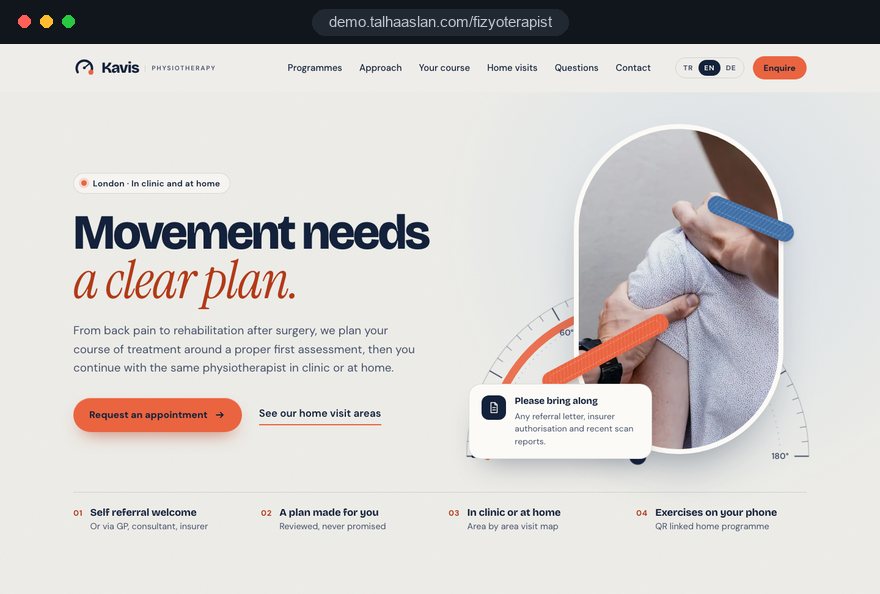
We do not have a live client project in physiotherapy yet, so we show our approach on a live demo site. The demo is not a client site; it shows how we build a physio website. You can see our work in other sectors on the references page.
Live demo
For this field we built a one page demo site for a fictional brand, made only to show our approach. You can explore the design, the copy structure and the mobile view live in three languages.
Open the live demoIn the first call we list the programmes you offer, the problems patients come with most and the areas you cover for home visits; the sitemap grows from that list.
We write programme and exercise pages in plain language, and nothing goes live before you have checked it for clinical accuracy.
Titles, images and claims are reviewed before launch against the rules that apply where you practise; anything doubtful is flagged for you.
We track which programme and which area bring enquiries, and update the site with you when you add a programme or a new area.
Related pages
Solutions
Let patients pick their own session slot from a calendar.
Industries
A separate structure for doctors, including rehabilitation medicine consultants.
Industries
For Pilates studios built around classes and memberships rather than rehabilitation.
Industries
For multi specialty medical centres that include a physiotherapy department.
 Lead Form Design for Booking, Quote and Demo Requests: UX Rules That Lift ConversionsRead article
 How to Do Google Maps SEO: A Guide to Ranking Your Business Higher on the MapRead article
 How to Build a GDPR and KVKK Compliant Website: A Business GuideRead article
 What Is Mobile First Design? How Mobile First Affects Your SEO RankingsRead article
FAQ
If your question is not here, write to us; we will send you an answer and a written quote.
Next step
In a free 15-minute call, in English, we will go through your programmes, your team and the areas you cover, then send a written scope and quote.
In-depth guide
A physiotherapist website usually meets its visitor at an awkward moment: back pain that will not settle, a knee replacement two weeks ago, a running injury that keeps coming back. That person wants three answers quickly: is this program right for me, how does treatment work, and can you see me, in clinic or at home. When the site answers calmly and honestly, an enquiry follows; when it does not, the next search result gets the call.
In this guide, Talha Aslan and team walk through the decisions we make, in order, when we build sites for physio clinics, independent physiotherapists and mobile services. Regulatory notes are general information; clinical content is always yours, and the final compliance check belongs to your practice and its advisers.
A physiotherapy website starts with your real service inventory, not with a color palette. Page count, menu structure and even the scope of the quote come from that inventory; projects that start without it usually get restructured after launch. Before the first call, we suggest preparing four lists:
These lists also force a priority decision. The area you want to grow, say neurological rehabilitation or sports injuries, moves to the top of the menu and the home page, while rarely offered services get a short mention instead of a full program page.
In our web design service, the scoping call starts from exactly these four lists, because the skeleton of a physiotherapist website is built from them. Bring them even if they are incomplete; filling gaps together costs far less than adding pages once the design is finished.
Every treatment program needs a page that answers its own search and follows the same order as every other program page. When patients compare pages and find the same information in the same place, deciding is easier; when your team adds a new program, they work from a template instead of a blank page. The order we recommend:
Narrow pages often work better than broad ones. Under a general sports injury page, a subpage on rehabilitation after ACL reconstruction sits much closer to what people actually type. Before opening a subpage, though, set a test: is there enough original material to write several paragraphs without borrowing from other pages? If not, the topic stays as a heading on the main program page.
A dedicated page on how patients start with you removes more phone calls than any other page on a physio site. People arrive with very different assumptions: some think they need a GP referral, some have a consultant letter after surgery, some are covered by an insurer and need an authorization code first.
Write this page from your actual process, not from a generic template. A clear version usually covers:
That last item matters for trust. A physiotherapist who explains when treatment is not the right first step sounds more credible than one who seems to accept everyone. Avoid lines such as "no need for surgery" or "we diagnose the cause"; they promise more than the page can stand behind.
If rehabilitation medicine doctors work alongside your clinic, their site needs a separate structure; we cover websites for doctors and consultant practices on their own page. The two sites can link to each other, but their roles should stay distinct in the copy.
An enquiry form should ask only what you need to call the patient back; diagnoses and surgical history belong in the first assessment. Under UK and EU data protection law, health information is special category data, so a mandatory "describe your condition" field means you are collecting, storing and protecting that data from the moment someone presses send.
Fields we recommend for physio clinics:
A link to your privacy notice belongs directly under the form. Agree with your adviser where submissions are stored, who can see them and how long they are kept.
Letting patients pick their own slot is not right for every clinic. If a first assessment needs a short screening call, a request form fits better; if follow up sessions have fixed lengths and known capacity, an online scheduling system takes real pressure off the phone. Whichever you choose, state how quickly you reply, so patients know what to expect.
A home visit page has to turn "we also do home visits" into information a patient can apply to their own situation. Often it is not the patient reading it but a son or daughter arranging care for a parent just discharged from hospital, so the tone should speak to both.
What the page should contain:
Be explicit about equipment as well. Saying what can be done with portable kit and which treatments are only possible in clinic prevents disappointment on the first visit.
Your team page should answer "who will treat my shoulder" and tie every title to something verifiable. In the UK, physiotherapist and physical therapist are titles protected by the HCPC, and using them without being on its Register is treated as misuse of title. Elsewhere, the equivalent rules sit with your national or state licensing body, so check them before launch.
A useful physiotherapist profile includes:
Assistants, sports therapists and reception staff deserve profiles too, but under their own accurate job titles; a team grid that labels everyone "physio" is the most common problem we see. Profile text works better as two or three sentences on clinical approach than as a list of adjectives. "I focus on early movement planning after shoulder surgery" tells a patient more than "passionate and dedicated".
Rule 12.1 of the UK CAP Code requires objective claims about treatments to be backed by evidence, so a physiotherapy website should inform rather than persuade. In practice that means describing process instead of outcomes, and documentation instead of adjectives.
Phrases we often meet, and what we suggest instead:
The same standard applies to the blog. A post on exercises for low back pain should also say who should not try them and when to see a doctor; that line is often what makes the post genuinely useful.
We write program and exercise copy in plain language, flag anything that looks doubtful, and nothing goes live until you have approved it for clinical accuracy.
Real photography of your rooms and your team earns more trust than any stock image, and it carries far less compliance risk than images of patients. A visual plan built around the clinic, the staff and short exercise demonstrations covers almost everything a physio site needs.
The plan we suggest:
If a patient is to appear anywhere, you need their documented consent, and you should think carefully about how that image might read as a promise of results. Testimonials follow the same logic: they should reflect a genuine experience, be used with consent and not imply outcomes you could not evidence. The simplest route is to keep patients out of the imagery entirely.
An exercise guide should be a set of short, plain pages a patient opens on their phone between sessions. Paper sheets get lost; a guide that lives on the site makes practice easier and shows the depth of your clinic's knowledge.
We give every exercise page the same layout: the name, its purpose, the starting position, numbered steps, a note that sets and repetitions are set by your physiotherapist, and a clear line saying to stop and get in touch if pain increases. Videos should make sense with the sound off, and the steps should also appear as text, because people often watch in a waiting room or late at night.
The bridge between paper and site is a QR code. Generate a separate code for each exercise page with our free QR code generator and print it in the corner of the home program sheet, so the patient lands on the right page in one move. Do not forget the print view: menus and footer hidden, steps fitting on one page.
To check plain language, paste an exercise text into the readability checker and trim long sentences. Keep the guide general; individual programs belong on the sheet you hand over or in a secure channel, not on public pages.
Most visitors to a physiotherapist website are on a phone, sometimes lying down or using one hand, so speed and ease of use are the first design criteria. Google's Core Web Vitals give a sound baseline: LCP, the time for the main content to load, should be 2.5 seconds or less; INP, how quickly the page responds to a tap, 200 milliseconds or less; and CLS, how much the layout shifts while loading, 0.1 or less.
Risks that are specific to physio sites:
To see where your current site stands, run the home page and your busiest program page separately through our mobile friendly test. Testing only the home page is misleading, because heavy video usually sits on program and exercise pages.
On a new site we run these measurements before launch and share the results with you.
Patients usually find a physio by searching "physio near me" or adding a town name, and in those searches your site and your Google Business Profile have to work together. The profile carries the map result; the program pages persuade the patient once they click through.
Google's rules are clear here. The business name must match the name you use in the real world, without added keywords such as "back pain specialist". A mobile physiotherapist who does not receive patients at an address can be set up as a service area business and hide that address. Name, address, phone number and opening hours should read exactly the same on the site, the profile and any directories you appear in.
On the site, program pages mention the area naturally, and the contact page covers directions, nearby bus stops and parking. Creating a near identical page for every town you cover, with only the place name changed, tends to be treated as low quality content; one detailed home visit page is the more robust approach.
When replying to reviews on your profile, never mention anything about the reviewer's health or treatment; a short thank you and an invitation to get in touch is enough. When the site, the profile and the content calendar are planned together, we manage those pieces on one schedule as part of our SEO service.
Measurement should show which program and which area bring enquiries, while never passing a patient's health information to any analytics tool. That separation matters far more on a physio site than on a typical business site.
Events we recommend tracking from day one:
The free text note, any description of symptoms or a diagnosis should never travel as an event parameter, a URL or an analytics label. Appending form content to the thank you page address is a common mistake and an easy one to miss.
In the UK and the EU, non essential cookies need consent before they are set, so tracking tags should wait for that consent; accept from the start that reports will undercount visitors who decline. A short monthly report is enough: enquiries by program, home visit requests by area, the most opened exercise pages and any pages that have slowed down. Those four headings tell you which program page to strengthen and which area to add next.
These are the mistakes we see most often when reviewing physio sites, each paired with what to do instead.
Use this list as a quick audit of your current site. Checking each item takes less than an hour and makes the scope of a redesign much clearer.
Choose the team for your physiotherapist website by how concretely they talk about regulation and patient flow. Design samples matter, but the questions asked in the first call tell you more.
Questions worth asking:
We do not yet have a live client project in physiotherapy, so we show our approach on a live demo site linked on this page. You can see our work in other sectors on our references page.
Share your programs, your team and the areas you cover through our contact page, and we will come back with a page structure and a written scope. Fixed price packages are listed in the web design pricing section; for a written quote based on your clinic's scope, the Get a quote form is all you need.
Start a Project
Thanks {name}, we've received your brief. We usually reply within the same day.
What happens next?