Plans nobody can compare
Monthly, annual, off-peak and student options sit in one image or are not listed at all. When visitors cannot see what each plan includes, they do the comparison on a competitor's site.

Your Windows contrast theme is on; colours come from your system.
Your device is set to reduce motion; animations are already off.
Your choices are saved in this browser only.
Industry-specific web design
New members usually find a gym while comparing a few clubs near home or work: which plan suits me, what classes run after six, how busy does it get. We build gym websites around membership options, a weekly class timetable, trainer profiles and a free trial pass, for independent gyms and fitness clubs in the UK, Europe and Turkey, working with you remotely in English.
Open the live demoA demo design we built for a fictional brand
In short
A gym website shows membership options side by side, keeps the weekly class timetable current, introduces the trainers and gets a hesitant visitor to claim a trial pass. Whether you call it a gym or a fitness club, the job is the same: answer the questions people have before they walk in, and make the first visit a one-tap decision.
Talha Aslan and teamLast updated:
Why it needs its own approach
A gym website has to get someone who has never seen the club through the door. Generic business templates do not handle plans, classes and trial passes, so the questions end up in Instagram DMs.
Monthly, annual, off-peak and student options sit in one image or are not listed at all. When visitors cannot see what each plan includes, they do the comparison on a competitor's site.
Where the timetable is uploaded as a PDF or a photo, last season's classes stay online. A member turns up for the evening yoga class and learns at the desk that it was dropped.
People choosing a gym also want to know who will coach them. Without focus areas and qualifications, the team stays anonymous and personal training is harder to sell.
Visitors message on Instagram, the front desk misses calls, the form lands in nobody's inbox. Requests arrive, but nobody knows which campaign or page they came from.
A health questionnaire or a fingerprint or face recognition entry system collects what UK GDPR treats as special category data. A form built without a privacy notice and a lawful condition in mind exposes the club.
Stock photos and a single shot of the entrance say nothing about the equipment, the space or how clean it is. If visitors cannot picture the floor, they will not even come for a free session.
Sources: ICO: Special category data (UK GDPR)
Our approach
We build a gym website in the order new members decide. First they see the club and its spaces, then they find a plan and class times that suit them, and finally they claim a trial pass. That is why plans sit side by side, the timetable lives in a table your team updates without calling us, and every page ends with the same trial sign-up.
If members should log in to see their plan and remaining classes, a member login area is connected to the site; for capped group classes, class spot reservations can be added. For a January or summer campaign, a single-goal landing page goes live without disturbing the main site.
Design, development and content sit in one team, so none of this is patched on later. Talha Aslan sets the strategy and an experienced team handles delivery; we work fully remotely with clubs outside Turkey.
Home
Plan, class and trainer pages all lead into the same trial pass sign-up.
The right setup
All three start from the same foundation; what you sell and how many sites you run make the difference.
One site
Members choose on location and hours, so the site shows the club and its plans clearly.
Group classes
What you sell is the timetable; functional training, boxing or indoor cycling sit at the center of the site.
Several sites
The brand is shared, but each site has its own hours, equipment and timetable.
Built for gyms
These are the points that need a decision most often when a club website is planned.
Length, included areas, whether group classes are included, freezing rules and student terms, side by side. Whether to publish your rates on the site is a decision we make together with you.
A table filtered by day, time, class type and trainer, which your team edits in the admin panel. Because it is text, not an image or a PDF, search engines can read it too.
Focus areas, qualifications, the classes they teach and a real photo. Qualifications are listed only where the trainer holds them.
A short form, click-to-call and a WhatsApp button on every page; requests are collected in one place with their source and measured as conversions.
Under UK GDPR, health data and biometric data used for identification are special category data, so you need an Article 9 condition as well as a lawful basis. We keep forms to the questions you need and put the privacy notice in plain view; the legal assessment belongs to your club.
Real photos and short videos of the free weights area, cardio floor, studios, changing rooms and parking. Real footage earns more trust than stock images.
Sources: ICO: Special category data (UK GDPR)
Comparison
| Topic | Generic business template | Site built for a gym |
|---|---|---|
| Membership options | One image or "call us for details" | Plans compared side by side with what each includes |
| Class timetable | A PDF or a photo, often out of date | A filterable table you update in the admin panel |
| Trainers | A team photo | Profiles with focus areas, qualifications and classes |
| Trial pass | A general contact form at the bottom | A short sign-up, click to call and WhatsApp on every page |
| Personal data | A plain form asking health questions | A form built with a privacy notice and the right legal condition |
| Measurement | Visitor numbers | Which plan or class page brings trial requests |
Quick check
Must haves: does your site have them?
0 of 6 in place Tick the boxes to see where your site stands.
Added as needed
We choose which of these you need together during the scoping call.
Share your membership options, weekly classes and number of sites; we will come back with a page structure and a written quote.
Process
We define your business, your audience and the site’s one-sentence job: who it sells what to, through which action. Scope and timeline are written from that answer.
The home page and key templates come to you as designs first; no code is written before your approval. We do not like surprises, and we do not cause them.
The approved design becomes fast, secure, maintainable code. You follow progress in the CRM and see every page in a staging environment before launch.
The site goes live with analytics, Search Console and conversion tracking connected; panel training is given, first-year hosting and maintenance included.
Search and speed foundations
People search for gym near me, a gym in their neighborhood, or a class by name such as boxing or spin. Class and site pages, the contact page and the Google Business Profile are built to support each other.
Club name, address, phone and opening hours are marked up so search engines can read them; nothing is marked up that is not on the page.
Most people looking for a gym do it on a phone, so photos and videos are compressed and Core Web Vitals are measured before launch.
Trial pass forms, calls and WhatsApp clicks are tracked as conversions from day one, so you can see which plan, class or campaign page brings new members.
Free tools
Before planning a new site, see how the current one loads on a phone and shows up in search, then build a WhatsApp link for trial requests, a QR code for the front desk and a tracked link for your next campaign. The tools are free and need no sign up.
Tech SEO
Test whether a page works well on phones: viewport, font size, tap targets, a mobile screenshot and Core Web Vitals.
Tech SEO
Scan any URL for title, meta description, headings, canonical, indexability and speed signals, and get an SEO score with a clear to-do list.
Conversion
Create a wa.me link with a preset message + embeddable button code.
Conversion
Turn URLs, WhatsApp, Wi-Fi, vCard and text into a QR code in seconds; download high-res PNG or SVG.
Analytics
Build correctly tagged links with Google Ads, social and newsletter presets.
Health
BMI, category and healthy weight range from height and weight; metric or imperial.
How we work
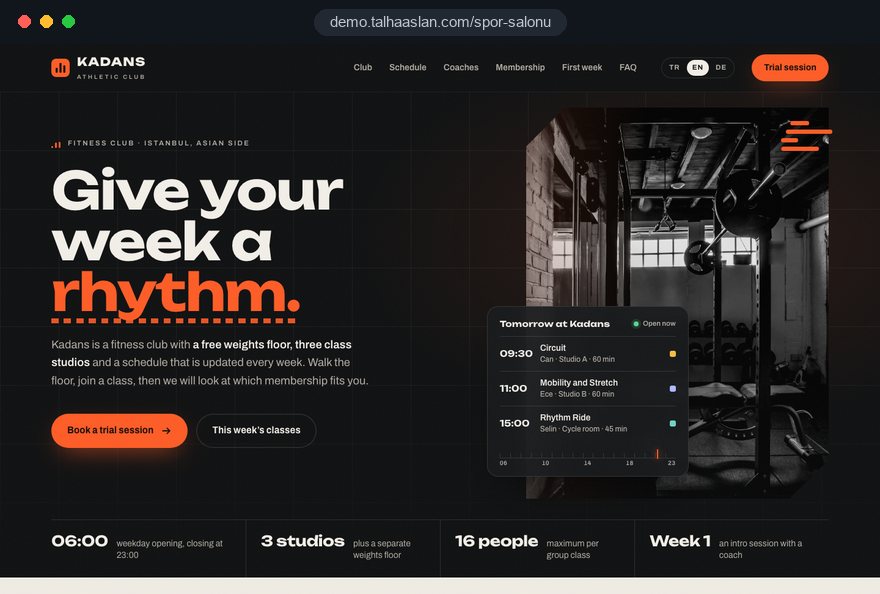
We do not have a live client project in this field yet, so we show our approach on a live demo site. The demo is not a client site; it shows how we build a gym website. You can see our work in other sectors on the references page.
Live demo
For this field we built a one page demo site for a fictional brand, made only to show our approach. You can explore the design, the copy structure and the mobile view live in three languages.
Open the live demoIn the first call we list your membership options, weekly classes, trainers and sites; the sitemap grows from that list.
Instead of stock images we plan photos and short videos of your own spaces, equipment and classes in action.
Classes and plans are edited in the admin panel, so adding a class or moving a slot does not depend on us.
We track which page brings trial requests and review the pages that convert poorly on a regular schedule.
Related pages
Industries
A separate structure for small studios selling reformer sessions.
Industries
For trainers who work with their own clients, independent of a club.
Solutions
Let members log in to see their plan and remaining classes.
Industries
For schools that teach children a sport and speak to parents.
 Lead Form Design for Booking, Quote and Demo Requests: UX Rules That Lift ConversionsRead article
 Professional Photography for Websites: What It Adds and How It Beats Stock PhotosRead article
 How Website Video Affects Conversion Rate: When It Helps, When It HurtsRead article
 How to Do Google Maps SEO: A Guide to Ranking Your Business Higher on the MapRead article
FAQ
If your question is not here, write to us; we will send you an answer and a written quote.
Next step
In a free 15-minute call, in English, we will go through your plans, your timetable and the members you want to reach, then send a written scope and quote.
In-depth guide
A gym website has to answer three questions for someone who has never set foot in the club: which plan fits me, is there a class at the time I can train, and what is it actually like inside.
This guide walks through the decisions a gym owner makes on a website project, in the order they come up: what the site is for, how to present plans and the timetable, how to handle health data, how to show up in local search and how to measure what brings members. Every section ends in something you can apply directly.
A gym website needs one primary goal, and for most clubs that goal is a claimed trial pass; personal training, corporate memberships and online plan sales come second.
Where your revenue comes from shapes the whole structure. An independent neighborhood gym is chosen on location and hours. A class led fitness club sells its timetable. A chain or multi site operator needs visitors to pick their nearest location before anything else. Before the kickoff call, write down your answers to these questions:
These answers change the sitemap directly. A gym that is packed after six but quiet before noon gets more from promoting an off peak plan on the home page than from a generic campaign banner.
The plans page exists so a visitor can find the option that fits their situation in about thirty seconds. That only works when plans are shown as text, side by side, with the same rows for each, rather than as a single promotional image.
Every plan needs every row filled in. A blank row reads as "not included" and sends people to the phone. The rows that belong in the comparison:
Publishing your rates is a commercial decision and both approaches have reasons behind them. Either way, spell out what each plan covers. On a phone, a wide comparison table should turn into stacked cards, one per plan, so nobody has to scroll sideways.
The weekly timetable is the content that changes most often and that members trust most, so it belongs in a table your team edits in the admin panel, not in a PDF or a poster. Each class becomes a record: day, start and end time, class type, trainer, studio, level and capacity.
The gains are practical: a cancellation shows on the site immediately, visitors can filter by day, time, class type or trainer, and because the timetable is text, search engines can read it, which gives your class pages a chance to appear for searches such as "evening spin class".
Agree on these rules with your team before launch:
If members should book a spot in group classes, the timetable has to share its data with the class reservation system. That way a time change is made once and the booking side follows automatically.
A dedicated page for each class type answers the questions a short class name leaves open and lowers the barrier for beginners. "Functional training" or "HIIT" is enough for a regular; someone coming for the first time wants to know who it suits, how hard it is and what to bring.
A useful class page covers:
Trainer profiles work for trust and for personal training sales at the same time. Each profile should list focus areas, the classes they teach, the groups they work with and a real photo. Qualifications appear only where the trainer actually holds them; an unverified "expert" label damages trust quickly.
A short personal training enquiry button under each profile works well. Tag those enquiries separately from the general trial pass form so you can see which trainer attracts which requests.
If visitors cannot see the club, they will not come even for a free session, so the photo and video shoot is a work item to plan before design starts. Stock images say nothing about the equipment, cleanliness or atmosphere.
Run the shoot from a list, in this order:
Be honest about busy hours: state them on the site and suggest quieter times, which prevents a disappointing first visit. Keep videos short, compress them, and load them after the page has appeared rather than embedding heavy files at the top.
The trial pass flow does not end when the form is sent; it runs until the person has trained in your club, and every step needs an owner.
A complete trial pass flow has these steps:
The last step is the one most clubs skip, yet it is what makes measurement meaningful. Without knowing which page's requests turned into members, the page with the most forms can look like a success when it is not.
Online plan sales and a member login are not essential for every gym; the decision depends on what your club management software already does and what your members actually ask for. If a system already handles access control and member records, a second member database on the website means double entry and mismatched data.
Before the scoping call, settle these questions:
If you take payments online, have your membership terms and consumer cancellation rules reviewed by your legal adviser; we build the technical side so those terms are visible and accepted before purchase. Starting simple is usually the right call: sell the trial pass and the campaign plan online first, and add member login once there is real demand for it. If online sales grow into a full shop for plans, merchandise and supplements, that becomes a separate e-commerce project.
Health questionnaires and fingerprint or face recognition entry systems collect what UK GDPR treats as special category data, so every form on the site should ask only for what is genuinely needed. Asking about medical conditions in a trial pass form is rarely necessary; that conversation can happen at the club with a trainer.
The ICO's guidance is clear that processing special category data needs a lawful basis plus a separate condition under Article 9, and people must be told how their data is used through a privacy notice. Check each form against this list:
Clubs serving members in the EU follow the GDPR, which uses the same special category concept. We build the forms within these limits and place the privacy notice and consent steps where they belong. The wording of the notices and the legal assessment remain with your club and your data protection adviser; have health forms checked before launch.
Most people look for a gym on a phone, often on the way home from work, so mobile speed sits near the top of the design decisions. Google's Core Web Vitals give concrete thresholds for what counts as good.
LCP, largest contentful paint, measures how long the biggest image or text block takes to load; good is 2.5 seconds or less. INP, interaction to next paint, measures how quickly the page responds to a tap; good is 200 milliseconds or less. CLS, cumulative layout shift, measures how much content jumps around while loading; 0.1 or less is good. Google assesses these at the 75th percentile of visits.
On gym websites, the usual causes of slow pages are predictable:
You can check how your current site behaves on a phone with our free mobile friendly test. On a new site, these values should be measured before launch and included in the handover report.
Most gym searches are local: people type "gym near me", a neighborhood name with "fitness", or a class such as "boxing class". Visibility rests on two pillars, your Google Business Profile and the website itself, and the two should support each other.
Google Business Profile guidelines require the business name to match the club's real world name, without added keywords. A stuffed name such as "Club Name Gym Fitness Personal Training Leeds" risks suspension. Steps for the profile:
On the website, each location needs its own page with address, hours, map and timetable. Club name, address, phone and opening hours should be marked up with structured data, and nothing should be marked up that is not visible on the page. Class pages serve searches by class name, location pages serve neighborhood searches. For the wider plan, see our SEO service.
Demand for gym memberships is seasonal; the new year and the weeks before summer are natural campaign periods, and campaigns should run on a separate page without changing the main site.
A single goal campaign landing page carries one offer, its end date, what it includes and the sign up form. Menus and distracting links are removed, so the only thing to do is fill in the form.
If you support the campaign with Google Ads, it helps to know the three components of Quality Score: expected click through rate, ad relevance and landing page experience. Google describes Quality Score as a diagnostic tool, not a direct input in the ad auction. When preparing a campaign:
If you would like us to run the campaigns, our Google Ads management page explains how we work.
The point of measurement is not counting visitors but seeing which plan, class or campaign page brings trial passes and, in the end, members. That requires the right events to be defined as conversions from the first day the site is live.
The core events on a gym website are trial pass form submissions, click to call taps, WhatsApp button clicks, personal training enquiries and, where offered, online plan purchases. Each event should record the page and the source it came from. Combined with the "joined" flag in your panel, it becomes a decision tool.
Cookie consent needs planning from the start. In the UK, PECR requires consent before non essential cookies such as analytics and advertising cookies are set, with no pre ticked boxes; in the EU, consent is needed before non essential tracking as well. For visitors in the European Economic Area, Google requires consent mode for measurement and personalized advertising features.
A short monthly review needs only these questions:
The answers decide which page gets rewritten next month and which campaign gets paused.
Most mistakes are decisions rather than technical faults, and fixing them after launch takes more effort than getting them right at the start. These are the six we see most often, each with what to do instead:
What these mistakes share is a site built apart from the club's daily routine; agreeing at the start how the front desk, trainers and management will use it prevents most of them.
You can judge a team for your gym website by what it asks in the first call: if it asks about your plans, your timetable and your trial process before colors and logos, it is starting in the right place. Before you request a quote, ask:
Match the scope to where your club is today. An independent gym with few classes usually needs a compact site focused on plans and the trial pass; a class led club puts the timetable and class pages at the center; a chain starts with location pages and a timetable per site. Scope beyond real need only stretches the budget and the timeline.
We do not have a live client project in this field yet, so we show our approach on the live gym demo linked on this page. You can see work in other sectors in our references and our full scope on the web design service page. Fixed scope packages are listed in the pricing section. When you are ready, get in touch with your plans, weekly classes and number of sites, and we will put together a page structure and a written quote.
Start a Project
Thanks {name}, we've received your brief. We usually reply within the same day.
What happens next?