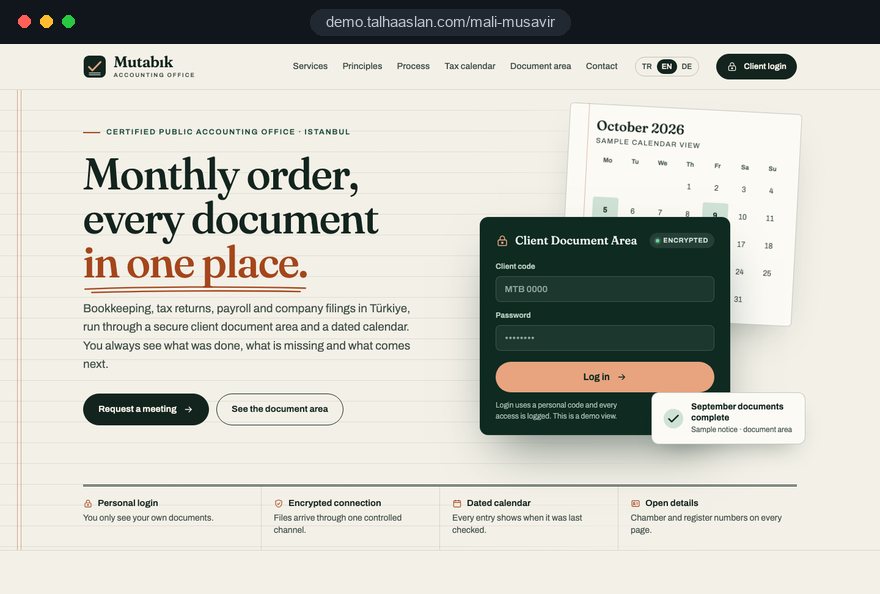
An accountant's website has two jobs that pull in different directions. It has to give a business owner enough clear, checkable information to choose a firm, and it has to give existing clients a quick, safe way to send invoices, bank statements and payroll records without another chain of email attachments.
This guide follows the decisions a practice owner makes in order, from the first page list to the questions worth asking an agency. Each section ends in something you can act on: a checklist, a criterion or a test. Where professional rules come in, we point to what they require and leave the final call to your professional body and your compliance adviser.
01Five decisions to settle before any design
The structure of an accounting site depends on five decisions, and changing any of them halfway through means rebuilding pages rather than adjusting them. Write the answers on one page before you ask for a quote; the quote will then describe real scope instead of guesses.
- Visitor balance: whether the home page leans toward new business owners or toward existing clients who log in every month.
- Service pages: which of bookkeeping, VAT, payroll, year end accounts, Self Assessment and company formation get their own page, and which client groups you focus on.
- Client uploads: whether documents go through the website or through the portal that comes with your practice software.
- Firm details: who supplies the registered name, professional body, practising status and address, and who signs them off.
- Languages: whether any pages are needed for clients who prefer another language, and who checks those texts.
Agree who inside the practice owns these decisions. When three partners each send separate feedback, drafts go round in circles; one person collecting comments and replying to the agency keeps the schedule intact.
02The disclosure rules that shape the site
For accountants in the UK, the Provision of Services Regulations 2009 require providers in a regulated profession to make their professional body and professional title available, and easy electronic access, such as a website page, is one accepted route. Your professional body adds its own rules on publicity and on how practising status is described.
In practice, the rules turn into a short list of things the site must handle correctly:
- Professional body and title: the body you belong to and the title you use, worded the way the body allows.
- Firm identity: the registered name, the address and, for a company, the details company law asks for on websites.
- Publicity standards: claims that are factual and can be backed up, with no misleading comparisons with other firms.
- Personal data: a privacy notice under UK GDPR and consent before non essential cookies, as required under PECR.
A useful working method: print the publicity section of your body's code, and next to each rule write the page of the new site that deals with it. Any rule with an empty line next to it is a gap to close before the first draft, not after launch. Firms outside the UK should run the same exercise with their own regulator's text.
03Building a firm details page people can check
A firm details page is both a legal requirement and the first piece of evidence a careful business owner looks for, so it should be a page of its own, linked from every footer, not a line of small print. Someone who has been referred to you will often search your name, land here and check the details before they call.
- People: names of the partners or principal, their professional qualifications and the languages they speak.
- Firm: registered name, company number where relevant and registered office.
- Regulation: professional body, professional title and, where your body issues one, the practising certificate wording it prescribes.
- Contact: office address, phone number and the hours when the phone is answered.
In a firm with several accountants, each person gets their own profile block, so nobody wonders who holds which qualification. The same details are marked up as structured data for search engines; you can test that markup with our structured data tool before launch.
Keep the page alive after launch. When a partner joins or leaves, or the office moves, the page should change the same day. We keep these fields separate and easy to edit in the admin panel for exactly that reason. Ask any agency where it takes the details from; a guessed registration line undermines the whole site.
04Writing service pages in a factual voice
Professional publicity rules allow information and rule out misleading or unverifiable claims, which in practice means writing what you do instead of how good you are. Template copy rarely respects that line, so every sentence needs rewriting rather than light editing.
These are the phrases we most often remove from draft copy, with what we write instead:
- Superiority claims: replace "the leading firm in the region" with the services you offer and the kinds of business you work with.
- Price bait: replace "cheap accounting" with what a service covers and what determines the fee.
- Outcome promises: replace "we cut your tax bill" with the topics a planning meeting actually covers.
- Unverifiable numbers: replace "hundreds of happy clients" with a description of how you work and what a new client can expect in the first month.
- Testimonials: if your body allows them, use real, attributable ones with permission; never placeholder quotes.
The test for a borderline line is simple: does it inform the visitor, or does it set the firm above others without proof? If it is the second, it goes. Apply the same thinking to images. Stock photos of crowded teams or rising charts carry an implied claim; real photos of the office and plain diagrams of the process are safer and more convincing.
05The anatomy of a good service page
A good service page answers the business owner's real question in one read: does this fit my situation, and what will you need from me. Taking a payroll page as the example, we recommend this order:
- Scope: which parts the firm handles, such as running payroll, RTI submissions to HMRC, payslips, starters and leavers, and pension auto enrolment duties.
- Who it suits: typical cases such as a company hiring its first employee, a director only payroll or a business opening a second site.
- What we need: the starter information, hours and overtime records, and changes to pay, each on one line.
- Monthly cycle: the date by which records should reach the firm and what happens after that.
- Questions: three or four questions specific to this service, with short factual answers.
Bookkeeping, VAT and company formation pages follow the same skeleton with different content. A company formation page explains the choice between sole trader and limited company and the steps to register; a bookkeeping page concentrates on how and when records are handed over. This prevents the same paragraph being copied onto five pages.
Ask the agency who writes the copy and when the accountant reviews it technically. Agency only copy is often vague, and copy written only by the firm is often dense. The workable split is an agency draft that the accountant corrects line by line.
06Security criteria for a client upload area
The upload area is where confidential records live, so it should be the most carefully specified part of an accountant website. A client seeing another client's bank statement is not a bug you can apologize away; it is a breach of the confidentiality your profession depends on.
- Personal logins: every client has their own account; no shared passwords and no accounts shared with staff.
- Two step login: an option to confirm sign in with a code sent to a phone or email address.
- File limits: only document and image formats, a size limit, and storage outside any publicly reachable folder.
- Access log: a record of who uploaded or opened which file, and when.
- Retention: a written rule for how long files stay on the site and how they are deleted after moving into your records.
If your practice software already includes a client portal, linking to it clearly from the website is usually wiser than building a second system that clients have to learn. Where your workflow genuinely needs something custom, we plan it as custom software, with hosting, backups and data processing terms written into the same scope.
Security also needs upkeep after launch: software updates, tested backups and closing the accounts of clients who leave should each have a named owner and a date in the calendar.
07Designing the monthly document flow
A secure area that clients avoid is worth nothing, so the screens must be designed around monthly habits as much as around security. Most clients send records at the end of the month, from a phone, in a hurry.
We start by mapping how a month actually runs in your firm: which clients send what, who is always late, and how your team chases missing records today. The screens follow that reality rather than an ideal process.
- Missing records list: after logging in, the client sees which records are expected for the period and which have not arrived.
- Phone uploads: paper receipts can be photographed and uploaded directly, with images reduced automatically.
- Period folders: files are sorted by month and type, so your team finds them without searching.
- Reminders: a short email before the deadline that contains no confidential detail, only a link to sign in.
Before launch, run a short trial with two or three real clients. The step where they hesitate is the screen that needs redesigning, and you will learn more from that hour than from writing a user manual.
Plan the transition too. Some clients will keep emailing attachments out of habit; a polite message template that points them to the upload area, used consistently for the first two months, settles the new routine faster than any announcement.
08Keeping deadline content accurate
A tax deadlines page can become one of the most visited pages on an accountant's website, but only while it is accurate; a page showing last year's dates is worse than no page at all. Treat it as a process with an owner, not as a page that is written once.
- Source: check every date against official sources such as GOV.UK and HMRC announcements, never against a list copied from elsewhere.
- Draft: the team prepares the update and notes any extensions or changes.
- Approval: the accountant approves the draft; no date goes live without that approval.
- Publication: the page shows a visible "last reviewed" date.
- Period end: past dates are archived or removed, and the next period opens with the same steps.
Articles and guides need the same discipline. Content on topics such as Making Tax Digital or the 31 January Self Assessment deadline ages quickly when rules change, so each article carries a review date and a named reviewer.
Ask an agency who reviews old articles when legislation changes. If nobody does, half the site will describe old rules within two years, and visitors notice.
09Privacy notices, forms and data processors
Accountants handle some of their clients' most sensitive information, so the way the website treats personal data is the first sign of how the firm will treat theirs. UK GDPR requires clear privacy information when you collect personal data, and that notice belongs right next to every form.
- Short forms: name, phone or email and a short note are enough for an enquiry; turnover, tax references and staff numbers belong in the first call.
- Cookie consent: analytics and other non essential tools stay off until the visitor agrees.
- Processors: list the services used for hosting, form notifications and email, and know where each stores data and on what terms.
- Staff access: decide in writing who in the firm can see enquiries and the upload area.
- Leavers: remove a departing employee's panel and upload area access on their last day, as part of the exit checklist.
We place the privacy and cookie texts with your adviser's approval; the final legal assessment belongs to your firm. Our part is making the site behave consistently with those texts, for example making sure that when a visitor rejects cookies, the measurement code genuinely does not run.
A quick test for your current site: when someone fills in the form today, where does the data go, through which service, and where is it stored? If nobody can answer in a minute, write that flow down before the new site is built.
10Being found by the clients you want
Most new clients reach an accountant through a referral followed by a search, or through a local search for a service, so visibility starts with solid core pages rather than with clever tricks. Both routes reward accurate, consistent information.
- Name searches: a referred business owner searches the firm's name; the firm details page, contact page and Google Business Profile must show the same name, address and phone number.
- Business Profile name: Google's guidelines require the name to match the real world name, without added keywords.
- Service and place: each service page targets one clear need, so a search for payroll help in your town can find the payroll page rather than the home page.
- Useful content: deadline pages and plain answers to common questions earn links and repeat visits over time.
Our search engine optimization work for professional firms focuses on technical health, page structure and accurate local data rather than volume tactics. We describe a similar approach for another regulated profession on our law firm website page.
A note for firms in Turkey that serve English speaking clients: the Turkish advertising regulation for certified public accountants applies to every language version, including its limits on promotional keywords and paid internet advertising aimed at winning work. English pages there are built around the firm name, city and factual content.
11Speed, mobile use and technical trust
Uploads and enquiries mostly happen on phones, so mobile speed is part of the client experience rather than a technical extra. Google's Core Web Vitals describe it with three measures, and the "good" threshold should be met at the 75th percentile of visits.
- LCP: how long the largest visible element takes to load; 2.5 seconds or less is good.
- INP: how quickly the page responds to a tap or click; 200 milliseconds or less is good.
- CLS: how much the layout shifts while loading; 0.1 or less is good.
Trust signals matter just as much. A valid security certificate on every page is non negotiable for a site with an upload area, and you can check yours with our SSL checker. Email sent from your domain should be protected against spoofing with SPF, DKIM and DMARC records; our email authentication checker shows whether they are in place, which matters in a sector where fake invoice emails are a familiar risk.
If you are replacing an old site, do not launch until every existing page address is mapped to its new address. We handle this as part of a website rebuild, so search visibility is carried over. Test speed on a real phone over mobile data, including a large photo upload, not on the office connection.
12Measuring what matters
An accounting website succeeds when it produces the right enquiries and when clients actually use the upload area, not when visitor numbers rise. Decide the handful of signals you will look at before launch.
- Enquiries by page: which page each form was sent from, showing which services genuinely attract work.
- Click to call taps: how often mobile visitors tap the phone number, especially on the contact and firm details pages.
- Upload area use: how many clients sign in each month and how close to the deadline their records arrive.
- Content reading: when deadline pages and articles are read, which tells you when to schedule reviews.
All of this depends on cookie consent, so numbers are never complete, but they show the trend clearly enough to act on.
The upload data also helps inside the firm. If the same clients send records on the last day every month, moving the reminder earlier is a simple fix. Keep the monthly report short: four signals, a comparison with last month and one change to try next. A report with dozens of charts quickly becomes a file nobody opens.
13Common mistakes on accountants' websites
These mistakes rarely come from bad intent; they come from adapting a general business template without thinking about professional rules or client workflow. Each one is paired with the better alternative.
- Hiding firm details in the footer: instead of one line of small print, give the professional body, title and registered details their own page linked from everywhere.
- Keeping template copy: delete "leading", "cheapest" and outcome promises, and describe each service by scope and process.
- Collecting records by email: instead of confidential attachments in inboxes, use a personal login upload area or your software's portal.
- Leaving deadlines unowned: instead of a page written once, set up a review process with a source, approval and period end step.
- Asking for everything up front: instead of turnover and tax references in the first form, ask for contact details and discuss the rest on the call.
- Launching without redirects: instead of letting old addresses break, map every old page to its new address before launch.
Check your current site on your phone as a client would: how many taps to reach the firm details, whether the way to send records is visible on the first screen, and which year the deadlines page shows. Those three answers tell you where to start.
14Choosing a partner and the next step
When choosing a team for an accountant website, look past the design samples and ask how the agency handles professional rules, document security and content upkeep. Ask for clear answers to these questions:
- Where do you take the firm details from, and how do we approve them before launch?
- How are logins, file limits and access logs set up in the upload area, and where are files stored?
- Who updates deadline content and articles after launch, and on what schedule?
- What support do we get in the first months, and how will our staff learn the admin panel?
We do not have a live client project for accountants yet, so we show our approach on a live demo site linked on this page; the demo is not a client site. You can see our work in other sectors among our client references. Because design, development and content sit in one team, the upload area and deadline content are planned from the start rather than added later.
Price depends on the number of service pages, content preparation and extras such as a secure upload area; it does not depend on where your firm is based. You can compare packages in our pricing section or request a written quote for your scope through the quote form. If you would rather talk first, book a short call and tell us about your services, your clients and how records reach you today; we will suggest a structure that fits.