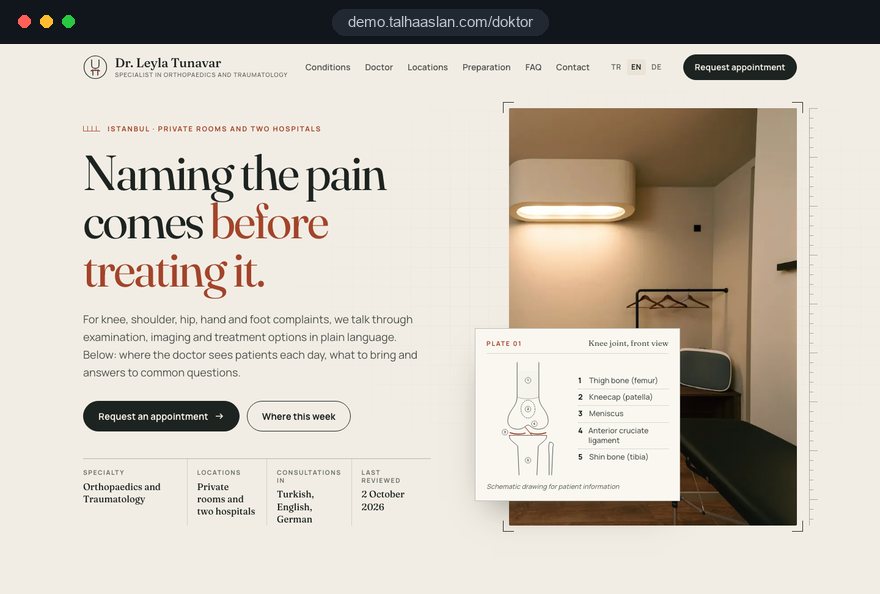
A doctor website rarely meets a patient at the doctor's name. Patients arrive with a symptom or a diagnosis, decide whether the doctor behind the page is qualified to help, and then look for where and when they can be seen. When the site answers those three questions in that order, enquiries follow.
In this guide, Talha Aslan and team walk through the decisions we make when planning websites for private consultants, physicians and surgeons: which conditions get their own page, how a condition page is built, the profile and titles, claims and images, multiple practice locations, enquiry forms and health data, search, measurement and choosing a partner. Medical content is always the doctor's call; we build the structure, the wording and the technical foundation.
01The order in which patients get to know a doctor
Patients judge a doctor online with three questions: does this person understand my problem, are they qualified to treat it, and how do I get an appointment. Every page on the site should answer one of these clearly and make the next one easy to reach.
The first question is answered on condition and treatment pages, which patients usually reach straight from search without ever seeing the home page. The second is answered on the profile, but patients only click through if the condition page has earned it. The third lives in the locations and contact section. So the home page is a junction, not a shop window.
- Condition page: ends with a short introduction to the doctor, a link to the full profile and an appointment button.
- Profile page: links back to the conditions the doctor treats, so the patient can return to their topic.
- Locations: reachable from any page in two taps, with phone number and map on the same screen.
- Home page: short routes to the four or five most common topics and a summary of clinic days.
A quick test: open your page on a condition you treat and count the taps to a phone number. More than three means the structure is losing patients.
02Turning your specialty into a sitemap
Which conditions and treatments get a page of their own depends on two things together: what patients actually ask and what you actually offer. Creating a page for every term in your field dilutes the content and creates more sign off work than a busy consultant can handle.
Before the first call we ask you and your medical secretary to list the questions that come up most often; call notes and e-mails are the most honest source. Then we narrow the list down in this order:
- Write down the symptoms and diagnoses patients most often come to you with, such as a torn meniscus, a frozen shoulder or sciatica for an orthopaedic surgeon.
- Add the treatments and procedures you perform, and leave out anything you do not offer.
- Merge topics that are close enough that patients ask the same question under two names.
- Prioritize: eight to twelve pages at launch, the rest added on a monthly schedule.
- Note which location each page should point to; a procedure page may lead to a hospital, a review appointment to your rooms.
The nature of the specialty shapes the list. In dermatology or cardiology it is built from symptoms such as a changing mole or palpitations; in obstetrics, longer journeys like antenatal care read better as a short linked series than as one long page.
03Anatomy of a condition page: the torn meniscus example
A good condition page answers the patient's questions in the order they occur to them and ends by telling them what to do next. Using a torn meniscus as the example, this is the skeleton we work with:
- Short definition: what the meniscus is and how tears happen, in two or three plain sentences.
- Symptoms: in the patient's own words, such as the knee locking, pain on stairs or swelling.
- Diagnosis: what the examination looks for and when imaging such as an MRI is requested.
- Treatment options: physiotherapy and arthroscopy, who each might suit and who they do not suit.
- Recovery: the stages of returning to daily life, without promising fixed timeframes.
- Questions and next step: four to six common questions, then a short introduction to the doctor and the locations.
This structure helps in two ways. Patients trust a page more when it also tells them surgery may not be right for them, and balanced information is what the rules expect anyway.
We do not set a word count. A topic with many questions, such as lower back pain, needs a long page; a page on a single diagnostic test can stay short. Every subheading should read like the patient's question, so someone scrolling on a phone lands where they need to be.
04Guides for surgical patients before and after the procedure
On a surgeon's site, the patient's real need is to make the decision about surgery with good information, so condition pages need companion guides that walk through the procedure step by step. Patients read them weeks in advance and again after the operation.
The preparation guide covers which tests to bring, which medication questions to raise with the surgeon, the hospital stay and arrangements for getting home. The recovery guide covers wound care, movement limits, review appointments and, most importantly, the signs that mean a patient should call straight away. That last part should be written in the surgeon's own words.
- Printable layout: guides are read on phones but many patients print them, so the page prints cleanly.
- Risks and complications: stated plainly and calmly, neither frightening nor played down.
- Out of hours line: who to contact outside clinic hours appears at the end of every guide.
- Public by design: guides are general information; anything specific to one patient belongs in your clinical communication, not on the website.
A patient who arrives prepared spends the consultation on the decision rather than on the basics.
05Writing a profile that patients and regulators can check
The profile page should show training and experience in a way patients can verify, and use titles exactly as you hold them. Overstating a role, or implying a specialism you are not formally recognized for, damages trust and can create problems with your regulator; in the UK, check how the GMC guidance on information about your services applies to you.
The most common confusion is between an area of interest and a specialty. A consultant orthopaedic surgeon may focus on shoulder surgery; saying so is information, presenting it as a separate specialty is not. We structure the page like this:
- Registration: your registration number with the relevant regulator, for example the GMC, so patients can look you up.
- Training: medical school, specialty training and fellowships, with institutions and years.
- Posts: current and previous appointments, including NHS posts if you hold them alongside private practice.
- Areas of interest: a short list linked to the condition pages, under its own heading.
- Publications and talks: title, journal or meeting and year, with a reference where possible.
The photo is part of the profile. Instead of stock images or generated portraits we use a current, real photograph; a patient who recognizes the face from the website walks into the consulting room with more confidence.
06Claims, images and reviews within the rules
Every sentence on a doctor's site should be informative and defensible, because in the UK the CAP Code requires objective claims in marketing, including a practice's own website, to be backed by evidence. Words like painless, perfect result or the latest technique are easy to write and hard to support.
Rules differ by country. In Turkey, the 2025 health promotion regulation allows before and after images only under strict conditions and bans promotional use of patient thanks or satisfaction statements; other markets have their own limits.
- Process over promise: describe how a procedure works and what the patient can expect, rather than results.
- No comparisons: avoid phrases that rank you against other doctors or clinics.
- Images with a purpose: anatomical illustrations, the consulting room and equipment instead of result photos.
- Reviews with care: if you show any patient feedback, follow the rules where you practise and never edit it into a claim.
- No sales language: discounts, offers and limited time wording do not belong on a medical website.
We prepare text and images within this frame and flag anything we are unsure about. The final legal assessment belongs to you and your adviser, which matters most in aesthetic specialties before launch.
07Author, review date and contact: the trust layer of patient content
Every patient information page should show who wrote it, when it was last reviewed and how to get in touch about it. Patients judge currency by it, and search engines look for clear expertise behind health information.
Rather than burying it in small print at the bottom, we put one line directly under the title: the doctor's name, specialty and "last reviewed" date. The name links to the profile, so both patients and search engines can confirm the source in one click.
A review date only means something if reviews actually happen. The routine we suggest:
- Set at least one review date a year for each condition page.
- At each review, check treatment options, locations and common questions.
- Update the date only when something has genuinely changed; a new date on unchanged text misleads.
- Keep a simple log of what changed and when, for your own records.
Before publishing, it is worth testing guides with the readability checker; long sentences and dense terminology show up immediately.
08Private rooms and hospitals: managing several locations
For a consultant who sees patients in several places, the site's job is to send each patient to the right address, on the right day, with the right phone number. That is why every location gets its own section, its own number and its own booking route.
The biggest difference between private rooms and a hospital is who owns the booking. Your secretary manages appointments in your rooms; at a hospital, bookings often go through its own team or online system. The site should send the patient to whichever channel really works for each location.
- Clinic timetable: one table showing which day you are where, plus a short notice line for leave and conferences.
- Location buttons: if a hospital runs its own booking system, the button for that location goes straight to it.
- Consistent details: the hospital's own consultant page and your site should show the same addresses and days.
- Arrival notes: parking, entrance and which floor the outpatient clinic is on make a first visit easier in a large hospital.
- Payment notes: whether you see self paying patients and which insurers you are recognized by, kept factual.
If patients should pick their own slot in your rooms, we build an appointment booking website for that location, while hospital days stay in the hospital's own flow. Organizations with several doctors and specialties need a different structure, which we plan separately.
09Enquiry forms and health data: what to ask and what not to
An enquiry form should ask for the minimum needed to arrange an appointment and avoid collecting health information it does not need. Under UK GDPR and the EU GDPR, data concerning health is special category data, so a large free text box asking patients to describe their symptoms in detail means collecting sensitive data you probably do not need.
We keep the form short. Name, phone number, preferred location and a preferred time window are usually enough. If you want to know what the patient is coming about, a short list of topics from your specialty works better than free text: it reduces the data you hold and shows which condition page the enquiry came from.
- Privacy notice: linked visibly next to the form, explaining who receives the data and why.
- No file uploads: do not collect test results or scans through the form; request them at the appointment or through a secure channel.
- Notification content: if enquiries reach you by e-mail, the e-mail carries contact details only and the rest stays in a secured panel.
- Access: only you and your secretary see enquiries, each with a personal login rather than a shared password.
The WhatsApp button follows the same logic: the prefilled message only asks for an appointment and a location, and patients are not invited to describe symptoms before anyone has replied. For visitors in the EU, consent is needed before non essential tracking, so analytics and cookies are limited to what is necessary until the visitor agrees.
10Helping search engines recognize the doctor correctly
For search engines to identify a doctor correctly, the name, specialty, practice addresses and hours must match on the website, on the Google Business Profile and in the structured data. Structured data is code that labels information on the page so search engines can read it reliably; anything not shown on the page should not be marked up.
On the Google Business Profile, the business name must match the real world name with no keywords added. A name like "Dr Jane Smith Knee Surgeon Sports Injuries" breaks the guidelines and looks less trustworthy. The address, phone and hours of the profile for your rooms should be identical to the location section on your site.
- Markup: suitable schema types for the physician, specialty, locations and opening hours, which you can test with our schema markup tool.
- Loading: LCP, the time until the largest element on the page appears, should be 2.5 seconds or less.
- Responsiveness: INP, how quickly the page reacts to a tap, should be 200 milliseconds or less.
- Stability: CLS, how much content shifts while loading, should stay at 0.1 or less so patients do not tap the wrong button.
- Phone check: the mobile friendly test shows how your current site behaves on a phone within minutes.
When condition pages, location pages and the profile support each other, the chances of appearing both for condition searches and for "near me" searches improve. Ongoing work on this is part of our SEO services.
11Getting content from a busy consultant: interviews and sign off
Doctor websites are usually delayed by content approval, not design, so we set up a content process that uses as little of the doctor's time as possible from the start. Writing copy between clinics and theatre lists is unrealistic; a short conversation is not.
- List the questions patients ask about each condition with your secretary; we add more from search data.
- Schedule interviews of twenty to thirty minutes, each covering one or two topics, and we take notes in your words.
- We turn the notes into a plain language draft and flag every clinical statement separately.
- You receive the draft as one shared document and comment directly on the text.
- Approved pages go live, and the approval date and approving doctor are recorded.
This keeps your voice. Patients sense that the explanation they hear in the consulting room and the text they read online come from the same person. A weekly approval rhythm makes the launch schedule predictable.
Existing texts, conference slides and patient leaflets are good starting material too; often they only need simpler language.
12Measuring which condition pages bring appointment requests
What matters on a doctor's site is not visitor numbers but which condition page brings enquiries for which location.
We set up measurement from day one, because tracking added later cannot recover the months before it. These are the events we record:
- Phone taps: on which page, and for which location's number.
- Form submissions: the chosen location and the page the form was sent from, without any health information.
- WhatsApp clicks: which page the prefilled conversation started on.
- Hospital referrals: clicks to a hospital's booking system, recorded as a separate event.
Analytics tools process personal data, so they should respect cookie choices and be described in the privacy notice. A short monthly report is enough: the five pages bringing the most enquiries, pages with visits but no enquiries, and the split by location.
A condition page that gets visits but no enquiries usually has one of two problems: it does not answer the patient's question, or the route to an appointment disappears at the bottom of the page. Both can be tested and fixed separately.
13Six common mistakes on doctors' websites
Most mistakes we see on doctors' websites come from adapting a generic business template rather than from bad intent. Use the six below, each with a better alternative, as a checklist for your current site.
- All interests on one page: neither patients nor search engines can find the topic; give the most common conditions their own pages instead.
- An interest presented as a specialty: use titles exactly as your regulator records them and list areas of interest under a separate heading.
- Promises that cannot be backed up: replace words like painless or permanent with a clear description of the process and realistic recovery.
- One phone number for everything: if you work in several places, give each location its own number and clinic days.
- Forms that ask for symptoms in detail: limit the form to contact details and a topic choice instead of collecting sensitive data.
- Leaving the site alone after launch: outdated details and undated guides erode trust; set a yearly review schedule.
Even one of these can weaken both credibility and search visibility. Tick the list off against your current site before planning a rebuild.
14Choosing a partner and preparing for the first call
Choose the team for your doctor website by the questions they ask about health content and advertising rules rather than by design samples alone. A good team talks about your specialty, your locations and your approval process in the first call, not about colours.
Useful questions to ask any agency: How do you decide which condition pages to build? Who checks text and images against the rules that apply to me? What does the form collect and who can see it? Which events do you measure? Who updates the site after launch?
We do not have a live client project in this field yet; a live demo showing how we build a doctor's website is linked on this page. You can see our work in other sectors in our client references and read the full scope of our web design service.
The first call is most productive if you bring:
- The eight to twelve topics patients ask about most in your specialty.
- Your locations, clinic days and the booking channel for each.
- An up to date CV and the photos you would like to use.
- Your current domain and website access details, if you have them.
Fixed packages are listed under web design pricing; for a written quote based on your scope, reach us through the contact page.