Emergency details are hard to find
An owner searching late at night wants to know whether you are open and which number to call. When that sits at the bottom of a contact page, they move on to another practice within seconds.

Your Windows contrast theme is on; colours come from your system.
Your device is set to reduce motion; animations are already off.
Your choices are saved in this browser only.
Industry-specific web design
Pet owners tend to arrive at a vet's website in one of two moods: the dog has eaten something it should not have and they need an open practice now, or they are planning a puppy's first vaccinations. We build veterinary websites that serve both, for practices in the UK and elsewhere that work with a remote team, keeping emergency details, clinical services and extras such as boarding and grooming clearly apart.
Open the live demoA demo design we built for a fictional brand
In short
A veterinary clinic website puts the emergency number and opening hours on every screen, explains vaccinations, neutering and surgery on their own pages, and keeps pet boarding and grooming separate from clinical care. In the UK, RCVS guidance asks that all advertising is accurate and truthful, and prescription only medicines may not be promoted to pet owners, so the copy stays informative.
Talha Aslan and teamLast updated:
Why it needs its own approach
A vet website has to answer a worried owner in seconds, inform the owner who is planning ahead and still respect professional and medicines advertising rules. Generic business templates manage none of the three well.
An owner searching late at night wants to know whether you are open and which number to call. When that sits at the bottom of a contact page, they move on to another practice within seconds.
Vaccinations, neutering, dental scale and polish, ultrasound and orthopaedic surgery share one bullet list. Owners cannot follow the process, and search engines cannot tell which page answers the neutering question.
Owners want to know who will examine their animal and whether the practice sees their species. Rabbit, bird or reptile owners end up phoning just to ask if you treat exotics.
RCVS guidance asks that all advertising is accurate and truthful and that the title specialist is used only by those on the relevant list. Bold claims and loose job titles create compliance work later.
When boarding and grooming are squeezed onto the clinical services page, neither the owner checking dates nor the one booking a trim finds what they need. These services have their own questions and their own enquiry flow.
Bank holiday hours, out of hours cover, a new vet or new equipment never make it onto the site. A vet website with the wrong opening hours sends an owner in an emergency to a locked door.
Our approach
We build a vet website for two different visitors. For the owner in an emergency, phone, WhatsApp, address and whether you are open right now sit on the first screen. For the owner planning ahead, vaccinations, neutering, surgery and the rest each get their own page with the process, preparation and common questions.
If owners should pick a consultation slot, an online booking system is connected to the site; if boarding works with date ranges, a reservation flow is set up separately. Clinical requests and boarding enquiries never land in the same inbox unsorted.
Design, development and content sit in one team, so none of this is patched on later. Talha Aslan sets the strategy and an experienced team handles delivery, working remotely and in English with practices abroad. The clinical accuracy of every service page is always signed off by your own vets.
Home
Emergency details sit at the top of every page; clinical services and boarding or grooming enquiries come in through separate flows.
The right setup
All three start from the same foundation; the scope of emergency cover and the number of extra services make the difference.
One vet
Local owners know the vet by name, and the site carries that familiarity.
Several vets
The brand is the practice; emergency cover, equipment and the clinical team are explained.
Extra services
A practice that also offers boarding and grooming is talking to two different customers.
Built for vet practices
These are the points that need a decision most often when planning a site for a vet practice.
Phone and WhatsApp buttons at the top of every screen; weekday, weekend, bank holiday and out of hours details updated in one place. If the practice is not open around the clock, the site says so plainly and tells owners where to turn when you are closed.
For vaccinations and parasite control, neutering, soft tissue and orthopaedic surgery, dentistry, ultrasound and lab work: what happens, how to prepare the animal and common questions. Whether to publish prices is a decision we make together with you.
Training, interests and a real photo for each vet, plus a clear statement of which species the practice sees: cats, dogs, rabbits, birds or reptiles. The title specialist is used only for vets on the RCVS list, as chapter 23 of the guidance requires.
UK guidance from the Veterinary Medicines Directorate says POM-V medicines may be advertised only to vets, pharmacists, vet nurses and professional keepers of animals, not to pet owners. Health guides on the site explain conditions without naming prescription products or brands; the final legal check belongs to your practice.
Boarding conditions, required vaccination and parasite records, feeding and visiting rules, the grooming service list and real photos on their own pages; enquiries arrive through a form separate from clinical requests.
Guides such as a puppy vaccination schedule, preparing for neutering or keeping pets safe in hot weather bring in search traffic and cut down the questions your reception answers again and again.
Sources: GOV.UK, Veterinary Medicines Directorate: Advertise veterinary medicines legally
Comparison
| Topic | Generic business template | Site built for a vet practice |
|---|---|---|
| Emergency details | One phone number on the contact page | Emergency number, WhatsApp and current status on every screen |
| Service content | All services in one list | Each service on its own page: process, preparation and questions |
| Species | Not mentioned | Species seen and the vets who treat them, stated clearly |
| Boarding and grooming | One line in the services list | Own section, conditions and a separate enquiry form |
| Tone | Offers and bold claims | Informative copy within RCVS and VMD guidance |
| Measurement | Visitor numbers | Emergency calls, consultation and boarding enquiries tracked separately |
Quick check
Must haves: does your site have them?
0 of 6 in place Tick the boxes to see where your site stands.
Added as needed
We choose which of these you need together during the scoping call.
Share your services, opening and out of hours arrangements, the species you see and whether you offer boarding or grooming; we will come back with a page structure and a written quote.
Process
We define your business, your audience and the site’s one-sentence job: who it sells what to, through which action. Scope and timeline are written from that answer.
The home page and key templates come to you as designs first; no code is written before your approval. We do not like surprises, and we do not cause them.
The approved design becomes fast, secure, maintainable code. You follow progress in the CRM and see every page in a staging environment before launch.
The site goes live with analytics, Search Console and conversion tracking connected; panel training is given, first-year hosting and maintenance included.
Search and speed foundations
In an emergency, owners search with a town or district, or type emergency vet or vet near me. Opening hours, the contact page and the Google Business Profile are kept consistent so they support each other.
Practice name, address, phone and opening hours are marked up so search engines can read them; nothing is marked up that is not on the page.
Most emergency searches happen on a phone, so pages are designed for phone screens first, images are compressed and Core Web Vitals are measured before launch.
Calls, form submissions and WhatsApp clicks are tracked as conversions from day one, with clinical requests reported separately from boarding and grooming enquiries.
Free tools
Before planning a new site, see how the current one loads on a phone, how it looks in search and whether your opening hours can be read by search engines. The tools are free and need no sign up.
Tech SEO
Test whether a page works well on phones: viewport, font size, tap targets, a mobile screenshot and Core Web Vitals.
Tech SEO
Scan any URL for title, meta description, headings, canonical, indexability and speed signals, and get an SEO score with a clear to-do list.
Tech SEO
Generate rich-result JSON-LD for Article, Product, FAQ, Local Business.
Conversion
Create a wa.me link with a preset message + embeddable button code.
Conversion
Turn URLs, WhatsApp, Wi-Fi, vCard and text into a QR code in seconds; download high-res PNG or SVG.
Image
Convert between JPG, PNG and WebP in one click or in batches; it detects the input format, lets you set quality and a background for transparency, and uploads nothing.
How we work
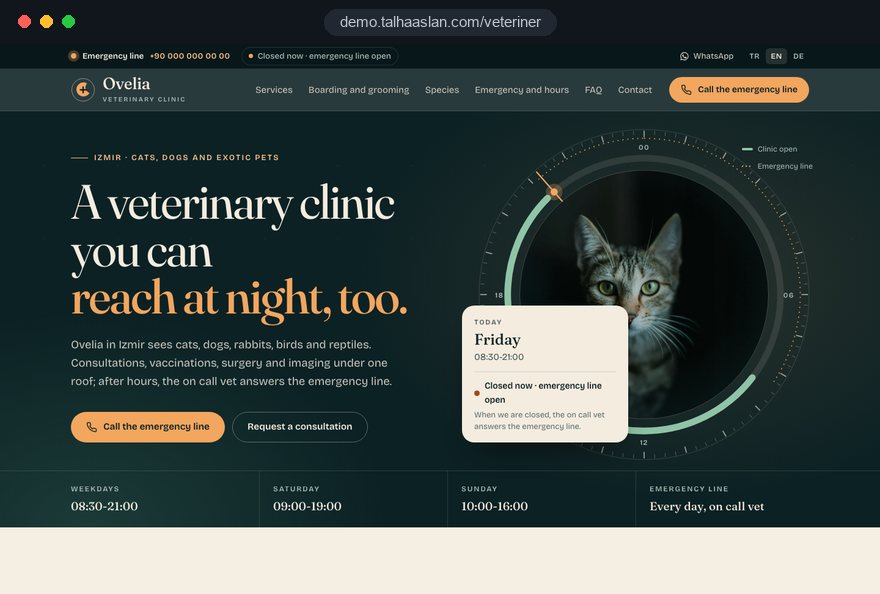
We do not yet have a live client project in the veterinary field to show, so we explain our approach on a live demo site. The demo is our own showcase, not a client. Our other client work is on the references page.
Live demo
For this field we built a one page demo site for a fictional brand, made only to show our approach. You can explore the design, the copy structure and the mobile view live in three languages.
Open the live demoBefore design starts, we go through the RCVS advertising guidance and the VMD rules on medicines with you and plan the pages within that frame.
The first design decision is how many seconds it takes an owner on a phone at night to reach the practice; the first screen is tested against that scenario.
We prepare the structure and tone of the service pages; your vets check the clinical accuracy. Nothing goes live without your approval.
Opening hours, out of hours cover and the vet list are edited in one place, and the site shows the same details as your Google Business Profile.
Related pages
Solutions
Let owners pick their own consultation slot from a calendar.
Solutions
Date range enquiries for pet boarding.
Locations
For practices in Istanbul: a site structure built around district searches.
 How to Do Google Maps SEO: A Guide to Ranking Your Business Higher on the MapRead article
 What Is Mobile First Design? How Mobile First Affects Your SEO RankingsRead article
 Lead Form Design for Booking, Quote and Demo Requests: UX Rules That Lift ConversionsRead article
 Professional Photography for Websites: What It Adds and How It Beats Stock PhotosRead article
FAQ
If your question is not here, write to us; we will send you an answer and a written quote.
Next step
In a free 15-minute call, in English, we will go through your services, opening and out of hours arrangements and any boarding or grooming, then send a written scope and quote.
In-depth guide
A veterinary clinic website is a working tool that answers most of the questions your phone, your reception desk and your front door would otherwise handle. Built well, it gets a worried owner to the right number in seconds at night, and it lets the owner who is planning ahead understand a procedure before the consultation.
In this guide, Talha Aslan and team walk through the decisions we make when planning a vet practice website, in the order we make them: structure, the emergency scenario, service pages, professional rules, boarding and grooming, booking, content, local search, speed and measurement. Clinical accuracy always rests with your own vets, and the final word on professional limits with your regulator.
The page list for a veterinary website comes from writing down why people arrive, before anyone chooses colors or photos. Skip this step and you get a site that looks polished yet makes an owner in an emergency click three times to find a phone number.
In planning calls we usually sort practice website visitors into five intents:
Attach one main action to each intent: a call for emergencies, a consultation request for planned care, a separate enquiry form for extras. In our web design service this map is the first document we deliver, because it decides the number of pages, the menu order and where each button sits.
Without it, a site either swells with pages nobody needs or leaves the most common question unanswered.
The only measure for the first screen is how many taps it takes an owner on a phone at night to reach the practice. That screen holds a call button, whether you are open or closed right now, and where to go if you are closed; not a logo, a slogan or a wide landscape photo.
If you are not open around the clock, do not hide it. Telling a caller exactly where to turn when you are closed, for example the out of hours provider you partner with, builds far more trust than leaving them guessing. If you use WhatsApp, a WhatsApp link generator lets the chat open with a prefilled message, but state clearly that a phone call is the right channel in an emergency.
Before launch we run this scenario on a real phone:
A first screen that fails any of these steps needs redesigning, however good it looks.
Opening hours should be entered in one place on the site, and every page should read from that one source. When hours are typed by hand into the home page, the contact page and the footer, a bank holiday change gets updated in one spot and stays wrong in two.
We recommend keeping at least these categories in the admin panel: weekdays, Saturday, Sunday, bank holidays, the Christmas period and out of hours arrangements. Enter holiday hours a few days ahead with a start and end date, and the site switches back to normal hours on its own when the period ends; nobody has to remember.
The same hours appear outside the site, and every copy has to match:
You can see whether the markup reads correctly with our schema markup checker. Decide up front whose job the update is; in most practices it falls to the practice manager or the head receptionist.
Service pages work when they answer the questions an owner has before a procedure, in the same order every time. A shared skeleton shortens sign off for your vets and lets readers find each piece of information in the same place on every page.
This is the skeleton we use for neutering, dental work, orthopedic surgery or ultrasound:
When a page focuses on one procedure, search engines can also tell which question it answers.
Whether to publish prices varies from practice to practice. If you choose not to, a short paragraph on what affects the cost still cuts down price questions on the phone.
A vet profile is where the owner handing over their animal decides whom to trust, because it answers the question of who will actually examine it. The profile carries a real photo, the vet's qualifications, their clinical interests and the days they usually work.
The species you see deserve their own clear section. "Exotics" alone is not enough; a plain yes or no for rabbits, small rodents, birds, reptiles and fish removes a whole category of phone calls. If only one vet sees a particular species, say so, because that vet's day off matters to the reptile owner.
For titles and credentials we follow these rules:
Avoid stock photography. A plain portrait taken in your own consulting room, in its own light, is more convincing than a staged studio shot, and it matches the face the owner sees at the door.
In the UK, a veterinary website has to stay inside two sets of rules: RCVS guidance asks that all advertising is accurate and truthful, and Veterinary Medicines Directorate guidance says prescription only veterinary medicines may be advertised only to vets, pharmacists, vet nurses and professional keepers of animals, not to pet owners. In practice, the site reads like a source of information rather than a sales brochure.
When we prepare the copy, we apply rewrites like these:
Outside the UK, check the equivalent rules of your own veterinary regulator and medicines authority before publishing; the principle of accurate, factual information is common, but the details differ.
If you are unsure whether a phrase crosses the line, ask your regulator or your practice's adviser. We prepare the copy within this frame; the final judgment belongs to the practice.
Boarding and grooming are a different customer decision from clinical care, so they need their own pages and their own forms. The boarding client looks for dates, conditions and reassurance; the grooming client looks for a service list, photos and an available day.
A boarding page should cover all of the following:
A form with a date range keeps boarding requests out of the consultation inbox. If you need to track occupancy, a reservation system can be set up; at Christmas and in the summer, switching the form to a waiting list when you are full is tidier than turning people down one call at a time.
On the grooming page, a service list, approximate times by breed and coat type, and real photos taken in your own grooming room are enough. Route grooming notifications to a separate person or address.
There are three ways to take consultation requests: a simple request form, a WhatsApp link, or a calendar where owners choose a vet and a time; the right one depends on how your practice actually runs. A calendar is not always the answer; in a practice where vets go into surgery during the day, a fully open calendar produces constant clashes.
We suggest deciding in this order:
If you choose a calendar, an online booking setup handles vets, services and slot lengths from the start. Whatever the method, the line "In an emergency, please call us" sits above the form.
Ask for the species, the animal's age and a short description of the concern, so reception can prioritize callbacks. An automatic confirmation that says when the practice will respond also cuts down repeat calls.
Choosing blog topics from the questions reception answers every week, rather than from a keyword list, produces articles that get read and lighten the phone load. Noting incoming questions on a simple list for a month is usually enough to fill the first content calendar.
A seasonal calendar makes sure each article is live when owners need it:
Publish every article under the name of the vet who checked it, with the date of the last review. Explain the condition and the general options instead of naming prescription medicines or brands, and leave the medicine decision to the consultation.
End each article with a link to the related service page and a short box titled "When to call us straight away". The reader then finds both reliable information and the route to the practice.
Local visibility rests on your Google Business Profile and your website confirming each other with identical information. In an emergency, owners search with a town name or simply "vet near me" and choose from the first few results on the map.
Our checklist for the profile and the site:
Asking for reviews and rewarding reviews are different things; the second can conflict with Google's review policies and with professional expectations. A plain thank you message after the visit, with a link to the profile, is enough.
This groundwork is the local part of our SEO work. If you run several branches, each one needs its own profile and its own branch page, showing that branch's address, hours and team.
Most emergency searches happen on a phone, so speed has to be judged on a real phone over mobile data, not in a desktop test. Google tracks this experience through three Core Web Vitals and treats these thresholds as good when they are met for 75 percent of visits:
On vet websites the usual culprits are large photos: interior shots, vet portraits and the grooming gallery. Resize images to the size they are shown at, load the gallery as the visitor scrolls down, and avoid a sliding carousel on the first screen.
Watch layout shifts as well. A cookie banner or notice bar that appears late and pushes the call button from under a finger makes a stressed owner tap the wrong thing. Check that the call button is at least a finger wide and that, when it stays fixed, it does not cover content.
A quick mobile friendly test shows where your current site stands within minutes.
Every enquiry carries the owner's name, phone number and often an address, so forms, the privacy notice and measurement have to be planned at the same time. The privacy notice should explain what you collect, why and for how long, and be reachable right next to every form.
Ask only for fields you will actually use. For a consultation request, name, phone, species, age and a short concern are enough; account details and anything else belong to registration at the practice. Set up cookie consent according to the rules that apply where you operate; in the EU, consent comes before any non essential tracking.
On the measurement side we record each request type as its own event:
This split makes a short monthly review meaningful: which service page brings in requests, which guide gets read but sends nobody to the practice. You decide based on the type of request, not on visitor numbers.
These are the mistakes we come across most often when reviewing practice websites, and most are relatively easy to fix. Each item comes with a better alternative.
What these six have in common is a site that has drifted away from how the practice really works. Build the site around the daily work of reception, the vets and the nursing team, and most of these problems disappear on their own.
Choose the team that builds your veterinary website by the questions it asks, more than by its design samples. A team that does not ask about your workflow, hours and extra services in the first call will tend to fit you into a generic template.
Questions worth asking every team you speak to:
This page links to a live demo site we built for the veterinary field; the demo is our own showcase, not a client. Our client work in other sectors is on the references page.
You can see what each package covers in the web design pricing section. For a written scope and quote for your practice, share your services, opening and out of hours arrangements, the species you see and any boarding or grooming through our contact page.
Start a Project
Thanks {name}, we've received your brief. We usually reply within the same day.
What happens next?