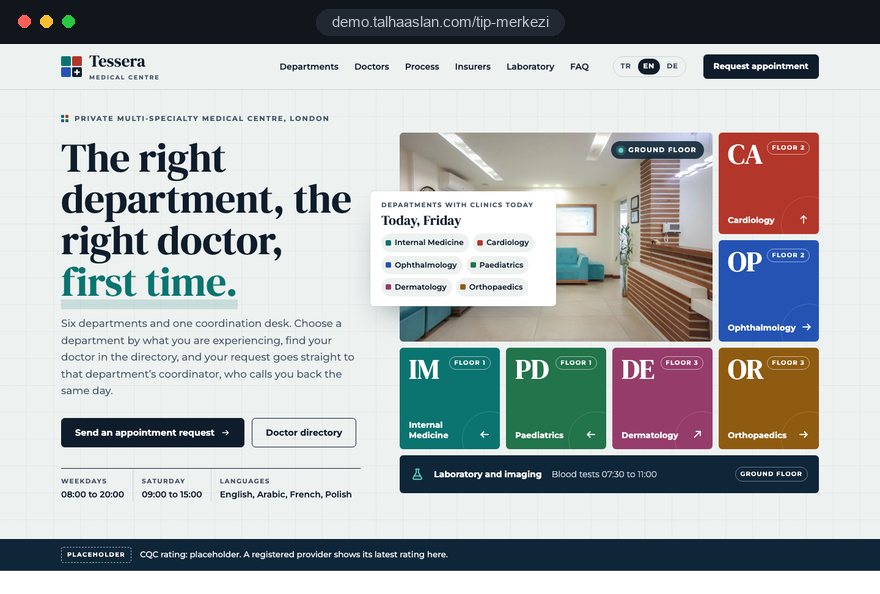
A medical centre website solves a different problem from a single doctor's site: patients have to find their own way through many departments and many clinicians, and the centre has to get every enquiry to the right team. As the site grows, information goes out of date, department pages come from different authors and requests pile up in one inbox.
In this guide, Talha Aslan and team walk through the decisions we make, in order, when planning sites for multi specialty centres, polyclinics and diagnostic laboratories. Clinical content is always your clinicians' call; we build the structure, the workflows and the technical foundation.
01Start with an inventory of departments, doctors and sites
The first deliverable of a medical centre project is not a design but one spreadsheet that describes the centre as it is today. The sitemap, the directory filters, enquiry routing and the measurement plan all come from it; if it is incomplete, every later stage loops back.
We build it with four tabs:
- Departments: name, the locations where it runs, the clinical lead and the person who handles its enquiries.
- Clinicians: title, specialty, department, clinic days, languages spoken and the locations where they consult.
- Locations: address, opening hours, phone number, parking and transport details, and the departments available there.
- Payers: private medical insurers, corporate schemes, self funded options and any departments a scheme does not cover.
Most centres find the same facts in three versions: the reception list, the HR roster and the old website. Deciding at the start which source counts as correct makes every later update easier.
There is also a boundary decision. The site should list only departments where your centre actually sees patients. A visiting consultant who holds a clinic two days a month belongs on the relevant department page as a clearly dated line, not as a department of their own. Put an owner's name on every tab.
02Turning the department list into a sitemap
We decide what becomes a page and what becomes a heading by looking at how patients search, not at the org chart. Patients search for cardiology or a children's ENT clinic, never for medical specialties division; internal groupings and page structure are different things.
Our working rule: if a unit has at least five distinct patient questions and at least one clinician, it gets its own page; otherwise it becomes a heading on the parent department page.
- Own page: main departments that see patients, such as cardiology, ophthalmology, gynaecology and dermatology.
- Heading: a sub service within a department, for example a heart rhythm clinic on the cardiology page.
- Separate branch: laboratory, imaging and health assessment packages, because patients come for these without a consultation.
- Patient guide: insurers, getting here, visiting rules and FAQs, kept apart from the departments.
An alphabetical department menu is usually the clearest option; labels like medicine and surgery mean little to patients. For a centre with thirty departments we add a small search box beside the menu that matches department names and common symptoms.
We also fix the URL pattern early. Department addresses should be short, lowercase and permanent, because over the years clinician profiles, location pages and outside links will all point to them.
03Anatomy of a department page: the ENT example
A department page answers one question: is this where I should go. So it opens with the reasons patients come, not with a paragraph about the centre. For an ear, nose and throat department we build the page in this order:
- Common reasons to visit: hearing loss, recurring tonsillitis, a blocked nose, dizziness, written in the words patients actually use.
- Consultations and procedures: audiometry, nasal endoscopy and similar, each with one or two plain sentences.
- The department's clinicians: cards pulled automatically from the directory, with clinic days.
- Where it runs: the locations offering the service and their hours.
- Practical questions: what to bring, whether children are seen, whether a GP referral or insurer authorisation is needed.
- The enquiry: a form with the department already selected, plus phone and WhatsApp.
Clinician cards and location details must never be typed by hand. Both are shared data fed from the inventory, so when a consultant's clinic day changes, the department page, the profile and the directory update together. Every hand typed copy is a line someone forgets when the team changes.
Keep the language plain and explain procedures the first time they appear. Describing audiometry as a hearing test that measures how well you hear different sounds keeps patients on the page and settles some questions before they reach the clinic.
04Doctor directory: filters, profile fields and sort order
A directory should let patients find the right person in three taps, so we derive its filters from patient questions rather than internal categories. Not every piece of data deserves a filter; too many fill a phone screen before any results appear.
- Specialty: matches the department names; if the patient arrives from a department page, it opens preselected.
- Location: the second most useful filter for centres with several sites.
- Clinic day: especially for working patients looking for evening or Saturday appointments.
- Language: only languages in which a consultation can genuinely be held.
Profile fields stay fixed: title, specialty, areas of interest, training and experience summary, registration details where your regulator expects them, clinic days, department and location, and a real, recent photo. When every profile has the same fields, the directory looks orderly; an empty field is simply hidden.
The default sort order is a decision too: seniority reflects internal hierarchy, alphabetical order is more neutral. Whatever you choose, explain the rule to your clinicians in writing at the start.
Photos follow one standard for background, framing and light, and they are the main speed risk: forty portraits loading at once make the directory slow on a phone. We serve small images that load as they scroll into view. The aim is to stay within Google's good thresholds: LCP (largest contentful paint, how fast the main content loads) of 2.5 seconds or less and INP (interaction to next paint, how fast the page responds) of 200 milliseconds or less.
05Keeping the site current when the team changes
Staff changes are the most frequent reason a medical centre website needs updating, so we tie every arrival and departure to a written workflow. The goal is that a change starting in HR reaches the site within the same week.
- When a new clinician joins, HR or the medical director's office sends the site editor a short information form.
- The editor fills in the profile fields, books a photo and sends the text to the clinician for approval.
- Once approved, the profile goes live and the department page and directory update automatically.
- When a clinician leaves, the profile comes down and its address is permanently redirected (a 301, the response that tells browsers and search engines a page has moved for good) to the relevant department page.
- On the same day, the clinician list in the enquiry form and the reception team's briefing note are checked.
Deleting a departed doctor's page and leaving nothing behind sends patients and search engines to an error page. A site rebuild creates the same problem on a large scale; you can match old addresses to new ones with our redirect mapping tool.
Admin permissions follow the same workflow. The editor can add and remove profiles; final approval of department texts sits with the clinical lead of each department.
06Routing every enquiry to the right department
The point of enquiry routing is that no request ever waits for someone to sort it; every enquiry has an owner the moment it arrives. So we design the centre's workflow first and the form fields second.
- Department: preselected when the patient comes from a department page; an "I am not sure which department" option sends the request to reception.
- Clinician: optional; making it mandatory loses patients who do not know any names yet.
- Location and preferred day: lets the person calling back offer the right slot on the first call.
- Source page: every request carries the page it was sent from, which is also the basis of measurement.
For requests that arrive out of hours, we state under the form when the patient will hear back and repeat it in an automatic confirmation email. If a department coordinator is on leave, the fallback to a deputy or to reception should be defined from day one.
If patients should pick a time themselves, we build an online appointment booking system or connect to the one your centre uses. Where a link to your patient administration system is possible, we define its scope in writing at the quote stage; where it is not, a well built routing form still gives you an orderly flow.
07Insurers, self funded care and corporate schemes
The insurer page answers the most practical question patients have and is the easiest one to get wrong, so we replace the strip of logos with a searchable list that explains cover. A patient who types their insurer's name should see what is and is not covered in the same row.
- Payer and type: private medical insurer, corporate scheme, embassy or employer agreement, or self funded.
- Scope: the departments and locations where the agreement applies.
- What the patient must do: whether an authorisation code or a GP referral is needed before booking.
- Last reviewed date: next to each row, not once at the bottom of the page.
Excesses, shortfalls and fee schedules change often and differ by policy. Rather than stating them as fixed facts on the site, we add a note asking patients to confirm with their insurer or your team, so nobody arrives at reception expecting the wrong outcome.
Decide early who owns the list. It usually belongs to whoever manages contracts; the editor only publishes. When an agreement ends, keeping the row for a while with a note that it has ended cuts down on repeated phone calls.
Corporate health assessments deserve their own enquiry route; an HR manager arranging staff screening should reach your business team, not a clinic coordinator.
08Laboratory and imaging pages: preparation and results
Patients visit laboratory and imaging pages for a task, not a consultation, so these pages must answer two questions: what do I need to do, and how do I get my results. Copying the department page template here does not work.
Preparation notes per test become the most read content in this branch. We feed them from one source approved by the laboratory lead and use the same pattern for every test:
- Preparation: fasting time, whether water is allowed, and a note to ask the clinician about regular medication.
- Sample collection: which location, which hours, and whether it is by appointment or walk in.
- Results: when they are usually ready and how they are delivered, through a portal link or collection in person.
- Imaging: preparation for MRI, CT and ultrasound, the approximate duration and which previous scans to bring.
If you use a results portal, we link to it securely; test results are never stored on the website itself. Collection points at different locations also appear on each location page.
Results are not interpreted on the site. What a value outside the reference range means is for the clinician to explain; the laboratory page can only point patients to the department they should follow up with.
09Regulation and editorial control with many authors
In a centre with many clinicians, compliance comes from an approval process, not from checking texts one by one. In England, regulation 20A of the Health and Social Care Act 2008 (Regulated Activities) Regulations 2014 requires CQC registered providers to show their most recent rating on every website they maintain, and rule 12.1 of the CAP Code requires evidence for objective claims.
We make the rating display a fixed part of the template, since it is easily lost in a rebuild, and set up four parts around it:
- Named editor: one person responsible for what goes live, with contact details on the site.
- Clinical sign off: each department text is approved by its clinical lead, and the approval date is recorded.
- Review date: shown on every page and changed only when the content genuinely changes.
- Pre launch checklist: superiority claims, promised outcomes, promotional offers and unverified effects are searched for before publishing.
Clinicians sometimes bring wording from elsewhere: leading centre in the region, painless treatment. The editor's job is to turn this into calm, informative language: what the procedure is, who it is for, who it is not for and what patients should expect.
Other countries have their own rules, which we check with you; the final legal assessment belongs to your compliance lead or legal adviser.
10Forms, health data and who sees what
An enquiry form can collect health data, so we ask only for what is needed to route the request. UK GDPR treats data concerning health as special category data, and your privacy notice must explain why the data is collected and who will see it.
- Required fields: name, phone number, department, preferred location and day.
- Optional short note: with helper text asking patients not to describe their medical history in detail.
- Privacy notice: linked right next to the form, explaining the purpose and who processes the request.
- Not asked: NHS or insurance policy numbers, test results or file uploads have no place in a first enquiry.
In a multi department setting, access matters as much as the form. The ophthalmology coordinator should not see cardiology requests. In the panel, each coordinator sees only their own department, while reception sees everything. Requests are deleted after a set period that we agree with your retention policy.
Notification emails carry no clinical notes, only a link to the panel, so enquiry content does not travel through shared inboxes. Under UK rules, analytics and marketing cookies should not run before the visitor consents.
11Locations, Business Profiles and structured data
Every location of a medical centre should have its own page and its own Google Business Profile; patients rarely search for a department alone, they search for one nearby. The location page is the address the profile links to, and it describes what actually happens at that site.
- Location page: address, map, opening hours, phone number, parking and public transport, the departments and clinicians on site.
- Profile name: under Google's guidelines, the real world name of the business, with no added specialties or place names.
- Categories and services: limited to what is genuinely offered at that location.
- Photos: entrance, waiting area and car park, real images that help patients find the door.
A common mix up is linking every profile to the home page; a patient who picks one location on the map lands on the site and sees another location's phone number. Linking each profile to its own location page fixes this, and address, phone number and hours must read the same everywhere.
Search engines understand these relationships through structured data, that is, labels that make page information machine readable. We define the organisation and each location separately and link every clinician profile to its department and location; nothing is marked up that is not visible on the page. You can check the markup with our schema markup tool, and our SEO services keep monitoring this foundation after launch.
12Measuring enquiries and replies per department
Meaningful measurement for a medical centre is not total visits but enquiries per department and whether each one got a reply; the site should make both visible. We record four events, each tagged with department and location:
- Enquiry: form submissions by department, location and source page.
- Call: taps on the phone number, with the department page they came from.
- WhatsApp: taps on a message link that opens with the department name.
- Reply: the coordinator marks each request in the panel as called, booked or unreachable.
The last event depends on your team's habits, but it holds the real management insight. If a department receives many requests and few bookings, the problem is usually response time or clinic capacity, not the website.
For a monthly report, three questions are enough: which department received requests, which went unanswered, and which pages were read often without producing requests. The third answer is not always bad news; a much read test preparation page shows patients solved their question on the site.
Because analytics depends on consent, the numbers are never complete, but they show the trend.
13Six common mistakes on medical centre websites
Most mistakes come not from design but from information nobody owns. In new projects we prevent these six from the start:
- Ordering departments by internal divisions: list the names patients know, alphabetically, instead of medicine and surgery groupings.
- Stacking all clinicians on one long page: build a directory filtered by specialty, location and day.
- Sending every enquiry to one inbox: route each request to the department coordinator and a deputy, and track it in a panel.
- Deleting a departed doctor's page: redirect the address permanently to the relevant department page.
- Showing insurers as a strip of logos: publish a searchable list with scope and a review date.
- Linking every location profile to the home page: link each profile to its own location page.
One more deserves a mention: forgetting old addresses when an old site is replaced. In a rebuild, listing every old URL and assigning each a new destination is the first item on the launch day checklist.
The common thread is ownership. Every piece of information needs an owner and an update rhythm, which is why the owner names in your inventory are the most valuable cells in the whole project.
14Choosing a partner and preparing the first call
The right partner for a medical centre asks about departments, staffing and enquiry flow before talking about design. When comparing quotes, ask these questions:
- Can our own team update clinicians and departments, and with which permissions?
- What happens to a departed clinician's page, and who sets up the redirect?
- How are enquiries split by department, and who sees what in the panel?
- Which approval steps cover regulatory and data protection checks?
- How are updates and technical maintenance handled after launch?
Bring a first draft of the inventory, your current appointment process and your insurer list to the call; that is enough to start. This page also links to a live demo we built for a healthcare provider with several departments, so you can compare it with your own structure. Our other work is in our client references.
For a practice built around one doctor's name, our doctor website guide is a better starting point, and if you treat patients from abroad, look at our health tourism website structure. The full scope is on our web design service page. You can see fixed packages in our web design pricing, and for a written quote based on your centre, reach us through the contact page.