Units look the same
The hot tub cabin, the one with a wood burner and the family bungalow share one gallery. Guests cannot name the unit they want, cannot see the bed layout or heating, and ask about each detail by message.

Your Windows contrast theme is on; colours come from your system.
Your device is set to reduce motion; animations are already off.
Your choices are saved in this browser only.
Industry-specific web design
Guests usually find a bungalow or cabin through a photo on Instagram, then ask the same questions in direct messages: which one is free, is the hot tub private, is breakfast included, can a normal car make it up the track in winter. So we build bungalow websites around a page per unit, a live calendar, direct enquiries and clear arrival details. If you build tiny houses, the same logic presents your models, floor plans and quote step.
Open the live demoA demo design we built for a fictional brand
In short
A bungalow website presents each unit on its own page with capacity, heating, hot tub or wood burner and real photos, shows availability in a calendar, collects enquiries on the site instead of in direct messages, and explains the route including winter conditions. Local licensing or registration rules decide what the listing has to show. For tiny house builders the same structure becomes model pages, floor plans and a quote form.
Talha Aslan and teamLast updated:
Why it needs its own approach
Bungalow and cabin businesses are run by small teams that often leave selling to social media. Generic business templates leave no room for unit differences, calendars, licence details or a difficult last mile.
The hot tub cabin, the one with a wood burner and the family bungalow share one gallery. Guests cannot name the unit they want, cannot see the bed layout or heating, and ask about each detail by message.
Availability, deposits and date changes are agreed in Instagram messages. When a reply takes a few hours, the guest moves on to another account, and nobody knows which enquiry came from where.
In Scotland, short-term lets need a licence, and a mandatory condition requires the licence number in every listing or advert. A site that does not show the details your area requires leaves guests unsure and the business exposed.
Cabins are often in woodland, on a hillside or by a lake, reached by a rough track. Without notes on winter access, parking and how to collect the key after dark, guests set off with questions.
Breakfast, hot tub heating, firewood, dogs and occasion decorations: extra or included, the site does not say. Guests who cannot work out the total either postpone or get a surprise on arrival.
Builder websites show beautiful photos but no dimensions, floor plan, materials, options or delivery details. Sweeping claims about permission lead buyers to ask for quotes with the wrong expectations.
Our approach
We build bungalow websites in the order guests decide: they browse the units, pick one, check dates in the calendar, read what is included and the house rules, then send an enquiry or pay a deposit. Guests arriving from Instagram land on the page of the unit they saw, and the inbox is left for questions that really are personal.
If guests should choose dates and pay on the site, we add a booking engine; if you host guests from abroad, we plan multiple languages from the start. For tiny house builders the same foundation turns into a catalogue structure with model pages and a quote form.
Design, development and content sit in one team, so calendars, payments and licence fields are not patched on later. Talha Aslan sets the strategy and an experienced team handles delivery, working remotely and in English with owners wherever they are.
Home
Every unit and every model answers its own search; calendar, arrival details and the enquiry form are reachable from every page.
The right setup
All three grow from the same foundation; the number of units, who runs them and whether the site sells stays or houses make the difference.
2 to 5 units
The owner is host and sales team at once; most guests come from Instagram and expect a quick answer.
Many units
Several unit types, shared facilities such as a breakfast room, pool or play area, and a reception.
Builder
The site sells homes, not nights; buyers want to understand the model, the dimensions, the materials and delivery.
Built for bungalows
This list comes from the decisions we make with you when planning a website for a bungalow business or a tiny house builder.
Capacity, bed layout, heating, whether the hot tub or wood burner is inside or outside, the view and real photos for every unit. Guests choose by name instead of describing what they want in a message.
An availability calendar per unit; if you also sell on listing platforms, booked dates sync through iCal links. Enquiry form, WhatsApp and deposit step sit together, and enquiries from Instagram are measured.
Where a licence or registration number is required, such as the short-term let licence in Scotland or a registration scheme under the EU short-term rental regulation, we give it a fixed place on each unit page. Which rules apply is yours to confirm with your adviser.
Coordinates, the state of the last mile, winter tyres or chains, parking and how keys are handed over after dark, all on one page that stays light enough to open on a weak signal.
Breakfast, hot tub heating, firewood and dog policy are visible before payment. Quiet hours and fire rules have their own page, and honeymoon or anniversary decorations have a separate request field.
Floor plan, dimensions, weight, materials, options and delivery for every model. Whether a tiny house needs planning permission depends on where and how it is placed, so the site does not promise that none is needed and points buyers to their local planning authority.
Sources: The Civic Government (Scotland) Act 1982 (Licensing of Short-term Lets) Order 2022, Schedule 3, legislation.gov.uk · European Commission: new rules on short-term rentals apply from 20 May 2026 · Regulation (EU) 2024/1028 on short-term accommodation rental services, EUR-Lex
Comparison
| Topic | Generic business template | Site built for bungalows |
|---|---|---|
| Units | One gallery, one "rooms" page | Each unit on its own page: capacity, heating, hot tub and view |
| Availability | A "message us" button | Calendar per unit, synced with platforms |
| Enquiries | Direct messages and calls, not recorded | Form, WhatsApp and deposit tracked with their source |
| Licence details | Not shown | Fixed fields for what your area requires |
| Getting there | A single map pin | Coordinates, winter access and key handover |
| Tiny houses | A photo album | Floor plan, size, options and quote form per model |
Quick check
Must haves: does your site have them?
0 of 6 in place Tick the boxes to see where your site stands.
Added as needed
We choose which of these you need together during the scoping call.
Share how many units you have, what types they are, which licence or registration applies and where your guests find you; we will work out the right page structure and a written quote.
Process
We define your business, your audience and the site’s one-sentence job: who it sells what to, through which action. Scope and timeline are written from that answer.
The home page and key templates come to you as designs first; no code is written before your approval. We do not like surprises, and we do not cause them.
The approved design becomes fast, secure, maintainable code. You follow progress in the CRM and see every page in a staging environment before launch.
The site goes live with analytics, Search Console and conversion tracking connected; panel training is given, first-year hosting and maintenance included.
Search and speed foundations
Guests do not just search for "bungalow"; they search with the area name, for a "cabin with hot tub", a "dog friendly cabin" or a "tiny house stay". Unit and feature pages answer each of these searches separately.
Profile and story links go to the page of the unit in the post, tagged with UTM parameters, so you see how many enquiries social media brings from data rather than guesswork.
Bungalow websites are heavy on photos and video; images are converted to modern formats, videos load without slowing the first screen, and Core Web Vitals are measured on a phone before launch.
Enquiry form, WhatsApp, calls and deposit steps are tracked as conversions from day one, showing which unit and which search bring guests.
Free tools
Before planning a new site, test how your current one opens on a phone, convert your cabin photos to lighter formats, get the coordinates of your entrance right and tag your Instagram links with UTM parameters. The tools are free and need no sign up.
Tech SEO
Test whether a page works well on phones: viewport, font size, tap targets, a mobile screenshot and Core Web Vitals.
Image
Convert between JPG, PNG and WebP in one click or in batches; it detects the input format, lets you set quality and a background for transparency, and uploads nothing.
Maps
Convert latitude and longitude between decimal degrees, DMS, DDM and UTM, and get the distance, bearing and midpoint between two points, with map links.
Analytics
Build correctly tagged links with Google Ads, social and newsletter presets.
Conversion
Create a wa.me link with a preset message + embeddable button code.
Conversion
Turn URLs, WhatsApp, Wi-Fi, vCard and text into a QR code in seconds; download high-res PNG or SVG.
How we work
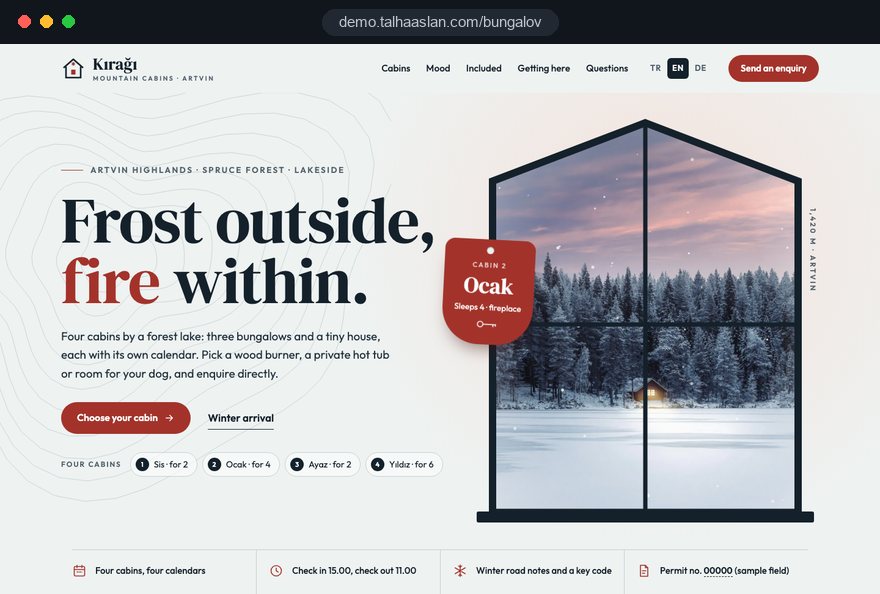
We do not have a live client site for bungalows or tiny houses yet, so we show our approach on a live demo. The demo is not client work. You can see the sites we built in other sectors on the references page.
Live demo
For this field we built a one page demo site for a fictional brand, made only to show our approach. You can explore the design, the copy structure and the mobile view live in three languages.
Open the live demoCapacity, bed layout, heating and what makes each bungalow different are listed with you, and the site menu comes from that list.
We talk through which licence, registration or permit applies to your units and give the required details a fixed place on the site.
We collect the questions guests ask most on Instagram, answer them on unit pages and in the FAQ, and point your profile link at the right page.
We track which unit page brings enquiries and where guests drop out, and fix it before the busy period starts.
Related pages
Industries
A separate structure for sites built around tent pitches, caravan pitches and glamping tents.
Industries
A separate structure for companies letting villas with pools and holiday homes by calendar.
Industries
A separate structure for businesses that hire out or sell caravans and motorhomes.
Solutions
For guests to pick dates and pay the deposit on the site.
 How to Drive More Website Traffic from Social Media: A Social and Website Integration GuideRead article
 Professional Photography for Websites: What It Adds and How It Beats Stock PhotosRead article
 How Website Video Affects Conversion Rate: When It Helps, When It HurtsRead article
 Lead Form Design for Booking, Quote and Demo Requests: UX Rules That Lift ConversionsRead article
FAQ
If your question is not here, write to us; we will send you an answer and a written quote.
Next step
In a free 15 minute call we talk about your units, your licence situation and your season, then prepare a written scope and quote.
In-depth guide
For most bungalow and cabin businesses, a sale starts with one photo and continues through dozens of messages. A good website makes most of those messages unnecessary: guests know which unit they want by name, see what is included and understand the arrival before they set off.
This guide follows the decisions an owner makes in order: the unit inventory, page structure, the move from direct messages to the site, seasonal and occasion content, licence fields, arrival details, model and quote pages for tiny house builders, search and measurement. Every section ends in something you can apply straight away.
The quality of a bungalow website depends less on design than on how precisely you have described each unit. Without a table that records the same fields for every cabin, the site will describe each one vaguely, and they will all start to look alike.
We suggest a simple spreadsheet with one row per unit. It later becomes the single source for unit pages, filters and calendars, so when a detail changes you update it once.
If two units end up with identical rows, guests will see them as identical too. Then you need to find what really sets them apart: the direction of the view, the sunset, the distance to the next cabin, or an enclosed garden that suits families with toddlers. We do not start a first draft without this table.
A memorable name for each bungalow makes requests precise and shortens message threads. "The Pine" or "Brookside" points to the same unit in an Instagram comment, an enquiry form and a phone call, while "Unit 2" invites confusion.
The menu follows from the names. A small site can list every unit directly; a larger holiday park needs type pages first, with units listed underneath.
The one rule for naming is that the name must rest on something true. If "Lakeview" only shows the lake in winter when the trees are bare, change the description rather than leave guests disappointed in July. The name sets the expectation before any photo does.
The first screen of a unit page should answer "does this bungalow suit us" without scrolling. On a phone that screen is small, so it holds the details guests use to rule a unit in or out, not everything you could say.
Below the first screen come the gallery, the full description, inclusions, rules and the calendar. Each unit shows its own booked and free dates; if you also sell through listing platforms, our page on a booking website with live availability explains how calendar syncing works.
Keep the enquiry form short: dates, number of guests, children, dogs, name and phone number. A hidden field records which unit the enquiry came from, so the owner never has to reply with "which cabin did you mean".
The guest then receives an automatic confirmation saying the request has arrived, when to expect a reply and whether the dates are held in the meantime. That short message often stops guests from writing to three businesses and booking with whoever answers first.
Your inbox is the most honest list of what your website is missing. Collecting the questions that repeat over recent months and answering them on the right pages is the quickest way to write the site in your guests' own words.
Your inbox will not go quiet after this. But messages shift from questions the site already answers, such as whether hot tub heating costs extra, to genuinely personal ones, such as whether a guest can bring a birthday cake. Replies get faster and fewer enquiries are lost along the way.
A bungalow sells as two different products across the year, and the website should reflect that. In summer, guests look for shade, a stream or lake and long evenings outdoors; in winter, the same cabin is chosen for warmth, a fire, a hot tub in the cold and a snowy view.
Instead of one fixed description, we suggest a seasonal block on every unit page that moves to the top according to the date, while everything else stays the same.
Seasonal content also helps in search. Someone searching for a "winter cabin with hot tub" decides more easily when the page shows snow rather than a gallery shot in August. A handful of new photos per unit at the start of each season is enough.
Before uploading, shrink the files; images converted to a modern format with the image converter keep their look and make the page much lighter.
Many bungalow guests come for a birthday, an anniversary, a proposal or a honeymoon, and those stays need different information. Squeezing them into the general enquiry form sends the owner into long phone calls to find out what is wanted.
We suggest a dedicated occasions page with its own short form. The page shows with photos what you can prepare; the form collects everything you need in one go.
Describe each extra precisely: what the decoration includes, where the cake comes from, how much notice you need. Whether you publish the prices of extras is your decision, but the fact that they cost extra must be visible before payment.
Because these forms collect personal data, link the privacy notice required in your country next to the form and explain what the data is used for and who sees it. Plan as well who on your team can read sensitive notes, such as the details of a surprise proposal.
Which licence or registration details a bungalow website must show depends on where your units are, so the first step is to establish what applies to you. The rules differ by country and sometimes by region or municipality.
Once the requirement is clear, we place the licence or registration number, capacity and any other required details in a fixed field on every unit page and in the footer. The field cannot be deleted during routine content edits, so a new unit picks it up automatically.
Nothing in this section is legal advice; please confirm your own obligations with your adviser. Our job is to make sure the right fields sit in the right places.
For a cabin in the woods or on a hillside, the guest's biggest worry is the road, and a single map pin does not settle it. Think of arrival information as a kit: one page on the site and a short message sent the day before arrival.
The core of the kit is the coordinate of the turnoff from the main road. In rural areas, navigation apps often drop a postal address in the wrong place; writing the turnoff coordinate correctly with the coordinate converter prevents many wrong turns.
Keep the arrival page text based and light; small photos instead of heavy embedded maps. The short version goes out by WhatsApp the day before, so everything is on the guest's phone before they lose signal.
A tiny house builder's website sells a product rather than a stay, so model pages replace unit pages and a quote form replaces the calendar. Buyers decide on dimensions, floor plan, materials and delivery, not on a mood photo.
When every model page carries the same headings in the same order, buyers can compare models without asking. We usually build this on a catalog website foundation.
The quote form should carry over the model and the options the buyer selected, then ask for the region of the plot, the intended use (own home, holiday let, garden office) and the preferred delivery period. Your first reply then starts from a working scope rather than a list of questions.
If you also reach buyers who are comparing modular and prefabricated buildings, explain the difference between the two product groups clearly. Our page on a prefabricated building company website sets out a separate structure for that market.
Planning permission is the question tiny house buyers ask most, and the website should guide rather than promise. A line like "no permission needed" sets the wrong expectation and can come back to the builder later.
Whether a tiny house needs planning permission depends on the country, the plot and how the house is used, for example whether it stays on wheels or sits on a foundation, and whether someone lives in it full time. So the site makes no general exemption claim and sends buyers to their local planning authority before they order.
A dedicated information page works well for this. It gives no legal advice; it shows buyers which questions to ask and whom to ask.
Describe delivery logistics with the same honesty: access to the site, whether a crane or a tow vehicle is needed, and how the ground must be prepared. When these points come up at quote stage, delivery day holds fewer surprises for both sides.
A bungalow website sells through photos, but if the photo weight slows the page on a phone, guests leave before the gallery appears. So we plan the photography and the technical load together.
Before any professional shoot, prepare a shot list for each unit. It makes sure every cabin is photographed from the same angles and that the details guests ask about are actually visible.
For speed we work with Google's Core Web Vitals. LCP measures how long the largest element takes to load and counts as good at 2.5 seconds or less; INP measures how quickly the page responds to a tap, good at 200 milliseconds or less; CLS measures how much the layout jumps, good at 0.1 or less.
To reach those values, gallery images load as the guest scrolls, the intro video does not autoplay on the first screen and image dimensions are declared in advance. We measure on a real phone over a weak connection before launch.
People rarely search for "bungalow" alone; they add an area name and a feature, so visibility starts with unit and feature pages that answer each of those searches separately. "Cabin with hot tub", "dog friendly cabin" and the area name plus "bungalow" each deserve their own page.
Our SEO service page explains our wider approach to search. Measurement on a bungalow site starts on day one: form submissions, WhatsApp clicks, calls and the deposit step are each tracked as separate conversions. If you have guests from the European Economic Area, cookie consent comes before any non essential tracking.
That data shows which unit page brings enquiries, which Instagram post worked and where guests drop off. Fixing the weakest page before the season is often a better use of time than starting a new campaign.
Most problems we see on bungalow websites come from missing information and the wrong order, not from design. Each mistake below comes with a better approach.
When choosing a team for a bungalow website, ask how they will handle your units and your licence before you look at design samples. A good team asks you questions in the first meeting instead of fitting your cabins into a ready template.
Questions worth asking in that meeting:
We do not yet have a live client website in the bungalow and tiny house field, so we show our approach on a live demo linked on this page. You can see completed work in other sectors among our client references.
Fixed scope packages are listed under web design pricing. If you would like to share your number of units, your licence situation and where your guests find you, get in touch with us, and we will put together a suitable page structure and a written quote.
Start a Project
Thanks {name}, we've received your brief. We usually reply within the same day.
What happens next?