Unclear what is being rented
Tent pitches, caravan pitches and glamping tents share one gallery under one camping heading. The family bringing their own tent and the couple who want a made bed cannot tell which option is theirs.

Your Windows contrast theme is on; colours come from your system.
Your device is set to reduce motion; animations are already off.
Your choices are saved in this browser only.
Industry-specific web design
Campers first want to know what they are actually getting: a pitch for their own tent, a hook up for the motorhome or a bell tent with the bed already made. Then come the questions about electricity, showers, shade, fires and the state of the last stretch of road. We build campsite websites around pitch and unit types, a site plan, the rules and directions, so the questions the site answers no longer arrive by phone.
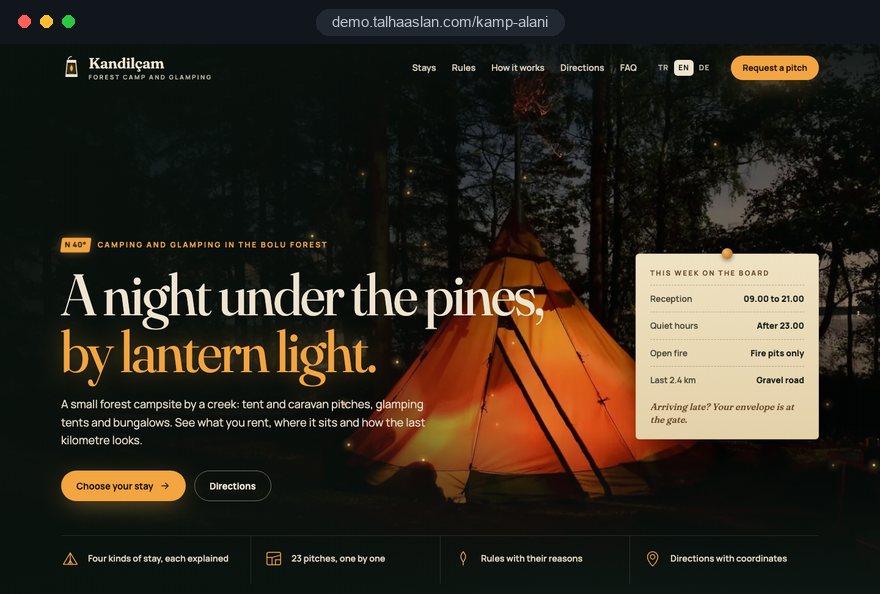
Open the live demoA demo design we built for a fictional brand
In short
A campsite website explains each accommodation type separately, from tent and caravan pitches to glamping tents and cabins, shows the site plan and shared facilities, sets out the camp rules and directions and takes enquiries or deposits. In the EU, the 2024 short-term rental regulation excludes accommodation on camping grounds; in Turkey, certified campsites must advertise in line with their tourism certificate and accurately.
Talha Aslan and teamLast updated:
Why it needs its own approach
Campers do not want to set off without knowing what they are renting, what to bring and how to get there. Generic business templates leave no room for pitch types, the layout of the site or the rules.
Tent pitches, caravan pitches and glamping tents share one gallery under one camping heading. The family bringing their own tent and the couple who want a made bed cannot tell which option is theirs.
Which pitches have shade, which are near the water, where the hook ups are and how far the toilets and showers are: none of it is on a plan. Guests find out when they arrive.
Fires and barbecues, quiet hours, dogs, vehicle access and waste rules are only on a sign at the entrance. The first disagreement with a guest happens on the field, in front of everyone.
Photos from another season, a unit called a cabin that is really a tent, an unclear number of facilities. In Turkey, certified campsites must advertise in line with their certificate and accurately, and everywhere overselling comes back as poor reviews.
Electricity, hot water, parking, extra vehicles, firewood or equipment hire: nobody can tell what costs extra. Guests who cannot work out a total send a message and look at another site while they wait.
Campsites are often out of town, with an unpaved last stretch and weak signal. A single pin on a map and a call us line do not help a guest looking for the turning after dark.
Our approach
We build a campsite website in the order campers ask their questions. First they choose the kind of stay, then they see their spot on the site plan and how far it is from the facilities, read the rules and what is included, and finally pick dates and send an enquiry or pay a deposit. That is why tent pitches, caravan pitches, glamping tents and cabins each get their own page with their own photos and capacity.
If guests should choose dates and a pitch type and pay entirely on your site, we set up an online booking system; if you welcome campers and motorhome travellers from several countries, we plan a multilingual structure from day one. For the season opening or school holidays, a single-goal landing page can go live without touching the main site.
Design, development and content sit in one team, so site plan, payment and language decisions are not patched on later. Talha Aslan sets the strategy and an experienced team handles delivery, working remotely and in English with campsite owners wherever they are.
Home
Each stay type answers its own search; the site plan, rules and directions are one tap away from every page.
The right setup
All three start from the same foundation; what guests bring, what they expect to find ready and the size of the site make the difference.
Tents and caravans
Campers bring their own kit and want to see pitch size, power, water and facilities before they book.
Glamping
Guests want nature with a proper bed; the inside of each tent, the view and the bathroom decide the booking.
Mixed site
The site serves overnight campers as well as day visitors and groups.
Built for campsites
These are the points we decide on with you when planning a campsite or glamping website.
Tent pitches, caravan pitches, glamping tents and cabins are defined separately, each with its capacity, pitch size and what is already there. For campsites in Turkey, the tourism facilities regulation does not allow kitchens in campsite bungalow units, so certified sites describe them accordingly.
A clear plan showing pitches, shaded areas, hook ups, toilets and showers, kitchen and laundry, the entrance and parking. With a booking system, guests can pick their spot straight from the plan.
Fires and barbecues, quiet hours, dogs, vehicle access, rubbish and grey water rules on their own page and at the payment step. Guests who read the rules first rarely argue about them on the field.
The EU short-term rental regulation, applying since 20 May 2026, expressly excludes accommodation on camping grounds and in caravan parks, such as tents and caravans. Cabins or glamping units let outside a campsite may be treated differently, so we leave room for any registration details and you confirm your case locally.
Whether electricity, hot water and parking are included, extra charges for vehicles or dogs, firewood, equipment and tent hire, breakfast and activities are all visible before payment.
Coordinates, directions, the state of the last stretch of road, a suitable route for large motorhomes, reception hours and what to do if there is no signal, all on one page. The page is kept light so it still loads on a weak connection.
Sources: Regulation (EU) 2024/1028, Article 3 and recital 7 (camping grounds excluded), EUR-Lex
Comparison
| Topic | Generic business template | Site built for campsites |
|---|---|---|
| Stay types | One camping page | Tent pitches, caravan pitches, glamping and cabins on their own pages |
| The site | A gallery in random order | Pitches, facilities and the entrance on one plan |
| Rules | Only on the sign at the gate | On their own page and at the payment step |
| What is included | Unclear, asked by message | Power, water, parking and extras stated clearly |
| Getting there | A single pin on a map | Coordinates, road conditions and a motorhome route |
| Season | Opening months not mentioned | Season dates, off season and weather notes |
Quick check
Must haves: does your site have them?
0 of 6 in place Tick the boxes to see where your site stands.
Added as needed
We choose which of these you need together during the scoping call.
Tell us how many pitches you have, which stay types you offer, the months you are open and where your guests come from; we will come back with a page structure and a written quote.
Process
We define your business, your audience and the site’s one-sentence job: who it sells what to, through which action. Scope and timeline are written from that answer.
The home page and key templates come to you as designs first; no code is written before your approval. We do not like surprises, and we do not cause them.
The approved design becomes fast, secure, maintainable code. You follow progress in the CRM and see every page in a staging environment before launch.
The site goes live with analytics, Search Console and conversion tracking connected; panel training is given, first-year hosting and maintenance included.
Search and speed foundations
Campers do not only search for a campsite; they add an area, or look for motorhome stopovers, glamping, dog friendly camping or a pitch by the sea. Stay type and feature pages are built to answer each of these searches separately.
Most guests find a campsite on a map and take their directions from there. Your Google Business Profile, the address on the site and the coordinates are set up to say exactly the same thing.
Guests often open the site on the road, on a phone, with patchy signal. Photos are converted to modern formats, directions and rules pages are kept light, and Core Web Vitals are measured on a phone before launch.
Enquiries, WhatsApp clicks, calls and deposits are tracked as conversions from day one, so you can see which stay type and which area search bring guests.
Free tools
Before planning a new site, see how the current one opens on a phone, convert your photos to lighter formats, get the coordinates of your entrance right and make a QR code for the rules or the Wi-Fi. The tools are free and need no sign up.
Tech SEO
Test whether a page works well on phones: viewport, font size, tap targets, a mobile screenshot and Core Web Vitals.
Image
Convert between JPG, PNG and WebP in one click or in batches; it detects the input format, lets you set quality and a background for transparency, and uploads nothing.
Maps
Convert latitude and longitude between decimal degrees, DMS, DDM and UTM, and get the distance, bearing and midpoint between two points, with map links.
Conversion
Turn URLs, WhatsApp, Wi-Fi, vCard and text into a QR code in seconds; download high-res PNG or SVG.
Conversion
Create a wa.me link with a preset message + embeddable button code.
Sharing
Preview how your link looks on WhatsApp, Facebook, X, LinkedIn and Telegram, and find missing Open Graph tags and image problems.
How we work
We do not have a live client site for campsites or glamping yet, so we show our approach on a live demo. The demo is not client work. You can see the sites we built in other sectors on the references page.
Live demo
For this field we built a one page demo site for a fictional brand, made only to show our approach. You can explore the design, the copy structure and the mobile view live in three languages.
Open the live demoWe list pitches, facilities, the entrance and parking with you and turn them into a simple site plan; the website is built on top of it.
Capacity, what is ready on arrival and what the rate includes are written with you for each type; if you hold a tourism certificate, unit names follow it.
Fire, quiet hours, dogs and waste rules are written briefly and with the reason behind them, not as a list of bans, and repeated at the payment step.
We track which page brings enquiries and where guests drop out, and fix it before the season opens.
Related pages
Solutions
Let guests choose dates and a stay type and pay on your own site.
Industries
A separate setup for villas and holiday homes let by calendar.
Industries
A separate setup for hotels and guesthouses that sell by room type.
Solutions
Pages per language for sites welcoming campers from abroad.
 How to Do Google Maps SEO: A Guide to Ranking Your Business Higher on the MapRead article
 What Is Mobile First Design? How Mobile First Affects Your SEO RankingsRead article
 How Website Video Affects Conversion Rate: When It Helps, When It HurtsRead article
 How to Choose a Payment Gateway: What to Check Before You SignRead article
FAQ
If your question is not here, write to us; we will send you an answer and a written quote.
Next step
In a free 15-minute call, in English, we will go through your pitches, your stay types and your season, then send a written scope and quote.
In-depth guide
When campers choose a campsite, they are really making three decisions: where they will sleep, what they need to bring and how they will find the place. A campsite website earns bookings to the extent that it makes those three decisions easy.
In this guide, we at Talha Aslan and team walk through the decisions we make with owners of classic campgrounds, glamping sites and mixed sites, in the order we make them. If you rent out individual homes on a calendar, our vacation rental website guide will fit you better; this one is about pitches, tents, RVs and guests who chose to sleep outdoors.
The first decision is which products the site will sell separately; tent pitches, RV and caravan pitches, glamping tents and cabins may share a field, but they serve different guests, follow different pricing logic and raise different questions. Pages written before this split is settled push campers toward the wrong option.
For each stay type, answer these questions in writing:
The last question in the list shapes your booking setup. If shaded and open tent pitches are interchangeable, sell them as one type; if they are not, describe them as two. Settle the names now too: call a unit a cabin or glamping only if it delivers what the word promises.
Each stay type page should answer the questions of the guest who will choose that type; copying one template four times is not enough. Tent campers look at the ground, RV travelers at the connections, glamping guests at the bed and the bathroom.
Put capacity, season and what is included at the top of each page, where they can be read at a glance; details can sit further down. Photos must belong to that type: an RV pitch page showing the inside of a bell tent tells the guest nothing.
Close each page with two paths: a short block pointing to the other stay types for guests who landed in the wrong place, and a single button to dates or the enquiry form.
The site plan is the most viewed and least prepared part of a campsite website; only on a plan can guests see their spot, the shade and the distance to the toilets. You do not need a surveyor's map, just an accurate and readable drawing.
A static plan is enough for sites where reception assigns spots on arrival, and it is easy to maintain. A selectable plan shows the guest who wants a spot by the water which pitches are free on their dates, but it requires every pitch to be managed as separate inventory.
Keep the plan zoomable on a phone and its labels legible. North, the water side and the distance from the gate tell a first time visitor more than the drawing itself.
Whether the site takes payment should follow from how your campground is run; a deposit is not the right answer for every campsite. A small site that assigns spots on arrival and mixes overnight guests with day visitors may do well with a clear enquiry form and WhatsApp.
Online deposits start to make sense when:
If you decide to take payment on the site, an online booking system needs one early decision: is inventory held per stay type or per pitch? Type level inventory is flexible; pitch level inventory lets guests choose their spot but makes it harder to move people around on the field.
If you stay with an enquiry form, keep it short: dates, number of guests, stay type, vehicle or RV length and a phone number. Ask about dogs or power only if the answer changes the price or the spot.
Campers should be able to estimate the total before they reach the payment screen; at most campgrounds the price is built from people, vehicles, tents, power and pets. Whether or not you publish your rates, the components that make up the price must be clear.
Weather is a cancellation topic specific to campsites. Your terms should state what happens with a storm warning, heavy rain or a fire ban: a date change, a partial refund or the standard terms. Leave that sentence out and every wet weekend turns into a negotiation.
Show the season calendar on the same page: opening months, units that stay open out of season, and which facilities close in winter.
Rules are accepted when guests read them before they travel and understand why they exist; a rule first seen on a sign at the gate feels like a restriction added after payment. Put the rules page next to the packing list and repeat a short reminder at the enquiry or payment step.
Write every rule in three parts: the rule, the reason and what guests can do instead. "No ground fires, because the dry season brings a real fire risk; use the shared grill area for cooking" prompts far fewer questions than "no fires".
A packing page that is specific to your grounds helps with:
If you rent out gear or tents, describe that on its own page: what can be rented, and whether it must be reserved in advance. A QR code at the entrance and in the shared areas that opens the same rules page lets guests check a rule on their phone instead of walking back to the sign.
The directions page is what actually gets guests to your gate, and it should be written to be read before they leave home. Campgrounds often sit at the end of rural roads, behind an unmarked turn, exactly where the signal fades.
End the page with a short section on what to do when the signal drops, such as a gate bell or a landline number, and suggest that guests save the page on their phone before setting off.
Link this page from every stay type page and from the confirmation message. In practice, the directions link in the confirmation is often the one guests open most.
At a campsite, photos work like a promise about what guests will find; if the field does not match the gallery, the review will say so. Overselling is a commercial risk everywhere, and in some markets a regulatory one: certified campsites in Turkey, for example, must advertise in line with their tourism certificate and accurately.
Plan the shoot in this order:
Keep video short: a walk from the gate to a pitch and from the pitch to the facilities explains scale better than any photo. Load it with a light player that starts on tap rather than embedding a heavy file that plays on its own.
Convert photos to modern formats such as WebP before uploading; our image converter is free and needs no account. Give every gallery photo a short, accurate caption, and if the caption says lake view, the lake should be visible from that pitch.
Campers rarely search only for "campsite"; they search with a region, a stay type or a feature, so the site structure should answer each of those searches on its own page. Searches like "RV campground near the coast", "glamping with hot tub" or "dog friendly campsite" have a far better chance when a page answers them in depth.
Reviews carry weight on maps; a short request in the checkout message, plus calm and specific replies to criticism, shows the next camper how the site is run.
If you want this work done steadily, our SEO service runs alongside a preseason content plan and profile maintenance. We do not promise rankings; giving searching campers a page that answers their question is simply the precondition for being found.
A campsite website is mostly opened on a phone, often on the road and on a weak connection; a site that looks good on a desktop but loads slowly on mobile fails at the moment it matters most.
Google's Core Web Vitals are a sound reference here. A page counts as good when these thresholds are met for 75 percent of visits:
Keep the directions, rules and contact pages especially light: no large galleries, autoplay video or heavy map embeds. A static map image with coordinates, and a button that opens the guest's own map app, is enough.
You can see how your current site behaves on a phone in a few minutes with our mobile friendly test. On a new site we measure before launch on a real phone with a throttled connection, and that check includes making sure the click to call and WhatsApp buttons sit where a thumb reaches them easily.
If you host campers from abroad, language should be part of the structure rather than something added later. Motorhome travelers often plan their route weeks ahead, searching in their own language.
Make these decisions in your language plan:
Some details matter more to international RV travelers than to local campers: the outlet type on the power posts, the dump station, the maximum vehicle length and whether the site is open in winter. These must not get lost in translation; they belong near the top of each language version.
On the technical side, each language should live at its own address, and hreflang annotations should reference every version, including the page itself. Planning a multilingual website from the start avoids the address and menu problems that appear when a language is bolted on later.
Enquiry forms and deposits collect personal data, so data decisions and measurement decisions belong together. For visitors in the European Economic Area, Google requires consent mode for its measurement and personalized advertising features, and non essential tracking needs cookie consent before it runs; sites run from Turkey also need a KVKK information notice wherever data is collected.
Ask only for what you will use. Collect ID details at reception on arrival rather than on the site, and if you need a license plate, say on the form why you ask for it.
Set up measurement from day one:
Read the data at least twice a year: at the start of the season to see which types fill first, and at the end to see which pages brought no enquiries. Those two readings decide the next season's photo shoot and content priorities.
Most mistakes come from skipping the guest's point of view, and small changes fix them.
One more mistake is common but does not fit the list: forgetting the site in the off season. If opening dates and winter information are not updated after closing, campers who plan early assume the site has shut down for good.
When choosing a team for a campsite website, look at how much they ask about your grounds and your guests before you look at their design samples. A team that does not ask about the number of pitches, the stay types, your season and where your guests come from in the first call is likely to offer a generic template.
Ask these questions in the first conversation:
We do not yet have a live client site in the campsite and glamping field, so we show our approach on the live demo linked on this page. You can see our work in other industries on our references page.
For a next step, send us your number of pitches and units, the stay types you offer, your opening months and whether you want online payment. You can review fixed scope packages in the pricing section of our web design page and request a written proposal for your site through our contact form.
Start a Project
Thanks {name}, we've received your brief. We usually reply within the same day.
What happens next?