Each vehicle looks like a classified ad
The photos are lovely, but berths, belted travel seats, length and weight are missing. A family of five has to ask by message and keeps looking elsewhere while they wait.

Your Windows contrast theme is on; colours come from your system.
Your device is set to reduce motion; animations are already off.
Your choices are saved in this browser only.
Industry-specific web design
Someone hiring a motorhome first wants to know how many it sleeps, whether their driving licence covers it and where they collect it. Someone ordering a camper conversion will not ask for a quote before they have seen the layouts and the equipment options. We build motorhome and caravan websites around these two journeys: vehicle, licence and pickup details for hirers, and layouts, equipment and a well structured quote form for buyers.
Open the live demoA demo design we built for a fictional brand
In short
A motorhome hire website describes each vehicle by berths, belted travel seats, length and maximum authorised mass, states which licence category it needs, explains pickup points and handover, and takes date enquiries or deposits. For caravan and campervan builders, the same site shows models, layouts, equipment options and the build process, and the quote form arrives already filled with the buyer's choices.
Talha Aslan and teamLast updated:
Why it needs its own approach
A motorhome is not hired like a car or sold like a sofa. Hirers will live in it for a week, buyers will use it for years; generic templates do not carry the information either decision needs.
The photos are lovely, but berths, belted travel seats, length and weight are missing. A family of five has to ask by message and keeps looking elsewhere while they wait.
When the site does not say which licence category each vehicle needs, hirers find out at handover. For a towed caravan the trailer weight matters, for a motorhome its maximum authorised mass; neither appears on the vehicle page.
Where to collect the vehicle, where to leave the car, how long the handover takes and what is expected on return, from cleaning to emptying the waste tank, is not written down. Handover day costs everyone hours.
Kitchen kit, bedding, awning, camping chairs, bike rack and gas bottles: included or extra, the site does not say. Hirers who cannot work out a total put the decision off.
The builder's site shows every project in one gallery; layouts, base vehicles, insulation and power packages are not explained one by one. The quote form only asks for a name and phone number, so the first call starts from scratch.
Pets, smoking, travel abroad, ferries, mileage and what to do after an accident sit on the back of the contract. Hirers discover the rule on the road, and so does the dispute.
Our approach
We build the site in the order two different visitors ask their questions. Hirers pick a motorhome that sleeps their group, check that their licence covers it, read about the pickup point and what is included, and finally choose dates and send an enquiry. Buyers pick a model, study the floor plan, tick the equipment they want and send a quote form already filled with those choices.
If hirers should choose dates and pay a deposit on your site, we set up an online booking system; builders with many models and options may be better served by a product catalogue structure. If you welcome hirers from abroad or sell into other countries, we plan a multilingual structure from the start.
Design, development and content sit in one team, so vehicle pages, quote form and payment step do not drift apart. Talha Aslan sets the strategy and an experienced team handles delivery, working remotely and in English with hire firms and builders wherever they are.
Home
Hire and builds run in two separate menus; the licence requirements and the pickup point are one tap away from every vehicle page.
The right setup
All three start from the same foundation; the difference is whether visitors want the vehicle for a few days or one built for themselves.
Hire
Hirers plan a holiday of a few days; group size, licence and pickup point are their first three questions.
Builds
Buyers order a vehicle they will use for years; layout, equipment and craftsmanship decide the order.
Mixed
The firm hires out the vehicles it builds and takes orders too; a hire is often the test drive before a purchase.
Built for motorhomes and caravans
These are the points we decide on with you when planning a hire or builder website.
Berths and belted travel seats, length, height, maximum authorised mass, fresh and waste water capacity, heating and power, all in one table per vehicle. Hirers get the answers by reading rather than asking.
Under GOV.UK guidance, a category B licence passed on or after 1 January 1997 covers petrol and diesel vehicles up to 3,500kg maximum authorised mass with up to 8 passenger seats; vehicles between 3,500kg and 7,500kg need C1. Each vehicle page states its category; checking the hirer's licence stays with you.
The pickup address, where to leave the car, pickup and return times, how long the handover walkthrough takes and the cleaning and tank emptying expected on return, all on one page. The handover video can be watched before the trip.
Kitchen kit, bedding, awning, camping furniture, bike rack, gas and whether pets are allowed, shown clearly before the hire step.
Model, floor plan, base vehicle, insulation, power package and interior choices are ticked step by step; the quote form fills itself with those choices and reaches your team as a ready brief.
GOV.UK notes that drivers who passed before 1 January 1997 are usually allowed vehicle and trailer combinations up to 8,250kg, and that today's category B allows a trailer up to 3,500kg. We explain this in plain words on the licence page rather than promising anything on the hirer's behalf.
Sources: GOV.UK, Driving licence categories: category B, category B before 1 January 1997, category C1
Comparison
| Topic | Generic business template | Site built for motorhomes and caravans |
|---|---|---|
| Vehicle details | A gallery and a short description | Berths, seats, weight and tanks in a table |
| Driving licence | Not mentioned, or asked at handover | The category on every vehicle page |
| Pickup | Only the company address | Pickup point, times and a handover video |
| What is included | Asked by message | Equipment and extras clear before hiring |
| Build quotes | A form asking for name and phone | A form filled with model and kit choices |
| Using the vehicle | On the back of the contract | Rules, videos and route ideas on the site |
Quick check
Must haves: does your site have them?
0 of 6 in place Tick the boxes to see where your site stands.
Added as needed
We choose which of these you need together during the scoping call.
Tell us how many vehicles you have, whether you hire, build or both, where your pickup points are and where your customers come from; we will come back with a page structure and a written quote.
Process
We define your business, your audience and the site’s one-sentence job: who it sells what to, through which action. Scope and timeline are written from that answer.
The home page and key templates come to you as designs first; no code is written before your approval. We do not like surprises, and we do not cause them.
The approved design becomes fast, secure, maintainable code. You follow progress in the CRM and see every page in a staging environment before launch.
The site goes live with analytics, Search Console and conversion tracking connected; panel training is given, first-year hosting and maintenance included.
Search and speed foundations
Hirers do not only search for motorhome hire; they look for a 4 berth motorhome, campervan hire near an airport, a pet friendly camper or hire in a named region. Buyers search for camper conversions and caravan builders. Vehicle and service pages answer each of these searches separately.
Pickup points and workshops are often found on a map. Your Google Business Profile, the address on the site and the pickup coordinates are set up to say exactly the same thing.
Motorhome sites live on interior photos and video tours. Images are converted to modern formats, videos do not load until asked for, and Core Web Vitals are measured on a phone before launch.
Hire enquiries, quote forms, WhatsApp clicks and calls are tracked as conversions from day one, so you can see which vehicle and which search bring customers.
Free tools
Before planning a new site, see how the current one opens on a phone, convert your interior photos to lighter formats, give hirers a fuel estimate for their route and the exact coordinates of your pickup point, and make a QR code that opens the vehicle guide. The tools are free and need no sign up.
Tech SEO
Test whether a page works well on phones: viewport, font size, tap targets, a mobile screenshot and Core Web Vitals.
Image
Convert between JPG, PNG and WebP in one click or in batches; it detects the input format, lets you set quality and a background for transparency, and uploads nothing.
Travel
Work out trip fuel cost per litre, per km and per person, and price a European road trip country by country with official EU weekly petrol, diesel.
Maps
Convert latitude and longitude between decimal degrees, DMS, DDM and UTM, and get the distance, bearing and midpoint between two points, with map links.
Conversion
Turn URLs, WhatsApp, Wi-Fi, vCard and text into a QR code in seconds; download high-res PNG or SVG.
Conversion
Create a wa.me link with a preset message + embeddable button code.
How we work
We do not have a live client site for motorhome hire or caravan building yet, so we show our approach on a live demo. The demo is not client work. You can see the sites we built in other sectors on the references page.
Live demo
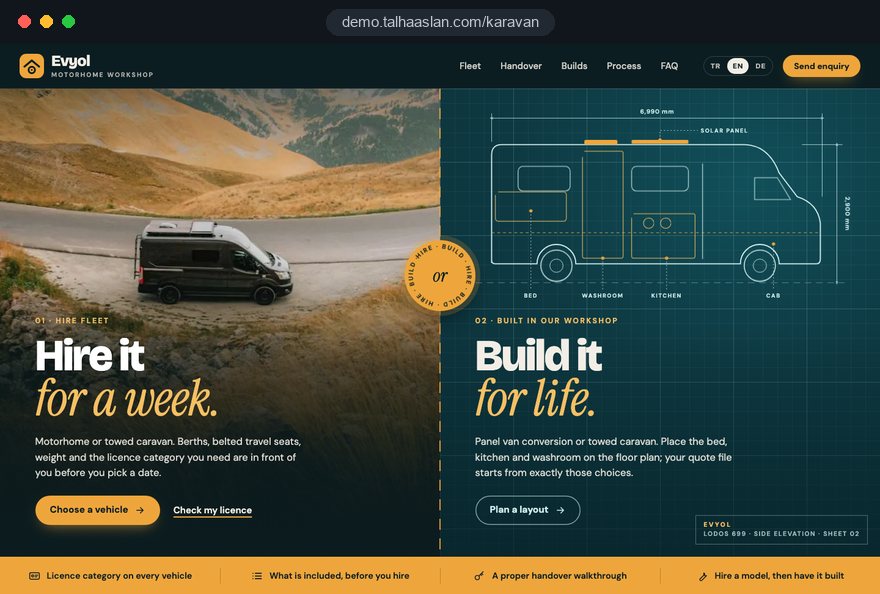
For this field we built a one page demo site for a fictional brand, made only to show our approach. You can explore the design, the copy structure and the mobile view live in three languages.
Open the live demoBerths, seats, weight and equipment are collected for each vehicle from its registration and technical documents, and the vehicle pages are built from that table.
We agree the licence category each vehicle needs based on its maximum authorised mass and add it to the vehicle page and the enquiry form.
The questions you ask on a first call move into the form, and each buyer's choices reach your team as a ready brief.
We track which vehicle brings enquiries and where visitors drop out, and fix it before the season opens.
Related pages
Industries
A separate setup for firms hiring out cars and minibuses.
Industries
A separate setup for the campsites and glamping sites where motorhomes stay.
Solutions
Let hirers choose dates and pay a deposit on your own site.
Solutions
A product structure for builders with many models and options.
 Lead Form Design for Booking, Quote and Demo Requests: UX Rules That Lift ConversionsRead article
 How Website Video Affects Conversion Rate: When It Helps, When It HurtsRead article
 Professional Photography for Websites: What It Adds and How It Beats Stock PhotosRead article
 How to Choose a Payment Gateway: What to Check Before You SignRead article
FAQ
If your question is not here, write to us; we will send you an answer and a written quote.
Next step
In a free 15-minute call, in English, we will go through your vehicles, your pickup points and your build process, then send a written scope and quote.
In-depth guide
A motorhome website serves two very different visitors: the hirer who will live inside the vehicle for a week and the buyer who is about to order a caravan or camper conversion they will use for years. Both decide on numbers: how many it sleeps, what the registration document says about weight, how long the fresh water lasts and which floor plan fits the family.
In this guide, we at Talha Aslan and team walk through the decisions we make, in order, when planning a website for motorhome hire companies and caravan builders. Every section ends in a concrete task for your team.
The first decision is which business the site explains first, because a hirer and a buyer ask their questions in a completely different order. Hirers start with berths, license and pickup point; buyers start with the model, the layout and the workmanship. A site that mixes both journeys in one menu answers each of them halfway.
Answer these questions in writing with your team before any design work:
For mixed businesses we build two menus and link every model page to both the hire enquiry and the quote form. Someone who wants to try a motorhome for a week before ordering one should never feel they are dealing with two different companies.
If you run a campsite or holiday accommodation instead, your needs are different; our campsite website guide covers pitches and stays. Here the subject is the vehicle itself, the person driving it and the person ordering it.
The foundation of the site is not the photo gallery but a spec sheet filled in once per vehicle that feeds every page. When the model page, the filters, the comparison view and the enquiry form all read from the same record, changing one number updates every place at once.
The sheet needs at least these fields, each matched against the registration document or the manufacturer's data:
Set these up as structured fields with fixed options rather than free text. Once "sleeps 4" is a searchable number, filters by party size, comparisons and FAQ answers come out right automatically.
We usually ask you to send this sheet as a spreadsheet together with a copy of each registration document and the manufacturer brochure. Any empty field is completed before launch rather than left on the site as "ask us".
The license question is the one thing in motorhome hire that must never be left until handover day, so every vehicle page shows the required category next to the weight. In the UK, GOV.UK guidance says a category B license passed on or after 1 January 1997 covers vehicles up to 3,500kg maximum authorized mass with up to 8 passenger seats, while vehicles between 3,500kg and 7,500kg need C1.
We bring this onto the site in this order:
GOV.UK also notes that drivers who passed before 1 January 1997 are usually allowed vehicle and trailer combinations up to 8,250kg, and that today's category B allows towing a trailer up to 3,500kg. We explain this without promising anything on the hirer's behalf. For international hirers, have your team define which foreign licenses you accept and state it on the same page.
Once you have more than five hire vehicles, visitors need to narrow the list without opening each page, and the right filters reduce this to a few taps. Because they read from the spec sheet, filters create no extra maintenance.
These are the filters motorhome hirers actually use:
Next to the filters, add a comparison view that puts two or three vehicles side by side. For an undecided family the most useful rows are length, tank capacity and bed layout, because that is where "which one is easier to park in town" and "how many days does the water last" get answered. Give each filtered list its own shareable address, so one partner can send it to the other.
The key decision in the hire flow is whether payment is taken before or after you check the license and identity. Compared with car rental, fleets are smaller, hires are longer and a handover walkthrough is required, so many motorhome companies work more comfortably with a request and approval model.
Make these decisions before building the flow:
If you want booked dates to close automatically, the deposit taken online and an automatic confirmation email, we set up a booking system website. In a request model, the payment link can be emailed after approval; the hirer pays nothing before passing your checks, and no refunds arise.
Let hirers pick extras at this step too. Bike rack, camping table, extra bedding and a spare gas bottle selected during the enquiry let your team prepare before handover, and the hirer does not have to guess the total.
Ask only for what you need: dates, party size, license category, pickup point and contact details. Requesting a license photo at the first step drives people away; collect it securely after approval.
Handover is the most time consuming moment in motorhome hire, and a well written handover page shortens it and prevents disputes at return. This page is not an address card but a set of instructions for what the hirer does, step by step, on the day.
The handover page should contain:
Convert the pickup point's coordinates with a coordinate converter and put them on the site and in the confirmation message, so satellite navigation does not send hirers to the wrong gate. If you have several pickup points, give each its own page, because parking, times and access differ at every location.
Almost every question a hirer asks on the road can be predicted, and collecting the answers in a library of short videos and written steps cuts both handover time and late night calls. Build the library per model, because heater, inverter and toilet systems differ from one vehicle to the next.
Prepare these topics for each model:
Stick small labels made with a QR code generator inside the vehicle, next to each appliance; a hirer standing in front of the heater lands straight on that video. Keep the pages light enough to load on a weak signal and always put written steps next to each video.
Share the library with the confirmation message and ask hirers to watch two or three basic videos for their vehicle type. When a new question comes up on the road, add the answer; the library grows with real questions every season.
For a caravan manufacturer or conversion workshop, the main job of the site is to collect the buyer's choices before the quote; a step by step configurator turns the first call from fact finding into a decision conversation. It does not need to show prices; it turns preferences into a tidy brief.
We build the configurator in this order:
Buyers should be able to stop halfway and continue later, because a motorhome order is often discussed at home for days. Letting them email the summary to themselves helps that discussion.
Define conflicts between options up front. If a heavy power package is chosen with a small base vehicle, the form should warn; otherwise you will have to go back to the customer at the quote stage. With many models and options, a catalog website structure keeps products and choices organized.
Someone ordering a caravan or motorhome commits money to an order they will wait months for, so they want to see how the work progresses; a page explaining your process builds trust before any number is discussed. It should show the steps you actually follow, not grand promises.
Cover these points on the build process page:
Publish finished builds as individual pages, each stating the model, layout and chosen equipment. Describe the vehicle rather than naming the customer, and show only vehicles you really built.
Open a separate page for ex fleet and used vehicles for sale. When these are linked to the same spec sheet, a model hirers already know can be bought with confidence.
Motorhome sites live on interior photos and video tours, so speed has to be planned while the visuals are planned, not after the design is finished.
Google uses three Core Web Vitals thresholds at the 75th percentile: LCP, which measures how fast the main content loads, at 2.5 seconds or less; INP, which measures how quickly the page responds to a tap, at 200 milliseconds or less; and CLS, which measures layout shift, at 0.1 or less. Large cover photos and autoplaying videos put the most pressure on these.
Test the pages on a real phone over mobile data before launch; a fast office connection says nothing about a hirer's experience on a country road. Repeat the check whenever a new vehicle is added, so the gallery does not grow heavier over time.
Hirers and buyers never search for a motorhome with a single phrase; model, party size, use and region searches each need their own page. Motorhome hire, campervan hire, caravan hire and caravan manufacturer searches carry different intent.
Build the page plan around these matches:
Pickup points and workshops are often found on a map. Under Google Business Profile guidelines, the business name must match the real world name without added keywords, and the profile address, the address on the site and the pickup location should all say the same thing.
If you target hirers from abroad or sell internationally, plan other languages from the start; in a multilingual website structure, each language version references the others and itself through hreflang.
To know which vehicle and which search bring customers, hire enquiries, build quote forms, WhatsApp clicks and calls must be tracked as separate conversions from launch day. Tracking added later loses the first season's data.
Set up these distinctions:
On personal data, explain next to every form what you collect and why, and if you take identity and license details, state how long you keep them and for what purpose. Collect only what you need: if a license photo is not required before approval, do not ask for it in the first form. Check the data protection rules that apply in each market you serve.
For visitors in the European Union, consent is needed before non essential tracking, and Google requires consent mode for its measurement and personalized advertising features there. Make sure the consent banner does not cause layout shift on load.
Most mistakes on motorhome and caravan sites come not from design but from information sitting in the wrong place. These are the six we see most often, each with the better alternative:
The team you choose for a motorhome or caravan website must show that it can build the spec sheet, license logic, handover process and configurator as one structure. Ask these questions in every conversation:
When comparing proposals, make sure the scope is written down: how many vehicle pages, how many pickup points, which languages, whether online deposits are included and who enters the content.
We do not yet have a live client site in this field, so our approach is shown in the live demo linked on this page. Work we have done in other sectors is on our references page.
Tell us through the contact form how many vehicles you have, whether you hire or build and where your pickup points are, and we will outline the right page structure and a written scope. You can see packages and fixed price options on the pricing page and request a written quote for your project through the Get a Quote form.
Start a Project
Thanks {name}, we've received your brief. We usually reply within the same day.
What happens next?