The catalog is one big PDF
A PDF of several hundred pages is slow to open on a phone, hard to search and has to be rebuilt and sent out again after every change. Nobody knows whether the version a customer holds is still current.

Your Windows contrast theme is on; colours come from your system.
Your device is set to reduce motion; animations are already off.
Your choices are saved in this browser only.
Web design solution
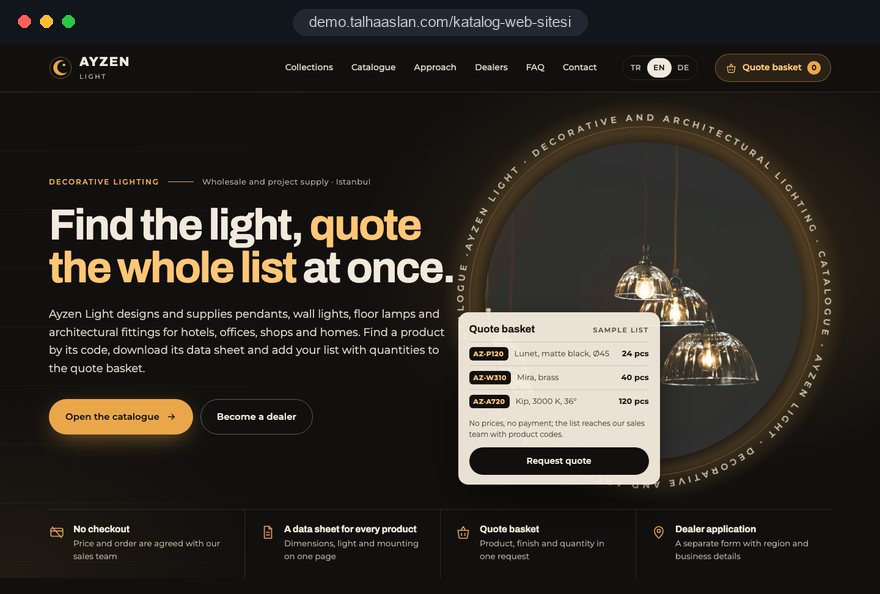
A catalog website presents your products without a checkout and starts the sales conversation instead. Visitors find the product, download its datasheet, add what they need to a quote basket or apply to become a dealer; price and order are agreed with your sales team.
Open the live demoA demo design we built for a fictional brand
In short
A product catalog website shows your range through categories, filters and product pages, with no cart or payment step. It suits companies that sell through quotes, dealers or projects rather than online orders: buyers add products to a quote basket and request one quote with quantities and notes, download datasheets or apply to become a dealer. Every enquiry reaches your sales team with its product list.
Talha Aslan and teamLast updated:
Who it is for
If you want to sell online and ship orders, what you need is an online shop; a catalog website does not replace it. But if your price depends on the customer, the quantity or the project and you sell through quotes or dealers, the problems below will sound familiar.
A PDF of several hundred pages is slow to open on a phone, hard to search and has to be rebuilt and sent out again after every change. Nobody knows whether the version a customer holds is still current.
A buyer searching by product code or specification will not reach a site where products only live inside a PDF or on a single gallery page. Without its own page and description, a product cannot appear as a separate search result.
When a quote based company runs an off-the-shelf shop theme, the cart, shipping and payment steps make no sense, and the workarounds used to hide prices only confuse visitors.
Product questions come in by email, WhatsApp and phone, and your team has to ask again which product and what quantity. Dealer applications get lost in the same mix.
Sources: Google Search Central: Product structured data (product snippets and merchant listings) · Google Search Central: Managing crawling of faceted navigation URLs
Our approach
We build the catalog around the way your sales team works: visitors reach a product by category or product code, filter by attributes such as size, material or application, and see the specification table, documents and related products on the product page. No cart, no shipping, no payment; every product page leads to an enquiry.
The quote basket lets a buyer send several products with quantities and notes in one form. The enquiry arrives in your inbox, and if you like in your CRM or a spreadsheet, together with the product list, so your sales team can prepare the quote without chasing missing details. Companies that want to become dealers use a separate form with their region and line of business.
If your dealers need to log in, see their own prices and place orders, that is a portal and belongs to our custom software work rather than a catalog site; we build the catalog so it can connect to such a portal later. For manufacturers, the sector specific setup is on our manufacturer website page.
No payment step: every product page leads to a quote or dealer enquiry, and products and datasheets are updated in the admin panel.
Which sales model?
Who you sell to and how decides which part of the catalog takes the lead.
Wholesale and project sales
Collects multi product enquiries in one form for wholesalers, importers and distributors.
Selling through dealers
For brands that sell through dealers: sends end customers to a dealer and new companies to the application form.
Technical products
A data first structure for products that engineers, architects or buyers compare before choosing.
What makes a catalog website
Each element answers one of two buyer questions: is this the product I need, and how do I ask about it now?
Before design starts, we collect your product attributes with you in one sheet: which field becomes a filter and which only appears on the product page. Products can then be imported in bulk from that sheet.
The category tree follows how buyers look for products, not your internal stock codes. Filters only use attributes that genuinely set products apart.
Images from several angles, the specification table, variants, applications and a downloadable datasheet sit on one page. Similar and complementary products are listed below.
Buyers add products to a list, enter quantities and notes, and type their company details once. You receive the enquiry with product codes, and the buyer gets a copy.
A dealer application is a separate form from a quote request: it asks for region, line of business and the brands already carried. Applications can go to a different inbox or person.
Whether prices appear on the site is decided with you according to your sales model; the catalog works either way. If prices are shown they are updated in the panel, and we recommend checking your price display obligations with your legal adviser.
Comparison
| Topic | PDF catalog | Catalog website |
|---|---|---|
| Updates | A new file is produced and sent out after every change | Products are edited in the panel and everyone sees the same version |
| Finding products | Scrolling page by page through a file | Found by product code, name and filters |
| Mobile | A large file opens slowly on a phone | Product pages are built for the phone screen |
| Search engines | Products do not appear as separate results | Every product has its own page and description |
| Enquiries | Asked one by one by email or phone | Products and quantities arrive in one form via the quote basket |
| Measurement | No idea which products draw interest | Viewed products and enquiries are reported |
Quick check
Must haves: does your site have them?
0 of 6 in place Tick the boxes to see where your site stands.
Added as needed
We choose which of these you need together during the scoping call.
Tell us how many products you have, how you sell them and who handles enquiries; we will come back with a catalog structure and a written quote.
Process
We define your business, your audience and the site’s one-sentence job: who it sells what to, through which action. Scope and timeline are written from that answer.
The home page and key templates come to you as designs first; no code is written before your approval. We do not like surprises, and we do not cause them.
The approved design becomes fast, secure, maintainable code. You follow progress in the CRM and see every page in a staging environment before launch.
The site goes live with analytics, Search Console and conversion tracking connected; panel training is given, first-year hosting and maintenance included.
Search, speed and tracking
Every product is published at its own URL with its own description. Google defines product snippet markup for product pages where people cannot buy directly and merchant listing markup for pages that sell; catalog pages are marked up as the former.
Filter combinations create a very large number of URLs. In line with Google's faceted navigation guidance, combinations nobody searches for are kept out of crawling, while the few that people do search for become pages with their own description.
Product images are compressed, converted to modern formats and loaded when needed, so lists with hundreds of products still open quickly on a phone.
Quote basket submissions, datasheet downloads and dealer applications are sent to Analytics as separate events, so you can see which products bring enquiries.
Free tools
Resize and convert product images, generate product structured data and a sitemap, and create QR codes and WhatsApp links for your printed catalog.
Image
Resize + compress photos and cut the KB; never leaves your device.
Image
Convert between JPG, PNG and WebP in one click or in batches; it detects the input format, lets you set quality and a background for transparency, and uploads nothing.
Tech SEO
Generate rich-result JSON-LD for Article, Product, FAQ, Local Business.
Tech SEO
Build a valid sitemap.xml with lastmod and priority from your URL list.
Conversion
Turn URLs, WhatsApp, Wi-Fi, vCard and text into a QR code in seconds; download high-res PNG or SVG.
Conversion
Create a wa.me link with a preset message + embeddable button code.
How we work
We are not showing a published client catalog site on this page yet; instead we explain our approach on a live demo site. Our other client work is on the references page.
Live demo
For this field we built a one page demo site for a fictional brand, made only to show our approach. You can explore the design, the copy structure and the mobile view live in three languages.
Open the live demoBefore design, we collect your products and their attributes in one sheet; the menu, the filters and the number of pages come from it.
We list every question your team asks before quoting and build the quote basket and dealer form fields from that list.
We train your team to add products, replace datasheets and take products offline in the panel; bulk changes can be made with the sheet.
We track which products are viewed and which bring enquiries, and adjust categories and filters based on that data.
Related pages
Industries
Factory websites for manufacturers and exporters, built around capabilities, documents and quotes.
Industries
For building material brands that sell through dealers and installers.
Solutions
To open your catalog to buyers abroad with separate pages per language.
Industries
A product catalogue, seasonal information and a wholesale quote form are the core of a farm site too.
 Category Structure for Large Websites: The Right Architecture for SEO and User ExperienceRead article
 How Does Product Filtering Affect Ecommerce Sales? UX and SEORead article
 URL Parameters and SEO: How Query Strings Affect Crawling, Canonicals and Faceted NavigationRead article
 Product Descriptions for SEO: How to Write Ones That RankRead article
FAQ
If your question is not here, write to us; we will send you an answer and a written quote.
Next step
Tell us about your product list and how you sell; after a free 15-minute call we will send a written scope and quote.
In-depth guide
A product catalog website succeeds or fails on how the product data is organized and how enquiries reach your sales team, far more than on its visual design. A catalog that looks polished but returns nothing when a buyer types a product code, or that forwards a quote request without quantities, will not take a single call off your sales team's desk.
In this guide we, Talha Aslan and team, walk through the decisions on a catalog project in the order we make them, from choosing the model and structuring data to enquiries, search, speed and measurement. Each section gives you a criterion you can apply to your own product list or to an agency proposal.
The right model depends on where the customer pays: if payment happens on the site you need a shop; if the deal closes through a quote or a dealer, you need a catalog website. A PDF is not a third option but an attachment that lives alongside the catalog site as a download.
When a company cannot decide, we ask these questions:
Mixed cases exist: a company selling spare parts online but quoting for machines can start with a catalog and add checkout to some groups later. Structuring product data so it can serve both models from day one saves you paying for a second site.
The first deliverable of a catalog project is not a screen design but a product sheet in which the purpose of every column is clear. The menu, the filters, the product page and the quote basket fields all come from that sheet; if it has gaps, they will surface later no matter how good the design is.
For every field we ask three questions: does this help the buyer choose, will it be a filter or appear only on the product page, and does its value come from a fixed list or free text? A size field kept as free text can never become a filter, because "20 mm", "20mm" and "2 cm" describe the same value three different ways.
If your product list lives in an ERP export, translating internal descriptions into language a buyer understands is a separate work item. Agreeing who does it before the contract is signed puts the most frequently delayed step of the project on the schedule.
The category tree should mirror how buyers describe products, not how your warehouse is organized. If purchasing managers search for "stainless steel fasteners", the fact that your internal system files them under "Group 14" should not shape the catalog menu.
Finding the buyer's language is often as simple as reading the latest enquiries your sales team received: which words do customers use, which applications do they mention? Those words are the raw material for category names and category page introductions.
Renaming categories after launch can change URLs as well. If the tree passes a test like this before launch, you avoid redirect work later and keep the value your pages have built in search.
A good filter narrows the result list in a meaningful way; not every technical field deserves to be one. A common problem on catalog sites is twenty filters side by side, most leaving a single result.
Before turning an attribute into a filter, we check these criteria:
On phones, filters should open in a full screen panel and show how many results remain while the buyer is still choosing. When a combination returns nothing, offering to remove one filter and a direct path to the quote basket or contact form, instead of an empty page, recovers enquiries that would otherwise be lost. Put the most used attribute at the top.
On catalog sites a large share of visitors already know what they want and type its code directly, so site search deserves the same care as the menu. A search that fails when the code is not typed exactly turns away your warmest buyers at the door.
The search box should handle these situations:
Suggestions that appear while typing make it unnecessary to type long codes in full, which matters most on a phone. Reading the zero result list once a month is the cheapest way to learn what your catalog is missing.
A product page should answer "is this the product I need" without scrolling, and then show the way to an enquiry. Image, product name, code and the add to quote button belong on the first screen; the full specification table and documents follow directly below.
On a product page we include, in this order:
Replacing the product page with a datasheet is a frequent shortcut. The datasheet should be a downloadable extra, while its core information also appears on the page as text; both search engines and buyers on a phone read page text far more easily than the inside of a PDF.
The quote basket is a form that lets a buyer answer, in one go, every question your sales team asks before quoting; that is why sales, not the designer, should define its fields.
The path an enquiry should follow from start to finish:
Most projects forget the last step, yet without it you cannot measure what the catalog contributes. The basket also has to work for a single item; instead of sending a buyer who asks about one product through every basket step, a short quick enquiry form on the product page does the job.
A brand that sells through dealers serves two different visitors: the end customer who wants to buy, and the company that wants to become a dealer. Sending both to the same contact form means your sales team sorts every message by hand.
For the dealer finder, we first ask who keeps the dealer list and in what form. A closed dealer shown on the map damages trust more than no map at all, so easy updates matter more than the map's look.
If you want to give dealers brochures, product images and price lists, separate a public archive from a password protected dealer area. A setup where dealers log in, see their own prices and place orders is a custom software project separate from the catalog site; the catalog's product data can connect to it later.
Whether prices appear in the catalog is a sales model decision, not a design preference, and it does not have to be the same for every product group. Showing prices for standard accessories while quoting project items is a balanced path for many companies.
We suggest looking at the decision from these angles:
For products without a visible price, instead of writing "call for price", add a short note on the product page explaining what the price depends on: quantity, delivery region, surface finish and similar factors. The note also teaches buyers what to write in the quote basket and reduces incomplete enquiries. Where prices are shown, the panel should allow bulk updates.
For each product to show up as its own search result, it needs its own URL, its own title and its own description. Two technical decisions follow: which kind of product structured data to use, and how to handle filter URLs.
Google defines product snippet markup for product pages where people cannot buy directly and merchant listing markup for pages that sell. Catalog pages use the former; you can draft the markup with our structured data generator and compare it against the fields in your product sheet.
If you want to keep a page out of the index, do not block it in robots.txt; Google cannot read the noindex on a blocked page. If you plan to open the catalog to buyers abroad, the hreflang setup that links language versions is covered on our multilingual website page. If your product pages need ongoing content and link work, our SEO service runs alongside the catalog.
Images are the heaviest load on a catalog site; unprepared, they make a category page with hundreds of products slow on a phone. Google's Core Web Vitals treat these values as good at the 75th percentile of visits: LCP (how long the largest element takes to load) of 2.5 seconds or less, INP (how quickly the page responds to a tap) of 200 milliseconds or less, and CLS (how much elements shift while loading) of 0.1 or less.
To get close to these thresholds, we tie image preparation to a workflow before launch:
When a filter is applied, updating results without reloading the whole page directly improves INP. The lasting fix is a panel that resizes and converts every uploaded image automatically, so the skill of whoever uploads products never decides how fast the site is.
Whether a catalog site works shows up not in visitor numbers but in which product brought which enquiry. That requires quote submissions, datasheet downloads and dealer applications to be tracked as separate events, each carrying the product code.
In the measurement plan we define these events separately:
Printed catalogs can feed into this measurement too. A QR code next to each product, leading to its page, makes the move from paper to site easy and measurable; create the codes with our QR code generator and give each print run its own campaign tag. Your PDF can stay on the site as a download, but the site becomes the master source, with the PDF generated from it.
For visitors in the European Economic Area, Google requires consent mode for measurement and personalized advertising features, and cookie consent is needed before non essential tracking.
Most mistakes we see on catalog sites appear when work starts before anyone has discussed the product data and the enquiry flow. Next to each mistake below, we have written the better way to solve the same problem.
If you are moving from an old product site to a new catalog, the most expensive mistake is removing existing product URLs without redirects. We cover that transition step by step on our website redesign page.
When choosing a partner for a catalog project, look less at portfolio images and more at the questions the agency asks about your product data and enquiry flow. A proposal from a team that never asked how many products you have, how you sell and who handles enquiries is most likely based on a ready made template.
We suggest asking any team you get a quote from:
To see our approach in practice, open the live demo catalog site linked on this page on both your phone and your computer. Send us your product list and a short description of how you sell; we will define the scope with you and prepare a written quote. If you have a small range and need a simple site, take a look at the fixed packages in our pricing section.
Start a Project
Thanks {name}, we've received your brief. We usually reply within the same day.
What happens next?