The calendar disagrees with the platforms
A villa is booked on a platform but still shows as free on the website. Two guests ask for the same week, one has to be cancelled and refunded, and that guest rarely comes back.

Your Windows contrast theme is on; colours come from your system.
Your device is set to reduce motion; animations are already off.
Your choices are saved in this browser only.
Industry-specific web design
Guests fall for a villa in the photos, but they decide on the calendar and the numbers: is that week free, what does it cost in high season, how much is the deposit. We build villa rental websites around a page per property, an availability calendar that stays in sync with the platforms and clear payment terms, for villa companies in Turkey letting to guests from abroad and for owners and agencies across Europe.
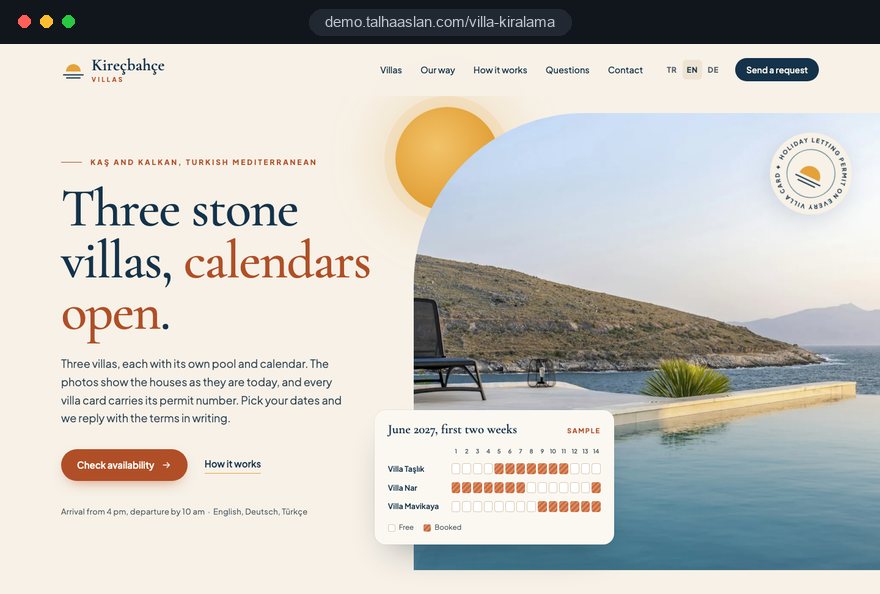
Open the live demoA demo design we built for a fictional brand
In short
A villa rental website gives every property its own page, shows availability and seasonal rates on a calendar and states deposit and cancellation terms before guests pay. Local rules shape the content: in Turkey, holiday letting of residences needs a permit that must appear wherever the property is advertised, and in the EU, the short-term rental regulation of April 2024 ties listings to a registration number where a member state requires one.
Talha Aslan and teamLast updated:
Why it needs its own approach
Villa guests send money for a house they have never seen. The site has to earn that trust and get the calendar, the rates and the legal details right, and generic business templates are not built for any of it.
A villa is booked on a platform but still shows as free on the website. Two guests ask for the same week, one has to be cancelled and refunded, and that guest rarely comes back.
The site offers nothing but an enquire for rates button. Guests who cannot see the total for their week move on to a site or platform that shows it upfront.
All properties sit on one page as small cards. A guest searching for a villa by name, by area or by a feature like a private pool never lands on the right page, and search engines cannot tell which villa answers which search.
The deposit is requested by bank transfer, the receipt arrives on WhatsApp and the cancellation terms are nowhere to be found. For a guest paying for a house they have not seen, that is reason enough to walk away.
Since 20 May 2026, the EU short-term rental regulation of April 2024 applies: where a member state runs a registration procedure, hosts must show their registration number in each listing on rental platforms. In Turkey, holiday letting of residences has required a permit since 2024. A site that leaves these details out invites questions guests and platforms will ask anyway.
Guests researching from abroad cannot work out a total on a Turkish or Greek only page priced in a currency they do not use. When every question has to go through messages, the decision gets put off.
Sources: Regulation (EU) 2024/1028 on short-term accommodation rental services, EUR-Lex
Our approach
We build a villa rental site in the order guests make decisions. First they fall for the villa in the photos, then they check their dates on the calendar, see the rates and payment terms, and finally send an enquiry or pay the deposit. That is why every villa has its own page, its own calendar and its own rate table, all leading into the same enquiry and payment flow.
If guests should pick dates and pay entirely on your site, we set up an online booking system; if you let to guests from several countries, we plan a multilingual structure from day one. For early booking or late season offers, a single-goal landing page can go live without touching the main site.
Design, development and content sit in one team, so calendar, payment and language decisions are not patched on later. Talha Aslan sets the strategy and an experienced team handles delivery, working remotely and in English with villa owners and agencies wherever they are.
Home
Each villa page answers its own search; calendar, rates and payment come together in one flow.
The right setup
All three start from the same foundation; the number of villas, where guests come from and where payment is taken make the difference.
One villa
Guests want to see one house, its photos and its calendar; the site is that villa's own brand.
Villa portfolio
The company manages many villas, and guests choose by dates, group size and area.
International guests
Guests research from another country, in their own language and their own currency.
Built for villa rentals
These are the points we decide on with you when planning a villa rental site.
Every villa has its own calendar. Booked dates are synced through the iCal calendar links that platforms such as Airbnb and Booking.com provide, so the same week is not sold twice and occupancy is managed in one place.
Nightly or weekly rates per season, minimum nights for peak weeks and holidays, and extras such as cleaning. Guests see the total for their dates before they pay.
Card payment for the deposit or a bank transfer option, when the balance is due, cancellation and refund terms and any security deposit are spelled out at the payment step.
In the EU, where a registration procedure applies, the registration number belongs in every listing under the EU short-term rental regulation. In Turkey, a 2023 regulation requires a legible copy of the holiday letting permit and details such as capacity, floor, pool, pets and arrival and departure times wherever a property is advertised. We build these as fixed fields; the final legal check is yours.
Separate pages per language with hreflang markup. Rates can be shown in the guest's chosen currency for information, while the payment step states clearly which currency is actually charged.
Turkish law fines misleading descriptions of a holiday let's location and features in any medium, including websites, and guests everywhere review what they find on arrival. We work with real photos, real distances to the beach and town, and accurate room details.
Sources: Turkish regulation on holiday letting of residences, Official Gazette no. 32413, 28 December 2023 · European Commission: new rules on short-term rentals apply from 20 May 2026
Comparison
| Topic | Generic business template | Site built for villa rentals |
|---|---|---|
| Villa content | All villas in one gallery page | Each villa on its own page: photos, capacity, location and house rules |
| Availability | None, or a table updated by hand | A calendar per villa, synced with the platforms |
| Rates | "Call for rates" | Seasonal rates, minimum stays and extras |
| Payment | Bank details and a receipt over WhatsApp | A deposit step with cancellation and refund terms |
| Legal details | No permit or registration number | Permit or registration details on every villa page |
| International guests | One language, one currency | Pages per language and rates in the guest's currency |
Quick check
Must haves: does your site have them?
0 of 6 in place Tick the boxes to see where your site stands.
Added as needed
We choose which of these you need together during the scoping call.
Tell us how many villas you have, your seasons, the platforms you use and where your guests come from; we will come back with a page structure and a written quote.
Process
We define your business, your audience and the site’s one-sentence job: who it sells what to, through which action. Scope and timeline are written from that answer.
The home page and key templates come to you as designs first; no code is written before your approval. We do not like surprises, and we do not cause them.
The approved design becomes fast, secure, maintainable code. You follow progress in the CRM and see every page in a staging environment before launch.
The site goes live with analytics, Search Console and conversion tracking connected; panel training is given, first-year hosting and maintenance included.
Search and speed foundations
Guests do not only search for villa rental; they add an area, a feature such as a private pool or sea view, or the villa's own name. Villa, area and feature pages are built to answer each of these searches separately.
Business name, contact details and the key features on each villa page are marked up so search engines can read them; nothing is marked up that is not on the page.
Villa pages carry a lot of images. They are converted to modern formats, served at the right size for each screen, and Core Web Vitals are measured on a phone before launch.
Enquiries, WhatsApp clicks and deposit payments are tracked as conversions from day one, so you can see which villa page and which area page bring guests.
Free tools
Before planning a new site, see how the current one opens on a phone, convert your villa photos to lighter formats and check what your rates look like in a guest's currency. The tools are free and need no sign up.
Currency
Convert euros and 30 currencies with official ECB reference rates, look up any past date since 1999 and see monthly averages.
Image
Convert between JPG, PNG and WebP in one click or in batches; it detects the input format, lets you set quality and a background for transparency, and uploads nothing.
Tech SEO
Test whether a page works well on phones: viewport, font size, tap targets, a mobile screenshot and Core Web Vitals.
Tech SEO
Correct hreflang tags for multilingual sites; x-default automatic.
Sharing
Preview how your link looks on WhatsApp, Facebook, X, LinkedIn and Telegram, and find missing Open Graph tags and image problems.
Conversion
Create a wa.me link with a preset message + embeddable button code.
How we work
We do not have a live client site for villa rentals yet, so we show our approach on a live demo. The demo is not client work. You can see the sites we built in other sectors on the references page.
Live demo
For this field we built a one page demo site for a fictional brand, made only to show our approach. You can explore the design, the copy structure and the mobile view live in three languages.
Open the live demoWe start by listing every platform your villas are sold on and deciding how the calendars will sync; the risk of double booking is closed before design begins.
Seasons, minimum nights and extras such as cleaning and security deposits are written down together with you and turned into a table guests understand.
Permit or registration numbers, capacity, floor, pool and house rules are written from the documents you give us; we do not publish a detail you cannot back up.
We track which villa page brings enquiries and where guests drop out of the payment step, and fix it before the busy season starts.
Related pages
Solutions
Let guests pick dates and pay entirely on your own site.
Solutions
A page structure per language for villas letting to guests from abroad.
Industries
A separate setup for hotels, boutique hotels and guesthouses that sell by room type.
Industries
Outdoor stays, seasonal calendars and availability work much like villa rentals.
 How to Choose a Payment Gateway: What to Check Before You SignRead article
 Professional Photography for Websites: What It Adds and How It Beats Stock PhotosRead article
 What Is the Hreflang Tag and How Do You Use It? Multilingual Website SEO SetupRead article
 How to Build Trust on Your Website: Trust Signals That Turn Visitors into CustomersRead article
FAQ
If your question is not here, write to us; we will send you an answer and a written quote.
Next step
In a free 15-minute call, in English, we will go through your villas, your seasons and where your guests come from, then send a written scope and quote.
In-depth guide
A guest booking a villa is not choosing a hotel room but a whole house, usually for a family or a group of friends, weeks or months ahead and with a sizeable deposit. A villa website therefore has to work less like a brochure and more like a decision tool that answers the guest's questions in order: is the house really like this, is our week free, what is the total, and is my money safe.
In this guide, Talha Aslan and team walk through the decisions we make with single villa owners and with agencies managing many properties, in the order we make them. If you sell by room type, our guide for hotel websites is the better fit; this one is about individual houses, their calendars and the rules their owners set.
Start by deciding how many villas the site will present and on whose behalf, because everything from the menu to the payment flow follows from that answer. For an owner with one villa, the site is the house's own brand: the home page is the villa, the calendar sits on the first screen and no search screen is needed.
For an agency with a portfolio, guests choose first. You need filters for dates, group size and area, a separate page for each villa and a consistent card layout that makes comparison easy. If the agency lets villas on behalf of owners, it must also be clear from the start who updates photos, rates and calendars.
Before any design work, write down answers to these questions:
Starting design before these four answers are settled usually means rebuilding the menu, the payment flow and the admin panel a few months later.
A good villa page answers questions in the order guests think of them: gallery at the top, legal details at the bottom but complete. Guests decide within seconds whether they like the house, then move on to practical details, so we structure the page around those two phases.
The bed layout is skipped on many sites, yet it decides bookings for larger groups. When two families travel together, someone will message to ask whether both main bedrooms are the same size; if the page says so, that message never arrives. The same goes for stairs, whether the pool is fenced, and whether the house suits older guests or small children.
If a villa is also sold on platforms, the calendar on your site is only reliable when it is synced with theirs; otherwise the same week gets sold twice. Platforms such as Airbnb and Booking.com provide an iCal link for each listing. iCal is a shared calendar format that passes booked dates to another system in a form it can read.
That link carries only booked and free dates; it does not carry rates, guest names or payment status. The sync also runs at intervals rather than instantly. That is why we set it up in this order:
With a confirmation step, the guest sends a request and pays only after you have confirmed the dates are still free. It closes the gap in which a booking from another platform could arrive between two sync runs.
As the number of platforms and villas grows, a channel manager, software that syncs rates as well as availability, starts to make more sense than iCal alone.
Guests want to see the total for their dates, not a nightly figure, so the rate table has to produce that total without errors. An enquire for rates button leaves the first question unanswered, and a guest who is comparing options simply moves on to the next tab.
When we build the rate table with you, we write down each of these items:
Mandatory extras belong inside the first total the guest sees. A cleaning fee that appears for the first time on the payment screen hits trust at its most fragile moment.
For two or three night gaps left between bookings, a rule that relaxes the minimum stay automatically is a practical way to reduce unsold nights at the end of the season.
For a guest sending money for a house they have never seen, the payment terms are read more carefully than anything except the photos, so they belong on the payment step, before the pay button.
For card deposits, a payment provider is connected; it processes card details in its own secure environment rather than on your server. A bank transfer option can stay, with a field for uploading the receipt and an automatic confirmation email.
At the payment step, guests should see:
Instead of copying one block of terms onto every villa, we store the parts that vary by villa, such as the security deposit, minimum stay and cancellation deadline, as separate fields.
If guests should pick dates and complete payment entirely on your site, our page on the website with an online booking system explains that flow in detail.
Permit and registration details should sit in fixed fields on each villa page, because the rules now tie them to advertising and listings. In Turkey, Law No. 7464 has made holiday letting of residences subject to a permit since 1 January 2024, and a regulation dated 28 December 2023 requires a legible copy of the permit wherever the property is advertised, along with details such as location, capacity, floor, pool, pets, internet, site rules and arrival and departure times.
In the EU, the short term rental regulation adopted in April 2024 has applied since 20 May 2026: where a member state runs a registration procedure, hosts must show their registration number in each listing on rental platforms. Showing the same number on your own site keeps every channel consistent. We build these as fields rather than free text:
The rules differ by country and sometimes by municipality, so please confirm your own case with a local adviser; we build the fields and fill them only from documents you give us.
On a villa site a photo is a sales tool and also a promise, because guests compare what they find on arrival with what they saw. Turkish law fines misleading descriptions of a holiday let's location and features in any medium, websites included, and guests everywhere write reviews.
The shot list we prepare for the photo day:
We write distances with the same care: instead of "close to the beach", how many minutes on foot or by car, and whether the walk back is uphill. If "private pool" means the pool is not overlooked by neighbors, we do not use the phrase without an image that shows it.
A villa guest arrives at a house with no reception desk, and every unclear arrival detail comes back as a phone call late at night. Putting a short version on the villa page and the full version in the booking confirmation reassures guests and saves you time.
The house rules that belong on the villa page are the maximum number of guests and whether visitors are allowed, quiet hours, pets, smoking, pool hours and child safety. Guests should see these before paying; a rule discovered on arrival becomes an argument.
What to include in the confirmation or on a private arrival page for confirmed guests:
While the public villa page gives the location information the rules require, details such as the door code and the key box position should go only to confirmed guests.
Guests often start with a broad holiday rental search, but they choose through searches that add an area, a feature or the villa's name, so each type of search needs its own page.
We build the structure in three layers:
A feature page should only go live when enough villas sit behind it; a page listing two villas disappoints guests and search engines alike.
Structured data, meaning information on the page marked up so search engines can read it, is used for business details and villa features; nothing is marked up that is not on the page. We run this longer term work as part of our SEO service, without promising rankings, and monitor results in Search Console.
For villas that let to guests from abroad, languages and currencies are not an option added at the end but one of the first structural decisions. A guest searching in their own language should land on a page in that language and understand the total in their own currency.
We use separate pages per language with hreflang markup. hreflang is the annotation that tells search engines about the language versions of a page; each version must reference the others and itself. Translation is only part of the job:
Answering an enquiry from the German page in English, or with machine translated text, undoes in one message the trust the page has built.
To see how your rates look in other currencies before you decide, try our currency converter. The technical side of language versions is covered on our multilingual website page.
Villa pages carry dozens of photos, and guests often open them on a phone, so speed is a design decision. Google's Core Web Vitals treat these as good: LCP, the time until the largest element on the page loads, at 2.5 seconds or less; INP, how quickly the page responds to a tap, at 200 milliseconds or less; CLS, how much content shifts while loading, at 0.1 or less.
To reach those thresholds on a photo heavy page, we follow these steps:
The last step solves a problem specific to villa sites: a site that pulls platform calendars on every page view keeps guests waiting whenever a platform responds slowly. You can see how your current site performs on a phone with our mobile friendly test.
The enquiry form, WhatsApp and the deposit are three doors into the same flow, and every enquiry should land in one place and be measured, whichever door it came through. The form should arrive prefilled with dates, group size and villa name, so guests never retype what they picked on the calendar. A WhatsApp button can carry the same details as a ready message.
Because you collect names, phone numbers and email addresses, you need a privacy notice under the data protection law that applies to you; in Turkey, Article 10 of KVKK (Law No. 6698) requires an information notice. For visitors in the EU, non essential tracking should start only after cookie consent,.
The events we set up from day one:
If many guests pick dates but never reach payment, the problem is usually the total or the terms. If many reach payment and leave, a payment method or a trust detail is missing. Seeing that difference before the season leaves time to fix it.
Most mistakes are not design problems; they come from a gap between how the business runs day to day and what the site shows. These are the ones we see most often, each with a better alternative:
Each of these is awkward to fix mid season, because the change lands in the busiest weeks for guest traffic.
When choosing a team for a villa website, look at what they ask about calendars, payments and legal fields before you look at their design samples; the right questions show they understand the business. Ask any agency you talk to:
We do not have a live client site for villa rentals yet, so we show our approach on the live demo linked on this page. You can see work we have done in other sectors on our references page.
In the first call we go through your number of villas, the platforms you sell on, your seasons and where your guests come from, then send a written scope. You can compare packages in the web design pricing section or get in touch for a quote based on your villas.
Start a Project
Thanks {name}, we've received your brief. We usually reply within the same day.
What happens next?