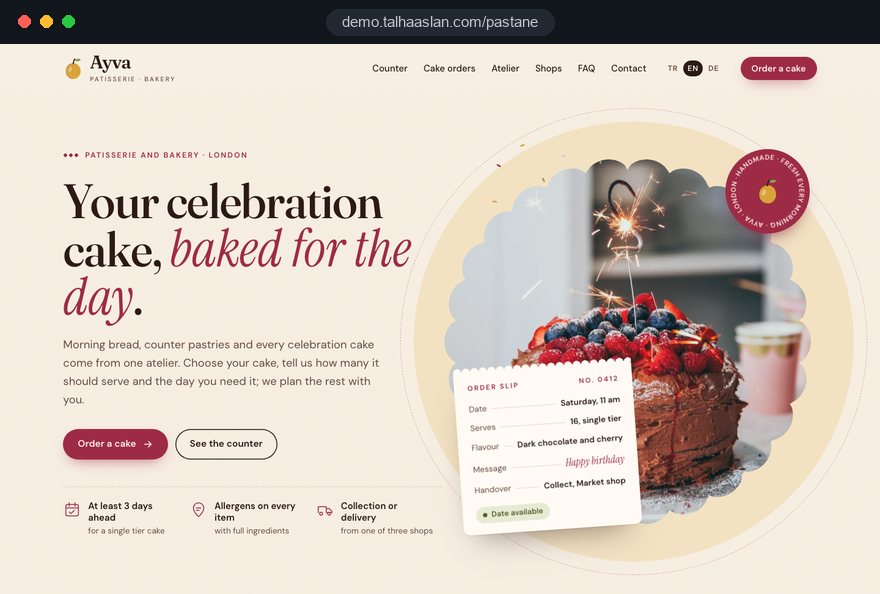
A bakery website serves two customers at once: the person walking past who wants a loaf or a croissant in the next ten minutes, and the person planning a birthday cake for a date two weeks away. The first needs hours and directions; the second needs to see your cakes, know how many each one serves and find out how to order.
This guide follows the decisions a bakery, patisserie or cake studio owner makes during a website project. Each section gives you a checklist, a criterion or a specific question to put to the agency you work with.
01Separating counter sales from advance orders
Before any design work, you need to know how much of your revenue comes from the counter and how much from orders placed in advance. That split decides what the home page puts first, how the menu is ordered and which actions you measure.
A neighborhood bakery mostly serves people who are already nearby and will come right away, so the first screen should show today's bakes, opening hours and directions. A cake studio lives on orders booked days or weeks ahead, so the first screen should show finished cakes and a clear path to the order form. A bakery with several shops carries both flows and has to send each customer to the right shop before anything else.
- Last three months: count the celebration cakes in your order book and note which channel each one came through.
- Phone questions: for one week, write down the five questions you hear most on the phone and on WhatsApp; the site has to answer them.
- Capacity: decide how many custom cakes you can make in one day; the order form is built around that limit.
Ask your agency directly: which sales flow does the first button on the home page serve, and why did you choose it?
02Product catalog, servings and descriptions
The catalog's job is to let a customer choose without picking up the phone, and that needs more than a photo per product. Categories should follow the way people search: celebration cakes, pastries, cookies, savory bakes, bread, and items made to order.
Product names should match the labels in your display case, so the raspberry and white chocolate cake a customer saw in the shop is not hiding under a different name online. In descriptions, concrete details sell more than adjectives. "Cocoa sponge, dark chocolate ganache and sour cherry; keeps two days in the fridge; order two days ahead" does more work than "an unforgettable taste".
- Servings chart: based on your own pan sizes, write once how many portions each size gives and reuse the same chart on every cake page.
- Lead time: state whether an item is available daily, needs one day's notice or needs a week.
- Storage and transport: whether it needs refrigeration, how long it stays fresh and how to carry it in a car.
Showing prices online is a separate decision. For fixed price items it cuts down questions; for cakes priced by design, explaining which choices drive the price sets more accurate expectations than a vague "from" figure.
03Fields of the celebration cake order form
A good cake order form asks every question you currently ask on the phone, in the same order, and cannot be sent with key details missing. Its purpose is a complete request ready for your confirmation.
Field order matters: the date comes first, so a fully booked day shows at step one instead of after twenty fields; cake details follow, contact and delivery details come last.
- Date and time: closed days and fully booked dates cannot be selected, and your minimum lead time is applied automatically.
- Servings and tiers: entering a number of guests lists the sizes that fit, so the customer never has to calculate.
- Flavor and filling: sponge, frosting and filling options, plus a separate checkbox for allergies.
- Theme, colors and message: the message on top has its own field with a character limit, since spelling errors are among the most common complaints.
- Reference photo: a few images can be uploaded, with a note that they are used as inspiration, not copied exactly.
- Collection or delivery: for collection, the shop and a time window; for delivery, the address, building details and the recipient's phone number.
Ask your agency to let you fill in a draft of the form on your own phone. If an order still needs a follow up message from you, the fields need another pass.
04From request to collection day
Submitting the form only starts the process; the real order comes from how requests are confirmed, how deposits are taken and what happens before collection day. When that flow is written on the site, customers know what to expect and stop calling to check.
Each request should reach you by email and WhatsApp in the same layout: date at the top, then servings, flavor, message and collection details. The automatic email to the customer should confirm receipt, say clearly that the order is not yet confirmed and tell them when you will reply.
Describe the flow on the site in four short steps:
- Request: the form is submitted and the customer receives a summary by email.
- Confirmation and deposit: you confirm design and amount and take the deposit your usual way; the date is not held until payment arrives.
- Last change date: message, colors and servings can be changed until a set day, which appears in the order summary.
- Collection: a reminder goes out the day before; for deliveries, the recipient is confirmed again.
If you keep taking cake questions on WhatsApp, the button on the site works better when it opens with a prepared message. With our WhatsApp link generator you can set a starting text such as "Hello, I would like to order a celebration cake for this date:".
05Writing deposit, change and cancellation terms
Most disputes over a personalized cake start because the terms were never written down at the time of ordering. Terms therefore belong right next to the order form in a short, readable format, not on a legal page nobody opens.
In the UK, regulation 28 of the Consumer Contracts Regulations 2013 excludes goods made to the consumer's specifications and goods liable to deteriorate rapidly from the cancellation right for distance contracts. Deposit and change rules are your own business decisions, and they need to be applied consistently. Final legal review stays with you and your adviser.
- Deposit: at which point the order is confirmed and what happens to the deposit if it is cancelled.
- Last change date: until when design, message and servings can still be changed.
- Likeness: that reference photos serve as inspiration and that handmade cakes vary slightly.
- Responsibility after handover: the moment transport and storage become the customer's responsibility on collection.
- Licensed characters: whether and on what basis you decorate with cartoon or brand figures.
A required "I have read the terms" checkbox just above the submit button, with its date stored in the request record, shows what was accepted if a question comes up on collection day.
06Organizing allergen and ingredient information
Allergen details are the first thing a customer with an allergy looks for, and they should sit in the same place and format on every product page.
UK guidance says that for non prepacked food sold online or by phone, allergen information must be available before the purchase is concluded and again at delivery. Keep the layout simple: an ingredients line under the description, followed by a short list with allergens in bold. Gluten free and vegan items should be filterable in the gallery. If there is a cross contact risk, for example when gluten free cakes are made in the same kitchen, say so plainly and let the customer decide.
- Source: take the data from your recipes and supplier specifications, never from memory.
- Owner: name the person who updates the site whenever a recipe changes.
- Check date: record in the panel when each product's information was last reviewed.
- Supplier switch: tag ingredients so that when your hazelnut paste or chocolate brand changes, every affected product shows up on one screen.
When the allergy checkbox on the order form is ticked, the request should reach you with a distinct heading so it cannot be missed in the kitchen. We prepare this information with your kitchen; its accuracy and upkeep remain with your production team.
07Product photos, gallery and page speed
Photos start the sale on a bakery website, but heavy images can slow the gallery on a phone and lose that same sale.
Three shots per cake are usually enough: the whole cake, a cut slice showing the layers, and one frame that gives scale, such as next to a plate or a hand. Keep background and light the same across the gallery so products can be compared side by side; stock cake images mislead customers and should not be used.
Google's Core Web Vitals give clear targets. LCP, which measures how long the largest visible element takes to load, should be 2.5 seconds or less; CLS, which measures how much the layout jumps while loading, should stay at 0.1 or less.
- Size: images are scaled to the width they are shown at, with a smaller version for phones.
- Format: modern formats such as WebP or AVIF replace heavy JPEGs; you can try your current photos with our image format converter.
- Reserved space: each image has its dimensions declared, so text does not shift while the page loads.
Before launch, open the gallery on your own phone, on mobile data, from inside the shop. Gray boxes that linger or buttons that jump point to image preparation, not design, and should be fixed before handover.
08Order request form or an online shop with basket
Not every bakery needs an online shop with a basket; the decision depends on how standardized your products are and who handles delivery. For cakes whose design is agreed in conversation, a request form usually works better than taking payment on the site.
A basket makes sense for items with fixed size and contents: cookie boxes, shortbread tins, holiday chocolates, ready dessert sets. If these can be shipped or delivered within your own area, online payment can be added through an e-commerce build. Fresh cream cakes need cold handling and a set handover time, so they usually stay limited to collection or nearby delivery in your own vehicle.
- Share of standard products: if most of your range needs no design conversation, a basket is worth considering.
- Delivery area: settle on paper which neighborhoods, which time slots and whose vehicle before building anything.
- Stock and capacity: check whether daily production limits can be set in the panel and whether sold out items hide automatically.
- Mixed setup: boxed items can sell through the basket while custom cakes go through the form, both from the same gallery.
A basket brings new routine work: stock per product, delivery fees, payment and refund wording. Without someone to keep that current daily, start with the request form and watch your orders for a few months.
09Seasonal calendar and holiday pages
Seasonal products have to be on the site during the weeks customers make their decisions, which means planning the year as a calendar. A Valentine's cake that goes live that same week reaches people who have already ordered elsewhere.
Once built, the calendar can be reused every year. Keep each holiday page at a fixed address, without the year in the URL, so last year's search visibility and shared links carry over. When the season ends, the page stays online; products are hidden and a note says when this year's range will be announced.
- List the year: Christmas, Valentine's Day, Easter, Mother's Day, Father's Day, Halloween, Thanksgiving where relevant, graduations and school events.
- Set publish dates: for each one, decide the day the page opens and the last order date.
- Shoot in advance: photograph seasonal items during the previous season or a test bake.
- Connect the announcements: Instagram posts, counter cards and WhatsApp messages all point to the same page.
- Record the result: when the season closes, note which items brought orders; next year's list gets shorter and sharper.
Adding source tags to campaign links tells you whether an order came from Instagram or from a card on the counter. Our UTM link builder lets you create a separate link for each channel.
10Shop pages and Google Business Profile
A bakery with several shops needs a page and a Google Business Profile for each one, so customers see at a glance where to collect and when that shop is open.
A shop page is not a copy of the gallery. It should hold what is specific to that location: full address, hours, phone, map, whether there is seating, parking, specials baked only there and where order collections happen inside the shop.
- Business name: Google's guidelines require the profile name to match the real name on the sign; adding phrases like "fresh cakes" puts the profile at risk.
- Special hours: holiday hours go into both the profile and the shop page in advance.
- Category and products: choose the bakery or patisserie category and add featured products with photos.
- Website link: each profile links to its own shop page, not to the home page.
Printed material in the shop can do more work too. A QR code on cake boxes and counter cards that opens the order page brings returning customers straight to the form. The broader search work, from local pages to content, is part of our SEO service.
11Business orders and bulk requests
If you supply offices, schools or events, those requests should not be squeezed into the individual cake form; they need their own page and their own form.
What helps most on a business page is a clear description of ready packages. A package such as "sweet and savory platter for a meeting of 20" can be forwarded easily for internal approval. If you also provide meals and service at events, the setup moves closer to a catering website and the quote flow needs separate planning.
- Invoice details: company name, billing address and VAT or tax number as separate fields.
- Delivery window: a time slot before the meeting starts, with the name and phone of the person receiving it.
- Repeat orders: start date and frequency for weekly or monthly standing orders.
- Logo and branding: an upload field for a vector file when a logo is printed on cookies or a cake.
- Packaging: individually wrapped portions or large trays, and whether labels or allergen cards are needed.
Business requests usually take longer and pass through more than one person. A tidy confirmation email with an order summary that the buyer can forward internally shortens that process noticeably.
12Measurement, cookies and privacy notice
A bakery website succeeds on order requests, calls and direction clicks, not on visitor counts. Measurement has to be set up before launch; added later, the first weeks of data are gone.
Tracking each conversion type separately shows which product pages and which seasons bring work. A short monthly review is enough: which product page brought requests, and which drew visits but no forms.
- Order form: every request is recorded together with the product page it came from.
- Calls and WhatsApp: click to call and WhatsApp buttons count as separate events.
- Directions: map clicks on shop pages are split by shop.
- Source: Instagram, Google Business Profile and campaign links appear as separate sources.
Because the form collects names, phone numbers, addresses and allergy details, a privacy notice belongs next to it, written for the data protection law that applies to your business. In the UK and the EU, non essential tracking and advertising cookies need consent before they are set. Agree early who holds order data, for how long, and how reference photos received on WhatsApp are deleted.
13Common mistakes on bakery websites
Most problems on bakery websites come not from design but from an order flow and an update routine nobody planned. These six mistakes come up most often, each with a better alternative.
- Embedding the Instagram feed: it loads slowly and gives search engines no product information; publish products in a categorized gallery with their own descriptions and point Instagram to those pages.
- A form that asks only for name, phone and message: incomplete requests need a second conversation; build a dedicated form that asks for date, servings, flavor, message and collection or delivery.
- Stock cake photos: customers expect what they saw and are disappointed at collection; shoot your own cakes with consistent light and background.
- Terms buried on a legal page: unread terms create arguments on collection day; place deposit, last change date and cancellation rules beside the form in short points.
- Opening seasonal ranges in the final week: customers who plan ahead go elsewhere; publish holiday pages weeks in advance with a last order date.
- Relying on the agency for every update: sold out items and changed hours stay online for days; ask for a panel where you can hide products, change hours and reopen seasonal pages yourself.
Show this list to agencies at the quote stage and ask how the site handles each point; vague answers mark what to settle before the project starts.
14Choosing a partner and the next step
The right agency asks about your order book, your phone questions and your shop layout before it talks about color palettes. Form, terms and gallery have to work together, which is easier when one team plans all three. Bring a few pages of your order book and a typical order chat to the first call.
When comparing quotes, ask every agency the same questions and get the answers in writing:
- Who defines the order form fields, and how is daily capacity managed?
- Which screens in the panel let us add, hide and edit products and hours?
- How will allergen information be structured, and who keeps it current?
- Which events will be measured before launch, and who reads the reports?
- How does support work after handover for seasonal pages and small changes?
We do not yet have a live client website for a bakery or patisserie, so we show our approach on a live demo linked on this page. You can see our work in other sectors among our references and the full scope of our web design service on its own page.
What each package includes is set out in our pricing section. Send us your product list, the number of shops and the channels your orders come through via the contact form, and we will reply with a written quote that lists scope and timeline item by item.