Menu as a PDF or a photo
The menu is a PDF or a photo of the printed card that guests have to pinch and zoom. It loads slowly, search engines cannot read the dishes, and every change means producing a new file.

Your Windows contrast theme is on; colours come from your system.
Your device is set to reduce motion; animations are already off.
Your choices are saved in this browser only.
Web design for your sector
Most guests check a restaurant on their phone shortly before they decide: the menu, a few photos, whether you are open and how to get there. So we build restaurant websites around a fast text menu, real photos and one tap to call, message or order, and we keep every detail in line with your Google Business Profile. We work with restaurants fully online.
Open the live demoA demo design we built for a fictional brand
In short
A restaurant website shows the menu as fast loading text, keeps opening hours and location current, and sends guests to a table request or a takeaway order in one tap. The same menu opens from the QR code on each table. In the UK, official guidance says allergen information for non prepacked food sold online must be available before the order is completed and again at delivery. Cafes and bistros use the same structure.
Talha Aslan and teamLast updated:
Why a dedicated approach
A restaurant website is part of a decision made in minutes: guests check the menu, the hours and the route, then choose. General business templates are not built for that quick decision.
The menu is a PDF or a photo of the printed card that guests have to pinch and zoom. It loads slowly, search engines cannot read the dishes, and every change means producing a new file.
The website shows one set of hours, Google another and Instagram a third version of the menu. Guests who arrive to a closed door often say so in a review.
A search for the restaurant name shows delivery apps, directories and social profiles first. When your own site is thin, guests get to know you through someone else's listing.
Table requests arrive by phone, Instagram and WhatsApp while takeaway orders go to third party apps. Nobody knows which channel brings guests, and messages go unanswered during service.
Uncompressed photos make the menu crawl on mobile data, and stock food images do not match what guests will find on their plate, which quietly erodes trust.
Guests with allergies look for allergen information before they order. When it is missing online or buried in a PDF, they pick somewhere else or call during the busiest hour.
Sources: Food allergen labelling and information requirements: technical guidance, GOV.UK
Our approach
We build the site in the order guests decide: first whether you are open, where you are and what you serve, then the menu and photos, and finally one tap to request a table or place an order. The menu is written as categorised text, so it opens quickly on a phone, search engines can read the dishes, and changing a dish means editing one line in the panel.
If calls and WhatsApp are enough for tables, the site stays simple; if guests should pick a time from a calendar, a reservation system is connected. If you want takeaway orders through your own channel, our own restaurant software Operox can be added as an optional QR menu and ordering system; otherwise we send guests to the delivery apps you already use.
Design, code and copy come from one team, so the menu, photos and order flow fit together from the start. Talha Aslan sets the strategy and our experienced team builds it; we work with restaurants in any country fully online.
Home
The menu sits at the centre; the table QR code, Google profile and Instagram link all open the same menu page.
The right setup
All three share one foundation; menu size, the reason guests come and the number of locations make the difference.
Cafe and brunch
Guests look for somewhere nearby and come straight away; the site puts hours, location and menu on the first screen.
Dinner
Guests plan ahead and study the menu and the room; the site leads to a table and to special occasions.
Several sites
Each location needs to appear in its own searches, and visitors need to read the menu in their own language.
Restaurant specifics
These are the points a restaurant or cafe has to decide when it plans its website.
Categories, dish names, short descriptions and real photos, with markers such as vegetarian, vegan or spicy. The menu is updated from a panel, and we decide together whether prices appear on the site.
UK guidance says allergen information for non prepacked food sold online or by phone must be available free of charge before the purchase is concluded and again at delivery. We place it on the menu page or one clear link away; the accuracy of the data and final compliance stay with your kitchen.
Tap to call, WhatsApp, a table request form and takeaway links sit in the same place on every page, and each button is measured as a conversion.
Name, address, phone, hours and menu link match on the site and on Google. Holiday hours are planned so that both places are updated together.
Your dishes, dining room and team on real photos, each image sized and compressed for a phone screen so the menu stays quick on mobile data.
In tourist areas the menu and allergen information get a page per language; we do not publish raw machine translation and explain local dishes in plain words.
Sources: Food Standards Agency technical guidance on allergen information, GOV.UK
Comparison
| Topic | Generic business template | Restaurant specific website |
|---|---|---|
| Menu | PDF file or a photo of the card | Text menu that loads fast and is updated from a panel |
| QR code | Links to a separate file | Opens the same menu page as the website |
| Hours and location | A small line in the footer | Open or closed status, map and directions on the first screen |
| Tables and orders | General contact form | Tap to call, WhatsApp, table request and order link |
| Photos | Stock food images | Your own dishes, compressed and fast |
| Measurement | Visit counts | Which button brings calls, directions or orders |
Quick check
Must haves: does your site have them?
0 of 6 in place Tick the boxes to see where your site stands.
Added as needed
We choose which of these you need together during the scoping call.
Share your current menu and how guests usually find you; we will work out the page structure together and send a written quote.
Process
We define your business, your audience and the site’s one-sentence job: who it sells what to, through which action. Scope and timeline are written from that answer.
The home page and key templates come to you as designs first; no code is written before your approval. We do not like surprises, and we do not cause them.
The approved design becomes fast, secure, maintainable code. You follow progress in the CRM and see every page in a staging environment before launch.
The site goes live with analytics, Search Console and conversion tracking connected; panel training is given, first-year hosting and maintenance included.
Search and speed basics
Guests search for 'brunch near me' or a cuisine plus an area name. The menu, the visit page and your Google Business Profile are set up to answer those searches together.
Name, address, phone, hours, cuisine and menu link are marked up as Restaurant structured data; nothing is marked up that is not on the page.
Menu and gallery pages are designed for phones first, images are converted to modern formats and Core Web Vitals are measured before launch.
Calls, directions, WhatsApp and order clicks are tracked as conversions from day one, so you see which page brings guests.
Free tools
Check how your menu opens on a phone, how your QR code works and how your links look when shared, before planning a new site. The tools are free and need no sign up.
Tech SEO
Test whether a page works well on phones: viewport, font size, tap targets, a mobile screenshot and Core Web Vitals.
Conversion
Turn URLs, WhatsApp, Wi-Fi, vCard and text into a QR code in seconds; download high-res PNG or SVG.
Image
Resize + compress photos and cut the KB; never leaves your device.
Tech SEO
Generate rich-result JSON-LD for Article, Product, FAQ, Local Business.
Conversion
Create a wa.me link with a preset message + embeddable button code.
Sharing
Preview how your link looks on WhatsApp, Facebook, X, LinkedIn and Telegram, and find missing Open Graph tags and image problems.
How we work
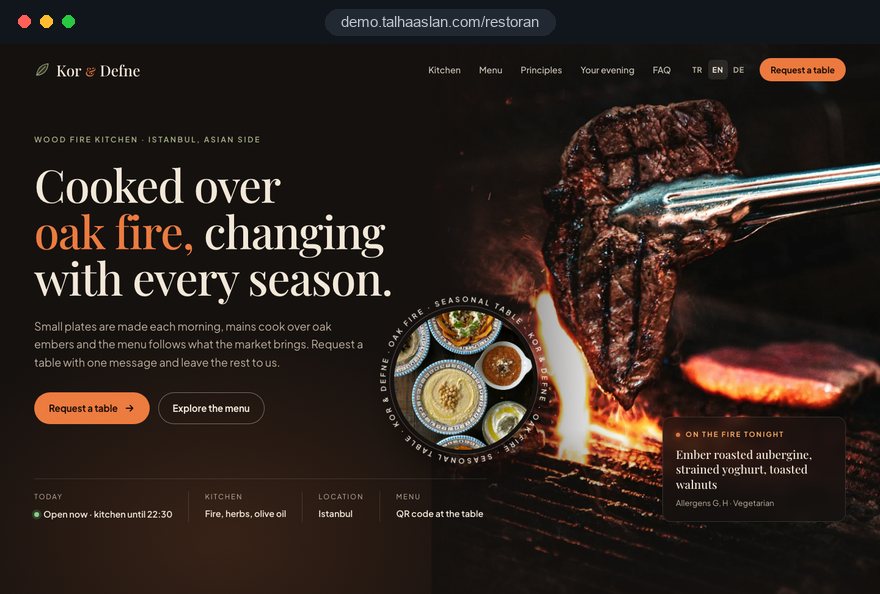
We do not have a live client website for a restaurant or cafe yet, so we show our approach on a live demo site. The demo is not a client site. You can see our work in other sectors on the references page.
Live demo
For this field we built a one page demo site for a fictional brand, made only to show our approach. You can explore the design, the copy structure and the mobile view live in three languages.
Open the live demoWe turn your current menu into text category by category and check descriptions and dietary markers with your kitchen.
Hours, address and phone are kept identical on the site, on Google and on social media.
We use photos of your dishes instead of stock images, and help plan a shoot if you do not have any yet.
We track which button brings calls, directions or orders and update the pages as menus and seasons change.
Related pages
Solutions
So guests can pick their own table and time from a calendar.
Industries
Product display, ordering and hygiene messaging matter just as much on the supply side.
Industries
For businesses built around a display counter and cake orders.
Industries
For businesses that quote for group meals and events rather than tables.
 How to Do Google Maps SEO: A Guide to Ranking Your Business Higher on the MapRead article
 Why Is My Instagram Ranking Above My Website on Google? How to Win Back Your Brand SearchRead article
 Professional Photography for Websites: What It Adds and How It Beats Stock PhotosRead article
 How to Optimize Images for Your Website: Format, Size and SEO SettingsRead article
FAQ
If your question is not here, write to us; we will send you an answer and a written quote.
Next step
In a short free call we listen to your menu, your locations and your order channels, then send a written scope and quote.
In-depth guide
A restaurant website works inside a decision that takes a few minutes on a phone: are you open, what do you cook, how do I get there, can I get a table. When the site answers those questions quickly, guests come; when it does not, the decision moves to a delivery app listing or to the place next door.
This guide follows the decisions a restaurant, cafe or bistro owner makes during a website project, in the order they usually come up. Each section gives you a checklist, a criterion or a question to put to an agency, from turning the menu into text and printing QR codes to ordering routes, your Google Business Profile and measurement.
The first screen of a restaurant website should answer four questions before the guest scrolls: are you open right now, where are you, what kind of food do you serve, and how do I get a table or place an order. If one of these is missing, the guest goes back to search.
In practice that means a short description of your cooking, today's hours and two clear buttons, not a slogan squeezed under a huge photo of the dining room. Sliders and intro videos push this information below the fold on a phone.
At the design presentation, ask your agency one question: can I see these four things on a phone without scrolling? If the answer is no, the layout needs rework, however polished it looks.
Moving the menu from a PDF to real text is the most labor intensive part of a restaurant website, and it pays back every week afterward, because an update takes minutes instead of a new file. Start it before design work, since the layout depends on how long the menu really is.
A useful description answers what a guest would otherwise ask the server: what is in it, how is it cooked, is it for sharing. Words like "delicious", "signature" or "special sauce" answer none of this. "Braised short rib, six hours in the oven, with creamed polenta and pickled shallots" covers ingredients, method and sides in one line.
Keep regional names and explain them: under "Shakshuka", add eggs poached in a spiced tomato and pepper sauce. Read the descriptions with your chef; a sentence the kitchen did not approve becomes a promise someone has to correct during service.
Whether prices appear on the public website is a business decision; allergen information is not, wherever the law requires it. In the UK, official guidance says that for non prepacked food sold online or by phone, allergen information must be available free of charge before the purchase is concluded and again at delivery.
Outside the UK the details differ, so treat the website as the place where allergen information is complete and easy to find, then confirm local requirements with your food safety advisor. On prices, decide early: if the QR code on the table opens the same menu as the public site, that page is the price list guests rely on, and it has to match what you charge.
We build the allergen section into the menu structure; the data and final compliance stay with your kitchen. If you change prices often, ask during the quote stage whether the panel supports bulk updates by category.
A QR code should point to a menu page whose address never changes, not to a file. When the code leads to a PDF or a campaign page, every menu change means reprinting the cards on every table.
Test the code in different light and on different phones before printing. Dim evening light, glossy surfaces and codes printed too small all make scanning harder. A short line next to the code, such as "Scan for the menu", plus the same address in plain text helps guests whose camera does not pick it up.
You can create codes with our free QR code generator and test them on several phones before printing. A small source tag on the address lets you count visits from the tables separately.
How you take table requests should follow how your dining room runs, not what a software demo shows. If one person can comfortably handle calls and WhatsApp messages, a calendar system adds a layer you do not need; if tables fill up every weekend and you run two seatings a night, a calendar reduces mistakes.
Look at the last few weeks before deciding: when requests arrive, who answers the phone during service, and how often guests fail to show up without notice.
If you move to a calendar, our page on a website with a reservation system explains how the setup works. Whichever route you choose, a prefilled WhatsApp message that asks for date and party size cuts down incomplete requests.
For takeaway and delivery there are two routes: send guests to the apps you already work with, or take orders through your own website. The first needs no setup and benefits from the app's audience; the second keeps the customer relationship and order data with you, but needs a kitchen and delivery routine that can carry it.
Before opening your own channel, answer four questions: who confirms orders, how payment is taken, who delivers, and can ordering be paused at peak times? If any of these is still open, starting with clear links to the apps is the safer step.
The decision is not permanent. Starting with the apps and adding your own channel once volume and team routines settle is a low risk sequence for most venues.
Restaurant photos are evidence that the menu and the room are real; an image that does not match what arrives on the plate costs trust. That is why a short, planned shoot of your own dishes is worth more than any stock photo of food.
Schedule the shoot after the menu text is final, because the menu decides which dishes need a picture: the ones guests order and ask about most. Shoot in afternoon daylight between services, with a cook plating exactly as for a guest.
Phone photos can work; consistent light and the same background matter more than expensive equipment. Note the setup of the shoot day so new seasonal dishes match the older pictures.
If a photo heavy menu loads slowly on mobile data, guests close it before they read it, so speed is part of restaurant website design. Google's Core Web Vitals give a clear target, measured at the 75th percentile of visits: LCP, which measures how fast the main content loads, at 2.5 seconds or less; INP, which measures response to taps, at 200 milliseconds or less; CLS, which measures layout shifts, at 0.1 or less.
On a menu page, those targets are reached with a few concrete steps that do not cost the design anything:
Before launch, open the menu inside the restaurant, in the corner with the weakest signal, on a phone that is not on your guest WiFi; that is exactly what guests experience. Our mobile friendly test shows how your current site looks on a phone.
Many hungry searches end in the map results, so your website and Google Business Profile must say the same thing. Name, address, phone, hours and menu link should match in both places, and holiday hours should be updated in both on the same day.
The business name on the profile must be the real name on your sign. Names stuffed with keywords, such as "Luigi's Pizza Brooklyn Late Night Delivery", break Google's guidelines and put the profile at risk; put your cuisine in the category and the description instead.
Your site's share of "brunch near me" or cuisine plus neighborhood searches grows with a visit page that describes the area and your cooking in natural language. If you want map and organic search handled together, see the scope of our SEO service.
If guests searching for your restaurant name see delivery apps and directories first, your own site is giving that search too little. To hold your name, the site has to offer, clearly and in readable text, what the platforms cannot.
The technical side of this is structured data: code that tells search engines, in a machine readable way, that the page belongs to a restaurant, along with its address, hours, cuisine and menu address. With Restaurant markup, only information visible on the page is marked up; adding a review rating that does not appear on the page breaks the rules.
You can review your current markup with our schema markup generator. On the content side, an our story page, the chef's approach, the producers you buy from and the history of the place are details that platform listings do not carry.
If you run several locations, each one needs its own page with its address, hours and map; a list of addresses on one contact page performs poorly in location searches. Each location page links to its own Google Business Profile and shows the dishes or hours specific to that site.
The menu can be shared, with location specials marked in the menu data and shown only on that location's page. A bistro in a tourist area or near business districts with many international guests needs a separate menu page per language. Publishing raw machine translation confuses guests on dish names; keeping the name and explaining the dish briefly works better.
For the technical setup and translation workflow, see our page on a multilingual website.
Visitor numbers alone say little on a restaurant website; what matters is which button brings calls, directions, WhatsApp messages or orders. Defining those clicks as conversions from the first day shows which page or campaign actually brings guests.
Measurement needs a legal footing. A table request form collects names and phone numbers, so it needs a clear privacy notice linked right beside it. In the EU, consent is needed before non essential cookies are set, and the UK has comparable rules; for users in the European Economic Area, Google also requires consent mode for its measurement and personalized advertising features.
If you plan to advertise, landing page experience is one of the three components of Google Ads Quality Score, and a fast, clear menu page is its foundation. For local campaign setup, see our Google Ads management.
Most restaurant website mistakes come not from design but from information that goes stale and from forgetting how quickly guests decide. These six are the ones we see most often, each with the better alternative.
One more mistake does not fit the list: not deciding who updates the site after launch. Choose the person who will keep menu, hours and photos current at the start of the project, and have that person attend the panel training.
When choosing a partner for a restaurant website, look less at portfolio visuals and more at how the agency handles the menu, the QR code and the ordering flow.
We do not have a live client website for a restaurant or cafe yet, so we show our approach on the live demo linked on this page. The demo is not a client site; it lets you try how the menu opens on a phone, where the QR code leads and how a table request is sent. You can also look at our wider web design service and how we work.
When you are ready, share your current menu, your number of locations and your order channels through our contact form; after a short call we send a written scope and timeline. To see what each package includes, visit the pricing section.
Start a Project
Thanks {name}, we've received your brief. We usually reply within the same day.
What happens next?