A menu that is only a gallery
The site shows beautiful plates but never says what each package includes, how many dishes it has or how it is served. Buyers cannot compare and end up phoning to ask.

Your Windows contrast theme is on; colours come from your system.
Your device is set to reduce motion; animations are already off.
Your choices are saved in this browser only.
Web design for your sector
The person buying catering is usually a facilities, procurement or HR manager, or a host planning one big day. They want to trust your kitchen, your capacity and your paperwork first, then ask for a quote based on headcount. So we build catering websites around clear menu packages, capacity and food safety information and a quote form that collects everything you need. We work with caterers fully online.
Open the live demoA demo design we built for a fictional brand
In short
A catering company website presents corporate and event menus as packages, explains daily capacity, kitchen and delivery area, gathers food safety documents on one page and collects quote requests with headcount, date and service style. In England, official guidance says food businesses, including those run from home or temporary premises, must register with their local authority at least 28 days before trading; your registration and hygiene details belong on that page.
Talha Aslan and teamLast updated:
Why a dedicated approach
Catering is not a table decision; it is a supplier choice for months or one large event. Buyers compare, ask for documents and collect quotes, and general templates do not support that process.
The site shows beautiful plates but never says what each package includes, how many dishes it has or how it is served. Buyers cannot compare and end up phoning to ask.
Headcount, date, address and service style are gathered one call at a time, and missing details delay the quote. Requests that arrive after hours wait until the next day and go elsewhere.
When buyers ask for registration, food safety and insurance details, scattered files go out by email. A company adding you to its supplier list wants to see them upfront.
How many meals you can produce a day, how many vehicles you run and which areas you cover is missing. A large site or a big wedding will not shortlist you without it.
A procurement manager looking for daily staff meals and a family planning a wedding reception land on the same page, and neither finds what they need.
People find you by name, but searches like 'office catering' or 'event caterer' plus a town have no matching page on your site, so enquiries go to directories.
Sources: Register a food business, GOV.UK
Our approach
The home page splits visitors into two routes: organisations looking for daily meals and hosts planning a one off event. The corporate side puts staff restaurant, packed meals, on site kitchen management, capacity and documents first; the event side shows canapé, buffet and seated dinner packages, service staff and equipment.
We write each menu package with its contents, number of dishes and service style, so buyers can put packages side by side. The quote form asks for headcount, date, address, service style and dietary needs; the request reaches you complete by email and WhatsApp, and you can prepare the quote on the first call.
Design, code and copy come from one team, so packages, documents and the form fit together. Talha Aslan sets the strategy and our experienced team builds it; we work with caterers in any country fully online.
Home
The quote form is the goal of the site; package, capacity and document pages all lead to the same form.
The right setup
The foundation is the same; who the client is, how long the contract runs and what the quote is based on make the difference.
Contract catering
The client is a procurement team looking for a long term supplier; capacity and documents decide.
Events
The client plans one day and wants to see the menu, the presentation and how the team looks.
Both
One kitchen serves organisations and events; the two audiences follow separate routes without mixing.
Catering specifics
These are the points a caterer has to decide when planning its website.
Each package lists the number of dishes, contents and service style; a sample weekly menu and vegetarian, gluten free or other dietary options are shown separately. We decide together whether figures appear on the site.
GOV.UK guidance says anyone who sells, cooks, stores, handles, prepares or distributes food must register at least 28 days before trading, including from home or temporary premises. We present your registration and hygiene details clearly; their accuracy stays with you.
Daily meal capacity, kitchen size, number of vehicles and the areas you cover are written from your own figures, so buyers see on the first page whether you fit.
Headcount, date, address, service style, meals per day and dietary needs are asked in the form. Requests reach you by email and WhatsApp and are tracked as conversions.
Logos and names of organisations you serve appear only with their permission; without it we describe the sector and service, and no reference is ever invented.
Your kitchen, team, vehicles and the buffets you set up on real photos, each image compressed and sized for a phone screen.
Sources: Register a food business, GOV.UK
Comparison
| Topic | Generic brochure template | Catering specific website |
|---|---|---|
| Menu | A photo gallery | Packages with contents and service style written out |
| Quote | Name, phone and message fields | Form asking for headcount, date, address and diets |
| Capacity | Not mentioned | Meals per day, vehicles and delivery areas |
| Documents | Sent by email on request | Gathered and current on one page |
| Audience | Everyone on the same page | Separate routes for corporate and events |
| Measurement | Visit counts | Which page brings quote requests |
Quick check
Must haves: does your site have them?
0 of 6 in place Tick the boxes to see where your site stands.
Added as needed
We choose which of these you need together during the scoping call.
Share which organisations and events you serve, your daily capacity and how quote requests reach you today; we will work out the page structure together and send a written quote.
Process
We define your business, your audience and the site’s one-sentence job: who it sells what to, through which action. Scope and timeline are written from that answer.
The home page and key templates come to you as designs first; no code is written before your approval. We do not like surprises, and we do not cause them.
The approved design becomes fast, secure, maintainable code. You follow progress in the CRM and see every page in a staging environment before launch.
The site goes live with analytics, Search Console and conversion tracking connected; panel training is given, first-year hosting and maintenance included.
Search and speed basics
Buyers search for 'contract catering' or 'office catering' plus a town, hosts for 'wedding caterer'. Each service and key delivery area gets its own page to answer those searches.
Name, address, phone, service area and services offered are marked up as structured data; nothing is marked up that is not on the page.
Buffet and presentation galleries are designed for phones first, images are converted to modern formats and Core Web Vitals are measured before launch.
Quote forms, calls, WhatsApp and brochure downloads are tracked as conversions from day one, so you see which service page brings enquiries.
Free tools
Check how your site opens on a phone, whether your quote emails land in spam and how heavy your photos are, before planning a new site. The tools are free and need no sign up.
Tech SEO
Scan any URL for title, meta description, headings, canonical, indexability and speed signals, and get an SEO score with a clear to-do list.
Tech SEO
Test whether a page works well on phones: viewport, font size, tap targets, a mobile screenshot and Core Web Vitals.
Image
Resize + compress photos and cut the KB; never leaves your device.
Why do your emails land in spam? Check a domain's SPF, DKIM and DMARC records, find the errors and get a corrected record to copy.
Tech SEO
Generate rich-result JSON-LD for Article, Product, FAQ, Local Business.
Conversion
Create a wa.me link with a preset message + embeddable button code.
How we work
We do not have a live client website for a caterer yet, so we show our approach on a live demo site. The demo is not a client site. You can see our work in other sectors on the references page.
Live demo
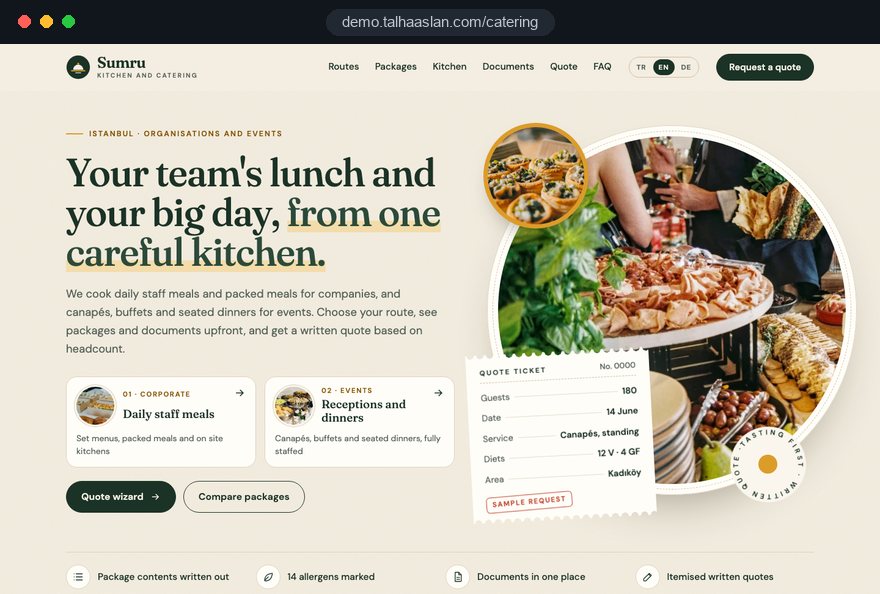
For this field we built a one page demo site for a fictional brand, made only to show our approach. You can explore the design, the copy structure and the mobile view live in three languages.
Open the live demoWe list the questions organisations ask before a quote and answer capacity, documents and service area on the site from the start.
We turn your menus into packages and check the number of dishes, service style and dietary options with your kitchen.
We use photos of your kitchen and the buffets you set up instead of stock images, and help plan a shoot if needed.
We track which page brings quote requests and update the pages for new seasons, packages and delivery areas.
Related pages
Industries
For restaurants and cafes that lead guests to a table or a takeaway order.
Industries
For event companies that also handle venue, decoration and programme.
Solutions
When a wedding season or corporate meal campaign needs a single focused ad page.
Solutions
For caterers serving international companies and consulate events.
 How to Build a B2B Website: Site Structure That Generates Qualified LeadsRead article
 Lead Form Design for Booking, Quote and Demo Requests: UX Rules That Lift ConversionsRead article
 How to Build Trust on Your Website: Trust Signals That Turn Visitors into CustomersRead article
 Professional Photography for Websites: What It Adds and How It Beats Stock PhotosRead article
FAQ
If your question is not here, write to us; we will send you an answer and a written quote.
Next step
In a short free call we listen to your services, your capacity and how quote requests reach you today, then send a written scope and quote.
In-depth guide
A catering company website has to serve two very different buyers at once: the procurement or facilities manager looking for a supplier of staff meals for the next few years, and the host choosing a menu for one evening. One asks about documents, capacity and continuity; the other about presentation, tastings and dates. We wrote this guide for caterers who want a site that moves both groups towards a quote without mixing them up.
The sections follow the order in which we make decisions on a project: first the revenue mix and the buyer's decision process, then packages, documents and the enquiry flow, and finally search, advertising, measurement and choosing a partner. Each section gives you a checklist, a question or a step you can act on directly.
The share of revenue that comes from contract catering versus one off events decides the skeleton of the whole site. For a caterer built on daily staff meals, the first screen belongs to capacity and documents; for one built on weddings and parties, it belongs to presentation and a date check. If both sides are similar in size, the home page gets two clear entrances and no page tries to speak to both audiences at the same time.
Your quotes from the last twelve months usually contain the answer. Bring these points to the first meeting:
Once the answers are clear, page order, navigation labels and the default path of the quote form follow almost by themselves. Write the decision down as one sentence, for example "contract catering is the core business, events are the complement", and settle every later design and copy discussion against it.
Contract catering is rarely bought in one click; it is the result of an evaluation that runs over weeks, and the site has to be useful at every stage. A procurement, facilities or HR manager usually builds a longlist, asks for documents, then compares tastings and prices. If the site has a ready answer for each stage, you stay on the list.
The last step is missing on most sites, yet the buyer's biggest worry is a disrupted service during the changeover week. Explaining in a few paragraphs how you align menus, take over equipment and supervise the first week reassures the decision maker and gives them an argument for their own management.
The documents page should give a corporate buyer everything needed to add you to an approved supplier list, in one place. In England, GOV.UK guidance says food businesses, including those run from home or temporary premises, must register with their local authority at least 28 days before trading. Your registration and hygiene details form the backbone of this page.
We suggest building it from these blocks:
Displaying the rating sticker is a legal duty in Wales and Northern Ireland and voluntary in England, but buyers anywhere tend to check it, so show it on the site as well. Add an expiry date next to each certificate and keep a "last updated" line at the bottom; an expired certificate looks worse than none. We decide with you which documents appear in full and which only by name and number, while their accuracy stays with you.
A package page should be written so that a buyer who places two caterers side by side finds answers to the same questions. A beautiful plate photo creates interest, but comparison needs written fields.
For contract clients, also publish a sample weekly menu; showing how your menu cycle and seasonal changes work removes the fear of the same dishes on repeat. On the events side, writing canapé receptions, buffets and seated dinners as separate packages helps hosts see which format fits their occasion. Whether prices appear on the site is your commercial decision. Keep package names descriptive rather than "Gold" or "Premium"; a name that says what is inside is easier to remember during comparison and can be reused word for word in the written quote.
At any large meal the allergen question will come, and the site should show you are ready for it. The Food Standards Agency says businesses selling non prepacked food must provide allergen information for any of the 14 regulated allergens in their dishes; this can be in writing, or verbally with a clearly visible written notice explaining how customers can get it. A website section supports that duty, but your kitchen remains responsible for its accuracy.
We suggest making these distinctions explicit:
The last item takes some commercial courage, but for an organization with a severely allergic employee it is the most valuable line on the site. Staying silent on something you cannot promise increases the burden of any incident later; an honest limit reads as a serious kitchen. Once a dietary need is agreed, repeat it in the same words from quote to contract so nothing gets lost between sales and kitchen.
One generic form tires both the buyer and the host, so the form should split the path at its first question. When someone picks regular meals for a workplace or a single event, only the fields for that path appear. Both sides see a short form, and you get everything you need to price the job.
On the thank you screen, say when you will reply and what steps the quote goes through; this prevents the same person from phoning an hour later to ask. Before launch, fill in the whole form on a phone and check that the file upload and the date picker work comfortably on a small screen.
The form's job ends when the request reaches the right person complete; what follows is sales, and the site can support that too. Make sure your quote emails do not land in spam by checking your domain's SPF, DKIM and DMARC records, which you can do in seconds with our email authentication checker. If those records are missing, even the warmest enquiry can disappear unnoticed.
We recommend this routine for incoming requests:
The last point looks minor but matters: if a package called "Standard Daily Lunch" on the site turns up under a different name in the quote, the buyer struggles to match the two documents. Attaching the capability brochure to the automatic summary also helps, because the buyer can file it straight into their supplier folder.
For event clients the decision often depends on a tasting and a date, so both need a separate and simple flow. Someone planning a wedding, an engagement party or a company year end dinner first wants to know whether you are free that day. Preparing a quote for a date you cannot serve wastes time on both sides.
You do not have to publish your calendar; the date can be the first field of the form, with a note that you reply quickly in peak season. For tastings, state these points clearly on the page:
On the contract side, a tasting is effectively the food committee's decision meeting, where portion consistency and delivery time matter as much as presentation. Tracking tasting requests as a separate option in the form is also a practical way to see which channel brings serious buyers.
On a catering site, photos are there to prove capacity and organization, not to decorate. A buyer wants to see a clean production area, cold storage and branded delivery vehicles; a host wants to see a complete buffet, the serving team's uniforms and the table layout. Stock images answer none of these questions, and an attentive buyer notices at once.
Use this shot list on the photography day:
That many images make pages heavy. Google treats LCP, which measures how long the largest element on the page takes to appear, as good at 2.5 seconds or less. Resizing photos with our image resizer and converting them to modern formats before upload is an easy step towards that threshold; we design galleries for phones first, lazy load images below the first screen and measure on a real phone before launch.
A corporate buyer does not know your name; they search for "contract catering" or "office catering" plus a town, and if no page answers that search, the enquiry goes to a directory. A separate page for each main service is the first step: staff restaurant management, delivered lunches, office catering, canapé receptions, weddings and conference catering. When each page answers its own questions, search engines also understand which page covers what.
Area pages need care. Copies that only swap the town name count as thin content; an area page is worth publishing only if it carries information specific to that area:
On your Google Business Profile, the business name must match your real world name without added keywords; if clients do not visit your kitchen, you can hide the address and set a service area. You can mark up services with our schema markup generator, and for ongoing work our SEO service covers the full picture.
In catering, the moments when advertising pays off are predictable: before wedding season, ahead of company year end events and during clients' budget planning period. Appearing in search ads during those weeks makes sense, but sending ad clicks to the home page wastes budget. Every campaign should land on a single purpose page that matches the search.
Google assesses Quality Score through expected click through rate, ad relevance and landing page experience; it describes the score as a diagnostic tool, not a direct input in the ad auction. In practice, someone searching for canapé catering should see canapé packages and a date check on the first screen. That is why building a dedicated landing page for each seasonal campaign works.
Never promise in an ad what the page does not show; the service style and area in the ad should appear in the same words on the landing page. If you want to plan campaigns together, our approach is described on our Google Ads management page.
Visitor numbers tell a caterer very little; the real question is which page brings which kind of enquiry. A multi year staff restaurant contract and a single canapé reception look like the same form submission, yet their value is very different. Measurement has to be set up to see that difference, otherwise many small requests hide a few valuable contract enquiries.
Outcome matching is the step most caterers skip, yet it is the only thing that tells you where to move ad budget. A simple sheet with date, source, type and outcome columns is enough. After a few months you can see from your own data whether, for example, contract enquiries from area pages turn into signed work more often than those from ads. Use the same sheet for phone enquiries; asking callers how they found you closes the weakest link in measurement.
These are the mistakes we see most often on catering websites, and most are easy to fix; each line includes what to do instead.
What these mistakes share is a site built around the company's wish to describe itself rather than the buyer's questions. Reading each page before launch with one question in mind, which buyer question does this page answer, catches most of them during design. To find your own priority, reread your recent enquiries; the question asked most often on the phone is usually exactly what the site is missing.
The right agency for a caterer tries to understand your sales process before your menu. A team that asks how quotes arrive today, who answers them and which requests get lost, before showing design samples, starts in the right place. Ask these questions in the first conversation:
We do not yet have a live client website in catering, so we show our approach on a live demo linked on this page; our work in other sectors is in our client references. The whole process is described on our web design service page. If the answers to the questions above stay vague, the result is likely to be a generic template; if they are concrete, the meeting ends with a list of pages to write, documents to collect and photos to take.
To clarify scope, share your services, capacity and current enquiry flow through our contact form; you can see what each package includes on the pricing page. Our written quote lists scope and schedule item by item.
Start a Project
Thanks {name}, we've received your brief. We usually reply within the same day.
What happens next?