All rooms in one mixed album
The main hall, the terrace and the garden sit in one gallery. Couples cannot tell which photo belongs to which space, where their own wedding would take place or how the room looks before it is dressed.

Your Windows contrast theme is on; colours come from your system.
Your device is set to reduce motion; animations are already off.
Your choices are saved in this browser only.
Web design for your sector
A couple looking for a wedding venue wants to see the space first: how many guests the room holds, how the garden looks in the evening light, where the day moves if it rains. Then comes the date; for a day planned a year or more ahead, whether that Saturday is free decides everything. That is why we build wedding venue websites around room and garden pages, capacity by layout, a date enquiry, menus and packages, a gallery and clear directions.
Open the live demoA demo design we built for a fictional brand
In short
A wedding venue website shows every room and outdoor space on its own page with capacity by layout, takes date enquiries with the room and guest count, lists what each menu and package includes and uses the gallery and directions to bring the couple to a viewing. Barn and garden venues also explain their wet weather plan. In England and Wales, a venue needs local authority approval to host civil ceremonies, and selling alcohol or offering regulated entertainment is a licensable activity.
Talha Aslan and teamLast updated:
Why a separate approach
A wedding venue really sells two things: a space and a date. Couples decide months ahead, often together with their families, and they will not book a viewing until they know the space fits their guest list, the day is free and what is included.
The main hall, the terrace and the garden sit in one gallery. Couples cannot tell which photo belongs to which space, where their own wedding would take place or how the room looks before it is dressed.
The site gives one guest number without saying whether it applies to a standing reception, round tables or a layout with a dance floor. A couple with a long guest list only finds out at the viewing whether the room works.
Is the second Saturday in June free arrives by Instagram, WhatsApp and phone, often without the room or the guest count. In peak season a slow reply sends the couple to another venue.
The site does not say how many courses there are or whether the cake, drinks, sound, lighting and table styling are included. Couples cannot compare venues side by side and ask every venue the same questions.
Barn and countryside venues are often outside town. How guests arrive, how many cars the car park holds, whether there is a shuttle and how people get home late at night is missing; there is not even a location link ready for the invitations.
Whether the venue can host the ceremony itself, until when music may play outdoors and what happens if it rains only come up at contract stage. Hosting civil ceremonies needs local authority approval and selling alcohol is a licensable activity; saying this plainly builds trust.
Sources: The Marriages and Civil Partnerships (Approved Premises) Regulations 2005, legislation.gov.uk · Licensing Act 2003, section 1 (licensable activities), legislation.gov.uk
Our approach
Every room and outdoor space gets its own page: the space empty and dressed, guest numbers for round tables, long tables and a standing reception, the dance floor, the stage and the entrance for the couple. For barn and garden venues the same page shows golden hour and evening photos, the wet weather plan and the indoor alternative.
The enquiry form asks for the room, the date, an alternative date, the guest count and the type of celebration; the request reaches you complete by email and WhatsApp. Menu and package pages list what is included, the directions page covers the map, parking and shuttle. Couples arrive at the viewing with the basic questions already answered.
Design, code and copy come from one team, so room pages, calendar and form work together. Talha Aslan sets the strategy and our experienced team builds it; we work with venues in the UK and internationally fully online.
Home
The date enquiry and the viewing request are the two goals; every room page links to both.
The right setup for you
The base is the same; the difference is what the venue is chosen for: capacity and access, atmosphere and nature, or several celebrations running under one roof on the same day.
Indoor venue
Large guest numbers and a long season; couples want to see capacity, menus and access quickly.
Countryside
Atmosphere sells; couples want to see light and landscape and know what happens if the weather turns.
Multi room
Several weddings or parties run on the same day; every room has its own capacity and its own calendar.
Specific to wedding venues
These are the points to decide when planning the website of a venue that runs its own rooms or grounds.
Each room lists its size, ceiling height, dance floor, stage, entrance and heating or air conditioning. Photos show the space empty and dressed, so couples can picture their own day there.
Guest numbers for round tables, long tables and a standing reception are listed separately. Multi room venues show all rooms in one table, so couples see at a glance which room fits their guest list.
The form asks for the room, the date, an alternative date, the guest count and the type of celebration. Showing booked dates in a calendar or only taking enquiries is your choice; every request is tracked as a conversion.
What each menu and package includes and what counts as an extra is listed clearly. Whether figures appear on the site is a decision we make with you.
Map, directions, car park size, shuttle options and nearby accommodation sit on one page. The location link and QR code printed on the invitations lead there too.
In England and Wales, the Approved Premises Regulations 2005 let a proprietor apply to the local authority so civil marriages and civil partnerships can take place at the venue. Under section 1 of the Licensing Act 2003, selling alcohol and providing regulated entertainment are licensable activities. We state your approvals plainly on the site.
Sources: The Marriages and Civil Partnerships (Approved Premises) Regulations 2005, legislation.gov.uk · Licensing Act 2003, section 1 (licensable activities), legislation.gov.uk
Comparison
| Topic | Generic template | Wedding venue website |
|---|---|---|
| Spaces | One mixed gallery | A page for every room and garden |
| Capacity | A single number | Separate numbers by layout |
| Date | Phone and inbox | Form asking for room, date and guest count |
| Menus | Package names only | Menus and packages with listed contents |
| Access | Address only | Map, directions, parking and shuttle |
| Tracking | Visits | Which room brings enquiries and viewings |
Quick check
Must haves: does your site have them?
0 of 6 in place Tick the boxes to see where your site stands.
Added as needed
We choose which of these you need together during the scoping call.
Share how many rooms and outdoor spaces you have, their capacity and how date enquiries reach you today; we will agree the page structure and a written quote together.
Process
We define your business, your audience and the site’s one-sentence job: who it sells what to, through which action. Scope and timeline are written from that answer.
The home page and key templates come to you as designs first; no code is written before your approval. We do not like surprises, and we do not cause them.
The approved design becomes fast, secure, maintainable code. You follow progress in the CRM and see every page in a staging environment before launch.
The site goes live with analytics, Search Console and conversion tracking connected; panel training is given, first-year hosting and maintenance included.
Search and speed foundation
Couples search for wedding venues by town or county, for barn wedding venues by region and for party venues by celebration. Each celebration type and key area gets its own page to answer those searches.
Name, address, phone and category on your Google Business Profile match the site exactly; the venue is marked up with structured data, and nothing is marked up that is not on the page.
Room galleries and videos are designed for phones first, images are converted to modern formats and lazy loaded, and Core Web Vitals are measured before launch.
Date enquiries, viewing requests, calls, WhatsApp and direction clicks are tracked as conversions from day one; you see which room and page bring requests.
Free tools
Test how fast your room gallery opens on a phone, create the QR code and location details for your invitations and check your WhatsApp link before planning a new site. The tools are free and need no sign up.
Tech SEO
Test whether a page works well on phones: viewport, font size, tap targets, a mobile screenshot and Core Web Vitals.
Image
Resize + compress photos and cut the KB; never leaves your device.
Conversion
Turn URLs, WhatsApp, Wi-Fi, vCard and text into a QR code in seconds; download high-res PNG or SVG.
Maps
Convert latitude and longitude between decimal degrees, DMS, DDM and UTM, and get the distance, bearing and midpoint between two points, with map links.
Conversion
Create a wa.me link with a preset message + embeddable button code.
Sharing
Preview how your link looks on WhatsApp, Facebook, X, LinkedIn and Telegram, and find missing Open Graph tags and image problems.
How we work
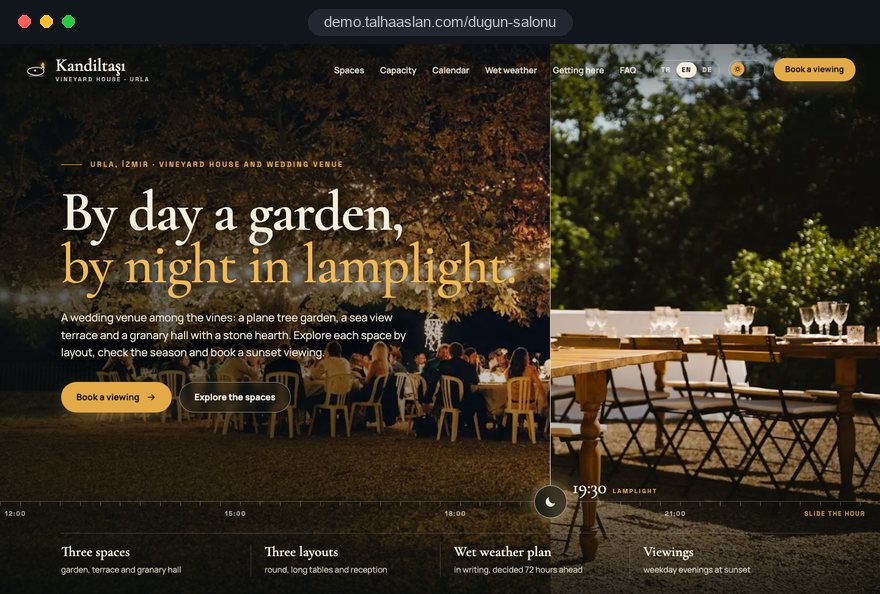
We do not yet have a live client website for a wedding venue, so we show our approach on a live demo site. The demo is not a client site. You can see our work in other sectors on the references page.
Live demo
For this field we built a one page demo site for a fictional brand, made only to show our approach. You can explore the design, the copy structure and the mobile view live in three languages.
Open the live demoWe list the questions couples ask most at viewings and answer capacity, menus, access and the wet weather plan on the site from the start.
We confirm the capacity of every room and outdoor space by layout with you and only publish numbers you have checked.
Instead of stock images we use your photos of the rooms empty and dressed, and publish guests' faces only with permission.
We watch which room brings enquiries and bring forward free dates and winter celebrations before the wedding season.
Related pages
Industries
For wedding and event planners who create concepts and styling without their own venue.
Industries
For caterers who only provide the food at weddings.
Industries
For bridal shops that sell or hire wedding dresses.
Industries
A portfolio focused structure for wedding photographers.
 How to Do Google Maps SEO: A Guide to Ranking Your Business Higher on the MapRead article
 How Website Video Affects Conversion Rate: When It Helps, When It HurtsRead article
 How to Optimize Images for Your Website: Format, Size and SEO SettingsRead article
 Lead Form Design for Booking, Quote and Demo Requests: UX Rules That Lift ConversionsRead article
FAQ
If your question is not here, write to us; we will send you an answer and a written quote.
Next step
In a short, free call we listen to how your rooms, grounds and date enquiries work today; then we send a written scope and quote.
In-depth guide
A wedding venue sells fixed inventory. Each room has a limited number of Saturdays, Fridays and weekday evenings in a year, and a date that passes empty never comes back. The job of the website is to make that inventory visible, answer the questions couples and their families bring to a viewing before they travel, and capture enquiries that match the right date to the right room.
In this guide, we at Talha Aslan and team walk through the decisions we make, in order, when planning a site for a venue that runs its own rooms or grounds, from date strategy and room details to measurement, common mistakes and choosing a partner. Each section contains something you can check on your current site.
Your hardest dates to sell should set the priorities of the site; if June Saturdays sell themselves, the site has to work hardest for winter, weekday evenings and daytime celebrations. Most wedding venue websites only show the biggest summer wedding and leave off peak demand to chance.
Before any design work, pull this picture from the last two seasons of bookings:
These answers reshape the main menu.
Separate pages for smaller celebrations, a section showing the indoor rooms warm and candlelit for winter weddings and a weekday option in the enquiry form all come from this data. If you plan a short Google Ads campaign for off peak dates, decide its landing page now; ads only make sense when they send people to a page that speaks about those dates and that type of event.
Room pages are read by more than the couple; planners, photographers, bands and stylists check them too, and they all want measurements.
The technical details we want on every room page:
We write this information as text on the page rather than inside a downloadable brochure, so it reads well on a phone and search engines understand it. The floor plan does not need architectural drawings, a clear plan with measurements is enough. We confirm the figures on site with your operations team once and update the page in the same week whenever a room is refurbished.
The right capacity figure is not the maximum the room can physically hold; it is the number your service team can work comfortably in that layout. When the website says one number and the viewing reveals another, couples read it as a sales tactic and trust breaks at the first meeting.
We prepare the capacity table in these steps:
Multi room venues get the same table with all rooms side by side. The enquiry form connects to it: when a couple enters 180 guests, the form suggests only the rooms that fit, so you stop receiving requests for rooms that are too small.
On a wedding venue website, images have to orient the visitor before they create atmosphere: in every frame the couple should know which space they are looking at, what time of day it is and how it could look on their own day. That is why we plan a shot list room by room instead of collecting random wedding photos.
For every space we ask for:
For video, we prefer a short walk through clip of thirty to sixty seconds per room over a single long promotional film. It follows the route from the car park into the room and answers the most common question before a viewing: where is it and how do guests get in.
A date enquiry can only be as reliable as the booking record behind it, so the venue needs a single record of which room is held for which date before the website can promise anything. A calendar split between a paper diary, a shared spreadsheet and the sales manager's phone is how one date ends up promised to two families.
Before we build, we ask venues to put these rules in writing:
Once this is in place, the site has two options: a calendar that shows booked dates, or an enquiry form only.
If the calendar can read from your booking record, couples see free dates themselves; if it has to be updated by hand, it goes stale quickly and does harm. In that case we use the form and make sure the first reply confirms availability. When you need more, we look at a website with a booking system together.
What couples struggle with most when comparing venues is what is included and who they may bring in from outside; a venue that writes these rules clearly stops answering the same questions at every viewing. The menu is only one part of it.
The questions we want each package page to answer point by point:
Publishing figures is a separate decision; describing the contents is necessary either way. We write the rules in the same language as your contract, because different wording on the site and in the contract invites disputes later. Keep package names plain as well: "Evening reception with dinner" compares more easily than a name like "Gold package".
A barn wedding venue or a garden sells atmosphere, but the decision usually turns on its risks: rain, wind, cool evenings, insects and when the music has to stop. Explaining those risks calmly on the page, rather than hiding them, eases the worries of couples and especially of parents.
What we recommend the outdoor page covers:
Once the curfew is settled with your licence conditions and the local authority, we state it in one clear sentence; vague wording like "late into the night" turns into disappointment at the viewing. A photo of a real wedding moved into the indoor alternative on a rainy day convinces more than any paragraph about the wet weather plan.
Wedding guests outnumber the couple many times over and vary widely, so the directions page is really written for everyone who receives an invitation. For a countryside venue, it answers the couple's quiet question: can our guests actually get here?
We build the directions page in this order:
The link printed on invitations points to this page, and couples share the same link in guest group chats. If you need a code for the printed card, create it with the QR code generator and test it on several phones before printing. Venues that often host guests from abroad can add a second language version of the directions and room pages to the same site structure later.
Showing your approvals plainly is a trust signal for a wedding venue; couples want to know the venue operates properly before they pay a sizeable deposit. In England and Wales, the Marriages and Civil Partnerships (Approved Premises) Regulations 2005 let a venue's proprietor apply to the local authority so civil marriages and civil partnerships can take place on the premises. Under section 1 of the Licensing Act 2003, selling alcohol and providing regulated entertainment are licensable activities.
You do not need to publish documents. A clear sentence saying whether ceremonies can be held on site and that the venue is licensed is usually enough; outside England and Wales, confirm the equivalent rules with your local authority. We also recommend these pages:
Have your solicitor review the legal substance of deposit and cancellation terms; we place them on the page in plain language and link them from the form.
Most traffic to a wedding venue website comes from phones, and the gallery is the heaviest part of every page, so speed has to be decided on the first day of design. A couple arriving from a saved Instagram post will not wait for a gallery that refuses to load.
Google's Core Web Vitals give clear targets. LCP, the time until the largest image or text block appears, should be 2.5 seconds or less; INP, how quickly the page responds to a tap, 200 milliseconds or less; CLS, how much the layout shifts while loading, 0.1 or less. Google assesses these at the 75th percentile of visits.
Before launch, we test every room page with the mobile friendly test and on a real phone over a mobile connection.
Many couples add a town or county to their search and see a map at the top of the results, so your Google Business Profile and website must say the same things in the same words. Visibility for a wedding venue grows from the content of the site and the consistency of the profile together.
Name, address, phone number and category must match exactly between the profile and the site. The other rules we apply:
One section giving travel times from the areas your guests actually come from is enough. We mark up the venue, address and rooms with structured data and never mark up information that is not visible on the page. Ongoing care for all of this sits within our SEO service.
A wedding venue website succeeds when it brings viewings and deposits for specific rooms and dates, not when it collects visits. That requires recording each important action on the site separately and having the sales team log the outcome after every viewing.
We set up measurement in these steps:
After a few months the table drives concrete decisions: perhaps the garden page gets plenty of visits but few deposits because its wet weather plan is unclear, or the winter weddings page is never found at all.
Most mistakes we see on wedding venue websites come not from design but from the venue's everyday knowledge never reaching the site. Each one below either forces the same question at the viewing or quietly sends the couple to another venue.
You can check your current site against this list by walking through it on a phone from start to finish. Every point where you hesitate is a point where couples hesitate too.
The right partner for a wedding venue website asks how your venue runs before talking about design: rooms, capacity, the booking record, supplier rules and the season. If none of that comes up in the first meeting, the result is likely to be an attractive brochure that does not bring bookings. Design, code and copy coming from one team keeps the links between room pages, the form and measurement intact.
Questions we suggest asking any agency:
This page links to a live demo site we built for wedding venues and countryside spaces, so you can explore the structure on your own phone. Read how our web design service works and what each package includes, then tell us about your rooms, outdoor spaces and how date enquiries reach you today through the contact form; we will send a written quote that lists scope and timeline point by point.
Start a Project
Thanks {name}, we've received your brief. We usually reply within the same day.
What happens next?