Galleries load slowly on phones
Full-size files straight from the camera are uploaded as they are, and the first image appears seconds later. Couples mostly browse on their phones, and rather than wait, they move on to the next photographer.

Your Windows contrast theme is on; colours come from your system.
Your device is set to reduce motion; animations are already off.
Your choices are saved in this browser only.
Industry-specific web design
Couples choosing a wedding photographer look at the pictures first, read the packages next and only then ask whether the date is free. We build photographer websites around those three steps: a portfolio that loads quickly even on a phone, packages that say exactly what is included, and a form that asks for the date, venue and type of shoot in one go.
Open the live demoA demo design we built for a fictional brand
In short
A photographer website shows your work in fast galleries split by type of shoot, explains what each package includes and leads clients to a date enquiry form. For wedding photographers the date and venue come first; for studios it is the session type and time. If galleries show recognisable people, permission to publish is planned from the start, since under UK GDPR their images can be personal data.
Talha Aslan and teamLast updated:
Why it needs its own approach
On a photographer's website the product is the picture itself. If the gallery is slow, the packages are vague and date enquiries go missing, even great photography will not hold the client.
Full-size files straight from the camera are uploaded as they are, and the first image appears seconds later. Couples mostly browse on their phones, and rather than wait, they move on to the next photographer.
Weddings, newborns, products and headshots sit mixed on a single page. Someone looking for a wedding photographer cannot find what they came for, and search engines cannot tell which page covers which type of shoot either.
Hours of coverage, number of edited images and whether an album is included are nowhere on the site. Every client asks the same questions by DM, and when the reply is slow, the booking goes elsewhere.
Questions about dates come in by phone, Instagram and email and are never collected in one place. When two couples ask about the same Saturday, it gets hard to tell who asked first and where each wedding takes place.
The whole portfolio sits on one social account; if the account is restricted or the algorithm changes, the shop window goes with it. People who search for your name find no page that you control.
Images showing clients' faces are added to the portfolio without written permission. The UK GDPR covers any information relating to an identifiable person, so a portfolio built without a consent process may later have to be cleaned up image by image.
Sources: ICO: What is personal data?
Our approach
We build a photographer website in the order clients decide: first they see your work, then they read what a package covers, and finally they ask about the date. Images are prepared in several sizes and modern formats for each screen, and images further down load as the visitor scrolls, so the gallery opens quickly on a phone without giving up quality.
If you want a simple site that presents you as a person, our personal website page may suit you better; this page is for photographers who win work through portfolio, packages and date enquiries. If you shoot destination weddings for couples from abroad, a multilingual structure is set up from day one.
Design, development and content sit in one team, so gallery speed, package copy and the form are not patched together separately. Talha Aslan sets the strategy and an experienced team handles delivery; we work remotely and in English with photographers abroad.
Home
Each type of shoot has its own gallery and answers its own search; all of them lead to the same date enquiry form.
The right setup
All three start from the same foundation; the client's first question makes the difference.
Weddings
Couples look at your style first, then check whether the date is free.
Photo studio
Clients choose a session type and ask for a suitable time.
Commercial
Brands and agencies want to see past work and how the process runs.
Built for photographers
These are the points photographers decide on most often when a site is planned.
Each image is prepared in several sizes and modern formats to match the screen, and the gallery loads as you scroll. The full-size file only opens when an image is enlarged, so the first picture shows on a phone without a wait.
Weddings, engagements, studio and commercial work each get their own page. Every page answers its own search and ends with the packages and the date form that fit that type of shoot.
Hours of coverage, number of edited images, album, turnaround and delivery format are written in the same layout for every package. Whether prices appear on the site is a decision we make together with you.
The form asks for the date, the town or venue, the type of shoot and the package of interest. Enquiries are collected in one place with their source, so requests for the same date are seen in order.
The UK GDPR defines personal data as any information relating to an identified or identifiable person, and the ICO's guidance explains how that is judged. We suggest covering portfolio use in your contract or a separate consent and only place images you have cleared; the final legal assessment is yours.
Instead of right-click blockers that annoy visitors, we publish at a sensible size, keep metadata and add an optional small signature. Full-resolution files never sit on the site.
Sources: Information Commissioner's Office: What is personal data?
Comparison
| Topic | Instagram and a ready portfolio template | Site built for a photographer |
|---|---|---|
| Gallery speed | Large files uploaded as they are | Gallery sized to the screen and loaded on scroll |
| Portfolio order | Images mixed in feed order | Separate galleries and stories by type of shoot |
| Packages | Explained one DM at a time | Every package's scope written in the same layout |
| Date enquiries | Lost between messages | A form asking for date, venue and type of shoot |
| Publishing consent | Not considered image by image | Consent process and privacy notice planned from the start |
| Measurement | Likes and followers | Which gallery brings date enquiries |
Quick check
Must haves: does your site have them?
0 of 6 in place Tick the boxes to see where your site stands.
Added as needed
We choose which of these you need together during the scoping call.
Tell us which shoots you do, what your packages include and which clients you want more of; we will come back with a gallery structure and a written quote.
Process
We define your business, your audience and the site’s one-sentence job: who it sells what to, through which action. Scope and timeline are written from that answer.
The home page and key templates come to you as designs first; no code is written before your approval. We do not like surprises, and we do not cause them.
The approved design becomes fast, secure, maintainable code. You follow progress in the CRM and see every page in a staging environment before launch.
The site goes live with analytics, Search Console and conversion tracking connected; panel training is given, first-year hosting and maintenance included.
Search and speed foundations
Clients do not only search for a photographer; they type wedding photographer with a county or city, or newborn photo studio near me. Pages for each type of shoot, the contact page and the Google Business Profile are built to support each other.
File names, alt text and page titles say what each picture shows; business details are marked up as structured data, and nothing is marked up that is not on the page.
Galleries are designed for phone screens first, images are compressed and Core Web Vitals are measured before launch.
Date form submissions, WhatsApp clicks and calls are tracked as conversions from day one, so you can see which gallery or package brings enquiries.
Free tools
Before planning a new site, check how your current gallery opens on a phone, then resize and convert your images. The tools are free and need no sign up.
Tech SEO
Test whether a page works well on phones: viewport, font size, tap targets, a mobile screenshot and Core Web Vitals.
Image
Resize + compress photos and cut the KB; never leaves your device.
Image
Convert between JPG, PNG and WebP in one click or in batches; it detects the input format, lets you set quality and a background for transparency, and uploads nothing.
Tech SEO
Scan any URL for title, meta description, headings, canonical, indexability and speed signals, and get an SEO score with a clear to-do list.
Sharing
Preview how your link looks on WhatsApp, Facebook, X, LinkedIn and Telegram, and find missing Open Graph tags and image problems.
Conversion
Create a wa.me link with a preset message + embeddable button code.
How we work
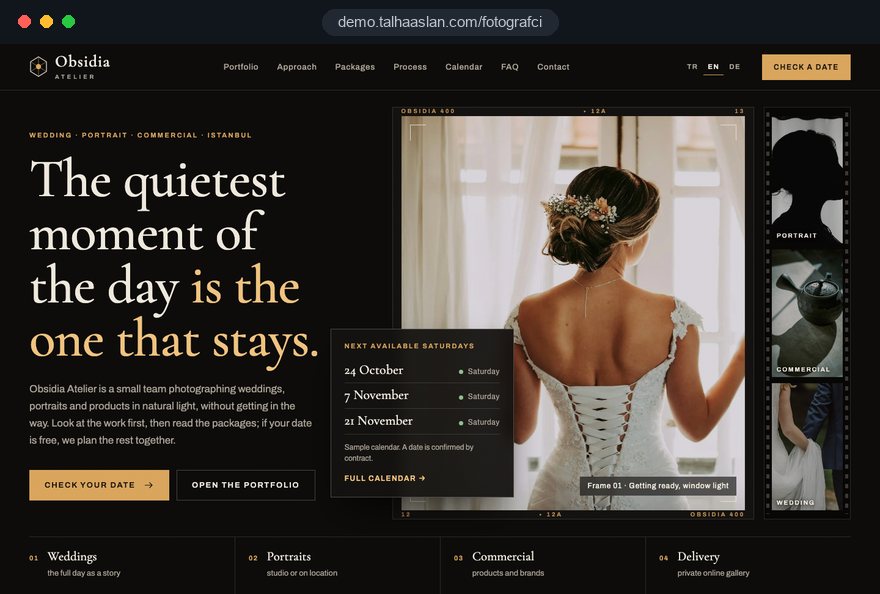
We do not yet have a live photographer project to show, so we built a sample photographer site as a live demo of the approach. Our work in other fields is on the references page.
Live demo
For this field we built a one page demo site for a fictional brand, made only to show our approach. You can explore the design, the copy structure and the mobile view live in three languages.
Open the live demoWe go through your archive together and pick the strongest images for each type of shoot. A smaller, consistent gallery wins more work than hundreds of mixed images.
Images are compressed with their colour profile intact, sized for each screen, and the gallery is measured on a phone before launch.
We prepare the package structure and layout; you set and approve the scope, turnaround and terms.
Only images you mark as cleared for publishing go into the gallery, and the privacy notice and form consent are in place from the start.
Related pages
Solutions
A better fit if you want a simple site built around your name.
Industries
Site structure for wedding and event planning companies.
Solutions
Let studio clients pick a session time from a calendar.
Solutions
Pages per language for photographers working with couples from abroad.
 Professional Photography for Websites: What It Adds and How It Beats Stock PhotosRead article
 How to Optimize Images for Your Website: Format, Size and SEO SettingsRead article
 What Is Lazy Loading? How It Affects SEO and Page SpeedRead article
 Lead Form Design for Booking, Quote and Demo Requests: UX Rules That Lift ConversionsRead article
FAQ
If your question is not here, write to us; we will send you an answer and a written quote.
Next step
In a free 15-minute call, in English, we will go through your shoots, your packages and the clients you want to reach, then send a written scope and quote.
In-depth guide
A photographer website is where clients make up their minds in a few minutes. A couple or a brand manager opens several photographers in several tabs, scans the images, checks the packages and writes to the one who makes asking easy. A site that stalls at any step loses the booking on speed and clarity, not on the work.
In this guide, Talha Aslan and team walk through the decisions we make, in order, when we plan sites for wedding photographers, photo studios and commercial photographers: structure, portfolio selection, gallery speed, package copy, date enquiries, publishing consent, client galleries, local search and measurement. Each section gives you something to check on your current site.
Clients choose a photographer in three steps: they fall for the style, they check whether the coverage fits their needs, and only then do they ask whether the date or time is free. When a site follows that order, visitors never have to hunt for the next step; when it breaks the order, every question ends up in your inbox.
That sequence decides where each block sits on every page. The first screen of the home page should carry a few of your strongest images and clear paths to each type of shoot, not a slogan. Package details come second, and the date question should appear at the end of every gallery and every package. Someone who lands from search on a single wedding story should be able to complete all three steps on that page.
You can test your current site with four quick questions:
The skeleton of the site follows the work that pays your bills; a wedding photographer, a photo studio and a commercial photographer are poorly served by the same template. The client's first question differs in each case, and menu, form and galleries follow it.
For photographers who do a bit of everything, our most common recommendation is to keep weddings and commercial work apart. A hotel marketing manager does not want to scroll past bridal portraits to find product shots, and a couple did not come to look at industrial equipment.
If you shoot destination weddings or work with brands abroad, decide on languages at this stage; language pages bolted on later tend to stay half finished. In a multilingual site, every language gets its own galleries and its own form. Our web design service page explains how we plan the full structure.
A portfolio wins work through consistency, not volume; hundreds of mixed images bring fewer enquiries than thirty carefully chosen ones. Visitors read your style in the first ten images; inconsistency leaves them unsure what they would pay for.
Open a separate folder for each type of shoot and cut with clear criteria. Keep only one frame from each run of similar moments. Keep color grading consistent within a gallery, so editing styles from different years do not sit side by side. Set aside any image whose publishing consent is unclear right at the start; we cover consent in its own section below.
For wedding photographers we suggest two layers:
Full stories answer the question couples care about most: does this photographer hold the same standard across an entire day? Highlights show the style quickly.
Gallery speed depends on how images are prepared, not on how good they are; if files go up straight from the camera, even a fast server will keep a phone waiting. A few rules agreed before launch decide it.
We see the effect of these rules in Google's Core Web Vitals. LCP, the time it takes for the largest element on the page to load, counts as good when it is 2.5 seconds or less for at least 75 percent of visits. On a photographer website that element is almost always the first large image; if it is badly prepared, nothing else rescues the score.
To try this with your own files, run a frame through our image resizer at a few different widths and compare the file sizes.
Design the gallery for the phone first, because many clients take their first look on a phone and only move to a laptop when they are close to deciding.
When portrait and landscape frames are mixed, the layout must not jump; each image's space is reserved before the image arrives. That keeps CLS, the measure of visual stability, under the 0.1 threshold, so the page does not shift just as someone goes to tap. The enlarged view should open with one tap, swipe to the next frame and keep the close button within reach of a thumb.
Responsiveness is measured separately. INP, which tracks how quickly the page reacts to a tap, counts as good at 200 milliseconds or less. Heavy slider plugins often push it up; a simple grid usually performs better.
Under every gallery, offer two paths that match the type of shoot being viewed: the relevant package and the date enquiry. A small sticky WhatsApp or call button works well on phones, as long as it never covers the images. You can check how your current gallery behaves on a phone with our mobile friendly test.
A package page is a scope document that answers the questions clients would otherwise send by DM; whether or not you show prices, every package should describe its scope in the same layout.
Each package should cover these points in the same order:
Whether to show prices depends on your business. Visible prices cut repeat questions for studio sessions; for weddings, some photographers give a starting point and leave the detail for the call. Whichever you choose, do not hide the scope lines; clients most want to know what is not included.
At the bottom of the package page, we suggest a short summary list that reads well on a phone instead of a wide comparison table. Wide tables force sideways scrolling on small screens.
A date enquiry form turns scattered messages into ordered, comparable requests; a form that asks the right questions lets you send a complete first reply in one message.
For wedding photographers we suggest these fields: date, town or venue, type of shoot, package of interest, name and contact details. Studios swap the date for session type and preferred days. Keep the free text box optional; required long descriptions make people abandon forms.
The path an enquiry takes after the form matters as much as the form itself:
Below the form, one short sentence explains why each detail is requested and how it is stored, with a link to your privacy notice. It builds trust and is part of your legal duties.
In a photo studio the client's concern is the time, not the date; letting people pick a slot from a calendar removes most of the back and forth by phone. For weddings, a calendar only informs; the contract confirms.
Before you open online booking, settle a few questions. How long is each session type, and how much buffer do you need between them? Should sessions with flexible timing, such as newborn shoots, go on the calendar at all, or start with a call? If you take a deposit, does payment happen inside the booking flow or after confirmation? Are cancellation and rescheduling rules visible on the booking screen?
Once those are clear, session pages connect to a simple flow: session type, day, time, contact details and confirmation. The confirmation message includes the address, directions, what to bring and the cancellation terms. A reminder the day before is the simplest way to reduce empty slots.
For short, frequent jobs such as passport and ID photos, plan for walk ins as well; opening hours and current waiting times should be clear on the site. If you want calendar, reminders and payment set up together, our appointment booking website page explains that setup in detail.
Every recognisable face in your portfolio needs a written consent process; building it into your contract from the start is far easier than cleaning a gallery image by image later. Under the UK GDPR, personal data is any information relating to an identified or identifiable person; a recognisable face can count as personal data.
The setup we recommend in practice:
If you work in the United States or elsewhere, the rules differ by jurisdiction; many photographers use a written release in the contract, and a local adviser can confirm what applies to you. If your site serves visitors in the EU, cookie consent is required before non essential tracking, and Google requires consent mode for its measurement and personalized advertising features for users in the European Economic Area.
Commercial work raises a different question: the brand wants to know where, for how long and in which regions it may use the images. Outline usage rights on the package page and set them out in full in the contract. The legal assessment belongs to your adviser; we make sure the site supports the process.
A private delivery gallery completes the client experience and, when set up properly, turns into a source of referrals. It must stay separate from the public portfolio and out of search results.
We follow a few rules for delivery galleries. Each one is password protected and sits at an address nobody could guess. Gallery pages carry a noindex tag for search engines. A common mistake belongs here: if a page is blocked in robots.txt, Google cannot read its noindex tag, so to keep a page out of the index it has to stay crawlable and carry noindex. Download links expire after a set period and can be renewed on request.
For the public portfolio, we avoid protection methods that frustrate visitors. Right click blocking annoys people and does nothing against screenshots. We use these layers instead:
Stripping location data matters most for at home sessions and newborn shoots; a client's home address should never be readable from a photo file.
Clients rarely type just "photographer"; they search for a type of shoot and a place together, so each shoot type needs its own page, working alongside a properly set up Google Business Profile.
In your Google Business Profile, the business name must match the name you use in the real world, without added keywords; "Emma Clarke Photography" is fine, while adding "Wedding Photographer London" to it is not. A wedding photographer without a studio who travels to clients can be set up as a service area business and hide the address, while a studio shows its address openly. Categories, hours and photos in the profile should match the site.
The images themselves should be searchable too. We apply these rules:
Full wedding stories add an extra advantage here: couples who search for their venue by name can land on a story shot at that very place. This content builds up over time. If you want search visibility handled as a plan, our SEO service treats it together with the structure of the site.
Instagram works for discovery and the site works for decisions; linking the two and measuring which path brings enquiries shows you where your effort pays off. Likes show interest; enquiries show work.
The link in your profile should go to the page for the shoot type that brings the most work, or to a short routing page, rather than to the home page. The preview image and title that appear when a link is shared matter as well; a badly cropped cover makes even a carefully edited post look flat. You can check this before sharing with our Open Graph checker.
Measurement should be in place from day one. These are the conversions we track:
After a few months the data answers a concrete question: which gallery and which package actually bring date enquiries.
Most mistakes we see on photographer websites have little to do with design; they come from ignoring the order in which clients decide. Each of the six below comes with its alternative.
Walk through your current site item by item with this list. Package scope and separate galleries usually give the most return for the least effort.
When choosing a team to build your photographer website, ask how they handle gallery speed and enquiry flow before you look at their design samples; a site that looks beautiful but loads slowly does not work for a photographer. Ask for clear answers to these questions:
To see our approach in practice, this page links to a live demo of a photographer website; you can try the gallery speed, the package layout and the date form on your own phone.
For the next step, tell us which shoots you do, what your packages include and which clients you want more of. You can request a short call through our contact page, and the fixed scope packages with online purchase are listed in the pricing section. For a written quote based on your scope, the Get a quote form is all you need.
Start a Project
Thanks {name}, we've received your brief. We usually reply within the same day.
What happens next?