Concepts scattered across Instagram
Your best tablescapes and stage designs live only in an Instagram feed. A couple looking for a rustic barn wedding scrolls through months of posts and cannot filter your work by style.

Your Windows contrast theme is on; colours come from your system.
Your device is set to reduce motion; animations are already off.
Your choices are saved in this browser only.
Web design for your sector
The person contacting an event planner is usually a couple with a date in mind and a picture in their head, or someone organising a company launch or awards night. They want to see events you have already styled, then find out whether you are free on their day and which venues you work with. So we build event planner websites around a concept gallery, clearly written packages, venue details and a date check. We work with planners in any country fully online.
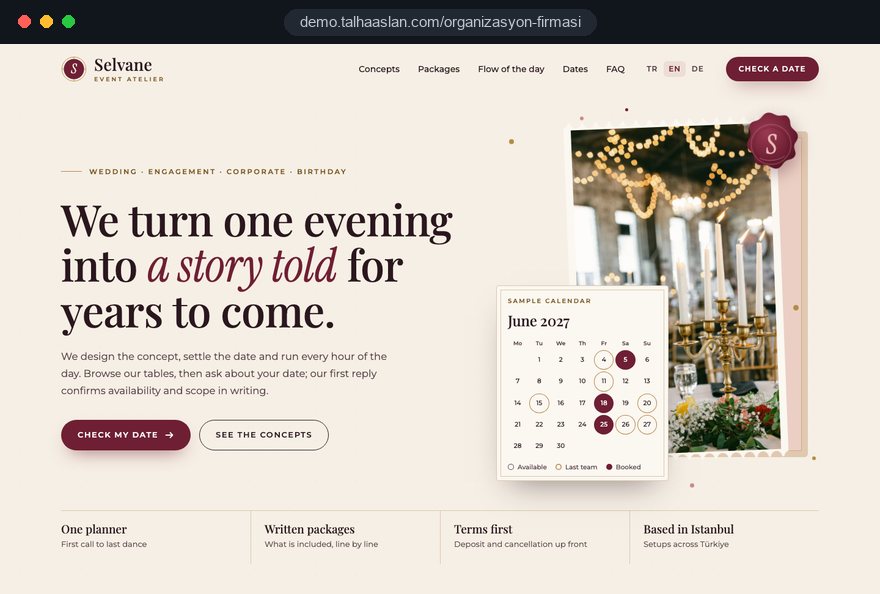
Open the live demoA demo design we built for a fictional brand
In short
An event planner website shows wedding and corporate event concepts in a gallery, spells out what each package covers, presents your venues with capacity and location and collects enquiries with date, guest numbers and event type. In the UK, the Consumer Contracts Regulations exempt leisure services booked for a specific date from the cancellation right, yet require you to tell consumers before the contract that no right to cancel applies; your deposit and cancellation terms belong on the site.
Talha Aslan and teamLast updated:
Why a dedicated approach
A wedding or a gala is planned once, often many months ahead and with a large budget. The decision maker wants to see the concept, secure the date and know what they are paying for; general templates leave all three questions open.
Your best tablescapes and stage designs live only in an Instagram feed. A couple looking for a rustic barn wedding scrolls through months of posts and cannot filter your work by style.
The site lists a 'Silver' and a 'Gold' package but never says whether flowers, lighting, sound, a host or the cake are included. Couples cannot compare and send every planner the same questions.
'Are you free on 14 June?' arrives through Instagram, WhatsApp and the phone, usually without guest numbers or a venue. In peak season, a slow reply means the booking goes elsewhere.
Which hotels, barns, gardens or boats you work with, how many guests you can handle and whether you travel is missing. Visitors only learn whether you fit after they call.
A family planning an engagement party and a marketing manager organising a sales conference land on the same page. One wants a story, the other wants capacity, production and references; neither finds it.
The deposit, date changes and what happens on cancellation are only discussed at contract stage. If you take bookings online, this information must reach the client before the contract, and hiding it weakens trust.
Sources: Consumer Contracts (Information, Cancellation and Additional Charges) Regulations 2013, regulation 28(1)(h), legislation.gov.uk · Consumer Contracts Regulations 2013, Schedule 2, paragraph (o), legislation.gov.uk
Our approach
The home page splits visitors into two routes: families planning a wedding, engagement or birthday, and employees organising a launch, gala or conference for their company. The wedding side puts concepts, packages and real event stories first; the corporate side shows capacity, staging, sound and lighting, team and process.
We build the concept gallery so it can be filtered by event type and style, and write each package as a clear list. The enquiry form asks for date, guest numbers, event type and preferred venue; the request reaches you complete by email and WhatsApp, so your first reply can confirm availability and scope.
Design, code and copy come from one team, so the gallery, packages and form work together. Talha Aslan sets the strategy and our experienced team builds it; we work with event planners in any country fully online.
Home
The date check is the goal of the site; concept, package and venue pages all lead to the same form.
The right setup
The foundation is the same; who decides, how far ahead the event is planned and whether you own the venue make the difference.
Weddings
A couple or a family decides; it starts with emotion and moves forward once package and date are clear.
Corporate
A marketing or HR team decides; they look for capacity, production and a reliable process.
Venue and planning
The garden, hall or boat is yours; visitors want to see the place first, then whether their day is free.
Built for event planners
This list covers the decisions to make when planning the website of a wedding and event planning company.
Concepts can be filtered by event type, style and venue, and each one notes the flowers, table layout and lighting used. Images are compressed so the gallery opens quickly on a phone.
Each package lists what it includes and what it does not; extras are shown separately. We decide with you whether figures appear on the site or stay in the quote.
The form asks for date, guest numbers, event type and preferred venue. Showing booked dates openly or only taking enquiries is your choice; requests reach you by email and WhatsApp and are tracked as conversions.
The venues you partner with or run are presented with capacity, location and indoor and outdoor options. Venue photos come only from sources you are allowed to use.
Under regulation 28(1)(h) of the UK Consumer Contracts Regulations, leisure services booked for a specific date carry no cancellation right, and Schedule 2 requires telling the consumer this before the contract. Check with your solicitor whether your service falls under it; we set out your terms clearly on the site.
A timeline explains the steps from the first call to the event day, including rehearsals and final checks. Visitors see from the start how working with you will run.
Sources: Consumer Contracts (Information, Cancellation and Additional Charges) Regulations 2013, regulation 28(1)(h), legislation.gov.uk · Consumer Contracts Regulations 2013, Schedule 2, paragraph (o), legislation.gov.uk
Comparison
| Topic | General brochure template | Site built for event planners |
|---|---|---|
| Concepts | One mixed photo gallery | Gallery filtered by type, style and venue |
| Packages | Package names only | Packages that list what is included |
| Dates | Phone and inbox | Form asking for date, guests and event type |
| Venues | Not mentioned | Capacity, location and space options |
| Audience | Everyone on one page | Separate routes for weddings and corporate events |
| Measurement | Visit counts | Which concept and page brings enquiries |
Quick check
Must haves: does your site have them?
0 of 6 in place Tick the boxes to see where your site stands.
Added as needed
We choose which of these you need together during the scoping call.
Share the kinds of events you plan, the venues you work with and how date enquiries reach you today; we will shape the page structure and a written quote together.
Process
We define your business, your audience and the site’s one-sentence job: who it sells what to, through which action. Scope and timeline are written from that answer.
The home page and key templates come to you as designs first; no code is written before your approval. We do not like surprises, and we do not cause them.
The approved design becomes fast, secure, maintainable code. You follow progress in the CRM and see every page in a staging environment before launch.
The site goes live with analytics, Search Console and conversion tracking connected; panel training is given, first-year hosting and maintenance included.
Search and speed foundation
Couples search for 'barn wedding planner' or a town plus 'wedding planner', companies for 'product launch event company'. Each event type and key area answers these searches with its own page.
Name, address, phone, service area and the event types you offer are marked up with structured data; nothing is marked up that is not on the page.
Concept galleries are designed for phones first, images are converted to modern formats and lazy loaded, and Core Web Vitals are measured before launch.
Date checks, calls, WhatsApp and brochure downloads are tracked as conversions from day one, so you see which concept and page brings enquiries.
Free tools
Before planning a new site, check how fast your gallery opens on a phone, how your links look when shared on WhatsApp and Instagram, and create the QR code for your invitations or brochure. The tools are free and need no sign up.
Tech SEO
Test whether a page works well on phones: viewport, font size, tap targets, a mobile screenshot and Core Web Vitals.
Image
Resize + compress photos and cut the KB; never leaves your device.
Sharing
Preview how your link looks on WhatsApp, Facebook, X, LinkedIn and Telegram, and find missing Open Graph tags and image problems.
Conversion
Create a wa.me link with a preset message + embeddable button code.
Conversion
Turn URLs, WhatsApp, Wi-Fi, vCard and text into a QR code in seconds; download high-res PNG or SVG.
Tech SEO
Scan any URL for title, meta description, headings, canonical, indexability and speed signals, and get an SEO score with a clear to-do list.
How we work
We do not yet have a live client website for an event planner, so we show our approach on a live demo site. The demo is not a client site. You can see our work in other sectors on the references page.
Live demo
For this field we built a one page demo site for a fictional brand, made only to show our approach. You can explore the design, the copy structure and the mobile view live in three languages.
Open the live demoWe list with you what couples and companies ask on the first call and answer date, capacity and package questions on the site upfront.
We group the events in your archive by type, style and venue and write a short, honest description for each concept.
We use photos of events you actually styled instead of stock images and never publish a shot without permission.
We track which pages bring enquiries and bring concepts and packages forward ahead of wedding season and year end events.
Related pages
Industries
For caterers who handle only the food side of an event.
Industries
A portfolio led structure for wedding and event photographers.
Solutions
When wedding season or a year end campaign needs a single goal ad page.
Solutions
For planners serving couples from abroad and international companies.
 Why Is My Instagram Ranking Above My Website on Google? How to Win Back Your Brand SearchRead article
 Lead Form Design for Booking, Quote and Demo Requests: UX Rules That Lift ConversionsRead article
 How to Build Trust on Your Website: Trust Signals That Turn Visitors into CustomersRead article
 Professional Photography for Websites: What It Adds and How It Beats Stock PhotosRead article
FAQ
If your question is not here, write to us; we will send you an answer and a written quote.
Next step
In a short, free call we listen to your events, your venues and how date enquiries reach you today; then we send you a written scope and quote.
In-depth guide
For an event planner, the website is where most of the decision happens before anyone picks up the phone. A couple, a parent or a company coordinator opens several planners in tabs, looks at concepts, tries to understand the packages and only asks about a date where their questions have already been answered. Every missing detail quietly removes you from the shortlist.
In this guide, Talha Aslan and team walk through the decisions we make, in order, when planning sites for wedding planners and event companies: from business model and concept archive to booking terms, speed, search and measurement. Each section gives you something to check or change on your current site.
The structure of the site follows from where your revenue comes from, so the first decision is about priorities, not design. A planner who mostly runs weddings and engagement parties cannot be served well by the same home page as a team that produces product launches and sales conferences. Owning a garden, barn or hall calls for a third structure, because visitors want to see the place first.
The last two seasons of quotes and contracts are enough to make this call. We ask clients to come to the first meeting with answers to these questions:
Once the answers are clear, the menu order, the first screen of the home page and the default option in the form follow naturally. Put the decision into one sentence, such as "weddings are the core, corporate events are the growth area". We settle later debates about design and copy against that sentence.
A concept gallery is valuable to the extent that visitors can quickly find something that looks like their own event, not simply because the photos are beautiful. Most archives sit in folders sorted by date; before anything goes on the site, each event needs a few shared tags.
These are the tag groups we use when sorting an archive:
Under each concept, write two or three honest sentences: which flowers, table layout and lighting were used and how a venue limitation was solved. Six or seven clear style tags are enough; fifteen tire visitors. Instead of a gallery padded with average shots, we pick eight to twelve strong images per concept, always including a wide room shot, a table detail, the stage or lighting and one moment full of guests.
An event story shows how a concept moved from first idea to the night itself, and it tells visitors what working with you actually feels like. The gallery shows what you made; the story shows how you handle problems.
We build a strong story page in this order:
Get written permission before publishing the couple's names, faces or guest photos; if a couple declines, tell the story through decor and venue shots only. Crediting the photographer under each image also builds referral partnerships. If you are curious how photographers structure their own sites, our photographer website page covers it; both sides tell the same event for different reasons.
The job of a package page is to let visitors compare two planners on the same terms, and a package name alone never does that. Under names like Silver or Gold, list what is included, what is excluded and what can be added for an extra charge, as three separate lists.
On every package page, we look for answers to these points:
Whether figures appear on the site is a separate decision we make with you. Even without figures, complete contents are essential; a couple who cannot see what is included cannot compare you and drops you from the list. If a partner supplies the food, say so inside the package and name the partner. For companies that run only the food side of events, we describe a catering website structure separately.
A venue page should answer the question "will this place work for my event" without a phone call. Capacity is the starting point for the hotels, barns, gardens, boats or your own hall; the real difference comes from stating honestly the limits that shape an event.
On each venue page, we collect the following:
Use only venue photos you took yourself or that the venue has allowed you to use. If you own the venue, simple floor plan drawings and a viewing request at the end of the page turn an enquiry into a concrete appointment. If the venue insists on its own caterer or band, say so; a hotel that accepts no outside suppliers changes the scope of your package directly.
The date enquiry is the real goal of the site, and the form should collect enough for your first reply to confirm availability and scope. A form that asks only for a name and phone number forces you to ask the same questions again by phone. Fifteen fields, on the other hand, frighten a couple still at the dreaming stage.
We set up the form and what follows in these steps:
We recommend stating your hold policy openly on the site, for example "we hold an available date for seven days without a deposit". It speeds up decisions and lets you answer a second couple asking about the same date fairly. A calendar showing booked dates only makes sense if it is updated with every contract; a stale calendar does more harm than a simple form.
A corporate buyer starts from risk management, not emotion, and the corporate side of the site has to prove that nothing will go wrong. A marketing manager or HR lead rarely decides alone; they carry what they find to their director and to procurement.
On the corporate route, we want to see this content:
Corporate clients often come with several date and city options, so the form should include an alternative date field. Alongside guest numbers and date, it should ask for company name, event objective and allow a brief to be uploaded. Never use a brand logo as a reference without permission; for clients who require confidentiality, describing the sector and event type is enough.
Publishing your deposit and cancellation terms on a clear page, rather than leaving them for the contract meeting, is the right move both legally and commercially. In the UK, regulation 28(1)(h) of the Consumer Contracts Regulations 2013 exempts leisure services booked for a specific date from the cancellation right, and Schedule 2 requires telling consumers before the contract when no right to cancel applies. In other countries the rules differ, so check with a local lawyer which rules cover your bookings.
Whatever the jurisdiction, a terms page should answer these questions:
Because the form collects names, phone numbers and event details, you also need a privacy notice, and in the EU cookie consent is required before any non essential tracking. Link the privacy notice under the form and use a separate checkbox for marketing messages. Link the same terms page from the form, the package pages and your pre contract information so clients know which version they read.
Event planner sites are built on photos, so the biggest technical risk is a gallery that opens slowly on a phone. Many visitors arrive from an Instagram bio or a WhatsApp group, on mobile data. Google treats LCP, the time it takes for the largest image to load, as good at 2.5 seconds or less, and CLS, which measures layout shift, as good at 0.1 or less.
These are the technical decisions that keep a gallery inside those limits:
You can check your current site with our mobile friendly test and shrink photos before uploading them with the image resizer. For INP, which measures how quickly the page responds to a tap, Google's good threshold is 200 milliseconds; heavy gallery plugins are the usual cause when it fails. We measure these values on a real phone before handover.
Couples and companies looking for an event planner rarely type generic words; they search by event type and place, and each important search deserves its own page. A family searching for a henna night planner and a company searching for a product launch event company should never land on the same page.
On the search side, priorities run in this order:
Area pages copied from a template with only the town name swapped do more harm than good; each one needs real venues and events from that area. We can plan the technical side and the content calendar together as part of our SEO service. If you want more enquiries ahead of the season, Google Ads management built around wedding season and year end events complements organic search.
The point of measurement is not counting visits but seeing which concept, page and channel brings date enquiries that turn into contracts. Without it, featured concepts and ad budgets are chosen by guesswork.
We set up measurement in these steps:
Tag the links you share on Instagram and elsewhere with our UTM builder to see which post brings enquiries. Visitors who decline cookies will not appear in analytics, so the numbers will always be incomplete; that is why a "how did you hear about us" question in the form still earns its place.
Most mistakes we see on event planner websites come from missing or badly ordered information rather than from design. Each of the following sends visitors to the phone or to a competitor; next to each one is the better alternative.
If three or more points apply to your current site, fixing the content structure will make more difference than a new design, and most of these fixes do not require rebuilding the whole site.
An event planner website is not finished on launch day; refreshing content before wedding season and year end steers enquiries toward the right concepts. Couples often plan many months ahead, so the shop window has to be ready well before the season starts.
We build the yearly content calendar in this order:
For this calendar to work, the content management panel must be simple enough for your own team. When we hand over the panel, we give one person on your team a short training session, so keeping the site current never depends on an outsider.
When you choose a partner for your event planner website, look less at design samples and more at whether the team understands how you sell. An impressive home page does not make up for a form that collects half the details or a gallery that crawls on a phone.
We suggest asking any agency these questions:
The written quote is a test too: scope, timeline and what you are expected to supply should be listed point by point. If preparing your photo archive, writing copy and the legal pages are not named in the quote, assume they will land on your desk later. A live demo built for this field is linked on this page, so you can see our approach in practice.
You can read how we work on our web design service page and see what the packages include in the pricing section. Tell us through the contact page which events you run and how date enquiries reach you today, and we will shape the page structure and a written quote together.
Start a Project
Thanks {name}, we've received your brief. We usually reply within the same day.
What happens next?