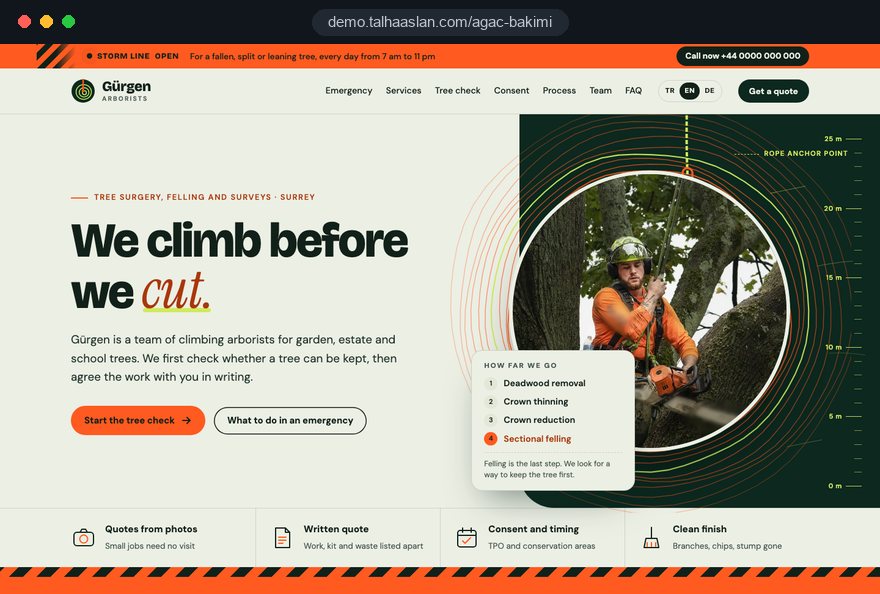
A tree surgeon website serves two very different people on the same day: a homeowner with a limb on the conservatory roof and nothing but a phone in hand, and a managing agent who needs a written case before the residents' board will approve work on three old limes. One has seconds, the other has weeks, and both are looking for proof that your team can be trusted at height.
This guide walks through the decisions a tree surgery business makes on a website project, in the order they come up: the emergency screen, separating the services, the photo quote, consent and protected trees, trust details, commercial sales, speed, local search and measurement. Each section ends with something you can apply to your own site this week.
01The moment a client arrives and the question they bring
Your priorities are set by the moment a visitor lands, and a tree surgeon site has three or four distinct moments, each needing a different page. Sorting last year's calls into these groups before the project starts shows you where the effort should go.
- The emergency: A tree down across the drive, a split stem, a branch on a car. The only question is who can come now.
- The season: Winter pruning, fruit trees, a garden that has gone dark. The question is whether the tree can be kept and when the work should happen.
- The decision: An estate, a school, a care home or a business park. The question is whether the trees are a risk and who will put that in writing.
- The project: A new house, an extension, a boundary wall. The question is whether the tree is in the way and whether consent is needed.
If you have no record of which group dominates, ask whoever answers the phone to note one word per call for two weeks. That sample tells you whether the emergency line or the quote form leads the home page, and the first questions your crew asks each group become the skeleton of the form and the emergency section.
02Designing the emergency screen for the first ten seconds
An emergency visitor scans rather than reads, so the emergency section has one job: get the call and the location by the shortest route. A call button fixed to the bottom of the phone screen, a WhatsApp button beside it for sharing a location, and the hours you can genuinely be reached form the core.
You can create a link with a ready made message in a couple of minutes with our WhatsApp link generator; adding "please attach a photo of the tree and your location" to the message speeds up your first reply. Be honest about hours. If nobody picks up at night, "messages sent overnight are answered from 7am" earns more trust than a 24/7 promise that rings out.
Under the buttons, add a short safety note:
- Keep people, pets and cars away from a fallen or leaning tree and the area beneath it.
- If the tree is touching a power line, stay well clear and call the network operator's emergency number.
- If the tree blocks a road or pavement, report it to the council or the police as well.
- From a safe distance, photograph the whole tree and the damage, and send the photos to us.
The note shows you are a responsible firm and helps your crew understand the site before they set off. Keep the emergency block in the same place on every page, so a visitor who lands on a blog post finds the same button in the same corner.
03Separating the work in your clients' own words
Each service page should answer one client question: the pruning page answers "can my tree be saved", the felling page answers "is removal really the only option". Use the trade terms, but explain each the first time; crown thinning, for example, removes a share of the smaller inner branches to let more light and wind through without changing the tree's overall shape.
- Pruning and crown thinning: Light, shade, wind load and fruiting; explained with plain examples rather than a dense table of species.
- Crown reduction and deadwooding: For branches reaching a roof, gutter or line; presented as the alternative to felling.
- Felling and sectional dismantling: Taking a tree down in pieces in a tight garden, rigging, aerial platforms or a crane.
- Stump grinding and roots: Grinding out what is left, and roots lifting paths or patios.
- Tree surveys: Inspection and a written report; the door to commercial work.
End each page with two sentences headed "if this is not the right job for you" and send the reader to the right alternative. The felling page, for instance, points someone who only wants less shade toward crown thinning. That honest redirect builds trust and tells search engines precisely what each page covers.
04Building the photo quote form step by step
A good quote form asks the questions your crew would ask on the phone, in the same order, so small jobs can be priced without a site visit. Breaking it into short steps makes it easier on a phone and shows you exactly where people give up.
- The job: Pruning, felling, stump grinding, a survey, or "not sure".
- The tree: Species if known, rough height in familiar terms (as high as a bungalow, a two story house, taller) and trunk thickness.
- The surroundings: Rough distance to the house, walls, the neighbor's boundary and any power line; whether cars, a greenhouse or a play area sit underneath.
- Access: Whether a van can reach the tree, the width of the side gate, ground conditions for a platform.
- Waste and timber: Whether you take the green waste, or leave logs cut to length.
- Photos and contact: At least two photos, the address, a phone number and good times to call.
Tell people what happens next: "We look at your photos and reply the same working day; if we need to see the tree, we suggest a time." Send completed forms to a dedicated thank you page so they can be measured. Link the form to your privacy notice and ask only for what the quote needs.
05Asking clients for the photos you actually need
An upload field on its own is not enough; without guidance you end up pricing a job from a close up of leaves. A short instruction with small example images placed right above the upload field cuts down the number of visits you have to make.
Ask for four shots:
- The whole tree: From a few steps back, crown and base in one frame, with a door or a car beside it for scale.
- The base and roots: Clear enough to show fungus, cavities, cracks or lifted ground.
- The problem: The limb on the roof, the tip near the line, the broken branch.
- The way in: From the road to the tree, including the gate and where a vehicle could park.
Phone photos are large; if the form does not shrink them on upload, they fail on a weak signal. Resize the job photos you publish on your own pages before uploading them, for example with our free image resizer.
Keep client photos out of your public gallery unless the client has agreed in writing. Your gallery should show pictures your own team took, showing the method as well as the result, such as the rigging set up or the cordoned work area.
06Explaining Tree Preservation Orders and notice periods
Whether tree work needs permission depends on where the tree stands and whether it is protected, so your guide should state only rules checked in official sources and send clients to their local planning authority for the rest.
In England, government guidance says that cutting down, topping, lopping or uprooting a tree covered by a Tree Preservation Order needs the local planning authority's written consent, and anyone, including a contractor, can apply. Most work on unprotected trees in a conservation area needs six weeks' notice. Dead trees need five working days' written notice before felling; for a tree posing an immediate risk of serious harm, notice must be given as soon as practicable. The authority keeps a register of protected trees.
- Open with a simple fork: is the tree in a private garden, on shared estate land, or on a street or in a park.
- For each path, name who decides: the planning authority, the managing agent, or the council's tree team.
- Note that wildlife law still applies, so work is checked for nesting birds and bats.
- Show the source and the date the guide was last checked.
- Add a clear limit: "We can make the application with you; we do not decide the outcome."
If you work outside England, write the rules for your own nation or state from the official source, or keep the guide general.
07Showing your team, equipment and insurance with evidence
For work at height the client's first question is safety rather than price; answering it with documented, specific information reduces hesitation on the largest jobs. Replace "experienced team" with what you actually have, named precisely.
- Equipment: Climbing and rigging kit, aerial platform, crane access, chipper and stump grinder; say so if you hire some of it in.
- Insurance: The type and level of cover, in your policy's wording; do not leave exclusions vague.
- Qualifications: The certificates your climbers and operators hold, under their exact titles.
- Site practice: How the work area is cordoned off, how neighbors are told in advance, how vehicles are moved.
Photos decide this section too. Real site pictures showing helmets, harnesses and a cordoned work area persuade far more than stock images; if your crew prefers not to show faces, shots from behind or at a distance work well.
Publish nothing you cannot document, and remove expired certificates promptly. Set one review date a year for this page, in the quiet weeks before the pruning season. A commercial buyer who asks for proof of what your site claims should receive the document the same day.
08Opening the door to commercial work with tree surveys
Managing agents, schools and businesses rarely decide alone, so the page that sells to them should describe the document a manager can take to the board. That is why the survey page uses a different tone and a different form from the homeowner pages.
Showing an example report structure is the most persuasive approach: a tree inventory, each tree's location and species, observed defects, recommended work, priority and the next inspection date. Never publish a real client report; use an example clearly marked as illustrative.
- Type of organization: estate, school, business, public body.
- Rough number of trees and size of the site.
- Request: a single survey, a yearly pruning program, or an urgent opinion on one tree.
- Decision process: who receives the quote, the meeting date, purchase order needs.
- Contact person and good times to talk.
If you want to sell a yearly program, add a short explanation of the calendar logic: winter pruning, a spring check, a review before the storm season.
Commercial enquiries tend to arrive during office hours from a desktop. On this page, a downloadable service summary and a meeting request can lead instead of the call button; the urgent tone of the emergency pages would feel out of place here.
09Explaining the day of the job in advance
One of the questions clients ask most is not about the tree but about what will happen in their garden on the day; answering it on the site cuts phone traffic and prevents complaints. Few tree surgeon sites cover it, which makes it a quiet differentiator.
- Preparation: Moving cars, clearing pots and garden furniture, keeping pets indoors.
- Neighbors: Who talks to them when branches overhang a boundary, and what happens with shared fences and walls.
- Noise and duration: Roughly when saws and the chipper will run, and how the length of the job is estimated.
- Waste: Chipping and removing brash, leaving logs on request, what happens to the stump.
- Afterward: The clean up, any marks on the lawn, and realistic expectations about how the tree will respond.
Keep this page consistent with the waste and timber step in the quote form, so the client sees what their choice turns into on the day. It also helps to name, without figures, the items that change the cost: access, rigging over a roof, removal of waste.
10A fast mobile site that loads on one bar of signal
After a storm, visitors often arrive on a weak mobile connection; the emergency block must appear before the rest of the page has loaded.
Google's Core Web Vitals give a useful frame. LCP, largest contentful paint, measures how fast the biggest element loads, and 2.5 seconds or less is good; INP, interaction to next paint, measures how quickly the page responds to a tap, with 200 milliseconds or less counted as good; CLS, cumulative layout shift, measures how much the layout jumps while loading, and 0.1 or less is good. A call button that moves while the page loads is the most frustrating CLS problem: the user taps the wrong thing.
- Skip video and sliders on the home page's first screen; one well compressed site photo is enough.
- Put the call button and phone number in as text, not as an image.
- Load gallery images only when they scroll into view.
- Build the form without heavy third party plugins, show progress while photos upload, and keep entered data if the connection drops.
Check how your current site behaves with our mobile friendly test. Run it on the emergency page as well as the home page; problems often hide on the page nobody on your side looks at.
11Treating emergency and planned work separately in local search
Tree work happens at the client's address, so local search works when you separate the area you can reach quickly for emergencies from the wider area you cover for planned work. Mixing the two brings emergency calls from towns you cannot serve in time.
Google Business Profile guidelines let businesses that do not serve customers at their own address hide it and set a service area instead. The business name must match your real world name, without added keywords; a profile named "Smith Tree Surgeon Reading Emergency" risks suspension.
- Create town pages only where you work regularly, and give each one local substance: typical species, narrow lanes, steep drives, conservation areas you often deal with.
- On the emergency page, say which towns you can attend and at what hours.
- When asking for reviews, invite clients to mention the job and the area in their own words; never write the text for them.
- Mark up your name, phone, hours and service area as structured data, and mark up nothing that is not on the page.
We describe the content and technical work that builds on this foundation in our SEO service.
12Measuring by season and timing your ads
Tree surgery demand is seasonal, so your measurement should count emergency calls, homeowner quotes and commercial enquiries as separate conversions and let you compare them month by month.
- Separate conversions: Call button, WhatsApp click, quote form thank you page and commercial form thank you page as four events.
- Tag your sources: Give the QR code on your vans, leaflets and business cards their own tagged links.
- Keep a diary: Note storm days and the pruning season, and match spikes in demand to those dates.
- Update ahead of time: Publish the winter pruning message a few weeks before demand rises.
- Close the loop: Once a month, match each enquiry to whether it became a job.
If you run search ads, separating an emergency campaign from a planned work campaign protects the budget: the emergency campaign runs only during your reachable hours and in your close area, the planned work campaign before the season.
Quality Score combines expected click through rate, ad relevance and landing page experience; Google describes it as a diagnostic tool rather than a direct input in the auction. A weak landing page score still signals that the ad leads to a generic home page; a stump grinding ad should land on the stump grinding page. We cover setup and management in our Google Ads service.
13Common mistakes on tree surgeon websites
Most mistakes on tree surgeon websites come not from design but from failing to separate the urgent side of the work from the planned side. Each mistake below comes with a better alternative.
- A 24/7 promise nobody can keep: An unanswered night call loses the client for good; publish your real hours and when overnight messages are answered.
- Every service on one page: Clients cannot learn that their tree might be saved; give pruning, felling, stumps and surveys their own pages and redirect honestly between them.
- A form asking only for name and phone: Every small job needs a visit; switch to a stepped form asking for height, distance, access and photos.
- Definite legal statements: "This tree does not need consent" makes you responsible; state general rules with their source and send clients to their planning authority.
- Stock imagery as proof: A forest photo from another continent persuades nobody; use real shots of your crew working in full safety gear.
- Tree work as a subpage of a landscaping site: It disappears under the garden gallery; if you offer both, build separate page groups and plan the landscaping side along the lines of a landscaping company website.
14Choosing a partner and the next step
When choosing who builds your tree surgeon website, look at how carefully they listen to your emergency process and your pricing questions before you look at their design samples. In this trade a good site is a digital copy of how the firm actually works; a template with your logo on it does not do that job.
- How will you build the emergency section, and what do you suggest for night hours?
- Who writes the quote form steps, and how will you collect my crew's questions?
- Which official sources will you use to check the consent guide?
- How will you measure emergency calls, quotes and commercial enquiries separately?
- Who handles the seasonal updates after launch?
We show this approach on a live demo site linked on this page; the demo is not a client site, it lets you see how the structure works. You can see our work in other sectors on our references page, our process on the web design service page and fixed scope packages in the pricing section. To talk through your emergency process, your quote questions and your commercial goals, get in touch, and we will send a written scope and quote.