Emergency number buried
The phone number sits in the footer or on the contact page. Someone searching on a phone at midnight has to hunt for it, and calls a competitor whose number is right at the top instead.

Your Windows contrast theme is on; colours come from your system.
Your device is set to reduce motion; animations are already off.
Your choices are saved in this browser only.
Sector specific web design
When a ceiling has come down after a leak or a kitchen fire is out, the homeowner is left with new questions: how do the walls dry, how does the smell go, what do I show my insurer. We build damage restoration websites around those three questions, with an emergency line that works in the first hours and a clear account of how the damage gets documented.
Open the live demoA demo design we built for a fictional brand
In short
A damage restoration website keeps the emergency line on every screen, explains water damage drying and moisture monitoring, fire damage soot and odour cleaning and reinstatement on separate pages, and states plainly how you document damage with dated photos and readings and what you hand to the policyholder. The goal is to be the first firm called on a bad day and to earn trust without promising any claim outcome.
Talha Aslan and teamLast updated:
Why it needs its own approach
In restoration the customer is not reporting a fault but dealing with the aftermath of an incident. They are often tired and anxious, talking to an insurer, a landlord or a managing agent at the same time. Generic renovation or cleaning templates meet neither the urgency nor the need for records.
The phone number sits in the footer or on the contact page. Someone searching on a phone at midnight has to hunt for it, and calls a competitor whose number is right at the top instead.
Flood drying, fire damage soot cleaning, odour removal, mould and reinstatement share one list. A person searching for fire damage help cannot see how you deal with soot and smoke.
Some sites say they will 'handle your claim'. In the UK, article 39A of the Regulated Activities Order 2001 makes assisting in the administration and performance of a contract of insurance a specified activity, so acting for the policyholder may need FCA permission. Say only what you are allowed to do.
Walls that look dry are plastered and painted too early and mould follows. If the site does not explain how moisture is measured, how often readings are taken and when drying counts as finished, customers push the crew to hurry.
The form asks for a name and a number only. Type of damage, rooms affected, whether the water source is off, whether power is on and photos are missing, so the first call runs long and the crew may set out with the wrong kit.
Water damage often involves more than one person: the tenant, the landlord, the managing agent, sometimes the flat upstairs. Without a route for them, larger jobs get lost in email chains.
Our approach
We build a restoration website in the order things happen after an incident: the emergency line and a short 'what to do now' list come first, then pages by type of damage, then reinstatement. The damage report form asks for the type of damage, the area affected, the state of the water and power supply and photos, so the crew arrives with the right drying and cleaning equipment.
We write the insurance section with care: your job is to assess the damage, record it with photos and moisture readings and prepare the repair estimate. The policyholder makes the claim and the insurer decides; the site makes no promise of payment. If you advertise during storm and flood periods, a single goal landing page can go live without disturbing the main site.
Design, development and content sit in one team, so none of this is patched on later. Talha Aslan sets the strategy and an experienced team handles delivery. We work remotely and in English with firms abroad, through video calls and written sign off.
Home
Each damage page answers its own search; all of them lead to the same emergency line and damage report form.
The right setup
All three start from the same foundation; the type of damage, the length of the job and who signs off make the difference.
Water damage
Customers often call at night; the site leads with the emergency line, the drying process and moisture readings.
Fire damage
Customers call once the fire service has left; the site explains cleaning methods, contents recovery and reinstatement.
Commercial
The decision sits with a property or facilities manager; the site covers framework agreements, reporting and response.
Built for restoration
This list covers the topics that take the most decisions when planning a website for a firm that restores properties after water and fire damage.
A fixed call and WhatsApp button on every screen, the hours you can really be reached, and safe steps the owner can take before the crew arrives: switching off power, lifting items off wet floors, taking photos.
Separate pages for floods, leaks through ceilings, soot and smoke after a fire, odour and mould: which equipment you use, how the job is planned and common questions.
How the process runs with moisture meters and dehumidifiers, how often readings are logged and what tells you drying is complete. Customers see for themselves why it takes the time it takes.
The damage as found, readings taken during the work and the finished repair, in one report with dated photos. The report belongs to the policyholder; how they use it is between them and their insurer.
Article 39B of the same Order excludes loss adjusting and claims management carried out on behalf of an insurer, not on behalf of the policyholder. If you do not hold FCA permission, describe your work as assessment, records and repair, and check the wording with your adviser.
How you handle damage in shared areas and let properties, who receives your reports and whether you offer framework agreements to managing agents and businesses.
Comparison
| Topic | Generic renovation template | Damage restoration website |
|---|---|---|
| Reachability | Number on the contact page | Fixed emergency line and WhatsApp on every screen |
| Work described | Decorating, bathrooms and water damage in one list | Water, fire, mould and reinstatement on their own pages |
| Enquiry | Name, phone and message form | Damage report asking for type, area and photos |
| Process | Not mentioned | Drying, moisture readings and when it is finished |
| Insurance | Missing, or a promise to pay | Your documentation role, with no promises |
| Measurement | Visit counts | Which damage page brings emergency calls |
Quick check
Must haves: does your site have them?
0 of 6 in place Tick the boxes to see where your site stands.
Added as needed
We choose which of these you need together during the scoping call.
Tell us which kinds of damage you handle, how people reach you at night and what records you give customers; we will propose a page structure and a written quote.
Process
We define your business, your audience and the site’s one-sentence job: who it sells what to, through which action. Scope and timeline are written from that answer.
The home page and key templates come to you as designs first; no code is written before your approval. We do not like surprises, and we do not cause them.
The approved design becomes fast, secure, maintainable code. You follow progress in the CRM and see every page in a staging environment before launch.
The site goes live with analytics, Search Console and conversion tracking connected; panel training is given, first-year hosting and maintenance included.
Search and speed foundations
People search for 'water damage drying' or 'smoke damage cleaning'. Each damage page is built to answer its own search, and the pages link to one another and to the emergency line.
Business name, address, phone, service area and opening hours are marked up so search engines can read them; nothing is marked up that is not on the page, such as a night service you do not offer.
Most emergency searches come from phones, sometimes on a weak signal; the first screen stays light, photos are compressed and Core Web Vitals are measured before launch.
Calls, WhatsApp clicks and damage reports are tracked as conversions from day one, so you can see which damage page brings emergency work and which brings reinstatement jobs.
Free tools
Before planning a new site, test how your current one loads on a phone and appears in search; resize damage photos, build your WhatsApp link and check that your forms run over a secure connection. The tools are free and need no sign up.
Tech SEO
Test whether a page works well on phones: viewport, font size, tap targets, a mobile screenshot and Core Web Vitals.
Tech SEO
Scan any URL for title, meta description, headings, canonical, indexability and speed signals, and get an SEO score with a clear to-do list.
Tech SEO
Generate rich-result JSON-LD for Article, Product, FAQ, Local Business.
Image
Resize + compress photos and cut the KB; never leaves your device.
Conversion
Create a wa.me link with a preset message + embeddable button code.
Security
Check an SSL certificate's validity, expiry date, issuer, hostname match, certificate chain and TLS versions in seconds.
How we work
We do not yet have a live client project in damage restoration, so we show our approach on a live demo site. The demo is not a client website. You can see our work in other sectors on the references page.
Live demo
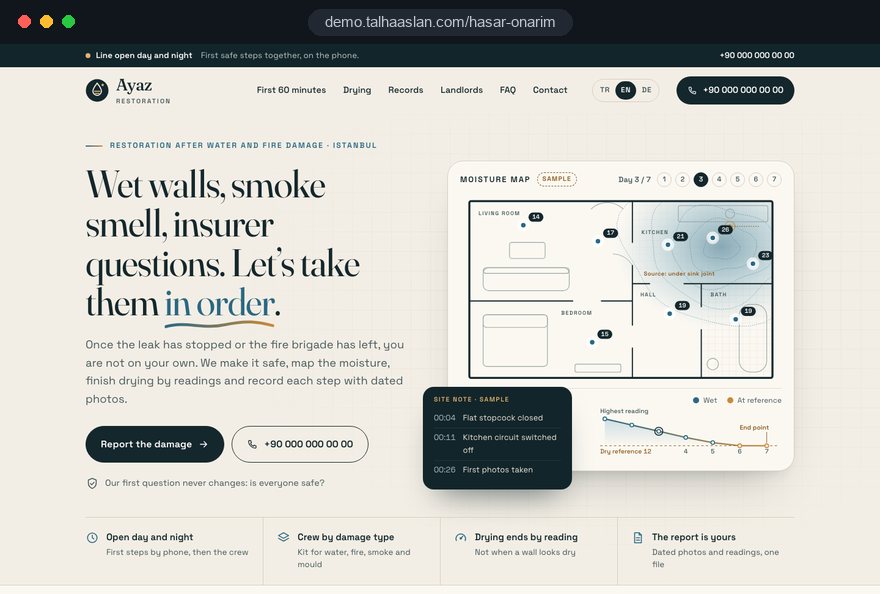
For this field we built a one page demo site for a fictional brand, made only to show our approach. You can explore the design, the copy structure and the mobile view live in three languages.
Open the live demoIn the first meeting we list the questions owners ask you on the phone at night; the home page and the damage report form come from that list.
We describe how drying, soot cleaning and reinstatement run together with your site team, without generic renovation copy.
On insurance, timing and results we publish only what you actually do; no sentence promises a payout or a fixed finish date.
We track which damage page brings emergency calls and where people leave the form, and adjust ahead of the wet season.
Related pages
Industries
A separate, fault focused setup for plumbers who find and fix the leak.
Industries
The site structure for insurance agencies working on policies and quotes.
Industries
For planned bathroom, kitchen and flat renovations where nothing has gone wrong.
 How to Do Google Maps SEO: A Guide to Ranking Your Business Higher on the MapRead article
 How to Build Trust on Your Website: Trust Signals That Turn Visitors into CustomersRead article
 How to Build a GDPR and KVKK Compliant Website: A Business GuideRead article
 Lead Form Design for Booking, Quote and Demo Requests: UX Rules That Lift ConversionsRead article
FAQ
If your question is not here, write to us; we will send you an answer and a written quote.
Next step
In a free 15 minute call we go through the damage you handle, your emergency line and the records you give customers, then send a written scope and quote.
In-depth guide
Nobody browses damage restoration websites for fun. People land on them with water coming through the ceiling, or a few hours after the fire crew has left, holding a phone and not sure what to do next. The site's first job is to give that person a calm, clear path; its second is to keep their trust through days of drying, cleaning and repairs.
This guide explains how we structure a damage restoration website around the hours and days after an incident, which page answers which question, and how to talk about insurance without promising anything you cannot control. The aim is simple: make the careful work your crews do on site visible online.
A damage restoration website works when its structure follows the time since the incident rather than a list of services. A homeowner with a flooded kitchen asks one thing in the first hour, another on day three and something else entirely two weeks later; the site should follow that sequence.
Before any design work, sit down with your field team and map a typical job on paper. The timeline usually looks like this:
Each stage becomes a page or a section, and each page links forward to the next. That turns damage restoration website design from a brochure into a process map the customer can follow.
The emergency line should be a fixed bar within thumb reach on every screen, starting a call with one tap. Someone calling at midnight will not open a menu or hunt for a contact page; they will call the first number they see.
Right below the bar sits a short first steps box. It lists only what a person can do without putting themselves at risk; touching an electrical panel with wet hands or walking into a fire damaged room never appears as advice. The bar and the box should include:
Before launch we settle who holds the phone, how the on call rota works and how missed calls are returned. If the hours on the site and the hours the phone is actually answered differ, even a carefully designed bar damages trust.
Water damage and fire damage may be handled by the same firm, but the person searching differs in mood, timing and question, so each needs its own page and its own opening lines. A flood usually brings an immediate call, often at night; after a fire, the call tends to come the next day or after the adjuster has visited.
When writing these pages we treat the differences separately:
Finding the leak and fixing the pipe is often a different trade. If a partner handles that part, say so on the page; this is exactly where the line runs between the repair focused structure we build for plumber websites and a restoration site. When customers know who does what, they stop confusing the two firms.
The drying page has one job: to show the customer that drying ends when the readings say so, not when the calendar does. A homeowner who wants to paint the day a wall looks dry understands the wait once they know what the meter shows.
The page describes how you really work: which type of moisture meter you use, where on the wall readings are taken, how often they are repeated and where they are logged. Explain in plain words what you compare against when deciding drying is complete; if you take a reference reading from an unaffected wall in the same building, saying so is enough.
A picture of a real moisture log works better than paragraphs of explanation. Instead of promising a number of days, the page explains that the time depends on the materials, the extent of the damage and ventilation.
Add what the customer should do during drying: keep the equipment running, when to open or close windows, and why the electricity bill will rise. This small note cuts down repeat calls to your team.
The damage report form should do half of the first phone call in advance; a contact form asking for a name and a number cannot. Your crew needs a few critical facts to set out with the right equipment and the right number of people.
We split the form into short steps that can be completed with one hand on a phone:
Phone photos are large, so we resize them automatically during upload; a form that stalls on a weak connection means a person who gives up and calls someone else. After submission the screen states the next step: who will call back, roughly when and what can be done while waiting. The same details reach your team instantly, so whoever calls back starts the conversation already looking at the photos.
Before launch, have someone on your team fill in the form on a phone while standing in a real wet room. This small test reveals problems a desk test misses, such as the camera not opening or the keyboard covering the submit button.
An anonymized sample of the report you hand to the property owner proves your documentation better than any sentence about it. Customers see in advance what they will receive and understand that your work is a recorded process, not only cleaning.
For the sample report we suggest these sections:
If you build the sample from a real job, remove the address, names, faces and personal belongings completely and get the customer's written permission. A cleaner route is a staged example in your own warehouse or an empty space. Showing the report as images on the page rather than as a download makes it easy to read on a phone.
Add two short notes next to it: the report belongs to the property owner, and how it is used is between them and their insurer. That keeps it a document sample rather than a promise.
The insurance section exists to describe your role accurately; promises about cover or payment fall outside that role. The policyholder makes the claim and the insurer decides whether and how much to pay, so the site never says otherwise.
In the UK there is an extra reason for care. Article 39A of the Regulated Activities Order 2001 makes assisting in the administration and performance of a contract of insurance a specified activity, so acting for the policyholder may need FCA permission. Article 39B excludes loss adjusting and claims management on behalf of an insurer, not on behalf of the policyholder. If you do not hold that permission, describe your work as assessment, records and repair, and check the wording with your adviser. Elsewhere, ask a local adviser which claims activities need a license.
This differs from the claims guide on an insurance broker's site: they speak from the policy side, you speak from the job site. Honest wording may cost the odd call in the short term, but it prevents disputes and negative reviews later.
With water damage the decision rarely sits with one person, so the site has to address several readers. The tenant calling at night wants help now, the landlord who joins the next day asks about cost and records, and the managing agent cares about common areas and other units.
Each gets a short section or page. Tenants learn they should inform the landlord and keep their photos; landlords learn the report can be shared with them too; agents see how you work on damage in shared areas and who receives your reports. The neighbor dealing with water from the flat above is another reader: explain why tracing the source matters and how communication between two units is handled.
Managing agents and letting firms can become repeat clients, so they get a route of their own: a short form requesting a framework agreement conversation, a field asking who should receive reports, and one point of contact across several buildings. This keeps larger jobs out of email chains and leaves the emergency line free for individual callers.
Damage photos are strong evidence, but they also belong to someone's worst day, so using them on the site means weighing privacy and law together. A burned child's bedroom or a flooded bedroom, shared carelessly or without permission, creates discomfort rather than trust.
Our rule: before and after comparisons only with the customer's written permission, and with family photos, documents, license plates and house numbers out of frame. Instead of emotionally heavy shots we choose images of the process: equipment in place, opened drywall, a cleaned ceiling.
Photos sent through the report form can contain personal data too. Data protection law in the UK and the EU expects a clear privacy notice at the point of collection, so it sits next to the form; photos are stored where only authorized staff can reach them, with a defined retention period. Where you use analytics or advertising cookies for EU visitors, consent comes before any non essential tracking. We check that the form and the whole site run over a secure connection before launch.
Every image should also be light in file size. Shrinking large field photos with our image resizer before publishing keeps the gallery fast on phones and gives your team a practical habit. Removing location data from photos before they go online belongs to the same habit.
Many emergency searches start on the map, so your Google Business Profile should be planned as part of the website. What the profile and the site say, especially opening hours and service area, must match exactly.
Under Google's guidelines the business name must match the real world name with no added keywords; appending "flood drying" to the name puts the profile at risk. Firms that go to the customer and do not receive visitors at their premises can operate as service area businesses and hide their address. Showing day and night hours on the profile and then not answering shows up quickly in reviews.
Rather than duplicating one page for every town, open area pages only where you have something real to say, for example how you work in a neighborhood where basements flood regularly. Copying the same text with town names swapped is worthless to readers as well as to search engines. A thorough SEO program plans these area pages, the damage type pages and structured data together; structured data never marks hours or services the page does not state.
Demand for damage restoration is not spread evenly across the year; it jumps during heavy rain, floods and winter freezes, so the site and the advertising should be ready before those weeks. Writing new pages or building campaigns once the rain starts pulls your busiest people off the job sites at the worst moment.
We plan the preparation in three parts. First, a simple way to add a seasonal note to the emergency section on the home page, honestly stating that callback times may be longer during peaks. Second, Google Ads campaigns built in advance and kept paused, so they can go live within minutes when a storm warning arrives. Third, a single goal landing page for ad traffic that puts only the emergency line and the report form up front without touching the main site.
The rule for site copy applies to ads too: no fear language and no promise of payment. An ad saying "your insurance covers it" promises something the site does not. Lead instead with what you really offer: fast response, drying and documentation.
Set the campaign budget by the number of people who can answer the phone. Every ad call that goes unanswered costs money and reputation.
Emergency searches mostly come from phones, sometimes from a house with the power off and a weak signal, so speed is a business issue here. Google's Core Web Vitals set the "good" thresholds at 2.5 seconds or less for LCP, which measures how fast the main content loads, 200 milliseconds or less for INP, which measures response to taps, and 0.1 or less for CLS, which measures layout shift.
It matters most that the fixed emergency bar does not jump while the page loads; if it moves, people tap the wrong thing. We recommend checking pages with our mobile friendly test before and after launch.
On measurement, instead of counting visits we set up answers to these questions:
Defining call and WhatsApp taps as conversions from day one, and matching phone jobs to their source at month end, is a sound start. For small teams a short table read once a month beats a complex dashboard.
Most of these come from adapting a general remodeling template to a damage restoration business. Each is listed with the better alternative.
If your current site has two or three of these, quick fixes can make a difference even before a new build. The emergency bar and the form are usually the first places to start.
The right starting point for a damage restoration website is knowing which work earns you the most and whether you can genuinely be reached at night. Those two answers shape the page structure, the form flow and the advertising plan.
We suggest working through the decision in this order:
Ask whichever team you hire how they will write the insurance section, where they will store photos from the form and how they will test that the emergency bar does not shift. A live demo showing our approach for this field is linked on this page; it is not a client site but a framework to be rewritten with your damage types, hours and reporting routine.
The healthiest timeline is to be live before the wet season. You can see our fixed price packages in the web design pricing section. To talk through your damage types and processes, get in touch with us; after the call we prepare a written scope and quote.
Start a Project
Thanks {name}, we've received your brief. We usually reply within the same day.
What happens next?