A gallery, but no projects
Hundreds of garden photos sit in one gallery with no location, size or scope. Visitors cannot find a job like theirs, and search engines cannot tell which photo shows patios, planting or a new lawn.

Your Windows contrast theme is on; colours come from your system.
Your device is set to reduce motion; animations are already off.
Your choices are saved in this browser only.
Industry-specific web design
Homeowners planning a new garden and managing agents looking after communal grounds both start with finished work, then look for an easy way to describe their plot. We build landscaping websites around detailed project pages, a survey request form that asks for size and photos, and the maintenance contract that follows the build. We work with landscapers in the UK and elsewhere, remotely and in English.
Open the live demoA demo design we built for a fictional brand
In short
A landscaping company website shows finished gardens on the day of handover and a year later, collects plot size, location and photos through a site survey form, and explains the scope of a yearly maintenance contract. For garden designers and landscape architects, design process and professional membership are added. The goal is to arrive at each survey prepared and to turn one off builds into regular maintenance work.
Talha Aslan and teamLast updated:
Why it needs its own approach
Landscaping work may start with the design of one family garden and continue as years of grounds maintenance for a housing development. Generic business templates stop at a photo gallery and a contact form, so they explain neither the project nor the regular work.
Hundreds of garden photos sit in one gallery with no location, size or scope. Visitors cannot find a job like theirs, and search engines cannot tell which photo shows patios, planting or a new lawn.
Photos are taken right after planting, with small shrubs and fresh turf. Without the same garden a season or a year later, the real quality of the work, choosing the right plants, stays invisible.
The form asks for a name and phone number only. Without plot size, slope, existing trees, drainage and access, the team drives out for every enquiry and can lose a day on small jobs far away.
If regular mowing, pruning, feeding and irrigation checks are not on the site, clients try to look after the garden themselves. The firm loses steady income and the showcase garden it could photograph for years.
Garden design, landscape architecture, hard landscaping and maintenance blur into one sentence. In the UK the Architects Registration Board treats 'landscape architect' as a use of the word that does not breach the Architects Act, so clients look for real memberships and qualifications instead.
In our projects enquiries for gardens tend to cluster around the planting seasons. A site that is not updated over winter greets spring visitors with old projects and an incomplete list of services.
Sources: Architects Registration Board, Policy on misuse of title (exceptions under the Architects Act 1997)
Our approach
We build a landscaping website in the order clients decide: first they find a project like their own garden, then they describe the plot in a few steps, and finally they check maintenance and team details and book a survey. The form asks for size, location, slope, existing trees and drainage and accepts photos, so your team knows what it will see before it arrives.
If you maintain grounds for managing agents, hotels or businesses, the maintenance contract gets its own page with a scope list and a seasonal calendar, plus a separate form for commercial enquiries. For seasonal campaigns such as spring planting or irrigation, a single-goal landing page can go live without disturbing the main site.
Design, development and content sit in one team, so none of this is patched on later. Talha Aslan sets the strategy and an experienced team handles delivery. We work remotely and in English with landscapers abroad, through video calls and written sign off.
Home
Each project page meets people looking for a similar garden; all of them lead to the same survey form, and finished builds lead to the maintenance page.
The right setup
All three start from the same foundation; who the client is and whether the work lives on paper, on site or over many years make the difference.
Design
The client is a homeowner with a bigger plan, an architect or a developer; the site explains your design approach and process.
Build
The client is a homeowner; the site leads with finished gardens and an easy way to book a survey.
Maintenance
The buyer is a managing agent, hotel or business; the site covers scope, frequency and the contract.
Built for landscapers
These are the points a landscaping firm has to decide on most often when planning its site.
For each project: town, plot size, work done, plants and materials used and duration. Visitors find a garden like theirs and the page answers that search; we never publish a client's full address.
Before, handover day and a year later on one page. How the planting matures is the most convincing proof of good plant choice and good aftercare.
Plot size, location, slope, existing trees, drainage and access, the work wanted and photo upload. The team arrives prepared, and enquiries outside your area are filtered before anyone drives out.
Monthly or seasonal plans, the task list for each visit, the pruning and feeding calendar and a report after each visit. Clients from finished builds move to regular maintenance here.
Your team travels to the client. Google asks businesses that do not serve customers at their own address to remove it from the profile and enter a service area only; the site describes the same towns on their own pages.
Professional memberships, qualified designers and the build team are shown separately. We only publish memberships and qualifications you actually hold and can document.
Comparison
| Topic | Generic business template | Site built for a landscaper |
|---|---|---|
| Projects | One gallery, photos without captions | Project pages with location, size and scope |
| Time | Handover day photos only | Before, handover and a year later |
| Survey | A general form with name, phone and message | A form asking size, location, slope and photos |
| Maintenance | Not mentioned | A contract page with written scope and frequency |
| Area | Company address only | Towns covered and a matching Business Profile |
| Measurement | Visitor numbers | Which project brings surveys and which brings maintenance |
Quick check
Must haves: does your site have them?
0 of 6 in place Tick the boxes to see where your site stands.
Added as needed
We choose which of these you need together during the scoping call.
Share the gardens you have finished, your balance between builds and maintenance and the questions you ask before a survey; we will come back with a page structure and a written quote.
Process
We define your business, your audience and the site’s one-sentence job: who it sells what to, through which action. Scope and timeline are written from that answer.
The home page and key templates come to you as designs first; no code is written before your approval. We do not like surprises, and we do not cause them.
The approved design becomes fast, secure, maintainable code. You follow progress in the CRM and see every page in a staging environment before launch.
The site goes live with analytics, Search Console and conversion tracking connected; panel training is given, first-year hosting and maintenance included.
Search and speed foundations
Clients search for garden landscaping in Guildford or grounds maintenance near me. Service pages, area pages and the Google Business Profile are built to support each other.
A landscaping site lives on large photos. We serve images at the right size and in modern formats and load off-screen ones later, so the gallery opens quickly on a phone.
Company name, phone, opening hours and service area are marked up so search engines can read them; nothing is marked up that is not on the page.
Survey forms, calls and WhatsApp clicks are tracked as conversions from day one, so you can see which project page brings surveys and which brings maintenance contracts.
Free tools
Before planning a new site, see how your current one loads on a phone and appears in search; resize your garden photos and convert them to WebP, and create a QR code for vans and a WhatsApp link. The tools are free and need no sign up.
Tech SEO
Test whether a page works well on phones: viewport, font size, tap targets, a mobile screenshot and Core Web Vitals.
Tech SEO
Scan any URL for title, meta description, headings, canonical, indexability and speed signals, and get an SEO score with a clear to-do list.
Image
Resize + compress photos and cut the KB; never leaves your device.
Image
Convert between JPG, PNG and WebP in one click or in batches; it detects the input format, lets you set quality and a background for transparency, and uploads nothing.
Conversion
Turn URLs, WhatsApp, Wi-Fi, vCard and text into a QR code in seconds; download high-res PNG or SVG.
Conversion
Create a wa.me link with a preset message + embeddable button code.
How we work
We do not have a live client project for a landscaping company yet, so we show our approach on a live demo site. The demo is not a client site. You can see our work in other sectors on the references page.
Live demo
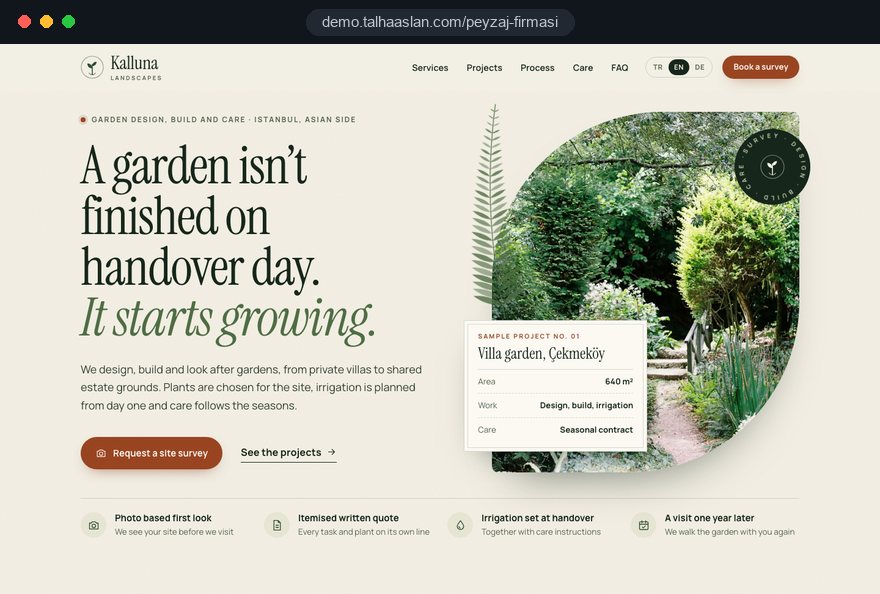
For this field we built a one page demo site for a fictional brand, made only to show our approach. You can explore the design, the copy structure and the mobile view live in three languages.
Open the live demoBefore design starts, we list your finished gardens, photos and details with you and decide which projects the site opens with and which gardens are worth photographing again.
We write down every question your team asks before a survey and build the steps of the form from that list.
We write the scope, frequency and seasonal calendar of your maintenance contracts with you and build the path from a finished build to regular care.
We track which project page and form step bring enquiries and update the site with new projects before the planting season.
Related pages
Industries
A separate setup for architecture practices showing building scale portfolios.
Industries
For construction firms whose housing projects you landscape.
Solutions
A single-goal page for seasonal campaigns such as spring planting or irrigation.
Locations
For firms in Istanbul: a site structure built around district searches.
 Professional Photography for Websites: What It Adds and How It Beats Stock PhotosRead article
 How to Optimize Images for Your Website: Format, Size and SEO SettingsRead article
 Lead Form Design for Booking, Quote and Demo Requests: UX Rules That Lift ConversionsRead article
 How to Do Google Maps SEO: A Guide to Ranking Your Business Higher on the MapRead article
FAQ
If your question is not here, write to us; we will send you an answer and a written quote.
Next step
In a free 15-minute call, in English, we will go through your projects, the questions you ask before a survey and your maintenance goals, then send a written scope and quote.
In-depth guide
A landscaping company website does more than display garden photos; it is the first step of your survey process. A visitor either finds a job like their own, describes the plot and leaves a complete enquiry, or picks up the phone and answers the same questions one at a time. The second route eats into your team's day and sends vans out to small jobs that were never a fit.
In this guide we, Talha Aslan and team, walk through the decisions a landscaping firm makes when planning its site, in the order they come up: preparing the project archive, a photography plan, the survey form, maintenance contracts, titles and memberships, speed, local search, seasonal planning and choosing a partner. Our general process is described on our web design service page.
Someone looking for a landscaper first wants to see a garden like theirs, then wants to understand who would do the work on their plot and how; the page order should follow those two questions. A visitor who reads a list of services before seeing a single finished garden usually opens a competitor's site to compare.
Four kinds of buyer reach the same site with different questions:
Splitting these paths on the first screen of the home page works well: two clear entries such as "Plan a new garden" and "Find grounds maintenance" move people to the right page in one tap. Open your current site on a phone and count how many taps each of these four people needs to find their answer; any question that takes more than three marks content that has to move in the new site.
The quality of a landscaping site is set by the project archive long before design starts, so the work begins with your files. Until photos scattered across phones, old laptops and social accounts are gathered in one place, nobody can decide which projects should lead.
We suggest preparing the archive in this order:
The spreadsheet also produces the skeleton of the site. Where you have few projects of one type, that service page stays short in the first version; folding roof gardens into a general build page is more honest than opening a dedicated page around one weak example.
A good project page answers "is this garden like mine" at first glance, and the way to do that is a short but complete fact panel next to the photos. A photo without context tells neither the client nor a search engine what the job actually was.
Every project page should include:
Below the panel, write three or four short paragraphs: the plot's starting problem, such as a wind exposed slope or a front garden in deep shade, the decision that solved it, and how aftercare was planned. Close with links to two similar projects and to the survey form. Someone searching for sloping garden landscaping then finds their situation and sees the next step on the same page.
The real quality of landscaping shows months after handover, so the photo plan should not end on the last day on site; it should cover the same garden a year later. A shot where hedges have filled in, the lawn has settled and the planting choices make sense convinces far more than a picture of fresh turf and small shrubs.
For every new project, try this routine:
On gardens with a maintenance contract this costs almost nothing, because the crew is already there. Phone photos can be enough; what matters is the same angle and a regular date. Bringing in a professional photographer once a year for your strongest gardens adds lasting value to the archive. Before uploading, run the files through an image resizer so the gallery stays light.
A service earns its own page when clients search for it by name and when the survey questions differ from your other work. For most firms garden design, hard landscaping, irrigation, and lawns and planting meet both tests, while tasks such as tree planting or topsoil supply can stay as sections on a related page.
Each service page should cover:
Open pages that match your real capacity. If you subcontract a trade, saying so plainly answers the question a commercial buyer would ask later. A page for work you do not carry out only produces enquiries you will turn down and makes the survey form's filtering harder.
A garden design page also needs a process description: first meeting, measured survey, concept drawings, revisions and the final planting and construction plans. Laying these steps out in order shows a client paying for design exactly what they receive and when.
A survey form is the written version of the questions your team asks on the phone before driving out; built well, it filters enquiries outside your area or scope before anyone gets in the van. A form showing fifteen fields on one screen gets abandoned, so the questions belong in short steps.
An order that works well for landscaping:
Photo upload is the most valuable part of the form, because your team sees the ground, trees and access before arriving. A short privacy notice should sit next to the form, with one sentence explaining why photos are requested. Adding click to call and WhatsApp buttons beside it keeps visitors who prefer not to fill in forms on a phone.
The screen after submission matters too. A short thank you page stating that the enquiry arrived, when the team will reply and what preparation helps before the survey reduces the chance that the client calls three other firms the same afternoon.
The maintenance page is where a one off build client turns into years of regular work, and concrete scope and timing let the client see what they are buying. A line such as "we also offer garden maintenance" explains neither frequency nor content.
Splitting the page by season makes comparison easy:
Under the calendar, list the fixed tasks on every visit and what the visit report contains; a few photos and a short note are often enough. Contract length, renewal and how extra work is charged should be stated clearly, with prices left to the quote form. A link to this page at the end of every finished project is the shortest path from build client to maintenance client.
If you offer two or three plans, present them under the same headings side by side: visit frequency, included tasks and chargeable extras. When the difference is visible at a glance, the client can choose without calling and the quote conversation moves straight to details.
A commercial buyer is not choosing a garden but a contract and a supplier, so they need a different route from homeowners. A residents' committee or hotel manager compares several contractors and usually decides in a meeting, with documents on the table.
Prepare these for the commercial route:
If you work with developers, add a short section on how you take on landscaping for housing schemes, who is responsible between design and build, and how you fit into the construction schedule. Looking at the site structure we describe for construction firms shows what that buyer is looking for.
Commercial enquiries should reach a different inbox or person from private garden enquiries. Tenders often arrive with a deadline attached; a request that sits in the wrong mailbox misses the committee meeting.
The site should state separately who designs, who builds and who maintains; that distinction drives commercial trust and keeps your wording accurate. In the UK the Architects Registration Board treats "landscape architect" as a use of the word that does not breach the Architects Act, so the title itself proves little and clients look for memberships and qualifications instead.
Use these criteria for the team page:
Personal data raises two further points. A survey form collects names, phone numbers, location and photos of a home, so it needs a privacy notice explaining what you do with that data. Before publishing a client's garden, get written permission and crop out house numbers, number plates and people; this protects the client and the relationship. Check your professional body's rules before using any member title.
A landscaping site lives on large photos, and left unchecked they become its slowest part; many visitors also open the site on a phone, standing in their own garden. Speed is therefore part of the gallery design rather than a setting added later.
Google's Core Web Vitals define three thresholds: LCP, the time until the largest image or text block has loaded, should be 2.5 seconds or less; INP, how quickly the page responds to a tap, 200 milliseconds or less; CLS, how much content shifts while loading, 0.1 or less. Photo heavy pages struggle most with LCP and CLS.
A mobile friendly test shows in minutes how your current site opens on a phone. Interactive parts such as a before and after slider also need testing with a thumb on a real device.
Because your crew travels to the client, what decides local search is the area you serve rather than where your yard is. Google asks businesses that do not receive customers at their own address to hide it on the Business Profile and enter a service area only; the site should describe the same area consistently.
Build the local foundation in these steps:
Details such as salt tolerant planting near the coast or heavy clay in one valley separate a useful town page from a duplicate. We describe how we handle technical foundations and content planning on our SEO service page.
In our projects, garden enquiries tend to cluster around the planting seasons, so updates and promotion need to be planned before the season starts. A visitor who meets last year's projects in spring goes to a competitor who prepared over winter.
A year can be planned like this:
For a seasonal campaign, a dedicated landing page keeps the main site stable and makes measurement cleaner. If you support it with Google Ads management, track survey forms, calls and WhatsApp clicks as separate conversions from day one. You then see which project page brings surveys and which brings maintenance, and next season's budget rests on records rather than guesses.
Part of measurement happens offline. Recording whether each surveyed enquiry became a job shows which source really brings work; a campaign with many forms but fruitless surveys can cost more than a project page that brings fewer, better enquiries.
Most mistakes on landscaping sites come from how the work is explained rather than from the design, and each has a better alternative. Use this list as a checklist when planning a new site or reviewing the current one.
If several need fixing at once, start with the survey form, then project pages, then the maintenance page. The first two shape the quality of incoming enquiries; the third shapes how much of your income repeats every year.
When choosing a partner for a landscaping website, the first thing to watch is how much the agency asks about your work; a proposal that suggests a design without asking about your photo archive, survey questions and maintenance clients ends up as a generic template. Ask these questions in the first call:
For this sector we show our approach on a live demo site linked on this page; the demo is not a client site. Our work in other sectors is on the references page. Package scopes are in the web design pricing section, and for a written quote based on your firm, fill in the Get a quote form. To talk through your project archive and survey questions, reach us through the contact page; starting to plan in winter gives the most comfortable schedule for a spring launch.
Start a Project
Thanks {name}, we've received your brief. We usually reply within the same day.
What happens next?