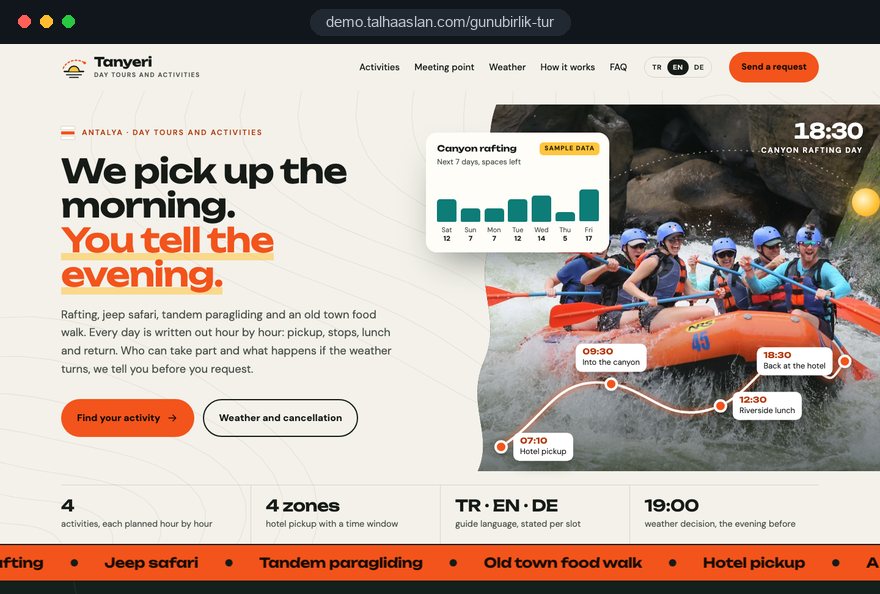
Slots and availability are hidden
Morning and afternoon departures, spaces left and fully booked days are nowhere on the site. Guests ask on WhatsApp whether tomorrow is still free, and when the answer is slow they book something else.

Your Windows contrast theme is on; colours come from your system.
Your device is set to reduce motion; animations are already off.
Your choices are saved in this browser only.
Industry-specific web design
Guests usually pick an activity in the middle of their holiday, on a phone in the hotel room: rafting tomorrow morning, a balloon flight at dawn, a cooking class at the weekend. We build tour and activity websites around activity pages, time slots, meeting points and cancellation terms written in plain words, for operators in the UK and elsewhere and for activity providers in Turkey selling to international guests.
Open the live demoA demo design we built for a fictional brand
In short
A tour and activity website explains each activity on its own page, shows time slots and the spaces left, sends guests to the right meeting point and states the cancellation terms in advance. Rules differ by country: in the UK, the package travel rules do not apply to trips under 24 hours without overnight accommodation, while in Turkey a day tour that includes transport is a regulated tour.
Talha Aslan and teamLast updated:
Why it needs its own approach
Activity decisions are made within hours and usually for tomorrow. If guests cannot see when, where and who can take part, they message you or move on to another operator on a marketplace.
Morning and afternoon departures, spaces left and fully booked days are nowhere on the site. Guests ask on WhatsApp whether tomorrow is still free, and when the answer is slow they book something else.
Which hotels are on the pickup route, what time is pickup, where do guests with their own car park? Without this on the site, the morning starts with phone calls and the minibus waits for the guest who could not find it.
Minimum age, weight limits, swimming ability, pregnancy and health conditions are missing, so guests are turned away at the meeting point. It is the worst moment of the day for the guest and for the team.
Wind, rain or river levels can cancel an activity. If the site does not say in advance whether the date moves and what happens to the payment, every cancellation turns into an argument.
Package travel rules depend on the length and content of the trip. In the UK, the Package Travel Regulations 2018 do not apply to packages covering less than 24 hours unless overnight accommodation is included. In Turkey, a commercial trip of under 24 hours that combines sightseeing and transport for one price is defined as a tour, and travel agency work requires a ministry licence.
The activity is listed only on tour marketplaces and the operator's own site is a single business card page. When a hotel concierge or a returning guest wants to contact you directly, there is no page that takes the request.
Sources: legislation.gov.uk: The Package Travel and Linked Travel Arrangements Regulations 2018, regulation 3(2)(a) · Turkish Law no. 1618 on Travel Agencies, articles 1(d) and 4, official legislation portal
Our approach
We build tour and activity websites in the order guests decide on holiday. First they understand the activity and whether it suits them, then they choose a slot and a meeting point, and finally they send a request or pay. That is why every activity has its own page and the requirements appear before the slot is chosen.
If guests should pick a slot and pay on the site, we set up an online booking system; if most guests come from abroad, we plan a multilingual structure from day one. Operators whose main product is a boat trip are often better served by the structure on our yacht charter page.
Design, development and content sit in one team, so slots, capacity and cancellation rules are not patched on later. Talha Aslan sets the strategy and an experienced team handles delivery; with operators abroad we work remotely and in English.
Home
Each activity page answers its own search, and all of them lead into the same slot choice and request flow.
The right setup
All three start from the same foundation; the risk of the activity, group size and where guests come from make the difference.
Outdoor and adventure
Guests ask about safety and suitability first, so the site puts requirements and equipment up front.
City and culture
Groups are small and language matters, so the site shows the guide's language and the route.
Workshops and experiences
Capacity is a handful of people, so the site states spaces left and what is included.
Built for tours and activities
These are the points activity operators decide on most often when we plan a site together.
Duration, difficulty, how the day runs, what is and is not included, real photos and video. With each activity on its own page, guests and search engines both see clearly what is on sale.
The day's slots, spaces left and closed days come from a panel your team can update in minutes. Each request reaches you with the slot the guest chose.
Map location, a photo of the meeting point, pickup areas and times, parking for guests who drive. The confirmation message repeats the same details.
Age, weight, swimming and health requirements, what to bring and the equipment used. Requirements appear before the slot is chosen and are confirmed in the request form.
Under regulation 28(1)(h) of the UK Consumer Contracts Regulations 2013, services related to leisure activities with a specific date are excluded from the usual cancellation rights. That makes your own cancellation, weather and rebooking terms the rule guests rely on, so we write them clearly; the legal check of the wording belongs to you.
If you sell tours that include transport, your licence number or the agency you work with is shown clearly. For international guests, each language has its own pages and the guide's language is stated per slot.
Sources: legislation.gov.uk: The Consumer Contracts (Information, Cancellation and Additional Charges) Regulations 2013, regulation 28(1)(h) · Turkish Law no. 1618 on Travel Agencies, articles 1 and 4, official legislation portal
Comparison
| Topic | One page brochure site | Site built for tours and activities |
|---|---|---|
| Activity content | All activities in one gallery | Each activity on its own page: duration, difficulty, inclusions |
| Slots and availability | Asked by phone or message | Time slots and spaces left on the site |
| Meeting | Only the business address | Meeting point, pickup areas and times |
| Requirements | Explained on the day | Written and confirmed before the slot is chosen |
| Weather and cancellation | No written rule | Clear cancellation, rebooking and refund rule |
| Measurement | Visitor numbers | Which activity and which hotel link brings requests |
Quick check
Must haves: does your site have them?
0 of 6 in place Tick the boxes to see where your site stands.
Added as needed
We choose which of these you need together during the scoping call.
Share your activities, how your slots run and where your guests come from; we will come back with a page structure and a written quote.
Process
We define your business, your audience and the site’s one-sentence job: who it sells what to, through which action. Scope and timeline are written from that answer.
The home page and key templates come to you as designs first; no code is written before your approval. We do not like surprises, and we do not cause them.
The approved design becomes fast, secure, maintainable code. You follow progress in the CRM and see every page in a staging environment before launch.
The site goes live with analytics, Search Console and conversion tracking connected; panel training is given, first-year hosting and maintenance included.
Search and speed foundations
Guests search with a place name: the canyon, the town, or things to do near me. Activity pages, meeting point details and the Google Business Profile are built to support each other.
Business name, address, phone and opening hours are marked up so search engines can read them; nothing is marked up that is not on the page.
Guests browse on hotel wifi or mobile data. Pages are designed for phones first, videos and photos are compressed and Core Web Vitals are measured before launch.
Requests, calls and WhatsApp clicks are tracked as conversions from day one, so you can see which activity and which hotel or partner link brings requests.
Free tools
See where your current site stands before planning a new one, and prepare tracked links for hotel partners and a QR code for your meeting point. The tools are free and need no sign up.
Tech SEO
Test whether a page works well on phones: viewport, font size, tap targets, a mobile screenshot and Core Web Vitals.
Tech SEO
Scan any URL for title, meta description, headings, canonical, indexability and speed signals, and get an SEO score with a clear to-do list.
Tech SEO
Correct hreflang tags for multilingual sites; x-default automatic.
Analytics
Build correctly tagged links with Google Ads, social and newsletter presets.
Conversion
Create a wa.me link with a preset message + embeddable button code.
Conversion
Turn URLs, WhatsApp, Wi-Fi, vCard and text into a QR code in seconds; download high-res PNG or SVG.
How we work
We do not have a live client project for a tour or activity operator yet, so we show our approach on a live demo site. The demo is not a client site. You can see our work in other sectors on the references page.
Live demo
For this field we built a one page demo site for a fictional brand, made only to show our approach. You can explore the design, the copy structure and the mobile view live in three languages.
Open the live demoIn the first call we collect your slot times, the pickup route and the questions guests ask most in the morning; the activity page template comes from that list.
Requirements, cancellation rules and licence details are taken from the texts and documents you give us; we do not publish anything we cannot verify.
Slots, capacity and closed days are entered in a panel your team can use from a phone, and we give a short training session at handover.
We track which activity, which language and which partner link bring requests, and adjust the pages before each season.
Related pages
Industries
For agencies selling multi-day packages and a dated tour catalogue.
Industries
A fleet and route structure for daily boat trips and gulet charters.
Industries
For operators who also sell airport and hotel transfers as a separate service.
Solutions
Let guests choose a slot and pay on the site.
 How Website Video Affects Conversion Rate: When It Helps, When It HurtsRead article
 How to Do Google Maps SEO: A Guide to Ranking Your Business Higher on the MapRead article
 How to Choose a Payment Gateway: What to Check Before You SignRead article
 What Is the Hreflang Tag and How Do You Use It? Multilingual Website SEO SetupRead article
FAQ
If your question is not here, write to us; we will send you an answer and a written quote.
Next step
In a free 15-minute call, in English, we will go through your activities, your slots and your guests, then send a written scope and quote.
In-depth guide
Most activity bookings happen the evening before, in a hotel room, on a phone with half a battery. A guest opens a few tabs and writes to whichever operator shows fastest that there is space tomorrow, where pickup is and whether their child can join. This guide explains how to plan a tour and activity website that wins that short window.
The sections follow the decisions an operator makes in order: how each activity is described, who controls capacity, how the morning meeting runs, how weather calls are made, what your legal status means for the site and how hotel partners send guests. The foundation is the same for rafting, balloon flights, quad safaris, walking tours and workshops; where they differ, we say so.
The first screen of an activity page has to answer four questions: what the activity is, the next open slot, where pickup happens and who can take part. If one of these sits further down, the guest sends a WhatsApp message and books another tab while waiting for your reply. On a tour and activity site, decisions are measured in hours, so the first screen belongs to these facts and not to a long welcome text.
A simple test: open the page on your phone, do not scroll, and ask a friend how many places are left at nine tomorrow and where they would be picked up. If the answer is not on the screen, the first screen needs rework.
Every activity deserves its own page, but not every variation; split where the guest asks a different question. If the short and long rafting routes have different minimum ages and durations, they need two pages.
These are the criteria we use when deciding:
Name pages with the words guests use, not your internal codes. The route your team calls "Route B" is what guests search for as "short rafting for families". Before planning, we ask you to write one line per activity: the guest facing name, duration, minimum age, meeting arrangement and season. That table feeds both the sitemap and the slot panel.
The body of an activity page is not a sales pitch; it is a timeline of the guest's day. "An unforgettable experience" answers nobody's question, while "7:15 hotel pickup, 8:30 breakfast and safety briefing at base, 9:30 on the water" answers three at once. It also tells guests when they will be back at the hotel.
Next to the timeline, add these four elements:
Workshops have shorter timelines, but the logic is the same. A pottery guest wants to know whether they take their piece home the same day or collect it after firing. Our standard for any tour and activity page is simple: every question a guest is likely to ask should already be answered on the page.
Requirements should appear before the slot is chosen and be accepted with a single checkbox in the request form; you rarely need medical details from the guest. Age, weight, swimming ability, pregnancy, back or heart conditions are the most common reasons guests are turned away at the meeting point.
There is a data protection point here. Under Article 9 of the UK GDPR and the EU GDPR, data concerning health is a special category whose processing is prohibited unless an exception such as explicit consent applies. In Turkey, Article 6 of KVKK (Law No. 6698) also treats health data as special category data. A free text field for "medical conditions" collects sensitive data you probably do not need. We suggest this structure instead:
We take the requirement wording from you; whatever your insurance policy or equipment manufacturer sets is what the site says.
"Four places left" only helps if your team can update it every day; otherwise it becomes an error that damages trust. Who controls capacity is a business decision before it is a technical one.
We recommend setting it up in this order:
The panel should be simple enough that a guide can close or open a slot from a phone in a few taps.
Meeting point information does not end with a map pin; it has to cover the last two hundred meters between the guest's car or hotel door and your minibus. A navigation app will bring the guest to the front of a gas station, but only you know the minibus waits in the parking lot behind it.
Choose one channel for morning communication. With our WhatsApp link generator you can create a link with a prefilled message and add it to the confirmation, so a guest can write "I'm in the lobby, room 214" without saving your number. For walking tours in a busy square, even the color of the guide's umbrella is worth writing down.
When a weather cancellation is decided, who decides it and how guests hear about it should be a written protocol on the site. Wind grounds balloon flights, river levels stop rafting, storms cancel boat trips. What frustrates guests most is waiting in a lobby at dawn without news.
In the UK, regulation 28(1)(h) of the Consumer Contracts Regulations 2013 excludes services related to leisure activities with a specific date from the usual cancellation rights. In Turkey, Article 15(g) of the Distance Contracts Regulation does the same for entertainment and leisure contracts on a specific date. Either way, your own cancellation, rebooking and refund terms are what guests rely on. We suggest this protocol:
We write this text from how you actually operate; the legal check belongs to you and your adviser. A closed slot should show "closed due to weather" on the site at once.
Whether you sell an activity, a regulated day tour or something closer to a package changes what the site must say, and the rules differ by country. In the UK, regulation 3(2)(a) of the Package Travel Regulations 2018 says the regulations do not apply to packages covering less than 24 hours unless overnight accommodation is included. Adding a night's stay can therefore change your position.
In Turkey, Article 1(d) of Law No. 1618 on Travel Agencies defines a commercial trip of under 24 hours that combines promoting a historical, natural, cultural or touristic value with transport, sold for one price, as a tour; Article 4 requires a ministry license for travel agency work.
Which model applies to you is a legal question for your adviser; our job is to make sure the site describes your real situation exactly.
Not every tour and activity operator needs online payment from day one; it depends on how tight capacity is and whether a person must approve each booking. A six person cooking class that mostly sells private groups can work well with a good request form. A safari operator selling dozens of seats across four daily slots loses guests for every hour they wait for confirmation.
These are the questions we ask before choosing:
When instant sales are needed, we build a website with an online booking system that combines slot choice, payment and confirmation. Starting with a request form built around slot choice and adding payment in the second season also works. Either way, each request should reach you with the chosen slot, group size and hotel name.
A large share of activity sales comes through hotel desks, concierges, guides and small agencies; giving each partner its own link replaces guesswork about who sends what. When a concierge shows a guest a QR code or short link instead of reading out a phone number, the request reaches your site tagged with that hotel's name.
A separate partner page also helps: the slot list, current requirements and downloadable photos for guides and small agencies.
The first thing an international guest looks for on an activity page is whether the guide speaks their language, so language is a property of the slot as much as of the website. Stating the guide's language per slot prevents disappointment on the day.
In a multilingual setup, these are the points we watch:
If most of your guests come from abroad, we plan a multilingual website structure from the start. Choose languages from last season's guest list, not from guesses.
Guests on holiday find activities by place name or with searches like "things to do near me"; to appear there, the activity page, the Google Business Profile and the meeting point details must say the same thing. Your profile name must be your real business name, since Google's guidelines do not allow added keywords.
Google's "good" threshold for LCP, which measures how quickly the largest content element loads, is 2.5 seconds or less; on activity pages, oversized cover photos and autoplay videos are the usual reasons it fails. Within our SEO service we work through page structure, markup and content planning with you before the season.
These are the decisions we see most often on activity operators' sites, and each one comes back as a problem on the ground. Next to each mistake is the better approach.
Most of these mistakes come from where information lives, not from design. In tour and activity businesses the accurate facts sit with your guides and operations lead, and the website is where those facts get written down.
When choosing a team for your site, test whether they understand your six in the morning operation before you look at design samples. Planning what a tour and activity site shows on the morning a slot closes for weather takes real thought about this industry.
Ask every team you talk to:
We do not yet have a live client project for a tour or activity operator, so we show our approach on a live demo site linked on this page; the demo is not a client site. You can see our work in other industries in our references and read how projects run on our web design service page.
Fixed price packages are in the web design pricing section. To share your activity list and how your slots run, get in touch with us; once you fill in the Get a quote form, we prepare a page structure and a written scope for your business.
Start a Project
Thanks {name}, we've received your brief. We usually reply within the same day.
What happens next?