The site looks like a product catalogue
The homepage lines up brand logos, device photos and specifications. Homeowners cannot tell what will change in their home, nor how you differ from the next firm selling the same kit.

Your Windows contrast theme is on; colours come from your system.
Your device is set to reduce motion; animations are already off.
Your choices are saved in this browser only.
Industry-specific web design
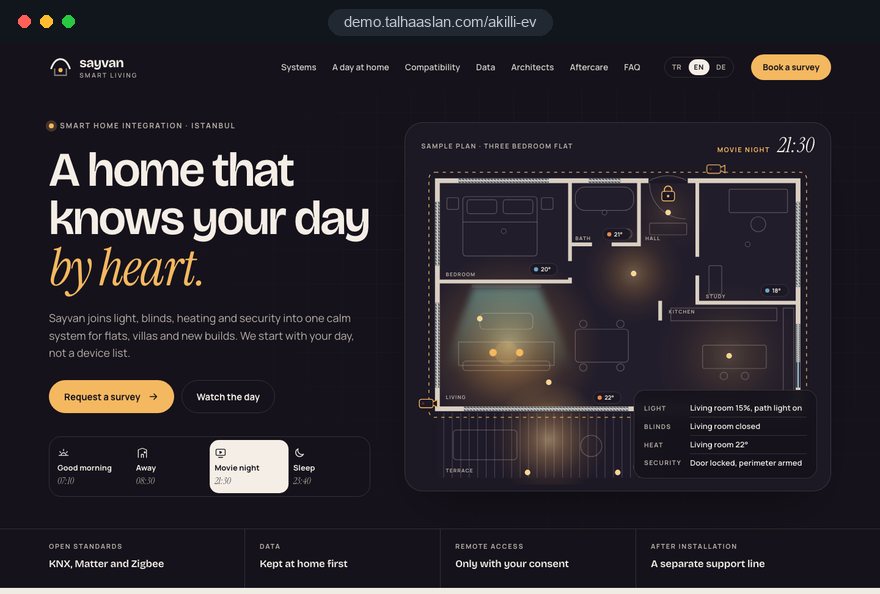
Homeowners looking for a smart home installer do not want a device list; they want to picture a day at home: blinds open in the morning, lights switch off when they leave, the house looks lived in while they are away. They also want to know who can see their camera feeds. We build smart home websites around scenes, compatible systems and a privacy policy people can actually read.
Open the live demoA demo design we built for a fictional brand
In short
A smart home website explains home automation through scenes from an ordinary day rather than a device list, states plainly which systems and standards the installer works with, has a privacy page covering who can access camera and sensor data, and leads visitors to a survey request that asks about their home and priorities. Aftercare, updates and support have their own page.
Talha Aslan and teamLast updated:
Why it needs its own approach
Someone buying a smart home lets both a system and a company into their house. A site built like a product showroom explains neither what life will feel like nor what happens to their data, so it does not help that decision.
The homepage lines up brand logos, device photos and specifications. Homeowners cannot tell what will change in their home, nor how you differ from the next firm selling the same kit.
Morning routine, leaving home, night mode or holiday mode get a single line. Yet people ask for a survey once they see how automation fits into their day; a feature list never paints that picture.
Do you install KNX, Matter, Zigbee or a wired system, and can you connect the existing heating or air conditioning? Without an answer, both new build owners and renovators have to phone before they can judge.
Cameras, video doorbells, voice assistants and motion sensors collect the most private information in a home. In the UK, the ICO notes that data protection law applies once home CCTV captures a neighbour's property or a public space. If the site does not explain camera planning and remote access, careful buyers leave.
Much smart home work arrives at design stage through an architect or developer. Without a section that offers them technical documents and a way to collaborate, that work depends on personal contacts.
Nobody can see what happens with software updates, a failed sensor or an extra room later on. Buyers want to know the installer will stay with the system for years; if support is not described, that trust is missing.
Sources: ICO: Domestic CCTV systems, guidance for the public
Our approach
We build a smart home website in the order buyers make their decision. Visitors first see in the scenes what will change at home, then check on the compatibility page whether your system suits their property and existing devices, read on the privacy page what happens to their data, and finally ask for a survey. Every scene page ends in the same survey flow.
If electrical installation is your main trade and automation is a side line, our electrical contractor website structure fits better; firms running alarm monitoring have a security company page of their own. This page is for integrators who design scenes, connect systems and stay with the home after installation.
Design, development and copy come from one team, so scene videos do not slow the site down and the survey form arrives connected to tracking. Talha Aslan sets the strategy and an experienced team handles delivery, working remotely and in English with installers abroad.
Home
Every scene and system page leads to the same survey flow; existing customers go to a separate support request.
The right setup
All three start from the same foundation; who the customer is and when the decision is made make the difference.
Homes
The customer is a homeowner upgrading an existing property; the site explains wireless options and a short installation.
Projects
The decision is made at drawing stage; the site makes room for technical documents and the collaboration process.
High end
The customer wants one interface for everything; the site leads with design and privacy.
Built for smart home installers
These are the points technical service firms decide on most often when we plan a site together, plus the basic rules on connected products and personal data.
Pages for morning routine, leaving home, night and holiday mode that show what happens, which devices work together and what the user touches. Short videos load only on click so pages stay fast.
We list honestly the systems you install, the standards you support and the device types you can connect. Only partnerships and certifications you really hold appear; brand names are used to inform, not to imply endorsement.
We write in plain language where recordings are stored, when remote access is opened and with whose consent, and how passwords are handed over. Camera angles are planned with neighbours and shared spaces in mind; the legal assessment stays with your firm.
Since 29 April 2024, UK manufacturers, importers and distributors of consumer connectable products must meet security requirements on passwords, vulnerability reporting and published minimum security update periods. If you supply devices, the site can show each product's update period; ask your adviser which duties apply to you.
A separate area for architects, interior designers and developers explaining when the system should join the project, cabling needs and how collaboration works.
Fault reporting, software updates, adding rooms or devices and maintenance plans on one page. Support requests go to a different inbox from sales enquiries.
Sources: GOV.UK: The UK Product Security and Telecommunications Infrastructure (product security) regime
Comparison
| Topic | Product showroom template | Site built for a smart home installer |
|---|---|---|
| Homepage | Brand logos and device photos | Scenes told as a day at home |
| System information | Specification tables | Supported standards and fit with existing devices |
| Privacy | A generic cookie notice only | Camera, sensor and remote access policy |
| Survey | Name, phone and message fields | A step by step form about the home and priorities |
| Aftercare | One number on the contact page | A support, updates and maintenance page |
| Tracking | Visit counts | Which scene page brings survey requests |
Quick check
Must haves: does your site have them?
0 of 6 in place Tick the boxes to see where your site stands.
Added as needed
We choose which of these you need together during the scoping call.
Tell us which systems you install, which scenes sell best and which customers you want survey requests from; we will draft the page structure and a written quote around them.
Process
We define your business, your audience and the site’s one-sentence job: who it sells what to, through which action. Scope and timeline are written from that answer.
The home page and key templates come to you as designs first; no code is written before your approval. We do not like surprises, and we do not cause them.
The approved design becomes fast, secure, maintainable code. You follow progress in the CRM and see every page in a staging environment before launch.
The site goes live with analytics, Search Console and conversion tracking connected; panel training is given, first-year hosting and maintenance included.
Search and speed foundations
Homeowners do not only search for 'smart home installer'; they also type needs such as 'smart blinds', 'smart lighting' or 'turn lights off when leaving home'. Scene and system pages answer each of these searches separately.
Business name, service area, contact details and FAQs are marked up for search engines to read; nothing is marked up that is not on the page.
Scene videos load on click rather than with the page, images are compressed and Core Web Vitals are measured on a phone screen before launch.
Survey forms, calls and support requests are tracked as separate conversions, so you can see which scene and which system page brings survey requests.
Free tools
Before planning a new site, check how fast your current one loads on a phone, its security basics and how it looks in search; you can also add a QR code to your installation guides that opens the support page. The tools are free and need no sign up.
Tech SEO
Test whether a page works well on phones: viewport, font size, tap targets, a mobile screenshot and Core Web Vitals.
Tech SEO
Scan any URL for title, meta description, headings, canonical, indexability and speed signals, and get an SEO score with a clear to-do list.
Security
Check an SSL certificate's validity, expiry date, issuer, hostname match, certificate chain and TLS versions in seconds.
Tech SEO
Generate rich-result JSON-LD for Article, Product, FAQ, Local Business.
Conversion
Turn URLs, WhatsApp, Wi-Fi, vCard and text into a QR code in seconds; download high-res PNG or SVG.
Energy
Turn an appliance's watts and hours of use into kWh and running cost per day, month and year, add standby power and total several devices at once.
How we work
We do not have a live client project in this field yet, so we show our approach on a live demo site built by our team. The demo is not a client site. You can see our work in other sectors on the references page.
Live demo
For this field we built a one page demo site for a fictional brand, made only to show our approach. You can explore the design, the copy structure and the mobile view live in three languages.
Open the live demoBefore any layout, we agree with you which scenes sell best and raise the most questions, and build the homepage and menu around them.
We do not guess supported standards, partnerships or certifications; we take them from the information you provide and never imply credentials you do not hold.
We discuss where recordings are stored and how remote access is opened, then turn that into a plain policy your customers can follow.
Survey requests go to your sales team, support requests to your technicians, and each is tracked as its own conversion.
Related pages
Industries
For electricians who offer automation alongside their electrical work.
Industries
For security firms running alarm monitoring and patrols.
Industries
For interior design studios that build smart systems into their projects.
Industries
For firms combining energy management with rooftop solar.
 How to Build a GDPR and KVKK Compliant Website: A Business GuideRead article
 How Website Video Affects Conversion Rate: When It Helps, When It HurtsRead article
 Lead Form Design for Booking, Quote and Demo Requests: UX Rules That Lift ConversionsRead article
 Website Data Security for Business Sites: Encryption and Secure Data Handling GuideRead article
FAQ
If your question is not here, write to us; we will send you an answer and a written quote.
Next step
In a free 15 minute call we discuss the systems you install, your scenes and your target customers, then prepare a written scope and quote.
In-depth guide
Someone buying a smart home system is choosing two things at once: a technology that will live in their house for years and a company that may be able to reach into it. That decision is rarely quick. Homeowners come back to the site several times, show it to a partner, forward it to their architect and only ask for a consultation once they feel at ease. The website's job is to have the right answer ready at every stop along that slow path.
In this guide, we at Talha Aslan and team walk through the decisions a home automation integrator makes when planning a site, in the order they come up: telling scenes, compatibility, camera and sensor data, remote access, aftercare, design professionals, the consultation form, speed, search and measurement. Our general project process is described on our web design service page; here we focus only on what is specific to smart home work.
A smart home buyer usually arrives in three separate visits with three different questions, and each visit deserves its own pages. On the first visit they are curious, on the second they check whether it fits their house, on the third they weigh whether they can trust your firm. A single brochure page cannot serve all three moods.
When you draw the sitemap around these four stops, the menu simplifies itself. A page that answers none of these questions probably belongs in the blog or nowhere at all. Writing next to each draft page which question it answers also shortens internal debates about what to include.
A smart home homepage works when it is built like a day rather than a product showroom. As visitors scroll, time moves forward: waking up, leaving the house, the empty home during the day, coming back in the evening, night mode. At each stop, one sentence and one image show what the house now does on its own.
This structure does two jobs. First, it separates you from competitors who install the same devices, because the difference lies in how the devices work together, not in the hardware. Second, visitors start placing their own routine into the story and thinking "we would also want this in the evening"; that thought is where consultation requests come from.
Make these decisions before you design the day:
Technical terms belong on the compatibility and system pages, not here. The homepage's task is to create desire, not to prove engineering depth.
A good scene page answers "how exactly does this work" from trigger to exception. Using the same skeleton for every scene, whether holiday mode, morning routine or energy saving, speeds up writing and lets visitors compare scenes easily.
Step four is skipped on most sites, yet it is usually the part that convinces a cautious buyer. An honest answer to "what happens to the door lock if the internet goes down" builds more trust than every polished image on the page. If you cannot write that answer, your system design may have a gap too.
The compatibility page answers, in advance, most of the questions that would otherwise arrive by phone. Homeowners want to know whether their boiler, heat pump, blinds or doorbell can connect; architects ask which standard you work with and whether it needs cabling.
We recommend building this page around device types and standards rather than a wall of logos. Brand lists date quickly and risk implying a partnership you do not hold, while standards and device types stay valid for years.
Writing "checked during the survey" where you are unsure is honest, and it is also good selling, because it sends the visitor to exactly the step you want: the consultation request.
Close the page with a short comparison of new builds and lived in homes. In a new build, cabling at first fix and a central panel are possible; in an occupied home, wireless solutions that avoid chasing walls come first. When owners recognize their situation in one of these two paragraphs, they answer the form's property question without hesitation.
A firm that installs cameras, video doorbells, voice assistants and motion sensors needs a separate page explaining what happens to recordings. A generic cookie notice does not cover this; owners are not worried about your website's cookies, they are worried about the sensor on the bedroom door.
Be precise about the legal side. In the UK, the ICO explains that if home CCTV captures someone else's property, a public area or a communal space, data protection law applies; the owner then needs a clear reason, should not capture more than needed, should tell people (for example with a sign), must provide recordings to people who ask, should delete footage regularly and should stop recording someone who objects without a legitimate reason to continue. Rules differ in other countries, so have your adviser confirm the wording for each market you serve.
On the privacy page, answer these questions in plain words:
Trust in a smart home firm is really tested after installation: who can get into the system remotely, and when. Instead of one vague paragraph, a step by step access policy reassures a cautious buyer and their architect.
If you supply devices in the UK, there is a second rule to reflect. Since 29 April 2024, the UK product security regime requires manufacturers, importers and distributors of consumer connectable products to meet requirements on passwords (unique per product or set by the user), on publishing how to report security issues, and on publishing a minimum security update period with an end date. Ask your adviser which of these duties apply to your role; the site can then show each product's update period clearly.
Most firms hesitate to write point four, yet the sentence "you can become independent of us at any time" reassures far more than it loses.
A smart home system needs software updates, battery changes and new rooms for years, and the site should make that long relationship visible on a dedicated support page. Before buying, owners want to see who they will call when a sensor fails; after buying, they use the same page.
Keep support apart from sales. Support requests should go to a different form, a different inbox and a different team; otherwise your sales inbox fills with fault reports and your measurement paints the wrong picture.
A practical extra: print a code linking to the support page in the handover manual you leave on installation day. Our QR code generator creates one in seconds, so the owner finds the right page years later without searching.
Many smart home projects come from a professional at the drawing board rather than from the homeowner, and a dedicated area for them stops that work staying inside your personal network. Architects, interior designers and developers ask different questions and expect a different tone.
State clearly when the system should join the project. For a wired system, first fix is the critical stage; if the site does not say so, professionals often call too late and the job shifts to a wireless compromise or to another firm.
If you want to see how interior design studios describe home automation on their own sites, look at the structure we suggest for interior designers. Knowing their language helps you write your own section for them.
A smart home consultation form should ask enough to let you arrive prepared, without wearing the visitor out. The most balanced way is to split the questions into a few short steps instead of one long page.
A floor plan shows where everything in a home is, so treat it as sensitive. Ask for it only when the survey truly needs it, say how long you keep it, and place a clear privacy notice next to the upload field.
Scene videos are the most persuasive part of a smart home site, and badly placed they are also what slows it most on a phone. The fix is to load each video only when the visitor presses play, not when the page opens.
Measure speed on a real phone before launch. Google's Core Web Vitals "good" thresholds at the 75th percentile of visits are 2.5 seconds or less for LCP, 200 milliseconds or less for INP and 0.1 or less for CLS. LCP measures how quickly the largest element appears, INP how quickly the page reacts to a tap, and CLS how much content shifts while loading.
To see how your current site performs on a phone, run our mobile friendly test; it is a useful baseline before you plan a new build.
Homeowners rarely search only for "home automation"; they search for the problem they want solved. Queries such as "motorized blinds", "lights off when I leave" or "multiroom audio for a villa" are met far better by a page dedicated to that need than by a general overview.
That makes scene and system pages the backbone of search visibility as well as sales. Each page should focus on one need, carry that need in its title and answer real questions in its content.
State your service area honestly and list only places you can actually survey. We describe the longer term search work on our SEO service page.
In smart home sales, days or weeks pass between a visit and a consultation request, so measurement that only counts visits misleads you. What you really want to see is which scene and system pages end in a consultation.
Separate conversions by type. Homeowner consultations, project enquiries from architects, support requests from existing clients and click to call taps should be recorded as distinct conversions; otherwise support tickets look like sales success.
Set up consent properly for analytics cookies. In the UK and the EU, consent is needed before non essential tracking, and Google requires consent mode for measurement and personalized advertising features for users in the European Economic Area. A site built on a privacy promise with a careless cookie banner undermines itself immediately.
Most mistakes on smart home sites come from not translating technical knowledge into the homeowner's language. Use the list below, each mistake with its better alternative, as a checklist when planning your new site.
If two or more of these appear on your current site, rebuilding the content plan is a better starting point than a new visual design.
When choosing a team for a smart home website, look at how they handle scenes, compatibility and privacy before you look at design samples. A good team asks in the first meeting about your top selling scenes and most frequent questions, not your device list.
Questions worth asking in that meeting:
Before the meeting, settle three things on your side: which client type you want more consultations from, your two or three strongest scenes, and the aftercare you can genuinely deliver. A renovation focused installer and a firm working with architects on villas start from the same foundation but need different emphasis.
We do not yet have a live client project in this field, so we show our approach on a live demo site built by our team and linked on this page. You can see our work in other sectors on our references page. Fixed price packages are listed in our web design pricing section, and for a written quote based on your scope, tell us about your systems and target clients through our contact page.
Start a Project
Thanks {name}, we've received your brief. We usually reply within the same day.
What happens next?