Products listed, cuts missing
Diced or minced, bone in or boneless, which pack size. When the site shows only a product name and a photo, the same questions are asked again on the phone for every order.

Your Windows contrast theme is on; colours come from your system.
Your device is set to reduce motion; animations are already off.
Your choices are saved in this browser only.
Industry-specific web design
Customers now choose their butcher on a phone: which cuts are in, how they are prepared, whether the shop delivers, when to order for the holidays. We build butcher shop websites around those questions, for independent butchers and halal meat shops in the UK and elsewhere working with a remote team, and for meat businesses and livestock farms in Turkey.
In short
A butcher shop website shows each product with its cuts and weights, collects orders from phone, form and WhatsApp in one place and states the delivery area clearly. For shops that offer Qurbani or seasonal orders, the site becomes a seasonal sales page weeks ahead. In the UK, the cancellation right does not apply to goods liable to deteriorate rapidly, and the site should say so plainly.
Talha Aslan and teamLast updated:
Why it needs its own approach
Customers order meat without touching it. If they cannot find the cut, the weight and the delivery slot on the site, they call or go elsewhere. A generic brochure site answers none of this.
Diced or minced, bone in or boneless, which pack size. When the site shows only a product name and a photo, the same questions are asked again on the phone for every order.
One order comes through Instagram, one through WhatsApp, one by phone. When the address, the cut and the delivery time sit in different places, the wrong pack gets made up or the order is forgotten.
If the site does not say which postcodes or districts you deliver to, whether there is a minimum order and which time slots you offer, many customers give up instead of asking.
Customers planning Christmas joints, barbecue season or Qurbani start looking weeks ahead. If the seasonal page goes up in the final week, the shop misses those searches and the phone becomes unmanageable.
Under UK consumer contract rules, the cancellation right does not cover goods liable to deteriorate rapidly. When that, and how customers should check their delivery, is not written on the site, the dispute happens on the doorstep.
Seasonal products sell out, new deli lines arrive, opening hours change over the holidays. As long as the site depends on someone else, customers ask for products you no longer have.
Our approach
We build a butcher shop website in the order customers place an order: first they choose the product and the cut, then they check that you deliver to them, and finally they send the order in one tap. That is why every product group has its own page, every product shows its cut and weight options and every page ends in the same order flow.
For Qurbani, Christmas or barbecue season, a single-goal landing page can go live without disturbing the main site; if your range is wide and you want to take payment online, an online shop is connected to the site. If you supply restaurants or trade buyers, a product catalogue site is another option.
Design, development and content sit in one team, so none of this is patched on later. Talha Aslan sets the strategy and an experienced team handles delivery. We work remotely and in English with shops abroad.
Home
Each product group answers its own search; the seasonal page stays at the same address every year and keeps what it has earned.
The right setup
All three start from the same foundation; the products, the way orders arrive and the weight of the season make the difference.
Shop and delivery
Customers search for a butcher nearby; the site explains the products, the cuts and home delivery.
Seasonal sales
Demand peaks before Eid al Adha; the site lists animals with breed and weight.
Online sales
The range is wide and orders come from further away; the site takes basket orders and payment.
Built for butchers
These are the points food and meat businesses decide on most often when we plan a site together.
For each product: the cut, bone in or boneless, pack weight and a real photo. Whether prices appear on the site and how they are kept up to date is a decision we make together with you.
Order form, click-to-call and WhatsApp buttons on every page; delivery areas, time slots and any minimum order are visible before ordering. Orders are collected in one place with their source.
For Christmas, barbecue season or Qurbani: what can be ordered, the order deadline, collection or delivery dates and payment terms. The page stays at the same address each year and is updated rather than deleted.
Regulation 28(1)(c) of the UK Consumer Contracts Regulations 2013 excludes goods liable to deteriorate or expire rapidly from the cancellation right. We write this, along with how to check a delivery and report a problem, in plain words; the final legal check belongs to your business.
Where the meat comes from, how it is kept chilled, real photos of the shop and the counter. Real photography earns more trust than stock images, and no certificate or claim goes on the site unless you hold it.
Which cut suits which dish, how to choose barbecue meat, which mince for which recipe. These guides answer customer questions and open new entry points to the site from search.
Comparison
| Topic | Generic brochure template | Site built for a butcher |
|---|---|---|
| Products | A few photos and a general product list | Product groups, cut and weight options, real photos |
| Ordering | A general contact form at the bottom | An order prompt, click to call and WhatsApp on every page |
| Delivery | No delivery information, or ask by phone | Delivery areas, time slots and order terms written clearly |
| Seasonal orders | One notice added in the final week | A seasonal page live weeks ahead and updated every year |
| Terms of sale | Cancellation and delivery terms unclear | Perishable goods exception and delivery checks written down |
| Measurement | Visitor numbers | Which product page brings orders |
Quick check
Must haves: does your site have them?
0 of 6 in place Tick the boxes to see where your site stands.
Added as needed
We choose which of these you need together during the scoping call.
Share what you sell, where you deliver and what you offer in the busy seasons; we will come back with a page structure and a written quote.
Process
We define your business, your audience and the site’s one-sentence job: who it sells what to, through which action. Scope and timeline are written from that answer.
The home page and key templates come to you as designs first; no code is written before your approval. We do not like surprises, and we do not cause them.
The approved design becomes fast, secure, maintainable code. You follow progress in the CRM and see every page in a staging environment before launch.
The site goes live with analytics, Search Console and conversion tracking connected; panel training is given, first-year hosting and maintenance included.
Search and speed foundations
Customers search for butcher near me, a town or neighbourhood name, or a product such as lamb shank or beef mince. Product pages, the contact page and the Google Business Profile are built to support each other.
Shop name, address, phone, opening hours and product details are marked up so search engines can read them; nothing is marked up that is not on the page.
Searches for holiday orders and Qurbani start rising weeks before the date. Because the seasonal page keeps the same address every year, it does not lose the visibility it built in earlier years.
Calls, form submissions and WhatsApp clicks are tracked as conversions from day one, so you can see which product or seasonal page brings orders.
Free tools
Before planning a new site, see how the current one opens on a phone, how heavy your product photos are and whether your WhatsApp order link works. The tools are free and need no sign up.
Tech SEO
Test whether a page works well on phones: viewport, font size, tap targets, a mobile screenshot and Core Web Vitals.
Image
Resize + compress photos and cut the KB; never leaves your device.
Conversion
Create a wa.me link with a preset message + embeddable button code.
Conversion
Turn URLs, WhatsApp, Wi-Fi, vCard and text into a QR code in seconds; download high-res PNG or SVG.
Tech SEO
Generate rich-result JSON-LD for Article, Product, FAQ, Local Business.
Tech SEO
Scan any URL for title, meta description, headings, canonical, indexability and speed signals, and get an SEO score with a clear to-do list.
Real project
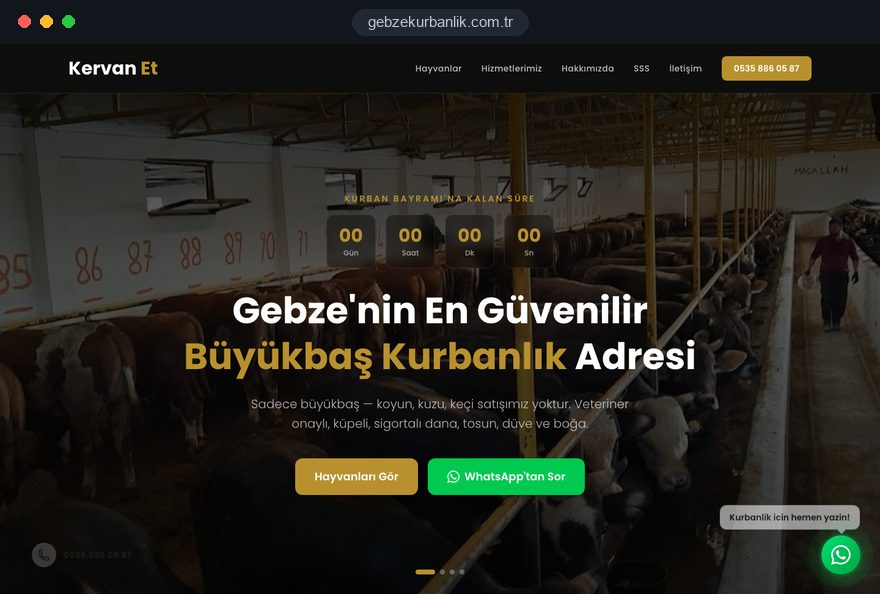
Our team designed and built the seasonal sales site of Kervan Et, a cattle farm in Gebze, Turkey, that sells sacrificial animals before Eid al Adha; the site is live. You can see our other work on the references page.
Livestock farm · web design, local SEO, landing page
Related pages
Solutions
A single-goal page matched to a Qurbani, Christmas or barbecue season campaign.
Solutions
For meat suppliers that show their range to restaurants and trade buyers.
Industries
A different structure for businesses that serve meat as cooked meals to companies and events.
Industries
A menu-led site for butchers that also run a grill or steak restaurant.
 Estimated Delivery Date on Product Pages: Should You Show It and How to Get It RightRead article
 WhatsApp Marketing Messages: Templates, Costs and Ads GuideRead article
 How to Do Google Maps SEO: A Guide to Ranking Your Business Higher on the MapRead article
 Free Shipping Threshold: How to Calculate It and How Shipping Costs Affect Order ValueRead article
FAQ
If your question is not here, write to us; we will send you an answer and a written quote.
Next step
In a free 15-minute call, in English, we will go through your products, your delivery area and your busy seasons, then send a written scope and quote.
In-depth guide
A butcher shop website has to answer the questions customers ask across the counter before they ever reach it: which cuts are in, how they are prepared, what pack sizes you offer, whether you deliver to their street, and when to order for the holidays. Otherwise the same questions keep arriving by phone every day.
This guide follows the decisions a butcher, deli or livestock farm owner makes during a website project, in the order they come up. Each section gives you a checklist, a criterion or a concrete question you can put to the team you hire.
The first decision that shapes the site is where your revenue comes from: the counter, local delivery, seasonal orders or shipping chilled boxes further afield. Each model puts a different button at the top of the home page and makes a different page essential.
A neighborhood butcher mostly serves people nearby, so the first screen needs opening hours, directions and a click to call button. A shop where delivery dominates leads with product groups and delivery areas. A livestock farm or a shop with a strong Qurbani trade has quiet months and a few intense weeks before Eid al Adha, so the site has to work in two modes: everyday and seasonal.
Ask the team you are considering: which sales channel does the first button on the home page serve, and why?
The product menu should follow the meal the customer has in mind, not the layout of your cold room. People rarely think "forequarter"; they think "something for Sunday roast" or "burgers for the weekend", and categories that use that language get them to the right product in two taps.
A practical structure combines main groups by animal with shortcuts by occasion. Beef, lamb, poultry and deli form the main groups, while shortcuts such as "Barbecue", "Slow cooking", "Roasting joints" and "Mince and burgers" show the same products from a second angle.
Deli products are a separate world: for sausages, cured meats and pies, customers look for origin, storage and slicing details. Give them their own group with their own information fields.
On a butcher website the page that brings orders is the product page, and its job is to answer every question that would otherwise be asked on the phone.
A well built product page follows a fixed order: photo and short description, then options, then storage and cooking notes, and finally the order button. Options should be selectable boxes rather than free text so the order arrives as a clean line such as "diced, 1 kg, lean".
For products sold by weight, explain in one sentence how the difference is settled. A clear rule such as "any difference after weighing is charged or refunded on delivery" closes the argument before it starts at the door. Ask your team: will I be able to change these options myself from the admin panel?
On a meat shop website, photos are the customer's only evidence of freshness, and stock images cannot provide that evidence.
Meat color is very sensitive to light: beef that looks brown under warm shop lighting returns to its natural color in daylight. Shooting by a window on a plain surface matters more than expensive equipment, and boosted colors invite suspicion.
The last step directly affects speed. A phone photo can weigh several megabytes, and a listing page with dozens of them slows down on mobile data. Photos should be scaled to the size they are displayed at and served in a modern format.
It matters less which channel an order arrives through than that every order lands in one place with the same details.
For many butchers WhatsApp is the fastest channel, and there is no need to give it up. The button on a product page can open WhatsApp with the product, cut and quantity already written, so the customer only adds an address and a time slot. You can try this with our WhatsApp link generator, which creates a link with a prefilled message to test on your own phone.
Do not skip the confirmation step. Customers assume the job is done once they press send, yet stock, cutting or driver availability may require a change. A short confirmation template reassures the customer and keeps the whole shop using the same wording.
Delivery information must be visible before the order; a customer who fills a basket and only then learns you do not deliver to them rarely tries again. Collect this information on a single Delivery page and link to it from every product page with a one line summary.
The Delivery page should list postcodes or districts, the time slots for each and any minimum order. If you offer same day delivery, state the latest order time. Keep bank holiday and weekend arrangements on the same page.
For meat brands that ship nationwide, also state which days boxes are dispatched, why weekend arrivals are held back and how long the packaging keeps the contents cold.
Whether to show prices on the site is a business decision, and both options carry a cost. Meat prices change often, so a published price that is not updated damages trust; no prices at all can send hesitant customers elsewhere.
If you publish prices, give one person the job of updating them on a fixed day of the week. When prices feed from a central list rather than being edited page by page, the update takes minutes. If you do not publish prices, each product page should end with one clear prompt, such as "Message us on WhatsApp for today's price", and replies should come quickly.
At handover, try the three tasks you will do most in the admin panel: changing a price, hiding a product and updating opening hours. If every change requires an email to your agency, the site will soon fall out of date.
A seasonal page for Qurbani, Christmas or barbecue season must be live weeks before the date, not in the final week; customers start researching early and search engines need time to pick the page up. The page keeps the same address every year and only its content is refreshed, so it holds on to the visibility it earned before.
For Kervan Et, a livestock seller in Gebze, Turkey, we built a seasonal site that lists animals with breed and weight, counts down to Eid and puts fast replies by phone and WhatsApp up front. A UK shop taking Qurbani orders needs the same clarity on share options, what is included and when the order is fulfilled.
If you run a paid campaign for the season, sending traffic to a single goal seasonal landing page rather than the home page makes results easier to measure. If you take deposits, state clearly on the page when they are refunded.
A basket with online payment makes sense for meat brands with a wide range and orders from further away; for a neighborhood butcher an order form with payment on delivery or collection is often enough.
Once you sell at a distance, consumer contract rules apply. In the UK, regulation 28(1)(c) of the Consumer Contracts Regulations 2013 excludes goods liable to deteriorate or expire rapidly from the cancellation right. That exception does not remove the customer's rights when meat arrives faulty or spoiled; both points belong on the site, in plain words.
If you add a basket, the e-commerce platform must handle stock, weight based pricing and delivery area rules; not every off the shelf package does. We draft these texts in plain language, but the final legal review belongs with your own adviser. Ask your team: how will the system handle the price difference on products sold by weight?
Customers buying meat want to know where it comes from and how it is kept, and the site should answer with concrete, verifiable details.
The About page should describe how you work: which farms or regions your animals come from, where they are slaughtered, how long beef is hung and at what temperature it is stored. Write only what you actually do, every week.
Claims such as halal, organic, grass fed or locally reared matter to customers but should be used only as far as you can document them. Check the rules for these terms with your certification body or local trading standards service. An unverifiable claim costs more trust than it earns.
People looking for a butcher usually search with a town or neighborhood name, or simply "butcher near me"; appearing for those searches depends on the site and your Google Business Profile supporting each other. Name, address, phone number and opening hours must match exactly on both.
Google Business Profile guidelines require the business name to match your real world name, without added keywords; a name like "Smith's Halal Butcher Cheapest Lamb" puts the profile at risk. A business that only delivers and has no shop customers can hide its address and define a service area instead.
Link each guide to the matching product page. If you want to grow search visibility in a planned way, see how our SEO service works for local searches and product pages. When you add structured data for your shop and products, mark up only information that is actually written on the page.
Meat orders are placed mostly on phones, so a fast mobile site with buttons that are easy to tap with one thumb is a basic requirement, not a nice extra. Google's Core Web Vitals express this experience in numbers.
The "good" thresholds, measured at the 75th percentile of visits, are: LCP, which measures how quickly the largest element on the page loads, at 2.5 seconds or less; INP, which measures how quickly the page responds to a tap, at 200 milliseconds or less; and CLS, which measures how much the layout shifts while loading, at 0.1 or less. Heavy product photos hurt LCP, while late loading buttons and popups hurt CLS. You can check your current site with our free mobile friendly test.
With this measurement in place from day one, you can see which product group and which seasonal page bring orders. If you run a Google Ads campaign for Qurbani or barbecue season, budgets can then follow evidence instead of guesswork. The page an ad points to should show the advertised product on the first screen; landing page experience is one of the three components of Google's Quality Score.
Most sites lose orders through a handful of repeated decisions rather than poor design. Run your current site against this list.
Most of these fixes do not need a full redesign. Start with the one behind the question you hear most often on the phone.
Choose the team for a butcher shop website by how they build the order flow and the seasonal plan, not by their portfolio alone.
If you get clear answers to the questions below in the first conversation, you are on the right track. If the answers stay vague, assume the essentials will be patched on later.
Design, development and content sit in one team with us, so these questions are answered together at the start, remotely and in English.
You can review the scope of our web design service and look through our previous work. Our fixed price packages are listed in the pricing section, and for a written scope and quote tailored to your shop you can get in touch with us. Bring your product list, your delivery areas and, if you sell for Qurbani or Christmas, a short summary of last season to the first call; it makes the scope of your butcher website clear from the start.
Start a Project
Thanks {name}, we've received your brief. We usually reply within the same day.
What happens next?