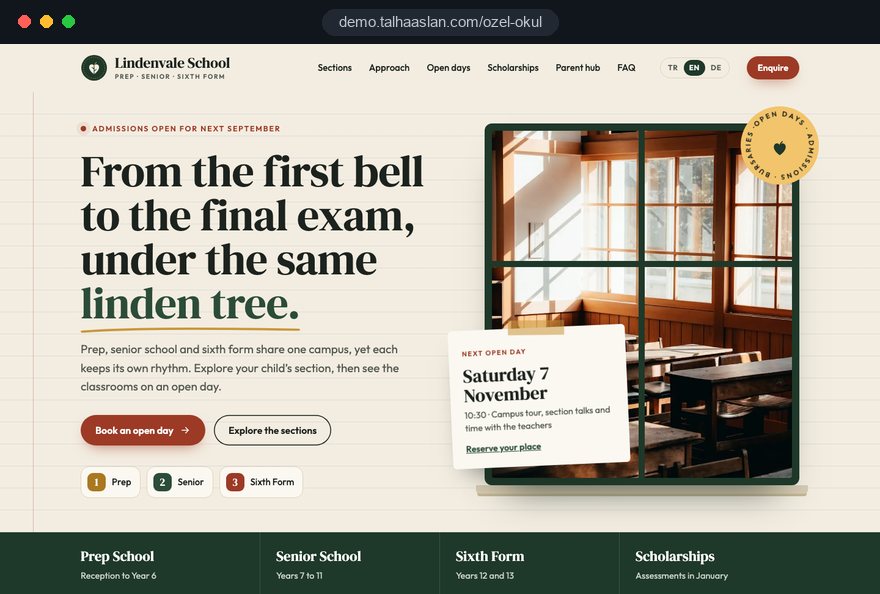
A private school website serves two very different readers at the same time. One is a family choosing a school for the next ten years, comparing a few options in the evening. The other is a current parent who wants to know when the coach leaves for Friday's fixture or which week the mock exams start.
In this guide, we at Talha Aslan and team walk through the decisions a K12 private school or independent school makes, in order, when it plans a new website: structure, section pages, open days, admissions enquiries, scholarships and bursaries, required information, pupil photos, privacy, parent communication, search, speed and measurement. Each section gives you something to use with your leadership team this week.
01Give prospective and current parents separate paths
The main navigation of a private school website should let visitors choose, with their first click, which kind of parent they are. Prospective families look for sections, campus and admissions; current parents look for notices, term dates and transport. Mixed in one menu, both groups search longer and the questions end up at the school office.
Agree on these four paths with your leadership team before any design work starts:
- Admissions path: Sections, open days, scholarships and bursaries and the enquiry form under one "Admissions" heading, with a clear button at the right of the menu.
- Parent path: Notices, term dates, exam weeks, transport and lunch menus under "Parents"; nothing a prospective family does not need appears on the home page.
- School path: Ethos and aims, leadership, staff and campus; shared information both groups consult from time to time.
- Policies path: Required information, policies, the inspection report, fees and the privacy notice, reachable from the footer of every page.
The home page follows from this split. The first screen states who the school is in one sentence, offers a choice of section and shows the next open day; just below, recent news shows that the school is lively. A small "Parent notices" shortcut can sit in the top bar for current families.
02What each section page has to answer
A section page is where a family finds an answer specific to their child's age: what will my child actually experience here, in this phase. The parent of a rising Reception child asks about phonics and the length of the school day; the family looking at sixth form asks about subject choices, class sizes and university guidance. One template filled per section gives both consistency and depth.
Each section page should answer these points:
- Weekly structure: Lessons, prep or homework time, clubs, and the start and finish of the school day.
- Languages: Which languages are taught from which year, and how sets or groups are formed.
- Pastoral care: Who looks after a pupil day to day, and how often parents hear from tutors.
- Transition: How pupils joining from the section below are welcomed, how the move from class teachers to subject specialists works, and what the route into the senior school or sixth form looks like.
- Next step: An open day and enquiry call at the end of the page, with this section preselected.
Write curriculum claims only as far as the school can document them. "French from Year 3, a second language from Year 7" goes straight into a family's comparison notes; vague praise does not. If your campus has an early years department, explain the move into Reception briefly; we cover early years pages in our nursery and preschool website guide. For international families, plan the English and other language versions of section pages from the start with a multilingual site structure rather than adding them later.
03Build the open day booking flow step by step
The open day is the most important conversion on a private school website during admissions season, and it should run from a booking flow on the site, not from a social media post. A post creates interest; only a form tells you who is coming, for which section and on which date.
The flow we recommend has five steps:
- Dates page: Every open morning, evening and taster day for the year on one page, with time and the section it is aimed at.
- Short form: Parent name, phone, email, the child's entry year and the chosen date; nothing else is mandatory.
- Automatic confirmation: An email straight after booking with date, address, parking and who to ask for at reception.
- Reminder: A short reminder the day before, with an option to cancel or choose another date.
- Follow up: A link to the admissions enquiry for families who attended, and the next date for those who could not.
The admissions team needs the same discipline. Every booking should reach the registrar by email and messaging, with its source (search, social, printed prospectus) visible on the record. A private tour as a second option in the same form keeps interest alive for families who cannot attend. On printed prospectuses and banners, use a QR code that leads directly to this booking page rather than to the home page.
04The admissions enquiry and the first reply
An admissions enquiry form is not an application file; it is a short request that starts a conversation, so it should ask only for what the registrar needs to call back. When a form asks for previous school reports, medical details or a full family history, many parents abandon it, and the school collects more personal data than it needs at that stage. Those details belong in registration, with the right privacy information.
Fields that are enough: parent name, phone, email, child's name, year of entry, the section or program of interest and a "how did you hear about us" question. An optional comment box covers siblings, transport or learning support questions.
The real value of the form is what happens after it is sent. Put these rules in writing with your admissions team:
- First reply: A call on the same working day during admissions season, with a named person responsible for it.
- One list: Enquiries from the website, the phone and open days in a single list, with duplicates merged.
- Status: A plain status for each family, such as contacted, visit booked, registered, offered, accepted or withdrawn.
- Reason lost: A short reason when a family does not proceed: fees, transport, program fit or another school.
This list is the only reliable source at the end of the season for which section page and which channel actually brought pupils.
05Fees, scholarships and bursaries in one honest place
Families need to see fees and the routes to financial support before they enquire, so a private school website should present them on one clear, dated page. When fees sit in an old PDF and bursaries appear in a single sentence, the families who would qualify for support are the ones who never get in touch.
A useful fees and support page contains:
- Fees by section: Per term or per year, with the academic year stated at the top and what is included or charged separately, such as lunches, trips or transport.
- Scholarships: Academic, music, art or sport awards, what each recognizes, when assessments take place and how to apply.
- Bursaries: That they are means tested, how the assessment works in outline, deadlines and who to contact in confidence.
- Sibling and other discounts: Only those your school actually offers, worded as in your fees policy.
- Application form: A short scholarship or bursary form with an automatic confirmation.
Keep one current page and retire old fee documents. An old fee list that still appears in search sends families into a conversation with wrong expectations, so remove it or archive it clearly as a previous year. The criteria and wording always come from your school; our part is making sure families can find them and that the page is easy for your bursar to update.
06Required information for independent schools in England
For independent schools in England, paragraph 32 of the Independent School Standards sets out information that has to be published on the school website or made available to parents. A private school website should give these items a fixed place rather than scattering them across news posts. Schools elsewhere should check their own regulator; one clear information page works everywhere.
Under paragraph 32, a school with a website publishes the particulars of its safeguarding arrangements there, and publishes the latest inspection report. Parents of pupils and prospective pupils must be given the school's address and phone number, the head teacher's name, the proprietor's details and a statement of ethos and aims. Other information must be made available to parents, including admissions, behavior and exclusions policies, the complaints procedure with the number of complaints in the previous school year, and academic performance and exam results.
A practical way to organize this:
- One hub page: A "School information" page linked from the footer, listing every required item.
- Owner per document: Each policy has a named member of staff responsible for keeping it current.
- Review date: Every document shows when it was last reviewed, so out of date versions are easy to spot.
- Accessible formats: Key policies as web pages rather than scanned PDFs, readable on a phone.
The content and its accuracy remain the school's responsibility; we provide the structure and make updates easy.
07Results, pupil photos and parental consent
A private school can present academic results and school life with confidence, but pupil names and images on a public website should follow the school's photo policy and the consent parents have given. The aim is a site that is honest about outcomes and careful with children.
Ways to show strength without overexposing pupils:
- Cohort results: Exam results for the year group as a whole, published in the same format each year, rather than named lists of top scorers.
- Process: How exam preparation, tutoring and university guidance work, explained as a process.
- Staff: Subject, experience and role in the school; qualifications only as far as they are documented.
- Campus: Labs, library and sports facilities shown empty or with pupils not identifiable.
For news and galleries, a simple rule works well: no names next to identifiable pupils unless parents have agreed, and no images of pupils whose families have opted out. A "consent checked" box in the admin area makes this step hard to skip. Under data protection law, such as the UK GDPR or the GDPR in the EU, photos of identifiable children are personal data, so align galleries with your privacy notice and ask your data protection lead where the lines are.
08Privacy notices, forms and children's data
Every form on a private school website collects personal data about parents and often about children, so each form should link to a privacy notice that explains who processes the data, why, on what basis and for how long. Your school writes the notice as the organization responsible for the data; we connect it correctly to every form and make it easy to find.
A checklist for forms and the technical setup:
- Minimal data: Each form asks only what that step needs; reports and identity documents wait for registration.
- Health and support needs: Medical information and details of special educational needs are sensitive; collect them through a secure process, not an open web form.
- Separate opt in: If you want to send newsletters or event invitations, use a separate, unticked checkbox.
- Access: Only the admissions team sees enquiry records; roles in the admin area match job responsibilities.
- Cookies: In the UK and the EU, analytics and advertising cookies do not run until the visitor has consented.
A short, readable notice also supports the decision to enquire. Review once a year which inboxes receive form submissions; enquiries landing in the mailbox of a former member of staff are both a data risk and lost families.
09The parent hub and who keeps news alive
The parent hub and the news page decide whether the website stays alive after launch, so the publishing routine should be agreed before design starts. Every week there is a fixture, a concert or a trip, but when publishing depends on one busy teacher, the news page stops within a few months. Prospective families read a school's energy from exactly that page.
A publishing routine that works:
- Roles: One contributor per section drafts news; the marketing or communications lead approves.
- Template: A headline, two short paragraphs, a few photos and a section tag; long articles are not required.
- Rhythm: A small, sustainable target, such as one story per section per week in term time.
- Calendar as data: Term dates, exam weeks and holidays as a searchable list on the site, not a PDF.
- Standing pages: Transport, lunch and uniform information on fixed pages updated at the start of each term.
Tagging news by section means each section page automatically shows its latest stories. The sixth form page then shows the debating society's last competition, the prep page the Year 2 reading week. At handover we train the people who will publish and answer their questions during the first weeks, so the routine is established before the next admissions season.
10Showing up for section and area searches
Families usually search for a private school by combining phase, area and a specific need, for example "independent prep school Surrey", "sixth form scholarship" or "international school IB Berlin". The foundation for these searches is a separate page for each section and a permanent scholarships page; a single general page cannot fully answer any of them.
Core steps for search visibility:
- Page titles: Each section page title includes the phase and the location; no title is repeated on two pages.
- Google Business Profile: The real name of the school without added keywords, with correct category, opening hours and campus photos.
- Structured data: School name, address, phone and open days marked up so search engines can read them, and only what the page actually shows; you can try the markup with our Schema markup generator.
- Several campuses: A page and a business profile for each site, each with its own open day details.
Pages answering real parent questions, such as transport routes or how bursaries work, gather search traffic over time. If you want this run as an ongoing plan, our SEO service treats section and admissions season searches as an editorial calendar tied to the school year.
11Mobile speed and the weight of campus photos
Most parents reach a private school website on a phone, often from a link shared in a class messaging group, so the site has to be designed for small screens first and its speed measured before launch. Large photos and school films make campus sites heavy; Google's Core Web Vitals give a useful target.
The "good" thresholds, measured at the 75th percentile of visits, are: LCP (largest contentful paint, how quickly the main content loads) 2.5 seconds or less; INP (interaction to next paint, how quickly the page responds to a tap) 200 milliseconds or less; CLS (cumulative layout shift, how much the page jumps while loading) 0.1 or less.
To meet these on a campus site:
- Hero image: A compressed still image sized for phones rather than a full screen autoplay video.
- Galleries: Photos below the visible screen load only as the visitor scrolls.
- School film: Hosted on a video platform and loaded only when someone taps play.
- Calendars and menus: Text on the page instead of PDFs, so nobody needs to pinch and zoom.
Before a new project, check how your current site behaves with our free mobile friendly test. Also test on the school's own mobile signal: a parent opening the site in the car park on open day should get a fast page too.
12Measurement: which section and channel bring families
The number to watch on a private school website is not visits but which section page and which channel produce open day bookings, enquiries and scholarship applications. Measurement should be set up from day one, within cookie consent, with conversions defined in advance.
Conversions to define:
- Open day booking: With section and date.
- Admissions enquiry: With entry year and source.
- Scholarship or bursary application: With the type of award.
- Calls and messaging clicks: With the page they came from.
Use separate trackable links for the prospectus, banners, school minibus livery and social posts; our UTM builder gives each channel its own label. If you advertise during admissions or scholarship season, a single goal landing page keeps the campaign focused without changing the main site, and makes measurement simpler.
At the end of the season, set website conversions next to the registrar's list of actual registrations. Only then do busy channels and productive channels separate.
13Common mistakes on private school websites
Most problems we see on private school websites come from planning and publishing habits, not from design. Each of these mistakes can turn directly into lost enquiries or compliance risk during admissions season:
- All sections in one text: Prep and sixth form described in one general page; instead, give each section its own page with its own timetable, pastoral model and call to action.
- Named league tables of pupils: Top performers listed with names and photos; instead, publish cohort results consistently and explain how the school prepares pupils.
- Open days only on social media: Bookings arrive through the general contact form; instead, build a booking page with section and date choice and an automatic confirmation.
- Required information scattered: Policies and the inspection report buried in news posts; instead, keep one school information page with an owner and review date for each item.
- Old fee lists still public: A previous year's PDF keeps appearing in search; instead, maintain one current fees page and archive or remove old files.
- Publishing depends on one person: News stalls for months; instead, appoint a contributor per section and use a short news template.
If three or more of these apply to your current site, decide on a rebuild before the next admissions season, not in the middle of it.
14Questions to ask a web partner and your next step
Choose the team for your private school website by whether they understand the school year and the rules your school works under; a visual portfolio alone is not enough. These are the questions we suggest asking in a first meeting:
- Timeline: By what date do we need to deliver content to launch before our admissions season begins.
- Rules: Who checks required information, results presentation, photos and scholarship wording before launch, and against what.
- Publishing: Can our staff update news, notices, term dates and fees themselves, with separate permissions for different people.
- Measurement: How will we see, at the end of the season, which section page and channel brought families.
- Ownership: In whose name will the domain, hosting and admin access be registered.
We do not yet have a live client project in this field, so we show our approach in a live private school demo linked on this page. The demo is not a client site; it shows how we build section pages, the open day flow and the parent hub. You can see work we have done in other sectors on our references page.
As a next step, send us your sections, your open day and scholarship calendar and the questions parents ask most through our contact form, and we will propose a site structure and a written scope. Fixed price packages are listed in the pricing section of our web design page, and the Get a Quote form gives you a written proposal for your school's scope.