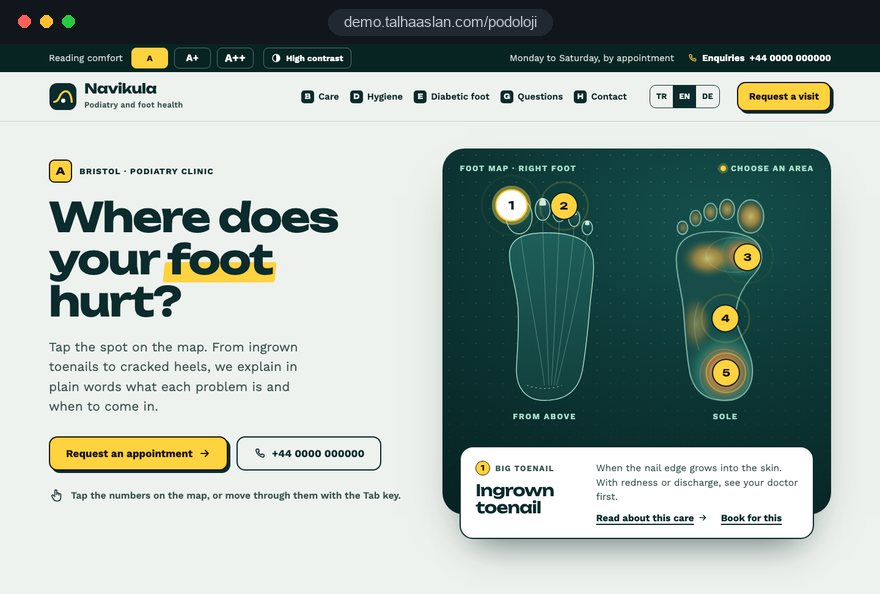
Most people who land on a podiatry website are either looking down at a sore toe or searching on behalf of a parent who can no longer manage their own feet. Both want three answers quickly: is this problem something you treat, are your instruments properly sterilized, and how do I get an appointment without a struggle.
This guide follows the decisions a clinic owner makes during a website project, in the order they come up: which conditions get pages, how each page is built, where the clinical boundary sits, how hygiene and titles are presented, how relatives enquire, and how search and measurement are set up.
01Mapping conditions: which problems earn their own page
A condition deserves its own page when it has its own search phrase, its own appointment pattern and its own set of patient questions. Ingrown toenails pass all three tests; "foot care" does not, because it is a menu heading rather than a problem anyone types into a search box at night.
Before any design work, we pull the last three months of phone and WhatsApp questions and sort them with four criteria:
- Search test: Do patients describe this problem in their own words, or do they only know your clinical service name?
- Process test: Does the visit pattern differ from other treatments; a nail brace usually means several reviews, while corn removal is often a single visit.
- Risk test: If the topic affects people with diabetes or poor circulation, it needs its own page with its own safety note.
- Volume test: The five questions your reception hears most often become the five pages in the first release.
Anything that fails these tests, such as short advice on cracked heels, can live as a section inside a broader page. That keeps the podiatry website free of thin, competing pages. The map should also match how the clinic is set up: an independent clinic leads with conditions, while a podiatry service inside a larger medical practice links the same map to the doctors' pages on the main site.
02Anatomy of a condition page, using ingrown toenails
A good condition page describes the process instead of promising an outcome; it tells patients what the problem is, when to come in and what will happen. We use the same skeleton for every condition, ordered the way a worried patient reads.
- Plain definition: Two or three sentences on what an ingrown toenail is, with the clinical term explained in brackets.
- Who should come in, and who should see a doctor first: A short, visible note on situations that need medical advice before podiatry.
- Your first appointment: How long it takes, what to bring, and what shoes and socks to wear on the day.
- Treatment options: The methods your clinicians actually use, described simply and without words like cure or permanent.
- Aftercare and reviews: How follow up visits are planned and what to watch for at home.
- Questions and enquiry: Four or five real questions from your reception log, then phone, WhatsApp and the form.
Two small details make a large difference. The phone number sits above the fold on every condition page, and each page carries a line saying which clinician wrote or reviewed it and when it was last updated. A dated, signed page reads like clinical information rather than marketing copy.
03When to see a GP first, and how referral works
Every condition page needs a clearly marked box that says when patients should see their GP or diabetes team before booking podiatry. The CAP Code, which governs nonbroadcast advertising in the UK, says marketing must not discourage essential treatment where medical supervision is needed, so this box is a compliance point as well as good care.
We write the box with a few rules:
- A list agreed with clinicians: Situations such as open wounds or signs of infection come from a list your senior podiatrist has approved, not from a copywriter.
- Visible placement: A different background color in the top third of the page, never a footnote.
- One next step: A sentence such as "If your doctor refers you, we can continue your care here."
- What to bring: Referral letters, medication lists or notes from the diabetes clinic, where relevant.
The same thinking shapes a "Getting started" page. Many clinics accept both referrals and self referrals, and some work with private medical insurers; patients want to know which route applies to them before they pick up the phone. Set out each route in a few numbered steps, say plainly which insurers you work with if you publish that list at all, and keep it current.
04Writing the hygiene page from your real sterilization routine
The first question in foot care is how the instruments are cleaned, and the answer has to come from your actual decontamination routine, not from a stock line about "a hygienic environment." On a podiatry website, the hygiene page is often the single page that moves a hesitant patient to enquire.
We draft it from a half hour interview with the clinician responsible for decontamination, then turn the same steps into a photo shot list:
- Used instruments leave the treatment room and go to the cleaning area.
- Cleaning and disinfection, naming the type of equipment used.
- Packing and sterilization in the autoclave.
- The sealed pack opened in front of the patient, with single use items shown.
- Preparation of the chair and surfaces between patients.
One photo and two sentences per step is enough. Photos show hands, instruments and equipment, never a patient's face or an identifiable foot. The text must match your written procedure exactly; a step described online but skipped in practice is a liability, not a trust signal.
Finish with two things patients can check for themselves during the visit: that the pack is opened in front of them, and that single use items are new. Review the page twice a year, and update it the week you change equipment or suppliers.
05Readability for older visitors and people living with diabetes
Many people who need regular foot care are older or living with diabetes, sometimes with reduced eyesight, so readability is a core design decision rather than a finishing touch. Someone squinting at a phone without reading glasses who cannot find your number on the first screen will usually try the next clinic.
During design we check five things:
- Text size: Body text large enough to read comfortably on a phone, with generous line spacing and no thin gray type.
- Color contrast: Text and buttons measured against the WCAG AA contrast threshold; pale teal on white does not survive.
- Tap targets: Call, WhatsApp and form buttons wide enough for an unsteady finger and spaced apart.
- Sticky contact bar: The phone number visible on every screen and dialing with one tap.
- Plain language: Clinical terms explained in a short clause the first time they appear.
You can test your current colors in a few minutes with our color contrast checker.
Speed belongs to readability too. Google treats LCP (largest contentful paint, how fast the main content loads) of 2.5 seconds or less, INP (interaction to next paint, how quickly the page responds to a tap) of 200 milliseconds or less and CLS (cumulative layout shift, how much the layout jumps) of 0.1 or less as good. A late loading banner that pushes the call button down is exactly how an older visitor ends up tapping the wrong thing.
06Clinician profiles and protected titles
In the UK, podiatrist and chiropodist are protected titles, and only people registered with the HCPC (Health and Care Professions Council) may use them; your team page has to reflect that precisely.
A clinician profile on a podiatry website should include:
- Exact title: Podiatrist or chiropodist only for registered clinicians; podiatry assistants and foot health practitioners described by the role they actually hold.
- Registration details: The HCPC registration number, so patients can check it on the public register.
- Qualifications: Degree and institution, plus relevant further training, listed as training rather than turned into a new job title.
- Areas of work: The conditions this person usually sees, linked to the matching condition pages.
Avoid invented labels such as "foot specialist" or "nail expert" when they suggest a status the person does not hold. If your clinic sits inside a medical practice, write two short paragraphs explaining what the doctor does and what the podiatrist does. Patients then understand who diagnoses and who provides ongoing care before they arrive.
07Claims, evidence and before and after photos
Under the CAP Code, objective health claims must be backed by evidence, so a podiatry website should describe process and experience rather than promise outcomes. Salon style words like painless, permanent or instant are where clinics most often get into difficulty.
A few rewrites we make on almost every project:
- "Permanent cure for ingrown toenails" becomes a description of the procedure, what recovery usually involves and when the clinician reviews it.
- "Completely painless" becomes an explanation of how local anesthetic is used, if it is used, and what patients typically feel.
- "Instant relief from corns" becomes what happens at the visit and why corns may return if the cause is not addressed.
- "Specialist treatment" becomes the actual title and training of the clinician.
Before and after photos of nails are restricted in several countries, and patient consent is needed in any case. We usually build the gallery around the clinic, the process and hygiene instead.
If you do want clinical images, agree the consent form, retention period and wording with your professional body or legal adviser before anything is published, and treat patient testimonials with the same caution. The final legal check always belongs to your clinic.
08Enquiries from relatives and sensitive health data
A large share of podiatry enquiries come from a daughter, son or carer rather than the patient, so the enquiry form should be built for that person. At the same time, health details are special category data under data protection law, so the form should not collect clinical information it does not need.
The fields we recommend are short and purposeful:
- Who is writing: Name and phone, with a "I am writing on behalf of a relative" option.
- Topic: Ingrown toenail, corns, thickened nails, routine care or home visit; no free diagnosis field.
- Preferred time: Broad windows such as morning, afternoon or Saturday.
- Optional note: With a line saying medical details can be discussed by phone.
Next to the form sits a link to your privacy notice and two sentences on why the data is collected and who holds it. Diabetes status, medication and wound details are taken at the first call, not through a web form.
If patients should choose their own slot, an online booking system follows the same principles; ask early where the booking provider stores data and make sure a data processing agreement is in place. For home visits, the area field becomes mandatory, so a request from outside your coverage gets a polite automatic reply.
09Follow up rhythm and reminders patients agree to
Diabetic foot care and recurring nail problems depend on regular visits, so the site should make the next appointment easy to request without turning reminders into marketing. Keep reminders to service messages and ask permission first; promotional messages sent without consent create both complaints and legal exposure.
The flow we recommend:
- At the end of a visit, the clinician asks whether the patient or relative would like reminders, and the answer is recorded.
- The site has a "Request my next visit" button that opens a one step form asking only what the previous visit was about.
- Reminder messages contain appointment details only, never offers or new service announcements.
- Every condition page states that review intervals are agreed with the patient's own doctor or diabetes team.
Patients with ongoing needs stay in touch without calling during busy hours, and the clinic sees from its own calendar who is overdue instead of sending bulk messages.
If you use WhatsApp for reminders, keep the template fixed and free of health details: "your appointment tomorrow at 11" is enough, and "your ingrown toenail review" is not needed. Every message should also explain how to stop reminders.
10A domiciliary page that relatives can rely on
If you offer home visits, they need their own page written for the relative who usually makes the decision, not a sentence on the home page. The relative's questions are predictable: which areas do you cover, who will come, how are instruments carried and what should we prepare.
We structure the page in this order:
- Areas covered: A readable list of towns or postcodes rather than only a map, plus what happens if an address is just outside.
- Who it suits: Patients with limited mobility, those who are housebound or recovering from surgery, with the same "see a doctor first" box repeated.
- On the day: How long the visit takes, how the patient will be seated, and simple preparation such as good light and a chair.
- Hygiene on the move: How sealed instrument packs travel and how used materials leave the home.
- Who visits: The clinician's name and title, linked to their profile and registration details.
We avoid photos inside patients' homes; that space is private, and a picture of a sealed instrument case says more about safety anyway. The form for this page makes the area field and the "on behalf of a relative" option mandatory, and lets the relative leave their own number rather than the patient's.
11Showing up for condition and local searches
Patients rarely search only for "podiatrist"; they type ingrown toenail, add their town or search for a chiropodist near me, and those searches are answered by your condition pages and your Google Business Profile working together. A podiatry clinic's visibility is built on page structure and profile accuracy first.
Our checklist for local search:
- Business name: Exactly as on your sign, as Google's guidelines require, with no added keywords such as "ingrown toenail clinic."
- Categories and services: Service names in the profile use the same words as your condition pages.
- Home visits only: A service area business can hide its address and define the areas it covers.
- Structured data: Clinic name, address, phone and opening hours marked up, and nothing marked up that is not on the page; check it with our schema markup tool.
- Mobile check: Every condition page passes a mobile friendly test before launch.
Reviews deserve a policy of their own: reply factually, never confirm that someone is a patient, and never discuss treatment details in public. If you want a longer term plan for content and search, our SEO service covers it, with every new article checked against the same claims rules as the condition pages.
12Measuring which condition page brings enquiries
Visitor numbers say little about a podiatry website; what matters is how many calls, WhatsApp messages and form enquiries each condition page produces. That tells you which page to expand next and where to spend your photography budget.
We set up these events as conversions:
- Click to call: Every tap on the phone number, recorded with the page it came from.
- WhatsApp clicks: Using a link that adds the page name to the opening message.
- Form submissions: With the selected topic, but never the content of the note field.
- Next visit requests: As a separate event, so returning patients are measured on their own.
The boundary is firm: no health information, names or phone numbers are sent to analytics tools. Non essential tracking waits for cookie consent, and for visitors in the European Economic Area Google requires consent mode for measurement and personalized advertising features.
A ten minute monthly review is enough: which pages bring enquiries, and which are read but bring none. In the second group, the phone number usually appears too late or the "see a doctor first" box is vague.
13Six mistakes we see on podiatry websites
Most problems on podiatry websites come from building the site on a beauty salon template or a generic business theme. Each mistake has a better alternative, and most can be fixed before design starts.
- One long treatment list: Instead of bullet points on a single services page, give every condition that passes the search test its own page.
- Offer language: Instead of "first visit discount" banners, explain what happens at the first appointment and answer fee questions plainly on the phone or a dedicated fees page.
- Stock hygiene images: Instead of a downloaded photo of gleaming instruments, show your own decontamination steps.
- Invented titles: Instead of "foot specialist," use the protected title only where it applies and show registration details.
- A testimonial wall: Instead of filling the home page with patient praise, give that space to hygiene, team and process.
- A hidden phone number: Instead of leaving it in the footer, make it sticky, large and dialable with one tap.
What links these mistakes is that they put the clinic's sales goal ahead of the patient's question. A simple test reveals most of them: hand your phone to an older relative, ask them to find the ingrown toenail page and call the clinic, and note every place they hesitate.
14Choosing a partner and planning your next step
The partner you need for a podiatry website is one who thinks about clinical rules and older users at the same time; an attractive template is no substitute. A handful of questions in the first call will show whether an agency has that habit.
- How do you handle protected titles and registration details on team pages?
- Who writes the hygiene page, and from what source?
- How do you measure contrast and tap targets before launch?
- How will you report which condition page brings enquiries?
We prefer to answer those questions with something you can click: the live podiatry demo linked on this page shows how we build condition pages, the hygiene section and the enquiry flow. The demo is not a client site; we do not yet have a published podiatry client project and would rather say so plainly. Our work in other sectors is on the references page, and the full scope of what we build is on our web design service page.
To get started, list the services you offer, the clinicians and doctors you work with, and whether you do home visits. In the first call we turn that list into a sitemap and a first set of condition pages, and we review titles, images and claims before launch, flagging anything doubtful in writing. Fixed packages are in the pricing section, and for a written scope and quote for your clinic you can reach us through the contact page.