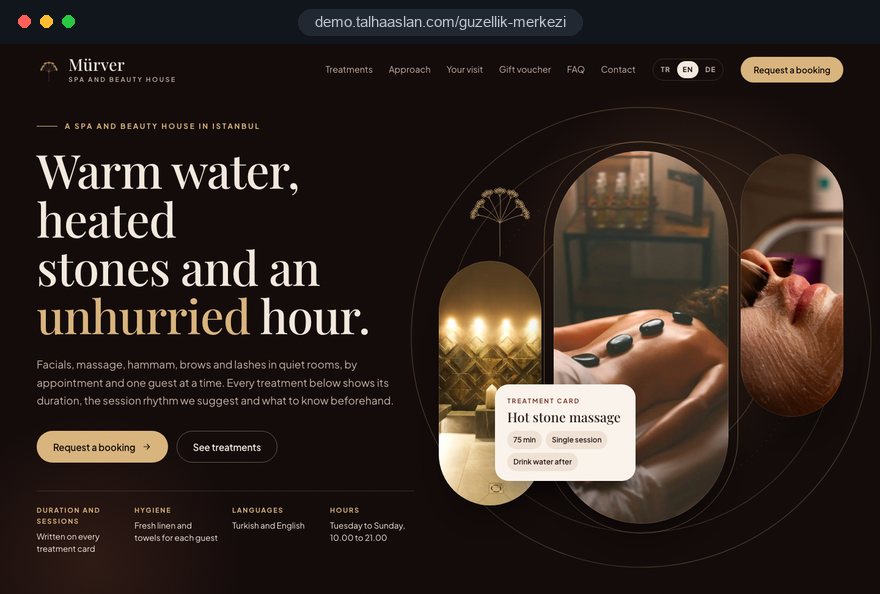
A beauty salon website has one practical job: to put in writing the answers your team gives out loud every day. How many weeks apart should laser sessions be, can a client have a peel before a facial, how long is a gift voucher valid? If those answers are missing, even a polished design will not take a single call or DM off the front desk.
This guide follows the decisions an owner of a beauty salon, skin clinic or spa makes on a website project, in the order they come up. It skips general web design advice and focuses on what makes a business built on treatments, courses, devices and client consent different.
01Turn your treatment menu into a sitemap
The sitemap comes from your treatment menu, not from the design, so the first task is to put every treatment into one spreadsheet. For each row, note the name, duration, number of sessions, spacing between sessions, the device used and which therapists can perform it.
Then decide which treatments deserve their own page. These criteria make the call easier:
- Search demand: If clients search for the treatment by name, such as brow lamination or hydrafacial, it needs its own page.
- Decision time: Treatments that take several sessions and that clients research in advance need a detailed page.
- Repeat questions: A treatment you get the same DM about every week is being asked about because it has no page.
- Quick treatments: Manicures, waxing and similar quick decisions work well as short cards on a group page.
Group treatments the way clients think: face, body, brows and lashes, hair removal, massage and spa. A menu organized by device brand may make sense inside the salon, but it tells a client nothing. Keep navigation to two levels; on a phone, a third level of dropdown is almost never used.
02The order of content on a treatment page
A treatment page turns into appointments when it answers the questions in the order clients ask them. We suggest using this sequence as a template for every page:
- Explain in two or three sentences what the treatment is and which concern or goal it addresses.
- Show duration, recommended number of sessions and spacing in one box that can be read at a glance.
- Describe how the treatment works step by step, what it feels like and which device is used.
- List what to do and avoid beforehand, then the aftercare advice.
- Show the therapists who perform it and the matching course on short cards.
- End with an appointment button, and keep one fixed at the bottom of the screen on phones.
Give every page its own questions and answers; a general FAQ page cannot answer treatment specific questions. Real photos taken in your treatment rooms build more trust than stock images. Write in your salon's own voice: talk on the page the way you talk to clients. Technical sentences copied from a device brochure are not read, and they do nothing to set you apart in search.
03Say clearly who a treatment is not for
Stating who a treatment is not suitable for does not lose you clients; it prevents bookings that end with disappointment. It is the information beauty salon websites leave out most often, and one of the strongest trust signals you can add.
Cover these points separately on each treatment page:
- When to check first: For example pregnancy, an active skin infection or a recent treatment in the same area, where the client should speak to the therapist before booking.
- Consultation and patch test: Whether laser or chemical peels start with a skin assessment and a patch test before the first full session.
- Expectations: That results vary between people, and when extra sessions might be needed.
- Aftercare: How many days to take care with sun exposure, makeup, exercise and saunas.
Write this with the therapist who performs the treatment, and phrase it as your salon's policy rather than as medical advice. Where you are unsure, "your therapist will assess this at the consultation" is far more accurate than a general health claim. It also makes the consultation a natural first booking.
04Make courses and packages easy to compare
The packages page should let a client answer "how many sessions should I book" on their own. Instead of offers that appear in a story for a day and disappear, build lasting cards on the site that can be compared side by side.
Every package card should show the same information in the same order:
- What is included: Which treatments and body areas are in the course, and which are not.
- Session plan: Total number of sessions and the recommended spacing between them.
- Validity: How many months the course can be used over, and whether it can be paused.
- Missed sessions: Whether a late cancellation or a missed appointment is deducted from the course.
- Transfer: Whether the course can be passed to someone else.
Whether prices appear on the site is a separate decision. Even if they do not, scope and rules should be clear, because the real question is usually the number of sessions. We cover the shared challenges of businesses that sell session packs on our Pilates studio website guide; there too, validity and cancellation rules end up as the most read part of the site.
05Build booking around your real schedule
Online booking creates double bookings if it does not know the salon's real constraints, so resources must be defined before the calendar goes live. In a beauty salon, the resource is not only the therapist: rooms, devices and preparation time shape the schedule too.
Settle these steps in order before setup:
- Write down the net duration of each treatment plus the preparation and cleaning time before and after.
- Define which room and which device each treatment needs, and how many clients can be treated at the same time.
- Enter which treatments each therapist can perform and their weekly working hours.
- Decide whether first time clients need a consultation or patch test before they can book the full treatment.
- Set the cancellation and change deadline, the reminder timing and your rule for missed appointments.
Once these rules are clear, an online booking system shows clients only the slots that really work. If you do not want to open the calendar fully, a request model where you confirm each booking is a sensible middle ground. You can also add a WhatsApp link with a prefilled message to every treatment page using our WhatsApp link generator; when the treatment name is already in the message, the first reply is much quicker.
The confirmation message is part of the flow too. If it includes the address, a directions link, a preparation note and the cancellation deadline, the front desk receives far fewer reminder and directions calls.
06Gift vouchers and spa rituals that sell online
A gift voucher is the one product where the buyer and the user are different people, so the flow has to be designed for both. The buyer is often deciding quickly, on a phone, close to the date.
A good voucher flow includes:
- Amount or experience: A specific ritual, a package for two or a voucher of open value.
- Personal note: A short message in the recipient's name and a choice of delivery date.
- Delivery: A printable voucher sent by e-mail, or a printed card collected at reception.
- Code and tracking: A unique code for each voucher that reception can mark as used.
- Terms: Validity, how to book the appointment, and refund and transfer conditions.
Spa ritual pages are written differently from treatment pages: they describe timing, steps and atmosphere, and lead with the experience rather than a result. Packages for two, occasion pages and information about the relaxation area belong here naturally. If online payment is added, terms and cancellation rights must be readable before the payment step; check the consumer rules that apply in your country.
07A therapist, device and hygiene page that earns trust
A first time client wants to see who will work on their face and which device will be used; this page matters as much as the treatment page itself. Build it from concrete information rather than a general "about us" text.
Include these details:
- Therapist profiles: A real photo, areas of focus, training completed and qualifications held.
- Insurance and qualifications: What your therapists are qualified and insured to perform, stated in plain words.
- Devices: Which device is used for which treatment, with a simple explanation of what it does.
- Hygiene routine: Single use materials, sterilization, room preparation and how linen is changed.
- Products: The product ranges used in treatments and what happens when a client mentions an allergy.
List only qualifications that are real and current, and say which certificate stands behind words like "advanced" or "certified". Set up a routine so that a therapist's profile is removed the day they leave; an old team photo or a bookable therapist who no longer works there damages trust faster than a new page builds it.
Link profiles and treatment pages both ways, so each treatment shows who performs it and each profile shows its treatments. A client who was recommended a specific therapist should be able to reach that therapist's calendar directly.
08Rules for before and after galleries and reviews
Before and after galleries and client reviews are the most persuasive parts of the site, and the most regulated. In the UK, ASA advice expects before and after images to be genuine, unretouched and representative of the result a typical client can expect, backed by signed and dated records.
Plan the gallery with these rules:
- Written consent: Record which image may be used, where and for how long; remove it if consent is withdrawn.
- Genuine images: Same light, same angle, no filters; do not crop or retouch to strengthen the result.
- Captions: Next to each image, name the treatment, the number of sessions and note that results vary.
- Records: Keep the signed and dated proof for every pair, so you can show it if a complaint is raised.
Prescription only medicines need special care. The ASA, working with the MHRA, treats advertising Botox and other botulinum toxin injections to the public as illegal, even when a registered prescriber administers them. If such treatments happen under your roof, keep them off the treatment menu and promotional pages, and plan any wording with your clinical team and a legal adviser.
For reviews, a link to your Google Business Profile is often simpler than collecting reviews on the site. If you do show reviews, show them as they are, not a hand picked set of screenshots.
09Privacy notice, forms and cookie consent
Booking and contact forms collect personal data, so the legal pages must be ready before launch. A clear privacy notice should sit right next to each form, linked in readable text, explaining what you collect, why and who you share it with.
Points to watch on beauty salon forms:
- Collect less: Name, phone, treatment and date are usually enough to book; do not ask for a date of birth or address unless you need it.
- Health details: Skin conditions, pregnancy or medication can count as health information, which data protection law handles with extra care; collect it at the consultation, not in an online form.
- Separate consents: Ask for photo consent and marketing consent in their own unticked boxes, separate from the booking.
- Cookies: In the EU, consent is needed before non essential tracking, and Google requires consent mode for measurement and personalized advertising for users in the European Economic Area. Check the equivalent rules where you operate.
Booking software, payment providers and WhatsApp process data too; name them in the privacy notice. We recommend having the final texts checked by your legal adviser. We set up where they sit, how they connect to the forms and how they work technically.
10Connect Instagram traffic to treatment pages
A large share of beauty salon visitors arrive from Instagram, on a phone, inside the app's built in browser, and the site should be designed for that journey. The single link in your profile should go to a page that leads to an appointment, not to the home page.
We suggest this setup to make Instagram and the site work together:
- Profile page: The bio link opens a simple page with your four or five most requested treatments, current courses and an appointment button.
- Post to page: Every reel or story about a treatment links to that treatment's page.
- Highlights: Story highlights use the same names as your treatment groups, so clients see one structure in both places.
- Source tags: Add source tags to links so you can see which posts lead to appointments.
The in app browser is slow and narrow, so speed directly affects bookings here. Google defines good Core Web Vitals as LCP (how fast the main content loads) of 2.5 seconds or less, INP (how quickly the page responds to a tap) of 200 milliseconds or less, and CLS (how much the layout shifts while loading) of 0.1 or less. Compress gallery images, load videos on tap rather than on page load, and check your current site with our free mobile friendly test.
11Showing up in maps and nearby searches
Many beauty searches are for a salon close by, and in these searches your website and your Google Business Profile work as a pair. If one is missing or inconsistent, the other loses much of its effect.
A checklist for local visibility:
- Business name: Use the real name on your sign; Google's guidelines do not allow keywords such as "laser hair removal" added to the name.
- Categories and services: Choose the primary category carefully and list services with the same names as your treatment pages.
- Consistent details: Address, phone number and opening hours match on the site, the profile and your social accounts.
- Review replies: Reply to profile reviews, including negative ones, briefly and without revealing any client details.
Mention your area naturally on treatment pages: transport, parking and nearby landmarks help clients and connect the page with the neighborhood. Creating copy pages for every nearby district does not work and lowers the quality of the whole site. Recent photos of the treatment rooms and team on the profile give people browsing the map an impression before they reach your site, and the profile's website link can point straight to booking. For a fuller local search plan, our SEO service looks at treatment pages and the profile together.
12Measure which treatment page brings appointments
Visitor numbers tell a beauty salon very little; the real question is which treatment page and which post bring appointments. Measurement has to be in place before launch, not added later.
We suggest setting it up in this order:
- Define the actions that count as conversions: completed bookings, WhatsApp clicks, phone taps and voucher sales.
- Record which treatment page each action started from.
- Add source tags to Instagram, Google Business Profile and ad links.
- Each month, compare bookings per treatment with your actual appointment book in the salon.
- Find pages with many visits but few bookings and improve those first.
If you plan to advertise one offer or a new device, sending the ad to a single goal landing page makes results easy to read without cluttering the main site. In Google Ads, Quality Score is built from expected click through rate, ad relevance and landing page experience, so the page should match the promise in the ad closely. For campaign setup and management, see our Google Ads service.
Share the data with the salon team. If reception asks phone clients where they found you, using a short list of options, bookings the website cannot see still end up in the picture and you decide with fewer gaps.
13Common beauty salon website mistakes
The mistakes below come up often in beauty salon projects, and most can be avoided with a few decisions at the planning stage. Each one comes with a better alternative.
- Every treatment on one page: Laser, facials and massage get a line each; instead, give every treatment that clients search for and research its own page with duration and sessions.
- Offers only in stories: A course appears for a day and vanishes; instead, keep a lasting package card on the site and link the story to it.
- Brochure copy: The manufacturer's technical text is pasted in; instead, write in your clients' words about how your salon performs the treatment.
- A gallery without proof: Old client photos are used without asking; instead, start with a small gallery of consented, unretouched and captioned images.
- Opening the calendar blind: Online booking goes live before rooms and devices are defined; instead, define resources first or start with a request and confirm model.
- Health questions in the form: The booking form asks about conditions and medication; instead, take this at the consultation with proper records.
Running this list against your current site is also a good start for a new project brief: every item where you think "that is us" shows where the new site should begin.
14Choosing a partner and the next step
The right team for a beauty salon website is the one that asks about your treatment menu, your schedule and your consent process before showing any design. We suggest asking these questions in every first meeting:
- Content: Who writes the treatment pages, and how will your therapists review and approve them?
- Booking: How will rooms, devices and preparation time be set up in the calendar?
- Consent and data: Where will photo consent, the privacy notice and cookie choices live, and how will they work?
- Measurement: How will you see which treatment page brings appointments in the first month after launch?
- Ownership: Whose name will the domain, content, images and analytics accounts be in?
To see our approach in practice, a live beauty salon demo site is linked on this page; it shows how treatment pages, package cards and the booking step work together. Our work in other sectors is on our references page, and fixed scope packages are listed in the pricing section.
For a written quote, share your treatment menu, your courses and how you take bookings today through the Get a quote form, or get in touch with us; we will work out the page structure and booking setup that fits your salon with you.