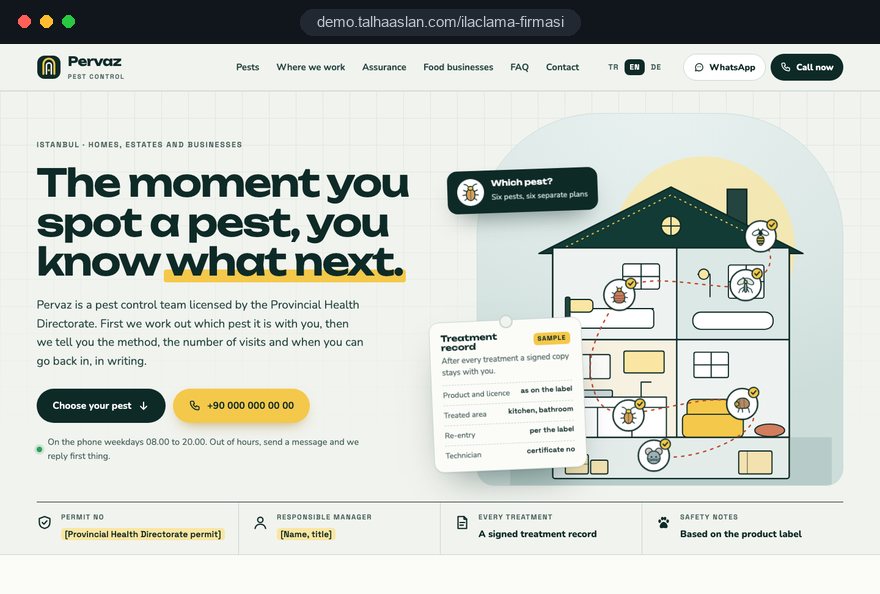
A pest control website serves two very different buyers on the same day. One has just seen a rat run behind the kitchen bin and wants someone on the phone now; the other is a hotel's facilities manager comparing firms for an annual contract. If the site cannot give each of them a short path to an answer, the phone either stays quiet or rings with the wrong questions.
In this guide, Talha Aslan and team walk through the decisions a pest control firm makes when planning a site, in the order they come up: pest pages, urgent contact, the quote form, safety and training, commercial contracts, area pages, local search, seasons, speed and measurement. Our general project process is described on our web design service page.
01Decide your balance of homes and businesses first
Before any design work, decide how much of your revenue comes from domestic callouts and how much from commercial contracts, and where you want that balance to be in two years. Page order, the first screen of the home page and the questions in your form all follow from that decision.
A firm that mostly treats homes is built on speed and reassurance: the call button, pest pages and safety notes. A firm that mostly serves businesses is built on process, records and documented training. If you do both, the first screen needs two clear routes: one for "I have a pest problem at home" and one for "I need a regular service for my business".
In the first meeting we answer these questions together:
- Revenue split: roughly how much of the last twelve months came from one off jobs and how much from contracts.
- Target clients: whether you want more restaurants, hotels, letting agents and property managers, or more households.
- Capacity: whether a technician can go out the same day or bookings usually move to the next day.
- Pest list: the pests you are called about most and the ones you do not treat at all.
- Season: the months when the phone goes quiet and the months when you cannot keep up.
02What every pest page has to answer
Each pest page should answer the questions in a worried visitor's head in the order they arise: is this really that pest, how serious is it, how is it treated and what do I need to prepare. It is a page that helps someone decide, not an encyclopedia entry about the insect.
A bed bug page, for example, can open with the signs people actually notice: small dark spots along mattress seams and bites in a line found in the morning. It then explains why treatment usually takes more than one visit. The same reader may be confusing bed bugs with fleas, and two sentences on the difference prevent a wrong booking.
A strong pest page contains these parts:
- Signs: marks a customer can check at home, shown with real photos.
- Lookalikes: similar pests and a quick way to tell them apart.
- Method: gel, spray, bait stations or monitoring, explained in plain English.
- Number of visits: how many visits are usually needed and what changes that.
- Preparation: cupboards to empty and food to put away before the technician arrives.
- Common questions: the three or four questions you hear most on the phone about that pest.
It also helps to close each page with a short answer to "when should you call straight away", such as a mouse seen in daylight in a kitchen or bites appearing in several rooms. We write these pages from your technicians' field knowledge, and each one ends with a call and WhatsApp button that opens with a message about that specific pest.
03Being reachable in the first thirty seconds
Someone who has just found a wasp nest by the back door will either call within seconds of landing on a site or go back to the results and try the next pest control firm; that is why a call and WhatsApp bar fixed to the bottom of every phone screen is essential. The number must be real text that works with one tap, never part of an image.
Small details around the bar matter as well. State your opening hours, tell out of hours callers when you will get back to them, and if you do not offer night callouts, say so plainly. A WhatsApp link that opens with a prefilled message such as "Hi, I think I have mice in the loft" tells your office which page the customer came from before the first reply.
We build the urgent contact flow in this order:
- Place a fixed call and WhatsApp bar at the bottom of every page on phones.
- Write a separate prefilled message for each pest page.
- Show opening hours and the out of hours reply time right above the bar.
- On desktop, put the number in the top menu as copyable text.
- Track call and WhatsApp clicks per page as conversions.
If you want to try prefilled links yourself, the WhatsApp link generator creates one in a few minutes. When the links on your vans and door hangers carry the same message, enquiries arrive in the same format whatever the channel.
04A quote form that prepares the technician
The purpose of the quote form is not to inform the customer; it is to make sure your technician sets out with the right products and equipment and books enough time. The form should therefore ask the same questions your office asks on the phone, in the same order.
Splitting the form into three short steps instead of one long page means fewer people abandon it in a hurry. Step one can be the pest and urgency, step two the property, step three contact details. A photo upload often tells your team more than a phone call when the question is "what is this insect".
Fields worth asking for homes and businesses:
- Pest and duration: what was seen, for how long and in which part of the building.
- Property: flat, house, restaurant kitchen or warehouse, with approximate size and number of floors.
- Sensitive situations: a baby, someone pregnant or with allergies, pets or a fish tank in the home.
- Timing: preferred days and times and when the property can be cleared.
- Photo: optional, one or two pictures of the pest or its traces.
Below the form, link to your privacy notice explaining how the data is used. A thank you page that states when you will reply at the latest stops many customers from ringing three more firms at the same time.
05Safety information before and after treatment
For a family with children or pets, the decision often depends on one question: when can we go back into the room. The site should answer it clearly and on the basis of the products you use, because vague, sweeping safety claims raise doubts instead of settling them.
We write safety content from your product labels and your own instructions. Rather than quoting one waiting time that varies by product, it is both accurate and safer to tell customers to follow the time your technician gives them on the day, in writing.
This section should cover:
- Preparation: putting away food, toys and pet bowls before treatment.
- Pets and fish tanks: where cats, dogs and birds should wait, how to cover a tank and what to do with the pump.
- Returning: that the time depends on the product and is stated in your written notes.
- Cleaning: when treated surfaces may be wiped and which areas to leave alone.
- Visit report: what the report or service sheet left after each visit records and why to keep it.
Offering this as a short summary on each pest page and as a detailed, printable page of its own saves your team from repeating the same explanation on every call.
06Showing training and stewardship
According to HSE, professional use of anticoagulant rodenticides in Great Britain and Northern Ireland must follow a UK rodenticide stewardship regime built on training and certification; showing your team's training is the simplest way for a careful buyer to tell a trained pest controller from an untrained operator.
No rule requires you to publish this on your site, but cautious customers, food businesses in particular, look for it before asking for a quote. Writing certificates out as text, not only as scanned images, makes them readable on a phone and understandable to search engines.
For a trust page we suggest:
- Training: the qualifications your technicians hold and that they are kept current.
- Rodenticide stewardship: how your team meets the stewardship requirements for professional rodent control.
- Memberships: trade association memberships you can document.
- Insurance: public liability cover and your registered company name.
- Sample report: an anonymized service report showing what a client receives.
We publish only what you can document today. An expired certificate left on the site costs more trust than showing nothing, so we note renewal dates in the project file. Outside the UK, rules differ by country, so we write this section around the requirements and qualifications that apply where you work.
07A contracts page for food businesses and hotels
Restaurants, hotels, food producers and property managers do not buy a single treatment; they buy a routine, and a contracts page must describe that routine, the visit frequency and what is left behind after each visit in concrete terms. These buyers are looking for something they can show an auditor, not a paragraph about "commercial solutions".
Walking through one example works well. For a restaurant kitchen, a flow in which bait stations are numbered and marked on a floor plan, every station is checked and logged at each visit, and the date of the next visit is written down gives a quality manager the clarity they need.
A commercial page should include:
- Visit frequency: monthly, fortnightly or a plan set around the client's needs.
- Monitoring points: how stations, traps and monitors are placed and recorded.
- Records: the report after every visit and a periodic summary.
- Callouts: how quickly you respond when pests appear between scheduled visits.
We build a separate form for commercial enquiries that asks for the type of business, the number of sites and when the current contract ends. If you wish, a simple password protected client area gives commercial clients access to their past reports.
08Building area pages around where you really work
Area pages should exist only for towns you regularly cover, and each one must carry information specific to that place; pages copied with only the town name changed tell neither customers nor search engines anything.
Real local detail is what makes an area page worth reading: student houses, older terraces or farm buildings on the edge of town each bring different problems.
We prepare an area page in these steps:
- Pull the towns you visit most from the last year's job records.
- Note typical travel time and the most common pests for each town.
- Describe the typical buildings: older terraces, flats above shops, new estates or industrial units.
- Add a short, original paragraph about a problem you often see there.
- Link the page to the relevant pest pages and to the quote form.
List the areas you cover on the home page and the contact page as well. A polite, ready reply for enquiries from outside your patch protects your team's time and still leaves a good impression.
09Google Business Profile and reviews
In local search, your site and your Google Business Profile work together; the name, category and service area on the profile must match your site exactly. Google's guidelines require the business name to match the real world name, with no added keywords such as "cheap pest control".
Businesses that visit customers can hide their address and define a service area instead, which suits most pest control firms that do not receive visitors. Listing services such as rodent control, bed bug treatment and commercial contracts separately on the profile mirrors the pest pages on your site.
Set up a steady, honest review routine:
- Timing: ask after the follow up visit, or a few days after treatment when the result is visible.
- Short link: send the review link by WhatsApp and print it as a QR code on the visit report.
- Replies: answer every review, including negative ones, calmly and without personal details.
- Honesty: do not offer discounts or gifts for reviews and do not let staff write them.
If you want reviews on the site, we show real Google reviews with their source. Hand typed reviews with no visible source reduce trust. Our full approach to local search is on our SEO service page.
10Planning content and campaigns around the seasons
Demand in pest control swings strongly with the seasons; wasp, flea and fly pages have to be ready and visible in search before the season starts. A page published once the season is under way takes time to be found.
We build the yearly calendar from your past call logs. A plan that pushes wasp nest removal in early summer, rodent proofing in autumn when mice move indoors, and bed bugs and cockroaches all year round tends to fit most firms.
- List last year's enquiries by month.
- Before each busy period, update the relevant pest page and refresh its questions.
- Change the featured pest on the home page with the season.
- For a seasonal campaign, prepare a separate page with a single goal.
- When the season ends, review which page brought enquiries and note it.
For short campaigns it is tidier to build a single goal campaign page than to rework the main site. Google Ads Quality Score has three components, expected click through rate, ad relevance and landing page experience, which is why the pest in the ad and the pest on the page should match. Our ad management is explained on our Google Ads service page.
11Pages that load fast even on a weak signal
Urgent enquiries come mostly from phones and often from a cellar, a loft or a warehouse, where the signal is weak; a page that becomes readable within a couple of seconds matters more than any design choice.
Google's Core Web Vitals define what "good" means: LCP, which measures how fast the largest piece of content loads, at 2.5 seconds or less; INP, which measures how quickly the page responds to a tap, at 200 milliseconds or less; and CLS, which measures how much the layout shifts, at 0.1 or less. These values are assessed at the 75th percentile of real visits.
What slows pest control sites down most often:
- Heavy photos: uncompressed pest and team photos that should be converted to modern formats.
- Video backgrounds: treatment videos that autoplay on the first screen.
- Late loading call bar: a bar that appears after the page opens and pushes content down.
- Too many add ons: chat bubbles, popups and several tracking scripts loading at once.
You can see how your current site opens on a phone in a few minutes with our mobile friendly test. On a new site we measure these values before launch and keep the call bar in the first render, so it never shifts the page.
12Measuring which pages bring in work
The point of measurement is not counting visitors but seeing which pest page and which area page produce calls, WhatsApp messages and forms; these three actions should be set up as conversions from day one.
Knowing which page a call started on decides where to invest before the next season. If the bed bug page gets few visits but many calls, it deserves more depth; if a page gets plenty of visits and no calls, it needs rewriting.
Each month we suggest looking at:
- Which pest page produced the most calls and WhatsApp clicks.
- Which area page gets visits but no enquiries.
- At which step people abandon the quote form.
- How many commercial enquiries actually turned into a quote.
Under UK and EU rules, non essential cookies generally need consent before they are set, so tracking has to work together with your cookie banner, and your privacy notice must say what data is collected and why. If you record calls or use a call tracking service, that belongs in the notice too.
13Common mistakes on pest control websites
These mistakes are usually made with good intentions, but they either alarm customers or weaken the firm's credibility; each comes with the better alternative.
- Alarming images: instead of giant close ups of insects on the home page, show your team, equipment and clean treated areas, and keep pest photos for identification on the relevant page.
- Promising certain results: instead of "gone in one visit", explain how many visits are usually needed and what affects the outcome.
- Claims not on the label: instead of calling a product "completely harmless" or "odorless", point to the label and the waiting time your technician gives in writing.
- Inconsistent contact details: instead of different numbers on the site, the Google profile and the van, use one number and one company name everywhere.
- Launching mid season: instead of going live when demand peaks, schedule the launch well before the busy months.
- Copied text: instead of borrowing other firms' pest descriptions, write from your own field experience and your own customers' questions.
If your current site has two or three of these, small fixes can restore trust even before a new site is planned. We decide together in the first meeting where to start.
14Questions to ask an agency, and your next step
When choosing who will build your pest control website, ask how they plan to make the phone ring and how they will convince commercial buyers before you look at design samples. If the answer is a description of a generic template, it will not meet your needs.
Questions worth asking in that conversation:
- Who writes the pest pages, and how will our technicians' knowledge be captured.
- How calls, WhatsApp clicks and forms will be measured from the first day.
- On what basis area pages will be created, and whether any will be copies.
- How training and certificates will be shown, and who updates them when they are renewed.
- How seasonal updates will be handled after launch.
We do not yet have a live client project in pest control, so we show our approach on the live demo site linked on this page. You can see our work in other sectors on our references page.
Fixed scope packages are listed in the pricing section, and for a written scope and quote tailored to your firm you can reach us through our contact page. In the first conversation we talk through the pests you treat, the areas you cover and your balance of domestic and commercial work, then prepare the page list and quote in writing.