Small, medium, large instead of sizes
Boxes are listed with a photo and a vague name, without internal size, external size or load. Buyers cannot tell whether their product fits, so they either phone or leave.

Your Windows contrast theme is on; colours come from your system.
Your device is set to reduce motion; animations are already off.
Your choices are saved in this browser only.
Industry-specific web design
A brand owner buying packaging looks for a size that fits the product first, then the material and the print finish; a food producer also asks about food contact compliance. We build packaging company websites in that order: product groups by use, internal and external size tables, a sample request and a quote form that accepts artwork, for packaging firms in the UK and for Turkish carton makers selling into Europe.
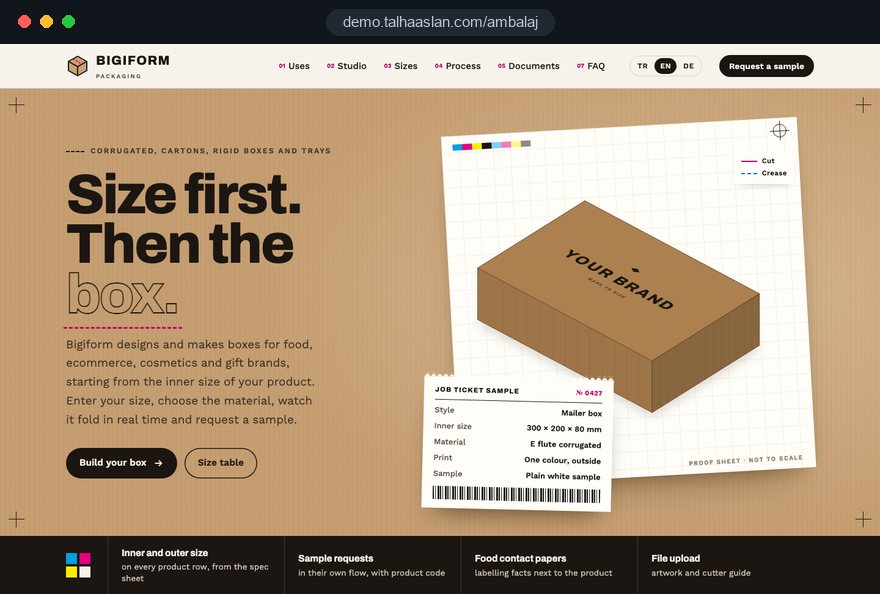
Open the live demoA demo design we built for a fictional brand
In short
A packaging company website groups boxes, cartons and bags by use, states each product's size, material and minimum order quantity, makes it easy to request a sample and shows the relevant documents for food contact items. In the UK, food contact materials not yet in contact with food must carry the words for food contact, a specific use or the glass and fork symbol, plus the responsible business's name and address.
Talha Aslan and teamLast updated:
Why it needs its own approach
Packaging buyers choose a box for their own product: size, material, print and quantity all matter at once. A generic company site answers none of these four questions.
Boxes are listed with a photo and a vague name, without internal size, external size or load. Buyers cannot tell whether their product fits, so they either phone or leave.
Single and double wall board, kraft, folding boxboard and film are mentioned in the same sentence. Buyers cannot learn which material works for courier shipping, chilled storage or the shelf.
Packaging decisions are usually made with a sample in hand, yet the site has no separate sample flow. Requests end up in the general contact form and the size and material get lost.
Food producers ask for a declaration of compliance and the answer goes out by email every time. Under the UK version of the EU framework regulation on food contact materials, materials covered by specific measures must come with a written declaration of compliance, yet the site never says how to get it.
Leaf icons and the word recyclable appear on every product. When the site does not say which material carries how much recycled content, a corporate buyer's supplier check is left with open questions.
With no minimum order quantity on the site, small businesses send requests you cannot serve and large buyers cannot see your capacity. Your sales team spends time filtering out requests that never fit.
Sources: Regulation (EC) No 1935/2004, Article 16 (UK version), legislation.gov.uk
Our approach
We do not structure a packaging site by product type but by what the customer needs: someone looking for food, mailer, cosmetics or gift packaging enters their group, filters by size, compares materials and asks for a sample in one click. Minimum order quantity and lead time appear clearly on every product page.
With a large range, we build a filterable product catalogue; if you want to sell stock boxes in small quantities online, we connect an online shop to the same product records. Bespoke printed work always goes through the quote flow.
Design, development and content sit in one team. Talha Aslan sets the strategy and an experienced team handles delivery. We work remotely and in English with packaging firms abroad, through video calls and written sign off.
Home
Every product page ends with size, material and minimum quantity, and all of them lead into the same sample and quote flow.
The right setup
All three share the same product foundation; the buyer's first question makes the difference.
Food packaging
Food producers ask about compliance first, so the site shows documents and conditions of use next to each product.
Mailer and shipping boxes
Online sellers search for a box by size, so the site answers with a size filter and small quantity options.
Bespoke print
Cosmetics and gift brands decide on looks, so the site explains print and finish options with real examples.
Built for packaging firms
These are the points we decide most often when planning a site with packaging manufacturers.
Internal and external size, board thickness and load where relevant, one row per product, taken from your specification sheets. Buyers enter their product size and filter the boxes that fit.
Corrugated board, kraft, folding boxboard and film options on a short guide page explaining where each is used; product pages link back to it.
Buyers choose size and material and request a sample; the request reaches sales with the product code. Whether samples are free or charged and how fast they ship is stated on the page according to your rules.
The quote form accepts logos, artwork and cutter guides and asks for colours, finish and quantity in the same place, so your studio does not have to chase missing files.
For materials not yet in contact with food, the UK version of the EU framework regulation on food contact materials requires the words for food contact, a specific use or the symbol in Annex II, the responsible business's name and address and traceability labelling. The site shows this next to the product and offers the declaration on request.
Recycled content and recycling facts appear only where you hold evidence. If you sell into the EU, the EU Packaging and Packaging Waste Regulation (PPWR) has applied since 12 August 2026 and aims to make all packaging on the EU market recyclable in an economically viable way by 2030.
Sources: Regulation (EC) No 1935/2004, Article 15 (UK version), legislation.gov.uk · European Commission, Packaging waste: Regulation (EU) 2025/40
Comparison
| Topic | Generic company site | Packaging site |
|---|---|---|
| Product structure | Boxes, bags and labels in one gallery | Groups by use such as food, mailer or cosmetics |
| Size | A photo and small, medium, large | Internal and external size table with a size filter |
| Samples | By phone or the general form | A separate sample request with size and material |
| Food contact | Document questions by email | Labelling facts on the product and a declaration request flow |
| Sustainability | The same green icon on everything | Material and content facts backed by evidence |
| Quotes | Name, phone and message | Quantity, colours, finish and file upload |
Quick check
Must haves: does your site have them?
0 of 6 in place Tick the boxes to see where your site stands.
Added as needed
We choose which of these you need together during the scoping call.
Share your products, minimum quantities and the questions buyers ask most about samples and documents; we will propose a page structure and a written quote.
Process
We define your business, your audience and the site’s one-sentence job: who it sells what to, through which action. Scope and timeline are written from that answer.
The home page and key templates come to you as designs first; no code is written before your approval. We do not like surprises, and we do not cause them.
The approved design becomes fast, secure, maintainable code. You follow progress in the CRM and see every page in a staging environment before launch.
The site goes live with analytics, Search Console and conversion tracking connected; panel training is given, first-year hosting and maintenance included.
Search and speed foundations
Buyers search for a use and a size, such as pizza boxes, 300 x 200 mailer boxes or kraft paper bags, not for your company name. Product groups and size pages are built to answer each of these searches.
Each product page marks up size, material and product code as structured data, so search engines and AI assistants read the product correctly.
Box and print photos are converted to modern formats and compressed, galleries load without blocking the page, and Core Web Vitals are measured before launch.
Sample requests, quote forms, calls and WhatsApp clicks are tracked as conversions from day one, so you can see which product group and which size bring enquiries.
Free tools
Before moving to a new site, test how your product pages look on a phone, how heavy your box photos are and whether replies to sample requests land in spam. You can also create the QR code for the documents page you print on your boxes. The tools are free and need no sign up.
Tech SEO
Test whether a page works well on phones: viewport, font size, tap targets, a mobile screenshot and Core Web Vitals.
Tech SEO
Scan any URL for title, meta description, headings, canonical, indexability and speed signals, and get an SEO score with a clear to-do list.
Image
Convert between JPG, PNG and WebP in one click or in batches; it detects the input format, lets you set quality and a background for transparency, and uploads nothing.
Tech SEO
Generate rich-result JSON-LD for Article, Product, FAQ, Local Business.
Conversion
Turn URLs, WhatsApp, Wi-Fi, vCard and text into a QR code in seconds; download high-res PNG or SVG.
Why do your emails land in spam? Check a domain's SPF, DKIM and DMARC records, find the errors and get a corrected record to copy.
How we work
We do not have a live client project in packaging yet, so we show our approach on a live demo site. The demo is not a client site. You can see our work in other sectors on the references page.
Live demo
For this field we built a one page demo site for a fictional brand, made only to show our approach. You can explore the design, the copy structure and the mobile view live in three languages.
Open the live demoIn the first call we work out which products are bought for food, shipping, cosmetics or gifts, and build the menu around those groups.
Sizes, materials and minimum quantities come from your specification sheets or production lists; we never publish a compliance or environmental claim you cannot document.
We list what information a sample needs, who approves it and how it ships, and build the form in that order.
We track which product group, which size and which documents page bring enquiries, and update pages before trade fairs and busy seasons.
Related pages
Industries
A separate setup for general factory sites built around technical data, certificates and export.
Industries
A capability led site for contract machining shops that quote from drawings.
Industries
The buyer side: a site for roasters selling their coffee online.
Solutions
A filterable product catalogue for firms with hundreds of boxes and sizes.
 How Does Product Filtering Affect Ecommerce Sales? UX and SEORead article
 Product Descriptions for SEO: How to Write Ones That RankRead article
 Lead Form Design for Booking, Quote and Demo Requests: UX Rules That Lift ConversionsRead article
 How to Build a B2B Landing Page That Generates Sales OpportunitiesRead article
FAQ
If your question is not here, write to us; we will send you an answer and a written quote.
Next step
In a free 15 minute call we talk through your product groups, sample process and document questions, then send you a written scope and quote.
In-depth guide
A packaging buyer does not visit your site to admire a box. They arrive with a product, a shipping method and a budget, and they need the box that fits all three. The decision usually passes through three people: the operations lead who checks dimensions, the quality manager who asks for documents and the buyer who negotiates quantity. Your site needs a separate answer for each of them.
This guide walks through the decisions a packaging manufacturer makes, in order, when planning a website: how to write dimensions, how to name box styles, how sample and artwork flows work, where food contact and environmental claims draw legal lines in the UK and the EU, and how to measure which products actually win orders. Every section ends with something you can check on your own site today.
On a packaging site, dimensions sell more than photos do, and the internal size, the space the buyer's product goes into, must come first. External size matters for pallet layouts, shelf space and courier volume pricing; both belong in the same table, in separate columns.
Set one rule for dimensions and apply it to every product:
In the size filter, buyers enter their own product dimensions and the site lists boxes that fit with a few millimeters of clearance. You decide that clearance per product group: tight for cosmetics cartons, wider for mailer boxes that need void fill. One sentence on the page explaining the rule makes buyers trust the result instead of phoning to ask whether their item fits.
Collect the size data before design starts. Specification sheets are often inconsistent; one uses centimeters, another millimeters, a third lists external size first. If those differences are not cleaned up in a single table before launch, the filter returns wrong results and a buyer's trust is gone after the first search.
The names the packaging trade uses internally rarely match how buyers search, so every box style needs two names: the technical name and the plain use name. A procurement manager types "regular slotted container" while an online seller searches for "shipping boxes"; both should land on the same product.
For corrugated boxes, showing the FEFCO style code, the catalog of box styles widely used in Europe (0201 for the regular slotted container, for example), as a small detail on the product card speeds up professional buyers. Next to the code, always add a plain sentence on how the box closes and photos of it open and closed.
Comparison gets easier when every style page presents these four facts in the same order:
That last point builds trust. An honest note such as "not recommended on its own for heavy products or liquids" prevents wrong orders and the returns that follow. Buyers take a supplier more seriously when it tells them what not to buy.
A material page should start from the buyer's scenario rather than a list of technical values: will the product travel by courier, sit in cold storage or stand on a retail shelf. Buyers may not know a flute profile, but they know exactly where and how their product moves.
Build a short guide page that matches scenarios to materials and link to it from every product page. A workable structure looks like this:
Keep grammage, caliper and strength values out of the guide and in the product's technical table. That way the guide stays readable and the table serves the technical reader. If a value has not been tested, leaving the cell empty is more honest than printing an estimate.
Hiding the minimum order quantity only shifts work onto your sales team; every product page should say how quantity and lead time are determined. You do not have to promise a delivery date, but you do need to say which items ship from stock and which go into production.
In packaging, minimum quantity is rarely one number, because plain stock boxes and branded printed boxes follow different logic. Explaining it in three layers works well:
A quantity tier table, with steps such as 1,000, 5,000 and 10,000 units where the unit cost changes, works without showing any prices: you show the steps and the quote form asks which one the buyer wants. Your sales team then answers well matched requests quickly instead of filtering out poor fits.
Write lead time the same way: rather than a fixed day, name the starting point, such as "after artwork approval", so buyers can plan properly. If you do not want to lose small buyers, one sentence pointing them to stock items or online ordering beats ignoring their request.
Packaging decisions are made with a sample in hand, so sample requests must be separate from the general contact form and arrive with a product code. Your sales team then sees in the first message who wants which size, in which material and for what purpose.
A well built sample flow runs through these steps:
That last step is also the basis for measuring what the site contributes to sales. A company that does not know how many samples become orders cannot judge what its sample program costs. While designing the flow, sit down once with sales and answer the question "which requests do we not send samples for"; it sharpens the form fields too.
For printed packaging, the quote form's real job is to receive complete files the first time; every missing file costs days between your prepress team and the buyer. The form should not just accept uploads but explain, right beside the upload field, how each file should be prepared.
A short checklist next to the upload field could read:
State the file size limit on the form and define a transfer route for large files. If the form also asks for number of colors, finish (matte varnish, gloss varnish, foil and so on) and quantity, quoting starts with a single message. Uploaded files belong to the customer's brand, so how long you keep them and who can access them belongs in your privacy notice. Saying that you will send a digital proof and that printing starts only after proof approval also heads off later disputes about color.
For food producers, compliance is the first question, and in Great Britain the UK version of the EU framework regulation on food contact materials sets out what must appear and where. Under Article 15, materials not yet in contact with food must carry the words "for food contact", a specific indication of use or the symbol in Annex II, plus the name and address of the responsible business and traceability labeling.
Under Article 16, materials covered by specific measures must be accompanied by a written declaration of compliance, and supporting documentation must be available to the authorities on demand; publishing the declaration on your website is not required.
The layout we use on site:
Do not write "food safe" on every product without conditions; state the conditions the declaration was issued for. Track document dates in the admin panel so an old declaration never gets attached to a new production run. Confirming with your quality manager which documents apply to you is always the last step before the documents page goes live. Turkish carton makers supplying the EU work under the EU version of the same framework regulation and should confirm the details with their own compliance adviser.
Environmental information is a strong selling point in packaging, but it should go only as far as your evidence. In the UK, the Competition and Markets Authority's Green Claims Code sets six principles: claims must be truthful and accurate, clear and unambiguous, must not omit or hide important information, must make fair and meaningful comparisons, must consider the full life cycle and must be substantiated.
The CMA's guidance on recyclability translates directly to a packaging site:
Your wording also tends to travel: a brand owner may copy your claim onto its own pack and advertising. So build a per product information card with material type, recycled content share and its source, and recycling instructions, and leave the card empty where you hold no evidence.
For a producer shipping boxes into Europe, the website is where compliance questions are asked first. According to the European Commission, the EU Packaging and Packaging Waste Regulation (PPWR) entered into force on 11 February 2025 and has applied since 12 August 2026; it aims to make all packaging on the EU market recyclable in an economically viable way by 2030.
In parallel, the EU Directive on Empowering Consumers for the Green Transition applies to traders from 27 September 2026. In consumer facing communication it bans generic claims such as "green" unless excellent environmental performance is proven, and product claims of neutral or positive climate impact that rely solely on offsetting. Your EU customers will decide what they can print on their own packs based on what you tell them.
On the website, that means:
A language version is more than a translation; it needs the target market's way of writing dimensions and its document vocabulary. We cover the technical side in our guide to a multilingual website.
Most packaging searches combine a use and a size, such as "pizza boxes", "mailer box 300 x 200" or "kraft paper bags". When planning pages for these searches, opening a separate page for every size combination is tempting, but it fills your index with thin, near identical pages.
A healthier architecture has three layers:
One technical detail matters here: Google cannot read the noindex tag on a page blocked in robots.txt. If you want a filter page kept out of the index, it must stay crawlable and carry noindex. Marking up size, material and product code as structured data on product pages also helps search engines read the product correctly. We handle this whole setup as part of our SEO work; for ranges with hundreds of products, our catalog website guide goes further.
A box photo's job is to explain size and construction, not just to look good, so every product needs a photo set shot from the same angles. A box shot from one angle on white cannot tell a 20 centimeter box from a 40 centimeter one.
The photo set we recommend for each product:
That many images can slow a page down. In Google's Core Web Vitals, the "good" threshold for LCP, which measures how quickly the main content loads, is 2.5 seconds or less, and for CLS, which measures layout shift, it is 0.1 or less. Convert photos to modern formats, size them to how they are displayed and load galleries so they never hold up the first view. You can see the difference right away by converting your current photos to WebP with our image converter.
The main result to measure on a packaging site is not visits but sample requests that turn into orders. When the website and the sales process share the same product code, you can see which product group actually brings business.
Track these events separately from day one: sample request, quote with file upload, document request, phone click and WhatsApp click. If every event carries the product code and group, your report produces concrete findings such as "mailer boxes generate samples but few orders". Running analytics tools that need consent only after consent is given, and placing the privacy notice next to each form, are part of this plan.
A QR code printed on the box is a measurement channel too. A code inside the lid or on the outer case label takes customers to the documents page or a reorder form; add a source parameter to the URL of a code made with our QR code generator and reorders from the box show up in your reports. If you decide to sell stock boxes online, an e-commerce setup tied to the same product records shows which sizes sell directly as well.
The same mistakes recur on packaging company websites, and most come from building the site like a brochure instead of a product catalog. Each has a better alternative:
Before starting a packaging company website, checking how ready your own data is matters as much as choosing the right team. With current specification sheets, size lists and documents, a site moves quickly; where they are missing, the data comes first.
Ask any team you are considering:
A live demo site we built for the packaging field is linked on this page; it is not a client site, it shows our approach in concrete form. Work we have delivered in other sectors is in our portfolio, and the full process is described on our web design service page. Scope is driven by the number of products and sizes, online ordering and language versions; you can review packages in the pricing section and request a free initial consultation with your product list to get a written quote.
Start a Project
Thanks {name}, we've received your brief. We usually reply within the same day.
What happens next?