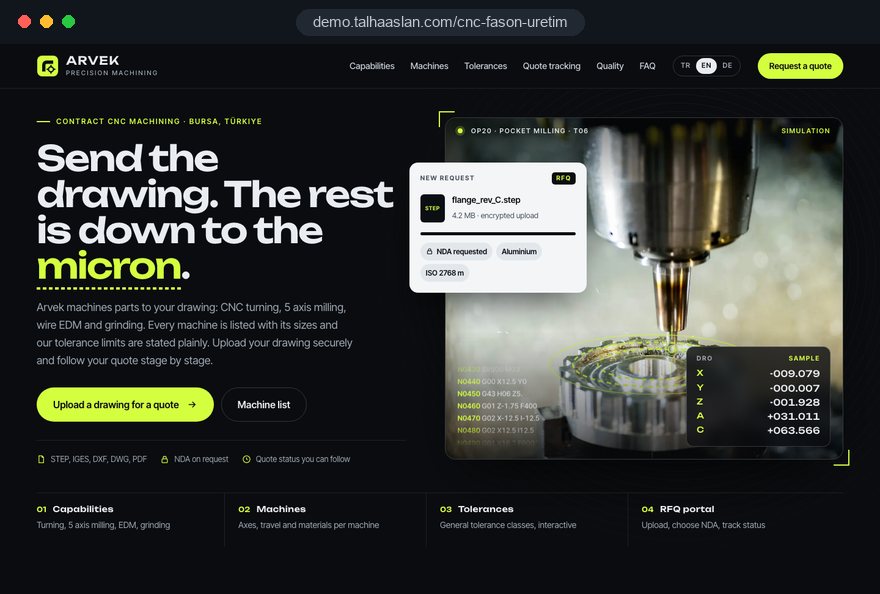
The machine list is one vague line
"State of the art CNC equipment" tells an engineer nothing. Without the number of axes, travels, table size or turning diameter and length, the only way to find out whether a part fits is a phone call.

Your Windows contrast theme is on; colours come from your system.
Your device is set to reduce motion; animations are already off.
Your choices are saved in this browser only.
Industry-specific web design
An engineer looking for a contract machining supplier arrives with a drawing and one question: can this shop make my part? We build CNC machine shop websites around that question, with a machine list, work envelopes, materials and tolerances, and an RFQ flow where drawings are uploaded securely and an NDA can be handled up front. We work with job shops in the UK and elsewhere, and with Turkish shops that take work from European customers.
Open the live demoA demo design we built for a fictional brand
In short
A CNC machine shop website shows the machines, the largest part size, the materials and the tolerances the shop can hold, and turns a customer's drawing into a quote through a secure RFQ form. For a contract machining job shop the goal is not to show products but to let an engineer decide on the site whether the part can be made there. Drawings are confidential, so upload, storage and the NDA step are planned from the start.
Talha Aslan and teamLast updated:
Why it needs its own approach
A job shop sells capability, not a product. Before trusting a shop with a drawing, customers ask about machines, sizes and confidentiality, and a generic template answers none of it.
"State of the art CNC equipment" tells an engineer nothing. Without the number of axes, travels, table size or turning diameter and length, the only way to find out whether a part fits is a phone call.
The site never says whether the shop cuts stainless, aluminium, titanium or plastics, or which tolerance band it holds comfortably. Good fits and poor fits arrive with the same uncertainty.
STEP and PDF files land in different inboxes, large files hit attachment limits, and nobody is sure which revision was quoted. Sales spends time chasing files instead of quoting.
Under the UK Trade Secrets Regulations 2018, information is a trade secret only if reasonable steps have been taken to keep it secret. Customers sending drawings therefore often want to know where files are stored, who sees them and whether an NDA comes first; a site that is silent on this makes them hesitate.
Inspection equipment, inspection reports and first article inspection are not explained, and certificates, where they exist, appear only as logos. The quality team approving suppliers has to ask for everything separately.
After submitting the form, the customer has no idea when a quote will arrive, and the shop does not track which request is at which stage. When the answer is slow, the same drawing goes to other shops too.
Sources: The Trade Secrets (Enforcement, etc.) Regulations 2018, regulation 2, legislation.gov.uk
Our approach
We build a machine shop website in the order an engineer decides: first the process and machine sizes, then the material and tolerance limits, and finally the drawing upload and quote request. That is why every process has its own page, the machine list shows real figures and every page ends in the same RFQ flow.
If you take work from abroad, we set up a multilingual structure together with the capability pages; for a trade fair or ad campaign, a landing page focused on one capability can go live without disturbing the main site. Factories with their own product range are covered on our manufacturer website page.
Design, development and content sit in one team, so file upload, notifications and tracking are not patched on later. Talha Aslan sets the strategy and an experienced team handles delivery. We work remotely and in English with shops abroad, through video calls and written sign off.
Home
Each capability page answers its own search, and all of them lead into the same RFQ flow.
The right setup
All three start from the same foundation; what customers bring to you makes the difference.
Machining job shop
Customers look for a specific process, so the site puts machines and size limits first.
Full-service supplier
Customers want machining, finishing and assembly from one supplier, so the site explains the whole chain.
Prototypes and small batches
Customers need a quick answer for urgent, low volume work, so the site makes quoting speed visible.
Built for machine shops
These are the points machine shops decide on most often when we plan a site together.
For each machine: make and model, number of axes, travels and table size, or turning diameter and length. The data comes from your own machine list; nothing you cannot confirm is filled in by guesswork.
The materials you cut and the tolerance band you hold comfortably, based on your own inspection records. For work outside those limits there is an honest "ask us" route.
STEP, IGES, DWG, DXF and PDF files, quantity, material, finish and required lead time in one form. Files travel over an encrypted connection and are stored in an area only authorised staff can open, never in a public folder.
If the customer wants one, they can download your NDA before the form and upload it signed. We do not write the agreement; your solicitor does. We build the flow and the secure storage around it.
Inspection equipment, inspection reports and first article inspection are explained. Certificates such as ISO 9001 appear only if you hold them, with their scope and expiry date.
Article 32 of the UK GDPR asks controllers to put appropriate technical and organisational measures in place, encryption among them. Retention periods, access rights and the privacy notice for form data are part of the build from day one; the final legal assessment belongs to your company.
Sources: UK GDPR, Article 32 Security of processing, legislation.gov.uk
Comparison
| Topic | Profile on a supplier platform | Your own CNC machine shop website |
|---|---|---|
| Capability content | The fixed fields the platform allows | A page per process with photos and sizes |
| Machine list | A short list or nothing at all | Axes, travels and part size for each machine |
| Drawings and confidentiality | File storage follows the platform's rules | Upload, storage and NDA flow under your control |
| Quote relationship | Requests run through the platform, often alongside competitors | Requests go straight to your sales team |
| Foreign customers | Whatever languages the platform offers | Capability pages in the language of your market |
| Measurement | Profile views | Which capability page brings drawings |
Quick check
Must haves: does your site have them?
0 of 6 in place Tick the boxes to see where your site stands.
Added as needed
We choose which of these you need together during the scoping call.
Share your machines, the materials you cut and what you need from customers before quoting; we will come back with a page structure and a written quote.
Process
We define your business, your audience and the site’s one-sentence job: who it sells what to, through which action. Scope and timeline are written from that answer.
The home page and key templates come to you as designs first; no code is written before your approval. We do not like surprises, and we do not cause them.
The approved design becomes fast, secure, maintainable code. You follow progress in the CRM and see every page in a staging environment before launch.
The site goes live with analytics, Search Console and conversion tracking connected; panel training is given, first-year hosting and maintenance included.
Search and speed foundations
Engineers search for things like 5-axis CNC milling subcontract, stainless turning or a machine shop near a town. A page per process and key material gives each of these searches its own answer.
Company name, address, phone and the processes you offer are marked up so search engines can read them; nothing is marked up that is not on the page.
If you take work from abroad, capability pages are published at their own addresses in the language of the market and linked with hreflang; sizes can be shown in both millimetres and inches.
RFQ submissions, drawing uploads, calls and WhatsApp clicks are tracked as conversions from day one, so you can see which capability page and which country bring drawings.
Free tools
Before planning a new site, check your current one on mobile, its SSL certificate and the email settings that keep your quotes out of spam; there is also a unit converter for millimetres and inches. The tools are free and need no sign up.
Tech SEO
Test whether a page works well on phones: viewport, font size, tap targets, a mobile screenshot and Core Web Vitals.
Tech SEO
Scan any URL for title, meta description, headings, canonical, indexability and speed signals, and get an SEO score with a clear to-do list.
Security
Check an SSL certificate's validity, expiry date, issuer, hostname match, certificate chain and TLS versions in seconds.
Why do your emails land in spam? Check a domain's SPF, DKIM and DMARC records, find the errors and get a corrected record to copy.
Tech SEO
Correct hreflang tags for multilingual sites; x-default automatic.
Calculator
Length, weight, temperature, volume, area and speed; all units in one table.
How we work
We do not have a live client project for a CNC or contract machining shop yet, so we show our approach on a live demo site. The demo is not a client site. You can see our work in other sectors on the references page.
Live demo
For this field we built a one page demo site for a fictional brand, made only to show our approach. You can explore the design, the copy structure and the mobile view live in three languages.
Open the live demoIn the first call we go through your machines, largest part size, materials and tolerance band together; the capability pages come straight from that list.
Before launch we agree in writing where drawings are stored, who can open them and how long they are kept.
We list what your estimator needs besides the drawing, and the RFQ fields come from that list; no field is added without a reason.
We track which capability page, which language and which channel bring drawings, and fix pages that stay empty and forms that are abandoned halfway.
Related pages
Industries
A separate setup for factories with their own product range and datasheets.
Solutions
Capability pages per language for winning machining work abroad.
Solutions
A page focused on one capability for a trade fair or ad campaign.
Solutions
A filterable product list for shops that also sell standard parts.
 Lead Form Design for Booking, Quote and Demo Requests: UX Rules That Lift ConversionsRead article
 Website Data Security for Business Sites: Encryption and Secure Data Handling GuideRead article
 Website CRM Integration: How to Track Form Leads AutomaticallyRead article
 How to Build a GDPR and KVKK Compliant Website: A Business GuideRead article
FAQ
If your question is not here, write to us; we will send you an answer and a written quote.
Next step
In a free 15-minute call, in English, we will go through your machines, the materials you cut and your quoting process, then send a written scope and quote.
In-depth guide
An engineer or buyer looking for a machining supplier usually arrives at your site with one drawing in mind and decides within minutes whether to send it to you or move on to the next shop on the list. This guide walks through the decisions a CNC job shop makes, in order, when building a site that makes that choice easy.
Each section, from building a machine inventory to storing customer drawings, quality pages and hiring machinists, gives you a checklist or a step you can apply to your own project. Manufacturers with their own product range need a different structure; here we focus on shops that machine parts to customer drawings.
The accuracy of a CNC shop website depends on a machine inventory prepared before design starts. Every figure on the site comes from that table; if it is incomplete, pages either stay thin or get filled with guesses, and the contradiction surfaces in the first technical call.
We suggest preparing the inventory with your production lead in this order:
The table is not only for the website; it becomes a shared reference for whoever writes quotes. When sales reads the same table to decide which machine a part goes on, what the site says and what is said on the phone stay consistent.
Customers do not ask about axis travels; they ask whether their part fits, so machine data should be written as a part envelope, meaning the largest size and weight a part can have. Travel and part size are not the same thing: fixtures, tool length and a rotary table make the real limit smaller than the travel.
Short lines under each machine group read better on a phone than long spec sheets. Many buyers in North America work in inches, so show both units; check conversions with a unit converter and always round down, never up.
Add a note for work just outside your limits, for example: "Parts close to these limits? Send the drawing and we will review it with you." That sentence reduces unsuitable requests without losing good jobs that sit on the boundary.
The tolerance you publish should be the band you hold comfortably in production, backed by inspection records, not the tightest result you achieved once. Engineers know the difference; if they send a drawing because of an ambitious number and then see price or lead time change, trust is gone.
We suggest building this page in layers:
Every figure should come from your own inspection records. Where you have no record, "we review this against your drawing" answers the question a quality engineer would ask at the first audit. For heat treated parts, a short note on sequence, meaning which features are machined before and which after hardening, shows a technical reader that you know the process.
The number of capability pages depends on two things together: how customers search and whether you have something genuinely different to say. Searches such as "CNC turning services", "5 axis machining" or "stainless steel machining" come from different needs, but generating a page for every process and material combination produces thin pages that copy each other.
Test whether a topic deserves its own page with these questions:
If the answers are weak, the topic stays as a heading on the main process page. The same test applies to industry pages: a page for aerospace, medical or automotive makes sense only if you meet that industry's documentation and traceability expectations.
We plan internal links and how each page is presented to search engines as part of our technical SEO work; structured data marks up only what is actually written on the page.
The file field is the most critical part of the RFQ form, and most mistakes happen there: accepted formats, size limits, multiple files and revision data need to be decided up front. The general form fields come from your estimators; this section is only about the file itself.
If files are stored under the request number, sales can still find months later which revision was quoted. When requests are tracked in a dashboard or the CRM you already use, we connect files and records through custom software development.
A customer sending a drawing wants to read on your site where the file lives, who can open it and when it is deleted. A short, concrete "how we protect your drawings" block right next to the RFQ form gives that answer and reassures even customers who never ask for an NDA.
That block should cover four points:
In the UK, under the Trade Secrets Regulations 2018, information counts as a trade secret only if reasonable steps have been taken to keep it secret, which is one reason customers ask these questions. Article 32 of the UK GDPR, mirrored in the EU GDPR, requires appropriate technical and organisational measures, encryption among them, for the personal data your form collects.
Your lawyer decides which agreement you need and writes it; we build the flow, storage and notifications. If you handle export controlled drawings, ask your compliance advisor which storage rules apply before launch.
The real reader of your quality page is the customer's quality team, filling in a supplier evaluation before adding you to the approved list. They want to see the process, not logos; building the page in the order they ask questions can shorten long approval threads.
Naming your quality lead with a direct contact at the end lets the customer's quality team talk to you without going through sales. That small detail helps a small shop without certification be taken seriously.
It also helps to collect the answers that supplier questionnaires ask again and again, such as number of shifts, calibration tracking and your corrective action process, into one downloadable supplier information file.
In a job shop, photos are evidence rather than decoration: they prove the machines exist, show how the floor is organized and reveal the surface of a finished part. Stock images provide none of that.
Plan the shoot day with a list: one wide and one close shot of each machine group, the inspection room, material storage, packing before dispatch, and the team at work during a shift. Get written permission for any frame showing a customer's part or drawing; without it, use your own test parts.
The more images you add, the more speed becomes an issue. Google's thresholds for a good experience, measured at the 75th percentile of visits, are LCP (how fast the largest content element loads) of 2.5 seconds or less, INP (how quickly the page responds to interaction) of 200 milliseconds or less, and CLS (how much the layout shifts) of 0.1 or less. In practice:
Before launch, run your key pages through a mobile friendly test to see what a buyer checking your site on a phone between meetings actually sees.
In contract machining a quote rarely happens in one step; a missing tolerance, an unclear finish note or a material question usually means a round of clarification. When the site and the dashboard behind it log that round, nobody asks the same question twice and answers do not get lost in email threads.
We suggest keeping these stages separate in each request record: received, in technical review, waiting for customer input, quote sent, won or lost. Marking the reason for a lost request with a short option (price, lead time, outside capability, no reply) shows within a few months which capability page creates the wrong expectations.
Repeat orders are a separate path and should not be mixed with the new customer form. A customer with production work does not want to upload the drawing again; they want to enter part number, revision and quantity and send. For that:
This split protects the time sales spends on new customers and speeds up work for existing ones.
In many CNC shops the limit on growth is not machines but finding experienced machinists and programmers, so the careers page deserves as much thought as the customer pages. A short listing on a job board leaves out what applicants ask most.
A useful careers page covers:
The application form collects personal data too, so applicants need their own privacy notice and a defined retention period for applications. A careers page can also answer searches such as "CNC machinist jobs" with a town name, which makes it a quiet hiring channel that depends less on job boards.
A good share of contract work comes from nearby: a plant in the same industrial park needing an urgent spare part searches for shops close by first. To appear in that search, your Google Business Profile and your website need to say the same things.
Winning work from abroad needs a different structure: capability pages are published in the language of each target market at their own addresses and linked with hreflang, with every version referencing the others and itself. We explain the details on our multilingual website page.
If you make your own products and also take contract work, see our approach to manufacturer websites, which combines product data with capability content.
The event that matters on a CNC shop website is not a page view but a quote request with a drawing; the rest of your measurement exists to explain where that request came from. Form submissions, file uploads, calls and WhatsApp clicks should be set up as separate conversions from day one.
We set it up in these steps:
For visitors in the European Economic Area, Google requires consent mode for measurement and personalized advertising features, and in the EU non essential tracking must wait for cookie consent. Matching by request number works independently of analytics, so you can still see which page brings orders when some visitors decline.
Watching where people abandon the form matters as well: a visitor stuck at the upload field leaves without sending, however persuasive the page is.
These are the mistakes we see most often on job shop websites; most are easy to avoid before launch.
Use this list as a checklist when content is handed over for the new site; going through it with your shop manager takes no longer than a short meeting.
When choosing a partner for a CNC shop website, the deciding factor is less the agency's design portfolio than how closely it asks about your machine list and quoting process. If those questions come up in the first call, the site is unlikely to end up as a generic corporate template.
Questions worth asking any agency you talk to:
We do not have a live client project in this field yet; we show our approach on a live demo site linked on this page, and the demo is not a client site. You can read how our web design service works and see fixed packages in the pricing section. Prepare your machine list and the information you need from customers to quote, then get in touch through the contact form; in a free 15 minute call we will discuss the right page structure for your shop and prepare a written scope.
Start a Project
Thanks {name}, we've received your brief. We usually reply within the same day.
What happens next?