A coffee roaster sells a product that never stays still. Lots sell out, harvests change, roast profiles get adjusted, yet every customer asks the same three things: what does it taste like, when was it roasted, and how should it be ground for my brewer.
This guide walks through the decisions a roastery owner makes on a website project, in the order the roastery itself works: coffee data, the roast calendar, grinding, subscriptions, brew guides, wholesale, shipping, rules and measurement. Each section gives you something to fill in with your roast log, or a concrete question to put to the agency you are talking to.
01Map your sales channels before any design
Before anyone sketches a layout, write down where your coffee sells, to whom and how often. Online retail, a shop counter and wholesale supply all draw on the same coffee pages, but that mix decides what the home page leads with.
A roastery that sells mostly online puts new coffees and the subscription on the first screen. A cafe that roasts in house needs opening hours, location and click and collect up front. A coffee roaster whose real income comes from cafes and offices should make wholesale the second button on the home page, not a footer link.
- Channel split: sort the last three months of orders into one off retail, repeat buyers and wholesale.
- Product scope: decide now whether the site sells only coffee or also brewers, filter papers, merchandise and gift boxes.
- Fulfillment: list which of courier delivery, local drop off and collection from the roastery you will actually offer.
The choice of e-commerce platform follows from this list, because subscriptions and separate wholesale pricing rule out some platforms early. Ask your agency: does the platform you propose handle recurring billing and customer groups with their own prices?
02Fix the fields every coffee page shows
A coffee page earns its keep when every coffee is described with the same fields in the same order, because only then can a buyer compare. Settling those fields in a spreadsheet before design also tells you exactly what to write each time a new lot lands.
- Origin: country, region, the farm, washing station or cooperative where known, and altitude.
- Plant and process: variety, plus washed, natural, honey or another process.
- Roast: light, medium or dark, and whether it is roasted for filter, espresso or both.
- Tasting notes: no more than three notes, with one plain line on body and acidity.
- Buying details: bag sizes, grind options, the next roast day and stock status.
Write tasting notes in words customers use at home: "apricot, milk chocolate, a little floral" reads faster than a cupping form. Add one usage line such as "holds up well with milk" or "brightest as a pour over", and an undecided buyer has a reason to choose.
For photos, the bag front, a close shot of the beans and a brewed cup are enough, in the same light and angle for every coffee. Run images through an image resizer to their real display size before upload, so the coffee list does not drag on a phone.
03When a lot sells out, keep the page
Selling out of a lot is normal in specialty coffee; deleting the page is the mistake. A deleted page sends visitors from search and shared links to an error and throws away the visibility it built.
It helps to think of each product in two layers. The permanent layer is the origin page, for example "Colombia Huila". The temporary layer is this year's lot. When a new harvest arrives the lot details change and the address stays the same. If a coffee leaves the range for good, the page stays live with a clear "not available" note and points to the closest flavor profile.
- Before the lot runs out, add a "last bags" note and the season you expect the next harvest.
- When stock hits zero, turn the cart button into a "tell me when it is back" signup.
- Add two similar coffees at the top of the page, each with one sentence on why it is similar.
- Rewrite the tasting notes when the new lot arrives; last year's notes would describe a different coffee.
For short campaigns such as a new harvest release or the holiday gift box, sending paid traffic to a dedicated landing page rather than the main shop saves you from rebuilding the navigation every season.
04Roast days, order cutoffs and dispatch dates
Customers should see when their coffee will be roasted and shipped before they pay; without that, the first message after every order is "when will it go out". To show it, the site has to know your production rhythm.
For a coffee roaster that roasts on fixed days, the site works out which roast an order joins based on a cutoff time. Say you roast on Tuesday and Friday with a noon cutoff the day before: an order on Monday morning joins Tuesday's roast, while one on Monday evening waits for Friday. The product page and the cart both state that date plainly.
- Write down your weekly roast days and the order cutoff for each roast.
- Note how many working days you allow between roasting, packing and handing parcels to the courier.
- Ask for a calendar where you can block public holidays, maintenance days and trade show weeks.
- Show "next roast" on the product page and "estimated dispatch" in the cart.
Instead of promising freshness in a number of days, describe your roast and dispatch routine. Customers know what to expect, and a courier delay does not become a broken promise. The roast date printed on the bag and the date on the site should come from the same source.
05Grind choice and helping buyers pick a coffee
Grind belongs inside the order step; a grind request left in the order notes gets missed or misread at the packing table. Name the options after the brewer in the customer's kitchen rather than in technical grind sizes.
- Whole bean: the default, with a short note that it suits anyone who owns a grinder.
- Pour over and filter: medium grind, linked to the filter brew guide.
- French press and cold brew: coarse grind, with a pointer to the steeping times in the guide.
- Moka pot and espresso: fine grind, with a note that home espresso machines usually do better with whole bean ground fresh.
Grinding also creates work in the roastery. Orders should turn into a grind list after each roast, and the chosen grind should print on the bag label, so two grinds of the same coffee never get mixed up.
Once the range grows, do not leave buyers alone with origin names. A three question finder works well: brew method, milk or not, fruity or chocolatey. The result screen should suggest no more than three coffees and give a one line reason for each. Ask your agency: is the finder updated by hand when a coffee is added, or does it read the fields on the coffee pages?
06Subscriptions the customer controls
A subscription removes the need to win a regular drinker back every month; a subscription that is hard to manage loses more trust than a one off order ever could. The real work is letting customers change everything from their own account.
- Selection: one fixed coffee, the roaster's monthly pick, or two coffees in rotation.
- Frequency and size: delivery interval and bag size can be changed before the next shipment.
- Skip and pause: skipping one delivery for a holiday or pausing indefinitely takes a few clicks.
- Cancel: in the same account area, with no extra screens and no phone call required.
- Heads up: a short e-mail before each shipment saying which coffee is coming and when the card will be charged.
Settle two technical points early: whether your payment provider supports stored cards and recurring charges, and what happens when a charge fails. Holding the shipment and sending a link to update the card works better for both sides than quietly cancelling the subscription.
Tie subscription dispatch to your roast calendar. When subscription orders gather on one roast day, production becomes predictable, and the subscription page can say which roast each delivery comes from, which also makes green coffee buying easier to plan.
07Brew guides and the QR code on the bag
Brew guides make the coffee taste right at home, which is what brings buyers back. For that to work, each method needs its own page, and the QR code on the bag must open that page rather than the home page.
Write every guide in the same pattern: equipment, coffee to water ratio, grind size, water temperature, total time and the steps in order. End each guide with two short blocks: what to change if the cup tastes sour or bitter, and which coffees suit this method.
- List the methods your customers actually use, such as V60, Chemex, AeroPress, French press and moka pot, and plan one page each.
- Decide where each bag's code points: the coffee's own page for single origins, the method guide for blends.
- Test the printed code on several phones and on the real bag; a small code on a curved, creased bag may not scan.
- Add a campaign tag to the code's address so scans from the bag show up separately in your reports.
You can create the codes with a QR code generator, but once a code is printed its address should never change. Pointing the code at a short, permanent address you control, rather than at a long page address, keeps old bags working even if the site structure changes later.
08A separate door for cafes and offices
Wholesale customers should not go through the retail cart; cafes, restaurants and offices decide on samples, consistency and support, not on bag sizes. Wholesale therefore gets its own menu item, its own form and, where needed, its own price list.
The wholesale page should cover three things: which espresso blends and filter coffees you supply and in what volumes, how much equipment and barista training support you offer, and how deliveries work. If you would rather not publish terms, outline the framework on the page and share the detail after an application.
- Business details: name, type of venue, location and a contact person.
- Expected volume: a measure the venue knows, such as bags per week, instead of a kilogram band.
- Equipment: the espresso machine and grinder in use.
- Sample request: which blend to sample and the delivery address.
A login for approved accounts speeds things up later: the cafe sees its own prices, repeats the last order in one click and downloads invoices in one place. Until you need that, a form and an order sheet will do. Ask your agency: will wholesale and retail prices live on the same product record?
Make the sample process visible too: how soon you reply, the sample bag size, and whether you visit to dial in the grinder. Pick a reply time you can keep in your busiest weeks.
09Shipping, packaging and bag sizes
Shipping decisions belong with product decisions, because bag sizes, packaging and the shipping fee policy affect one another.
Limit bag sizes to what your production can handle. Five sizes for every coffee multiplies packaging stock and label work; two or three options cover most roasteries. When you set a free shipping threshold, look at how those sizes add up: a threshold that matches two bags nudges customers to try a second coffee.
- Delivery details: which couriers you use, your dispatch days and how tracking numbers are sent.
- Packaging: valve bags, boxes and protection for fragile items, with brewing equipment explained separately.
- Collection: if offered, the hours and how customers hear their order is ready.
If orders from abroad matter to you, first settle which countries you can ship to and which customs and food rules apply there. Only then plan a multilingual website for those markets; adding a language should come after you know you can deliver there, not before.
10Food information, cancellation and registration
Any roaster selling food online must show the label's mandatory information before the purchase is completed. In the UK, Article 14 of the Food Information Regulation as it applies there requires the mandatory information for prepacked food sold at a distance, apart from the date marking, to be available before the purchase is concluded, and all of it at the moment of delivery.
So the label and the product page should draw on one data source. Copying label text into the site by hand every time a lot changes will sooner or later publish two different versions.
- Product page: the mandatory label details in a block that appears before the order button.
- Right to cancel: under regulation 28(3)(a) of the Consumer Contracts Regulations 2013, the right to cancel ends for sealed goods unsuitable for return for health protection or hygiene reasons once they are unsealed after delivery; say plainly in your terms how this applies to opened bags.
- Registration: GOV.UK states that businesses selling, storing or distributing food, including online and from home, must register with their local authority at least 28 days before trading; showing who roasts and where builds trust on the about page.
- Consent: for visitors in the EU, non essential tracking cookies need consent before they load.
If coffee and equipment share a cart, write separate return terms for each; an unopened grinder and an opened bag of coffee are not treated the same way. Elsewhere the rules differ; confirm with your food authority or a food law adviser what applies to you.
11Origin searches, product data and page speed
People looking for coffee often search by origin, process or brew method rather than by brand, and what answers those searches is a well built coffee or guide page, not the home page. Queries such as "Ethiopian coffee for pour over", "natural process coffee beans" or "coffee for moka pot" each deserve a page of their own.
- Origin hubs: if you sell several coffees from one country, a parent page on its regions and processing habits links down to each coffee.
- Product data: each coffee carries structured data with name, image, price and availability; a schema markup generator shows you example code.
- Internal links: guides link to suitable coffees, and each coffee links back to its guide.
- Duplicates: bag sizes and grinds of one coffee are options on one page, not separate pages.
For speed, Google's Core Web Vitals set the bar at the 75th percentile: LCP, which measures how fast the largest content loads, at 2.5 seconds or less; INP, which measures how fast the page responds to a tap, at 200 milliseconds or less; CLS, which measures layout shift, at 0.1 or less. Large bag photos and sliders usually hurt LCP; test on a mid range phone, not a desktop.
All of this sits within our SEO service, but the foundation is a page structure that is right from the start.
12Measure which coffee, which guide, which channel
Looking only at total sales hides which coffees and which content are doing the work. Write the measurement plan before launch, and make it answer the decisions a coffee roaster really makes: which coffee to buy again, which guide to expand, who fills in the wholesale form.
- Purchase events: add to cart, checkout start and purchase, recorded together with the coffee and grind chosen.
- Subscription events: start, skip, pause and cancel tracked separately, with a short reason question on cancel.
- Wholesale form: submissions, sample requests, and which page and channel the visitor came from.
- QR visits: guide pages opened from the bag, tracked separately through the campaign tag.
Cancellation reasons are the most valuable data here. "Arrives too often" tells you the frequency options are too narrow; "the taste changed" tells you lot changes are not being explained well. Both are problems the site itself can fix.
Plan the consent banner and privacy notice as part of the measurement setup. Ask your agency: in the first month after launch, which report will I see, and which question does it answer?
13Common coffee roaster website mistakes
Most mistakes on a coffee roaster website come from the roastery's routine never making it onto the site, not from design. Each of the following can be avoided with a decision at the planning stage.
- Deleting the page of a sold out lot: keep it live with a "not available" note, the expected harvest season and links to similar coffees.
- Leaving grind to the order notes: make grind a required option and print the chosen grind on the bag label automatically.
- Promising freshness in days: publish your roast days, cutoff time and dispatch routine instead.
- A subscription that is hard to cancel: offer skip, pause and cancel in the same account area, with no phone call or e-mail required.
- Sending cafes to the retail cart: build a separate application form, a sample process and a price view for approved accounts.
- Pointing the QR code at the home page: send it to the matching guide or coffee page through a permanent address you control.
Write down which of these six your current site has; that list sets the priorities for the new project, starting with the one behind the question customers message you about most.
14Deciding on the right setup and the next step
The right setup for a coffee roaster starts with the weight of your sales channels and your roast routine; visual style comes after those decisions.
- Prepare a short note splitting sales into one off retail, repeat buyers and wholesale.
- Put your coffees into a table with origin, process, roast level and tasting notes.
- Write down your weekly roast days, cutoff times and dispatch routine.
- Decide whether subscriptions and wholesale go into the first phase or a later one.
- Ask your payment provider about recurring billing support.
You do not have to build everything at once. Coffee pages, grind choice, the roast calendar and the legal information form the core of a first launch; subscriptions and a wholesale login can follow once the first months of sales data are in. What matters is choosing a platform in phase one that can carry that growth.
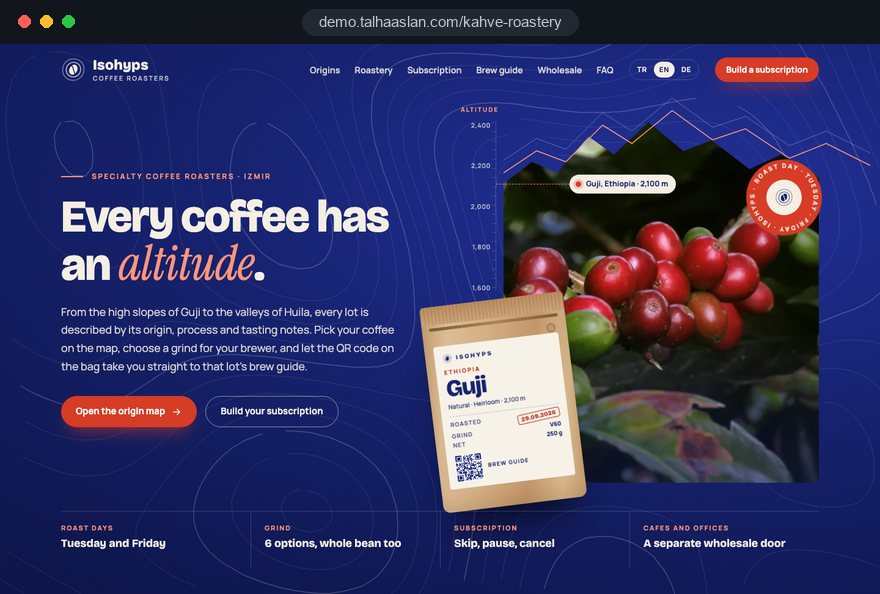
Having design, development and content in one team means coffee pages, cart and wholesale form are built together rather than patched together later. A live demo site showing our approach for coffee roasters is linked on this page, and you can see our work in other sectors on our references page.
To talk through your scope, get in touch; fixed price packages and online purchase are in the pricing section. Bring your table and notes, and we will draw up the written scope together in the first call.