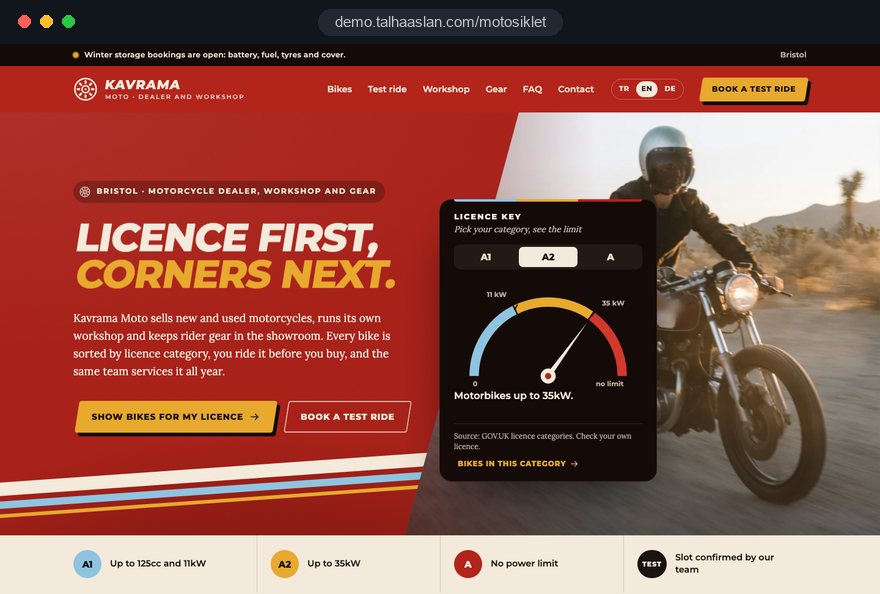
Bikes are not sorted by licence
A new rider cannot see which bikes suit an A1 or A2 licence. When every model sits in one list, they either look at the wrong bike or leave instead of ringing to ask.

Your Windows contrast theme is on; colours come from your system.
Your device is set to reduce motion; animations are already off.
Your choices are saved in this browser only.
Industry-specific web design
A rider's first question is rarely the price; it is which bikes their licence allows and whether they can try one first. We build motorcycle dealer and workshop websites around bikes sorted by A1, A2 and A categories, test ride requests, service bookings and helmet and gear pages, for dealers in the UK and elsewhere working with a remote team.
Open the live demoA demo design we built for a fictional brand
In short
A motorcycle dealer website lists new and used bikes by licence category, takes test ride and service requests with the model attached, and shows helmets, clothing and accessories on their own pages. In the UK, categories A1, A2 and A set engine and power limits, and learners can ride up to 125cc with L plates after compulsory basic training.
Talha Aslan and teamLast updated:
Why it needs its own approach
Riders look for a bike their licence allows, want to ride it first, buy their gear from the same place and come back for servicing every season. A car dealer template meets none of those needs together.
A new rider cannot see which bikes suit an A1 or A2 licence. When every model sits in one list, they either look at the wrong bike or leave instead of ringing to ask.
Most riders want to try a bike before buying. Without a proper request route, test ride enquiries get lost in messages, and the model, the day and the rider's licence category all have to be asked again.
The dealer runs a workshop, but the site only sells. Riders looking for a service, tyres, a chain and sprocket kit or winter storage cannot see which makes you work on or how to book in.
Helmets, jackets, gloves and accessories sell in the showroom but not online. Someone who has just bought a bike researches gear elsewhere and the dealer misses the natural next sale.
Learners on CBT can ride up to 125cc with L plates, and the certificate lasts two years. If the site never explains this, the 125cc range does not reach the riders it is meant for.
Spring brings new models and test rides, autumn brings servicing and storage. When the home page stays the same all year, the site stops answering what riders need right now.
Sources: GOV.UK, Driving licence categories (AM, A1, A2 and A) · GOV.UK, Motorcycle and moped training (CBT)
Our approach
We build a motorcycle site in the order riders decide: first they see the bikes their licence allows, then they read the specification and look at the photos, and finally they ask to ride that model. That is why every bike shows its licence category, engine size and power in the same place and the same layout.
If you run a workshop, servicing, tyres, chains and winter storage each get their own page; riders book in with their registration and model so the workshop can plan before the bike arrives. If you want to sell gear online, an e-commerce setup can be added to the same site; if not, a stock enquiry is enough.
Design, development and content sit in one team, so the model template, request forms and tracking are not patched on later. Talha Aslan sets the strategy and an experienced team handles delivery. We work remotely and in English with dealers abroad.
Home
Each model page shows the licence category, the test ride request and matching gear together; workshop pages bring riders back after the sale.
The right setup
All three start from the same model and enquiry foundation; what you sell, the work you take on and your riders' experience make the difference.
Franchise
Riders see the model on the manufacturer's site, then look for a nearby dealer; your site shows stock, test rides and servicing.
Used and scooters
Stock turns quickly; mileage, service history and clear listing details build trust.
Workshop
Riders look for servicing, repairs or season prep; the site explains the work, the makes and how to book in.
Built for motorcycle dealers
These are the points that come up most often when planning a site for a motorcycle dealer or workshop.
GOV.UK defines A1 as light motorbikes up to 125cc and 11kW, A2 as motorbikes up to 35kW, and A as anything above. Every model page carries this category, taken from the manufacturer's specification.
After CBT, learners can ride a moped from 16 or a 125cc, 11kW motorcycle from 17 with L plates, and the certificate is valid for two years. A short guide explains this and leads to your 125cc range.
New and used bikes are filtered by make, type, engine size, power and licence category; each model shows its specification, colours and photos in the same layout.
The form on the model page asks for the rider's licence category, preferred day and contact details; the request reaches the sales team with the model's name, and your team confirms the slot.
Riders book in with their registration, model and the job they need; servicing, tyres, chains and winter storage each have their own page, and season reminders go only to riders who opted in.
Helmets, clothing and accessories get their own pages, linked from the model pages they suit; you choose whether they are sold online or shown with a stock enquiry.
Sources: GOV.UK, Driving licence categories: AM, A1, A2 and A · GOV.UK, Motorcycle and moped training (CBT): what you can ride after CBT and how long it lasts
Comparison
| Topic | Generic business template | Site built for a motorcycle dealer |
|---|---|---|
| Bikes | Photos in one long list | Filters by licence category, engine size and power |
| Licence information | Missing or asked by phone | A1, A2 or A shown on every model page |
| Test rides | A general contact form | A test ride request naming the model |
| Workshop | One line saying we also service bikes | Pages by type of job and booking by registration |
| Rider gear | Not on the site | Helmet, clothing and accessory pages or online sales |
| Measurement | Visitor numbers | Which model brings test rides and service bookings |
Quick check
Must haves: does your site have them?
0 of 6 in place Tick the boxes to see where your site stands.
Added as needed
We choose which of these you need together during the scoping call.
Tell us which makes you sell, whether you deal in used bikes and how big your workshop and gear side are; we will come back with a site structure and a written quote.
Process
We define your business, your audience and the site’s one-sentence job: who it sells what to, through which action. Scope and timeline are written from that answer.
The home page and key templates come to you as designs first; no code is written before your approval. We do not like surprises, and we do not cause them.
The approved design becomes fast, secure, maintainable code. You follow progress in the CRM and see every page in a staging environment before launch.
The site goes live with analytics, Search Console and conversion tracking connected; panel training is given, first-year hosting and maintenance included.
Search and speed foundations
Riders do not only search for your dealership's name; they search for a model, for 125cc bikes or for what they can ride on an A2 licence. Model pages and the licence guide are built to answer these searches separately.
Model pages carry product details and workshop pages carry service and business details in a form search engines can read; nothing is marked up that is not on the page.
Model pages can carry close-up photos and riding videos, so images are resized and converted to modern formats on upload and videos load without slowing the page.
Test ride requests, service bookings, calls and WhatsApp clicks are tracked as conversions from day one, so you can see which model and which seasonal campaign bring enquiries.
Free tools
Before planning a new site, see how the current one opens on a phone, how heavy your bike photos are and how it looks in search, and make a QR code for the bikes on your showroom floor. The tools are free and need no sign up.
Tech SEO
Test whether a page works well on phones: viewport, font size, tap targets, a mobile screenshot and Core Web Vitals.
Tech SEO
Scan any URL for title, meta description, headings, canonical, indexability and speed signals, and get an SEO score with a clear to-do list.
Image
Convert between JPG, PNG and WebP in one click or in batches; it detects the input format, lets you set quality and a background for transparency, and uploads nothing.
Tech SEO
Generate rich-result JSON-LD for Article, Product, FAQ, Local Business.
Conversion
Create a wa.me link with a preset message + embeddable button code.
Conversion
Turn URLs, WhatsApp, Wi-Fi, vCard and text into a QR code in seconds; download high-res PNG or SVG.
How we work
We do not have a live client project for a motorcycle dealer yet, so we show our approach on a live demo site. The demo is not a client site. You can see our work in other sectors on the references page.
Live demo
For this field we built a one page demo site for a fictional brand, made only to show our approach. You can explore the design, the copy structure and the mobile view live in three languages.
Open the live demoIn the first call we talk about how much of your business is sales and how much is workshop, and how that shifts with the season, then shape the sitemap around it.
Licence categories on model pages come from the manufacturer's specification and the official definitions; a bike we cannot place with certainty stays unclassified.
Mileage, service history and condition of used bikes come only from your documents; we do not publish a claim without something behind it.
We track which model, test ride and workshop job bring enquiries and update the home page and campaigns as the season changes.
Related pages
Industries
For dealers selling cars instead of bikes: stock and inspection focused structure.
Industries
For garages servicing and repairing cars: job and make pages.
Industries
For schools training riders for A1, A2 and A licences.
 Lead Form Design for Booking, Quote and Demo Requests: UX Rules That Lift ConversionsRead article
 How Website Video Affects Conversion Rate: When It Helps, When It HurtsRead article
 What Makes a Great Ecommerce Product Page? A Guide to Product Pages That SellRead article
 How to Do Google Maps SEO: A Guide to Ranking Your Business Higher on the MapRead article
FAQ
If your question is not here, write to us; we will send you an answer and a written quote.
Next step
In a free 15-minute call, in English, we will go through the bikes you sell, your workshop and gear side and how riders reach you, then send a written scope and quote.
In-depth guide
A motorcycle dealer website is not a smaller version of a car dealer site. A rider first asks which bikes their licence allows, then whether the bike fits their height and the way they ride; after that they want to try it, buy the right gear and come back every season for servicing. This guide turns that order into decisions you can make one by one while planning the site.
It is drawn from the decision points we work through when planning motorcycle sales and workshop sites. There are no invented figures or promised results; every rule we mention comes from the official source, and every section ends in something you can check, decide or ask an agency.
The menu of a motorcycle site should reflect where the business earns its money, so the first decision is not design but the weight of sales, workshop and gear. A franchise selling new bikes and an independent workshop cannot share the same home page. If much of your turnover comes from servicing, the service booking belongs on the first screen.
Bring answers to these questions to the first meeting:
The answers set the menu order. A sales led dealer runs "Bikes, Test rides, Workshop, Gear"; a workshop led business puts servicing first and keeps sales to a single stock page.
The licence label on a bike tells a rider what they may legally ride, so it has to come from specification data, not a guess. GOV.UK defines category A1 as light motorbikes up to 125cc with a power output up to 11kW and a power to weight ratio of no more than 0.1kW per kg. Category A2 covers motorbikes up to 35kW with a ratio of no more than 0.2kW per kg, and the bike must not be derived from a vehicle of more than double its power. Category A covers anything above.
Two practical points follow. Engine size alone does not decide the label, because a light bike can exceed the ratio. And a restricted version of a larger bike only fits A2 if the original is no more than twice as powerful. Every model record should therefore hold:
The admin panel can calculate the ratio and suggest a category, but a person compares it with the specification sheet before it goes live. A restricted version gets its own record with its own figures. A bike you cannot place with certainty stays unlabeled with a note asking riders to check with the sales team, and every model page reminds riders to confirm what their own licence allows.
Many people who walk into a showroom for a 125cc or a scooter are learners, and one clear guide page that answers their questions with the source saves your sales team repeating the same explanation every day. GOV.UK states that after compulsory basic training (CBT) a learner can ride a moped from 16, or a motorcycle up to 125cc and 11kW from 17, with L plates (L or D plates in Wales). The full moped or motorcycle test has to be passed within two years, or the rider must take CBT again or stop riding.
We suggest building the guide page in this order:
Explaining how lessons work is a riding school's job, covered on our page for driving and riding schools.
A car buyer reads the equipment list; a motorcycle buyer first wants to know whether the bike fits their body and their riding, so the model page should answer that on the first screen. A shorter rider who cannot find the seat height may like the bike and still never book a test ride. Put a summary box of the figures riders decide on above the specification table.
Apply the same thinking to photos. Alongside the studio shots, a side photo of a rider sitting on the bike shows how their feet reach the ground and answers half of the "will it fit me" question.
Ask your agency one question: "When we add a new model, are the summary box fields required, or can they be left empty?" If they are optional, within a few months half the model pages will be live with gaps.
Test rides are limited by the number of demo bikes and your team's time, so treat them as requests that your team confirms rather than as an open calendar. The form collects the request; your team confirms the day and time.
Step four is the one most dealers skip. If you lend helmets to riders without their own, say so. Agree the insurance and liability terms with your insurer and add them to the confirmation; the site does not need legal commentary, only your own terms stated clearly.
Scooter and 125cc buyers usually come with a need rather than a passion: getting to work, crossing town, or riding for a job. Their questions are different, so do not leave them to wander among the big bikes; give them their own entry in the menu and on the home page.
That section should bring these points forward:
Pay attention to riders who will use the bike for work. Licence and insurance questions for business use are different from those for private riding, so place one sentence above the business form asking buyers to check that their licence and insurance cover the use they have in mind.
The visual language can change here too. Instead of performance shots, scooter pages work better with everyday scenes: parking in town, a helmet going under the seat, rain gear going on. Add "commuting" and "electric" to the filter.
A used motorcycle listing has two jobs: give the rider a clear, comparable picture of the bike's condition, and make sure every claim can be backed by a document. There is rarely an independent inspection report for a used bike, so trust comes from a fixed checklist that you apply to every listing.
A field without evidence stays empty; phrases like "well looked after" without anything behind them are not published. Your trading name and contact details appear on every listing automatically, entered once in the admin panel. Consumer rules for selling used vehicles differ between markets, so once the template is built, have your legal adviser confirm that the fields cover your obligations.
When a bike sells, marking it as sold takes the listing down at the same moment, and its address redirects to the list for the same model or type.
Helmets, jackets, gloves and boots are the natural next sale after a bike, so build the gear section as a guide that starts from the bike and the rider rather than as a brand catalog. Someone who has just bought a bike wonders what to wear on it, not which brands you stock.
Decide these points while planning the gear section:
If you sell online, explain size exchanges and returns on a clear page; exchanges are common with riding gear, and unclear terms stop orders. Stock, sizes and colors can be managed through an e-commerce setup on the same site; if your stock data does not match the showroom system, solve that before selling starts.
Motorcycle workshop work follows its own rhythm: scheduled services follow mileage, tyres and chains follow use, and winter storage and spring preparation follow the calendar. If the booking form recognizes these job types, the workshop can plan parts and time before the bike arrives.
We suggest these fields:
Each job type deserves its own page: what is done, a general idea of how long the bike may stay, and which makes you work on. A workshop that services other makes says so plainly, but does not use brand names in a way that suggests it is an authorized dealer.
Service reminders need their own consent, separate from the booking. Your privacy notice must explain that contact details will be used for reminders, and the consent box should be unticked by default. If you use an online booking tool run by a third party, check what data it stores and where before you connect it.
Motorcycle demand shifts clearly with the season, so the home page and featured content should rotate on a written plan rather than being patched at the last minute. Write the year's content calendar at the start and name the person responsible for it.
Two or three showcase areas on the home page that can be changed from the admin panel are enough for this cycle; you do not need a designer every season.
Seasonal content also earns search traffic. Pages that answer "how to store a motorcycle for winter" or "what to check before the first ride of spring" are searched again at the same time every year. Link each one to the service booking form.
Motorcycle model pages carry close photos, color options and riding videos, which makes them the heaviest pages on the site; measure their speed on a phone, not a desktop. Google assesses Core Web Vitals at the 75th percentile of visits, and its "good" thresholds are:
In practice the main photo loads first and the gallery follows as the rider scrolls. Color options start as small previews instead of downloading a full size photo for each color. The riding video loads when the rider taps play, not when the page opens, and starts muted.
Manufacturer press photos are often very large files. If your current site does not convert images on upload, try a few in our image converter and see how much lighter they become. Before launch, ask the agency for the phone results of a fully populated model page; a good score on an empty test page proves nothing. You can check how your current site behaves on a phone today with the mobile friendly test.
The point of measurement is not counting visitors but seeing which model brings test rides, which workshop job brings bookings and which seasonal page brings enquiries. Set up the test ride form, the service booking, the call button and the WhatsApp button as separate conversions from day one, each carrying the model or job type.
Once a month, look at these questions:
For the last question, place a QR code next to each bike on the floor that opens that model's page with its source tagged; you can make one now with the QR code generator.
For local search, Google's Business Profile guidelines require the business name to match the real world name, without added keywords, and the name, address and phone number should match the site exactly. Where your market requires it, cookie consent must be in place before non essential tracking runs. If you want search visibility planned across the whole site, see what our SEO service covers.
These habits turn a motorcycle dealer site into dead weight within a few months. Each comes with what to do instead.
What these mistakes share is a site run apart from the daily work of the showroom and workshop.
When choosing an agency for a motorcycle dealer site, ask how they will manage model data and enquiries before you look at design samples.
Ask for clear answers to these questions:
We do not yet have a live client project for a motorcycle dealer, so we show our approach on a live demo site linked on this page; the demo is not a client site. You can see our work in other sectors in our references, and how we build sites in our web design service.
Fixed scope packages are listed in the pricing section. Tell us which makes you sell, whether you deal in used bikes and how large your workshop and gear side are, and we will come back with a suitable structure and a written quote; just get in touch with us.
Start a Project
Thanks {name}, we've received your brief. We usually reply within the same day.
What happens next?