For a driving school, the website is the front desk that never closes. When a learner driver checks it on a phone late in the evening and finds which licence they need, how lessons are paid for, who would teach them and roughly when they could start, the next morning's call is no longer a request for information. It is a request for a first lesson.
In this guide, we at Talha Aslan and team walk through the decisions a driving school owner makes, in order, when planning a new site: the question list, licence pages, packages, availability, instructor profiles, the enquiry form and follow up, pupil photos, local search, speed, measurement, common mistakes and choosing a partner. Each section ends in something you can do with your instructors this week.
01Start from the questions learners really ask
The content of a driving school website should be decided by the questions your office and instructors answer every day, not by a designer's template. When the sitemap grows from those questions, learners find answers in one tap and your instructors stop repeating the same reply between lessons.
You can build the list in two weeks:
- Log every question: Calls, WhatsApp messages and questions asked in the car go into one shared sheet, tagged by licence type.
- Group them: Sort them under licence, packages, availability, instructors, tests and vehicles, and count the repeats.
- Rank them: The five most frequent questions must be answered no more than one tap from the home page.
- Assign an owner: Note who knows each answer; anything about rules or instructor status is approved by the school owner.
- Mark what changes: Flag answers that change every season, such as start dates, so they become fields your team updates in the admin panel.
This sheet replaces a long brief in the first call with an agency. It often corrects assumptions, too. An owner may expect price to dominate, while the log shows learners mostly asking whether an automatic car is free on Saturdays or whether pick up from college is possible.
Repeat the exercise with enrolled pupils. Their questions differ: test routes, what happens on test day, how a failed attempt is followed up. Those answers belong in a pupil area or a test guide, not on the home page.
02What every licence category page should contain
Each licence page should answer every question of the learner searching for that licence, on one page and in the same order. Using the same skeleton for car, motorcycle and HGV pages makes them easy to compare and quick for your team to update.
- Scope: Which vehicles the licence covers in plain words, with edge cases such as towing a trailer in a separate box.
- Who it suits: Typical learners for this licence, the minimum age and any requirements, worded from a source the owner has checked.
- How lessons work: Lesson length, how progress is planned, manual or automatic options and when lessons take place.
- Test stages: Theory test, practical test and what happens after a fail, without promising any date.
- Vehicles used: The car, bike or truck pupils train in, with gear type stated clearly.
- Questions and actions: Three to five questions specific to the licence, then two clear buttons to packages and the enquiry form.
Keep rules that come from regulation in one shared content block rather than typing them into each page. When a rule changes, your team updates one field and every licence page shows the same current wording, so the motorcycle page never contradicts the car page.
03Manual, automatic and routes from a current licence
Gear type and current licence are the two filters learners use before anything else, so the site should let them choose a route rather than read every page. A nervous adult who wants automatic lessons and a van driver moving towards an HGV licence need very different paths.
For car learners, separate manual and automatic clearly. If automatic cars are fewer in your fleet, say so and explain the effect on availability; hiding it only moves the disappointment to the first call. A short paragraph on what an automatic licence allows you to drive, written from an official source, prevents a common misunderstanding.
For motorcycle and HGV schools, build a route page:
- Current licence first: The learner selects the licence they hold, then the one they want; the steps for that move appear.
- Career learners: HGV and bus routes explain which parts of training run on weekdays, so learners can plan time off work.
- Employer requests: A separate form for companies sending several drivers, with the response time you commit to.
- Unclear cases: Situations such as a licence from another country lead to "talk to us" instead of a guess.
Every row on the route page should rest on a written source the owner has checked. The page is a readable version of that table, not legal advice.
04Presenting lesson packages and payment terms clearly
Learners compare packages before they phone, so the packages page should let them see what each option includes and how payment works without a call. Single lessons, block bookings and intensive courses belong side by side, described in the same terms.
Use these criteria when planning the page:
- Same structure for each option: Number and length of lessons, what is included, who it suits and how it is paid.
- Payment terms: Deposit, paying per lesson or per block, and what happens to unused lessons if a pupil stops.
- Cancellation terms: Your notice period for cancelled lessons, written in one plain sentence and repeated at booking.
- What is not included: Test fees paid to the official service and the cost of using the school car on test day, if separate.
- Intensive courses: What a learner must have done before starting, and a clear note that the test date is not in your control.
Your team should enter the figures and terms in the admin panel, so a change before the summer rush never waits on the agency. Publish the page as real text, not as an image of a flyer; a picture cannot be read on a small screen, by search engines or by a screen reader.
05Showing availability without promising test dates
Availability is the most honest answer to "when could I start", and it must separate what your school controls from what it does not. You control start dates and instructors' diaries; practical and theory tests are booked through the official GOV.UK service, so the site explains the steps and links there.
Make the difference visible in the calendar. Confirmed start dates and free instructor slots appear in one colour; general guidance about the test stage sits in a separate block with no dates attached. A learner can plan around that without your school taking responsibility for a date it cannot set.
- Availability card: Licence, gear type, area, days and times, and whether new pupils are being taken.
- Waiting list note: If an instructor is full, say so and offer a waiting list rather than an empty form.
- Route timeline: The order of stages from first lesson to practical test and what each stage depends on.
- Last updated: A date on the calendar so learners know how fresh it is.
A calendar on the site beats a social media post because it stays at one address. A post disappears in the feed; a calendar page can be shared with a parent, found in search and updated in place. New intakes announced on social media should point to this page, not replace it.
06Instructor profiles that state status plainly
Learners want to know who will sit next to them, and a clear profile is the most direct way to earn that trust before the first lesson. It also answers a question many learners ask: is this instructor fully qualified?
Under section 123 of the Road Traffic Act 1988, paid instruction in driving a car may only be given by someone on the approved instructors register or holding a current trainee licence, and the certificate or licence must be shown in the car. A site that blurs the two invites questions, so each profile should state the instructor's status in plain words.
With each instructor's agreement, a profile can include:
- Name and photo: A friendly, recent photo taken for the site, not a cropped group shot.
- Status: Approved driving instructor or trainee, worded as the owner approves.
- Licences and gear: Which licences they teach and whether they teach in a manual or automatic car.
- Areas and times: The areas they cover for pick up and the days they usually teach.
- Approach: Two sentences on how they work with nervous learners, which helps more than a long biography.
Profiles also cut calls. The learner who wants a calm instructor for automatic lessons in the evening can find one on the site and ask for that person by name.
07Which fields the enquiry form should ask for
The enquiry form exists to call the learner back and match them with the right licence and instructor, so it should ask for nothing more than that. A short form converts better and leaves you with less personal data to protect.
- Name and phone: Enough for a call back; e-mail can be optional.
- Licence type: A dropdown, including an "I am not sure" option.
- Gear preference: Manual, automatic or undecided, because it decides which instructor can help.
- Area and times: Pick up area and preferred days, which match the learner to a diary.
- Experience so far: A single choice between complete beginner, some lessons and test booked.
Leave out date of birth, licence number and health details; if they are needed, they are handled later in person. Place a privacy notice next to the form, visible before the send button, and say how long enquiries are kept.
Many learners are under 18, so write the form and the notice in language a parent would accept. A parent often fills in the form for their child; an optional field for the parent's name and number avoids a confused first call.
After sending, show a useful next step instead of a plain thank you: the packages link, what to bring to the first lesson and when you will call back.
08The follow up flow from enquiry to first lesson
Collecting enquiries is half the job; the difference is made by how fast and in what order they are followed up. If form submissions, WhatsApp messages and calls to an instructor's mobile do not land in one list, nobody knows who is waiting or who has gone to another driving school.
- Instant reply: When the form is sent, the learner receives a message with packages and what happens next.
- One list: Every enquiry lands in one list with its source: form, WhatsApp, call or campaign.
- Call back: A named person calls, confirms licence, gear and area, and matches the learner to an instructor.
- Booking: The first lesson is booked and confirmed in writing, with the cancellation terms.
- Close or note: The enquiry is closed when the lesson happens; if it does not, the reason is noted.
If you want enrolled pupils to pick their own lesson slots, an online booking system can follow this flow. Instructors' free slots are kept in the system, pupils choose, and your team keeps the final say over the diary. For most schools, getting the enquiry list right first and adding slot selection later is the safer order.
09Pupil photos, reviews and recorded consent
Pass photos are popular on driving school pages, but they should only go online with the pupil's agreement, and for under 18s with a parent's agreement as well. Plan the gallery around recorded consent rather than posting first and asking later.
A simple process keeps this manageable:
- Written agreement: A short consent form on a tablet or phone after the test, stating where the photo will appear.
- First names only: Surnames stay off by default; no test centre details next to a face.
- Easy removal: A clear way to ask for a photo to be taken down, handled within days.
- Alternatives: Training cars, the classroom and instructors make a strong gallery without any pupil at all.
Reviews deserve the same care. Show Google reviews on the site only in the form Google allows, and reply to reviews politely without repeating a pupil's name or test result. Check your privacy notice with your adviser so it covers images and reviews; data protection rules in the UK and the EU generally expect a clear lawful basis and an easy way to withdraw.
10Appearing in local searches and on the map
Learners choose a driving school largely by distance and pick up area, so searches with a town name, map results and the Google Business Profile matter as much as the site itself.
- Profile name: Use the name on your cars and signs; Google's guidelines do not allow added keywords such as "cheap lessons" in the name.
- Service area: If you teach from pupils' homes rather than an office, set service areas and hide the address, which Google allows for such businesses.
- Consistent details: Name, phone and address are written identically on the site, the profile and directories.
- Area pages: Only for areas you really cover, each with real detail such as pick up points and local test routes, not a copied paragraph with a new town name.
- Structured data: School name, phone, hours and licences are marked up so search engines can read them.
Licence pages answer searches like "automatic driving lessons" and "intensive driving course", while the profile and area pages answer "driving school near me". We explain how we handle this work on our SEO services page.
11Mobile speed and readability on small screens
Most learners arrive on a phone, often from social media or a map, so a driving school site should be designed for small screens first and its speed measured before launch. Google's Core Web Vitals give a shared yardstick.
- LCP: Measures how fast the largest content on the page loads; 2.5 seconds or less counts as good.
- INP: Measures how quickly the page responds to a tap; 200 milliseconds or less counts as good.
- CLS: Measures how much the layout shifts while loading; 0.1 or less counts as good.
These thresholds apply at the 75th percentile of visits. On driving school sites the usual culprits are an autoplaying promo video on the home page, uncompressed photos of cars and embedded social media feeds on every page.
Readability matters as much as speed. The packages page and calendar must not need sideways scrolling, call and WhatsApp buttons sit where a thumb reaches them, and text is readable without zooming. Test on a mid range phone over mobile data, which is how learners actually browse. You can check your current site in minutes with our free mobile friendly test.
12Measuring which licence and campaign brings pupils
Measurement is not about counting visitors; it shows which licence and which channel bring real enquiries. Without it, ad budgets and seasonal campaigns are run on guesswork.
From day one, record three events as conversions: an enquiry form sent, a tap on the call button and a tap on WhatsApp. Record the licence page each one came from. That is how you notice a concrete problem, such as a motorcycle page with plenty of visits and few enquiries. Where consent is required, tracking runs only after the visitor agrees.
- Seasonal campaigns: A summer intensive course or the start of the motorcycle season gets its own single goal campaign landing page without changing the main site.
- Search ads: Ad groups split by licence and gear type point to the matching page; our Google Ads management page explains how we run them.
- Cars and print: Roof signs, car stickers and flyers carry a QR code with its own source tag; you can make one with our free QR code generator.
- Season review: At the end of each season, licence, channel and enquiries that became booked lessons are reviewed in one table.
Add booked lessons to the picture. Comparing enquiries on the site with first lessons that actually took place shows which channel really fills diaries.
13Common mistakes on driving school websites
Most mistakes we see on driving school sites come from not deciding upfront who updates what and how often, rather than from design. These six are the most frequent, each with a better alternative:
- Packages as an image: A flyer photo cannot be read on a phone or found in search; publish packages as real text your team updates.
- Hinting at test dates: A date you cannot keep damages trust; explain the stages, link to the official booking service and show only your own start dates.
- Every licence on one page: Learners cannot find their answer and search engines cannot match the page to the query; give each licence its own page with the same skeleton.
- Vague instructor status: A profile that does not say approved or trainee raises doubt; state each instructor's status plainly.
- Pass photos without a process: Posting first and asking later creates risk; use recorded consent, first names only and easy removal.
- Scattered enquiries: Inbox, WhatsApp and instructors' phones held separately mean learners are forgotten; collect every enquiry with its source in one list.
All six can be caught with a short checklist before launch. Go through it line by line with your agency before you accept the site.
14Choosing a partner and the next step
The right web team for a driving school is the one that asks about your licences, packages and instructors' diaries in the first call, not about colours. Put these questions to every agency you talk to and compare the answers:
- Can our team update packages, start dates and instructor availability without asking you?
- How will form, call and WhatsApp enquiries be collected in one list with their source?
- Will instructor status, terms and images be reviewed before launch?
- Will Core Web Vitals be measured before launch and reported to us?
- Will we see from day one which licence and which campaign brings enquiries?
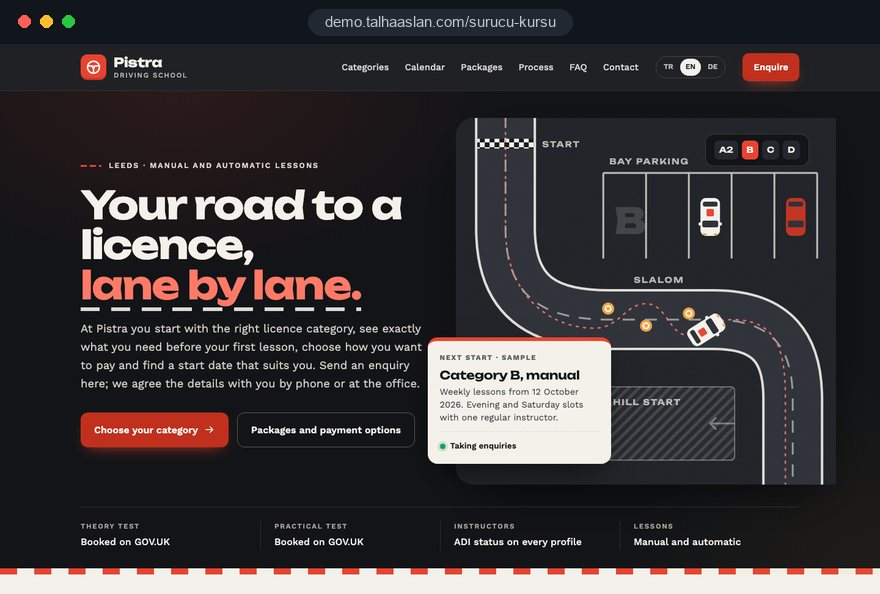
We do not have a live client project in this field yet; you can see our approach on the live driving school demo linked on this page. Design, development and content sit in one team in our web design service, and you can see fixed price packages in the pricing section.
For a plan built around your driving school, send us the licences you teach, your packages and how your instructors' diaries work. Use the contact page to book a short call, and we will put the page structure and a written scope together with you.