Products reduced to brand logos
The site shows the logos of the brands you stock, but not which product comes in which size, finish or grade. A tradesperson who cannot find the product does not call; they open another merchant's page.

Your Windows contrast theme is on; colours come from your system.
Your device is set to reduce motion; animations are already off.
Your choices are saved in this browser only.
Industry-specific web design
Tradespeople, contractors and site managers usually look up building materials on a phone, often from site: they want the size, the data sheet, when it can reach site and where the nearest stockist is. We build building materials websites around searchable product pages, data sheets, delivery areas and a quote basket that sends the whole materials list in one go, for merchants and brands in the UK and elsewhere working with a remote team, and for Turkish producers that need a proper English site.
Open the live demoA demo design we built for a fictional brand
In short
A building materials website shows each product on its own page with sizes, finishes and data sheet, points tradespeople and contractors to the nearest stockist or delivery area, and collects the materials list through a quote basket. For a builders merchant or hardware store the goal is not to list everything, but to answer the buyer on site quickly. For EU markets, a manufacturer may also publish declarations of performance on its website under set conditions.
Talha Aslan and teamLast updated:
Why it needs its own approach
Building materials have more than one kind of buyer: the tradesperson checks from site on a phone, the contractor sends a take-off for pricing, the homeowner picks a colour or finish. A generic company template does not serve all three on the same page.
The site shows the logos of the brands you stock, but not which product comes in which size, finish or grade. A tradesperson who cannot find the product does not call; they open another merchant's page.
Coverage rates, application conditions and declarations of performance sit in a folder instead of on the site. A site manager who cannot find the document needed for the specification suggests an alternative product.
The site never says which postcodes or districts you deliver to, with which vehicles and on which days. The contractor calls to find out when materials can reach site, and if the answer is slow, the order goes to another yard.
The contact form asks for a name and a message only, so a fifteen-line list arrives in fragments over WhatsApp. Your counter staff ask for every size again and the quote is delayed.
A brand site shows the product but not where to buy it. A tradesperson or homeowner who likes it but cannot find a stockist picks another brand from the shelf.
The site was built for desktops: tables overflow on a phone, the phone number is not tappable and the directions link does not work. Yet buyers on site mostly look you up from their phones.
Sources: Commission Delegated Regulation (EU) No 157/2014, Article 1, EUR-Lex
Our approach
We do not build a building materials site like a company brochure; we follow the order in which buyers on site ask their questions: the product and its size first, then the document, and finally where it comes from and when. Technical data, installation notes and delivery information sit together on the product page, so the tradesperson, the contractor and the homeowner each find their own answer there.
For a range of thousands of lines we build a filterable product tree in the spirit of a product catalogue site; if your production side is mainly about export and technical quotes, a manufacturer website may suit you better. For a seasonal promotion or a new product line, a single-goal landing page can go live without disturbing the main site.
Design, development and content sit in one team, so product data, quote basket and stockist map are not patched together later. Talha Aslan sets the strategy and an experienced team handles delivery. We work remotely and in English with merchants and brands abroad, through video calls and written sign off.
Home
Every product page links to the quote basket and to the nearest stockist or delivery area.
The right setup
All three start from the same foundation; the buyer the site serves makes the difference.
Hardware store
Buyers are nearby and need the product today; the site answers range, directions and contact fast.
Building materials brand
Buyers search for the brand but buy from a stockist; the site explains the product and sends the sale to the stockist.
Trade and site supply
Buyers arrive with a materials list; the site collects it and makes site delivery clear.
Built for building materials
This list comes from the questions tradespeople, contractors and stockists most often bring to a supplier's site.
Size, thickness, colour, pack and grade options on one page per product, so variants of the same product are not scattered across pages. The data comes from your product list or an export from your accounts or stock system.
In the EU, the Commission's delegated regulation on declarations of performance online lets economic operators publish a declaration of performance on a website, provided it is not altered, stays continuously available and free of charge for 10 years, and buyers are told how to find it. We give each product a document area tied to its product code; the content remains the manufacturer's responsibility.
A tradesperson or contractor adds products with quantities, uploads a take-off, enters the site address and sends the list at once. There is no checkout; your sales team prepares the quote.
Which areas you deliver to, with which vehicle types and on which days, the terms for crane or pallet deliveries, and what is expected from whoever receives the goods on site, written out clearly.
For brands: stockists on a map by region and town, with phone and directions; stockist applications arrive through a separate form. The list is kept up to date from the admin panel.
Simple calculators showing how many bags, boxes or rolls a given area needs, plus installation steps. The values come from your own data sheets, so the question tradespeople ask most is answered on the page.
Sources: Commission Delegated Regulation (EU) No 157/2014, Article 1, EUR-Lex
Comparison
| Topic | Generic company template | Site built for building materials |
|---|---|---|
| Product information | Brand logos and a few product photos | A page for every product with size, finish and grade |
| Documents | No documents, or a single PDF | Data sheets and declarations of performance linked to product codes |
| Quote requests | A form asking for name, phone and message | A quote basket collecting quantities, take-off files and the site address |
| Delivery | The yard address only | Delivery areas, delivery days and site terms |
| Where to buy | A single contact page | A map-based stockist finder and stockist applications |
| Measurement | Visitor numbers | Which product group and which area bring quote requests |
Quick check
Must haves: does your site have them?
0 of 6 in place Tick the boxes to see where your site stands.
Added as needed
We choose which of these you need together during the scoping call.
Share your product groups, the brands you stock, the areas you deliver to and the details your sales team needs before quoting; we will come back with a page structure and a written quote.
Process
We define your business, your audience and the site’s one-sentence job: who it sells what to, through which action. Scope and timeline are written from that answer.
The home page and key templates come to you as designs first; no code is written before your approval. We do not like surprises, and we do not cause them.
The approved design becomes fast, secure, maintainable code. You follow progress in the CRM and see every page in a staging environment before launch.
The site goes live with analytics, Search Console and conversion tracking connected; panel training is given, first-year hosting and maintenance included.
Search and speed foundations
Buyers rarely search for your company name; they search for a product, a size or a brand. Product and product group pages are built so each of these searches has its own answer, with product structured data.
For a builders merchant or hardware store, location decides. Your Google Business Profile is matched to the address and opening hours on the site, and each branch or stockist gets its own page.
Product photos are compressed, data sheets load separately without holding up the page, and Core Web Vitals are measured before launch with weak mobile signal on site in mind.
Quote baskets, document downloads, calls, WhatsApp and directions clicks are tracked as conversions from day one, so you can see which product group and which area bring enquiries.
Free tools
Before planning a new site, check how your current one opens on a phone, the structured data on your product pages and the size of your images; linking a QR code on packaging or shelving to the product page is part of it too. The tools are free and need no sign up.
Tech SEO
Test whether a page works well on phones: viewport, font size, tap targets, a mobile screenshot and Core Web Vitals.
Tech SEO
Scan any URL for title, meta description, headings, canonical, indexability and speed signals, and get an SEO score with a clear to-do list.
Tech SEO
Generate rich-result JSON-LD for Article, Product, FAQ, Local Business.
Image
Resize + compress photos and cut the KB; never leaves your device.
Conversion
Create a wa.me link with a preset message + embeddable button code.
Conversion
Turn URLs, WhatsApp, Wi-Fi, vCard and text into a QR code in seconds; download high-res PNG or SVG.
How we work
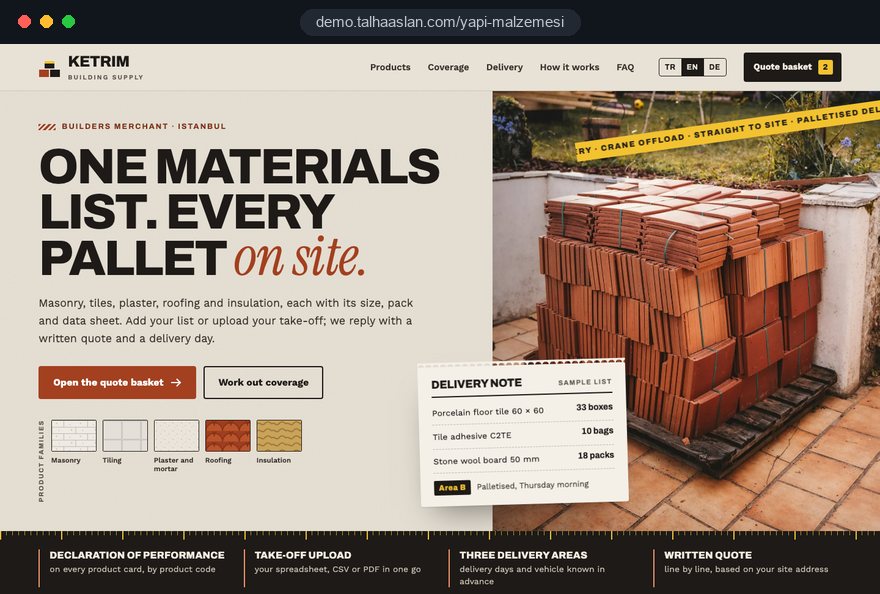
We do not have a live client project in building materials yet, so we show our approach on a live demo site. The demo is not a client site. You can see our work in other sectors on the references page.
Live demo
For this field we built a one page demo site for a fictional brand, made only to show our approach. You can explore the design, the copy structure and the mobile view live in three languages.
Open the live demoFirst we take your product list or system export and separate stock lines, special order lines and discontinued products; the menu and number of pages come from that list.
Data sheets, coverage rates and declarations of performance come from the manufacturer's own files, and we do not publish a strength or grade claim without a document behind it.
We agree delivery areas, vehicle types and site terms with the person who runs dispatch, so the site makes no promise you cannot keep.
We track which product group, which area and which document bring enquiries, and adjust the pages before the building season starts.
Related pages
Solutions
A product catalogue site that collects quotes without a stockist network or site delivery.
Industries
A factory website for plants focused on export and technical quotes.
Industries
A separate setup for construction companies that sell projects and homes, not materials.
 How to Do Google Maps SEO: A Guide to Ranking Your Business Higher on the MapRead article
 Out of Stock Product Pages SEO: 404, 410 or 301?Read article
 Estimated Delivery Date on Product Pages: Should You Show It and How to Get It RightRead article
 Category Structure for Large Websites: The Right Architecture for SEO and User ExperienceRead article
FAQ
If your question is not here, write to us; we will send you an answer and a written quote.
Next step
In a free 15-minute call, in English, we will go through your product groups, delivery areas and quote process, then send a written scope and quote.
In-depth guide
A building materials website has one job before any other: to answer the three questions a tradesperson asks from site without making them phone you. Which sizes do you carry, where is the data sheet, and when can it reach site from where? A site that cannot answer them will not reduce calls to the trade counter, however polished it looks.
In this guide, Talha Aslan and team set out the decisions we make, in order, for builders merchants and hardware stores, for manufacturers selling through a stockist network, and for yards supplying contractors. Each section gives you a criterion you can apply to your own product list, your delivery routine or a proposal from an agency.
The first decision for a building materials site is not the design but where your revenue comes from; the menu, the homepage and the contact buttons follow from that answer. A local merchant's buyer wants a product today and directions to the branch, a brand's buyer likes the product and asks where to get it, and a yard's buyer arrives with a materials list.
We suggest working through these questions with management and sales, in this order:
The answers are usually mixed: many merchants run a trade counter and also supply contractors. In that case two clear entry points on the homepage work well, one for the tradesperson searching for a product and one for the contractor who wants to send a list.
Publishing every line from a stock list of thousands is usually a mistake; the site should carry what buyers look for and what you can reliably supply. If every row in your stock system becomes a product page, you end up with hundreds of thin pages that nobody can maintain.
We start by sorting your product list into four groups:
Product names also need to be written in the language of the trade. An item stored as "PLBD 12.5 STD SE" in your system should appear online as "standard plasterboard 12.5 mm, square edge", with the common names used on site mentioned in the description. Your counter staff know the regional names buyers use; collect them.
Where a large range needs filters, our guide to a product catalogue site covers product data and filtering in detail; the point here is that the selection itself should rest on sales data.
In building materials, documents sell as much as the product does: a site manager needs the data sheet and the declaration of performance to get a product into a specification. In the EU, the Commission's delegated regulation on declarations of performance online allows them to be published on a website, provided the file is not altered, stays available free of charge for 10 years and buyers are told where to find it.
When we build the document area, we follow these rules:
Merchants face a separate question: do you host the documents yourself or link to the manufacturer's files? Links break whenever the manufacturer reorganizes its site; keeping copies on your own site with the manufacturer's permission, and stating that the content is the manufacturer's responsibility, is more robust. For products sold in Great Britain or outside the EU, check with your conformity assessment body which marking and declaration rules apply.
The delivery page should answer the contractor's question, "can this be on site tomorrow", without a phone call, and it should promise only what your transport team can deliver.
We recommend that the page covers:
We draft the area list with the person who runs your transport, not only with sales. The delivery page also links into product pages: a short note such as "this product is delivered by crane offload vehicle" on heavy or bulky items prevents surprises on site.
For a contractor, the most valuable feature is sending the whole materials list at once and knowing where the quote stands. That is why we design the quote basket as the first step of your sales workflow, not as a contact form.
A list follows this path:
Knowing up front whether another brand is acceptable saves your sales team a round of calls. The automatic confirmation e-mail should say when the buyer will hear back, and that should be the response time your team actually achieves.
If quote requests need to flow into your accounts package or CRM, we plan that connection as a separate step, once the basket has settled into daily use.
The question tradespeople ask most from site is "how many bags do I need"; a simple calculator on the product page answers it, cuts phone traffic and puts the right quantity into the quote basket. For the calculator to be trusted, its values must come from the manufacturer's data sheet, not from estimates.
A good coverage calculator follows these rules:
For product groups where usage depends on area, such as tile adhesive, plaster, paint and waterproofing, these pages can also appear for searches like "how much plaster for a wall".
A building materials brand with a stockist network does not close the sale on its own site; it carries the buyer to the right stockist. That is why the stockist finder belongs at eye level for the person who likes the product, not at the very bottom of the page, and why the site must never look like a sales channel competing with your stockists.
What we pay attention to when building it:
To avoid channel conflict, a brand site should not show prices that contradict your stockists, should route quote requests to the stockist for that area, and should explain this arrangement to stockists in advance.
Stockist applications belong in a separate form; asking for region, current range and storage facilities lets your sales team prepare for the first call. For manufacturers focused on export, our manufacturer website guide covers distributor pages separately.
A password protected area for stockists or trade accounts only creates value if there is content they access regularly and that has to stay current; otherwise it becomes a maintenance burden nobody logs into. Before deciding, list the reasons your stockists phone you today.
A trade login is worth it when:
If we build such an area, each stockist gets its own user account, access for a departing stockist is closed with one click, and you can see who downloaded which file. Because personal data is processed there, your privacy notice must cover this area too.
An area that opens with only the price list and an image library, then grows with actual use, tends to work better than a large portal built up front. If ordering, account balances and stock levels are also needed, we treat that part as a custom software project separate from the website.
Buyers searching for a hardware store or builders merchant usually want one nearby, so your Google Business Profile and the branch details on your site must match exactly. The site's role is to confirm, for someone who found you on the map, what you stock and how you work.
A local visibility checklist:
For building materials brands the picture is different: in local search it is your stockists' profiles that appear, not the brand's. A short guide for stockists on setting up a profile, keeping hours current and naming product groups correctly therefore supports the brand's visibility as well. For broader work on maps and organic results, see our SEO service.
Buyers usually search for the product name, size or brand rather than your company name, and each of those searches needs its own complete page to land on. A single "our brands" page made of logos answers none of them.
Our priorities on the search side:
A common problem for merchants is that the same product description appears word for word on the manufacturer's site and on dozens of stockist sites. A note from your own experience, such as which product customers prefer for a given job, sets your page apart.
A tradesperson checking a building materials site is usually holding a phone, often with a weak signal on site, so speed and touch usability are a condition of the sale rather than a design preference. If size tables that look fine on a desktop overflow on a phone, the product page stops doing its job.
The points we check on phones rely on Google's Core Web Vitals thresholds, assessed at the 75th percentile of visits:
Data sheets do not load with the page; they open when the buyer asks for them, so a product page with dozens of documents stays fast. You can check your current site in a few minutes with our mobile friendly test.
A building materials website is judged not by its visitor count but by which product groups and which areas bring in quote requests. It feeds stock and promotion decisions before the season.
Events to track from day one:
A QR code on packaging, shelf labels, printed catalogues or delivery vehicles that leads to the relevant product page or delivery area shows where interest from the field comes from; a separate link for each print run is enough. You can create these codes with our QR code generator.
For visitors in the EU and the UK, analytics and advertising tags are set up so they only run after cookie consent. A short monthly review of groups with no requests guides the next round of page changes.
Most mistakes in this field come not from missing products but from skipping the question the buyer on site is actually asking. These are the ones we see most often, each with a better alternative:
To apply this list to your own site, take the view of a tradesperson: search for three products on your phone, download one data sheet and try to find out the delivery day. Every step where you get stuck belongs on the fix list.
The scope of the site follows from how buyers find you today and where the sale closes: product groups and branch pages for a local merchant, a stockist finder and document area for a brand, a quote basket and delivery page for a yard serving contractors. You do not have to build everything at once; starting with product pages and the quote basket and leaving the trade area for a later phase is a common path.
Questions to ask any agency you talk to:
We do not yet have a live client project in building materials, so we show our approach on a live demo site linked on this page. You can see our work in other sectors on our references page and the full scope in our web design service.
Fixed packages are listed in the pricing section; to talk through your product groups and delivery areas, get in touch with us, and we will follow up with a written scope and quote.
Start a Project
Thanks {name}, we've received your brief. We usually reply within the same day.
What happens next?